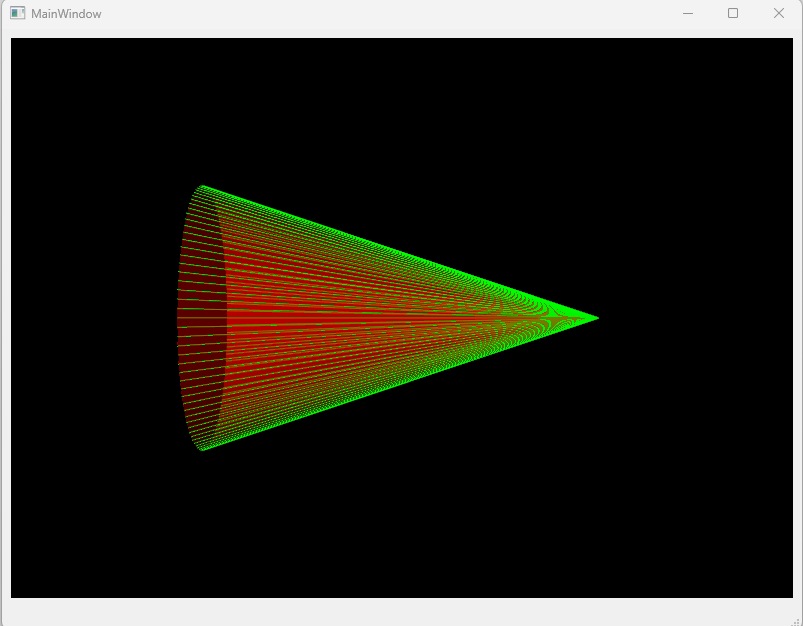
MainWindow.h
cpp
#ifndef MAINWINDOW_H
#define MAINWINDOW_H

#include <QMainWindow>
#include <QVTKOpenGLNativeWidget.h>

QT_BEGIN_NAMESPACE
namespace Ui { class MainWindow; }
QT_END_NAMESPACE

class MainWindow : public QMainWindow
{
    Q_OBJECT

public:
    MainWindow(QWidget *parent = nullptr);
    ~MainWindow();

private:
    Ui::MainWindow *ui;
    QVTKOpenGLNativeWidget *m_vtkWd = nullptr;

    void InitVDK();
};
#endif // MAINWINDOW_H
MainWindow.cpp
cpp
#include "MainWindow.h"
#include "./ui_MainWindow.h"
#include <QVBoxLayout>
#include <vtkConeSource.h>
#include <vtkPolyDataMapper.h>
#include <vtkActor.h>
#include <vtkProperty.h>
#include <vtkRenderer.h>
#include <vtkRenderWindow.h>

MainWindow::MainWindow(QWidget *parent)
    : QMainWindow(parent)
    , ui(new Ui::MainWindow)
{
    ui->setupUi(this);
    InitVDK();
}

MainWindow::~MainWindow()
{
    delete ui;
}

void MainWindow::InitVDK()
{
    m_vtkWd = new QVTKOpenGLNativeWidget(this);

    auto ly = new QVBoxLayout();
    ui->centralwidget->setLayout(ly);
    ly->addWidget(m_vtkWd);

    auto cone = vtkSmartPointer<vtkConeSource>::New();
    cone->SetRadius(1);
    cone->SetHeight(3);
    cone->SetResolution(100);

    auto mapper = vtkSmartPointer<vtkPolyDataMapper>::New();
    mapper->SetInputConnection(cone->GetOutputPort());

    auto actor = vtkSmartPointer<vtkActor>::New();
    actor->SetMapper(mapper);
    actor->GetProperty()->SetColor(0, 1, 0);
    actor->GetProperty()->SetRepresentationToWireframe();


    auto mapper2 = vtkSmartPointer<vtkPolyDataMapper>::New();
    mapper2->SetInputConnection(cone->GetOutputPort());

    auto actor2 = vtkSmartPointer<vtkActor>::New();
    actor2->SetMapper(mapper2);
    actor2->GetProperty()->SetColor(1, 0, 0);
    actor2->GetProperty()->SetOpacity(0.5);

    auto render = vtkSmartPointer<vtkRenderer>::New();
    render->AddActor(actor);
    render->AddActor(actor2);

    m_vtkWd->renderWindow()->AddRenderer(render);
}