ArcGIS JS 基础教程(9):天空盒与大气效果
零、写在前面
📌 本系列教程完整目录 :ArcGIS JS 系列基础教程(100个项目常用热门功能)
💡 在线示例 :完整可运行的 HTML 示例,无需任何环境配置,可直接在浏览器中打开体验
🗂️ 专栏导航 :收藏 + 关注,专栏文章第一时间送达
❤️ 一键三连:点赞(给教程充电)+ 评论(提问必回)+ 收藏(下次再看)
一、功能介绍
在 ArcGIS Maps SDK for JavaScript 的三维场景中,除了地形和光照外,天空 是决定场景沉浸感的关键元素。ArcGIS JS 提供了两个简单但强大的环境开关:
starsEnabled(星空开关):控制场景天空是否显示星星。在低光条件(如清晨、傍晚、夜间)下开启星空,能极大增强场景的真实感atmosphereEnabled(大气效果开关):控制场景是否渲染大气散射效果------包括天空颜色渐变、地平线雾化、远景朦胧等真实大气光学现象
这两个功能不仅用于提升场景真实感 ,在需要优化渲染性能时也能通过关闭大气效果来降低 GPU 开销------对于低配设备或大规模数据场景非常实用。
二、功能实现
核心 API: view.environment.starsEnabled 和 view.environment.atmosphereEnabled,均为 boolean 类型。
2.1 星空控制(starsEnabled)
javascript
// 开启星空显示
view.environment.starsEnabled = true;

// 关闭星空显示
view.environment.starsEnabled = false;
当 starsEnabled 为 true 时,场景天空会根据当前光照时间自动决定是否显示星星。通常只在日出前、日落后以及夜间才能看到星星------这与真实世界一致。
2.2 大气效果控制(atmosphereEnabled)
javascript
// 开启大气散射效果
view.environment.atmosphereEnabled = true;

// 关闭大气效果
view.environment.atmosphereEnabled = false;
当 atmosphereEnabled 为 true 时:
- 天空呈现真实的蓝色渐变(白天)或橙色/红色渐变(日出日落)
- 远景有自然的大气雾化效果
- 地平线附近有柔和的光晕过渡
当 atmosphereEnabled 为 false 时:
- 天空变为纯黑色
- 没有大气散射,远景清晰但缺乏真实感
- 渲染性能提升,适合性能敏感场景
2.3 四种组合效果
| starsEnabled | atmosphereEnabled | 视觉效果 | 适用场景 |
|---|---|---|---|
| ✅ true | ✅ true | 真实天空 + 星空(夜间可见) | 常规三维展示、城市漫游 |
| ✅ true | ❌ false | 黑色天空 + 星空 | 太空/科幻主题、天文模拟 |
| ❌ false | ✅ true | 真实天空渐变,无星星 | 白天日照分析 |
| ❌ false | ❌ false | 纯黑天空,无大气效果 | 极致性能模式、地下/室内场景 |
2.4 搭配光照时间
星空和大气效果与 时间 紧密相关。配合 SunLighting 的 date 属性切换不同时段,可以直观观察到大气颜色的变化以及星空的隐现:
javascript
// 设置傍晚时间,观察大气颜色变化和星空渐显
view.environment.lighting = {
    type: "sun",
    date: new Date(2026, 5, 1, 19, 0, 0)  // 傍晚 19:00
};
view.environment.atmosphereEnabled = true;
view.environment.starsEnabled = true;
2.5 自定义天空背景颜色(ColorBackground)
当默认的天空和大气效果不满足需求时,可以通过 view.environment.background 自定义纯色背景 ,甚至实现透明背景让场景与网页融合。
核心 API: ColorBackground(@arcgis/core/webscene/background/ColorBackground.js)
javascript
// 方式一:直接设置纯色背景(米白色)
view.environment.background = {
    type: "color",
    color: [255, 252, 244, 1]  // RGBA 数组,A=1 为不透明
};
// 必须关闭星空和大气,否则它们会覆盖在背景之上
view.environment.starsEnabled = false;
view.environment.atmosphereEnabled = false;
透明背景(让场景融入网页):
实现透明背景需要两个步骤:
- 背景颜色 Alpha 通道设为
0 - 开启
SceneView.alphaCompositingEnabled
javascript
// 开启透明度合成
const view = new SceneView({
    container: "mapContainer",
    map: map,
    alphaCompositingEnabled: true,          // 关键:启用透明度合成
    environment: {
        background: {
            type: "color",
            color: [0, 0, 0, 0]             // Alpha=0 完全透明
        },
        starsEnabled: false,
        atmosphereEnabled: false
    }
});
⚠️ 注意: alphaCompositingEnabled 会对渲染性能有一定影响,仅在确实需要透明效果时才开启。
常用背景颜色预设:
| 颜色 | RGBA 值 | 效果 |
|---|---|---|
| 纯黑(默认) | [0, 0, 0, 1] |
默认天空背景 |
| 透明 | [0, 0, 0, 0] |
场景融入网页背景 |
| 米白色 | [255, 252, 244, 1] |
柔和背景 |
| 天空蓝 | [135, 206, 235, 1] |
模拟晴朗天空 |
| 深灰 | [40, 40, 40, 1] |
科技感暗色背景 |
| 半透明黑 | [0, 0, 0, 0.5] |
半透明遮罩效果 |
三、功能应用
| 应用场景 | starsEnabled | atmosphereEnabled | 说明 |
|---|---|---|---|
| 城市漫游(白天) | true | true | 真实蓝天+白云效果,远景自然雾化 |
| 城市夜景展示 | true | true | 深蓝星空+城市灯光,极具视觉冲击力 |
| 日出/日落摄影视角 | true | true | 暖色调大气散射,星星若隐若现 |
| 日照分析 | false | true | 专注阴影变化,无星星干扰 |
| 太空/卫星视角 | true | false | 黑色背景+星空,模拟外太空 |
| 地下管线/室内导航 | false | false | 不需要天空,极致性能 |
| 大规模数据可视化 | --- | false | 关闭大气减轻 GPU 负担 |
| 低配设备适配 | false | false | 关闭所有特效确保流畅 |
| 自定义米白背景 | false | false | ColorBackground 纯色背景,简洁风格 |
| 透明场景嵌入网页 | false | false | alphaCompositingEnabled + 透明背景 |
| 科技感暗色背景 | false | false | 深灰 ColorBackground,适合智慧大屏 |
| 半透明遮罩效果 | false | false | 半透明背景叠在网页内容上 |
四、核心代码
📦 完整代码 已保存至
sample/lesson12_sky_atmosphere.html,可直接在浏览器打开。
html
<!DOCTYPE html>
<html lang="zh-CN">
<head>
    <meta charset="UTF-8">
    <meta name="viewport" content="width=device-width, initial-scale=1.0">
    <title>第12课:天空盒与大气效果</title>
    <link rel="stylesheet" href="https://js.arcgis.com/5.0/esri/themes/light/main.css">
    <script type="module" src="https://js.arcgis.com/5.0/"></script>
    <style>
        * { margin: 0; padding: 0; box-sizing: border-box; }
        body {
            font-family: "Microsoft YaHei", sans-serif;
            /* 棋盘格背景 --- 用于演示透明背景效果 */
            background-image:
                linear-gradient(45deg, #e9e6ef 25%, transparent 25%, transparent 75%, #e9e6ef 75%),
                linear-gradient(45deg, #e9e6ef 25%, transparent 25%, transparent 75%, #e9e6ef 75%);
            background-size: 51px 51px;
            background-position: 0 0, 25px 25px;
        }
        #mapContainer { width: 100vw; height: 100vh; }
        .page-title {
            position: absolute;
            top: 20px; left: 50%;
            transform: translateX(-50%);
            background: rgba(255,255,255,0.95);
            padding: 10px 24px; border-radius: 6px;
            font-size: 18px; font-weight: bold;
            z-index: 100;
            box-shadow: 0 2px 8px rgba(0,0,0,0.15);
        }
        .control-panel {
            position: absolute;
            top: 80px; right: 20px;
            background: rgba(255,255,255,0.95);
            padding: 16px; border-radius: 8px;
            box-shadow: 0 2px 12px rgba(0,0,0,0.15);
            z-index: 100; min-width: 300px; max-height: 85vh; overflow-y: auto;
        }
        .control-panel h3 { margin: 0 0 10px 0; font-size: 14px; color: #333; }
        .toggle-group { margin-bottom: 12px; }
        .toggle-group label {
            display: flex; align-items: center;
            font-size: 13px; color: #333; cursor: pointer;
            padding: 6px 10px; border-radius: 6px;
            background: #f8f9fa; margin-bottom: 4px;
            transition: background 0.2s;
        }
        .toggle-group label:hover { background: #e8f4ff; }
        .toggle-group input[type="checkbox"] {
            margin-right: 8px; width: 16px; height: 16px; cursor: pointer;
        }
        .toggle-group .desc { font-size: 11px; color: #999; margin-left: auto; }
        .form-group { margin-bottom: 10px; }
        .form-group label { display: block; font-size: 12px; color: #666; margin-bottom: 4px; }
        .form-group select {
            width: 100%; padding: 6px 8px; border: 1px solid #d9d9d9; border-radius: 4px;
            font-size: 13px; background: white; cursor: pointer;
        }
        .time-presets { margin-top: 12px; }
        .time-presets h4 { font-size: 12px; color: #666; margin-bottom: 8px; }
        .preset-row { display: flex; gap: 6px; flex-wrap: wrap; margin-bottom: 12px; }
        .preset-row button {
            padding: 5px 10px; font-size: 12px;
            border: 1px solid #d9d9d9; border-radius: 4px;
            background: white; cursor: pointer;
            transition: all 0.2s;
        }
        .preset-row button:hover { border-color: #1890ff; color: #1890ff; }
        .preset-row button.active { background: #1890ff; color: white; border-color: #1890ff; }
        .info-card {
            margin-top: 12px; padding: 10px 12px;
            background: #f0f5ff; border-radius: 6px;
            border-left: 3px solid #1890ff;
        }
        .info-card .label { font-size: 11px; color: #666; margin-bottom: 2px; }
        .info-card .value { font-size: 13px; color: #333; font-weight: bold; }
        .status-text {
            position: absolute; bottom: 20px; left: 50%;
            transform: translateX(-50%);
            background: rgba(0,0,0,0.7); color: white;
            padding: 8px 20px; border-radius: 20px;
            font-size: 13px; z-index: 100; pointer-events: none;
        }
    </style>
</head>
<body>
<h1 class="page-title">第12课:天空盒与大气效果</h1>

<div class="control-panel">
    <h3>🌌 天空环境控制</h3>

    <div class="toggle-group">
        <label>
            <input type="checkbox" id="chkAtmosphere" checked>
            <span>大气效果 <span class="desc">atmosphereEnabled</span></span>
        </label>
        <label>
            <input type="checkbox" id="chkStars" checked>
            <span>星空显示 <span class="desc">starsEnabled</span></span>
        </label>
    </div>

    <h3>🎨 自定义背景颜色</h3>
    <div class="form-group">
        <label>背景颜色预设:</label>
        <select id="selBackground">
            <option value="default">🖤 默认(黑色)</option>
            <option value="white">🤍 米白色 [255,252,244,1]</option>
            <option value="skyblue">💙 天空蓝 [135,206,235,1]</option>
            <option value="darkgray">⬛ 深灰 [40,40,40,1]</option>
            <option value="transparent">🫥 透明 [0,0,0,0](需开启透明度合成)</option>
            <option value="semitransparent">🌫️ 半透明黑 [0,0,0,0.5]</option>
        </select>
    </div>
    <div class="toggle-group">
        <label>
            <input type="checkbox" id="chkAlphaCompositing">
            <span>启用透明度合成 <span class="desc">alphaCompositingEnabled</span></span>
        </label>
    </div>

    <div class="time-presets">
        <h4>⏰ 时段预设(配合观察天空变化)</h4>
        <div class="preset-row">
            <button data-hour="6">🌅 06:00 日出</button>
            <button data-hour="9">☀️ 09:00</button>
            <button data-hour="12">☀️ 12:00 正午</button>
            <button data-hour="15">🌤 15:00</button>
            <button data-hour="18">🌇 18:00 日落</button>
            <button data-hour="21">🌙 21:00 夜晚</button>
            <button data-hour="0">🌙 00:00 深夜</button>
        </div>
    </div>

    <div class="info-card" id="infoCard">
        <div class="label">当前天空状态</div>
        <div class="value" id="infoText">大气:开启 | 星空:开启 | 背景:默认</div>
    </div>
</div>

<div class="status-text" id="statusText">天空状态:大气✅ 星空✅ | 提示:选择透明背景并开启透明度合成观察融合效果</div>

<div id="mapContainer"></div>

<script type="module">
    const Map = await $arcgis.import("@arcgis/core/Map.js");
    const SceneView = await $arcgis.import("@arcgis/core/views/SceneView.js");
    const GraphicsLayer = await $arcgis.import("@arcgis/core/layers/GraphicsLayer.js");
    const Graphic = await $arcgis.import("@arcgis/core/Graphic.js");
    const Mesh = await $arcgis.import("@arcgis/core/geometry/Mesh.js");
    const Point = await $arcgis.import("@arcgis/core/geometry/Point.js");
    const getTianditu = await $arcgis.import("https://openlayers.vip/examples/resources/tianditu.js");

    const vecLayers = getTianditu.default({ type: "vec_w" });
    const map = new Map({
        basemap: { baseLayers: [vecLayers.base, vecLayers.anno] },
        ground: {
            surface: {
                elevationLayers: [{
                    url: "https://www.geosceneonline.cn/image/rest/services/OpenData/ChinaTerrain3D/ImageServer/"
                }]
            }
        }
    });

    const view = new SceneView({
        container: "mapContainer",
        map: map,
        center: [118.08, 30.33],   // 黄山区域
        zoom: 16,
        tilt: 55,
        alphaCompositingEnabled: false  // 默认关闭,仅在透明背景时开启
    });

    window.view = view;

    // ===== 背景颜色预设表 =====
    const bgPresets = {
        default:    { color: [0, 0, 0, 1],       label: "默认" },
        white:      { color: [255, 252, 244, 1],  label: "米白色" },
        skyblue:    { color: [135, 206, 235, 1],  label: "天空蓝" },
        darkgray:   { color: [40, 40, 40, 1],     label: "深灰" },
        transparent:{ color: [0, 0, 0, 0],        label: "透明" },
        semitransparent: { color: [0, 0, 0, 0.5], label: "半透明黑" }
    };

    // ===== 应用自定义背景颜色 =====
    function applyBackground(presetKey) {
        const preset = bgPresets[presetKey];
        const isTransparent = (presetKey === "transparent" || presetKey === "semitransparent");

        // 启用/禁用透明度合成(仅在透明/半透明时需要)
        if (isTransparent) {
            document.getElementById("chkAlphaCompositing").checked = true;
            view.alphaCompositingEnabled = true;
        } else {
            document.getElementById("chkAlphaCompositing").checked = false;
            view.alphaCompositingEnabled = false;
        }

        // 设置背景颜色(自定义背景需关闭星空和大气)
        view.environment.background = {
            type: "color",
            color: preset.color
        };
        view.environment.starsEnabled = false;
        view.environment.atmosphereEnabled = false;

        // 同步复选框状态
        document.getElementById("chkStars").checked = false;
        document.getElementById("chkAtmosphere").checked = false;
    }

    // ===== 恢复默认天空(星空+大气) =====
    function restoreDefaultSky() {
        view.environment.background = null;
        view.environment.starsEnabled = true;
        view.environment.atmosphereEnabled = true;
        view.alphaCompositingEnabled = false;

        document.getElementById("chkStars").checked = true;
        document.getElementById("chkAtmosphere").checked = true;
        document.getElementById("chkAlphaCompositing").checked = false;
        document.getElementById("selBackground").value = "default";
    }

    // ===== 添加 3D 参照物 =====
    function addReferenceObjects() {
        const layer = new GraphicsLayer({
            title: "参照物体",
            castShadows: true, receiveShadows: true
        });

        const nearBox = new Graphic({
            geometry: Mesh.createBox(
                new Point({ longitude: 118.080, latitude: 30.330, z: 0 }),
                { size: { width: 300, height: 400, depth: 300 } }
            ),
            symbol: { type: "mesh-3d", symbolLayers: [{ type: "fill", material: { color: [220, 180, 140, 0.9] } }] }
        });

        const farBox1 = new Graphic({
            geometry: Mesh.createBox(
                new Point({ longitude: 118.085, latitude: 30.332, z: 0 }),
                { size: { width: 200, height: 300, depth: 200 } }
            ),
            symbol: { type: "mesh-3d", symbolLayers: [{ type: "fill", material: { color: [180, 200, 220, 0.9] } }] }
        });

        const farBox2 = new Graphic({
            geometry: Mesh.createBox(
                new Point({ longitude: 118.075, latitude: 30.327, z: 0 }),
                { size: { width: 150, height: 250, depth: 150 } }
            ),
            symbol: { type: "mesh-3d", symbolLayers: [{ type: "fill", material: { color: [200, 160, 120, 0.9] } }] }
        });

        layer.addMany([nearBox, farBox1, farBox2]);
        map.add(layer);
    }

    // ===== 设置光照时间 =====
    function applyTime(hour) {
        const d = new Date();
        d.setHours(Math.floor(hour), Math.round((hour % 1) * 60), 0, 0);
        view.environment.lighting = {
            type: "sun",
            date: d,
            directShadowsEnabled: true
        };
    }

    // ===== 初始化 =====
    view.when(() => {
        addReferenceObjects();
        applyTime(14);

        // 大气效果开关 --- 仅在非自定义背景模式下生效
        document.getElementById("chkAtmosphere").addEventListener("change", (e) => {
            const bgSelect = document.getElementById("selBackground").value;
            if (bgSelect !== "default") {
                // 自定义背景模式下不允许单独开大气
                restoreDefaultSky();
                view.environment.atmosphereEnabled = e.target.checked;
                view.environment.starsEnabled = document.getElementById("chkStars").checked;
            } else {
                view.environment.atmosphereEnabled = e.target.checked;
            }
            updateAll();
        });

        // 星空开关
        document.getElementById("chkStars").addEventListener("change", (e) => {
            const bgSelect = document.getElementById("selBackground").value;
            if (bgSelect !== "default") {
                restoreDefaultSky();
                view.environment.starsEnabled = e.target.checked;
                view.environment.atmosphereEnabled = document.getElementById("chkAtmosphere").checked;
            } else {
                view.environment.starsEnabled = e.target.checked;
            }
            updateAll();
        });

        // 背景颜色选择器
        document.getElementById("selBackground").addEventListener("change", (e) => {
            const key = e.target.value;
            if (key === "default") {
                restoreDefaultSky();
            } else {
                applyBackground(key);
            }
            updateAll();
        });

        // 透明度合成开关
        document.getElementById("chkAlphaCompositing").addEventListener("change", (e) => {
            view.alphaCompositingEnabled = e.target.checked;
            updateAll();
        });

        // 时段预设按钮
        document.querySelectorAll(".preset-row button").forEach(btn => {
            btn.addEventListener("click", () => {
                const hour = parseFloat(btn.dataset.hour);
                applyTime(hour);
                clearActive();
                btn.classList.add("active");
                updateAll();
            });
        });

        updateAll();
    });

    function clearActive() {
        document.querySelectorAll(".preset-row button").forEach(b => b.classList.remove("active"));
    }

    function updateAll() {
        const a = view.environment.atmosphereEnabled;
        const s = view.environment.starsEnabled;
        const alpha = view.alphaCompositingEnabled;
        const bgSelect = document.getElementById("selBackground").value;
        const bgLabel = (bgSelect === "default") ? "默认" : bgPresets[bgSelect].label;

        const l = view.environment.lighting;
        const hour = l.date ? formatHour(l.date.getHours() + l.date.getMinutes() / 60) : "--:--";

        document.getElementById("infoText").textContent =
            `大气:${a ? "开启" : "关闭"} | 星空:${s ? "开启" : "关闭"} | 背景:${bgLabel} | 时间:${hour}`;

        const h = l.date ? l.date.getHours() : 14;
        const isLowLight = (h >= 20 || h <= 5);
        const isTwilight = (h >= 6 && h <= 7) || (h >= 17 && h <= 19);

        let hint = "";
        if (bgSelect !== "default") {
            hint = `🎨 自定义背景:${bgLabel}` + (alpha ? " | 透明度合成已开启" : "");
        } else if (s && isLowLight) {
            hint = "✨ 夜空模式:星星可见";
        } else if (s && isTwilight) {
            hint = "🌅 晨昏模式:星星渐显渐隐";
        } else if (s && !isLowLight && !isTwilight) {
            hint = "☀️ 白天模式:星星不可见(正常)";
        } else {
            hint = "🌟 星星已关闭";
        }

        document.getElementById("statusText").textContent =
            `天空状态:大气${a ? "✅" : "❌"} 星空${s ? "✅" : "❌"} | ${hint}`;
    }

    function formatHour(hour) {
        const h = Math.floor(hour);
        const m = Math.round((hour % 1) * 60);
        return String(h).padStart(2, "0") + ":" + String(m).padStart(2, "0");
    }
</script>
</body>
</html>
五、在线示例
🔗 在线体验地址(GitHub资源,等待时间较长,或者架梯子) :https://southjor.github.io/arcgis-examples/lessons/lesson9.html
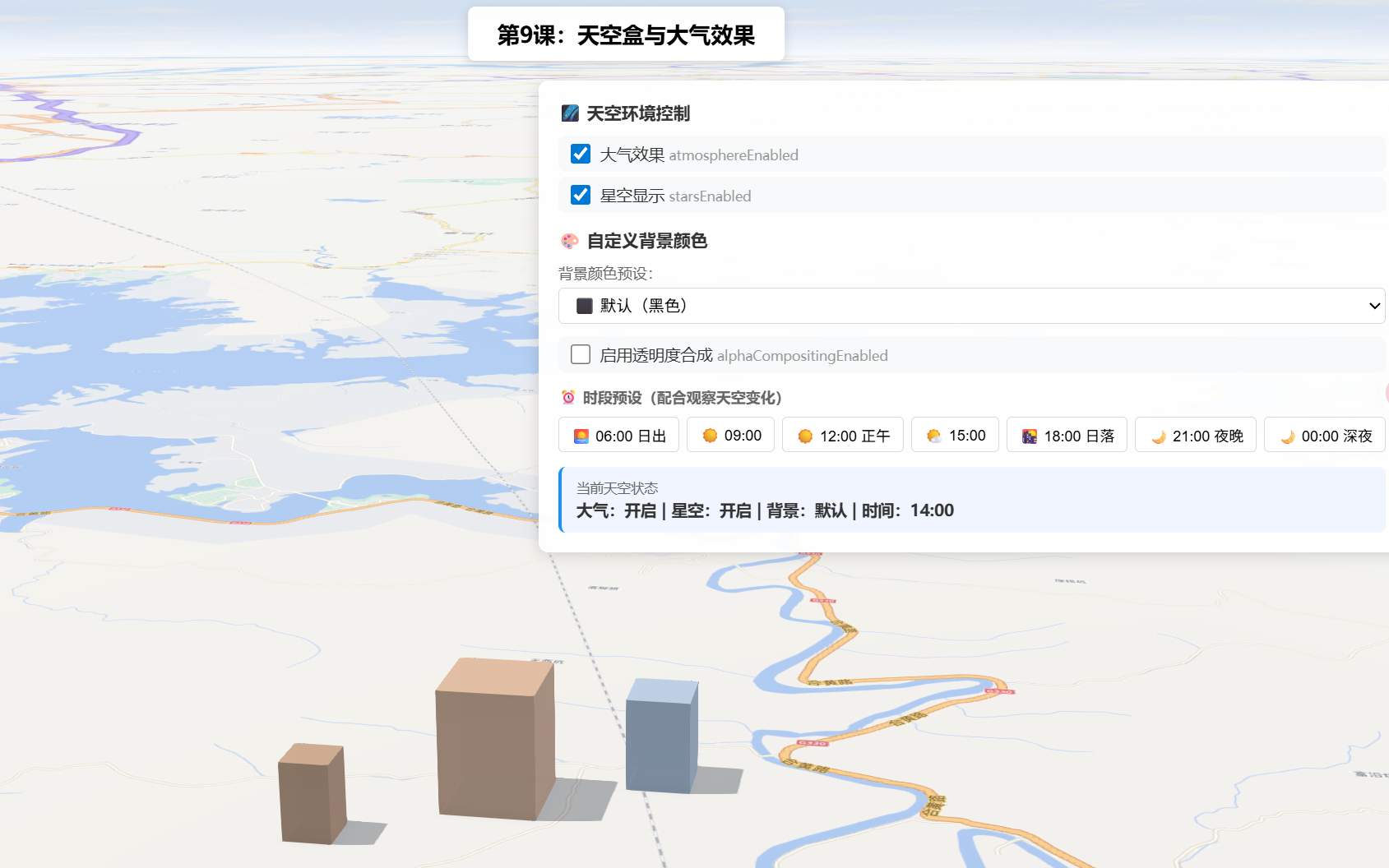
操作说明:
- 勾选/取消「大气效果」复选框,观察天空颜色和远景雾化的变化
- 勾选/取消「星空显示」复选框,配合夜间时段观察星空开关效果
- 点击时段预设按钮(日出/正午/日落/夜晚/深夜),观察不同时间下天空颜色和星空的变化
- 使用「背景颜色」下拉选择预设颜色(默认/米白/天空蓝/深灰/透明),立即切换天空背景
- 透明背景需配合「启用透明度合成」复选框,观察场景融入网页背景的效果
- 关键对比:切换到透明背景,观察场景如何与网页背景融合
六、关键API说明
| API | 类型 | 说明 |
|---|---|---|
view.environment.starsEnabled |
boolean | 是否在天空显示星星(夜间/低光情况下可见) |
view.environment.atmosphereEnabled |
boolean | 是否渲染大气散射效果(天空渐变+远景雾化) |
view.environment.background |
ColorBackground |
自定义纯色天空背景,支持 RGBA 颜色和透明 |
view.alphaCompositingEnabled |
boolean | 启用场景透明度合成,允许背景透明与网页融合 |
view.environment.lighting.type |
"sun" | "virtual" |
光照类型,配合时间驱动天空颜色变化 |
view.environment.lighting.date |
Date | 太阳日期时间,决定天空颜色和星空可见性 |
常见坑点
| 问题 | 原因 | 解决方案 |
|---|---|---|
| 开了星空但看不到 | 当前时间是白天,星星只在夜间/低光环境下显示 | 切换到傍晚或夜间时段(如 date 设为 21:00) |
| 关闭大气后天空全黑 | atmosphereEnabled = false 即关闭大气散射渲染 |
这是预期行为,适合太空/室内/性能模式 |
| 星空和大气都关了,场景没有天空 | 两个都是关闭状态 | 至少保留一个开启或使用 ColorBackground 自定义背景 |
| 大气效果开了但变化不明显 | 不同时间的天空色温差异在正午附近较小 | 切换到日出(06:00)或日落(18:00)时段观察 |
| 自定义背景色没效果 | 星空或大气效果覆盖在背景之上 | 设置 starsEnabled: false 和 atmosphereEnabled: false |
| 设置透明背景后网页没透出来 | 未启用 alphaCompositingEnabled |
在 SceneView 构造时设置 alphaCompositingEnabled: true |
七、系列导航
⬅️ 上一篇 :ArcGIS JS 基础教程(11):环境光照与阴影
➡️ 下一篇 :ArcGIS JS 基础教程(13):Camera对象基础
💡 小贴士 :
starsEnabled和atmosphereEnabled是两个独立的开关,互不影响。你可以组合出四种天空效果:真实天空+星空(默认推荐)、黑色天空+星空(太空感)、蓝色天空无星星(日照分析)、纯黑天空(性能模式)。配合ColorBackground还能实现米白柔和背景、深灰科技风、透明嵌入网页等更多效果,根据你的场景需求灵活搭配即可。