大家好我是鸿蒙Jack,本期以我的《时光旅记》APP 为例,聊一下 HarmonyOS 里的应用评论服务怎么接。
这个能力来自 AppGalleryKit。开发者调用 commentManager.showCommentDialog(context) 后,可以直接在应用内拉起评分与评论弹窗,用户不用先跳到应用市场详情页。对《时光旅记》这种工具型 APP 来说,这个入口很适合放在"我的"页面,也可以在用户真正体验过核心功能后做一次轻量提醒。
官方文档地址:应用评论服务
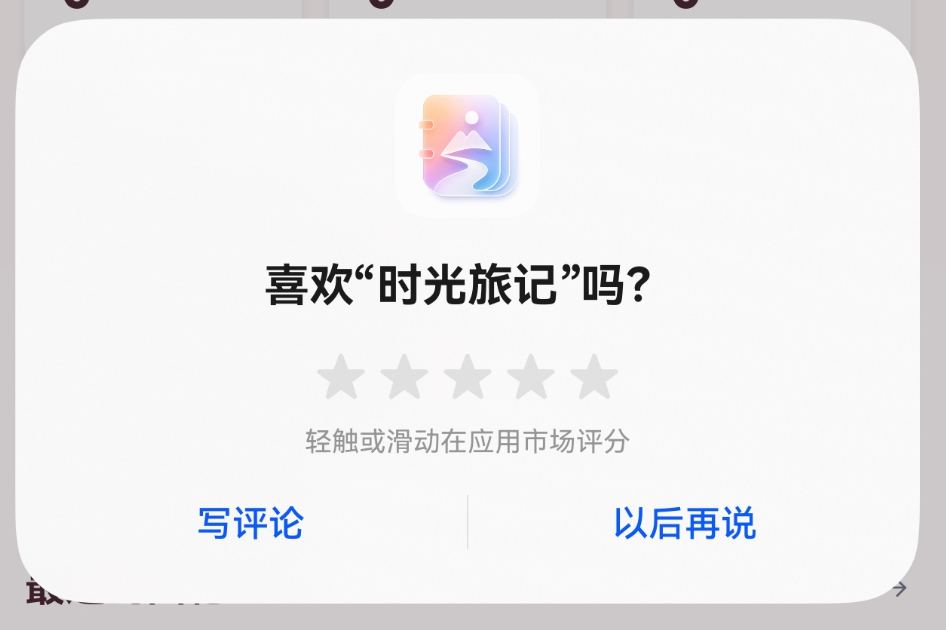

项目里是怎么用的?
项目里的用法不是单点调用,而是做了三层封装。
第一层是最底层能力:调用 commentManager.showCommentDialog(context) 拉起应用内评论弹窗。
第二层是体验策略:用 preferences 保存启动次数、上次尝试时间、下次可弹时间,避免每次打开 APP 都打扰用户。
第三层是兜底:当用户已经评价过,或者需要查看与修改评论时,用 Deep Linking 拉起应用市场写评论页。
这次用到的技术栈
这里把所有相关技术栈一次讲清楚。
《时光旅记》客户端是 HarmonyOS Stage 模型工程,语言是 ArkTS,页面使用 ArkUI。应用评论弹窗来自 @kit.AppGalleryKit 的 commentManager 模块。拉起弹窗需要传入 common.UIAbilityContext 或 common.UIExtensionContext,当前项目从 ArkUI 页面里通过 this.getUIContext().getHostContext() 获取 UIAbilityContext。
错误处理用的是 @kit.BasicServicesKit 里的 BusinessError。自动弹窗策略用 @kit.ArkData 的 preferences 做本地轻量持久化。跳转应用市场写评论页用的是 @kit.AbilityKit 的 Want 和 context.startAbility(want)。
这个能力不需要在 oh-package.json5 里安装三方依赖,也不需要在 module.json5 里申请额外权限。官方约束要注意两点:应用评论弹窗从 HarmonyOS 6.0.0(20) 开始支持,并且不支持模拟器,调试要用真机。
接口本身只有一个核心方法:
ts
commentManager.showCommentDialog(
  context: common.UIExtensionContext | common.UIAbilityContext
): Promise<void>
它的返回值没有评分内容。业务侧只需要知道弹窗有没有成功拉起,或者失败时是什么错误码。常见错误码我在项目里做了业务化处理:
| 错误码 | 含义 | 《时光旅记》的处理 |
|---|---|---|
1021500006 |
用户未登录华为账号 | 提示先登录华为账号 |
1021500007 |
当前版本已评论 | 认为本次评价链路已完成,提示可去应用市场查看或修改 |
1021500008 |
评论次数达到上限 | 认为本次评价链路已完成,延后下次自动提醒 |
1021500009 |
已评论且距上次评论不足一年 | 认为已评价,自动提醒延后一年 |
为什么不能只写一个按钮
评论弹窗是一个很容易"接上能跑,但体验不好"的能力。
如果用户第一次打开 APP,我就弹评分,会很唐突,因为他还没记录任何时光、旅行计划或照片。如果每次启动都弹,也会让用户反感。所以我在《时光旅记》里把它放进两个场景。
一个是用户主动点击"我的"页里的"给个好评",这个动作很明确,直接拉起评论弹窗。
另一个是自动提醒。用户第二次进入 APP 后才进入候选状态,并且只在首页可见、欢迎引导已完成、没有编辑弹窗、没有旅行计划弹窗、当前不忙的时候,随机延迟几秒再尝试。成功拉起或遇到"已评价/次数上限"这类完成态后,下一次自动提醒会延后一个月;如果错误码是"一年内已评论",则延后一年。
整体结构如下:
#mermaid-svg-BFOKJs3SPz9zOm3j{font-family:"trebuchet ms",verdana,arial,sans-serif;font-size:16px;fill:#333;}@keyframes edge-animation-frame{from{stroke-dashoffset:0;}}@keyframes dash{to{stroke-dashoffset:0;}}#mermaid-svg-BFOKJs3SPz9zOm3j .edge-animation-slow{stroke-dasharray:9,5!important;stroke-dashoffset:900;animation:dash 50s linear infinite;stroke-linecap:round;}#mermaid-svg-BFOKJs3SPz9zOm3j .edge-animation-fast{stroke-dasharray:9,5!important;stroke-dashoffset:900;animation:dash 20s linear infinite;stroke-linecap:round;}#mermaid-svg-BFOKJs3SPz9zOm3j .error-icon{fill:#552222;}#mermaid-svg-BFOKJs3SPz9zOm3j .error-text{fill:#552222;stroke:#552222;}#mermaid-svg-BFOKJs3SPz9zOm3j .edge-thickness-normal{stroke-width:1px;}#mermaid-svg-BFOKJs3SPz9zOm3j .edge-thickness-thick{stroke-width:3.5px;}#mermaid-svg-BFOKJs3SPz9zOm3j .edge-pattern-solid{stroke-dasharray:0;}#mermaid-svg-BFOKJs3SPz9zOm3j .edge-thickness-invisible{stroke-width:0;fill:none;}#mermaid-svg-BFOKJs3SPz9zOm3j .edge-pattern-dashed{stroke-dasharray:3;}#mermaid-svg-BFOKJs3SPz9zOm3j .edge-pattern-dotted{stroke-dasharray:2;}#mermaid-svg-BFOKJs3SPz9zOm3j .marker{fill:#333333;stroke:#333333;}#mermaid-svg-BFOKJs3SPz9zOm3j .marker.cross{stroke:#333333;}#mermaid-svg-BFOKJs3SPz9zOm3j svg{font-family:"trebuchet ms",verdana,arial,sans-serif;font-size:16px;}#mermaid-svg-BFOKJs3SPz9zOm3j p{margin:0;}#mermaid-svg-BFOKJs3SPz9zOm3j .label{font-family:"trebuchet ms",verdana,arial,sans-serif;color:#333;}#mermaid-svg-BFOKJs3SPz9zOm3j .cluster-label text{fill:#333;}#mermaid-svg-BFOKJs3SPz9zOm3j .cluster-label span{color:#333;}#mermaid-svg-BFOKJs3SPz9zOm3j .cluster-label span p{background-color:transparent;}#mermaid-svg-BFOKJs3SPz9zOm3j .label text,#mermaid-svg-BFOKJs3SPz9zOm3j span{fill:#333;color:#333;}#mermaid-svg-BFOKJs3SPz9zOm3j .node rect,#mermaid-svg-BFOKJs3SPz9zOm3j .node circle,#mermaid-svg-BFOKJs3SPz9zOm3j .node ellipse,#mermaid-svg-BFOKJs3SPz9zOm3j .node polygon,#mermaid-svg-BFOKJs3SPz9zOm3j .node path{fill:#ECECFF;stroke:#9370DB;stroke-width:1px;}#mermaid-svg-BFOKJs3SPz9zOm3j .rough-node .label text,#mermaid-svg-BFOKJs3SPz9zOm3j .node .label text,#mermaid-svg-BFOKJs3SPz9zOm3j .image-shape .label,#mermaid-svg-BFOKJs3SPz9zOm3j .icon-shape .label{text-anchor:middle;}#mermaid-svg-BFOKJs3SPz9zOm3j .node .katex path{fill:#000;stroke:#000;stroke-width:1px;}#mermaid-svg-BFOKJs3SPz9zOm3j .rough-node .label,#mermaid-svg-BFOKJs3SPz9zOm3j .node .label,#mermaid-svg-BFOKJs3SPz9zOm3j .image-shape .label,#mermaid-svg-BFOKJs3SPz9zOm3j .icon-shape .label{text-align:center;}#mermaid-svg-BFOKJs3SPz9zOm3j .node.clickable{cursor:pointer;}#mermaid-svg-BFOKJs3SPz9zOm3j .root .anchor path{fill:#333333!important;stroke-width:0;stroke:#333333;}#mermaid-svg-BFOKJs3SPz9zOm3j .arrowheadPath{fill:#333333;}#mermaid-svg-BFOKJs3SPz9zOm3j .edgePath .path{stroke:#333333;stroke-width:2.0px;}#mermaid-svg-BFOKJs3SPz9zOm3j .flowchart-link{stroke:#333333;fill:none;}#mermaid-svg-BFOKJs3SPz9zOm3j .edgeLabel{background-color:rgba(232,232,232, 0.8);text-align:center;}#mermaid-svg-BFOKJs3SPz9zOm3j .edgeLabel p{background-color:rgba(232,232,232, 0.8);}#mermaid-svg-BFOKJs3SPz9zOm3j .edgeLabel rect{opacity:0.5;background-color:rgba(232,232,232, 0.8);fill:rgba(232,232,232, 0.8);}#mermaid-svg-BFOKJs3SPz9zOm3j .labelBkg{background-color:rgba(232, 232, 232, 0.5);}#mermaid-svg-BFOKJs3SPz9zOm3j .cluster rect{fill:#ffffde;stroke:#aaaa33;stroke-width:1px;}#mermaid-svg-BFOKJs3SPz9zOm3j .cluster text{fill:#333;}#mermaid-svg-BFOKJs3SPz9zOm3j .cluster span{color:#333;}#mermaid-svg-BFOKJs3SPz9zOm3j div.mermaidTooltip{position:absolute;text-align:center;max-width:200px;padding:2px;font-family:"trebuchet ms",verdana,arial,sans-serif;font-size:12px;background:hsl(80, 100%, 96.2745098039%);border:1px solid #aaaa33;border-radius:2px;pointer-events:none;z-index:100;}#mermaid-svg-BFOKJs3SPz9zOm3j .flowchartTitleText{text-anchor:middle;font-size:18px;fill:#333;}#mermaid-svg-BFOKJs3SPz9zOm3j rect.text{fill:none;stroke-width:0;}#mermaid-svg-BFOKJs3SPz9zOm3j .icon-shape,#mermaid-svg-BFOKJs3SPz9zOm3j .image-shape{background-color:rgba(232,232,232, 0.8);text-align:center;}#mermaid-svg-BFOKJs3SPz9zOm3j .icon-shape p,#mermaid-svg-BFOKJs3SPz9zOm3j .image-shape p{background-color:rgba(232,232,232, 0.8);padding:2px;}#mermaid-svg-BFOKJs3SPz9zOm3j .icon-shape .label rect,#mermaid-svg-BFOKJs3SPz9zOm3j .image-shape .label rect{opacity:0.5;background-color:rgba(232,232,232, 0.8);fill:rgba(232,232,232, 0.8);}#mermaid-svg-BFOKJs3SPz9zOm3j .label-icon{display:inline-block;height:1em;overflow:visible;vertical-align:-0.125em;}#mermaid-svg-BFOKJs3SPz9zOm3j .node .label-icon path{fill:currentColor;stroke:revert;stroke-width:revert;}#mermaid-svg-BFOKJs3SPz9zOm3j :root{--mermaid-font-family:"trebuchet ms",verdana,arial,sans-serif;} 否
是
否
是
成功拉起
已评价/上限
临时失败
已评价
MainPage onPageShow
recordAppCommentLaunch 记录启动次数
是否满足自动提醒条件
本次前台周期不处理
随机延迟 6 到 18 秒
页面是否仍适合打扰用户
tryShowAutoAppCommentDialog
commentManager.showCommentDialog
结果
写入 lastAutoPromptAt 和 nextEligibleAt
1 天后允许重试
ProfileTab 给个好评
MainPage handleRateAppClick
弹出已评价提示
Deep Linking 打开应用市场写评论页
时序图更直观一点:
应用市场 Preferences AppGalleryKit AppCommentService MainPage ProfileTab 用户 应用市场 Preferences AppGalleryKit AppCommentService MainPage ProfileTab 用户 #mermaid-svg-68WabuTi6u9zRrDQ{font-family:"trebuchet ms",verdana,arial,sans-serif;font-size:16px;fill:#333;}@keyframes edge-animation-frame{from{stroke-dashoffset:0;}}@keyframes dash{to{stroke-dashoffset:0;}}#mermaid-svg-68WabuTi6u9zRrDQ .edge-animation-slow{stroke-dasharray:9,5!important;stroke-dashoffset:900;animation:dash 50s linear infinite;stroke-linecap:round;}#mermaid-svg-68WabuTi6u9zRrDQ .edge-animation-fast{stroke-dasharray:9,5!important;stroke-dashoffset:900;animation:dash 20s linear infinite;stroke-linecap:round;}#mermaid-svg-68WabuTi6u9zRrDQ .error-icon{fill:#552222;}#mermaid-svg-68WabuTi6u9zRrDQ .error-text{fill:#552222;stroke:#552222;}#mermaid-svg-68WabuTi6u9zRrDQ .edge-thickness-normal{stroke-width:1px;}#mermaid-svg-68WabuTi6u9zRrDQ .edge-thickness-thick{stroke-width:3.5px;}#mermaid-svg-68WabuTi6u9zRrDQ .edge-pattern-solid{stroke-dasharray:0;}#mermaid-svg-68WabuTi6u9zRrDQ .edge-thickness-invisible{stroke-width:0;fill:none;}#mermaid-svg-68WabuTi6u9zRrDQ .edge-pattern-dashed{stroke-dasharray:3;}#mermaid-svg-68WabuTi6u9zRrDQ .edge-pattern-dotted{stroke-dasharray:2;}#mermaid-svg-68WabuTi6u9zRrDQ .marker{fill:#333333;stroke:#333333;}#mermaid-svg-68WabuTi6u9zRrDQ .marker.cross{stroke:#333333;}#mermaid-svg-68WabuTi6u9zRrDQ svg{font-family:"trebuchet ms",verdana,arial,sans-serif;font-size:16px;}#mermaid-svg-68WabuTi6u9zRrDQ p{margin:0;}#mermaid-svg-68WabuTi6u9zRrDQ .actor{stroke:hsl(259.6261682243, 59.7765363128%, 87.9019607843%);fill:#ECECFF;}#mermaid-svg-68WabuTi6u9zRrDQ text.actor>tspan{fill:black;stroke:none;}#mermaid-svg-68WabuTi6u9zRrDQ .actor-line{stroke:hsl(259.6261682243, 59.7765363128%, 87.9019607843%);}#mermaid-svg-68WabuTi6u9zRrDQ .innerArc{stroke-width:1.5;stroke-dasharray:none;}#mermaid-svg-68WabuTi6u9zRrDQ .messageLine0{stroke-width:1.5;stroke-dasharray:none;stroke:#333;}#mermaid-svg-68WabuTi6u9zRrDQ .messageLine1{stroke-width:1.5;stroke-dasharray:2,2;stroke:#333;}#mermaid-svg-68WabuTi6u9zRrDQ #arrowhead path{fill:#333;stroke:#333;}#mermaid-svg-68WabuTi6u9zRrDQ .sequenceNumber{fill:white;}#mermaid-svg-68WabuTi6u9zRrDQ #sequencenumber{fill:#333;}#mermaid-svg-68WabuTi6u9zRrDQ #crosshead path{fill:#333;stroke:#333;}#mermaid-svg-68WabuTi6u9zRrDQ .messageText{fill:#333;stroke:none;}#mermaid-svg-68WabuTi6u9zRrDQ .labelBox{stroke:hsl(259.6261682243, 59.7765363128%, 87.9019607843%);fill:#ECECFF;}#mermaid-svg-68WabuTi6u9zRrDQ .labelText,#mermaid-svg-68WabuTi6u9zRrDQ .labelText>tspan{fill:black;stroke:none;}#mermaid-svg-68WabuTi6u9zRrDQ .loopText,#mermaid-svg-68WabuTi6u9zRrDQ .loopText>tspan{fill:black;stroke:none;}#mermaid-svg-68WabuTi6u9zRrDQ .loopLine{stroke-width:2px;stroke-dasharray:2,2;stroke:hsl(259.6261682243, 59.7765363128%, 87.9019607843%);fill:hsl(259.6261682243, 59.7765363128%, 87.9019607843%);}#mermaid-svg-68WabuTi6u9zRrDQ .note{stroke:#aaaa33;fill:#fff5ad;}#mermaid-svg-68WabuTi6u9zRrDQ .noteText,#mermaid-svg-68WabuTi6u9zRrDQ .noteText>tspan{fill:black;stroke:none;}#mermaid-svg-68WabuTi6u9zRrDQ .activation0{fill:#f4f4f4;stroke:#666;}#mermaid-svg-68WabuTi6u9zRrDQ .activation1{fill:#f4f4f4;stroke:#666;}#mermaid-svg-68WabuTi6u9zRrDQ .activation2{fill:#f4f4f4;stroke:#666;}#mermaid-svg-68WabuTi6u9zRrDQ .actorPopupMenu{position:absolute;}#mermaid-svg-68WabuTi6u9zRrDQ .actorPopupMenuPanel{position:absolute;fill:#ECECFF;box-shadow:0px 8px 16px 0px rgba(0,0,0,0.2);filter:drop-shadow(3px 5px 2px rgb(0 0 0 / 0.4));}#mermaid-svg-68WabuTi6u9zRrDQ .actor-man line{stroke:hsl(259.6261682243, 59.7765363128%, 87.9019607843%);fill:#ECECFF;}#mermaid-svg-68WabuTi6u9zRrDQ .actor-man circle,#mermaid-svg-68WabuTi6u9zRrDQ line{stroke:hsl(259.6261682243, 59.7765363128%, 87.9019607843%);fill:#ECECFF;stroke-width:2px;}#mermaid-svg-68WabuTi6u9zRrDQ :root{--mermaid-font-family:"trebuchet ms",verdana,arial,sans-serif;} alt 已评价 临时失败 点击"给个好评" onRateApp() showAppCommentDialog(context) commentManager.showCommentDialog(context) Promise 成功或 BusinessError AppCommentDialogResult 标记本次评价提醒完成 提示已经评价过 点击查看评价 openAppGalleryCommentPage(context) startAbility(store://...action=write-review) 返回提示文案 展示轻提示
最核心的一行代码
如果只看官方能力,代码很短:
ts
import { commentManager } from '@kit.AppGalleryKit';
import type { common } from '@kit.AbilityKit';

const context: common.UIAbilityContext = this.getUIContext().getHostContext() as common.UIAbilityContext;
await commentManager.showCommentDialog(context);
但真实项目里,我不会把这一行散落在页面中。页面只负责触发,服务类负责调用、错误码归一化、节流和兜底。
完整代码
下面这套代码就是《时光旅记》当前项目里的接入方式。为了文章完整,我把可以直接复制使用的封装和页面接入点都放出来。
1. 封装应用评论服务
文件:entry/src/main/ets/utils/AppCommentService.ets
ts
import { common, Context, Want } from '@kit.AbilityKit';
import { preferences } from '@kit.ArkData';
import { BusinessError } from '@kit.BasicServicesKit';
import { commentManager } from '@kit.AppGalleryKit';

const COMMENT_PROMPT_PREFERENCES_NAME: string = 'time_imprint_comment_prompt';
const APP_BUNDLE_NAME: string = 'com.smartcloud.lifetime';
const KEY_LAUNCH_COUNT: string = 'launch_count';
const KEY_LAST_AUTO_PROMPT_AT: string = 'last_auto_prompt_at';
const KEY_NEXT_AUTO_PROMPT_ELIGIBLE_AT: string = 'next_auto_prompt_eligible_at';
const KEY_LAST_AUTO_ATTEMPT_AT: string = 'last_auto_attempt_at';
const FIRST_AUTO_PROMPT_LAUNCH_COUNT: number = 2;
const DAY_MS: number = 24 * 60 * 60 * 1000;
const MONTH_MS: number = 30 * DAY_MS;
const YEAR_MS: number = 365 * DAY_MS;
const NEXT_PROMPT_JITTER_MS: number = 7 * DAY_MS;
const FAILED_RETRY_DELAY_MS: number = DAY_MS;
const AUTO_PROMPT_MIN_DELAY_MS: number = 6000;
const AUTO_PROMPT_MAX_DELAY_MS: number = 18000;

export class AppCommentPromptState {
  launchCount: number = 0;
  lastAutoPromptAt: number = 0;
  nextAutoPromptEligibleAt: number = 0;
  lastAutoAttemptAt: number = 0;
}

export class AppCommentDialogResult {
  succeeded: boolean = false;
  code: number = 0;
  message: string = '';
}

export function recordAppCommentLaunch(context: Context): AppCommentPromptState {
  const prefs: preferences.Preferences = getCommentPromptPreferences(context);
  const state: AppCommentPromptState = readAppCommentPromptStateFromPreferences(prefs);
  state.launchCount += 1;
  prefs.putSync(KEY_LAUNCH_COUNT, state.launchCount);
  flushCommentPromptPreferences(prefs);
  return state;
}

export function shouldQueueAutoAppCommentPrompt(
  state: AppCommentPromptState,
  now: number = Date.now()
): boolean {
  if (state.launchCount < FIRST_AUTO_PROMPT_LAUNCH_COUNT) {
    return false;
  }
  if (state.nextAutoPromptEligibleAt > now) {
    return false;
  }
  if (state.lastAutoPromptAt > 0 && now - state.lastAutoPromptAt < MONTH_MS) {
    return false;
  }
  return true;
}

export function getRandomAppCommentPromptDelayMs(): number {
  return Math.floor(
    AUTO_PROMPT_MIN_DELAY_MS + Math.random() * (AUTO_PROMPT_MAX_DELAY_MS - AUTO_PROMPT_MIN_DELAY_MS)
  );
}

export async function showAppCommentDialog(
  context: common.UIAbilityContext
): Promise<AppCommentDialogResult> {
  const result: AppCommentDialogResult = new AppCommentDialogResult();
  try {
    await commentManager.showCommentDialog(context);
    result.succeeded = true;
  } catch (error) {
    const businessError: BusinessError = error as BusinessError;
    result.code = normalizeCommentErrorCode(businessError.code);
    result.message = businessError.message ?? '';
    if (isAppCommentPromptFulfilled(result)) {
      console.info(
        `[AppCommentService] comment already fulfilled code=${result.code} message=${result.message}`
      );
    } else {
      console.error(
        `[AppCommentService] showCommentDialog failed code=${result.code} message=${result.message}`
      );
    }
  }
  return result;
}

export async function tryShowAutoAppCommentDialog(
  context: common.UIAbilityContext
): Promise<AppCommentDialogResult> {
  const result: AppCommentDialogResult = new AppCommentDialogResult();
  const prefs: preferences.Preferences = getCommentPromptPreferences(context);
  const state: AppCommentPromptState = readAppCommentPromptStateFromPreferences(prefs);
  const now: number = Date.now();
  if (!shouldQueueAutoAppCommentPrompt(state, now)) {
    return result;
  }

  prefs.putSync(KEY_LAST_AUTO_ATTEMPT_AT, now);
  flushCommentPromptPreferences(prefs);

  const showResult: AppCommentDialogResult = await showAppCommentDialog(context);
  const nextEligibleAt: number = showResult.succeeded || isAppCommentPromptFulfilled(showResult)
    ? buildNextEligibleAtForResult(showResult)
    : now + FAILED_RETRY_DELAY_MS;

  if (showResult.succeeded || isAppCommentPromptFulfilled(showResult)) {
    prefs.putSync(KEY_LAST_AUTO_PROMPT_AT, now);
  }
  prefs.putSync(KEY_NEXT_AUTO_PROMPT_ELIGIBLE_AT, nextEligibleAt);
  flushCommentPromptPreferences(prefs);
  return showResult;
}

export function markAppCommentPromptCompleted(
  context: Context,
  result?: AppCommentDialogResult
): void {
  const prefs: preferences.Preferences = getCommentPromptPreferences(context);
  const now: number = Date.now();
  prefs.putSync(KEY_LAST_AUTO_PROMPT_AT, now);
  prefs.putSync(KEY_NEXT_AUTO_PROMPT_ELIGIBLE_AT, buildNextEligibleAtForResult(result));
  flushCommentPromptPreferences(prefs);
}

export function isAppCommentPromptFulfilled(result: AppCommentDialogResult): boolean {
  return result.code === 1021500007 || result.code === 1021500008 || result.code === 1021500009;
}

export function isAppCommentAlreadyReviewed(result: AppCommentDialogResult): boolean {
  return result.code === 1021500007 || result.code === 1021500009;
}

export function getAppCommentFailureToast(result: AppCommentDialogResult): string {
  if (isAppCommentAlreadyReviewed(result)) {
    return '已经评价过啦,感谢支持';
  }
  if (result.code === 1021500008) {
    return '评论次数已达上限';
  }
  if (result.code === 1021500006) {
    return '请先登录华为账号后再评价';
  }
  return '暂时无法打开评价窗口';
}

export async function openAppGalleryCommentPage(
  context: common.UIAbilityContext
): Promise<boolean> {
  const want: Want = {
    action: 'ohos.want.action.appdetail',
    uri: 'store://appgallery.huawei.com/app/detail?id=' + APP_BUNDLE_NAME + '&action=write-review'
  };
  try {
    await context.startAbility(want);
    return true;
  } catch (error) {
    const businessError: BusinessError = error as BusinessError;
    console.error(
      `[AppCommentService] open appgallery comment page failed code=${businessError.code} ` +
      `message=${businessError.message}`
    );
    return false;
  }
}

function buildNextMonthlyEligibleAt(): number {
  return Date.now() + MONTH_MS + Math.floor(Math.random() * NEXT_PROMPT_JITTER_MS);
}

function buildNextYearlyEligibleAt(): number {
  return Date.now() + YEAR_MS + Math.floor(Math.random() * NEXT_PROMPT_JITTER_MS);
}

function buildNextEligibleAtForResult(result?: AppCommentDialogResult): number {
  if (result?.code === 1021500009) {
    return buildNextYearlyEligibleAt();
  }
  return buildNextMonthlyEligibleAt();
}

function normalizeCommentErrorCode(code: number | string | undefined): number {
  if (code === undefined) {
    return 0;
  }
  if (typeof code === 'number') {
    return code;
  }
  const parsed: number = Number.parseInt(code, 10);
  return Number.isNaN(parsed) ? 0 : parsed;
}

function readAppCommentPromptStateFromPreferences(
  prefs: preferences.Preferences
): AppCommentPromptState {
  const state: AppCommentPromptState = new AppCommentPromptState();
  state.launchCount = readPreferenceNumber(prefs, KEY_LAUNCH_COUNT, 0);
  state.lastAutoPromptAt = readPreferenceNumber(prefs, KEY_LAST_AUTO_PROMPT_AT, 0);
  state.nextAutoPromptEligibleAt = readPreferenceNumber(prefs, KEY_NEXT_AUTO_PROMPT_ELIGIBLE_AT, 0);
  state.lastAutoAttemptAt = readPreferenceNumber(prefs, KEY_LAST_AUTO_ATTEMPT_AT, 0);
  return state;
}

function readPreferenceNumber(
  pref: preferences.Preferences,
  key: string,
  defaultValue: number
): number {
  try {
    const value: preferences.ValueType | undefined = pref.getSync(key, defaultValue);
    return typeof value === 'number' ? value : defaultValue;
  } catch (_error) {
    return defaultValue;
  }
}

function getCommentPromptPreferences(context: Context): preferences.Preferences {
  return preferences.getPreferencesSync(context, { name: COMMENT_PROMPT_PREFERENCES_NAME });
}

function flushCommentPromptPreferences(prefs: preferences.Preferences): void {
  try {
    prefs.flushSync();
  } catch (_error) {
  }
}
这段封装里最重要的是 isAppCommentPromptFulfilled。showCommentDialog 失败不一定代表业务失败,比如用户已经评价过当前版本,这种情况对"不要继续打扰用户"来说其实是完成态。
2. 在 MainPage 里接入自动提醒和手动入口
文件:entry/src/main/ets/pages/shell/MainPage.ets
先导入服务:
ts
import {
  AppCommentDialogResult,
  AppCommentPromptState,
  getAppCommentFailureToast,
  getRandomAppCommentPromptDelayMs,
  isAppCommentAlreadyReviewed,
  isAppCommentPromptFulfilled,
  markAppCommentPromptCompleted,
  openAppGalleryCommentPage,
  recordAppCommentLaunch,
  shouldQueueAutoAppCommentPrompt,
  showAppCommentDialog,
  tryShowAutoAppCommentDialog
} from '../../utils/AppCommentService';
在页面里准备状态:
ts
@State isIndexPageVisible: boolean = false;

private appCommentPromptTimer: number = -1;
private appCommentPromptQueuedForCurrentForeground: boolean = false;
onPageShow 时记录前台启动,并尝试排队自动提醒:
ts
onPageShow(): void {
  this.isIndexPageVisible = true;
  this.refreshVisibleStoreBindings();
  this.queueWelcomeGuideIfNeeded(120);
  this.queueAutoAppCommentPromptIfNeeded();
}

onPageHide(): void {
  this.isIndexPageVisible = false;
  this.appCommentPromptQueuedForCurrentForeground = false;
  this.clearAppCommentPromptTimer();
}
自动提醒逻辑如下:
ts
private queueAutoAppCommentPromptIfNeeded(): void {
  if (this.appCommentPromptQueuedForCurrentForeground) {
    return;
  }
  const hostContext: common.UIAbilityContext | undefined = this.getHostAbilityContext();
  if (hostContext === undefined) {
    return;
  }
  const state: AppCommentPromptState = recordAppCommentLaunch(hostContext);
  if (!shouldQueueAutoAppCommentPrompt(state)) {
    return;
  }
  this.appCommentPromptQueuedForCurrentForeground = true;
  this.clearAppCommentPromptTimer();
  this.appCommentPromptTimer = setTimeout(() => {
    void this.showAutoAppCommentPromptIfReady();
  }, getRandomAppCommentPromptDelayMs());
}

private async showAutoAppCommentPromptIfReady(): Promise<void> {
  this.clearAppCommentPromptTimer();
  if (!this.isIndexPageVisible || this.showWelcomeGuide || !this.store.hasSeenWelcomeGuide) {
    return;
  }
  if (this.showNotebookComposer || this.showMomentComposer || this.showTravelPlanComposer || this.isBusy) {
    return;
  }
  const hostContext: common.UIAbilityContext | undefined = this.getHostAbilityContext();
  if (hostContext === undefined) {
    return;
  }
  await tryShowAutoAppCommentDialog(hostContext);
}

private clearAppCommentPromptTimer(): void {
  if (this.appCommentPromptTimer < 0) {
    return;
  }
  clearTimeout(this.appCommentPromptTimer);
  this.appCommentPromptTimer = -1;
}
用户手动点击"给个好评"时,走这段:
ts
private async handleRateAppClick(): Promise<string> {
  const hostContext: common.UIAbilityContext | undefined = this.getHostAbilityContext();
  if (hostContext === undefined) {
    return '暂时无法打开评价窗口';
  }

  const result: AppCommentDialogResult = await showAppCommentDialog(hostContext);
  if (result.succeeded) {
    markAppCommentPromptCompleted(hostContext, result);
    return '';
  }

  if (isAppCommentPromptFulfilled(result)) {
    markAppCommentPromptCompleted(hostContext, result);
    if (isAppCommentAlreadyReviewed(result)) {
      this.showAlreadyReviewedAppCommentDialog();
      return '';
    }
    return getAppCommentFailureToast(result);
  }

  return getAppCommentFailureToast(result);
}

private async openAppGalleryCommentPageFromProfile(): Promise<string> {
  const hostContext: common.UIAbilityContext | undefined = this.getHostAbilityContext();
  if (hostContext === undefined) {
    return '暂时无法打开应用市场评论页';
  }
  const opened: boolean = await openAppGalleryCommentPage(hostContext);
  return opened ? '' : '暂时无法打开应用市场评论页';
}

private showAlreadyReviewedAppCommentDialog(): void {
  setTimeout(() => {
    try {
      this.getUIContext().showAlertDialog({
        title: '已经评价过啦~',
        message: '感谢支持!您的五星好评是我们前进的动力!你可以前往应用市场查看或修改评价。',
        autoCancel: true,
        primaryButton: {
          value: '关闭',
          action: () => {
          }
        },
        secondaryButton: {
          value: '查看评价',
          action: () => {
            void this.openAppGalleryCommentPageFromProfile();
          }
        }
      });
    } catch (error) {
      console.error('[MainPage] show already reviewed dialog failed', error);
    }
  }, 100);
}

private getHostAbilityContext(): common.UIAbilityContext | undefined {
  try {
    return this.getUIContext().getHostContext() as common.UIAbilityContext;
  } catch (_error) {
    return undefined;
  }
}
最后把回调传给个人页:
ts
ProfileTab({
  store: this.getAccessibleStoreValue(),
  refreshVersion: this.refreshVersion,
  onRateApp: async (): Promise<string> => await this.handleRateAppClick()
})
这里我让 handleRateAppClick 返回 string。空字符串表示已经处理完,不需要再提示;非空字符串交给 ProfileTab 展示轻提示。这样页面组件不需要知道 AppGalleryKit 的错误码。
3. ProfileTab 只负责展示入口
文件:entry/src/main/ets/pages/shell/tabs/ProfileTab.ets
回调定义:
ts
onRateApp: () => Promise<string> | string = () => '';

@State ratingNoticeVisible: boolean = false;
@State ratingNoticeText: string = '';
private ratingNoticeTimer: number = -1;
入口 UI:
ts
@Builder
private buildRateAppEntry(): void {
  Row() {
    Row({ space: 16 }) {
      Row() {
        SymbolGlyph($r('sys.symbol.star_fill'))
          .fontSize(20)
          .fontColor([ThemePalette.accentPrimary()])
      }
      .width(40)
      .height(40)
      .borderRadius(14)
      .justifyContent(FlexAlign.Center)
      .linearGradient({
        angle: 135,
        colors: [[$r('app.color.hero_glow_primary'), 0.0], [$r('app.color.hero_glow_secondary'), 1.0]]
      })

      Column() {
        Text('给个好评')
          .fontSize(16)
          .fontColor(ThemePalette.textPrimary())
          .fontWeight(500)
        Text('您的好评是我们前进的动力!')
          .fontSize(12)
          .fontColor(ThemePalette.textTertiary())
          .margin({ top: 1 })
      }
      .alignItems(HorizontalAlign.Start)
    }

    Image($r('app.media.ic_profile_arrow_right')).width(20).height(20)
  }
  .width('100%')
  .height(81)
  .padding({ left: 16, right: 16 })
  .backgroundColor(ThemePalette.surfacePrimary())
  .borderRadius(24)
  .shadow({ radius: 3, color: $r('app.color.shadow_medium'), offsetY: 1 })
  .justifyContent(FlexAlign.SpaceBetween)
  .onClick(() => {
    void this.handleRateAppClick();
  })
}
点击处理:
ts
private async handleRateAppClick(): Promise<void> {
  const message: string = await this.onRateApp();
  if (message.trim().length === 0) {
    return;
  }
  this.showRatingNotice(message);
}

private showRatingNotice(message: string): void {
  this.ratingNoticeText = message;
  this.ratingNoticeVisible = true;
  if (this.ratingNoticeTimer >= 0) {
    clearTimeout(this.ratingNoticeTimer);
  }
  this.ratingNoticeTimer = setTimeout(() => {
    this.ratingNoticeVisible = false;
    this.ratingNoticeTimer = -1;
  }, 2200);
}
ProfileTab 的职责到这里就结束了。它不直接 import commentManager,也不拼应用市场链接,这样后面如果调整评价策略,只改 MainPage 和 AppCommentService。
4. 应用市场写评论页兜底
应用内评论弹窗是主路径,但我仍然保留了应用市场写评论页兜底。
Deep Linking 格式是:
text
store://appgallery.huawei.com/app/detail?id=你的bundleName&action=write-review《时光旅记》的包名来自 AppScope/app.json5:
json
{
  "app": {
    "bundleName": "com.smartcloud.lifetime",
    "versionName": "2.3.4"
  }
}
在 ArkTS 里调用:
ts
import { common, Want } from '@kit.AbilityKit';
import { BusinessError } from '@kit.BasicServicesKit';

async function openAppGalleryCommentPage(context: common.UIAbilityContext): Promise<boolean> {
  const bundleName: string = 'com.smartcloud.lifetime';
  const want: Want = {
    action: 'ohos.want.action.appdetail',
    uri: 'store://appgallery.huawei.com/app/detail?id=' + bundleName + '&action=write-review'
  };

  try {
    await context.startAbility(want);
    return true;
  } catch (error) {
    const businessError: BusinessError = error as BusinessError;
    console.error(`open AppGallery comment page failed: ${businessError.code}, ${businessError.message}`);
    return false;
  }
}
如果你的场景是在网页里引导用户评论,也可以用 App Linking:
html
<a href="https://appgallery.huawei.com/app/detail?id=com.smartcloud.lifetime&action=write-review">
  去应用市场评价
</a>
但在 APP 内,我更推荐先用 showCommentDialog,因为它不会把用户带离当前页面。
接入时容易踩的坑
这里不展开讲太多,只说我觉得真接入时最容易漏的几个点。
showCommentDialog 需要真实设备,不支持模拟器。你在模拟器里调不起来,不代表代码错了。
context 要拿 UIAbilityContext 或 UIExtensionContext。普通业务对象里没有 getUIContext(),所以我把真实调用放在 MainPage 这类页面上层,再把结果通过回调传给子组件。
错误码要按业务含义处理。1021500007、1021500008、1021500009 都不应该继续高频提醒用户,因为这些都说明本轮评价诉求已经没有必要继续打扰。
自动弹窗一定要节流。应用评论是增长入口,不是启动广告。用户正在写瞬间、编辑旅行计划、看新手引导时,不应该弹。
包名不要写错。store://appgallery.huawei.com/app/detail?id=...&action=write-review 里的 id 用的是应用 bundleName,不是应用名称,也不是 AGC 的 Client ID。
最后
这次接入的核心 API 只有一个,但真正放进《时光旅记》以后,我更关心的是"什么时候弹"和"弹失败怎么办"。
我的处理方式是:主动入口直接弹,自动入口延迟且节流,已评价就引导去应用市场查看或修改,临时失败只给轻提示。这样既能让愿意支持的用户少走一步,也不会把评分弹窗变成对正常使用的干扰。