前言
在音视频工具开发中,文件信息解析是非常基础但又非常重要的一步。无论是做播放器、转码工具、音频分析工具,还是媒体管理软件,都需要先知道一个文件里包含什么内容。
常见需求包括:
- 文件名、文件路径、文件类型
- 文件大小、创建时间、修改时间
- 媒体时长、封装格式、总码率
- 音频通道数、采样率、采样格式、位深
- 视频宽高、帧率、像素格式
- 音频流、视频流、字幕流数量
- title、artist、album、encoder 等元数据
本文基于一个 Qt + FFmpeg 项目,介绍如何解析音视频文件的基础属性、媒体流信息和元数据,并使用 QVariantMap 传递给 QML 进行展示。
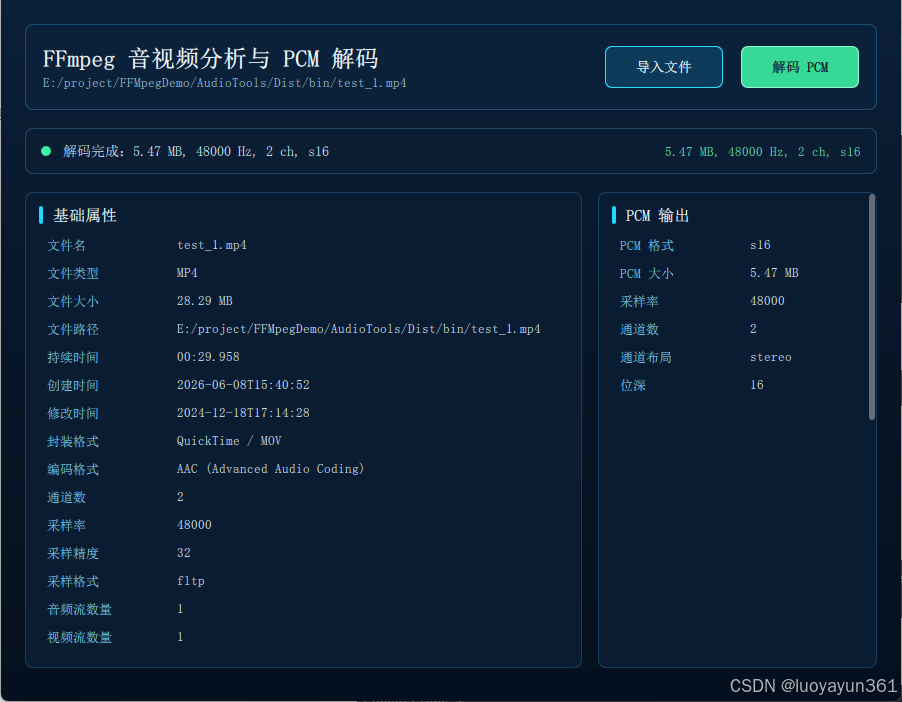
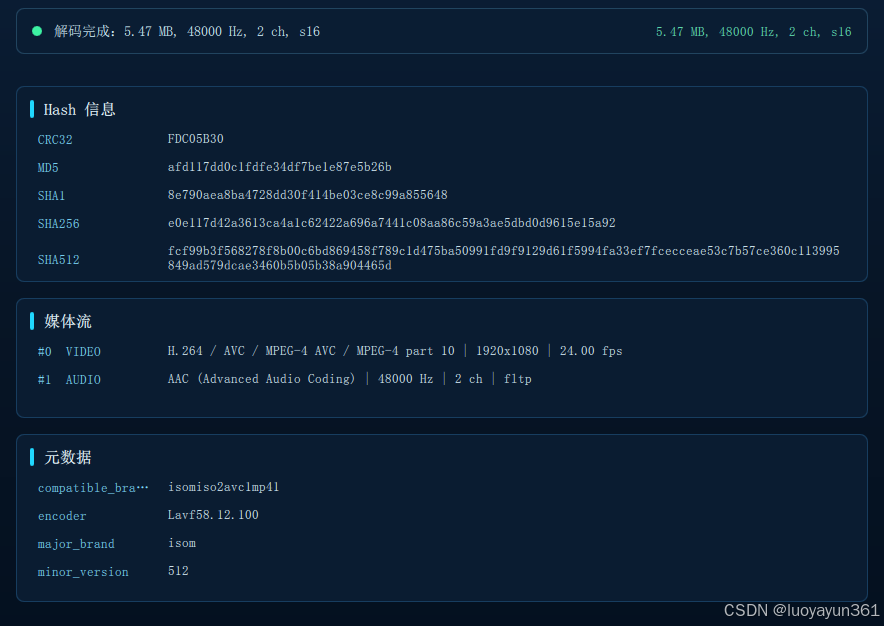
本文对应项目中的核心文件:
text
mediainfoparser.h/.cpp   // 解析文件属性、流信息、元数据
mediaanalyzer.h/.cpp     // QML 控制入口
ffmpegutils.h/.cpp       // FFmpeg 公共辅助函数
main.qml                 // 信息展示界面
components/InfoPanel.qml // 通用信息面板
1. 为什么要拆分 MediaInfoParser
项目中没有把所有 FFmpeg 逻辑都塞进 QML 控制类,而是拆成:
text
MediaAnalyzer      // QML 交互控制层
MediaInfoParser    // 媒体信息解析
AudioDecoder       // PCM 解码
FileHashCalculator // Hash 计算
FFmpegUtils        // 公共工具函数
MediaInfoParser 的接口非常简单:
cpp
class MediaInfoParser
{
public:
    bool parse(const QString &filePath,
               QVariantMap *info,
               QString *errorText) const;
};
返回值表示是否解析成功,解析结果放在 QVariantMap 中。
2. 信息来源:Qt + FFmpeg 各司其职
项目中使用两类 API 获取信息:
2.1 Qt 获取文件系统属性
这类信息不需要 FFmpeg,使用 QFileInfo 更合适:
cpp
QFileInfo fileInfo(filePath);

result.insert(QStringLiteral("fileName"), fileInfo.fileName());
result.insert(QStringLiteral("fileType"), fileInfo.suffix().toUpper());
result.insert(QStringLiteral("fileSize"), fileInfo.size());
result.insert(QStringLiteral("filePath"), fileInfo.absoluteFilePath());
result.insert(QStringLiteral("createdTime"), fileInfo.birthTime().toString(Qt::ISODate));
result.insert(QStringLiteral("modifiedTime"), fileInfo.lastModified().toString(Qt::ISODate));
这些字段属于文件系统层面的信息,和媒体编码格式无关。
2.2 FFmpeg 获取媒体封装和流信息
这类信息来自媒体文件内部:
cpp
AVFormatContext
AVStream
AVCodecParameters
AVDictionary
例如:
- 封装格式:
formatContext->iformat - 时长:
formatContext->duration - 总码率:
formatContext->bit_rate - 流数量:
formatContext->nb_streams - 每个流的 codec:
stream->codecpar->codec_id - 元数据:
formatContext->metadata和stream->metadata
3. 打开媒体文件
解析媒体信息的第一步和解码类似,也是打开输入文件:
cpp
AVFormatContext *formatContext = nullptr;
int ret = avformat_open_input(&formatContext,
                              filePath.toUtf8().constData(),
                              nullptr,
                              nullptr);
if (ret < 0) {
    if (errorText)
        *errorText = FFmpegUtils::errorString(ret);
    return false;
}
然后读取流信息:
cpp
ret = avformat_find_stream_info(formatContext, nullptr);
if (ret < 0) {
    if (errorText)
        *errorText = FFmpegUtils::errorString(ret);
    avformat_close_input(&formatContext);
    return false;
}
avformat_find_stream_info 会让 FFmpeg 分析媒体流,填充更多字段。如果不调用它,部分文件可能无法拿到准确的流参数。
4. 解析基础文件属性
项目中首先使用 QFileInfo 解析基础属性:
cpp
QVariantMap result;
result.insert(QStringLiteral("fileName"), fileInfo.fileName());
result.insert(QStringLiteral("fileType"),
              fileInfo.suffix().isEmpty()
                  ? QStringLiteral("-")
                  : fileInfo.suffix().toUpper());
result.insert(QStringLiteral("fileSize"), fileInfo.size());
result.insert(QStringLiteral("fileSizeText"),
              FFmpegUtils::formatBytes(fileInfo.size()));
result.insert(QStringLiteral("filePath"), fileInfo.absoluteFilePath());
这里同时保存了两个文件大小字段:
text
fileSize      // 原始字节数,适合程序处理
fileSizeText  // 格式化后的字符串,适合 UI 展示
例如:
text
3670016
3.50 MB
创建时间和修改时间:
cpp
result.insert(QStringLiteral("createdTime"), fileInfo.birthTime().isValid()
    ? fileInfo.birthTime().toString(Qt::ISODate)
    : fileInfo.metadataChangeTime().toString(Qt::ISODate));
result.insert(QStringLiteral("modifiedTime"),
              fileInfo.lastModified().toString(Qt::ISODate));
这里对创建时间做了兼容处理:如果 birthTime() 无效,则使用 metadataChangeTime() 兜底。
5. 解析封装格式、时长和码率
FFmpeg 的 AVFormatContext 中包含封装层信息。
5.1 时长
cpp
const qint64 durationMs = formatContext->duration == AV_NOPTS_VALUE
    ? -1
    : static_cast<qint64>(formatContext->duration / (AV_TIME_BASE / 1000.0));

result.insert(QStringLiteral("durationMs"), durationMs);
result.insert(QStringLiteral("durationText"),
              FFmpegUtils::formatDuration(durationMs));
FFmpeg 中 formatContext->duration 的单位是 AV_TIME_BASE,通常是微秒级时间基。项目中转换成毫秒,便于 Qt 使用。
如果 duration 不可用,则返回 -1。
5.2 封装格式
cpp
result.insert(QStringLiteral("formatName"),
              formatContext->iformat && formatContext->iformat->name
                  ? QString::fromUtf8(formatContext->iformat->name)
                  : QStringLiteral("-"));

result.insert(QStringLiteral("formatLongName"),
              formatContext->iformat && formatContext->iformat->long_name
                  ? QString::fromUtf8(formatContext->iformat->long_name)
                  : QStringLiteral("-"));
例如一个 MP4 文件可能得到:
text
formatName: mov,mp4,m4a,3gp,3g2,mj2
formatLongName: QuickTime / MOV
5.3 总码率
cpp
result.insert(QStringLiteral("bitRate"),
              static_cast<qlonglong>(formatContext->bit_rate));
码率单位通常是 bit/s。
6. 解析全局元数据
很多媒体文件中带有元数据,例如:
text
title
artist
album
encoder
date
comment
creation_time
FFmpeg 使用 AVDictionary 存储这类键值对。
项目中封装了一个公共函数:
cpp
QVariantMap FFmpegUtils::dictionaryToMap(const AVDictionary *dict)
{
    QVariantMap result;
    const AVDictionaryEntry *entry = nullptr;
    while ((entry = av_dict_iterate(dict, entry)) != nullptr) {
        result.insert(QString::fromUtf8(entry->key),
                      QString::fromUtf8(entry->value));
    }
    return result;
}
解析全局元数据时直接调用:
cpp
result.insert(QStringLiteral("metadata"),
              FFmpegUtils::dictionaryToMap(formatContext->metadata));
使用 QVariantMap 的好处是可以直接传给 QML,并在 QML 中用 Object.keys() 遍历展示。
7. 遍历媒体流
一个媒体文件可能有多个流。项目通过 formatContext->nb_streams 遍历:
cpp
for (unsigned int i = 0; i < formatContext->nb_streams; ++i) {
    const AVStream *stream = formatContext->streams[i];
    const AVCodecParameters *params = stream ? stream->codecpar : nullptr;
    if (!params)
        continue;

    QVariantMap streamInfo;
    streamInfo.insert(QStringLiteral("index"), static_cast<int>(i));
    streamInfo.insert(QStringLiteral("codec"),
                      FFmpegUtils::codecName(params->codec_id));
    streamInfo.insert(QStringLiteral("codecLongName"),
                      FFmpegUtils::codecLongName(params->codec_id));
    streamInfo.insert(QStringLiteral("bitRate"),
                      static_cast<qlonglong>(params->bit_rate));
    streamInfo.insert(QStringLiteral("metadata"),
                      FFmpegUtils::dictionaryToMap(stream->metadata));
}
每个流都会保存:
| 字段 | 含义 |
|---|---|
| index | 流索引 |
| type | 流类型,audio/video/subtitle 等 |
| codec | 短 codec 名称 |
| codecLongName | 完整 codec 名称 |
| bitRate | 当前流码率 |
| metadata | 当前流自己的元数据 |
8. 解析音频流信息
如果当前流是音频流:
cpp
if (params->codec_type == AVMEDIA_TYPE_AUDIO) {
    ++audioCount;
    streamInfo.insert(QStringLiteral("type"), QStringLiteral("audio"));
    streamInfo.insert(QStringLiteral("channels"), params->ch_layout.nb_channels);
    streamInfo.insert(QStringLiteral("channelLayout"),
                      FFmpegUtils::channelLayoutName(params->ch_layout));
    streamInfo.insert(QStringLiteral("sampleRate"), params->sample_rate);
    streamInfo.insert(QStringLiteral("sampleFormat"),
                      FFmpegUtils::sampleFormatName(params->format));
    streamInfo.insert(QStringLiteral("bitsPerSample"),
                      FFmpegUtils::bitsPerSample(params));
    audioStreams.append(streamInfo);
}
这里拿到的典型字段包括:
text
channels: 2
channelLayout: stereo
sampleRate: 44100
sampleFormat: fltp
bitsPerSample: 32
codecLongName: AAC (Advanced Audio Coding)
8.1 通道布局
FFmpeg 6 使用 AVChannelLayout 表示通道布局。项目通过工具函数转换成人类可读字符串:
cpp
QString FFmpegUtils::channelLayoutName(const AVChannelLayout &layout)
{
    if (layout.nb_channels <= 0)
        return QStringLiteral("-");

    char buffer[256] = {0};
    av_channel_layout_describe(&layout, buffer, sizeof(buffer));
    return QString::fromUtf8(buffer);
}
8.2 采样格式
采样格式通过 av_get_sample_fmt_name 转换:
cpp
QString FFmpegUtils::sampleFormatName(int format)
{
    if (format < 0)
        return QStringLiteral("-");

    const char *name = av_get_sample_fmt_name(
        static_cast<AVSampleFormat>(format));
    return name ? QString::fromUtf8(name) : QStringLiteral("unknown");
}
常见采样格式包括:
text
s16
s32
flt
fltp
dbl
dblp
9. 解析视频流信息
如果当前流是视频流:
cpp
if (params->codec_type == AVMEDIA_TYPE_VIDEO) {
    ++videoCount;
    const AVRational frameRate = stream->avg_frame_rate.num != 0
        ? stream->avg_frame_rate
        : stream->r_frame_rate;

    const char *pixelFormatName = params->format >= 0
        ? av_get_pix_fmt_name(static_cast<AVPixelFormat>(params->format))
        : nullptr;

    streamInfo.insert(QStringLiteral("type"), QStringLiteral("video"));
    streamInfo.insert(QStringLiteral("width"), params->width);
    streamInfo.insert(QStringLiteral("height"), params->height);
    streamInfo.insert(QStringLiteral("pixelFormat"),
                      pixelFormatName
                          ? QString::fromUtf8(pixelFormatName)
                          : QStringLiteral("-"));
    streamInfo.insert(QStringLiteral("frameRate"), frameRate.den != 0
        ? QString::number(av_q2d(frameRate), 'f', 2)
        : QStringLiteral("-"));
    videoStreams.append(streamInfo);
}
典型输出可能是:
text
type: video
width: 1920
height: 1080
pixelFormat: yuv420p
frameRate: 29.97
codecLongName: H.264 / AVC / MPEG-4 AVC / MPEG-4 part 10
10. 汇总流列表
项目中同时保存了三个列表:
cpp
result.insert(QStringLiteral("streams"), streams);
result.insert(QStringLiteral("audioStreams"), audioStreams);
result.insert(QStringLiteral("videoStreams"), videoStreams);
含义如下:
| 字段 | 含义 |
|---|---|
| streams | 所有流 |
| audioStreams | 只包含音频流 |
| videoStreams | 只包含视频流 |
另外还保存数量:
cpp
result.insert(QStringLiteral("audioStreamCount"), audioCount);
result.insert(QStringLiteral("videoStreamCount"), videoCount);
result.insert(QStringLiteral("streamCount"),
              static_cast<int>(formatContext->nb_streams));
这样 UI 可以快速展示:
text
音频流数量: 1
视频流数量: 1
总流数量: 2
11. 设置默认字段
并不是所有媒体文件都有音频流。例如纯视频文件没有采样率和通道数。为了避免 QML 侧访问字段时出现空值,项目中对关键字段做了默认值处理:
cpp
if (!result.contains(QStringLiteral("codec")))
    result.insert(QStringLiteral("codec"), QStringLiteral("-"));
if (!result.contains(QStringLiteral("channels")))
    result.insert(QStringLiteral("channels"), QStringLiteral("-"));
if (!result.contains(QStringLiteral("sampleRate")))
    result.insert(QStringLiteral("sampleRate"), QStringLiteral("-"));
if (!result.contains(QStringLiteral("sampleFormat")))
    result.insert(QStringLiteral("sampleFormat"), QStringLiteral("-"));
if (!result.contains(QStringLiteral("bitsPerSample")))
    result.insert(QStringLiteral("bitsPerSample"), QStringLiteral("-"));
这类默认值处理对 UI 很有价值,可以减少大量判空逻辑。
12. 控制层如何调用解析器
MediaAnalyzer 是暴露给 QML 的控制类。导入文件时,它会同时调用媒体信息解析和 hash 计算:
cpp
bool MediaAnalyzer::openFile(const QUrl &fileUrl)
{
    const QString filePath = toLocalFile(fileUrl);
    if (filePath.isEmpty()) {
        setStatus(QStringLiteral("无效的文件路径"));
        return false;
    }

    setBusy(true);
    setCurrentFile(filePath);
    setPcmData(QByteArray());

    QString mediaError;
    QVariantMap media;
    const bool mediaOk = m_infoParser.parse(filePath, &media, &mediaError);
    setMediaInfo(mediaOk ? media : QVariantMap());

    QString hashError;
    QVariantMap hashes;
    const bool hashOk = m_hashCalculator.calculate(filePath, &hashes, &hashError);
    setHashInfo(hashOk ? hashes : QVariantMap());

    setBusy(false);
    return mediaOk;
}
QML 只需要调用:
qml
mediaAnalyzer.openFile(fileUrl)不需要知道内部使用了 FFmpeg。
13. QML 如何展示 QVariantMap
MediaAnalyzer 暴露了属性:
cpp
Q_PROPERTY(QVariantMap mediaInfo READ mediaInfo NOTIFY mediaInfoChanged)
Q_PROPERTY(QVariantMap hashInfo READ hashInfo NOTIFY hashInfoChanged)
QML 中监听变化:
qml
Connections {
    target: mediaAnalyzer
    function onMediaInfoChanged() { refreshMediaRows() }
    function onHashInfoChanged() { refreshHashRows() }
}
基础属性通过固定字段生成行数据:
qml
basicRows = makeRows(info, [
    { label: "文件名", key: "fileName" },
    { label: "文件类型", key: "fileType" },
    { label: "文件大小", key: "fileSizeText" },
    { label: "文件路径", key: "filePath" },
    { label: "持续时间", key: "durationText" },
    { label: "创建时间", key: "createdTime" },
    { label: "修改时间", key: "modifiedTime" },
    { label: "封装格式", key: "formatLongName" },
    { label: "编码格式", key: "codecLongName" },
    { label: "通道数", key: "channels" },
    { label: "采样率", key: "sampleRate" },
    { label: "采样精度", key: "bitsPerSample" },
    { label: "采样格式", key: "sampleFormat" }
])
元数据则适合动态遍历:
qml
function mapRows(source) {
    var rows = []
    if (!source)
        return rows

    var keys = Object.keys(source).sort()
    for (var i = 0; i < keys.length; ++i)
        rows.push({ label: keys[i], value: clean(source[keys[i]]) })

    return rows
}
这样无论文件里有哪些 metadata key,都可以自动展示。
14. UI 面板组件化
项目把信息展示抽成了 InfoPanel.qml:
qml
InfoPanel {
    Layout.fillWidth: true
    title: "基础属性"
    modelData: root.basicRows
    emptyText: "尚未导入文件"
}
Hash 信息:
qml
InfoPanel {
    Layout.fillWidth: true
    title: "Hash 信息"
    modelData: root.hashRows
    emptyText: "尚未计算 hash"
    valueWrap: Text.WrapAnywhere
}
元数据:
qml
InfoPanel {
    Layout.fillWidth: true
    title: "元数据"
    modelData: root.metadataRows
    emptyText: "未发现元数据"
    valueWrap: Text.WrapAnywhere
}
拆成组件后,主页面只负责组织布局,不再堆大量重复 delegate 代码。
15. Hash 信息的补充
虽然本文重点是媒体属性和元数据,但项目导入文件时也计算了基础 hash:
text
MD5
CRC32
SHA1
SHA256
SHA512
Hash 计算由 FileHashCalculator 负责,结果也通过 QVariantMap 返回:
cpp
QVariantMap hashes;
const bool hashOk = m_hashCalculator.calculate(filePath, &hashes, &hashError);
setHashInfo(hashOk ? hashes : QVariantMap());
这类信息在媒体文件校验、重复文件判断、传输完整性检查中很有用。
16. 解析结果示例
解析一个常见 MP4 文件后,mediaInfo 的结构大致如下:
text
fileName: demo.mp4
fileType: MP4
fileSizeText: 24.16 MB
filePath: E:/media/demo.mp4
durationText: 02:13.520
formatLongName: QuickTime / MOV
codecLongName: AAC (Advanced Audio Coding)
channels: 2
sampleRate: 44100
sampleFormat: fltp
bitsPerSample: 32
audioStreamCount: 1
videoStreamCount: 1
流信息示例:
text
#0 VIDEO
H.264 / AVC / MPEG-4 AVC / MPEG-4 part 10 | 1920x1080 | 29.97 fps

#1 AUDIO
AAC (Advanced Audio Coding) | 44100 Hz | 2 ch | fltp
元数据示例:
text
encoder: Lavf60.16.100
creation_time: 2026-06-08T07:30:00.000000Z
title: demo
具体字段取决于文件本身,不同容器和编码器写入的 metadata 会不同。
17. 常见注意事项
17.1 文件后缀不等于真实封装格式
QFileInfo::suffix() 只能得到文件扩展名,例如 mp4。真实封装格式应该以 FFmpeg 的解析结果为准:
cpp
formatContext->iformat->name
formatContext->iformat->long_name
有些文件可能扩展名写错,但 FFmpeg 仍能识别真实格式。
17.2 duration 可能不可用
流媒体、损坏文件、部分裸流文件可能没有准确时长。因此项目中判断:
cpp
formatContext->duration == AV_NOPTS_VALUE不可用时使用 -1 和 "-"。
17.3 元数据不是固定字段
不同媒体文件的元数据 key 不固定。不要假设一定有 title、artist 或 album。
更稳妥的做法是像项目中这样,把 AVDictionary 转成 map,然后动态展示。
17.4 采样精度不一定总能准确表示
有些编码格式的位深不容易直接从 AVCodecParameters 推导。项目中先根据 sample format 判断:
cpp
av_get_bytes_per_sample(...)如果不可用,再尝试:
cpp
av_get_bits_per_sample(params->codec_id)仍不可用时返回 0 或使用默认展示值。
18. 小结
本文介绍了如何使用 Qt + FFmpeg 获取音视频文件信息:
text
QFileInfo              -> 文件名、路径、大小、时间
AVFormatContext        -> 封装格式、时长、总码率、全局元数据
AVStream               -> 单个媒体流
AVCodecParameters      -> codec、采样率、通道数、宽高、像素格式
AVDictionary           -> 元数据 key/value
QVariantMap/QVariantList -> 传给 QML 展示
项目结构上,将媒体解析封装为独立的 MediaInfoParser,控制层 MediaAnalyzer 只负责调度和通知 QML,这样代码更容易维护,也方便后续扩展。
后续可以继续增加:
- 字幕流解析
- 音频封面图解析
- chapter 章节信息
- side data 信息
- HDR / color space 信息
- 导出 JSON 报告