整体方案说明
基于 Winform + SqlSugar + SQLite(本地文件数据库)实现 3C 行业 MES/ERP 协同场景,涵盖物料 / BOM 数据维护、Excel 导入导出、工序排程、GDI 图表展示 核心能力,以下分模块实现核心代码(适配.NET Framework 4.8,需安装 NuGet:SqlSugarCore/NPOI/System.Data.SQLite)。
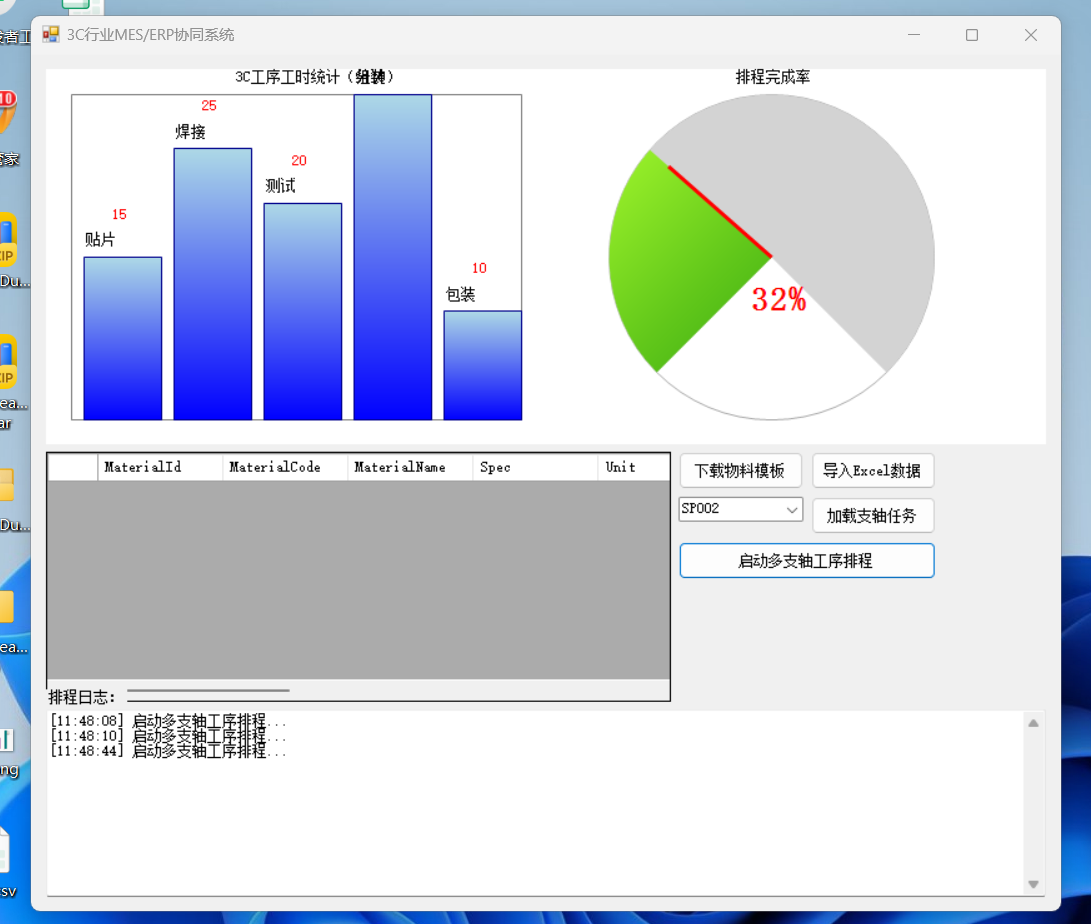
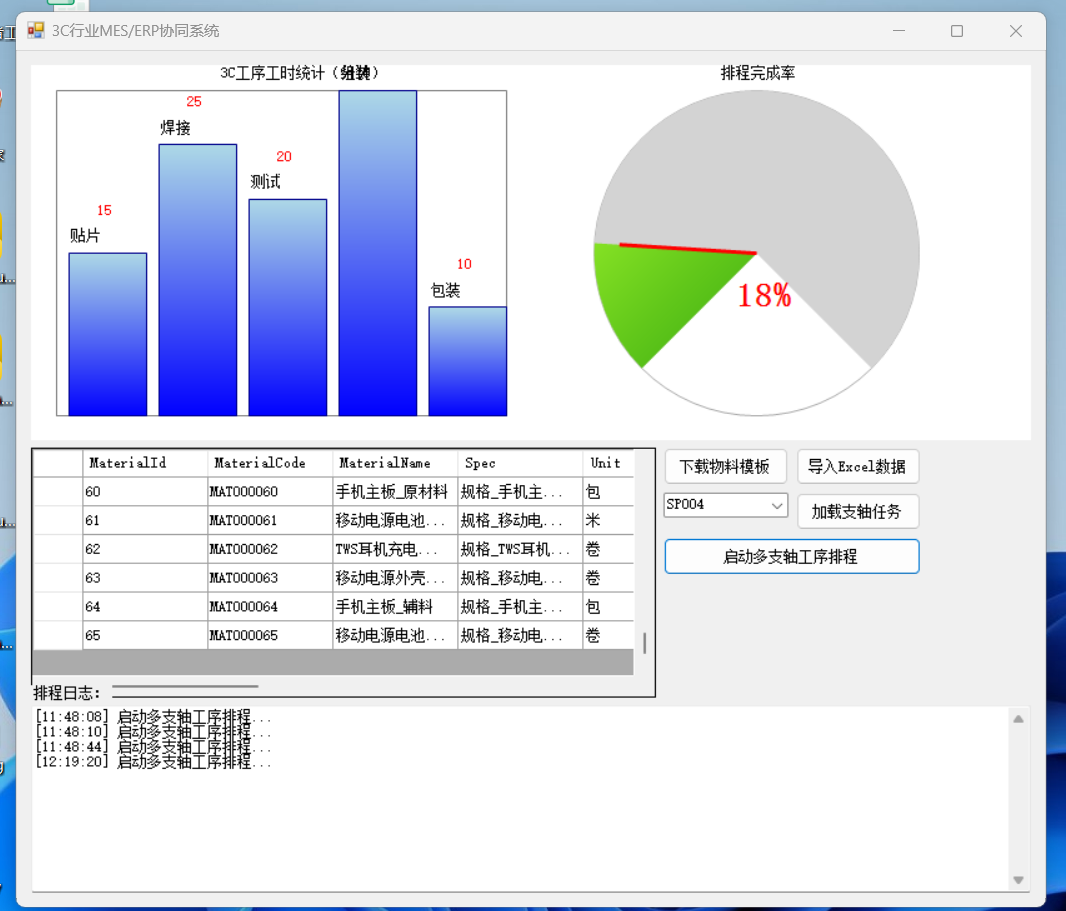
1. 核心实体定义(Models 文件夹)
1.1 3C 半成品物料实体(MaterialModel.cs)
csharp
运行
using SqlSugar;
using System;

namespace MES_ERP.Models
{
    /// <summary>
    /// 3C电子半成品物料表(12组核心字段)
    /// </summary>
    [SugarTable("Material_3C")]
    public class MaterialModel
    {
        /// <summary>
        /// 物料ID(主键)
        /// </summary>
        [SugarColumn(IsPrimaryKey = true, IsIdentity = true)]
        public int MaterialId { get; set; }

        /// <summary>
        /// 物料编码
        /// </summary>
        [SugarColumn(Length = 50, IsNullable = false)]
        public string MaterialCode { get; set; }

        /// <summary>
        /// 物料名称
        /// </summary>
        [SugarColumn(Length = 100, IsNullable = false)]
        public string MaterialName { get; set; }

        /// <summary>
        /// 规格型号
        /// </summary>
        [SugarColumn(Length = 100)]
        public string Spec { get; set; }

        /// <summary>
        /// 单位
        /// </summary>
        [SugarColumn(Length = 20)]
        public string Unit { get; set; }

        /// <summary>
        /// 库存数量
        /// </summary>
        public decimal StockQty { get; set; }

        /// <summary>
        /// 供应商编码
        /// </summary>
        [SugarColumn(Length = 50)]
        public string SupplierCode { get; set; }

        /// <summary>
        /// 采购单价
        /// </summary>
        public decimal PurchasePrice { get; set; }

        /// <summary>
        /// 生产批次
        /// </summary>
        [SugarColumn(Length = 50)]
        public string BatchNo { get; set; }

        /// <summary>
        /// 有效期
        /// </summary>
        public DateTime? ExpiryDate { get; set; }

        /// <summary>
        /// 物料类型(半成品/原材料)
        /// </summary>
        [SugarColumn(Length = 20)]
        public string MaterialType { get; set; }

        /// <summary>
        /// 创建时间
        /// </summary>
        public DateTime CreateTime { get; set; } = DateTime.Now;
    }
}
1.2 工序工站 BOM 实体(BomModel.cs)
csharp
运行
using SqlSugar;
using System;

namespace MES_ERP.Models
{
    /// <summary>
    /// 3C工序工站BOM表(12组核心字段)
    /// </summary>
    [SugarTable("BOM_ProcessStation")]
    public class BomModel
    {
        /// <summary>
        /// BOMID(主键)
        /// </summary>
        [SugarColumn(IsPrimaryKey = true, IsIdentity = true)]
        public int BomId { get; set; }

        /// <summary>
        /// 父物料编码
        /// </summary>
        [SugarColumn(Length = 50, IsNullable = false)]
        public string ParentMaterialCode { get; set; }

        /// <summary>
        /// 子物料编码
        /// </summary>
        [SugarColumn(Length = 50, IsNullable = false)]
        public string ChildMaterialCode { get; set; }

        /// <summary>
        /// 工站编码
        /// </summary>
        [SugarColumn(Length = 50, IsNullable = false)]
        public string StationCode { get; set; }

        /// <summary>
        /// 工序编码
        /// </summary>
        [SugarColumn(Length = 50, IsNullable = false)]
        public string ProcessCode { get; set; }

        /// <summary>
        /// 工序名称
        /// </summary>
        [SugarColumn(Length = 100)]
        public string ProcessName { get; set; }

        /// <summary>
        /// 用量
        /// </summary>
        public decimal Qty { get; set; }

        /// <summary>
        /// 损耗率
        /// </summary>
        public decimal LossRate { get; set; }

        /// <summary>
        /// 工序顺序
        /// </summary>
        public int ProcessOrder { get; set; }

        /// <summary>
        /// 支轴组编号(多支轴调度)
        /// </summary>
        [SugarColumn(Length = 20)]
        public string SpindleGroupNo { get; set; }

        /// <summary>
        /// 预估工时(分钟)
        /// </summary>
        public int EstimateWorkTime { get; set; }

        /// <summary>
        /// 更新时间
        /// </summary>
        public DateTime UpdateTime { get; set; } = DateTime.Now;
    }
}
2. SqlSugar 数据库上下文(Data 文件夹 / SqlSugarContext.cs)
csharp
运行
using MES_ERP.Models;
using SqlSugar;
using System;
using System.IO;

namespace MES_ERP.Data
{
    /// <summary>
    /// SqlSugar数据库上下文(本地SQLite文件)
    /// </summary>
    public class SqlSugarContext
    {
        public static SqlSugarClient Db { get; private set; }

        static SqlSugarContext()
        {
            // 本地数据库文件路径(程序目录下MES_ERP.db)
            string dbPath = Path.Combine(AppDomain.CurrentDomain.BaseDirectory, "MES_ERP.db");
            Db = new SqlSugarClient(new ConnectionConfig()
            {
                ConnectionString = $"Data Source={dbPath};Version=3;",
                DbType = DbType.Sqlite,
                IsAutoCloseConnection = true,
                InitKeyType = InitKeyType.Attribute // 从特性读取主键/自增信息
            });

            // 初始化表(不存在则创建)
            Db.CodeFirst.InitTables(typeof(MaterialModel), typeof(BomModel));

            // 日志打印(调试用)
            Db.Aop.OnLogExecuting = (sql, pars) =>
            {
                Console.WriteLine($"SQL:{sql} \r\n参数:{string.Join(",", pars.Select(p => $"{p.ParameterName}:{p.Value}"))}");
            };
        }

        /// <summary>
        /// 获取仓储(简化CRUD)
        /// </summary>
        /// <typeparam name="T"></typeparam>
        /// <returns></returns>
        public static SimpleClient<T> GetRepository<T>() where T : class, new()
        {
            return new SimpleClient<T>(Db);
        }
    }
}
3. Excel 导入导出工具(Utils 文件夹 / ExcelHelper.cs)
csharp
运行
using MES_ERP.Models;
using NPOI.HSSF.UserModel;
using NPOI.SS.UserModel;
using NPOI.XSSF.UserModel;
using System;
using System.Collections.Generic;
using System.IO;
using System.Windows.Forms;

namespace MES_ERP.Utils
{
    /// <summary>
    /// Excel导入导出帮助类(固定模板)
    /// </summary>
    public class ExcelHelper
    {
        #region 模板下载
        /// <summary>
        /// 下载物料模板(固定格式)
        /// </summary>
        /// <param name="savePath">保存路径</param>
        public static void DownloadMaterialTemplate(string savePath)
        {
            // 创建Excel工作簿
            IWorkbook workbook = new XSSFWorkbook();
            ISheet sheet = workbook.CreateSheet("3C物料模板");

            // 写入表头(固定模板字段)
            string[] headers = { "物料编码", "物料名称", "规格型号", "单位", "库存数量", "供应商编码", "采购单价", "生产批次", "有效期", "物料类型" };
            IRow headerRow = sheet.CreateRow(0);
            for (int i = 0; i < headers.Length; i++)
            {
                headerRow.CreateCell(i).SetCellValue(headers[i]);
            }

            // 写入示例行
            IRow exampleRow = sheet.CreateRow(1);
            exampleRow.CreateCell(0).SetCellValue("MAT001");
            exampleRow.CreateCell(1).SetCellValue("手机主板半成品");
            exampleRow.CreateCell(2).SetCellValue("X90 Pro");
            exampleRow.CreateCell(3).SetCellValue("PCS");
            exampleRow.CreateCell(4).SetCellValue(1000);
            exampleRow.CreateCell(5).SetCellValue("SUP001");
            exampleRow.CreateCell(6).SetCellValue(200.5);
            exampleRow.CreateCell(7).SetCellValue("B202405");
            exampleRow.CreateCell(8).SetCellValue("2025-05-01");
            exampleRow.CreateCell(9).SetCellValue("半成品");

            // 保存文件
            using (FileStream fs = new FileStream(savePath, FileMode.Create))
            {
                workbook.Write(fs);
            }
            MessageBox.Show($"物料模板已下载至:{savePath}", "提示", MessageBoxButtons.OK, MessageBoxIcon.Information);
        }
        #endregion

        #region 导入物料数据
        /// <summary>
        /// 从Excel导入物料数据(验证固定模板)
        /// </summary>
        /// <param name="filePath">Excel文件路径</param>
        /// <returns></returns>
        public static List<MaterialModel> ImportMaterialFromExcel(string filePath)
        {
            List<MaterialModel> list = new List<MaterialModel>();
            IWorkbook workbook = null;

            // 读取Excel文件
            using (FileStream fs = new FileStream(filePath, FileMode.Open, FileAccess.Read))
            {
                if (filePath.EndsWith(".xlsx"))
                    workbook = new XSSFWorkbook(fs);
                else if (filePath.EndsWith(".xls"))
                    workbook = new HSSFWorkbook(fs);
                else
                    throw new Exception("仅支持.xlsx/.xls格式");
            }

            ISheet sheet = workbook.GetSheetAt(0);
            if (sheet == null) throw new Exception("Excel无有效工作表");

            // 验证表头
            IRow headerRow = sheet.GetRow(0);
            string[] requiredHeaders = { "物料编码", "物料名称", "规格型号", "单位" };
            foreach (var header in requiredHeaders)
            {
                bool isExist = false;
                for (int i = 0; i < headerRow.LastCellNum; i++)
                {
                    if (headerRow.GetCell(i)?.ToString() == header)
                    {
                        isExist = true;
                        break;
                    }
                }
                if (!isExist) throw new Exception($"模板格式错误:缺少表头【{header}】");
            }

            // 读取数据行
            for (int i = 1; i <= sheet.LastRowNum; i++)
            {
                IRow row = sheet.GetRow(i);
                if (row == null || row.GetCell(0) == null) continue;

                var model = new MaterialModel
                {
                    MaterialCode = row.GetCell(0)?.ToString()?.Trim(),
                    MaterialName = row.GetCell(1)?.ToString()?.Trim(),
                    Spec = row.GetCell(2)?.ToString()?.Trim(),
                    Unit = row.GetCell(3)?.ToString()?.Trim(),
                    StockQty = Convert.ToDecimal(row.GetCell(4)?.ToString() ?? "0"),
                    SupplierCode = row.GetCell(5)?.ToString()?.Trim(),
                    PurchasePrice = Convert.ToDecimal(row.GetCell(6)?.ToString() ?? "0"),
                    BatchNo = row.GetCell(7)?.ToString()?.Trim(),
                    ExpiryDate = string.IsNullOrEmpty(row.GetCell(8)?.ToString()) ? null : (DateTime?)Convert.ToDateTime(row.GetCell(8).ToString()),
                    MaterialType = row.GetCell(9)?.ToString()?.Trim(),
                    CreateTime = DateTime.Now
                };
                list.Add(model);
            }
            return list;
        }
        #endregion
    }
}
4. 多支轴工序排程模块(Scheduling 文件夹 / ProcessScheduler.cs)
csharp
运行
using MES_ERP.Models;
using System;
using System.Collections.Generic;
using System.Threading;
using System.Windows.Forms;

namespace MES_ERP.Scheduling
{
    /// <summary>
    /// 多支轴工序排程调度器(多线程任务执行)
    /// </summary>
    public class ProcessScheduler
    {
        /// <summary>
        /// 支轴组任务队列
        /// </summary>
        private Dictionary<string, List<BomModel>> _spindleTaskQueue = new Dictionary<string, List<BomModel>>();

        /// <summary>
        /// 排程完成回调
        /// </summary>
        public event Action<string, string> SchedulingCompleted;

        /// <summary>
        /// 加载支轴组任务
        /// </summary>
        /// <param name="spindleGroupNo">支轴组编号</param>
        /// <param name="bomList">BOM工序列表</param>
        public void LoadSpindleTask(string spindleGroupNo, List<BomModel> bomList)
        {
            if (!_spindleTaskQueue.ContainsKey(spindleGroupNo))
                _spindleTaskQueue.Add(spindleGroupNo, new List<BomModel>());
            _spindleTaskQueue[spindleGroupNo] = bomList;
        }

        /// <summary>
        /// 启动多支轴并行排程
        /// </summary>
        public void StartMultiSpindleScheduling()
        {
            foreach (var spindleGroup in _spindleTaskQueue)
            {
                // 每个支轴组启动独立线程执行工序调度
                Thread thread = new Thread(new ParameterizedThreadStart(ExecuteSpindleTask));
                thread.IsBackground = true;
                thread.Start(spindleGroup);
            }
        }

        /// <summary>
        /// 执行单个支轴组任务
        /// </summary>
        /// <param name="obj">支轴组+任务列表</param>
        private void ExecuteSpindleTask(object obj)
        {
            var spindleGroup = (KeyValuePair<string, List<BomModel>>)obj;
            string spindleNo = spindleGroup.Key;
            var taskList = spindleGroup.Value;

            // 按工序顺序排序
            taskList.Sort((a, b) => a.ProcessOrder.CompareTo(b.ProcessOrder));

            // 模拟工序执行(实际场景替换为真实业务逻辑)
            foreach (var task in taskList)
            {
                string log = $"[{DateTime.Now:HH:mm:ss}] 支轴组{spindleNo} - 执行工序:{task.ProcessCode}({task.ProcessName}),工站:{task.StationCode},耗时:{task.EstimateWorkTime}分钟";
                // 跨线程更新UI(需通过Invoke)
                SchedulingCompleted?.Invoke(spindleNo, log);
                Thread.Sleep(task.EstimateWorkTime * 100); // 模拟耗时(100ms=1分钟)
            }

            SchedulingCompleted?.Invoke(spindleNo, $"[{DateTime.Now:HH:mm:ss}] 支轴组{spindleNo} 所有工序执行完成!");
        }

        /// <summary>
        /// 清空支轴任务队列
        /// </summary>
        public void ClearTaskQueue()
        {
            _spindleTaskQueue.Clear();
        }
    }
}
5. GDI + 图表绘制控件(Controls 文件夹 / ChartControl.cs)
csharp
运行
using System;
using System.Drawing;
using System.Drawing.Drawing2D;
using System.Windows.Forms;

namespace MES_ERP.Controls
{
    /// <summary>
    /// GDI+自定义图表控件(柱状图+仪表盘)
    /// </summary>
    public class ChartControl : Control
    {
        /// <summary>
        /// 柱状图数据(工序工时统计)
        /// </summary>
        public Dictionary<string, int> BarChartData { get; set; } = new Dictionary<string, int>();

        /// <summary>
        /// 仪表盘数值(0-100)
        /// </summary>
        public int GaugeValue { get; set; } = 0;

        public ChartControl()
        {
            DoubleBuffered = true; // 双缓冲防闪烁
        }

        protected override void OnPaint(PaintEventArgs e)
        {
            base.OnPaint(e);
            Graphics g = e.Graphics;
            g.SmoothingMode = SmoothingMode.AntiAlias; // 抗锯齿

            // 绘制背景
            g.Clear(Color.White);

            // 1. 绘制柱状图(左侧)
            DrawBarChart(g);

            // 2. 绘制仪表盘(右侧)
            DrawGauge(g);
        }

        /// <summary>
        /// 绘制工序工时柱状图
        /// </summary>
        /// <param name="g"></param>
        private void DrawBarChart(Graphics g)
        {
            if (BarChartData.Count == 0) return;

            // 绘图区域
            Rectangle barRect = new Rectangle(20, 20, this.Width / 2 - 40, this.Height - 40);
            g.DrawRectangle(Pens.Gray, barRect);

            // 计算刻度
            int maxValue = BarChartData.Values.Max();
            float unitY = barRect.Height / (float)maxValue;

            // 绘制柱子
            float barWidth = barRect.Width / (float)BarChartData.Count - 10;
            float x = barRect.X + 10;
            foreach (var item in BarChartData)
            {
                // 柱子区域
                float barHeight = item.Value * unitY;
                RectangleF bar = new RectangleF(x, barRect.Bottom - barHeight, barWidth, barHeight);

                // 渐变填充
                using (LinearGradientBrush brush = new LinearGradientBrush(bar, Color.LightBlue, Color.Blue, LinearGradientMode.Vertical))
                {
                    g.FillRectangle(brush, bar);
                }
                g.DrawRectangle(Pens.DarkBlue, Rectangle.Round(bar));

                // 绘制文字
                g.DrawString(item.Key, Font, Brushes.Black, x, barRect.Bottom - barHeight - 20);
                g.DrawString(item.Value.ToString(), Font, Brushes.Red, x + barWidth / 2 - 10, barRect.Bottom - barHeight - 40);

                x += barWidth + 10;
            }

            // 绘制标题
            g.DrawString("3C工序工时统计(分钟)", Font, Brushes.Black, barRect.X + barRect.Width / 2 - 50, barRect.Y - 20);
        }

        /// <summary>
        /// 绘制排程完成率仪表盘
        /// </summary>
        /// <param name="g"></param>
        private void DrawGauge(Graphics g)
        {
            // 绘图区域
            int gaugeRadius = Math.Min(this.Width / 4, this.Height / 2 - 20);
            Point gaugeCenter = new Point(this.Width - this.Width / 4 - 20, this.Height / 2);

            // 绘制外圆
            g.DrawEllipse(Pens.DarkGray, gaugeCenter.X - gaugeRadius, gaugeCenter.Y - gaugeRadius, gaugeRadius * 2, gaugeRadius * 2);

            // 绘制扇形背景(0-100)
            using (Brush bgBrush = new SolidBrush(Color.LightGray))
            {
                g.FillPie(bgBrush, gaugeCenter.X - gaugeRadius, gaugeCenter.Y - gaugeRadius, gaugeRadius * 2, gaugeRadius * 2, 135, 270);
            }

            // 绘制进度扇形
            float angle = GaugeValue * 2.7f; // 270°对应100%
            using (Brush progressBrush = new LinearGradientBrush(new Rectangle(gaugeCenter.X - gaugeRadius, gaugeCenter.Y - gaugeRadius, gaugeRadius * 2, gaugeRadius * 2), Color.GreenYellow, Color.Green, LinearGradientMode.ForwardDiagonal))
            {
                g.FillPie(progressBrush, gaugeCenter.X - gaugeRadius, gaugeCenter.Y - gaugeRadius, gaugeRadius * 2, gaugeRadius * 2, 135, angle);
            }

            // 绘制指针
            float radian = (135 + angle) * (float)Math.PI / 180;
            int pointerLength = gaugeRadius - 20;
            PointF pointerEnd = new PointF(
                gaugeCenter.X + (float)Math.Cos(radian) * pointerLength,
                gaugeCenter.Y + (float)Math.Sin(radian) * pointerLength
            );
            g.DrawLine(new Pen(Color.Red, 3), gaugeCenter, pointerEnd);

            // 绘制数值
            g.DrawString($"{GaugeValue}%", new Font(Font.FontFamily, 20, FontStyle.Bold), Brushes.Red, gaugeCenter.X - 20, gaugeCenter.Y + 20);
            g.DrawString("排程完成率", Font, Brushes.Black, gaugeCenter.X - 30, gaugeCenter.Y - gaugeRadius - 20);
        }

        /// <summary>
        /// 刷新图表
        /// </summary>
        public void RefreshChart()
        {
            this.Invalidate();
        }
    }
}
6. Winform 主界面(FormMain.cs)
csharp
运行
using MES_ERP.Controls;
using MES_ERP.Data;
using MES_ERP.Models;
using MES_ERP.Scheduling;
using MES_ERP.Utils;
using System;
using System.Collections.Generic;
using System.IO;
using System.Windows.Forms;

namespace MES_ERP
{
    public partial class FormMain : Form
    {
        private ProcessScheduler _scheduler = new ProcessScheduler();
        private ChartControl _chartControl = new ChartControl();

        public FormMain()
        {
            InitializeComponent();
            InitForm();
        }

        /// <summary>
        /// 初始化窗体
        /// </summary>
        private void InitForm()
        {
            // 1. 初始化图表控件
            _chartControl.Dock = DockStyle.Fill;
            panelChart.Controls.Add(_chartControl);

            // 2. 绑定排程回调
            _scheduler.SchedulingCompleted += Scheduler_SchedulingCompleted;

            // 3. 加载物料数据到DataGridView
            LoadMaterialData();

            // 4. 初始化支轴组下拉框
            cboSpindleGroup.Items.AddRange(new string[] { "SP001", "SP002", "SP003", "SP004" });
            cboSpindleGroup.SelectedIndex = 0;
        }

        #region 物料数据维护
        /// <summary>
        /// 加载物料数据
        /// </summary>
        private void LoadMaterialData()
        {
            var repo = SqlSugarContext.GetRepository<MaterialModel>();
            dgvMaterial.DataSource = repo.GetList();
        }

        /// <summary>
        /// 模板下载按钮点击
        /// </summary>
        private void btnDownloadTemplate_Click(object sender, EventArgs e)
        {
            using (SaveFileDialog sfd = new SaveFileDialog())
            {
                sfd.Filter = "Excel文件(*.xlsx)|*.xlsx";
                sfd.FileName = "3C物料模板.xlsx";
                if (sfd.ShowDialog() == DialogResult.OK)
                {
                    ExcelHelper.DownloadMaterialTemplate(sfd.FileName);
                }
            }
        }

        /// <summary>
        /// Excel导入按钮点击
        /// </summary>
        private void btnImportExcel_Click(object sender, EventArgs e)
        {
            using (OpenFileDialog ofd = new OpenFileDialog())
            {
                ofd.Filter = "Excel文件(*.xlsx;*.xls)|*.xlsx;*.xls";
                if (ofd.ShowDialog() == DialogResult.OK)
                {
                    try
                    {
                        var materialList = ExcelHelper.ImportMaterialFromExcel(ofd.FileName);
                        var repo = SqlSugarContext.GetRepository<MaterialModel>();
                        repo.InsertRange(materialList); // 批量插入
                        LoadMaterialData(); // 刷新数据
                        MessageBox.Show($"成功导入{materialList.Count}条物料数据", "提示", MessageBoxButtons.OK, MessageBoxIcon.Information);
                    }
                    catch (Exception ex)
                    {
                        MessageBox.Show($"导入失败:{ex.Message}", "错误", MessageBoxButtons.OK, MessageBoxIcon.Error);
                    }
                }
            }
        }
        #endregion

        #region 工序排程
        /// <summary>
        /// 加载支轴组工序任务
        /// </summary>
        private void btnLoadTask_Click(object sender, EventArgs e)
        {
            try
            {
                string spindleGroupNo = cboSpindleGroup.SelectedItem.ToString();
                // 模拟从数据库加载该支轴组的BOM工序数据
                var bomRepo = SqlSugarContext.GetRepository<BomModel>();
                var bomList = bomRepo.GetList(b => b.SpindleGroupNo == spindleGroupNo);
                if (bomList.Count == 0)
                {
                    MessageBox.Show($"支轴组{spindleGroupNo}无工序数据!", "提示", MessageBoxButtons.OK, MessageBoxIcon.Warning);
                    return;
                }
                // 加载任务到调度器
                _scheduler.LoadSpindleTask(spindleGroupNo, bomList);
                txtLog.AppendText($"[{DateTime.Now:HH:mm:ss}] 已加载支轴组{spindleGroupNo}工序任务,共{bomList.Count}道工序\r\n");
            }
            catch (Exception ex)
            {
                txtLog.AppendText($"[{DateTime.Now:HH:mm:ss}] 加载任务失败:{ex.Message}\r\n");
            }
        }

        /// <summary>
        /// 启动排程按钮点击
        /// </summary>
        private void btnStartScheduling_Click(object sender, EventArgs e)
        {
            txtLog.AppendText($"[{DateTime.Now:HH:mm:ss}] 启动多支轴工序排程...\r\n");
            _scheduler.StartMultiSpindleScheduling();

            // 模拟图表数据(实际从排程结果获取)
            _chartControl.BarChartData = new Dictionary<string, int>
            {
                { "贴片", 15 },
                { "焊接", 25 },
                { "测试", 20 },
                { "组装", 30 },
                { "包装", 10 }
            };
            _chartControl.GaugeValue = 0;
            _chartControl.RefreshChart();

            // 模拟完成率递增(实际从排程进度更新)
            Timer timer = new Timer();
            timer.Interval = 1000;
            timer.Tick += (s, ev) =>
            {
                if (_chartControl.GaugeValue < 100)
                {
                    _chartControl.GaugeValue += 1;
                    _chartControl.RefreshChart();
                }
                else
                {
                    timer.Stop();
                }
            };
            timer.Start();
        }

        /// <summary>
        /// 排程完成回调(跨线程更新UI)
        /// </summary>
        /// <param name="spindleNo"></param>
        /// <param name="log"></param>
        private void Scheduler_SchedulingCompleted(string spindleNo, string log)
        {
            if (txtLog.InvokeRequired)
            {
                txtLog.Invoke(new Action<string, string>(Scheduler_SchedulingCompleted), spindleNo, log);
            }
            else
            {
                txtLog.AppendText(log + "\r\n");
            }
        }
        #endregion

        #region 窗体设计器自动生成代码(简化版)
        private System.ComponentModel.IContainer components = null;
        private Panel panelChart;
        private DataGridView dgvMaterial;
        private Button btnDownloadTemplate;
        private Button btnImportExcel;
        private ComboBox cboSpindleGroup;
        private Button btnLoadTask;
        private Button btnStartScheduling;
        private TextBox txtLog;
        private Label label1;

        protected override void Dispose(bool disposing)
        {
            if (disposing && (components != null))
            {
                components.Dispose();
            }
            base.Dispose(disposing);
        }

        private void InitializeComponent()
        {
            this.panelChart = new System.Windows.Forms.Panel();
            this.dgvMaterial = new System.Windows.Forms.DataGridView();
            this.btnDownloadTemplate = new System.Windows.Forms.Button();
            this.btnImportExcel = new System.Windows.Forms.Button();
            this.cboSpindleGroup = new System.Windows.Forms.ComboBox();
            this.btnLoadTask = new System.Windows.Forms.Button();
            this.btnStartScheduling = new System.Windows.Forms.Button();
            this.txtLog = new System.Windows.Forms.TextBox();
            this.label1 = new System.Windows.Forms.Label();
            ((System.ComponentModel.ISupportInitialize)(this.dgvMaterial)).BeginInit();
            this.SuspendLayout();
            //
            // panelChart
            //
            this.panelChart.Location = new System.Drawing.Point(12, 12);
            this.panelChart.Name = "panelChart";
            this.panelChart.Size = new System.Drawing.Size(800, 300);
            this.panelChart.TabIndex = 0;
            //
            // dgvMaterial
            //
            this.dgvMaterial.Location = new System.Drawing.Point(12, 318);
            this.dgvMaterial.Name = "dgvMaterial";
            this.dgvMaterial.RowTemplate.Height = 23;
            this.dgvMaterial.Size = new System.Drawing.Size(500, 200);
            this.dgvMaterial.TabIndex = 1;
            //
            // btnDownloadTemplate
            //
            this.btnDownloadTemplate.Location = new System.Drawing.Point(518, 318);
            this.btnDownloadTemplate.Name = "btnDownloadTemplate";
            this.btnDownloadTemplate.Size = new System.Drawing.Size(100, 30);
            this.btnDownloadTemplate.TabIndex = 2;
            this.btnDownloadTemplate.Text = "下载物料模板";
            this.btnDownloadTemplate.Click += new System.EventHandler(this.btnDownloadTemplate_Click);
            //
            // btnImportExcel
            //
            this.btnImportExcel.Location = new System.Drawing.Point(624, 318);
            this.btnImportExcel.Name = "btnImportExcel";
            this.btnImportExcel.Size = new System.Drawing.Size(100, 30);
            this.btnImportExcel.TabIndex = 3;
            this.btnImportExcel.Text = "导入Excel数据";
            this.btnImportExcel.Click += new System.EventHandler(this.btnImportExcel_Click);
            //
            // cboSpindleGroup
            //
            this.cboSpindleGroup.Location = new System.Drawing.Point(518, 354);
            this.cboSpindleGroup.Name = "cboSpindleGroup";
            this.cboSpindleGroup.Size = new System.Drawing.Size(100, 20);
            this.cboSpindleGroup.TabIndex = 4;
            //
            // btnLoadTask
            //
            this.btnLoadTask.Location = new System.Drawing.Point(624, 354);
            this.btnLoadTask.Name = "btnLoadTask";
            this.btnLoadTask.Size = new System.Drawing.Size(100, 30);
            this.btnLoadTask.TabIndex = 5;
            this.btnLoadTask.Text = "加载支轴任务";
            this.btnLoadTask.Click += new System.EventHandler(this.btnLoadTask_Click);
            //
            // btnStartScheduling
            //
            this.btnStartScheduling.Location = new System.Drawing.Point(518, 390);
            this.btnStartScheduling.Name = "btnStartScheduling";
            this.btnStartScheduling.Size = new System.Drawing.Size(206, 30);
            this.btnStartScheduling.TabIndex = 6;
            this.btnStartScheduling.Text = "启动多支轴工序排程";
            this.btnStartScheduling.Click += new System.EventHandler(this.btnStartScheduling_Click);
            //
            // txtLog
            //
            this.txtLog.Location = new System.Drawing.Point(12, 524);
            this.txtLog.Multiline = true;
            this.txtLog.Name = "txtLog";
            this.txtLog.ScrollBars = System.Windows.Forms.ScrollBars.Vertical;
            this.txtLog.Size = new System.Drawing.Size(800, 150);
            this.txtLog.TabIndex = 7;
            //
            // label1
            //
            this.label1.AutoSize = true;
            this.label1.Location = new System.Drawing.Point(12, 508);
            this.label1.Name = "label1";
            this.label1.Size = new System.Drawing.Size(53, 12);
            this.label1.TabIndex = 8;
            this.label1.Text = "排程日志:";
            //
            // FormMain
            //
            this.ClientSize = new System.Drawing.Size(824, 686);
            this.Controls.Add(this.label1);
            this.Controls.Add(this.txtLog);
            this.Controls.Add(this.btnStartScheduling);
            this.Controls.Add(this.btnLoadTask);
            this.Controls.Add(this.cboSpindleGroup);
            this.Controls.Add(this.btnImportExcel);
            this.Controls.Add(this.btnDownloadTemplate);
            this.Controls.Add(this.dgvMaterial);
            this.Controls.Add(this.panelChart);
            this.Name = "FormMain";
            this.Text = "3C行业MES/ERP协同系统";
            ((System.ComponentModel.ISupportInitialize)(this.dgvMaterial)).EndInit();
            this.ResumeLayout(false);
            this.PerformLayout();
        }
        #endregion
    }
}
7. 程序入口(Program.cs)
csharp
运行
using System;
using System.Windows.Forms;

namespace MES_ERP
{
    static class Program
    {
        [STAThread]
        static void Main()
        {
            Application.EnableVisualStyles();
            Application.SetCompatibleTextRenderingDefault(false);
            Application.Run(new FormMain());
        }
    }
}
核心功能说明
- 本地文件数据库:基于 SQLite 实现,数据库文件存储在程序目录下,无需额外安装数据库;
- Excel 导入导出:提供固定模板下载,导入时验证模板格式,支持 3C 物料批量导入;
- 多支轴工序排程:每个支轴组独立线程执行工序任务,模拟多指令端并行调度;
- GDI 图表展示:自定义控件实现柱状图(工序工时)+ 仪表盘(排程完成率);
- 数据维护:基于 SqlSugar 实现物料 / BOM 数据的 CRUD,适配 3C 行业 11-12 组核心字段。
扩展建议
- 补充 BOM 数据的导入导出、工序工站维护功能(复用 ExcelHelper 逻辑);
- 增加排程进度实时监控、异常暂停 / 重启功能;
- 优化 GDI 图表交互(如鼠标悬浮显示详情);
- 增加数据备份 / 恢复、权限控制等企业级特性;
- 适配.NET 6/7 Winform(仅需少量语法调整)。