画PG网络有两种方式,一种是自己根据命令直接画,一种是做定义,规定约束,然后让工具自动画.
两种方式都需要先创建net,如下:
create_net VDD
create_net VSS
set_net_type -net VDD -type power
set_net_type -net VSS -type ground
规定约束让工具自己画,如下:
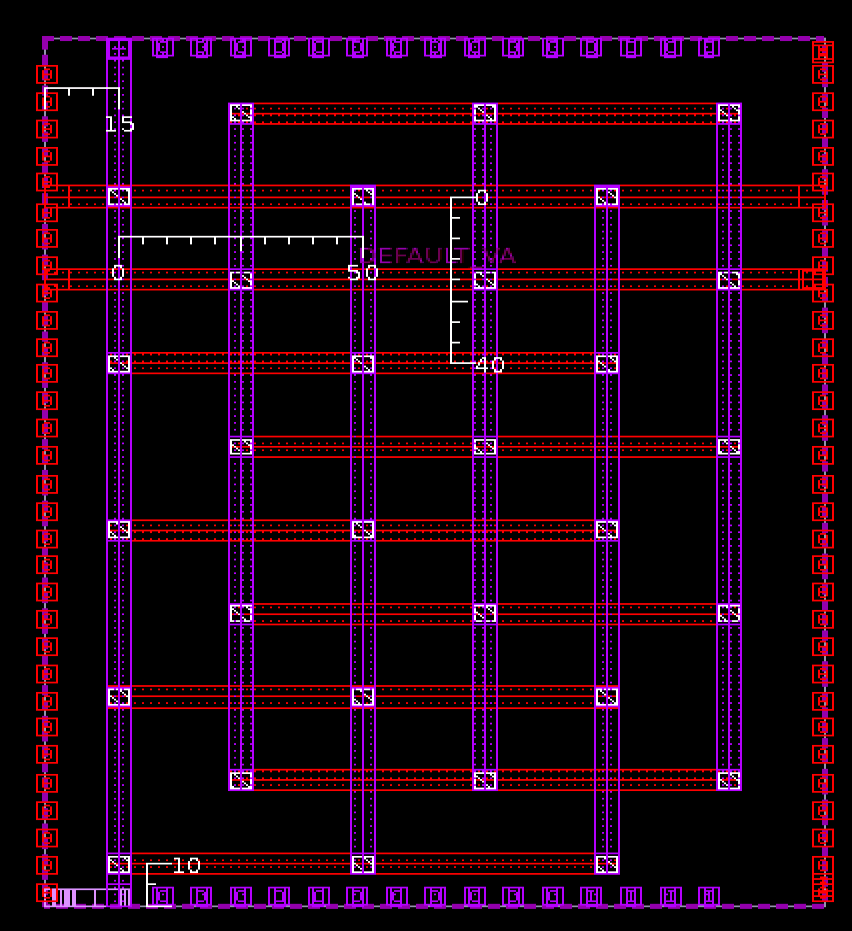
create_pg_mesh_pattern top_pg -layers {{{horizontal_layer:M3} {width:5} {spacing:interleaving} {pitch:40} {offset:10} {trim:true} \
{{vertical_layer:M4} {width:5} {spacing:interleaving} {pitch:50} {offset:15} {trim:true}}}
set_pg_strategy top_vddvss -core \
-pattern {{name:top_pg} {nets:{VDD VSS}}} \
-extension {stop:design_boundary_and_generate_pin}
compile_pg -strategies top_vddvss
执行完这三条命令后,画的PG如下:
根据命令直接画:
create_pg_strap -net VDD -direction vertical -layer M2 -width 5 -start 10 -pitch 40 -stop 160
create_pg_strap -net VSS -direction vertical -layer M2 -width 5 -start 30 -pitch 40 -stop 160
create_pg_strap -net VDD -direction horizontal -layer M3 -width 5 -start 15 -pitch 50 -stop 210
create_pg_strap -net VSS -direction horizontal -layer M3 -width 5 -start 40 -pitch 50 -stop 210
当画完PG后想要删除,命令如下:
remove_routes -nets {VDD VSS} -stripe
remove_pg_patterns -all
remove_pg_strategies -all