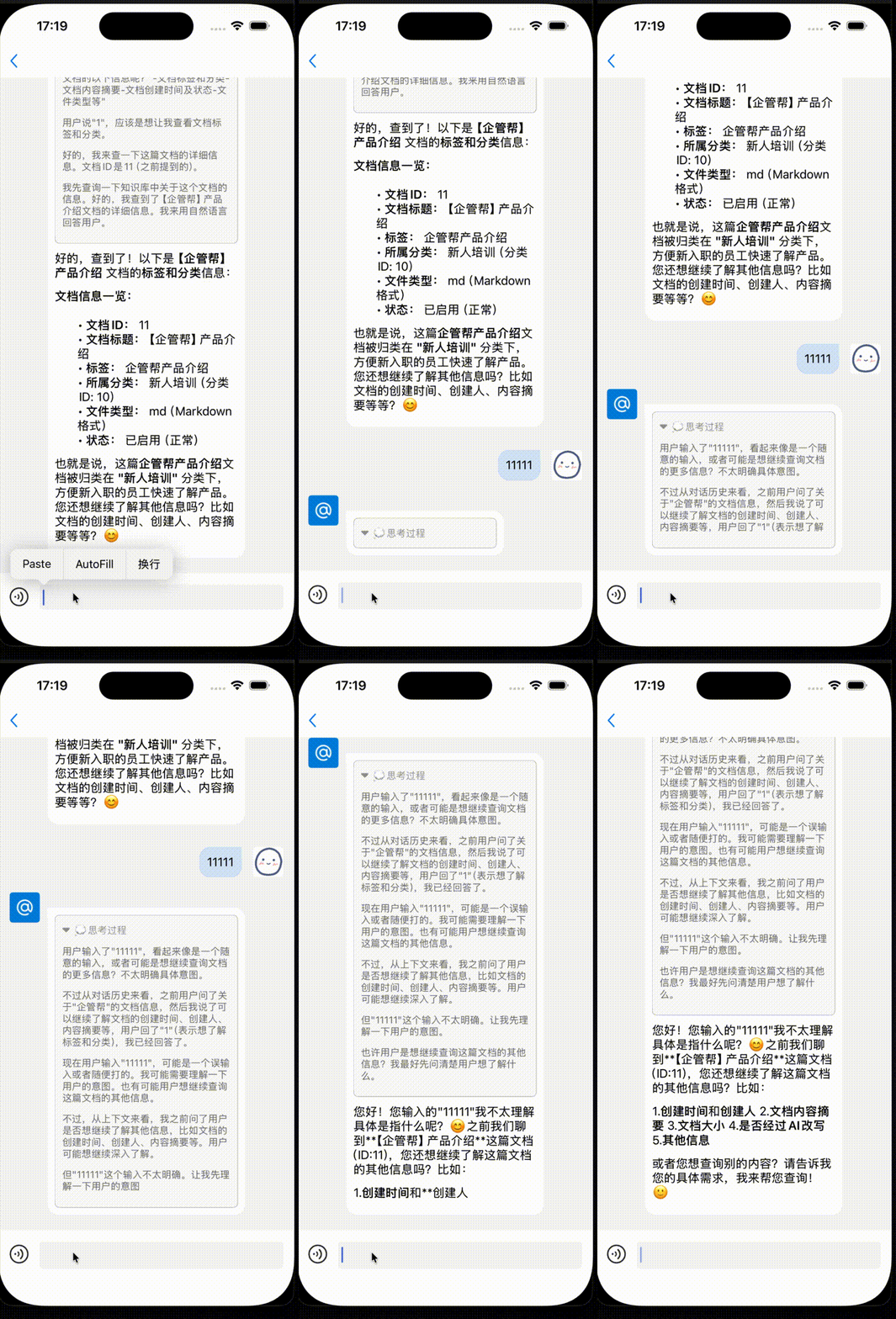
使用AFNETWORK进行SSE请求时返回的Data是一整包数据,导致并没有按照期待的蹦蹦跳跳的效果来显示UI~用户体验就很差劲,特此实现一套SSE请求类库。
一、SSE 协议概述
Server-Sent Events(SSE) 是 HTML5 标准中定义的一种基于 HTTP 的服务器向客户端单向推送实时数据的协议。其核心特性包括:
- 单向通信:服务器主动推送数据至客户端,客户端无需轮询;
- 自动重连:连接中断后客户端自动尝试恢复;
- 文本流式传输 :数据格式为
text/event-stream,支持纯文本消息; - 事件类型支持 :可自定义事件名称(如
event: update)。
二、SSE 与其他技术的对比
| 特性 | SSE | WebSocket | 长轮询 |
|---|---|---|---|
| 协议 | HTTP | 自定义 TCP 协议 | HTTP |
| 通信方向 | 单向(服务器 → 客户端) | 双向(服务器 ↔ 客户端) | 单向(请求-响应) |
| 复杂度 | 简单,无需握手 | 复杂,需维护长连接 | 高延迟,频繁请求 |
| 兼容性 | 主流浏览器支持(IE 不支持) | 广泛支持(含旧版本) | 完全兼容 |
| 适用场景 | 流式输出、通知推送 | 实时游戏、协作编辑 | 旧系统兼容 |
典型选择建议:
- 大模型流式输出(如 ChatGPT 的逐字生成)首选 SSE ;
- 双向高频交互(如在线游戏)使用 WebSocket;
- 兼容性优先(如企业内网)采用长轮询。
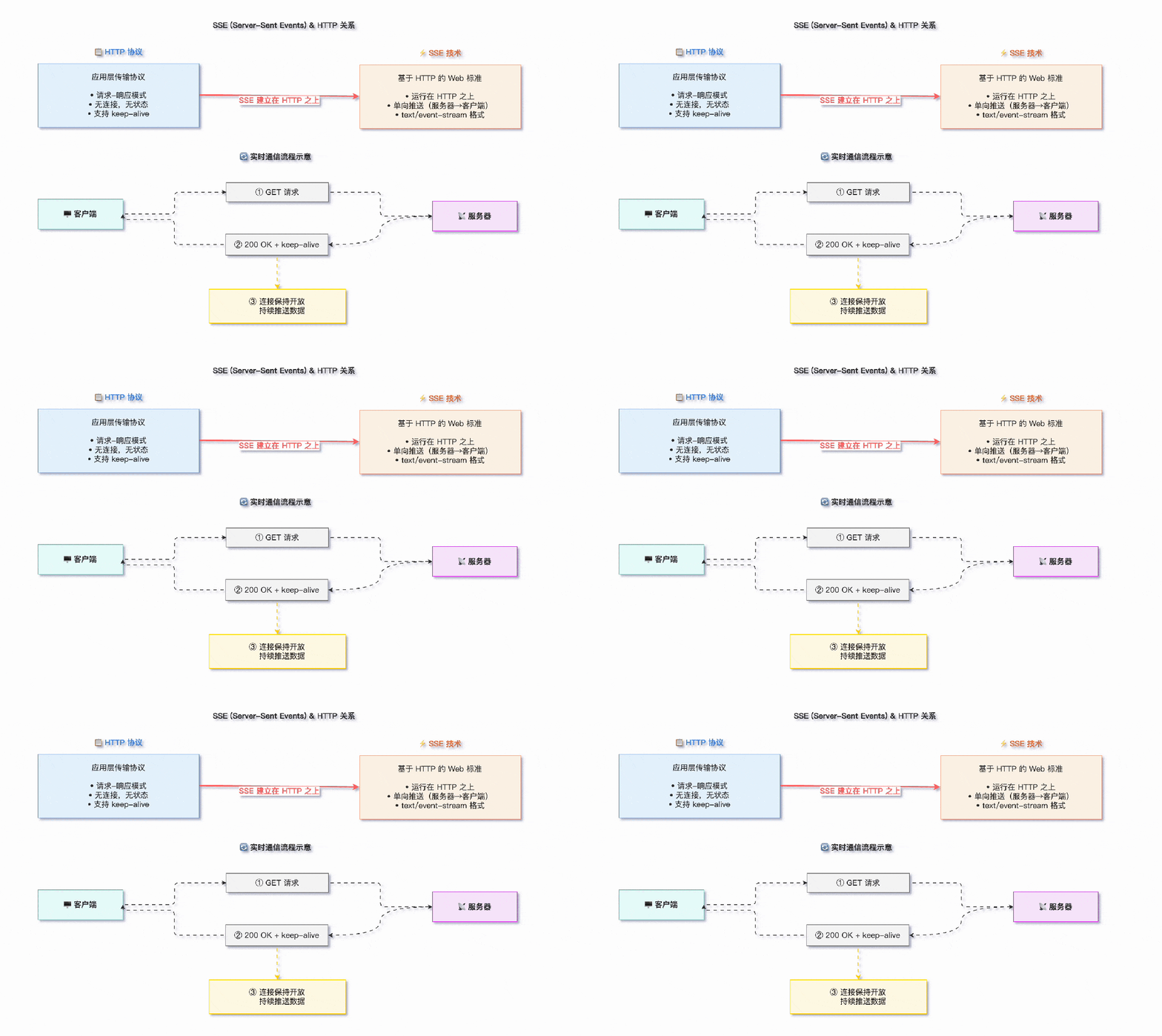
说白了,就是他本质还是一个HTTP,只是建立连接后,服务端可以持续推数据流过来。而一般的HTTP请求到响应一次性完结结束。
头文件:NSHttp2SSELInk.h
objectivec// // NSHttp2SSELInk.h // QGB_IM2 // // Created by carbonzhao on 2026/6/9. // #import <Foundation/Foundation.h> NS_ASSUME_NONNULL_BEGIN // SSE 事件模型 @interface SSEEvent : NSObject @property (nonatomic, copy, nullable) NSString *eventId; @property (nonatomic, copy, nullable) NSString *eventName; @property (nonatomic, copy) NSString *data; @property (nonatomic, assign) NSInteger retryInterval; // 毫秒 @end @interface NSHttp2SSELInk : NSObject @property (nonatomic, strong, readonly) NSString *url; @property (nonatomic, strong, readonly) NSMutableDictionary *headers; @property (nonatomic, strong, readonly) NSMutableDictionary *bodyData; @property (nonatomic, strong, readonly) NSMutableDictionary *urlParams; - (instancetype)initWithURL:(NSString *)url; - (instancetype)initWithURL:(NSString *)url headers:(NSMutableDictionary *)headers bodyData:(NSMutableDictionary *)bodyData urlParams:(NSMutableDictionary *)urlParams; //data sign ,when value is not null,you need implent ApiDataSign callback - (NSHttp2SSELInk *)signKey:(NSString *)akey; - (void)connect:(void (^)(void))connectedBlock receiveEventBlock:(void (^)(SSEEvent *event))receiveEventBlock failWithErrorBlock:(void (^)(NSError *NSError))failWithErrorBlock disConnectBlock:(void (^)(void))connectedBlock; - (void)disconnect; @end NS_ASSUME_NONNULL_END
实现文件NSHttp2SSELInk.m
objectivec// // NSHttp2SSELInk.m // QGB_IM2 // // Created by carbonzhao on 2026/6/9. // #import "NSHttp2SSELInk.h" #import <UIKit/UIKit.h> #import <Foundation/Foundation.h> #import "NSExtentionSloter.h" #import "ApiDataSign.h" #import "march.h" @implementation SSEEvent @end @interface NSHttp2SSELInk () <NSURLSessionDataDelegate> @property (nonatomic, strong) NSURLSession *session; @property (nonatomic, strong) NSURLSessionDataTask *crrTask; @property (nonatomic, strong) NSMutableData *buffer; @property (nonatomic, copy) NSString *lastEventId; @property (nonatomic, assign) BOOL isCancelled; // 标记是否主动取消 @property (nonatomic, strong) NSString *signKey; @property (nonatomic, strong) NSString *url; @property (nonatomic, copy) dispatch_block_t didConnectedBlock; @property (nonatomic, copy) void (^didReceivedEventBlock)(SSEEvent *event); @property (nonatomic, copy) void (^didErrorBlock)(NSError *error); @property (nonatomic, copy) dispatch_block_t didDisConnectBlock; @end @implementation NSHttp2SSELInk - (instancetype)initWithURL:(NSString *)url { self = [super init]; if (self) { _url = url; _buffer = [NSMutableData data]; _isCancelled = NO; } return self; } - (instancetype)initWithURL:(NSString *)url headers:(NSMutableDictionary *)headers bodyData:(NSMutableDictionary *)bodyData urlParams:(NSMutableDictionary *)urlParams { self = [self initWithURL:url]; if (self) { _headers = [NSMutableDictionary dictionaryWithDictionary:headers]; _bodyData = [NSMutableDictionary dictionaryWithDictionary:bodyData]; _urlParams = [NSMutableDictionary dictionaryWithDictionary:urlParams]; } return self; } - (void)connect:(void (^)(void))connectedBlock receiveEventBlock:(void (^)(SSEEvent *event))receiveEventBlock failWithErrorBlock:(void (^)(NSError *NSError))failWithErrorBlock disConnectBlock:(void (^)(void))disConnectBlock { self.didConnectedBlock = connectedBlock; self.didReceivedEventBlock = receiveEventBlock; self.didErrorBlock = failWithErrorBlock; self.didDisConnectBlock = disConnectBlock; [self connect]; } - (void)connect{ if (!self.crrTask) { // 避免重复连接 self.isCancelled = NO; // 1. 配置 Session NSURLSessionConfiguration *config = [NSURLSessionConfiguration defaultSessionConfiguration]; config.requestCachePolicy = NSURLRequestReloadIgnoringLocalCacheData; config.URLCache = nil; // 2. 创建带有 Delegate 的 Session // 注意:delegateQueue 设为 nil 表示使用内部串行队列,或者指定 mainQueue 以便直接更新 UI self.session = [NSURLSession sessionWithConfiguration:config delegate:self delegateQueue:[NSOperationQueue mainQueue]]; NSString *url = self.url; NSMutableDictionary *headerValue = self.headers; NSMutableDictionary *requestParams = self.urlParams; //以上为数据签名过程类,若用到可留言索取,亦可按照你们后端要求自行开发,若不需要则将整个IF块删除 if (self.signKey) { ApiDataSignEntity *et = [[ApiDataSignEntity alloc] init]; [et setUrl:url]; [et setMethod:@"get"]; [et setHeaders:headerValue]; [et setParams:requestParams]; [ApiDataSign callSign:self.signKey requestData:et]; url = et.url; requestParams = et.params; headerValue = et.headers; } if (requestParams && [requestParams allKeys].count > 0) { NSArray *keys = [requestParams allKeys]; NSArray *sortedArray = [keys sortedArrayUsingComparator:^NSComparisonResult(id obj1, id obj2) { return [obj1 compare:obj2 options:NSNumericSearch]; }]; NSString *fstr = nil; for (NSString *key in sortedArray) { NSString *value = [requestParams stringForKey:key]; value = [self urlEncoded:value]; if (!fstr) { fstr = [NSString stringWithFormat:@"%@=%@",key,value]; } else { fstr = [fstr stringByAppendingFormat:@"&%@=%@",key,value]; } } url = [url stringByAppendingFormat:@"?%@",fstr]; } // 3. 构建 Request self.url = url; NSMutableURLRequest *request = [NSMutableURLRequest requestWithURL:[NSURL URLWithString:url]]; request.HTTPMethod = @"GET"; // if (headerValue && headerValue.allKeys.count > 0) // { // [headerValue enumerateKeysAndObjectsUsingBlock:^(id _Nonnull key, id _Nonnull obj, BOOL *_Nonnull stop) // { // [request setValue:obj forHTTPHeaderField:key]; // }]; // } [request setValue:@"text/event-stream" forHTTPHeaderField:@"Accept"]; [request setValue:@"no-cache" forHTTPHeaderField:@"Cache-Control"]; [request setValue:@"text/event-stream" forHTTPHeaderField:@"Content-Type"]; // 如果有上次的事件 ID,添加 Last-Event-ID 头以实现断点续传 if (self.lastEventId.length > 0) { [request setValue:self.lastEventId forHTTPHeaderField:@"Last-Event-ID"]; } // 4. 启动任务 self.crrTask = [self.session dataTaskWithRequest:request]; [self.crrTask resume]; } } //data sign ,when value is not null,you need implent ApiDataSign callback - (NSHttp2SSELInk *)signKey:(NSString *)akey { self.signKey = akey; return self; } - (void)disconnect { self.isCancelled = YES; [self.crrTask cancel]; self.crrTask = nil; [self.session invalidateAndCancel]; self.session = nil; [self.buffer setLength:0]; if (self.didDisConnectBlock) { self.didDisConnectBlock(); } } #pragma mark - URLSessionDataDelegate - (void)URLSession:(NSURLSession *)session dataTask:(NSURLSessionDataTask *)dataTask didReceiveResponse:(NSURLResponse *)response completionHandler:(void (^)(NSURLSessionResponseDisposition))completionHandler { // 校验 Content-Type if ([response.MIMEType isEqualToString:@"text/event-stream"]) { completionHandler(NSURLSessionResponseAllow); if (self.didConnectedBlock) { self.didConnectedBlock(); } } else { // 如果不是 SSE 流,取消任务 DLog(@"sse ulr = %@",self.url); completionHandler(NSURLSessionResponseCancel); NSError *error = [NSError errorWithDomain:@"SSEClientError" code:-1 userInfo:@{NSLocalizedDescriptionKey: @"Invalid Content-Type"}]; if (self.didErrorBlock) { self.didErrorBlock(error); } } } - (void)URLSession:(NSURLSession *)session dataTask:(NSURLSessionDataTask *)dataTask didReceiveData:(NSData *)data { // 将新数据追加到缓冲区 [self.buffer appendData:data]; // 尝试解析缓冲区中的完整事件 [self parseBuffer]; } - (void)URLSession:(NSURLSession *)session task:(NSURLSessionTask *)task didCompleteWithError:(NSError *)error { self.crrTask = nil; if (error) { // 如果是主动取消,不报错 if (error.code != NSURLErrorCancelled) { if (self.didErrorBlock) { self.didErrorBlock(error); } // 这里可以实现简单的自动重连逻辑 if (!self.isCancelled) { NSLog(@"SSE Connection lost. Reconnecting in 3 seconds..."); dispatch_after(dispatch_time(DISPATCH_TIME_NOW, (int64_t)(3.0 * NSEC_PER_SEC)), dispatch_get_main_queue(), ^{ if (!self.isCancelled) { [self connect]; } }); } } } else { // 正常完成(服务器主动关闭连接) if (self.didDisConnectBlock) { self.didDisConnectBlock(); } } } #pragma mark - Parsing Logic - (void)parseBuffer { // 将缓冲区转换为字符串 NSString *content = [[NSString alloc] initWithData:self.buffer encoding:NSUTF8StringEncoding]; if (!content) return; // SSE 事件由 \n\n 分隔 NSRange separatorRange = [content rangeOfString:@"\n\n"]; while (separatorRange.location != NSNotFound) { // 提取一个完整的事件块 NSString *eventBlock = [content substringToIndex:separatorRange.location]; // 从缓冲区中移除已处理的部分 NSUInteger nextStartIndex = separatorRange.location + separatorRange.length; NSData *remainingData = [[content substringFromIndex:nextStartIndex] dataUsingEncoding:NSUTF8StringEncoding]; self.buffer = [NSMutableData dataWithData:remainingData ? remainingData : [NSData data]]; // 解析单个事件块 SSEEvent *event = [self parseEventBlock:eventBlock]; if (event) { // 更新 Last-Event-ID if (event.eventId.length > 0) { self.lastEventId = event.eventId; } if (self.didReceivedEventBlock) { self.didReceivedEventBlock(event); } } // 继续检查缓冲区中是否还有下一个事件 content = [[NSString alloc] initWithData:self.buffer encoding:NSUTF8StringEncoding]; if (!content) { break; } separatorRange = [content rangeOfString:@"\n\n"]; } } - (SSEEvent *)parseEventBlock:(NSString *)block { SSEEvent *event = [[SSEEvent alloc] init]; event.data = @""; event.retryInterval = -1; NSArray *lines = [block componentsSeparatedByCharactersInSet:[NSCharacterSet newlineCharacterSet]]; for (NSString *line in lines) { if (line.length == 0) continue; // 跳过注释行 if ([line hasPrefix:@":"]) continue; // 分割 key 和 value NSRange colonRange = [line rangeOfString:@":"]; if (colonRange.location == NSNotFound) continue; NSString *key = [line substringToIndex:colonRange.location]; NSString *value = @""; // 处理 value:如果冒号后有空格,通常忽略第一个空格 NSUInteger valueStartIndex = colonRange.location + 1; if (valueStartIndex < line.length) { if ([line characterAtIndex:valueStartIndex] == ' ') { valueStartIndex++; } if (valueStartIndex < line.length) { value = [line substringFromIndex:valueStartIndex]; } } if ([key isEqualToString:@"id"]) { event.eventId = value; } else if ([key isEqualToString:@"event"]) { event.eventName = value; } else if ([key isEqualToString:@"data"]) { // data 字段可能有多行,需要拼接 if (event.data.length > 0) { event.data = [event.data stringByAppendingString:@"\n"]; } event.data = [event.data stringByAppendingString:value]; } else if ([key isEqualToString:@"retry"]) { event.retryInterval = [value integerValue]; } } // 如果只有空数据且无其他字段,视为无效事件 if (event.data.length == 0 && !event.eventId && !event.eventName) { return nil; } return event; } - (NSString*)urlEncoded:(NSString *)string { NSCharacterSet *charset = [[NSCharacterSet characterSetWithCharactersInString:@"!'();:@&=+$,/?%#[]^%"]invertedSet]; NSString *encodedString = [string stringByAddingPercentEncodingWithAllowedCharacters:charset]; return encodedString; } @end
演示效果:
演示代码:
objectivecNSString *url = [NSString stringWithFormat:@"%@chat/stream", [IMDataConfigTools instance].aiUrlApiConfigBlock()]; NSMutableDictionary *params = [NSMutableDictionary dictionaryWithCapacity:0]; [params setString:weakSelf.currentSession.sessionId forKey:@"sessionId"]; [params setString:text forKey:@"message"]; weakSelf.sseLink = [[NSHttp2SSELInk alloc] initWithURL:url headers:@{} bodyData:@{} urlParams:params]; [weakSelf.sseLink signKey:@"ai"]; [weakSelf.sseLink connect:^{ NSLog(@""); } receiveEventBlock:^(SSEEvent * _Nonnull event) { NSLog(@""); if ([event.eventName isEqualToString:@"reasoning"]) { if (!n.thinking || n.thinking.length == 0) { n.thinking = [NSString stringWithString:event.data]; } else { n.thinking = [n.thinking stringByAppendingString:event.data]; } } else if ([event.eventName isEqualToString:@"answer"]) { if (!n.content || n.content.length == 0) { n.content = [NSString stringWithString:event.data]; } else { n.content = [n.content stringByAppendingString:event.data]; } } [n reset]; [weakSelf.listView updateMessage:n withAnimation:NO completeBlock:^{ }]; } failWithErrorBlock:^(NSError * _Nonnull NSError) { failedBlock(); } disConnectBlock:^{ [n setIsThinking:NO]; [weakSelf.listView updateMessage:n withAnimation:NO completeBlock:^{ }]; completeBlock(); }];