文章目录
目前在使用mujoco时发现其碰撞是使用凸包进行碰撞检测的,这样一来,对于一些机械零件、带孔洞的物体就无法正确地进行碰撞检测了。
经过查找资料,发现这个开源库【coal:An extension of the Flexible Collision Library】能够实现精确的物体碰撞检测。
经过测试,将coal与mujoco进行结合,能够实现必要的运动仿真+精确的碰撞检测,能够满足我的机器人仿真平台的实现。
下面简单记录一下如何编译coal。
1.前置条件
我使用的工具如下所示
| 工具 | 路径 / 版本 |
|---|---|
| CMake | 4.3.0(D:/Program Files/CMake) |
| MSVC 2019 | D:/Program Files (x86)/Microsoft Visual Studio/2019/Community |
| vcpkg 依赖 | D:/Utils/vcpkg/packages |
| vcvars64 | D:/Program Files (x86)/Microsoft Visual Studio/2019/Community/VC/Auxiliary/Build/vcvars64.bat |
以下所有命令均在 Developer Command Prompt for VS 2019 (或已执行
vcvars64.bat的终端)中运行。
2.第三方依赖(vcpkg)
Coal 编译依赖以下第三方库,需通过 vcpkg 安装(triplet: x64-windows):
必须依赖
| vcpkg 包 | CMake 包 | 说明 |
|---|---|---|
eigen3 |
Eigen3 (≥ 3.0.0) | 线性代数 |
boost-serialization |
Boost.Serialization | 序列化 |
boost-filesystem |
Boost.Filesystem | 文件系统操作 |
assimp |
assimp | 3D 模型导入 |
安装命令:
powershell
vcpkg install eigen3 boost-serialization boost-filesystem assimp --triplet x64-windows可选依赖
| vcpkg 包 | CMake 包 | 对应 CMake 选项 | 说明 |
|---|---|---|---|
boost-log |
Boost.Log | COAL_ENABLE_LOGGING=ON |
日志 |
octomap |
octomap (≥ 1.8.0) | 自动检测 | 八叉树碰撞 |
qhull |
Qhull | COAL_HAS_QHULL=ON |
凸包计算 |
构建期自动拉取(无需 vcpkg)
| 名称 | 来源 | 说明 |
|---|---|---|
jrl-cmakemodules |
GitHub FetchContent | CMake 辅助模块 |
满足上面的前置条件后,就可以开始编译了
3.编译及安装
到某个空白文件夹下,打开控制台窗口,依次执行以下执行
下载coal源码
bash
git clone https://github.com/coal-library/coal.git激活vc编译环境(注意带引号),具体路径得看你vs的安装位置
bash
"D:/Program Files (x86)/Microsoft Visual Studio/2019/Community/VC/Auxiliary/Build/vcvars64.bat"将后面的脚本保存为build-both.bat,放在当前目录下,然后执行。
bash
build-both.bat 这个脚本会先编译release版本、然后编译debug版本,然后将编译好的库安装到当前目录下的install文件夹。
如下图所示
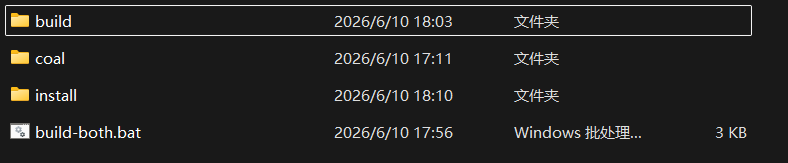
| 文件/文件夹 | 说明 |
|---|---|
| build | 编译时产生的中间文件 |
| coal | coal源码 |
| install | 编译后的库安装到的位置,后面第三方就可以直接使用这里面的东西 |
| build-both.bat | 主导编译的脚本 |
bash
@echo off
setlocal

set PREFIX_PATH=D:/Utils/vcpkg/packages/boost-cmake_x64-windows/share/boost;D:/Utils/vcpkg/packages/eigen3_x64-windows/share/eigen3;D:/Utils/vcpkg/installed/x64-windows

:: Source dir is coal/ (relative to the parent dir where this script runs)
set SRC=coal

:: ---- Release ----
echo ===== Configuring Release =====
cmake -S %SRC% -B build\release -DCMAKE_PREFIX_PATH="%PREFIX_PATH%" -DBUILD_PYTHON_INTERFACE=OFF -DBUILD_TESTING=OFF
if %ERRORLEVEL% NEQ 0 (
    echo [WARN] CMake failed. Patching boost.cmake...
    powershell -Command "(Get-Content 'build/release/_deps/jrl-cmakemodules-src/boost.cmake') -replace 'Boost_NO_BOOST_CMAKE ON','Boost_NO_BOOST_CMAKE OFF' | Set-Content 'build/release/_deps/jrl-cmakemodules-src/boost.cmake'"
    cmake -S %SRC% -B build\release -DCMAKE_PREFIX_PATH="%PREFIX_PATH%" -DBUILD_PYTHON_INTERFACE=OFF -DBUILD_TESTING=OFF
)
echo ===== Building Release =====
cmake --build build\release --config Release -- /m

:: ---- Debug ----
echo ===== Configuring Debug =====
cmake -S %SRC% -B build\debug -DCMAKE_PREFIX_PATH="%PREFIX_PATH%" -DBUILD_PYTHON_INTERFACE=OFF -DBUILD_TESTING=OFF
if %ERRORLEVEL% NEQ 0 (
    echo [WARN] CMake failed. Patching boost.cmake...
    powershell -Command "(Get-Content 'build/debug/_deps/jrl-cmakemodules-src/boost.cmake') -replace 'Boost_NO_BOOST_CMAKE ON','Boost_NO_BOOST_CMAKE OFF' | Set-Content 'build/debug/_deps/jrl-cmakemodules-src/boost.cmake'"
    cmake -S %SRC% -B build\debug -DCMAKE_PREFIX_PATH="%PREFIX_PATH%" -DBUILD_PYTHON_INTERFACE=OFF -DBUILD_TESTING=OFF
)
echo ===== Building Debug =====
cmake --build build\debug --config Debug -- /m

:: ---- Install ----
echo ===== Installing =====
if exist install rmdir /s /q install

:: 1. Install Release (headers + libs + cmake config)
echo --- Installing Release ---
cmake --install build\release --config Release --prefix install

:: 2. Install Debug to temp, then extract only libs/binaries to install/debug/
echo --- Installing Debug ---
cmake --install build\debug --config Debug --prefix install_debug_tmp
if not exist install\debug\lib mkdir install\debug\lib
if not exist install\debug\bin mkdir install\debug\bin

:: Copy only Debug .lib / .dll / .pdb to debug subdir (never headers or cmake config)
robocopy install_debug_tmp\lib install\debug\lib *.lib *.pdb /mov /njh /njs /nfl >nul
robocopy install_debug_tmp\bin install\debug\bin *.dll *.pdb /mov /njh /njs /nfl >nul

:: Remove temp dir (any leftover files like cmake config, headers)
rmdir /s /q install_debug_tmp

echo ===== Done =====
echo.
echo Install layout:
echo   install\include\    -- shared headers
echo   install\lib\        -- Release .lib + cmake config
echo   install\bin\        -- Release .dll
echo   install\debug\lib\  -- Debug .lib
echo   install\debug\bin\  -- Debug .dll
endlocal