🎯 两者的关系与分工
| 工具 | 角色 | 功能 |
|---|---|---|
| go-ios | 设备连接层 | 跨平台连接 iOS 设备、启动/管理 WebDriverAgent、端口转发 |
| Midscene | AI 自动化层 | 通过自然语言控制 iOS App,基于 WebDriverAgent 协议 |
协作架构
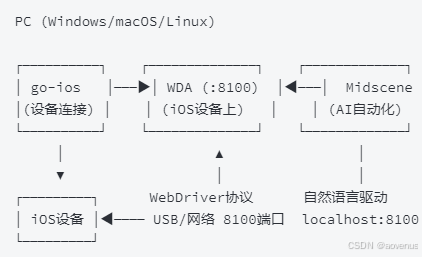
📦 完整协作流程
第一步:安装 go-ios(设备连接工具)
Windows 额外依赖:
- 安装iTunes(提供 usbmuxd USB 驱动)
- iOS 17+ 需安装wintun(隧道组件)
第二步:安装 WebDriverAgent(WDA) WDA 是 iOS 自动化的事实标准服务端,Midscene 通过它控制设备。
方式一:macOS + Xcode 直接编译(推荐 macOS 用户)

# 克隆 WDA 源码

git clone https://github.com/appium/WebDriverAgent.git

# 用 Xcode 打开 WebDriverAgent.xcodeproj

# 配置签名(需 Apple Developer 账号)

# Product → Scheme → WebDriverAgentRunner → Test


方式二:跨平台 IPA 安装(Windows/Linux 可用)

在 macOS 上编译生成 IPA 包:

xcodebuild build-for-testing \

-scheme WebDriverAgentRunner \

-sdk iphoneos \

-configuration Release \

-derivedDataPath /tmp/WDA-build

# 打包 IPA

cd /tmp/WDA-build/Build/Products/Release-iphoneos

mkdir Payload && mv WebDriverAgentRunner.app Payload/

zip -r WDA.ipa Payload
第三步:通过 go-ios 启动 WDA 并建立连接
# 安装 IPA 到设备

ios install --path /path/to/WDA.ipa

# iOS 17+ 必须启动隧道

ios tunnel start

# 查看设备列表

ios list

# 获取 WDA Bundle ID

ios apps

# 启动 WDA

ios runwda \

--bundleid=com.yourname.WebDriverAgentRunner \

--testrunnerbundleid=com.yourname.WebDriverAgentRunner \

--xctestconfig=WebDriverAgentRunner.xctest

# 端口转发(关键!Midscene 通过这个端口连接 WDA)

ios forward 8100 8100
第四步:验证 WDA 可访问
访问 http://localhost:8100/status,返回 JSON 即成功:
{

"value": {

"message": "WebDriverAgent is ready to accept commands",

"state": "success",

"ready": true

}

}
第五步:使用 Midscene 连接 WDA
安装 Midscene iOS SDK:
npm install @midscene/ios dotenv --save-dev编写脚本:
import 'dotenv/config';

import { IOSAgent, IOSDevice, agentFromWebDriverAgent } from '@midscene/ios';

const sleep = (ms) => new Promise((r) => setTimeout(r, ms));

(async () => {

// 方式一:直接创建设备

const page = new IOSDevice({ wdaPort: 8100, wdaHost: 'localhost' });

// 方式二:便捷函数(推荐)

const agent = await agentFromWebDriverAgent({

wdaPort: 8100,

wdaHost: 'localhost',

aiActionContext: 'If any permission popup appears, click agree.',

});

await page.connect();

// 打开 App/网页

await page.launch('https://ebay.com');

await sleep(3000);

// 用自然语言执行操作

await agent.aiAct('Search for "Headphones"');

await agent.aiWaitFor('At least one headphone product is displayed');

// 提取页面数据

const items = await agent.aiQuery(

'{itemTitle: string, price: Number}[]'

);

console.log('Products:', items);

// AI 断言

await agent.aiAssert('Multiple headphone products are displayed');

await page.destroy();

})();
运行并查看报告:
npx tsx demo.ts

# 输出:Midscene - report file updated: /path/to/report/some_id.html

# 浏览器打开可回放每一步操作
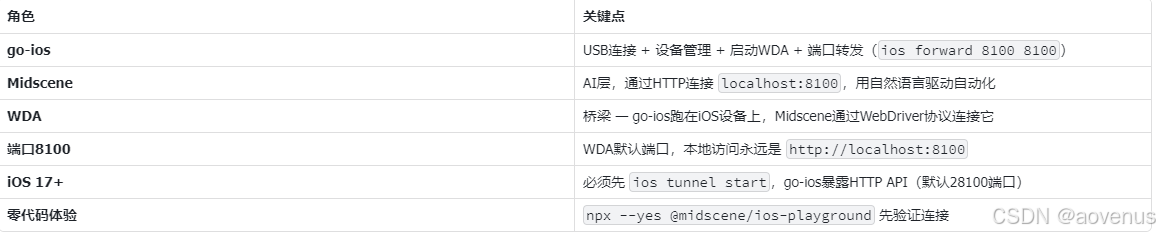
🔑 核心协作要点
⚠️ 常见问题
Q:Midscene 连接 WDA 失败?
- 确认 ios forward 8100 8100 在运行
- 访问 localhost:8100/status 验证 WDA 在线
- iOS 设备需开启开发者模式(设置 → 隐私与安全性 → 开发者模式)
- iOS 设备需信任此电脑
Q:iOS 17+ 隧道启动失败?
- 确认 wintun.dll 已放到系统目录
- 重启电脑后重试
Q:go-ios 和 Midscene 分别在什么场景用?
- go-ios 单独用:纯命令行的设备管理、IPA 安装、端口转发
- Midscene 单独用:需要 AI 理解界面、执行复杂多步骤自动化、生成 HTML 报告
- 配合用:go-ios 负责设备层准备就绪 → Midscene 负责 AI 自动化