一、 认知颠覆:撕下大模型与传统数字人的"流媒体假象"
随着 DeepSeek、Qwen 等国产大模型以极高的推理能力风靡全球,我们正在见证 AI 认知能力的巅峰。然而一个尴尬的现实无法规避:大模型的能力被死死困在了"纯文本"的对话框里。 在传统的 ChatBot 交互范式下,大模型是一个"看得见摸不着的幕后智者"。面对冷冰冰的吐字,用户感受到的是极具距离感的"机器感"。没有眼神的交流,没有情绪的共鸣,没有肢体的表达。
为了解决这个问题,市场上出现了很多将"大模型+TTS语音+数字人视频流"拼接的方案。但这种拼凑型方案在底层逻辑、技术弊端及用户感受上面临着巨大的局限性:
-
高延迟的"精神分裂":传统方案通常是在云端把语音和动作渲染成视频流,再通过网络推流传输到客户端。大模型生成文本需要时间,TTS 转语音需要时间,云端渲染视频更需要大量的算力时间。导致用户问一句话,大模型在屏幕前傻等好几秒才开始吐字,交互毫无即时性。
-
音画不同步的机械感:由于文本、声音、画面是在云端不同模块中离散处理的,在网络略有波动时,经常出现声音已经播完、嘴型还在抽搐的音画脱节现象。
-
高昂的算力与带宽成本:云端渲染 3D 视频流对 GPU 服务器的消耗是极其恐怖的。每一个同时在线的用户,都需要占用云端专属的渲染算力,这直接导致商业化落地时昂贵的带宽和算力成本成为无法逾越的鸿沟。
传统数字人虽具备基础交互能力,但受云端视频流架构制约,交互体验生硬、响应延迟高,难以胜任下一代人机交互场景。要打破这种困局,大模型必须拥有真正的 AI 具身智能体表现层。

二、 破局之道:魔珐星云端到端"参数流"革命
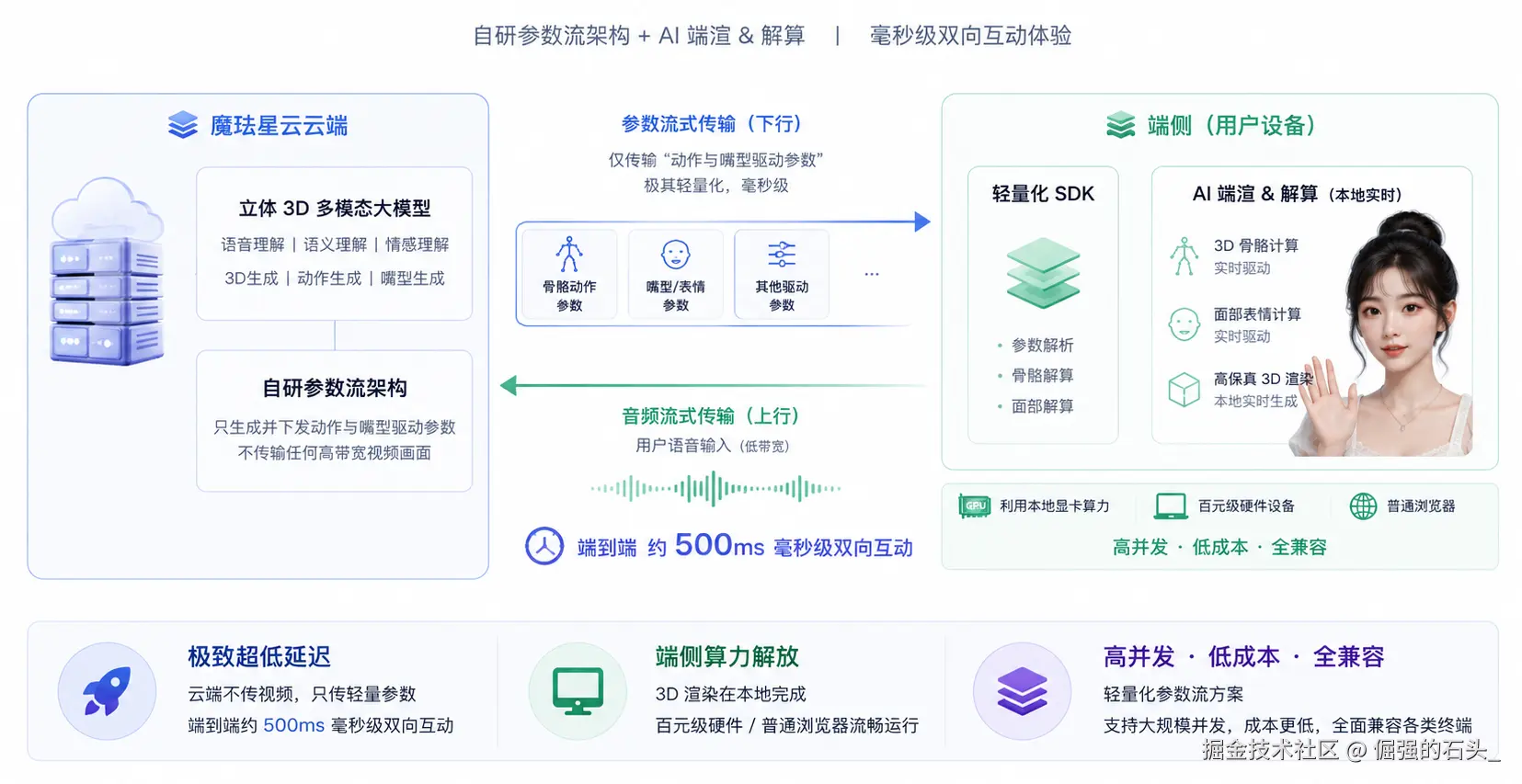
如何让数字人真正具备即时交互的"具身"能力?魔珐星云给出了硬核的解法。作为具身智能数字人开放平台,魔珐科技自研的立体 3D 多模态大模型搭配自研参数流架构,突破了传统云端视频流渲染高算力、高延迟的行业瓶颈。
魔珐星云的核心技术优势在于其独创的自研参数流架构搭配 AI 端渲和解算
-
极致超低延迟 :魔珐星云云端不传输任何高带宽的视频画面,只下发极其轻量化、毫秒级的"动作与嘴型驱动参数"。通过流式传输,实现了端到端 约 500ms 的毫秒级双向互动响应。
-
端侧算力解放:前台通过轻量化 SDK 直接利用本地设备的显卡算力,在本地实时生成高保真的 3D 骨骼和面部表情。这使得原本极为消耗算力的 3D 渲染,能够在百元级硬件设备或普通浏览器上流畅运行,高并发、低成本、全兼容。
三、 真实落地场景:将冰冷的显示屏升级为"AI具身智能体"
想象一个传统的智慧文旅、酒店大堂或景区导览场景:现在的智能大屏幕大多只是挂着一个类似"网页版说明书"的输入框,冷清且无人问津。
当我们引入魔珐星云的 AI 具身智能数字人 方案,传统的显示大屏将完成一次颠覆性的"具身智能"升级:
屏幕上出现的是一个饱含热情、拥有细腻微表情、眼神能与你实时对视的 3D 专属导游。当你疲惫地走到大屏前询问:"附近有什么好玩好吃的呀?",大模型在飞速思考的同时,导游就已经带着亲切的微笑、配合着自然的肢体动作,如同老朋友般流利地为你解说起来。
接下来,我们将不借助任何繁琐的后端服务器,仅通过纯前端一个 HTML 文件,快速跑通这个具有划时代意义的具身智能交互 Demo。
四、 硬核实战:单文件激活 DeepSeek × 魔珐星云具身灵魂
为了降低开发门槛,我们抛弃了复杂的 FastAPI 或 Node.js 后端中转架构,直接在前端使用标准的 Server-Sent Events (SSE) 流式解析大模型文字,并通过魔珐官方最新的 XmovAvatar SDK 驱动 3D 躯壳。
4.1 带你手搓一个导游数字人
先准备好大模型和魔珐星云3D应用的配置: 这里我是用的deepseek作为大模型底座,这个自己去deepseek的平台创建API获取key就OK了 这里就不赘述了
接下来进入魔珐星云平台(全球领先的具身智能3D数字人开放平台 - 魔珐星云),创建一个具身智能应用 选择形象、场景、音色、表演等等细节
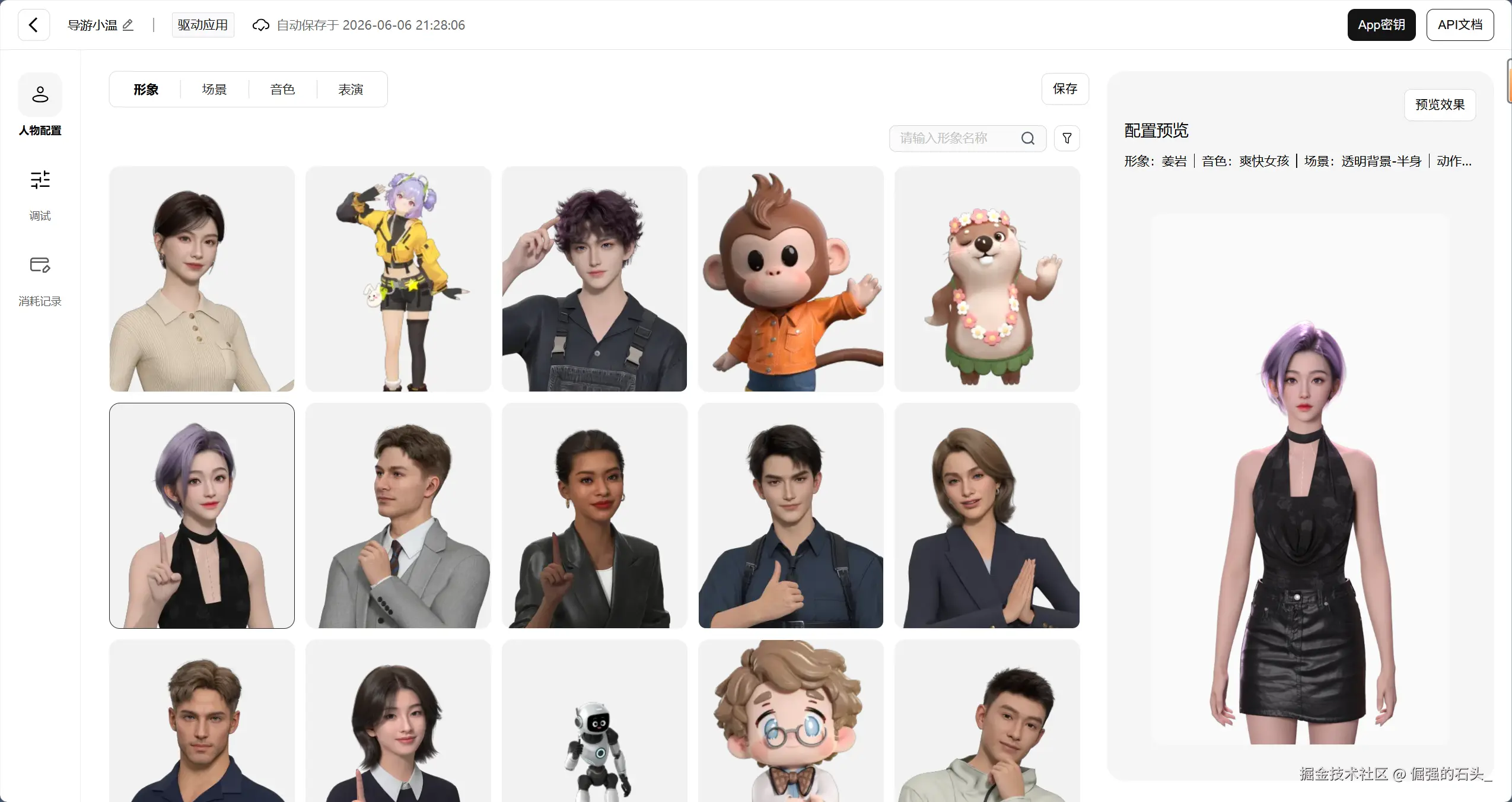
之后获取 1. App ID:应用的唯一标识(用于 SDK appId 字段) 2. App Secret:应用密钥(用于 SDK appSecret 字段)
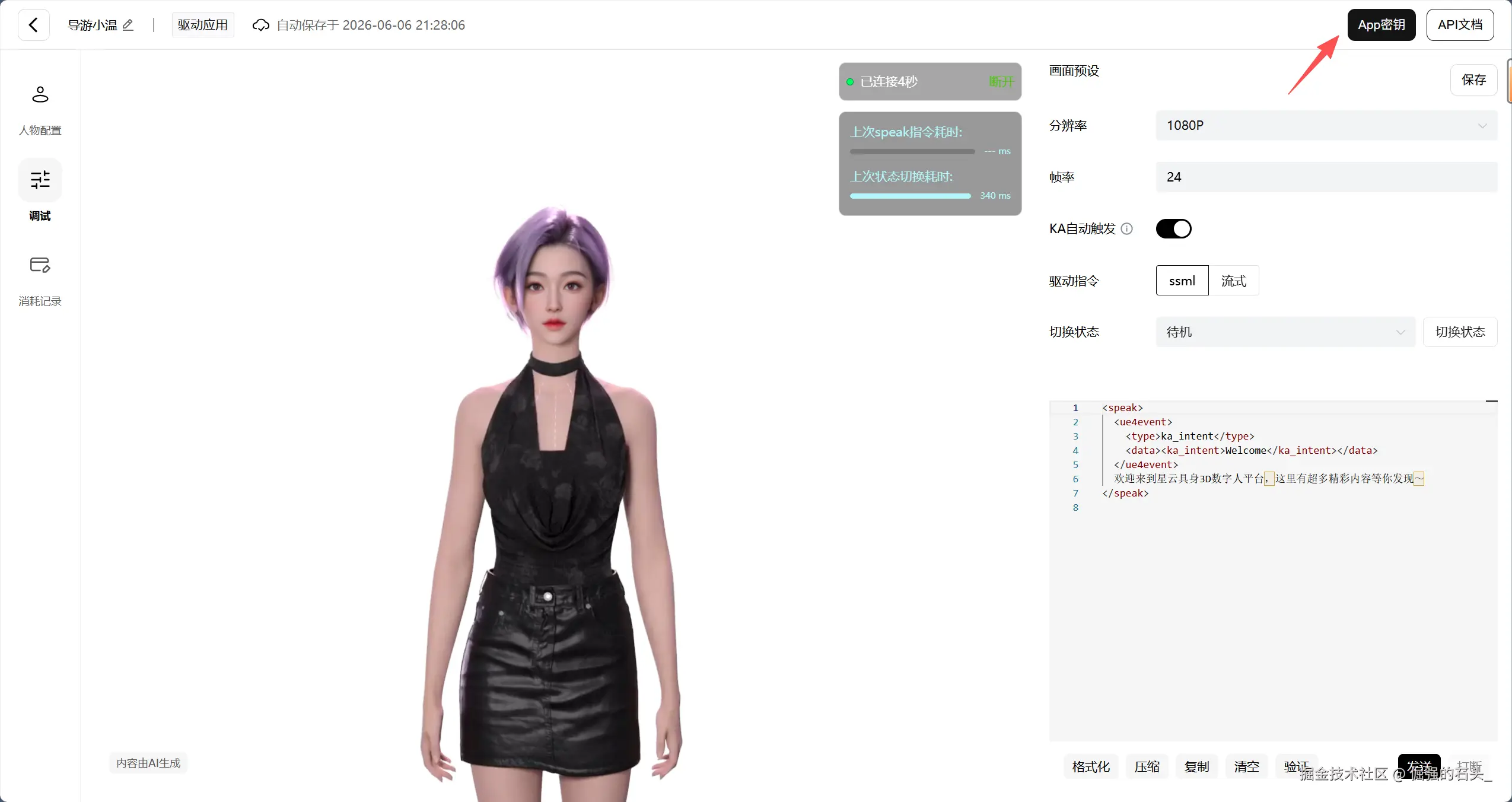
在本地目录新建一个 index.html 文件,将以下完整代码粘贴进去(记得更换你的魔珐星云ID和Secret,以及大模型的API key):
HTML
<!DOCTYPE html>
<html lang="zh-CN">
<head>
    <meta charset="UTF-8">
    <meta name="viewport" content="width=device-width, initial-scale=1.0">
    <title>DeepSeek × 魔珐星云 3D 具身智能导游</title>
    <script src="https://cdn.jsdelivr.net/npm/@tailwindcss/browser@4"></script>
    <script src="https://media.xingyun3d.com/xingyun3d/general/litesdk/xmovAvatar@latest.js"></script>
    <style>
        #avatar-container {
            background: linear-gradient(135deg, #1e293b, #0f172a);
        }
    </style>
</head>
<body class="bg-slate-900 text-slate-100 min-h-screen flex flex-col items-center justify-center p-4 md:p-8">
    <div class="w-full max-w-4xl bg-slate-800 rounded-2xl shadow-2xl border border-slate-700 overflow-hidden flex flex-col md:flex-row h-[750px]">
        <div class="w-full md:w-1/2 relative flex flex-col" id="avatar-container">
            <div id="sdk_canvas" class="w-full h-full"></div>
            <div id="loading-tips" class="absolute inset-0 flex flex-col items-center justify-center bg-slate-950/80 p-4 text-center">
                <div class="animate-spin rounded-full h-12 w-12 border-b-2 border-blue-500 mb-4"></div>
                <p class="text-sm text-slate-300">3D 智能体正在降临现实躯壳...</p>
                <p class="text-xs text-slate-500 mt-2">首次加载需下载 3D 材质,请耐心等待</p>
            </div>
            <div class="absolute top-4 left-4 bg-slate-900/60 backdrop-blur-sm px-3 py-1 rounded-full text-xs flex items-center gap-2 border border-slate-700">
                <span class="h-2 w-2 rounded-full bg-emerald-500 animate-pulse"></span>
                <span id="status-text">3D 躯壳未就绪</span>
            </div>
        </div>
        <div class="w-full md:w-1/2 flex flex-col p-6 bg-slate-850 border-t md:border-t-0 md:border-l border-slate-700">
            <div class="mb-4">
                <h1 class="text-xl font-bold bg-clip-text text-transparent bg-gradient-to-r from-blue-400 to-emerald-400">
                    DeepSeek × 魔珐星云
                </h1>
                <p class="text-xs text-slate-400">具身智能 3D 交互流动 Demo</p>
            </div>
            <div id="chat-output" class="flex-1 overflow-y-auto bg-slate-950 rounded-xl p-4 border border-slate-800 space-y-4 mb-4 text-sm scrollbar-thin">
                <div class="text-slate-400 italic text-center text-xs py-2">
                    提示:请确认代码配置区已填写您的完整凭证
                </div>
            </div>
            <div class="space-y-2">
                <div class="flex gap-2">
                    <input type="text" id="user-input" placeholder="输入你想问本地导游的问题..."
                           class="flex-1 bg-slate-950 border border-slate-700 rounded-xl px-4 py-3 text-sm focus:outline-none focus:border-blue-500 transition-colors">
                    <button id="send-btn" class="bg-blue-600 hover:bg-blue-500 px-5 py-3 rounded-xl text-sm font-medium transition-all shadow-lg active:scale-95">
                        发送
                    </button>
                </div>
                <button id="stop-btn" class="w-full bg-slate-700 hover:bg-rose-900 text-slate-300 hover:text-white py-2 rounded-xl text-xs font-medium transition-all border border-slate-600 hover:border-rose-700">
                    🛑 紧急打断数字人发言
                </button>
            </div>
        </div>
    </div>
    <script>
        // ==========================================
        // 1. 核心账号配置区
        // ==========================================
        const CONFIG = {
            mofa: {
                appId: "从魔珐星云应用获取",
                appSecret: "从魔珐星云应用获取",
                gatewayServer: "https://nebula-agent.xingyun3d.com/user/v1/ttsa/session"
            },
            deepseek: {
                apiKey: "这里写大模型API key",
                apiUrl: "https://api.deepseek.com/v1/chat/completions",
                systemPrompt: "你是一个名叫做'小温'的生动温暖的数字人导游。你的语言风格亲切、温暖,就像邻家大姐姐一样,富有画面感和感染力。回答控制在80字以内,极其适合口语表达,绝对不要使用长篇大论、机械的分点列表或代码块。"
            }
        };
        let mofaSdk = null;
        let isFirstSentence = true;
        let textBuffer = "";
        const punctReg = /[。!?;;!?]/;
        // ==========================================
        // 2. 初始化 XmovAvatar 数字人
        // ==========================================
        function initMofaAvatar() {
            // 安全守卫:校验全局 XmovAvatar 类是否存在
            if (typeof XmovAvatar === 'undefined') {
                console.error("SDK 脚本未成功加载,请检查网络链接。");
                return;
            }
            // 实例化官方核心类
            mofaSdk = new XmovAvatar({
                containerId: '#sdk_canvas',
                appId: CONFIG.mofa.appId,
                appSecret: CONFIG.mofa.appSecret,
                gatewayServer: CONFIG.mofa.gatewayServer,
                onMessage: function(msg) {
                    console.log("SDK 收到通知:", msg);
                }
            });
            // 执行官方标准的初始化方法
            mofaSdk.init({
                onDownloadProgress: (progress) => {
                    console.log("资源下载进度:", progress + "%");
                    document.getElementById('status-text').innerText = `正在下载材质: ${progress}%`;
                }
            }).then(() => {
                // 初始化 Promise 成功响应后隐藏加载层
                console.log("3D 渲染就绪!");
                document.getElementById('loading-tips').style.display = 'none';
                const statusEl = document.getElementById('status-text');
                statusEl.innerText = "3D 具身躯壳已就绪";
                statusEl.classList.replace('text-slate-400', 'text-emerald-400');
            }).catch((err) => {
                console.error("3D 初始化失败:", err);
                document.getElementById('status-text').innerText = "3D 初始化异常";
            });
        }
        // 确保页面资源完全加载完后再实例化
        window.addEventListener('load', initMofaAvatar);
        // ==========================================
        // 3. 流式断句驱动
        // ==========================================
        function processStreamText(textChunk, isFinal = false) {
            textBuffer += textChunk;
            let match;
            while ((match = punctReg.exec(textBuffer)) !== null) {
                const breakIndex = match.index + 1;
                const sentence = textBuffer.substring(0, breakIndex).trim();
                textBuffer = textBuffer.substring(breakIndex);
                if (sentence.length > 0) {
                    driveAvatarSpeak(sentence, false);
                }
            }
            if (isFinal && textBuffer.trim().length > 0) {
                driveAvatarSpeak(textBuffer.trim(), true);
                textBuffer = "";
            }
        }
        function driveAvatarSpeak(text, isEnd) {
            if (!mofaSdk) return;
            console.log(`[驱动声音] isStart=${isFirstSentence}, isEnd=${isEnd}, 文本: ${text}`);
            mofaSdk.speak(text, isFirstSentence, isEnd);
            if (isFirstSentence) {
                isFirstSentence = false;
            }
        }
        // ==========================================
        // 4. 大模型 SSE 流式交互
        // ==========================================
        async function handleSendMessage() {
            const inputEl = document.getElementById('user-input');
            const outputEl = document.getElementById('chat-output');
            const query = inputEl.value.trim();
            if (!query) return;
            inputEl.value = "";
            textBuffer = "";
            isFirstSentence = true;
            outputEl.innerHTML += `<div class="text-right"><span class="bg-blue-600 text-white inline-block px-3 py-2 rounded-xl rounded-tr-none max-w-[85%] text-left"><b>你:</b>${query}</span></div>`;
            const aiBubbleContainer = document.createElement('div');
            aiBubbleContainer.className = "text-left";
            const aiBubble = document.createElement('span');
            aiBubble.className = "bg-slate-800 border border-slate-700 text-slate-100 inline-block px-3 py-2 rounded-xl rounded-tl-none max-w-[85%]";
            aiBubble.innerHTML = `<b>小温:</b>`;
            aiBubbleContainer.appendChild(aiBubble);
            outputEl.appendChild(aiBubbleContainer);
            outputEl.scrollTop = outputEl.scrollHeight;
            try {
                const response = await fetch(CONFIG.deepseek.apiUrl, {
                    method: 'POST',
                    headers: {
                        'Content-Type': 'application/json',
                        'Authorization': `Bearer ${CONFIG.deepseek.apiKey}`
                    },
                    body: JSON.stringify({
                        model: "deepseek-chat",
                        messages: [
                            { role: "system", content: CONFIG.deepseek.systemPrompt },
                            { role: "user", content: query }
                        ],
                        stream: true
                    })
                });
                if (!response.ok) throw new Error(`HTTP 异常: ${response.status}`);
                const reader = response.body.getReader();
                const decoder = new TextDecoder('utf-8');
                while (true) {
                    const { done, value } = await reader.read();
                    if (done) {
                        processStreamText("", true);
                        break;
                    }
                    const chunkStr = decoder.decode(value, { stream: true });
                    const lines = chunkStr.split('\n');
                    for (let line of lines) {
                        line = line.trim();
                        if (!line || line === 'data: [DONE]') continue;
                        if (line.startsWith('data:')) {
                            try {
                                const jsonStr = line.replace('data:', '').trim();
                                const parsed = JSON.parse(jsonStr);
                                const token = parsed.choices[0]?.delta?.content || "";
                                if (token) {
                                    aiBubble.innerHTML += token;
                                    outputEl.scrollTop = outputEl.scrollHeight;
                                    processStreamText(token, false);
                                }
                            } catch (err) {}
                        }
                    }
                }
            } catch (error) {
                console.error(error);
                aiBubble.innerHTML += `<span class="text-rose-400"><br>[数据连接异常]</span>`;
            }
        }
        // ==========================================
        // 5. 控制绑定
        // ==========================================
        document.getElementById('send-btn').addEventListener('click', handleSendMessage);
        document.getElementById('user-input').addEventListener('keydown', (e) => {
            if (e.key === 'Enter') handleSendMessage();
        });
        document.getElementById('stop-btn').addEventListener('click', () => {
            if (mofaSdk) {
                mofaSdk.interactiveIdle();
                textBuffer = "";
                isFirstSentence = true;
                document.getElementById('chat-output').innerHTML += `<div class="text-center italic text-amber-500 text-xs py-1">⚠️ 3D 智能体已被打断</div>`;
            }
        });
    </script>
</body>
</html>
等待片刻即可加载成功
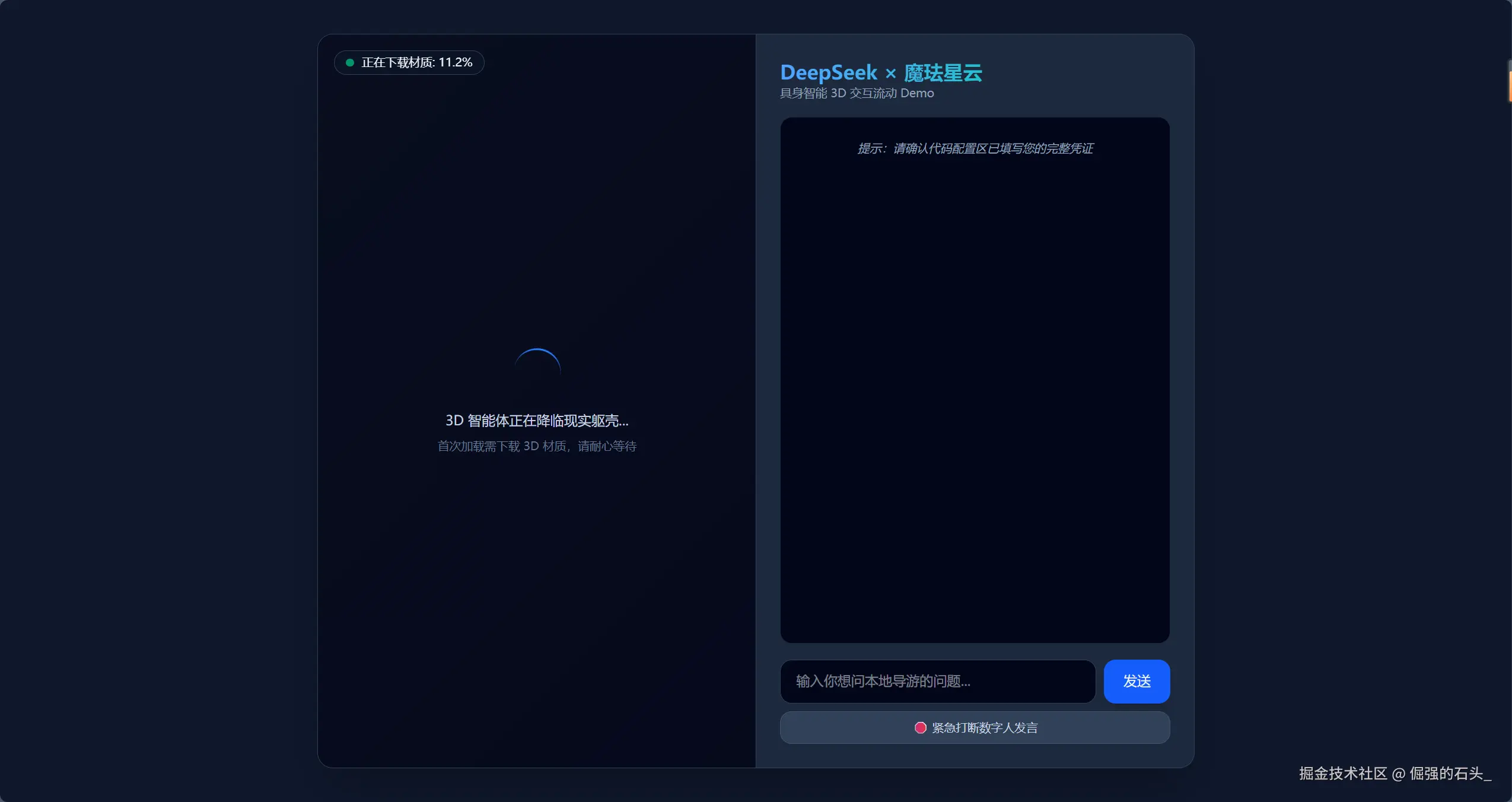
来看看我们的成果吧
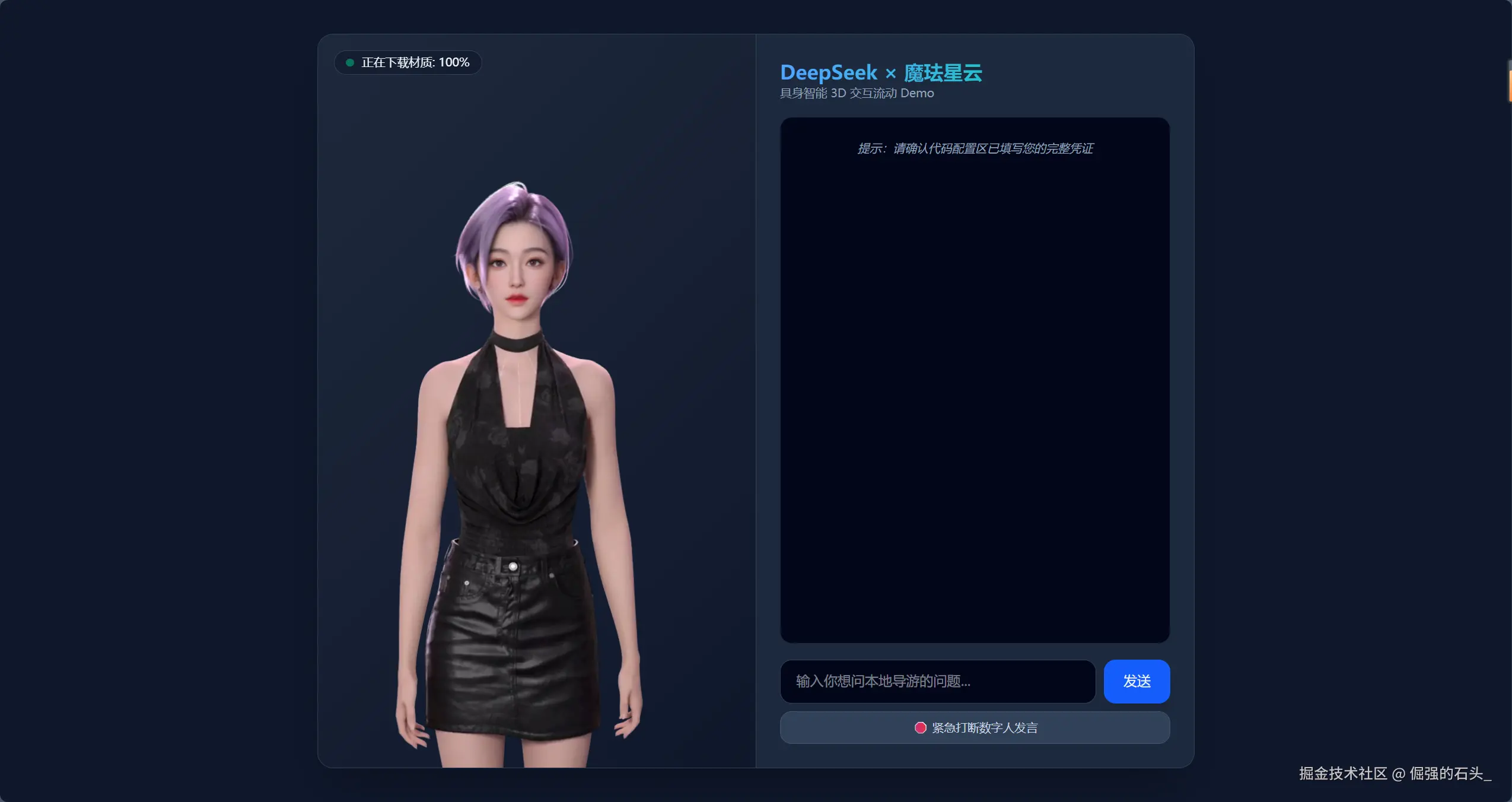
这样的美女导游谁看了不迷糊呢
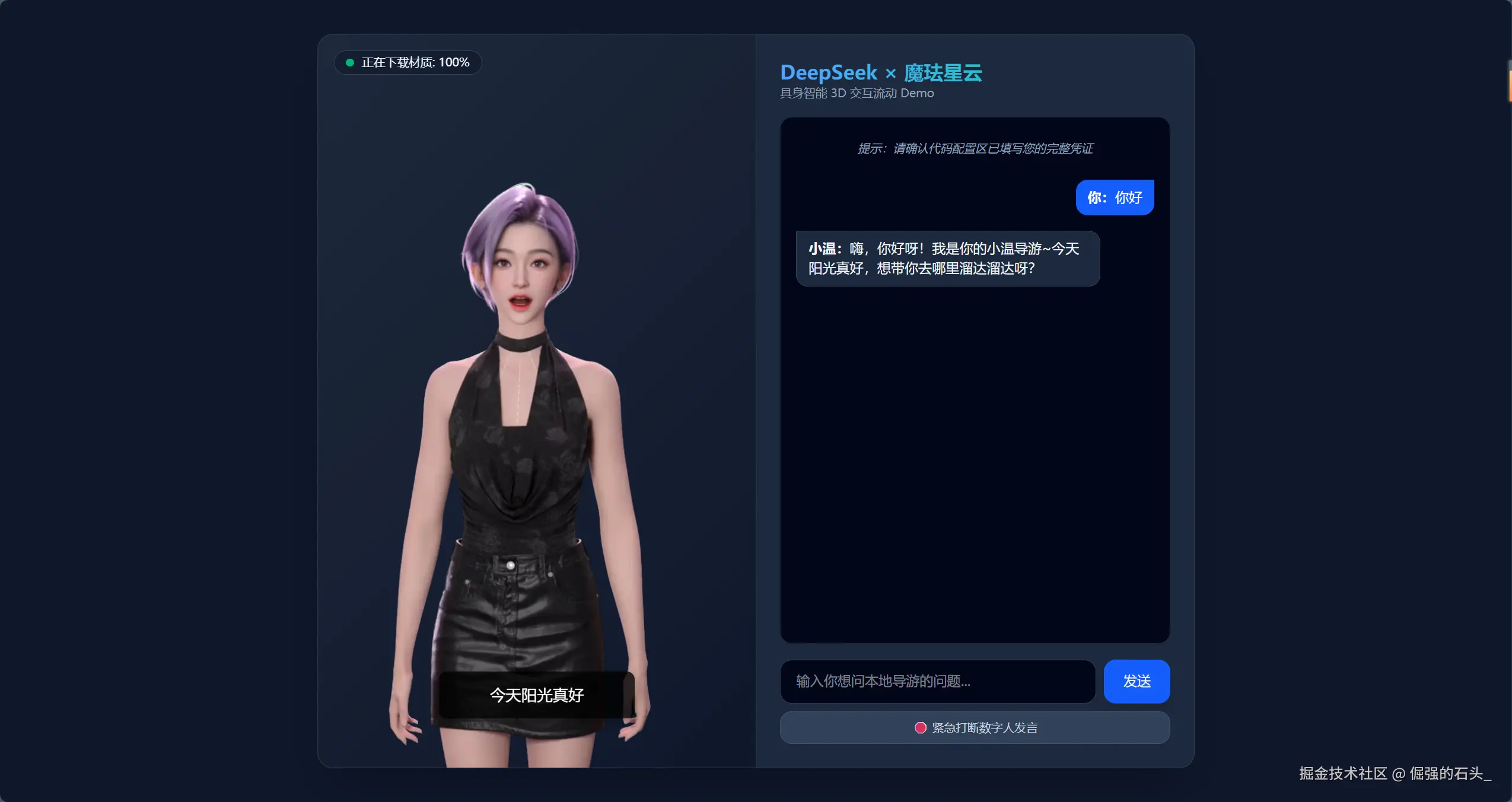
4.2 官方 SDK 功能详解与段落代码深度分析
通过 AI Coding 工具加速完成核心逻辑后,我们来逐个剖析魔珐星云官方最新轻量级 SDK 运行的底层密码。
A. 3D 容器实例化与云端解算握手
大模型的感知信号想要接入 3D 躯壳,首先需要建立一个安全的双向握手。
Plain
// 核心片段:类的实例化与配置
mofaSdk = new XmovAvatar({
    containerId: '#sdk_canvas', // 传入承载数字人的盒子选择器appId: CONFIG.mofa.appid,   // 权限校验凭证appSecret: CONFIG.mofa.appSecret,
    gatewayServer: CONFIG.mofa.gatewayServer, // 云端解算服务路径onMessage: (message) => { console.log(message); }
});
⚙️ 技术拆解:
我们在初始化配置时传入的
containerId具有决定性作用。SDK 内部会读取对应的 DOM 元素,自动计算其宽高比并自适应拉起一个高清的 WebGL 画布。魔珐的流式传输网关gatewayServer必须使用ttsa服务路径,这是魔珐星云特有的 Text-to-Speech + Animation 端到端参数解算协议,只有这样云端才会吐出控制 3D 数字人骨骼与嘴型的轻量化参数,而不是笨重高延迟的视频画片流。
B. 异步流式文本的实时并发驱动
为了解决"大模型全部生成完才开口说话"的数秒尴尬空白期,我们开发了专门的并发管道。当大模型刚开始吐字,正则捕捉到第一个结束标点(如"!"或"。")时,这一小段完整的语义文本将立刻被送入发音队列:
Plain
function driveAvatarSpeak(text, isEnd) {
    if (!mofaSdk) return;
    // 严格调用官方底层控制方法:speak(ssml, is_start, is_end)
    mofaSdk.speak(text, isFirstSentence, isEnd);
    if (isFirstSentence) {
        isFirstSentence = false; // 首句完成打通后,后续追加流的 start 标志置为假
    }
}
⚙️ 技术拆解:
对齐官方文档
speak方法内部有极其精密的参数边界控制:
启动句 (
is_start=true, is_end=false):通知云端数字人进入发音过渡,并无缝切入第一句动作。流式追加句 (
is_start=false, is_end=false):在第一句还在端侧播放的期间,后面的声音流参数在后台源源不断地静默流式堆叠。结束尾句 (
is_start=false, is_end=true):标志整段大模型意图表述完毕,虚拟人平稳回到待机互动循环。
C. "有机互打断"状态机的优雅实现
在具身人机交互场景中,"随叫随停"是检验智能体真实交互性的硬指标。如果虚拟人正在长篇大论,用户强行打字插话,若没有中断机制,多层声音在云端层叠会导致音轨崩溃。
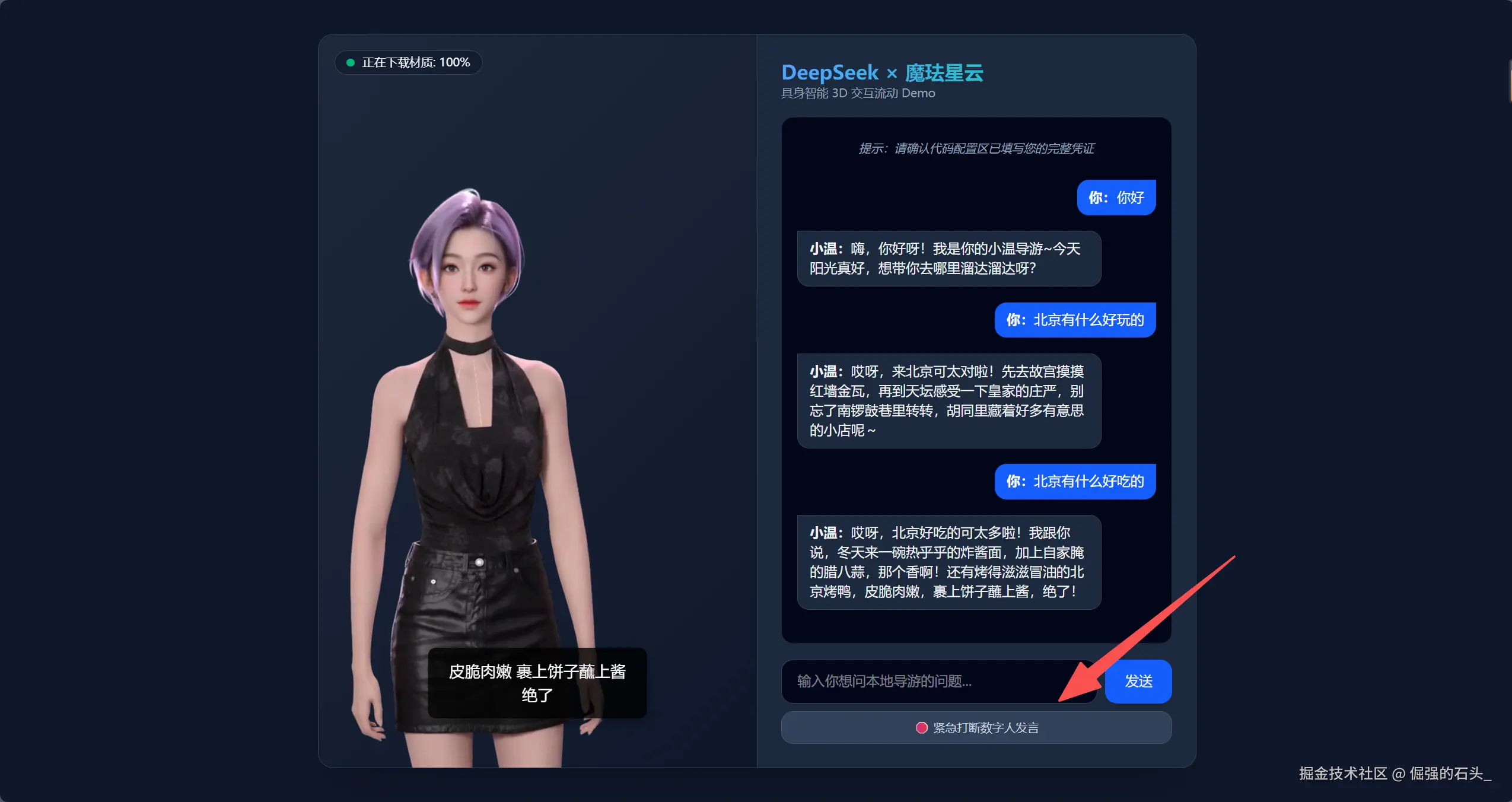
Plain
// 绑定按钮:触发紧急打断
mofaSdk.interactiveIdle();
⚙️ 技术拆解:
魔珐星云 SDK 绝非简单的视频播放容器,它在本地维护着一个精密的状态机。调用官方标准的
interactiveIdle()方法,能够直接命令端侧及云端渲染管道瞬间清空未播放完的参数流缓存 ,并让数字人强制从播放说话状态无缝过渡,优雅切回interactive_idle(有机待机互动)状态,完美避开音轨重叠,实现了极其自然的双向即时交谈。
五、 运转与避坑指南
- 不要直接双击运行 :由于代码直接引入了魔珐的线上 WebGL 渲染脚本及请求了外部大模型服务,如果直接双击打开
index.html可能会因浏览器的本地安全策略(file://协议)导致加载崩溃。请在项目目录下使用 VS Code 的 Live Server 插件点击右下角Go Live运行,或者使用本地命令快捷拉起本地微型服务器:

Plain
python -m http.server 8000-
然后用浏览器访问
http://localhost:8000即可完美运转。 -
生产环境跨域(CORS)与密钥防护提示 :本篇教程由于是极简的技术征文评测展示,所以将大模型的
apiKey直接硬编码在前端 JS 中。在实际商业项目落地(例如真实的酒店大屏)时,强烈建议把大模型的 Fetch 请求以及魔珐星云的身份验签移到企业后端进行中转,以防前端代码被反编译导致企业凭证泄漏。
结语
大模型的技术迭代,其终极形态不应仅停留在文字层面的吞吐,更应该走向拥有真实情感、敏捷互动的具身智能时代。魔珐星云用强大的自研端侧渲染与参数流处理技术,成功打破了传统 3D 渲染的带宽与延迟枷锁。
通过今天这个仅用单前端文件跑通的轻量级 Demo,我们真切感受到了国产大模型"高智商大脑"与魔珐星云"高保真 3D 躯壳"融合后散发出的迷人魅力。一个真正有温度、能对视、响应快于 500ms 的 AI 具身智能体时代,大幕已启。
👉魔珐星云平台(全球领先的具身智能3D数字人开放平台 - 魔珐星云)