示例
bash
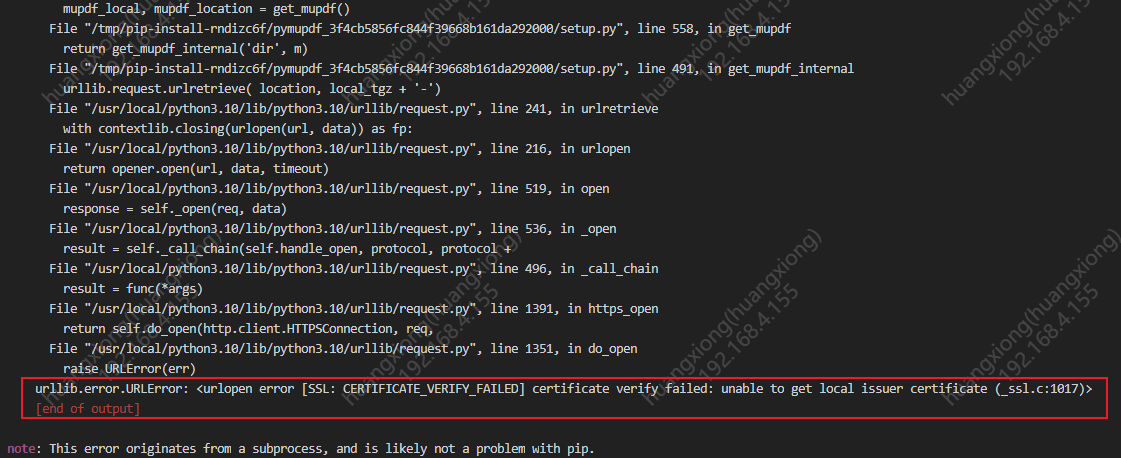
pip3 install PyMuPDF -i https://pypi.doubanio.com/simple/ --trusted-host pypi.doubanio.com错误如图:
【Centos 7解决办法】
bash
sudo yum install ca-certificates
sudo update-ca-trust
export SSL_CERT_FILE=/etc/pki/tls/certs/ca-bundle.crt
export REQUESTS_CA_BUNDLE=/etc/pki/tls/certs/ca-bundle.crt
问题原因:
这个错误出现在安装 PyMuPDF 时,其 setup.py 试图从 https://mupdf.com 下载 MuPDF 源码包,但 SSL 证书验证失败。
因为 Python 环境(手动安装在 /usr/local/python3.10/)缺少系统根证书,无法验证 mupdf.com 的证书。
--trusted-host 只对 pip 的索引源有效,对 setup.py 内部的 urllib 下载无效。需要从根本上解决 SSL 证书问题。
【注意:出现编译源码失败后,可尝试安装预编译的 wheel(跳过源码编译)】
此方法可跳过源码编译方式安装,但不是每个平台都可能有预编译包
bash
pip3 install PyMuPDF --only-binary=:all: -i https://pypi.doubanio.com/simple/ --trusted-host pypi.doubanio.com