配套环境:Ubuntu20.04 + ROS Noetic + Python3
前言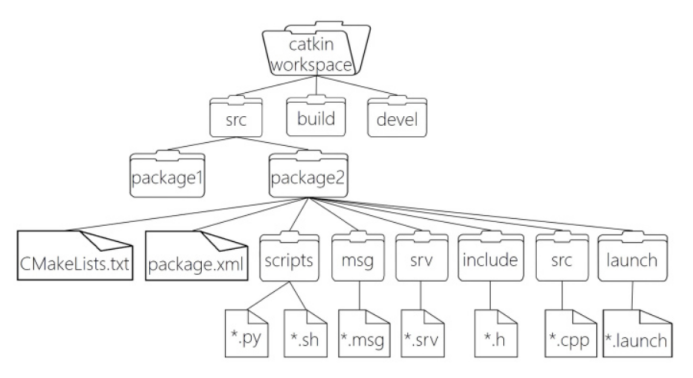
本文整合博主原创4天ROS课堂教案,从零梳理ROS基础文件系统、高频命令、Topic话题通信、自定义Msg消息、Service服务通信,搭配小乌龟标准案例、坦克仿真实战,贴合课堂授课流程、复刻实操报错与解决方案,零基础直接照搬即可运行,适配课堂作业、期末实训、课程实验。
🔥 全局硬性前置要求(全文通用,必看)
删除Linux所有多余工作空间,仅保留唯一工作空间:catkin_ws
~/.bashrc文件末尾配置环境变量,标准格式:
bashsource /opt/ros/noetic/setup.bash source ~/catkin_ws/devel/setup.bash注意:原生ros环境必须放在自定义工作空间上方,禁止顺序颠倒,否则环境覆盖、功能包找不到
修改代码/新增包/新增msg、srv文件后,必须执行 catkin_make 编译
catkin_make 命令:仅可在 ~/catkin_ws 根目录执行
catkin_create_pkg 创建功能包:仅可在 ~/catkin_ws/src 目录执行
所有ROS节点启动前,必须优先运行 roscore
一、ROS基础:文件系统+常用命令(第2天 小乌龟案例)
1.1 核心概念精讲
1.1.1 ROS工作空间(Workspace)
工作空间为ROS项目顶层根目录,统一托管全部功能包、编译缓存、环境变量、项目依赖,所有自定义代码、驱动、仿真文件必须放入工作空间才可编译运行。
(1)标准目录结构(catkin_ws标准架构)
bashcatkin_ws/ ├─ src/ # 【核心目录】存放所有自定义功能包、源码文件 ├─ build/ # 编译临时目录,存放编译中间文件、cmake缓存 ├─ devel/ # 开发运行目录,存放可执行程序、环境配置脚本 └─ install/ # 可选安装目录,初学开发全程无需使用(2)从零创建工作空间命令
bash# 递归创建工作空间+src源码目录 mkdir -p ~/catkin_ws/src # 切换至工作空间根目录 cd ~/catkin_ws # 初始化编译环境,自动生成build、devel文件夹 catkin_make(3)激活工作空间环境
bash# 当前终端临时激活 source devel/setup.bash # 永久配置环境(一劳永逸) echo "source ~/catkin_ws/devel/setup.bash" >> ~/.bashrc source ~/.bashrc
1.1.2 ROS功能包(Package)
功能包是ROS开发最小功能单元,节点代码、启动文件、自定义消息、服务配置全部封装在内。
(1)创建语法:catkin_create_pkg 包名 依赖1 依赖2 ...
bash# 固定路径创建测试包 cd ~/catkin_ws/src catkin_create_pkg test_demo rospy std_msgs geometry_msgs --rosdistro noetic(2)功能包标准目录
bashmy_package/ ├─ CMakeLists.txt # 编译配置文件(禁止删除重命名) ├─ package.xml # 包依赖描述核心文件 ├─ scripts/ # Python脚本节点存放目录 ├─ src/ # C++源码目录 ├─ msg/ # 自定义消息目录 └─ srv/ # 自定义服务目录开发硬性规则:Python脚本放入scripts后,必须授权 chmod +x 脚本.py;包名禁止大写、中文、特殊符号。
1.1.3 黄金编译命令 catkin_make
作用:编译工作空间全部源码、解析依赖、生成可执行节点程序。
ROS开发黄金三连命令(必背考点)
bashcd ~/catkin_ws # 切入工作空间根目录 catkin_make # 全局编译工作空间 source devel/setup.bash # 激活环境变量
1.2 ROS全套常用命令期末速查表
五大核心:节点Node 、话题Topic、服务Service、参数Param、功能包Package
|-------------------|-------------------|
| 命令 | 功能说明 |
| roscore | 启动ROS核心、主节点、参数服务器 |
| rosrun 包名 节点名 | 运行指定功能包内部单个节点 |
| roslaunch | 批量启动节点、加载配置文件 |
| rosnode list/info | 查看运行节点、节点绑定信息 |
| rostopic 系列 | 查看话题、打印数据、检测发布频率 |
| rosmsg show | 查看消息字段结构 |
| rosservice 系列 | 查看、调用ROS服务 |
| rosparam 系列 | 修改、读取全局参数 |
| rqt_graph | 可视化节点话题通信拓扑 |
1.3 综合实战:小乌龟自动画圆
步骤1:编写运动发布脚本
bashcd ~/catkin_ws/src/turtle_test mkdir scripts && cd scripts gedit move_turtle.pymove_turtle.py 源码
python#!/usr/bin/env python3 import rospy from geometry_msgs.msg import Twist # 初始化节点 rospy.init_node('move_turtle') # 创建发布者,绑定小乌龟速度话题 pub = rospy.Publisher('/turtle1/cmd_vel', Twist, queue_size=10) rate = rospy.Rate(10) # 10Hz发布频率 # 配置运动参数:前进+旋转画圆 msg = Twist() msg.linear.x = 1.0 # 线速度(前进) msg.angular.z = 0.5 # 角速度(旋转) # 循环发布指令 while not rospy.is_shutdown(): pub.publish(msg) rate.sleep()步骤2:授权脚本
bashchmod +x move_turtle.py步骤3:四终端启动运行
bash终端1:roscore 终端2:rosrun turtlesim turtlesim_node 终端3:rosrun turtle_test move_turtle.py 运行现象:小乌龟持续画圆运动步骤4:终端指令拓展实操
bash# 1.终端手动控制乌龟直行 rostopic pub -r 10 /turtle1/cmd_vel geometry_msgs/Twist "linear: {x: 2.0}, angular: {z: 0.0}" # 2.原地旋转 rostopic pub -r 10 /turtle1/cmd_vel geometry_msgs/Twist "linear: {x: 0.0}, angular: {z: 1.0}" # 3.新增乌龟 rosservice call /spawn "x: 2.0,y: 2.0,theta: 0.0,name: 'turtle2'" # 4.修改画布白色背景 rosparam set /turtlesim/background_r 255 rosparam set /turtlesim/background_g 255 rosparam set /turtlesim/background_b 255 rosservice call /clear
二、ROS Topic话题通信(第3天 教案)
2.1 话题通信原理
通信模型:Publisher发布者 + Subscriber订阅者
核心特点:异步通信、节点松耦合、支持多对多传输
通信流程:节点向ROS Master注册 → 发布者推送话题数据 → 订阅者回调接收数据
适用场景:机器人运动控制、传感器实时数据传输
2.2 乌龟位置订阅节点实战
功能:实时监听乌龟坐标、姿态角度并打印输出
bashcd ~/catkin_ws/src/turtle_test/scripts gedit pose_listener.pypose_listener.py 源码
python#!/usr/bin/env python3 import rospy from turtlesim.msg import Pose # 回调函数:接收话题数据后自动执行 def callback(msg): rospy.loginfo("乌龟坐标:x=%.2f, y=%.2f, 朝向=%.2f",msg.x, msg.y, msg.theta) if __name__ == '__main__': rospy.init_node('pose_listener') # 订阅/turtle1/pose话题 rospy.Subscriber('/turtle1/pose', Pose, callback) rospy.spin() # 阻塞监听,防止节点退出
bashchmod +x pose_listener.py rosrun turtle_test pose_listener.py
2.3 拓展实战:坦克仿真话题通信
2.3.1 仿真环境部署
bash
cd ~/catkin_ws/src
unzip tank_sim.zip
cd ~/catkin_ws
catkin_make
source devel/setup.bash
roslaunch tank_sim tank_sim.launch
2.3.2 终端一键控制指令
bash
# 坦克移动
rostopic pub -r 10 /tank1/cmd_vel geometry_msgs/Twist "linear: {x: 80.0}, angular: {z: 0.8}"
# 坦克发射炮弹
rostopic pub /tank1/fire tank_sim/Fire "speed: 300.0, max_range: 600.0"
# 生成新坦克
rosservice call /spawn "x: 200.0,y: 200.0,theta: 0.0,name: 'tank2'"
2.3.3 键盘控制坦克完整节点
功能:方向键控制移动、Q键发射炮弹、支持多坦克单独控制
bashgedit tank_keyboard_controller.py
bash#!/usr/bin/env python3 import rospy import sys import tty, termios from geometry_msgs.msg import Twist from tank_sim.msg import Fire # 方向键映射 key_bindings = { '\x1b[A': (1, 0), # 上:前进 '\x1b[B': (-1, 0), # 下:后退 '\x1b[C': (0, -1), # 右:右转 '\x1b[D': (0, 1), # 左:左转 } fire_key = 'q' # 非阻塞读取键盘按键 def get_key(): fd = sys.stdin.fileno() old_settings = termios.tcgetattr(fd) try: tty.setraw(sys.stdin.fileno()) ch1 = sys.stdin.read(1) if ch1 == '\x1b': ch2 = sys.stdin.read(1) if ch2 == '[': ch3 = sys.stdin.read(1) return ch1 + ch2 + ch3 return ch1 finally: termios.tcsetattr(fd, termios.TCSADRAIN, old_settings) def main(): if len(sys.argv) < 2: print("用法: rosrun tank_sim tank_keyboard_controller.py 坦克名") return tank_name = sys.argv[1] rospy.init_node(f"{tank_name}_keyboard_controller") # 绑定坦克话题 pub_vel = rospy.Publisher(f"/{tank_name}/cmd_vel", Twist, queue_size=10) pub_fire = rospy.Publisher(f"/{tank_name}/fire", Fire, queue_size=10) speed = 50.0 turn = 1.0 print("操作说明:方向键控制移动,Q键发射炮弹,Ctrl+C退出") try: while not rospy.is_shutdown(): key = get_key() twist = Twist() fire = Fire() if key in key_bindings: linear, angular = key_bindings[key] twist.linear.x = linear * speed twist.angular.z = angular * turn pub_vel.publish(twist) elif key.lower() == fire_key: fire.speed = 300.0 fire.max_range = 600.0 pub_fire.publish(fire) elif key == '\x03': break except rospy.ROSInterruptException: pass if __name__ == "__main__": main()运行指令:rosrun tank_sim tank_keyboard_controller.py tank1
三、ROS自定义Msg消息(第4天 实验)
实验需求:自定义Student学生消息,包含姓名、年龄、学号、分数,完成发布+订阅通信
3.1 步骤1:创建功能包+msg文件
bashcd ~/catkin_ws/src catkin_create_pkg ros_msg_demo rospy std_msgs cd ros_msg_demo mkdir msg cd msg gedit Student.msgStudent.msg内容
bash#学生信息自定义消息 string name int32 age string student_id float32 score
3.2 步骤2:修改双配置文件
3.2.1 package.xml 添加依赖
bash
<build_depend>message_generation</build_depend>
<exec_depend>message_runtime</exec_depend>
3.2.2 CMakeLists.txt 四段修改
bash
#1.补充依赖
find_package(catkin REQUIRED COMPONENTS
rospy
std_msgs
message_generation
)
#2.注册消息
add_message_files(
FILES
Student.msg
)
#3.消息依赖生成
generate_messages(
DEPENDENCIES
std_msgs
)
#4.包依赖声明
catkin_package(
CATKIN_DEPENDS rospy std_msgs message_runtime
)
3.3 步骤3:编译验证消息
bash
cd ~/catkin_ws
catkin_make
source devel/setup.bash
rosmsg show ros_msg_demo/Student
3.4 步骤4:发布、订阅节点代码
student_pub.py 发布端
python
#!/usr/bin/env python3
import rospy
from ros_msg_demo.msg import Student

def pub_student():
    rospy.init_node("student_publish_node",anonymous=True)
    pub=rospy.Publisher("/student_info",Student,queue_size=10)
    rate=rospy.Rate(1)
    while not rospy.is_shutdown():
        stu=Student()
        stu.name="mike"
        stu.age=20
        stu.student_id="2025001"
        stu.score=92.5
        pub.publish(stu)
        rospy.loginfo("发布:%s,%d,%s,%f",stu.name,stu.age,stu.student_id,stu.score)
        rate.sleep()

if __name__=="__main__":
    try:
        pub_student()
    except rospy.ROSInterruptException:
        pass
student_sub.py 订阅端
python
#!/usr/bin/env python3
import rospy
from ros_msg_demo.msg import Student

def callback(data):
    rospy.loginfo("接收信息:%s %d %s %f",data.name,data.age,data.student_id,data.score)

def sub_student():
    rospy.init_node("student_sub_node")
    rospy.Subscriber("/student_info",Student,callback)
    rospy.spin()

if __name__=="__main__":
    sub_student()
3.5 运行命令
bash
chmod +x student_pub.py student_sub.py
#终端1
roscore
#终端2
rosrun ros_msg_demo student_pub.py
#终端3
rosrun ros_msg_demo student_sub.py
#终端4
rostopic echo /student_info
四、ROS Service服务通信(第5天 实验指导)
4.1 服务通信机制
Service为同步阻塞式通信:客户端发送请求、阻塞等待、服务端处理后返回响应;点对点交互,适合运算、参数配置、单次指令调用。
srv文件规则:请求数据 --- 响应数据,横线分割两段内容
实验1:计算器加减乘除服务
4.1.1 创建服务文件
bashcd ~/catkin_ws/src catkin_create_pkg my_service_pkg rospy std_msgs cd my_service_pkg mkdir srv gedit Calculator.srvCalculator.srv
bashfloat32 a float32 b string op --- float32 result string status
4.1.2 配置依赖文件
package.xml新增:
bash<build_depend>message_generation</build_depend> <exec_depend>message_runtime</exec_depend> <build_export_depend>message_runtime</build_export_depend>CMakeLists.txt配置消息生成规则,绑定srv文件
4.1.3 服务端+客户端源码
calculator_server.py 服务端
python
#!/usr/bin/env python3
import rospy
from my_service_pkg.srv import Calculator, CalculatorResponse

def handle_calculator(req):
    try:
        if req.op == '+':
            res = req.a + req.b
        elif req.op == '-':
            res = req.a - req.b
        elif req.op == '*':
            res = req.a * req.b
        elif req.op == '/':
            res = req.a / req.b
        else:
            return CalculatorResponse(0, "Unsupported operation")
        return CalculatorResponse(res, "OK")
    except Exception as e:
        return CalculatorResponse(0, str(e))

def calculator_server():
    rospy.init_node('calculator_server')
    s = rospy.Service('calculator', Calculator, handle_calculator)
    rospy.loginfo("Calculator Service Ready...")
    rospy.spin()

if __name__ == "__main__":
    calculator_server()
calculator_client.py 客户端
python
#!/usr/bin/env python3
import rospy
from my_service_pkg.srv import Calculator

def calculator_client(a, b, op):
    rospy.wait_for_service('calculator')
    try:
        calc = rospy.ServiceProxy('calculator', Calculator)
        resp = calc(a, b, op)
        return resp.result, resp.status
    except rospy.ServiceException as e:
        print("Service call failed: %s"%e)
        return None, str(e)

if __name__ == "__main__":
    rospy.init_node('calculator_client')
    try:
        a = float(input("请输入第一个数字: "))
        b = float(input("请输入第二个数字: "))
        op = input("请输入运算符 (+, -, *, /): ")
    except ValueError:
        print("输入无效,请输入数字!")
        exit(1)
    result, status = calculator_client(a, b, op)
    print("计算结果:", result, "状态:", status)
实验2:整形数组排序服务
SortArray.srv 文件内容
bashint32[] array --- int32[] sorted_array string status服务端读取数组、自动升序排序,客户端控制台输入数组调用服务,源码直接照搬文档即可。
4.3 服务统一运行步骤
bash
#1.脚本授权
chmod +x *.py
#2.工作空间编译
cd ~/catkin_ws && catkin_make && source devel/setup.bash
#3.启动服务端、客户端测试
五、全局报错解决方案+开发注意事项
5.1 硬性开发规范
系统仅保留catkin_ws单个工作空间,杜绝多工作空间环境冲突
.bashrc环境变量:原生ROS环境在前,自定义工作空间在后
新增msg、srv、py文件后必须执行catkin_make编译
Python脚本必须添加可执行权限,否则rosrun无法启动
服务名称全局唯一,禁止重复命名
5.2 高频报错修复
报错 package not found:执行source ~/catkin_ws/devel/setup.bash
报错 Couldn't find executable xxx.py:执行chmod +x 脚本授权
自定义消息调用失败:检查package.xml、CMakeLists.txt配置,重新编译
roscore端口占用:关闭全部ROS终端,重启终端运行
六、全文课程总结
基础流程:工作空间创建→功能包搭建→代码编写→配置文件修改→编译→运行调试
Topic话题:异步发布订阅、持续数据流,适配乌龟、坦克运动控制
自定义Msg:拓展标准消息格式,自定义结构体传输业务数据
Service服务:同步请求响应,适合数学运算、单次指令交互