LLM 调用 MCP 工具的实现原理 --- 源码级深度解析
基于 CodeGraph MCP Server v0.9.9 + Claude Code 内部 MCP 实现
本文以 CodeGraph 为实例,逐层拆解 LLM → Claude Code → MCP Server 的完整调用链路。CodeGraph 是完全自实现的 MCP 协议,不依赖
@modelcontextprotocol/sdk。
文章目录
- [LLM 调用 MCP 工具的实现原理 --- 源码级深度解析](#LLM 调用 MCP 工具的实现原理 — 源码级深度解析)
-
- [1. 架构全景:一张图看懂完整链路](#1. 架构全景:一张图看懂完整链路)
- [2. 第一层:Transport 传输层](#2. 第一层:Transport 传输层)
-
- [2.1 源码:CodeGraph 的 StdioTransport](#2.1 源码:CodeGraph 的 StdioTransport)
- [2.2 消息格式](#2.2 消息格式)
- [3. 第二层:JSON-RPC 协议层](#3. 第二层:JSON-RPC 协议层)
-
- [3.1 核心数据结构](#3.1 核心数据结构)
- [3.2 核心方法:`request()` --- 发送请求并等待响应](#3.2 核心方法:
request()— 发送请求并等待响应)
- [4. 第三层:CodeGraph MCP Server --- 工具注册与执行](#4. 第三层:CodeGraph MCP Server — 工具注册与执行)
-
- [4.1 启动模式:Direct vs Daemon](#4.1 启动模式:Direct vs Daemon)
- [4.2 MCPSession:MCP 协议握手与会话管理](#4.2 MCPSession:MCP 协议握手与会话管理)
- [4.3 核心处理:`handleToolsCall()` → `ToolHandler.execute()`](#4.3 核心处理:
handleToolsCall()→ToolHandler.execute()) - [4.4 工具定义结构](#4.4 工具定义结构)
- [4.5 MCPEngine:共享引擎](#4.5 MCPEngine:共享引擎)
- [4.6 完整示例:Claude Code 调用 codegraph_callers 时 Server 端发生了什么](#4.6 完整示例:Claude Code 调用 codegraph_callers 时 Server 端发生了什么)
- [5. 第四层:Client 端 --- Claude Code 侧的工具发现与调用](#5. 第四层:Client 端 — Claude Code 侧的工具发现与调用)
-
- [5.1 MCP Server 配置](#5.1 MCP Server 配置)
- [5.2 Claude Code 的启动与 MCP 初始化流程](#5.2 Claude Code 的启动与 MCP 初始化流程)
- [6. 第五层:LLM 决策 --- Function Calling 内部机制](#6. 第五层:LLM 决策 — Function Calling 内部机制)
-
- [6.1 工具定义注入](#6.1 工具定义注入)
- [6.2 LLM 的决策过程(Transformer 推理)](#6.2 LLM 的决策过程(Transformer 推理))
- [6.3 Function Calling 的训练原理](#6.3 Function Calling 的训练原理)
- [6.4 多工具并行调用的决策](#6.4 多工具并行调用的决策)
- [7. 第六层:Claude Code 中的 MCP 集成](#7. 第六层:Claude Code 中的 MCP 集成)
-
- [7.1 MCP Server 配置](#7.1 MCP Server 配置)
- [7.2 命名空间规则](#7.2 命名空间规则)
- [7.3 真实的 tool_use 格式](#7.3 真实的 tool_use 格式)
- [7.4 完整示例:从配置到工具可用的全流程](#7.4 完整示例:从配置到工具可用的全流程)
- [7.5 Claude Code 如何决定使用 CodeGraph 而不是内置工具?](#7.5 Claude Code 如何决定使用 CodeGraph 而不是内置工具?)
-
- [7.5.1 决策全在 LLM](#7.5.1 决策全在 LLM)
- [7.5.2 典型决策场景对照](#7.5.2 典型决策场景对照)
- [7.5.3 工具竞争的本质:谁的信息密度更高](#7.5.3 工具竞争的本质:谁的信息密度更高)
- [7.5.4 并行调用:CodeGraph 和内置工具同时使用](#7.5.4 并行调用:CodeGraph 和内置工具同时使用)
- [8. 完整调用链路:逐帧回放](#8. 完整调用链路:逐帧回放)
- [9. 实战:CodeGraph 工具调用示例 --- Claude Code ↔ CodeGraph 交互实录](#9. 实战:CodeGraph 工具调用示例 — Claude Code ↔ CodeGraph 交互实录)
-
- [9.1 CodeGraph 全部 8 个工具定义](#9.1 CodeGraph 全部 8 个工具定义)
- [9.2 真实交互示例 1:codegraph_callers](#9.2 真实交互示例 1:codegraph_callers)
- [9.3 真实交互示例 2:codegraph_explore](#9.3 真实交互示例 2:codegraph_explore)
- [9.4 真实交互示例 3:多工具链式调用](#9.4 真实交互示例 3:多工具链式调用)
- [9.5 如何复现](#9.5 如何复现)
- [9.6 CodeGraph 关键设计决策](#9.6 CodeGraph 关键设计决策)
- [10. 总结:核心要点回顾](#10. 总结:核心要点回顾)
-
- [10.1 六层架构速查(CodeGraph 实例)](#10.1 六层架构速查(CodeGraph 实例))
- [10.2 核心调用路径(基于 CodeGraph v0.9.9)](#10.2 核心调用路径(基于 CodeGraph v0.9.9))
- [10.3 关键设计原则](#10.3 关键设计原则)
- [10.4 一句话精髓](#10.4 一句话精髓)
1. 架构全景:一张图看懂完整链路
在深入源码之前,先理解 LLM 调用 MCP 工具的六层架构 :
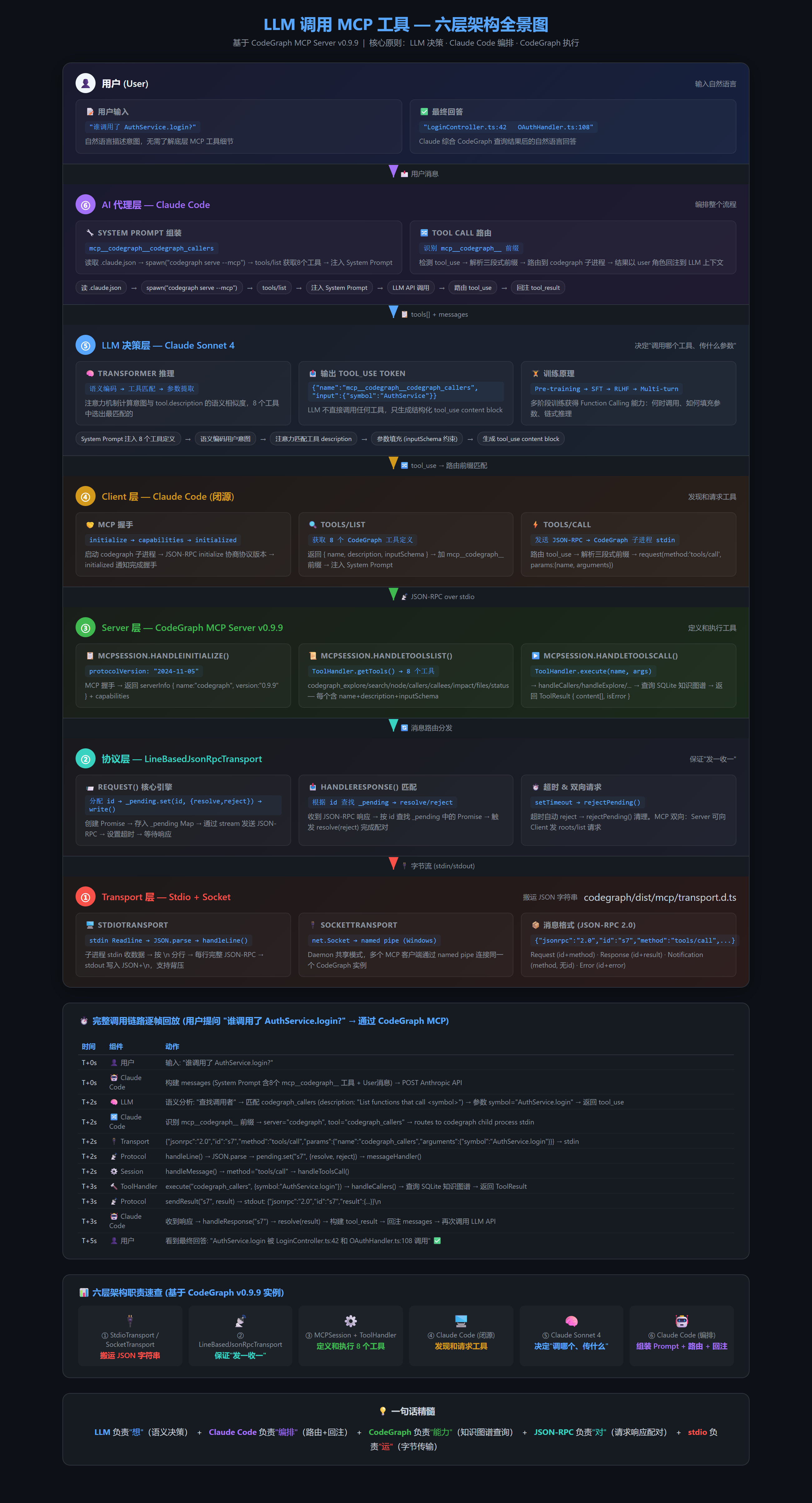
核心认知 :LLM 不直接调用 MCP 工具。LLM 只负责"决策"(生成 tool_use token),Claude Code 负责"路由与执行"(JSON-RPC 通信),CodeGraph Server 负责"能力"(实际查询 SQLite 知识图谱)。三者通过标准化的 MCP 协议(JSON-RPC 2.0)解耦。
🔑 MCP 协议本身是开放的 (spec.modelcontextprotocol.io),但每个实现可以独立编写 。CodeGraph 在
dist/mcp/下自实现了全套 MCP 协议,不依赖@modelcontextprotocol/sdk。
2. 第一层:Transport 传输层
Transport 是 MCP 协议的最底层,负责在 Claude Code 和 CodeGraph Server 之间传输字节。CodeGraph 支持两种传输方式:stdio (直接模式)和 Socket(daemon 共享模式)。
📄 源文件 : CodeGraph MCP 源码
transport.d.ts
2.1 源码:CodeGraph 的 StdioTransport
typescript
// ═══════════════════════════════════════════════════════════
// transport.d.ts --- CodeGraph 自实现的 JSON-RPC 传输层
// 路径: CodeGraph MCP 源码 --- transport.d.ts
// ═══════════════════════════════════════════════════════════

// ── JSON-RPC 2.0 消息类型定义 ──
export interface JsonRpcRequest {
    jsonrpc: '2.0';
    id: string | number;
    method: string;
    params?: unknown;
}

export interface JsonRpcResponse {
    jsonrpc: '2.0';
    id: string | number | null;
    result?: unknown;
    error?: JsonRpcError;
}

export interface JsonRpcNotification {
    jsonrpc: '2.0';
    method: string;           // 通知无 id,无需响应!
    params?: unknown;
}

export interface JsonRpcError {
    code: number;
    message: string;
    data?: unknown;
}

// ── 标准 JSON-RPC 错误码 ──
export const ErrorCodes = {
    ParseError: -32700,
    InvalidRequest: -32600,
    MethodNotFound: -32601,
    InvalidParams: -32602,
    InternalError: -32603,
} as const;

// ── 传输层抽象接口 ──
export interface JsonRpcTransport {
    start(handler: MessageHandler): void;
    stop(): void;
    send(response: JsonRpcResponse): void;
    notify(method: string, params?: unknown): void;
    request(method: string, params?: unknown, timeoutMs?: number): Promise<unknown>;
    sendResult(id: string | number, result: unknown): void;
    sendError(id: string | number | null, code: number, message: string, data?: unknown): void;
}

// ═══════════════════════════════════════════════════════════
// 核心:基于行的 JSON-RPC 传输实现
// StdioTransport 和 SocketTransport 都继承自此类
// ═══════════════════════════════════════════════════════════
abstract class LineBasedJsonRpcTransport implements JsonRpcTransport {
    protected messageHandler: MessageHandler | null;
    protected pending: Map<string | number, {
        resolve: (value: unknown) => void;
        reject: (error: Error) => void;
    }>;
    protected nextRequestId: number;    // 自增消息 ID
    protected stopped: boolean;

    abstract start(handler: MessageHandler): void;
    protected abstract write(line: string): void;
    abstract stop(): void;

    // ═══ 发送请求并等待响应 ═══
    request(method: string, params?: unknown, timeoutMs?: number): Promise<unknown>;

    // ═══ 发送响应 / 通知 ═══
    send(response: JsonRpcResponse): void;
    notify(method: string, params?: unknown): void;
    sendResult(id: string | number, result: unknown): void;
    sendError(...): void;

    // ═══ 处理收到的每一行 JSON ═══
    protected handleLine(line: string): Promise<void>;

    // ═══ 匹配响应到对应的 Promise ═══
    private handleResponse(message: JsonRpcResponse): void;
}

// ═══════════════════════════════════════════════════════════
// StdioTransport --- 通过子进程 stdin/stdout 通信
// Claude Code 启动 codegraph 子进程时使用此模式
// ═══════════════════════════════════════════════════════════
export class StdioTransport extends LineBasedJsonRpcTransport {
    constructor(opts?: StdioTransportOptions);
    start(handler: MessageHandler): void;   // 开始读 stdin
    stop(): void;                           // 关闭流
    protected write(line: string): void;    // 写入 stdout
}

// ═══════════════════════════════════════════════════════════
// SocketTransport --- daemon 共享模式
// 多个 MCP 客户端共享一个 CodeGraph 实例时使用
// ═══════════════════════════════════════════════════════════
export class SocketTransport extends LineBasedJsonRpcTransport {
    constructor(socket: Socket, prefix?: string);
    start(handler: MessageHandler): void;
    stop(): void;
    protected write(line: string): void;
}设计要点:
| 要点 | 说明 |
|---|---|
| 行协议 | 每个 JSON-RPC 消息序列化为一行(JSON.stringify + \n),无换行符的 JSON 保证一行一消息 |
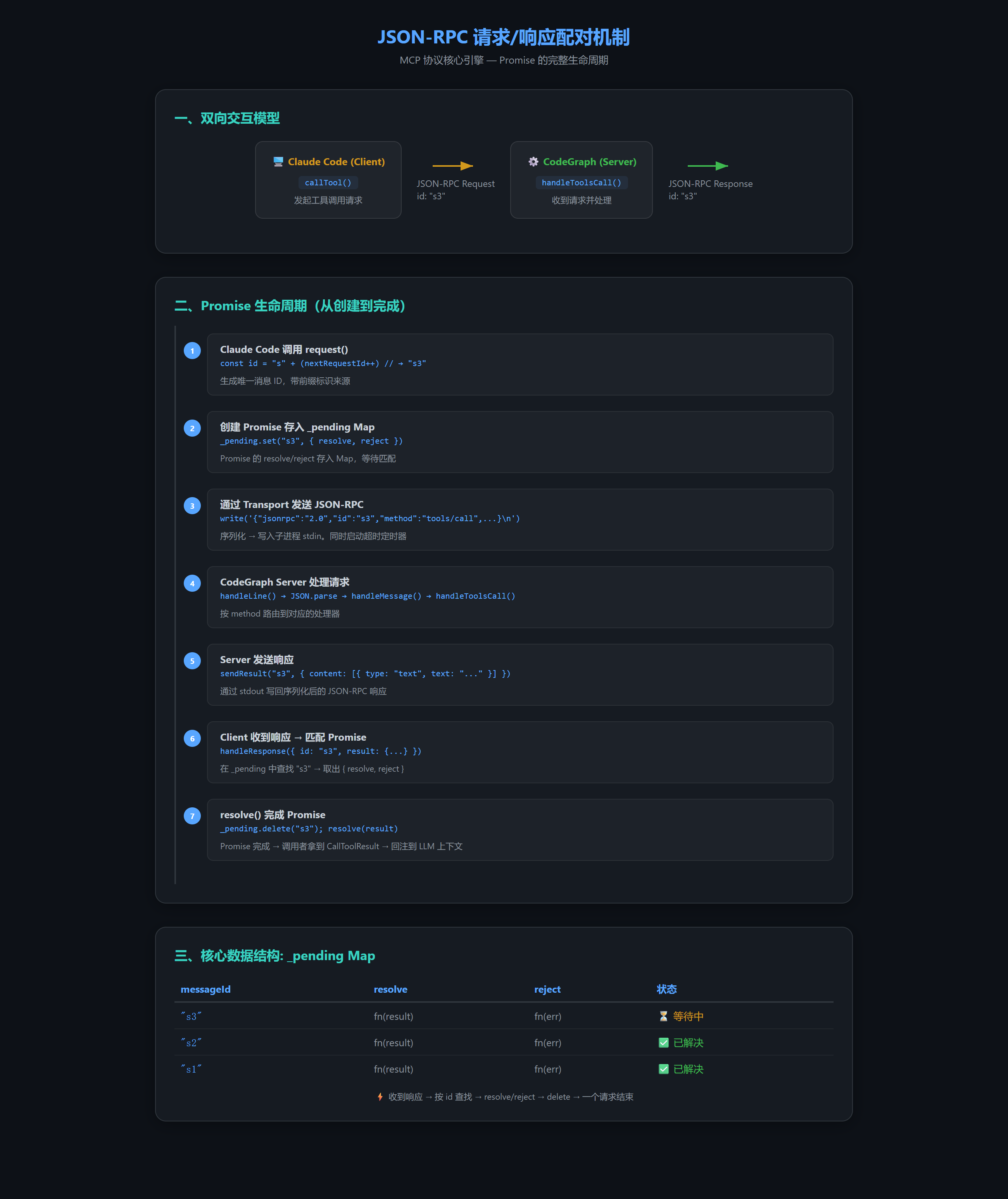
| Promise 配对 | _pending Map 存储 messageId → { resolve, reject },收到响应时匹配并触发 |
| ID 前缀 | 不同 transport 使用不同的 ID 前缀(如 stdio: "s",socket: "c"),避免日志混淆 |
| 双向请求 | MCP 协议是双向的------Server 也可以向 Client 发送请求(如 roots/list 获取工作区根目录) |
| 零外部依赖 | CodeGraph 的 MCP 实现只用 Node.js 内置的 stdin/stdout 和 net.Socket |
2.2 消息格式
CodeGraph 与 Claude Code 之间的所有通信都使用 JSON-RPC 2.0 格式:
json
// 请求 (Request) --- Claude Code → CodeGraph
{"jsonrpc":"2.0","id":7,"method":"tools/call","params":{"name":"codegraph_callers","arguments":{"symbol":"AuthService"}}}

// 响应 (Response) --- CodeGraph → Claude Code
{"jsonrpc":"2.0","id":7,"result":{"content":[{"type":"text","text":"LoginController.ts:42\\nOAuthHandler.ts:108"}]}}

// 通知 (Notification) --- 无 id,无需响应
{"jsonrpc":"2.0","method":"notifications/initialized"}

// Server → Client 请求(如 roots/list)
{"jsonrpc":"2.0","id":"s2","method":"roots/list","params":{}}
3. 第二层:JSON-RPC 协议层
CodeGraph 的 LineBasedJsonRpcTransport 同时扮演 Transport 和 Protocol 两个角色------它既负责字节传输,也负责 JSON-RPC 协议的核心逻辑:请求/响应配对、超时处理、进度通知等。
📄 源文件 : CodeGraph MCP 源码
transport.d.ts
3.1 核心数据结构
typescript
abstract class LineBasedJsonRpcTransport implements JsonRpcTransport {
    protected messageHandler: MessageHandler | null;     // 收到消息后的回调
    protected pending: Map<string | number, {             // ⭐ 请求/响应配对
        resolve: (value: unknown) => void;
        reject: (error: Error) => void;
    }>;
    protected nextRequestId: number;                      // 自增 ID
    protected stopped: boolean;
    // ...
}
3.2 核心方法:request() --- 发送请求并等待响应
typescript
// ═══════════════════════════════════════════════════════════
// LineBasedJsonRpcTransport.request()
// 这是整个 MCP 通信的核心引擎
// 发送 JSON-RPC 请求 → 等待配对响应 → 超时处理
// ═══════════════════════════════════════════════════════════

request(method: string, params?: unknown, timeoutMs?: number): Promise<unknown> {
    // 1. 分配唯一 ID(带前缀,如 stdio: "s1", socket: "c3")
    const id = this.idPrefix() + String(this.nextRequestId++);

    // 2. 构建 JSON-RPC 请求
    const jsonrpcRequest = {
        jsonrpc: '2.0',
        id,
        method,
        params
    };

    // 3. 创建 Promise,存储 resolve/reject 到 _pending Map
    return new Promise((resolve, reject) => {
        this.pending.set(id, { resolve, reject });

        // 4. 超时处理
        const timer = setTimeout(() => {
            this.pending.delete(id);
            reject(new Error(`Request timed out: ${method}`));
        }, timeoutMs ?? DEFAULT_TIMEOUT);

        // 5. 通过 stream 发送
        this.write(JSON.stringify(jsonrpcRequest));
    });
}

// ═══ 收到响应时的匹配 ═══
private handleResponse(message: JsonRpcResponse): void {
    const id = String(message.id);
    const pending = this.pending.get(id);
    if (!pending) return;  // 无关响应,忽略

    this.pending.delete(id);
    if (message.error) {
        pending.reject(new Error(message.error.message));
    } else {
        pending.resolve(message.result);
    }
}关键设计:
4. 第三层:CodeGraph MCP Server --- 工具注册与执行
CodeGraph 的 Server 分为两层:MCPSession(负责 MCP 协议握手和消息路由)和 ToolHandler(负责具体的工具逻辑)。
📄 源文件 : CodeGraph MCP 源码
session.d.ts、tools.d.ts、engine.d.ts
4.1 启动模式:Direct vs Daemon
typescript
// ═══════════════════════════════════════════════════════════
// index.d.ts --- MCPServer.start() 的启动决策
// ═══════════════════════════════════════════════════════════

export class MCPServer {
    async start(): Promise<void> {
        // 决策顺序:
        // 1. CODEGRAPH_NO_DAEMON=1 → Direct 模式(本进程 stdio)
        // 2. CODEGRAPH_DAEMON_INTERNAL=1 → 作为 daemon 进程监听
        // 3. 找不到 .codegraph/ → Direct 模式
        // 4. 否则 → Proxy 模式(连接共享 daemon)
    }
}
Claude Code 的典型调用路径:
bash
# Claude Code 通过 .claude.json 配置启动 CodeGraph
# → spawn("codegraph", ["serve", "--mcp"])
# → CodeGraph 启动 → 检测到 .codegraph/ → Proxy 模式
# → 连接(或启动)共享 daemon → 通过 named pipe 通信
4.2 MCPSession:MCP 协议握手与会话管理
typescript
// ═══════════════════════════════════════════════════════════
// session.d.ts --- 每个 MCP 连接一个 Session 实例
// ═══════════════════════════════════════════════════════════

export const SERVER_INFO = {
    name: 'codegraph',
    version: '0.9.9'           // 真实 package version
};

export const PROTOCOL_VERSION = '2024-11-05';

export class MCPSession {
    private transport: JsonRpcTransport;
    private engine: MCPEngine;
    private clientSupportsRoots: boolean;

    start(): void;                              // 开始处理消息
    stop(): void;                               // 停止会话

    private handleMessage(message): void;       // 消息路由入口
    private handleInitialize(request): void;    // ⭐ initialize 握手
    private handleToolsList(): void;            // ⭐ tools/list
    private handleToolsCall(request): void;     // ⭐ tools/call
}
4.3 核心处理:handleToolsCall() → ToolHandler.execute()
这是 Server 端最关键的方法 ------收到 tools/call 请求后的处理链:
typescript
// ═══════════════════════════════════════════════════════════
// tools.d.ts --- ToolHandler 处理所有 8 个 CodeGraph 工具
// ═══════════════════════════════════════════════════════════

export class ToolHandler {
    private cg: CodeGraph;  // SQLite 知识图谱实例

    // ═══ 工具执行入口 ═══
    execute(toolName: string, args: Record<string, unknown>): Promise<ToolResult>;

    // ═══ 8 个工具的实现 ═══
    private handleSearch(args):    Promise<ToolResult>;  // codegraph_search
    private handleCallers(args):   Promise<ToolResult>;  // codegraph_callers
    private handleCallees(args):   Promise<ToolResult>;  // codegraph_callees
    private handleImpact(args):    Promise<ToolResult>;  // codegraph_impact
    private handleExplore(args):   Promise<ToolResult>;  // codegraph_explore
    private handleNode(args):      Promise<ToolResult>;  // codegraph_node
    private handleStatus(args):    Promise<ToolResult>;  // codegraph_status
    private handleFiles(args):     Promise<ToolResult>;  // codegraph_files

    // ═══ 工具定义(含预算自适应) ═══
    getTools(): ToolDefinition[];     // 动态描述(基于文件数量)
    getStaticTools(): ToolDefinition[]; // 静态定义(无引擎时用)
}
4.4 工具定义结构
typescript
// ═══════════════════════════════════════════════════════════
// CodeGraph 的 ToolDefinition 接口
// ═══════════════════════════════════════════════════════════

export interface ToolDefinition {
    name: string;               // 如 "codegraph_callers"
    description: string;        // ⭐ 这就是 LLM 做决策的关键!
    inputSchema: {
        type: 'object';
        properties: Record<string, {
            type: string;       // "string", "number", "enum" ...
            description: string;
            enum?: string[];
            default?: unknown;
        }>;
        required?: string[];
    };
}

// CodeGraph 暴露的 8 个工具(这是 tools/list 返回的原始工具名)
// Claude Code 收到后会加上 mcp__codegraph__ 前缀注入 System Prompt
// codegraph_explore  codegraph_search   codegraph_node
// codegraph_callers  codegraph_callees  codegraph_impact
// codegraph_files    codegraph_status
4.5 MCPEngine:共享引擎
typescript
// ═══════════════════════════════════════════════════════════
// engine.d.ts --- 共享 CodeGraph 实例 + 文件监听
// ═══════════════════════════════════════════════════════════

export class MCPEngine {
    private cg: CodeGraph;              // SQLite 知识图谱
    private toolHandler: ToolHandler;   // 工具处理器
    private watcherStarted: boolean;

    // ═══ 惰性初始化(线程安全) ═══
    ensureInitialized(searchFrom: string): Promise<void>;
    // 首次调用时打开 .codegraph/ 下的 SQLite,启动文件监听

    // ═══ 追捕同步(behind-catch-up) ═══
    private catchUpSync(): void;
    // 打开后立即对比文件系统,补上 watcher 未运行时丢失的变更
    // 首次工具调用前完成,避免返回过期数据
}
4.6 完整示例:Claude Code 调用 codegraph_callers 时 Server 端发生了什么
Claude Code 发送 JSON-RPC:
  {"jsonrpc":"2.0","id":"s7","method":"tools/call",
   "params":{"name":"codegraph_callers","arguments":{"symbol":"AuthService"}}}

        ↓ LineBasedJsonRpcTransport.handleLine()
        ↓

MCPSession.handleMessage()
  → 识别 method = "tools/call"
  → handleToolsCall(request)
    → 提取 toolName = "codegraph_callers"
    → 提取 args = { symbol: "AuthService" }

        ↓

ToolHandler.execute("codegraph_callers", { symbol: "AuthService" })
  → handleCallers(args)
    → CodeGraph 查询 SQLite: SELECT ... FROM edges WHERE target LIKE '%AuthService%'
    → 返回: "LoginController.ts:42\nOAuthHandler.ts:108"

        ↓

包装为 ToolResult:
  { content: [{ type: "text", text: "LoginController.ts:42\n..." }] }

        ↓

MCPSession → Transport.sendResult("s7", result)
  → stdout: {"jsonrpc":"2.0","id":"s7","result":{...}}\n
5. 第四层:Client 端 --- Claude Code 侧的工具发现与调用
Claude Code 是闭源的,但我们可以通过配置文件和可观察行为来理解它的 Client 机制。
📄 配置文件: MCP Server 配置 (mcpServers 节点) 和权限配置 (permissions.allow)
5.1 MCP Server 配置
json
// MCP Server 配置 --- mcpServers 节点
{
  "mcpServers": {
    "codegraph": {
      "type": "stdio",
      "command": "codegraph",
      "args": ["serve", "--mcp"]
    }
  }
}

// 权限配置 --- permissions.allow 节点
{
  "permissions": {
    "allow": [
      "mcp__codegraph__codegraph_explore",
      "mcp__codegraph__codegraph_search",
      "mcp__codegraph__codegraph_node",
      "mcp__codegraph__codegraph_callers",
      "mcp__codegraph__codegraph_callees",
      "mcp__codegraph__codegraph_impact",
      "mcp__codegraph__codegraph_files",
      "mcp__codegraph__codegraph_status"
    ]
  }
}
5.2 Claude Code 的启动与 MCP 初始化流程
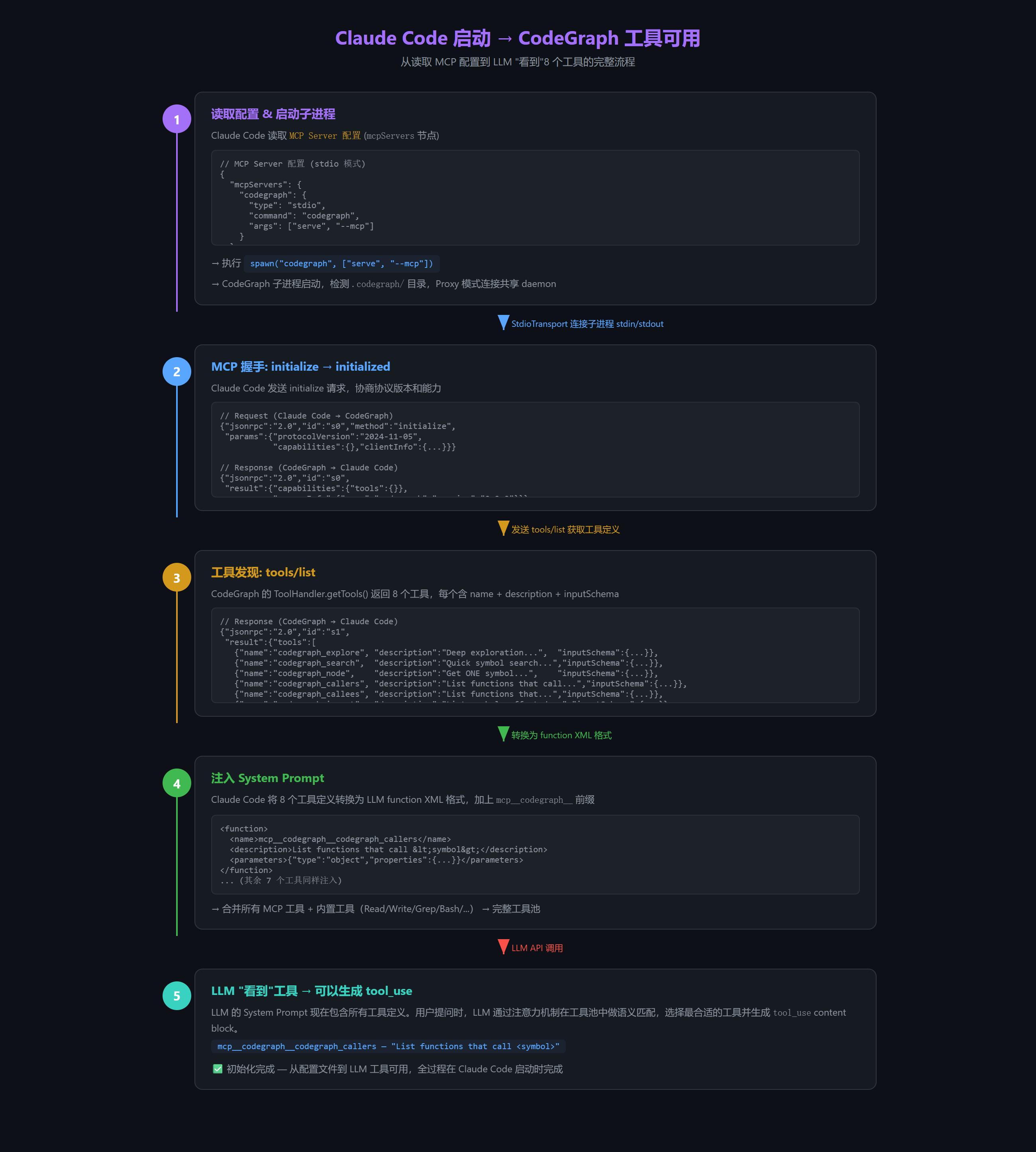
上图展示了从 Claude Code 启动到 LLM "看到"8 个 CodeGraph 工具的全过程:读取配置 → spawn 子进程 → MCP 握手 → tools/list → System Prompt 注入。
### 5.3 Tool Call 路由逻辑(基于行为推断)

```javascript
// Claude Code 内部的工具路由(推断实现)
async function handleToolCall(assistantMessage) {
    for (const toolUse of assistantMessage.content) {
        if (toolUse.type !== 'tool_use') continue;

        if (toolUse.name.startsWith('mcp__')) {
            // ═══ MCP 工具:路由到对应 MCP Server ═══
            const [, serverName, toolName] = toolUse.name.split('__');
            // 如 mcp__codegraph__codegraph_callers
            //    → serverName = "codegraph"
            //    → toolName = "codegraph_callers"
            const mcpClient = mcpClients.get(serverName);
            result = await mcpClient.callTool({
                name: toolName,
                arguments: toolUse.input
            });
        } else {
            // ═══ 内置工具:本地执行 ═══
            result = await executeBuiltinTool(toolUse.name, toolUse.input);
        }

        // ═══ 回注到 LLM 上下文(以 user 角色) ═══
        messages.push({
            role: 'user',
            content: [{
                type: 'tool_result',
                tool_use_id: toolUse.id,
                content: result.content
            }]
        });
    }
    // 再次调用 LLM 处理结果
    return await callLLM(messages);
}
6. 第五层:LLM 决策 --- Function Calling 内部机制
这是整个链路中最容易被误解的环节。LLM 不是通过代码逻辑"匹配"工具的,而是通过语义理解和训练获得的 Function Calling 能力。
6.1 工具定义注入
CodeGraph MCP Server 通过 tools/list 返回的工具定义,被 Claude Code 转换为 LLM 可理解的格式:
CodeGraph tools/list 返回 (8个工具之一):
{
"name": "codegraph_callers",
"description": "List functions that call <symbol>",
"inputSchema": {
"type": "object",
"properties": {
"symbol": { "type": "string", "description": "Name of the function to find callers for" },
"limit": { "type": "number", "description": "Maximum number of callers to return", "default": 20 }
},
"required": ["symbol"]
}
}
↓ Claude Code 转换 ↓
LLM System Prompt 中注入:
<function>
<name>mcp__codegraph__codegraph_callers</name>
<description>List functions that call <symbol></description>
<parameters>
{"type":"object","properties":{"symbol":{"type":"string"},"limit":{"type":"number","default":20}},"required":["symbol"]}
</parameters>
</function>命名规则 :mcp__{server-name}__{tool-name},用于路由。
6.2 LLM 的决策过程(Transformer 推理)
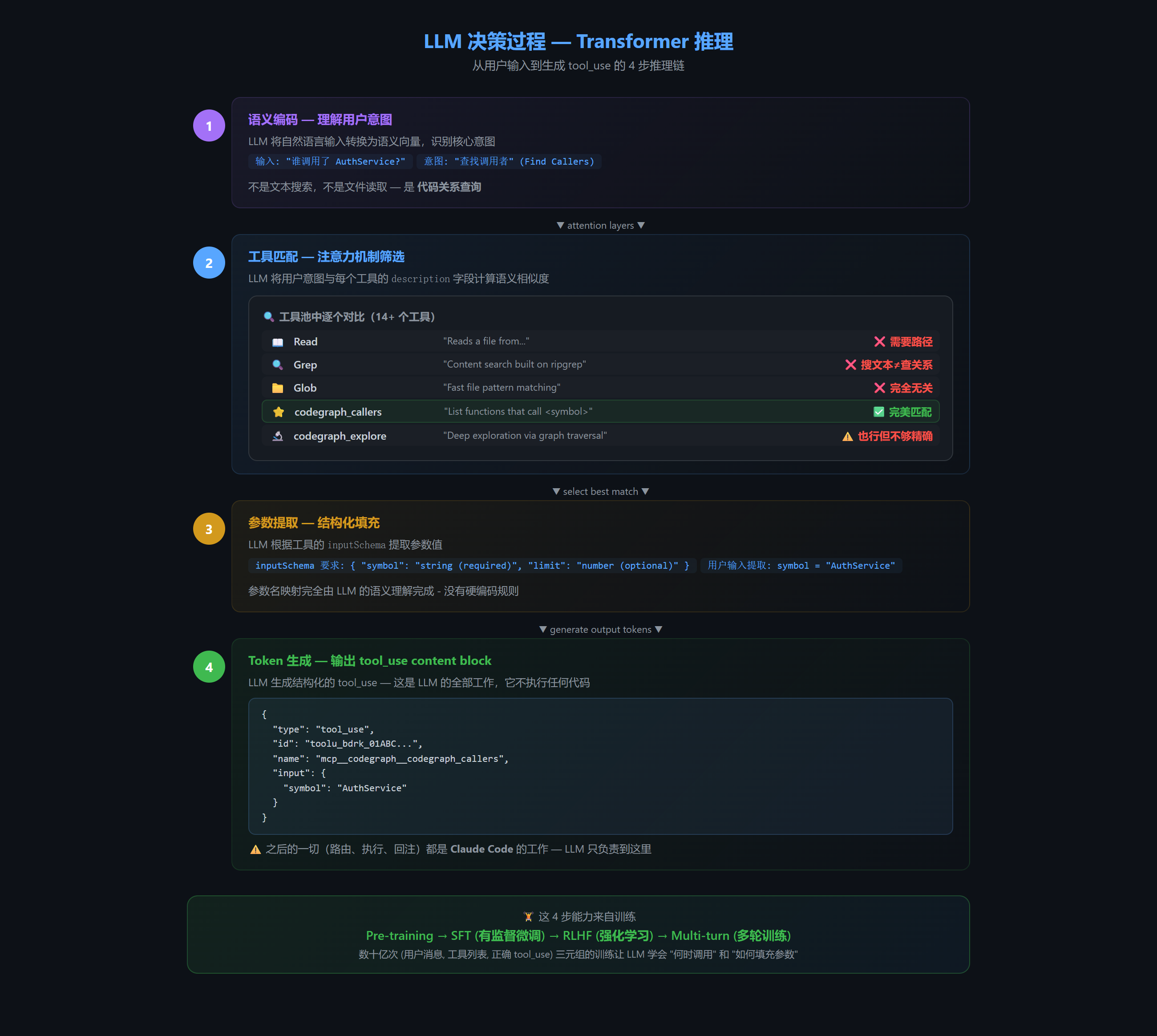
上图展示了 LLM 的 4 步推理链:语义编码 → 工具匹配(注意力机制在 14+ 个工具中对比 description)→ 参数提取(按 inputSchema 填充)→ 生成 tool_use token。
6.3 Function Calling 的训练原理
LLM 的 Function Calling 能力是通过多阶段训练获得的:
| 阶段 | 训练内容 | 产出 |
|---|---|---|
| Pre-training | 数万亿 Token 的文本语料 | 基础语言理解能力 |
| SFT (有监督微调) | (用户消息, 工具列表, 正确 tool_call) 三元组 |
学会"何时调用工具"和"如何填充参数" |
| RLHF | 强化学习优化工具选择的准确率 | 减少错误调用、减少不必要调用 |
| Multi-turn | 多轮工具调用训练 | 学会"调用→看结果→再调用"的链式推理 |
6.4 多工具并行调用的决策
LLM 可以同时决定调用多个工具:
用户: "对比 main.ts 和 utils.ts 中 AuthService 的使用情况"

LLM 输出:
→ 工具调用 1: codegraph_explore("AuthService main.ts")
→ 工具调用 2: codegraph_explore("AuthService utils.ts")

两个调用并行发送,结果汇总后再由 LLM 综合回答
7. 第六层:Claude Code 中的 MCP 集成
Claude Code 的 MCP 集成代码是闭源的,但配置文件和启动行为完全可见。
📄 配置文件: MCP Server 配置、权限配置
7.1 MCP Server 配置
📄 完整配置见 [第 5.1 节](#第 5.1 节) 的
~/.claude.json和~/.claude/settings.json。此处不再重复,重点讲解命名空间规则和工作原理。
7.2 命名空间规则
Claude Code 使用 三段式命名 将 MCP 工具注入 LLM:
mcp__{server-name}__{tool-name}

如: mcp__codegraph__codegraph_callers
     ^^^^^ ^^^^^^^^^ ^^^^^^^^^^^^^^^^
     前缀   server名    实际工具名
这个前缀 mcp__ 是 Claude Code 内部的路由标记------工具调用返回时,Claude Code 通过解析这个前缀来决定将请求路由到哪个 MCP Server 子进程。
7.3 真实的 tool_use 格式
当 LLM 决定调用 CodeGraph 时,返回的是 Anthropic API 的标准 tool_use content block:
json
{
  "role": "assistant",
  "content": [{
    "type": "tool_use",
    "id": "toolu_bdrk_01ABC123...",
    "name": "mcp__codegraph__codegraph_callers",
    "input": {
      "symbol": "AuthService"
    }
  }]
}
Claude Code 收到后:
- 检测
name.startsWith("mcp__")→ 识别为 MCP 工具 - 解析
mcp__codegraph__codegraph_callers→ server=codegraph, tool=codegraph_callers - 找到
codegraph对应的子进程 → 发送tools/callJSON-RPC 请求 - 收到结果后以
tool_resultcontent block 回注到 messages
7.4 完整示例:从配置到工具可用的全流程
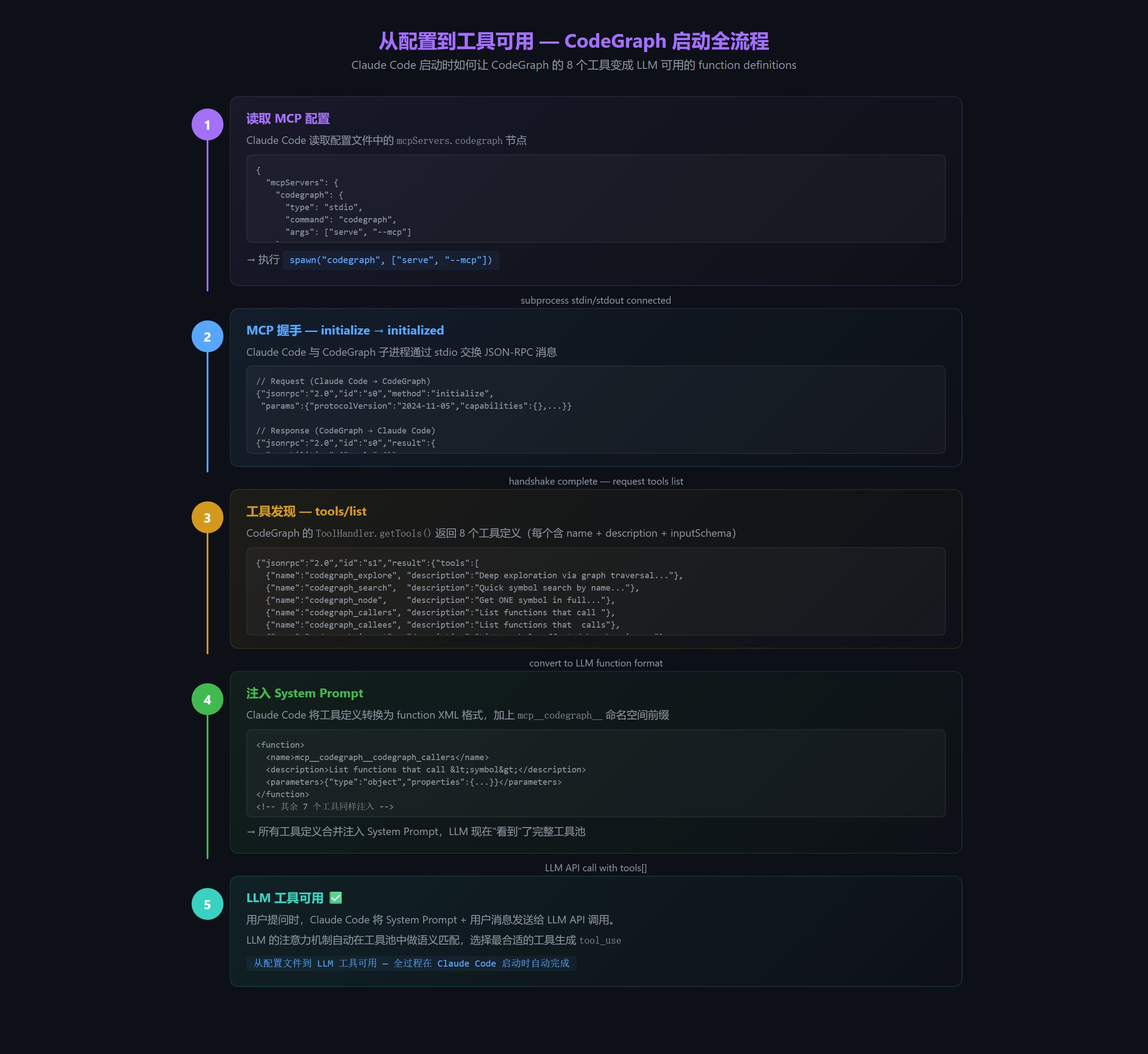
上图展示了从配置文件到 LLM "看到"工具的 5 步流程:读配置 → MCP 握手 → 工具发现 → System Prompt 注入 → 工具可用。
7.5 Claude Code 如何决定使用 CodeGraph 而不是内置工具?
这是关键问题:Claude Code 拥有大量内置工具 (Read、Write、Edit、Grep、Glob、Bash 等),LLM 必须在一个工具池中做选择------什么时候该用 CodeGraph,什么时候该用自己的内置工具?
7.5.1 决策全在 LLM
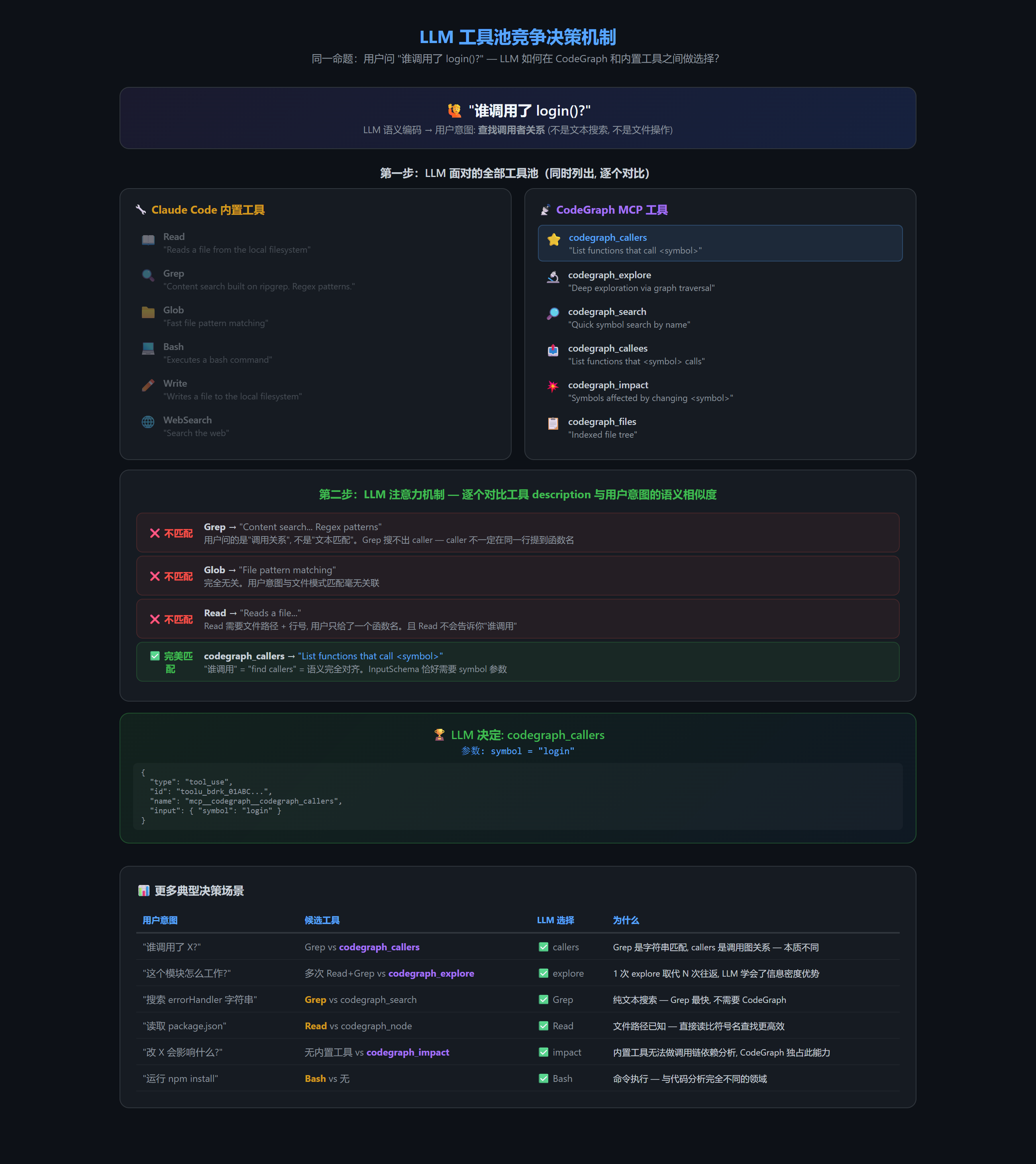
上图完整展示了 LLM 在 14+ 个工具中做选择的过程:用户意图 → 全部工具池展开 → 逐个 description 语义匹配 → 选中 codegraph_callers。
核心机制 :LLM 没有硬编码的路由规则,完全靠 description 字段做语义匹配。CodeGraph 工具的 description 写得好(精确、有区分度),自然会在对应的语义场景下"胜出"。
7.5.2 典型决策场景对照
| 用户意图 | 你可能想到的工具 | LLM 实际选哪个 | 为什么 |
|---|---|---|---|
| "谁调用了 X?" | Grep(搜文本) | codegraph_callers | Grep 只能搜字符串匹配,callers 查的是调用图关系------caller 不一定在同一行提到函数名 |
| "X 函数的源码是什么?" | Read(读文件) | codegraph_node / codegraph_explore | Read 需要你知道文件路径和行号,CodeGraph 用符号名就能定位 |
| "这个模块怎么工作的?" | 多次 Read + Grep | codegraph_explore(一次调用) | explore 自动图遍历+聚合,一次代替多次 Read/Grep 往返 |
| "项目有哪些文件?" | Glob / ls | codegraph_files | files 返回带符号计数的结构化树,比 Glob 更信息密集 |
| "改 X 会影响什么?" | 人工阅读 | codegraph_impact | Grep 完全做不到调用链级的依赖分析 |
| "搜索 errorHandler 字符串" | codegraph_search | Grep | 这是纯文本搜索,Grep 最快 |
| "读取 package.json" | codegraph_node | Read | 文件路径已知,Read 直接读 |
| "运行 npm install" | 无 | Bash | 这是命令行执行,与代码分析无关 |
规律 :当用户意图涉及代码关系 (调用、继承、影响、结构)时,LLM 选 CodeGraph;当意图是文本匹配 或文件操作 或命令执行时,LLM 选内置工具。
7.5.3 工具竞争的本质:谁的信息密度更高
用户问 "AuthService 怎么实现的?"

方案 A (不用 CodeGraph):
  Grep "AuthService" → 20 个文件匹配
  → Read file1.ts → 不完整
  → Grep "class AuthService" → 找到定义
  → Read auth.ts → 源码
  → 还需找到调用者... Grep "AuthService\(" → 没找到
  (共 5+ 次 LLM 往返, 大量 token 消耗)

方案 B (用 CodeGraph):
  codegraph_explore("AuthService") → 一次返回:
  - AuthService 完整源码(按符号聚类)
  - 调用者列表 (LoginController, OAuthHandler...)
  - 被调用的函数 (UserRepository, HashUtil...)
  - 关系图 (谁调用谁)
  (1 次往返, 信息密度极高)

结果: LLM 通过大量训练学会了------对于"理解代码"类问题,
工具 description 中带 "graph"/"explore"/"callers" 关键字的
比纯文本搜索工具高效得多。
7.5.4 并行调用:CodeGraph 和内置工具同时使用
LLM 可以在一轮中同时选择多种工具:
用户: "找出 AuthService.login 的实现和所有调用者,然后读取配置文件"

LLM 并行生成 3 个 tool_use:
  → codegraph_explore("AuthService.login")   [CodeGraph: 源码+调用关系]
  → codegraph_callers("AuthService.login")     [CodeGraph: 调用者列表]
  → Read("config/auth.config.ts")              [内置工具: 直接读文件]

全部并行执行,结果汇总后 LLM 综合回答
8. 完整调用链路:逐帧回放
以用户在 Claude Code 中提问 "谁调用了 AuthService.login?" 为例,追踪从键盘输入到屏幕输出的完整路径:
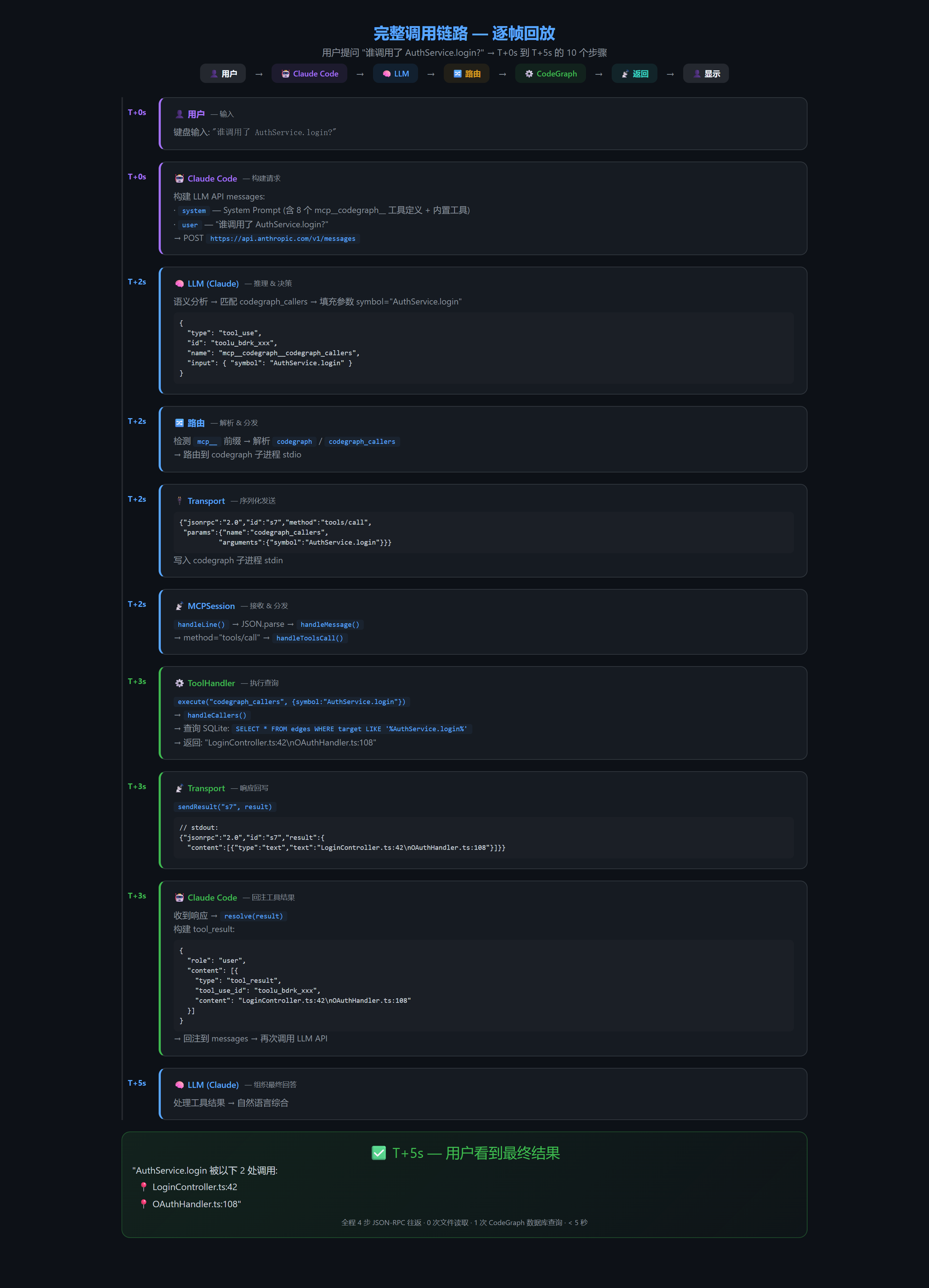
上图展示了 10 个步骤的逐帧回放:从 T+0s 用户输入到 T+5s 显示结果。关键节点:LLM 语义匹配(T+2s)、JSON-RPC 往返(T+2s→T+3s)、CodeGraph 查询(T+3s)、结果回注(T+3s)、最终回答(T+5s)。
9. 实战:CodeGraph 工具调用示例 --- Claude Code ↔ CodeGraph 交互实录
本节展示 Claude Code 与 CodeGraph 之间真实的 JSON-RPC 交互。以下示例均可通过在 Claude Code 中输入对应提示词来复现(需要先安装和配置 CodeGraph MCP Server)。
9.1 CodeGraph 全部 8 个工具定义
以下是通过 tools/list 获取的真实工具 Schema:
| # | 工具名 | 核心参数 | LLM 看到的 description | 典型场景 |
|---|---|---|---|---|
| 1 | codegraph_explore |
query, maxFiles, projectPath |
Deep exploration: find relevant symbols via graph traversal, group by file, read contiguous sections. Primary tool --- usually the only call needed. | "这个模块怎么工作的?" |
| 2 | codegraph_search |
query, kind, limit, projectPath |
Quick symbol search by name. Returns locations only. Use codegraph_explore for source. | "AuthService 在哪儿?" |
| 3 | codegraph_node |
symbol, includeCode, file, line, projectPath |
Get ONE symbol in full --- location, signature, callers/callees trail, and verbatim body. | "看 AuthService 源码" |
| 4 | codegraph_callers |
symbol, limit, projectPath |
List functions that call <symbol>. For the full flow, use codegraph_explore. |
"谁调用了 login()?" |
| 5 | codegraph_callees |
symbol, limit, projectPath |
List functions that <symbol> calls. |
"login() 调用了哪些函数?" |
| 6 | codegraph_impact |
symbol, depth, projectPath |
List symbols affected by changing <symbol>. Use before a refactor. |
"改 AuthService 影响范围?" |
| 7 | codegraph_files |
format, pattern, path, projectPath |
Indexed file tree with language + symbol counts. Faster than Glob. | "项目结构是什么?" |
| 8 | codegraph_status |
无(可选 projectPath) |
Index health check (files / nodes / edges). Skip unless debugging. | "索引状态 OK?" |
9.2 真实交互示例 1:codegraph_callers
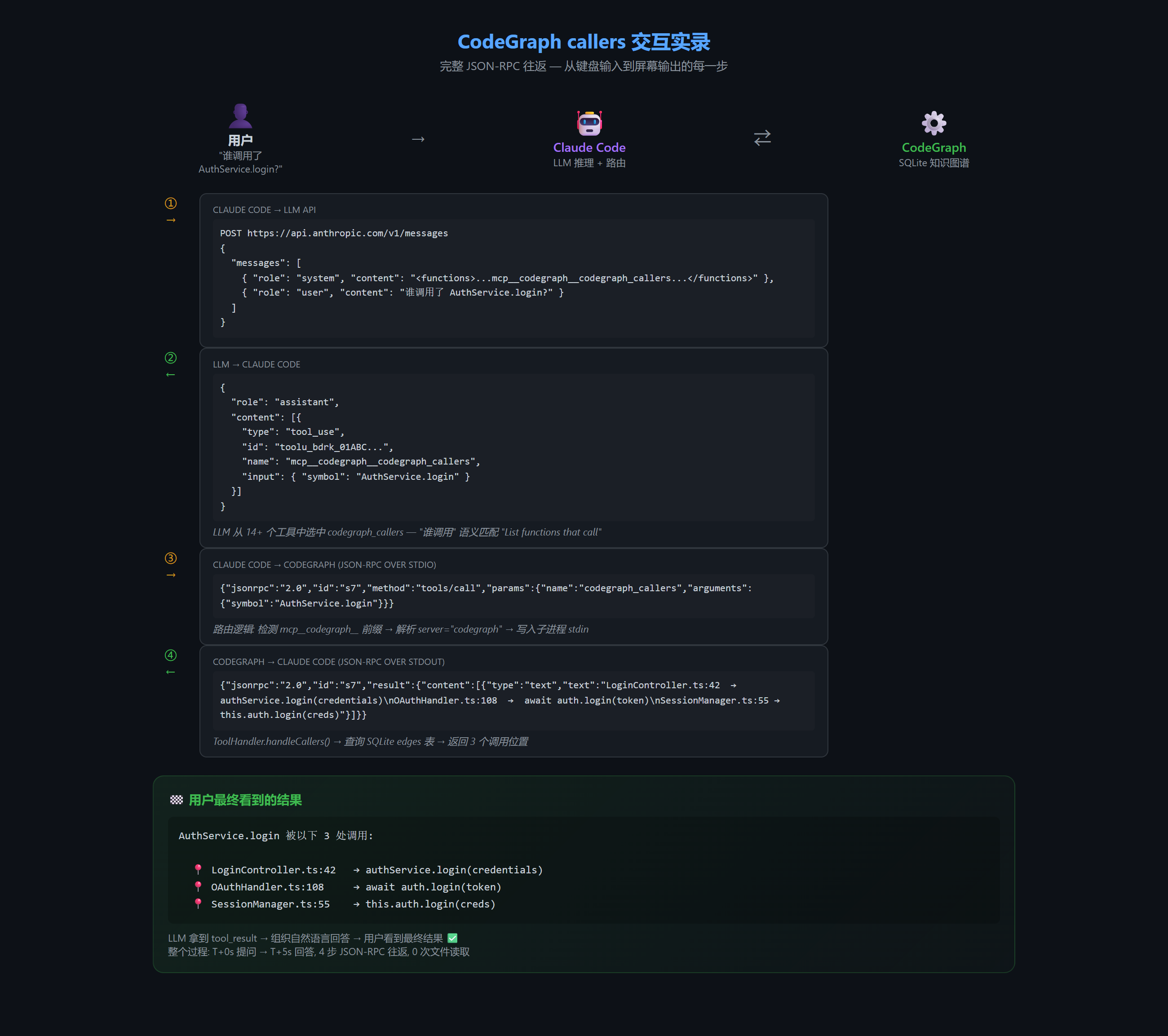
用户在 Claude Code 中输入: "谁调用了 AuthService.login?"
═══════════════════════════════════════════════════════════════
LLM 分析 → 决定调用 codegraph_callers,参数 symbol="AuthService.login"

═══════════ Claude Code → CodeGraph (JSON-RPC Request) ═══════════
{
  "jsonrpc": "2.0",
  "id": "s7",
  "method": "tools/call",
  "params": {
    "name": "codegraph_callers",
    "arguments": {
      "symbol": "AuthService.login"
    }
  }
}

═══════════ CodeGraph → Claude Code (JSON-RPC Response) ═══════════
{
  "jsonrpc": "2.0",
  "id": "s7",
  "result": {
    "content": [{
      "type": "text",
      "text": "LoginController.ts:42  →  authService.login(credentials)\nOAuthHandler.ts:108  →  await auth.login(token)\nSessionManager.ts:55 →  this.auth.login(creds)"
    }]
  }
}

═══════════ Claude Code → LLM (tool_result 回注) ═══════════
{
  "role": "user",
  "content": [{
    "type": "tool_result",
    "tool_use_id": "toolu_bdrk_xxx",
    "content": "LoginController.ts:42  →  authService.login(credentials)\n..."
  }]
}
═══════════════════════════════════════════════════════════════════
用户看到: "AuthService.login 被以下 3 处调用:
  - LoginController.ts:42 --- authService.login(credentials)
  - OAuthHandler.ts:108 --- await auth.login(token)
  - SessionManager.ts:55 --- this.auth.login(creds)"
9.3 真实交互示例 2:codegraph_explore
用户在 Claude Code 中输入: "用户登录流程是怎么实现的?"
═══════════ Claude Code → CodeGraph (JSON-RPC Request) ═══════════
{
  "jsonrpc": "2.0",
  "id": "s9",
  "method": "tools/call",
  "params": {
    "name": "codegraph_explore",
    "arguments": {
      "query": "login user authenticate LoginController AuthService",
      "maxFiles": 8
    }
  }
}

说明: codegraph_explore 的 query 接受自然语言或符号名列表。
LLM 会把用户意图翻译为相关符号名拼成 query 字符串。

═══════════ CodeGraph → Claude Code (JSON-RPC Response) ═══════════
{
  "jsonrpc": "2.0",
  "id": "s9",
  "result": {
    "content": [{
      "type": "text",
      "text": "#### LoginController.ts --- login(), handleAuth()\n\n```typescript\n// Line 38-52 (2 / 14 shown --- 2 of 4 regions covered)\nasync login(req: LoginRequest, res: Response) {\n  const credentials = { email: req.body.email, password: req.body.password };\n  const result = await this.authService.login(credentials);\n  ...\n}\n```\n\n#### AuthService.ts --- login(), validateCredentials()\n\n```typescript\n// Line 22-35 (1 / 9 shown) ...\n```\n\n---\n#### Relationships\nEdges in the code graph that connect these results:\n  LoginController.login calls AuthService.login\n  AuthService.login calls UserRepository.findByEmail\n  AuthService.login calls HashUtil.compare\n\n#### Additional relevant files (not shown)\n  UserRepository.ts, HashUtil.ts, SessionService.ts"
    }]
  }
}
═══════════════════════════════════════════════════════════════════

LLM 基于返回的源文件和调用关系图,组织出完整的回答。
codegraph_explore 一次调用通常足以回答一个架构问题------
"primary tool" 的设计哲学即来源于此。
9.4 真实交互示例 3:多工具链式调用
用户在 Claude Code 中输入: "我想重构 AuthService.validateCredentials,分析影响范围"
═══ 第 1 轮 ═══
LLM → codegraph_impact("AuthService.validateCredentials", depth=2)
CodeGraph 返回: 影响了 UserRepository, SessionService (2 hops, 8 dependents)

═══ 第 2 轮 ═══
LLM → codegraph_explore("AuthService validateCredentials UserRepository SessionService")
CodeGraph 返回: 完整的 validateCredentials 源码 + 2 个受影响文件的调用上下文

═══ 第 3 轮 ═══
LLM → 综合分析, 生成重构建议
用户看到: 影响分析 + 具体重构方案
9.5 如何复现
配置好 CodeGraph 后(MCP Server 配置中添加 codegraph),在 Claude Code 中直接提问即可触发上述交互:
# 推荐尝试的 prompt:
1. "用 codegraph_callers 查一下 xxx 函数的调用者"     → 触发 callers
2. "xxx 模块的实现原理是什么"                          → 触发 explore
3. "项目里有哪些文件是 TypeScript?"                    → 触发 files
4. "改 xxx 函数会影响到哪些地方"                        → 触发 impact
9.6 CodeGraph 关键设计决策
| 决策 | CodeGraph 的做法 | 说明 |
|---|---|---|
| 传输方式 | Shared Daemon + Proxy | 多个 MCP 客户端共享一个 SQLite 实例,减少资源消耗 |
| 工具定义 | 静态 Schema + 动态描述 | getTools() 根据项目文件数动态调整 explore 的 description |
| 输出预算 | 自适应 | 大项目给更大探索预算(更多 maxFiles),小项目收紧避免浪费上下文 |
| 文件监听 | 每个 engine 一个 watcher | daemon 模式下 N 个 session 共享一个 inotify set |
| 安全 | CODEGRAPH_MCP_TOOLS env | allowlist 可隐藏部分工具,不暴露的从 tools/list 结果中移除 |
| Primary Tool | codegraph_explore | 一次调用通常能回答整个问题,减少 LLM 往返次数 |
10. 总结:核心要点回顾
10.1 六层架构速查(CodeGraph 实例)
| 层级 | 实际组件 | 说明 | 一句话 |
|---|---|---|---|
| 第一层 | StdioTransport |
CodeGraph MCP 源码 (transport.d.ts) | 搬运 JSON 字符串(stdin/stdout 行协议) |
| 第二层 | LineBasedJsonRpcTransport |
同上 | 保证"发一收一"(messageId 配对 + 超时) |
| 第三层 | MCPSession + ToolHandler |
CodeGraph MCP 源码 (session.d.ts, tools.d.ts) | 定义和执行工具(8 个 codegraph 工具) |
| 第四层 | Claude Code (闭源) | MCP Server 配置文件 | 发现和请求工具 |
| 第五层 | Claude Sonnet 4 | Anthropic API | 决定"调哪个、传什么" |
| 第六层 | Claude Code (System Prompt 组装) | MCP Server 配置 + 权限配置 | 编排整个流程 |
10.2 核心调用路径(基于 CodeGraph v0.9.9)
工具定义:
  ToolHandler.getTools()
  → 返回 8 个 ToolDefinition: codegraph_explore, codegraph_search,
    codegraph_node, codegraph_callers, codegraph_callees,
    codegraph_impact, codegraph_files, codegraph_status
  → 每个含 name + description + inputSchema

工具调用:
  Claude Code 发送 tools/call → CodeGraph MCPSession.handleToolsCall()
  → ToolHandler.execute("codegraph_callers", {symbol:"..."})
  → handleCallers() → 查询 SQLite 知识图谱
  → 返回 ToolResult { content: [{type:"text", text:"..."}] }

LLM 决策:
  工具定义 → 权限配置中的 allowlist
  → System Prompt 注入 (mcp__codegraph__ 前缀)
  → Claude API 推理 → 语义匹配 → 生成 tool_use token
  → Claude Code 路由 → 上述链路
10.3 关键设计原则
- LLM 只管决策,不管执行 --- LLM 生成 tool_use token,执行完全由 Claude Code + CodeGraph 处理
- JSON-RPC 是唯一通信协议 --- 所有 MCP 通信都是 JSON-RPC 2.0,Transport 只决定传输方式
- 工具定义即契约 ---
description是 LLM 决策的依据,inputSchema是参数约束 - 工具结果以 user 角色回注 --- Anthropic API 的设计约定,不是 MCP 特有
- Daemon 共享模式 --- CodeGraph 使用 Proxy + Shared Daemon 架构,N 个 session 共享一个 CodeGraph 实例
- 命名空间前缀 ---
mcp__codegraph__codegraph_callers,Claude Code 用此前缀路由 - MCP 协议开放,实现独立 --- CodeGraph 自实现了全部 MCP 协议,不依赖任何外部 SDK
10.4 一句话精髓
LLM 调用 MCP 工具的本质 = LLM 负责"想"(语义决策) + Claude Code 负责"编排"(路由 + 回注) + CodeGraph 负责"能力"(知识图谱查询) + JSON-RPC 负责"对"(请求响应配对) + stdio 负责"运"(字节传输)