Qdrant 向量数据库从入门到实战:构建高效语义检索系统
Qdrant 是一个 AI 原生的向量搜索与语义搜索引擎,专为高性能、大规模向量检索场景设计。它不仅能高效存储和检索向量数据,还原生支持混合搜索、量化压缩、多租户等企业级特性,是构建 RAG(检索增强生成)、知识库问答、NLP2SQL、推荐系统等 AI 应用的核心组件之一。
在典型的 AI 应用流程中,我们会先将文本、图像、音频等非结构化数据通过嵌入模型转换为高维向量,再将向量与对应的原始数据、元数据(如表名、字段名、业务标签)一起写入 Qdrant。当用户发起查询时,同样将查询内容转换为向量,通过相似度检索快速找到最相关的上下文信息,最终送入大模型生成准确回答。
一、Qdrant 基础介绍
1.1 Qdrant 的核心优势
Qdrant 相比其他向量数据库,具有以下显著特点:
- Rust 语言编写:极致的性能表现,低延迟、高吞吐量,支持百万级 QPS
- 原生混合搜索:同时支持向量相似度检索和全文关键词检索,大幅提升召回质量
- 丰富的过滤能力:支持复杂的 Payload 过滤条件,可与向量检索无缝结合
- 多种量化技术:支持标量量化、乘积量化,在保持检索精度的同时降低内存占用 4-16 倍
- 分布式架构:支持水平扩展,可处理百亿级向量数据
- 开箱即用:提供完善的 Web UI、REST API 和 gRPC 接口,以及多语言客户端
1.2 核心概念详解
1.2.1 Collection(集合)
Collection 是 Qdrant 中最高级别的数据组织单元,相当于传统数据库中的"表"。同一类向量数据应放在同一个 Collection 中,例如:
- 在 RAG 项目中,可创建
knowledge_baseCollection 存储文档片段 - 在 NLP2SQL 项目中,可创建
nlp2sql_schemaCollection 存储表结构、字段说明和 SQL 示例 - 在推荐系统中,可创建
user_embeddings和item_embeddings分别存储用户和物品向量
创建 Collection 时必须指定向量维度 和距离计算方式,这两个参数一旦创建便无法修改。向量维度必须与后续写入的向量长度完全一致。
1.2.2 Point(点)
Point 是 Qdrant 中的最小数据单元,相当于传统数据库中的"行"。每个 Point 包含三个核心部分:
id:唯一标识符,支持整数(u64)和 UUID 两种类型vector:用于相似度计算的高维向量,维度必须与 Collection 配置一致payload:与向量绑定的结构化业务数据,支持任意 JSON 格式
在实际业务中,vector 负责语义匹配,payload 负责存储可读信息和过滤条件。例如在 NLP2SQL 场景中,payload 可以包含:
python
{
    "type": "sql_example",
    "table_name": "orders",
    "question": "查询2024年第一季度的总销售额",
    "sql": "SELECT SUM(amount) FROM orders WHERE order_time BETWEEN '2024-01-01' AND '2024-03-31'",
    "difficulty": "easy"
}
1.2.3 Distance(距离度量)
Distance 定义了向量之间相似度的计算方式,不同的距离度量适用于不同的场景:
| 距离类型 | 适用场景 | 特点 |
|---|---|---|
Distance.COSINE |
文本语义检索 | 最常用,不受向量长度影响,关注向量方向 |
Distance.DOT |
归一化向量检索 | 计算速度最快,与余弦相似度在向量归一化后等价 |
Distance.EUCLID |
数值空间距离计算 | 适合图像、传感器数据等欧几里得空间数据 |
Distance.MANHATTAN |
高维稀疏数据 | 对异常值不敏感 |
最佳实践:文本语义检索优先使用余弦相似度;如果嵌入模型输出已经归一化,使用点积可以获得更好的性能。
二、准备 Qdrant 运行环境
2.1 使用 Docker 启动 Qdrant
Docker 是部署 Qdrant 最简单、最推荐的方式:
bash
# 拉取最新稳定版镜像
docker pull qdrant/qdrant:latest

# Windows 系统启动命令
docker run -p 6333:6333 -p 6334:6334 ^
  -v "%cd%/qdrant_storage:/qdrant/storage" ^
  qdrant/qdrant:latest

# Linux/macOS 系统启动命令
docker run -p 6333:6333 -p 6334:6334 \
  -v "$(pwd)/qdrant_storage:/qdrant/storage:z" \
  qdrant/qdrant:latest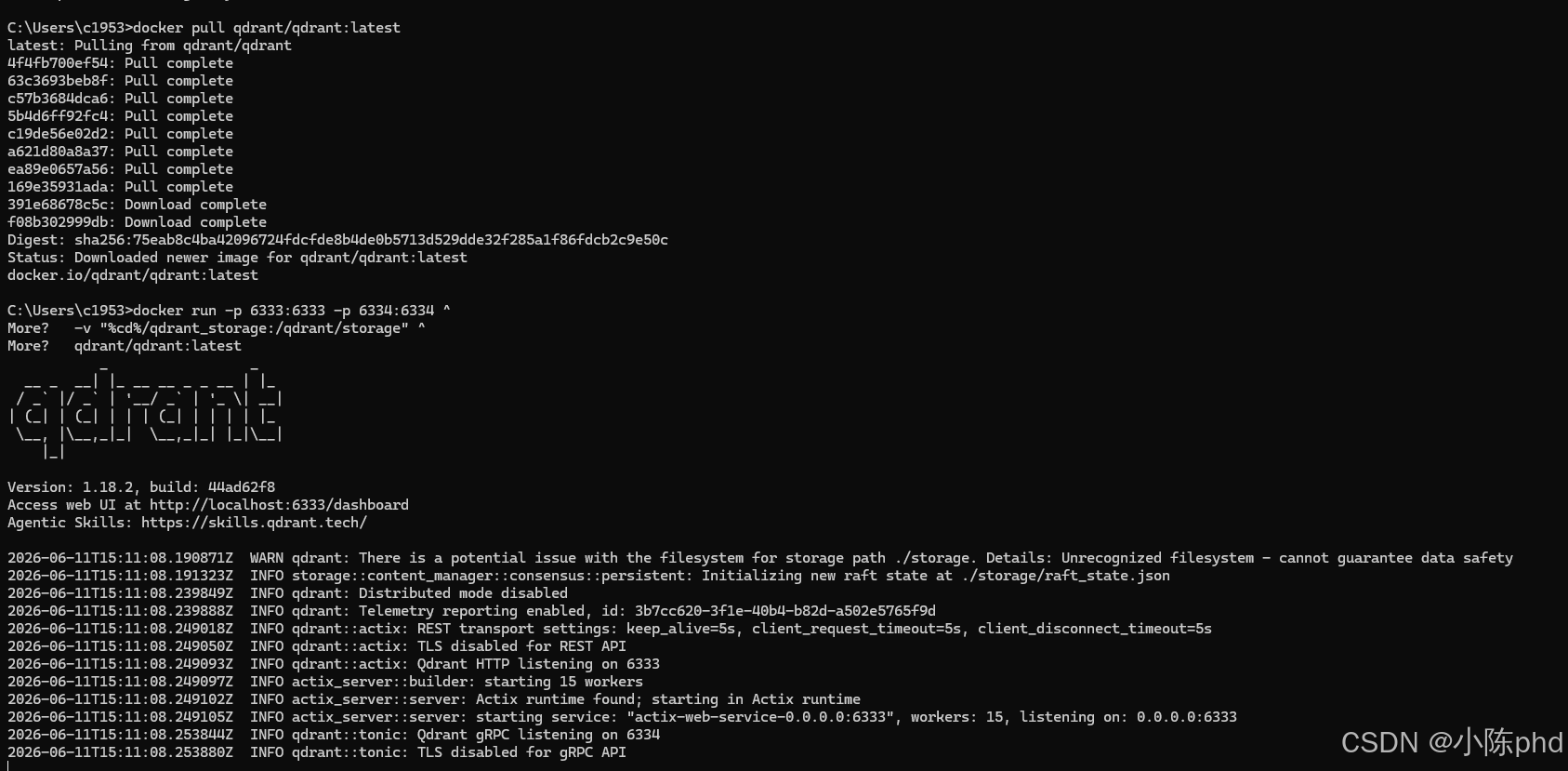
启动成功后,可访问以下地址:
- REST API:
http://localhost:6333 - Web UI 控制台:
http://localhost:6333/dashboard - gRPC 接口:
localhost:6334
⚠️ 安全提醒:默认启动的 Qdrant 没有开启认证和加密,仅适合本地开发使用。生产环境部署必须配置 API Key 认证和 TLS 加密。
2.2 安装 Python 客户端
Qdrant 提供了功能完善的 Python 客户端,支持同步和异步两种模式:
bash
# 安装最新版客户端
pip install qdrant-client[fastembed]
推荐安装带 fastembed 扩展的版本,它内置了多个开源嵌入模型,可以直接在客户端本地生成向量,无需额外部署嵌入服务。
2.3 初始化客户端连接
python
# 异步客户端(推荐,性能更好)
from qdrant_client import AsyncQdrantClient

# 本地连接
client = AsyncQdrantClient(url="http://localhost:6333")

# 带认证的连接(生产环境)
# client = AsyncQdrantClient(
#     url="https://your-qdrant-instance.com",
#     api_key="your-api-key"
# )

# 测试连接
async def test_connection():
    try:
        await client.get_collections()
        print("Qdrant 连接成功!")
    except Exception as e:
        print(f"连接失败:{e}")

import asyncio
asyncio.run(test_connection())
三、创建 Collection
3.1 基础 Collection 创建
python
from qdrant_client import AsyncQdrantClient
from qdrant_client.models import Distance, VectorParams

client = AsyncQdrantClient(url="http://localhost:6333")

async def create_basic_collection():
    # 创建向量维度为1536(OpenAI text-embedding-3-small 输出维度),距离计算方式为余弦相似度的集合
    await client.create_collection(
        collection_name="knowledge_base",
        vectors_config=VectorParams(
            size=1536,
            distance=Distance.COSINE,
            on_disk=True  # 将向量存储在磁盘上,节省内存(适合大数据量)
        ),
        # 可选:配置分片和复制因子(分布式部署时使用)
        # shard_number=3,
        # replication_factor=2,
    )

    # 验证集合创建成功
    collection_info = await client.get_collection("knowledge_base")
    print(f"集合创建成功,向量维度:{collection_info.config.params.vectors.size}")

asyncio.run(create_basic_collection())
3.2 多向量 Collection
Qdrant 支持在一个 Collection 中存储多个不同维度的向量,这在需要同时使用多个嵌入模型的场景中非常有用:
python
await client.create_collection(
    collection_name="multi_vector_collection",
    vectors_config={
        "text": VectorParams(size=1536, distance=Distance.COSINE),
        "image": VectorParams(size=512, distance=Distance.EUCLID)
    }
)
写入数据时需要指定对应的向量名称:
python
await client.upsert(
    collection_name="multi_vector_collection",
    points=[
        PointStruct(
            id=1,
            vector={
                "text": [0.1, 0.2, ..., 0.1536],
                "image": [0.3, 0.4, ..., 0.512]
            },
            payload={"title": "产品介绍"}
        )
    ]
)
3.3 避免重复创建 Collection
在项目初始化脚本中,应先检查 Collection 是否存在,避免重复创建导致数据丢失:
python
COLLECTION_NAME = "knowledge_base"

async def init_collection():
    if not await client.collection_exists(COLLECTION_NAME):
        await client.create_collection(
            collection_name=COLLECTION_NAME,
            vectors_config=VectorParams(size=1536, distance=Distance.COSINE)
        )
        print(f"集合 {COLLECTION_NAME} 创建成功")
    else:
        print(f"集合 {COLLECTION_NAME} 已存在")
四、写入向量数据
4.1 基础写入操作
使用 upsert 方法写入数据,它支持"有则更新,无则插入"的语义:
python
from qdrant_client.models import PointStruct

async def insert_points():
    points = [
        PointStruct(
            id=1,
            vector=[0.05, 0.61, 0.76, 0.74],
            payload={"city": "Berlin", "country": "Germany", "population": 3.7}
        ),
        PointStruct(
            id=2,
            vector=[0.19, 0.81, 0.75, 0.11],
            payload={"city": "London", "country": "UK", "population": 8.9}
        ),
        PointStruct(
            id=3,
            vector=[0.36, 0.55, 0.47, 0.94],
            payload={"city": "Moscow", "country": "Russia", "population": 12.5}
        )
    ]

    operation_info = await client.upsert(
        collection_name="test_collection",
        wait=True,  # 等待写入完成后再返回
        points=points
    )

    print(f"成功写入 {operation_info.status} 条数据")
4.2 批量写入大数据量
当需要写入大量数据时,应分批次写入,避免单次请求过大:
python
import numpy as np

async def batch_insert(batch_size=100):
    # 生成10000条测试数据
    num_points = 10000
    vectors = np.random.rand(num_points, 1536).tolist()

    for i in range(0, num_points, batch_size):
        batch_vectors = vectors[i:i+batch_size]
        batch_points = [
            PointStruct(
                id=i+j,
                vector=vector,
                payload={"index": i+j, "group": j % 10}
            )
            for j, vector in enumerate(batch_vectors)
        ]

        await client.upsert(
            collection_name="knowledge_base",
            wait=True,
            points=batch_points
        )

        print(f"已写入 {i+len(batch_points)} 条数据")
4.3 使用 FastEmbed 本地生成向量
Qdrant 客户端内置的 FastEmbed 可以直接在本地生成高质量向量,无需调用外部 API:
python
from qdrant_client import QdrantClient
from qdrant_client.models import PointStruct

# 初始化客户端时指定使用 FastEmbed
client = QdrantClient(
    url="http://localhost:6333",
    embedding_model_name="BAAI/bge-small-zh-v1.5"  # 中文嵌入模型
)

# 文本会自动转换为向量
client.add(
    collection_name="knowledge_base",
    documents=[
        "Qdrant 是一个高性能的向量数据库",
        "向量数据库用于存储和检索高维向量",
        "RAG 技术结合了检索和生成能力"
    ],
    metadatas=[
        {"category": "数据库", "source": "官网"},
        {"category": "数据库", "source": "教程"},
        {"category": "AI", "source": "论文"}
    ]
)
五、执行向量检索
5.1 基础相似度查询
python
async def basic_search():
    search_result = await client.query_points(
        collection_name="test_collection",
        query=[0.2, 0.1, 0.9, 0.7],  # 查询向量
        limit=5,  # 返回最相似的5条结果
        with_payload=True,  # 返回 payload 数据
        with_vectors=False  # 不返回原始向量(节省带宽)
    )

    for point in search_result.points:
        print(f"ID: {point.id}, 相似度: {point.score:.4f}, 城市: {point.payload['city']}")
5.2 带 Payload 过滤的检索
Payload 过滤可以先限定数据范围,再进行向量检索,大幅提升检索精度和速度:
python
from qdrant_client.models import FieldCondition, Filter, MatchValue, Range

async def filtered_search():
    # 查找人口大于500万的欧洲城市中最相似的结果
    search_result = await client.query_points(
        collection_name="test_collection",
        query=[0.2, 0.1, 0.9, 0.7],
        query_filter=Filter(
            must=[
                FieldCondition(
                    key="country",
                    match=MatchValue(value="Germany")
                ),
                FieldCondition(
                    key="population",
                    range=Range(gt=3.0)  # 大于300万
                )
            ],
            must_not=[
                FieldCondition(
                    key="city",
                    match=MatchValue(value="Berlin")
                )
            ]
        ),
        limit=3,
        with_payload=True
    )

    print("过滤后的检索结果:")
    for point in search_result.points:
        print(point.id, point.score, point.payload)
5.3 混合搜索(向量+全文)
Qdrant 原生支持混合搜索,同时结合向量的语义理解和全文检索的关键词匹配能力,是 RAG 系统中提升召回质量的关键技术:
python
async def hybrid_search():
    # 首先需要为全文检索字段创建索引
    await client.create_payload_index(
        collection_name="knowledge_base",
        field_name="content",
        field_schema="text"
    )

    # 执行混合搜索
    search_result = await client.query_points(
        collection_name="knowledge_base",
        query="向量数据库的应用场景",
        query_filter=Filter(
            must=[FieldCondition(key="category", match=MatchValue(value="数据库"))]
        ),
        limit=5,
        with_payload=True
    )

    print("混合搜索结果:")
    for point in search_result.points:
        print(f"相似度: {point.score:.4f}, 内容: {point.payload['content'][:50]}...")
5.4 分页查询
当需要展示大量检索结果时,使用分页查询:
python
async def paginated_search(page=1, page_size=10):
    search_result = await client.query_points(
        collection_name="knowledge_base",
        query=[0.2, 0.1, ..., 0.7],
        limit=page_size,
        offset=(page-1)*page_size,  # 偏移量
        with_payload=True
    )

    print(f"第 {page} 页结果:")
    for point in search_result.points:
        print(point.id, point.score)
六、性能优化技巧
6.1 为 Payload 字段创建索引
对于经常用于过滤的 Payload 字段,创建索引可以将过滤查询速度提升几个数量级:
python
# 为整数/浮点数字段创建索引
await client.create_payload_index(
    collection_name="knowledge_base",
    field_name="group",
    field_schema="integer"
)

# 为文本字段创建全文索引
await client.create_payload_index(
    collection_name="knowledge_base",
    field_name="content",
    field_schema="text"
)

# 为布尔字段创建索引
await client.create_payload_index(
    collection_name="knowledge_base",
    field_name="is_active",
    field_schema="bool"
)
6.2 使用量化技术
量化技术可以将向量从 32 位浮点数压缩为 8 位整数甚至更低,在保持 95% 以上检索精度的同时,将内存占用降低 4-16 倍:
python
from qdrant_client.models import QuantizationConfig, ScalarQuantization

# 创建时启用标量量化
await client.create_collection(
    collection_name="quantized_collection",
    vectors_config=VectorParams(size=1536, distance=Distance.COSINE),
    quantization_config=QuantizationConfig(
        scalar=ScalarQuantization(
            type="int8",  # 8位整数量化
            always_ram=True  # 将量化后的向量保留在内存中
        )
    )
)

# 为已有集合启用量化
await client.update_collection(
    collection_name="knowledge_base",
    quantization_config=QuantizationConfig(
        scalar=ScalarQuantization(type="int8")
    )
)
6.3 索引配置优化
Qdrant 使用 HNSW(Hierarchical Navigable Small World)索引进行向量检索,可以通过调整索引参数平衡检索速度和精度:
python
from qdrant_client.models import HnswConfigDiff

# 调整 HNSW 索引参数
await client.update_collection(
    collection_name="knowledge_base",
    hnsw_config=HnswConfigDiff(
        m=16,  # 每个节点的邻居数,越大精度越高,内存占用越大
        ef_construct=100,  # 构建索引时的邻居探索数
        ef_search=128  # 检索时的邻居探索数,越大精度越高,速度越慢
    )
)
七、数据管理进阶
7.1 更新和删除数据
python
# 更新 Point 的 payload
await client.set_payload(
    collection_name="test_collection",
    payload={"population": 3.8},
    points=[1]  # 要更新的 Point ID 列表
)

# 删除指定 ID 的 Point
await client.delete(
    collection_name="test_collection",
    points_selector=[1, 2]
)

# 根据过滤条件删除 Point
await client.delete(
    collection_name="test_collection",
    points_selector=Filter(
        must=[FieldCondition(key="country", match=MatchValue(value="UK"))]
    )
)

# 删除整个 Collection(谨慎操作!)
# await client.delete_collection("test_collection")
7.2 数据备份与恢复
python
# 创建快照
snapshot_info = await client.create_snapshot("knowledge_base")
print(f"快照创建成功:{snapshot_info.name}")

# 列出所有快照
snapshots = await client.list_snapshots("knowledge_base")
for snapshot in snapshots:
    print(f"快照名称:{snapshot.name}, 创建时间:{snapshot.creation_time}")

# 恢复快照
# await client.restore_snapshot("knowledge_base", "snapshot_name.snapshot")
八、NLP2SQL 实战示例
下面是一个完整的 NLP2SQL 场景下的 Qdrant 使用示例:
python
import asyncio
from qdrant_client import AsyncQdrantClient
from qdrant_client.models import Distance, VectorParams, PointStruct, Filter, FieldCondition, MatchValue

# 使用 BGE 中文嵌入模型
from sentence_transformers import SentenceTransformer
embedding_model = SentenceTransformer("BAAI/bge-small-zh-v1.5")

COLLECTION_NAME = "nlp2sql_schema"
client = AsyncQdrantClient(url="http://localhost:6333")

async def init_nlp2sql_collection():
    if not await client.collection_exists(COLLECTION_NAME):
        await client.create_collection(
            collection_name=COLLECTION_NAME,
            vectors_config=VectorParams(size=512, distance=Distance.COSINE)
        )

        # 创建表结构和SQL示例数据
        schema_data = [
            {
                "type": "table_schema",
                "table_name": "orders",
                "content": "订单表,存储所有订单信息。字段:order_id(订单ID), user_id(用户ID), amount(订单金额), order_time(下单时间), status(订单状态:pending/paid/shipped/completed/cancelled)"
            },
            {
                "type": "table_schema",
                "table_name": "users",
                "content": "用户表,存储用户信息。字段:user_id(用户ID), username(用户名), email(邮箱), register_time(注册时间), vip_level(VIP等级:0-5)"
            },
            {
                "type": "sql_example",
                "question": "查询所有已支付的订单",
                "sql": "SELECT * FROM orders WHERE status = 'paid'",
                "table_name": "orders"
            },
            {
                "type": "sql_example",
                "question": "统计2024年每个月的订单总额",
                "sql": "SELECT DATE_TRUNC('month', order_time) AS month, SUM(amount) AS total_amount FROM orders WHERE order_time >= '2024-01-01' GROUP BY month ORDER BY month",
                "table_name": "orders"
            },
            {
                "type": "sql_example",
                "question": "查询VIP等级大于3的用户的所有订单",
                "sql": "SELECT o.* FROM orders o JOIN users u ON o.user_id = u.user_id WHERE u.vip_level > 3",
                "table_name": "orders,users"
            }
        ]

        # 生成向量并写入Qdrant
        points = []
        for i, data in enumerate(schema_data):
            vector = embedding_model.encode(data["content"]).tolist()
            points.append(PointStruct(id=i, vector=vector, payload=data))

        await client.upsert(collection_name=COLLECTION_NAME, wait=True, points=points)
        print("NLP2SQL 知识库初始化完成")

async def retrieve_relevant_schema(question: str):
    query_vector = embedding_model.encode(question).tolist()

    # 同时检索表结构和SQL示例
    search_result = await client.query_points(
        collection_name=COLLECTION_NAME,
        query=query_vector,
        limit=5,
        with_payload=True
    )

    # 分离表结构和SQL示例
    table_schemas = []
    sql_examples = []
    for point in search_result.points:
        if point.payload["type"] == "table_schema":
            table_schemas.append(point.payload["content"])
        elif point.payload["type"] == "sql_example":
            sql_examples.append(f"问题:{point.payload['question']}\nSQL:{point.payload['sql']}")

    return table_schemas, sql_examples

async def main():
    await init_nlp2sql_collection()

    # 测试检索
    question = "查询2024年VIP用户的消费总额"
    table_schemas, sql_examples = await retrieve_relevant_schema(question)

    print("相关表结构:")
    for schema in table_schemas:
        print(f"- {schema}")

    print("\n相似SQL示例:")
    for example in sql_examples:
        print(f"- {example}")

if __name__ == "__main__":
    asyncio.run(main())
九、生产环境部署建议
9.1 安全配置
- 启用 API Key 认证:在启动命令中添加
-e QDRANT__SERVICE__API_KEY=your_secure_api_key - 启用 TLS 加密:配置证书和私钥,使用 HTTPS 协议
- 限制网络访问:只允许可信 IP 访问 Qdrant 服务
- 定期更新 Qdrant 版本,修复安全漏洞
9.2 资源配置
- 内存:建议内存大小为向量数据大小的 1.5-2 倍(启用量化后可大幅降低)
- CPU:Qdrant 对 CPU 要求较高,建议使用多核 CPU
- 存储:使用 SSD 存储,避免使用机械硬盘
- 分布式部署:数据量超过 1 亿条时,建议使用分布式集群部署
9.3 监控与运维
- 监控 Qdrant 的关键指标:查询延迟、吞吐量、内存使用率、磁盘使用率
- 定期备份数据,制定灾难恢复计划
- 建立索引优化和数据清理的定期任务
十、常见问题与排查
10.1 连接不上 Qdrant
- 检查 Docker 容器是否正在运行:
docker ps - 检查端口是否被占用:
netstat -tulpn | grep 6333 - 检查防火墙设置,确保 6333 和 6334 端口开放
- 尝试使用
curl http://localhost:6333测试 API 是否正常
10.2 向量维度不匹配错误
- 确认 Collection 创建时的
size参数与嵌入模型输出维度一致 - 常见嵌入模型维度:
- BAAI/bge-small-zh-v1.5:512 维
- OpenAI text-embedding-3-small:1536 维
- OpenAI text-embedding-3-large:3072 维
- Sentence-BERT all-MiniLM-L6-v2:384 维
10.3 检索结果不准确
- 检查距离计算方式是否正确,文本检索优先使用余弦相似度
- 尝试增加
limit参数,返回更多结果 - 检查嵌入模型是否适合当前业务场景,中文数据优先使用中文嵌入模型
- 考虑使用混合搜索,结合全文检索提升召回质量
10.4 查询速度慢
- 为常用的 Payload 过滤字段创建索引
- 启用量化技术,减少内存占用和计算量
- 调整 HNSW 索引的
ef_search参数,平衡速度和精度 - 避免使用过于复杂的过滤条件
十一、Qdrant Edge:轻量级嵌入式向量搜索
Qdrant Edge 是 Qdrant 推出的轻量级嵌入式向量搜索引擎,专为边缘设备和离线场景设计:
- 无需后台服务,直接嵌入到应用进程中
- 极小的内存占用(仅需几 MB)
- 无需网络连接,完全离线运行
- 支持所有核心向量搜索功能
- 适用于机器人、自助终端、移动设备等场景
使用 Qdrant Edge 非常简单:
python
from qdrant_client import QdrantClient

# 本地文件模式,数据存储在指定目录
client = QdrantClient(path="./qdrant_edge_data")

# 内存模式,数据不持久化
# client = QdrantClient(":memory:")

# 后续操作与普通 Qdrant 客户端完全一致
client.create_collection(
    collection_name="edge_collection",
    vectors_config={"size": 512, "distance": "cosine"}
)
总结
Qdrant 作为一款优秀的 AI 原生向量数据库,凭借其出色的性能、丰富的功能和易用性,已成为构建 RAG、NLP2SQL、推荐系统等 AI 应用的首选向量数据库之一。
本文从基础概念入手,详细介绍了 Qdrant 的环境搭建、数据写入、向量检索、性能优化等核心内容,并提供了完整的 NLP2SQL 实战示例。通过本文的学习,你应该能够快速上手 Qdrant,并将其应用到实际的 AI 项目中。
随着大模型技术的不断发展,向量数据库作为 AI 应用的基础设施,将发挥越来越重要的作用。Qdrant 也在不断迭代更新,推出更多企业级功能,如多租户、实时更新、向量数据库即服务(DBaaS)等,为 AI 应用的落地提供更强大的支撑。
官方资源:
- Qdrant 官方文档:https://qdrant.tech/documentation/
- Qdrant GitHub:https://github.com/qdrant/qdrant
- Qdrant Discord 社区:https://qdrant.to/discord