摘要: 经过前几篇的学习,你已经掌握了 Vue 3 的组件、路由和状态管理三大支柱。但你是否注意到,不同组件中常常会出现相似的逻辑------获取鼠标位置、发起异步请求、处理表单校验,这些代码如果每次都要重写,既枯燥又容易出错。Vue 3 的组合式函数(Composables) 正是为解决逻辑复用而生的。它将可复用的状态逻辑抽离成独立函数,让你像搭积木一样在组件中组装功能。本文将先带你理解"为什么要抽出组合式函数",然后从最简单的 useMouse、useFetch 等实例入手,逐步掌握组合式函数的编写规范、响应式数据暴露、生命周期集成以及与 Pinia Store 的分工协作。最后我们会将 Todo 应用中与数据无关的交互逻辑(如按钮倒计时、输入防抖、本地持久化)抽离成组合式函数,让代码更清晰、更可测试。
一、逻辑复用的前世今生
1.1 Vue 2 时代的"混入"(Mixin)与局限
在 Vue 2 中,如果要复用一段组件逻辑,通常会使用混入(Mixin)。一个 Mixin 对象可以包含 data、methods、生命周期钩子等,组件引入后会自动与自身合并。但混入有三大痛点:
-
命名冲突:如果组件和 Mixin 有同名属性,合并规则不直观,容易产生 bug。
-
来源不明:使用多个 Mixin 后,很难知道某个方法或数据来自哪一个 Mixin,调试困难。
-
类型推导差:TypeScript 对 Mixin 的支持有限,自动补全几乎不可用。
1.2 React Hooks 的启发
React 在 16.8 版本推出了 Hooks,允许在函数组件中"钩入"状态和生命周期。这种模式让逻辑复用成为可能------你可以编写自定义 Hook(如 useWindowSize、useFetch),并在不同组件间共享。
Vue 3 的组合式 API 在设计之初就吸收了这一思想,推出了组合式函数(Composables) 。它们是一类以 use 开头命名的函数,内部可以使用 ref、reactive、computed、watch、生命周期钩子等所有 Vue 响应式能力,并且可以返回响应式状态和方法给组件。
1.3 组合式函数 vs Pinia Store
你可能已经在上一篇学习了 Pinia,它也是逻辑和状态共享的一种方式。那么,何时用组合式函数,何时用 Pinia Store?
| 场景 | 组合式函数 | Pinia Store |
|---|---|---|
| 跨组件/页面共享全局状态 | 不太适合(除非配合 provide/inject) | ✅ 推荐 |
| 与特定组件实例绑定的逻辑(局部状态) | ✅ 完美 | ❌ 太重 |
| 需要持久化或 Devtools 调试的状态 | ❌ 需手动实现 | ✅ 内置支持 |
| 纯逻辑复用(不涉及全局状态) | ✅ 推荐 | ❌ 可能过度 |
| 多个独立组件实例需拥有各自的状态副本 | ✅ 每次调用创建新实例 | ❌ 默认单例(除非使用工厂) |
简单记忆:如果一段逻辑是"这个组件自己的事",就用组合式函数;如果一段逻辑需要"整个应用都知道",就用 Pinia。
二、编写第一个组合式函数:useMouse
我们来写一个追踪鼠标位置的组合式函数,体验逻辑抽离的好处。
2.1 基本实现
新建 src/composables/useMouse.ts:
TypeScript
// src/composables/useMouse.ts
import { ref, onMounted, onUnmounted } from 'vue'
export function useMouse() {
const x = ref(0)
const y = ref(0)
function update(event: MouseEvent) {
x.value = event.pageX
y.value = event.pageY
}
onMounted(() => {
window.addEventListener('mousemove', update)
})
onUnmounted(() => {
window.removeEventListener('mousemove', update)
})
return { x, y }
}2.2 在组件中使用
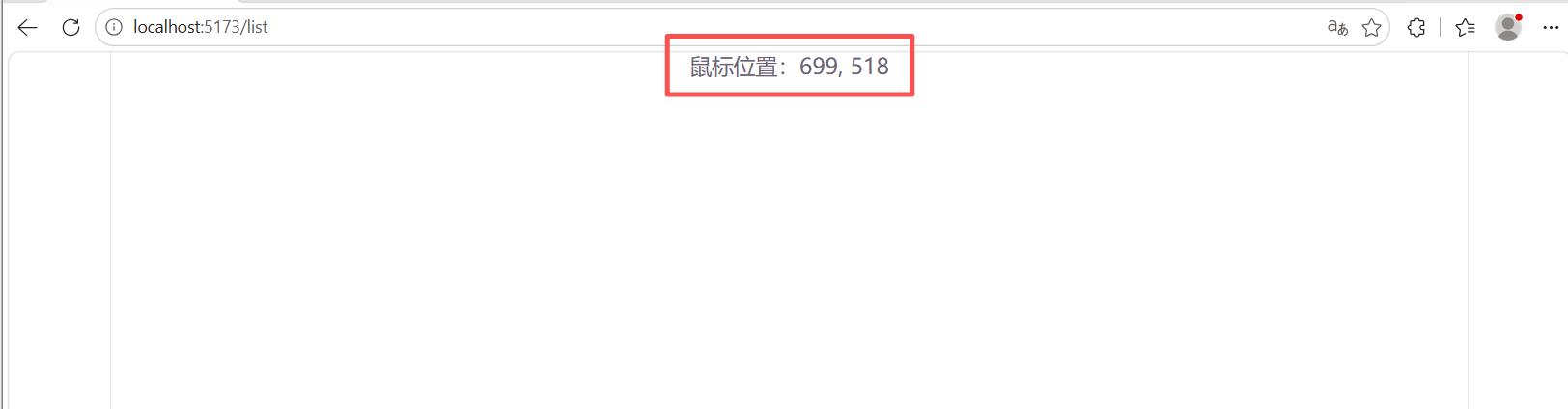
任何组件都可以引入并使用它,且每个组件调用都会创建独立的响应式引用(示例使用App.vue):
TypeScript
<script setup lang="ts">
import { useMouse } from './composables/useMouse'
const { x, y } = useMouse()
</script>
<template>
<p>鼠标位置:{{ x }}, {{ y }}</p>
</template>模板中 x 和 y 会随着鼠标移动实时更新。组件销毁时,事件监听自动移除,没有内存泄漏。
2.3 加入配置选项
让组合式函数更灵活,可以接收参数。例如,我们想限制只在某个元素内追踪鼠标:
TypeScript
// src/composables/useMouse.ts
import { ref, onMounted, onUnmounted, type Ref } from 'vue'

export function useMouse(target?: Ref<HTMLElement | null> | HTMLElement) {
  const x = ref(0)
  const y = ref(0)

  function update(event: MouseEvent) {
    x.value = event.pageX
    y.value = event.pageY
  }

  onMounted(() => {
    const el = target instanceof HTMLElement ? target : target?.value
    if (el) {
      el.addEventListener('mousemove', update)
    } else {
      window.addEventListener('mousemove', update)
    }
  })

  onUnmounted(() => {
    const el = target instanceof HTMLElement ? target : target?.value
    if (el) {
      el.removeEventListener('mousemove', update)
    } else {
      window.removeEventListener('mousemove', update)
    }
  })

  return { x, y }
}
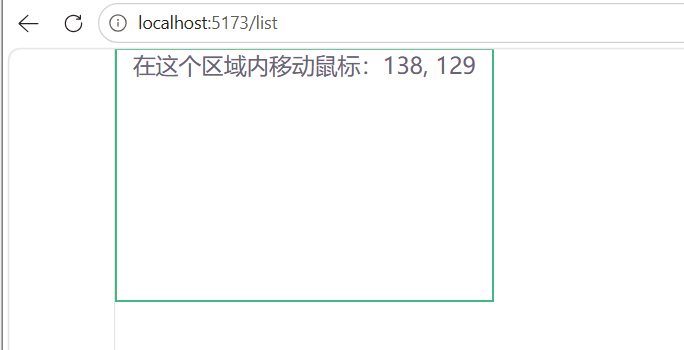
现在你可以传入一个模板引用:
TypeScript
<script setup lang="ts">
import { ref } from 'vue'
import { useMouse } from './composables/useMouse'

const box = ref<HTMLElement | null>(null)
const { x, y } = useMouse(box)
</script>

<template>
  <div ref="box" class="mouse-area">
    在这个区域内移动鼠标:{{ x }}, {{ y }}
  </div>
</template>

<style scoped>
.mouse-area {
  width: 300px;
  height: 200px;
  border: 2px solid #42b883;
}
</style>
浏览器中显示鼠标位置坐标的截图,限制在一个框内
三、异步数据请求:useFetch 组合式函数
在 Vue 中,数据请求通常与组件生命周期绑定。我们写一个通用的 useFetch,把请求状态、错误处理、响应数据都封装起来。
3.1 实现 useFetch
TypeScript
// src/composables/useFetch.ts
import { ref, type Ref, type UnwrapRef } from 'vue'
interface UseFetchReturn<T> {
data: Ref<UnwrapRef<T> | null>
error: Ref<Error | null>
loading: Ref<boolean>
execute: (url?: string) => Promise<void>
}
export function useFetch<T = unknown>(url: string): UseFetchReturn<T> {
const data = ref<T | null>(null) as Ref<T | null>
const error = ref<Error | null>(null)
const loading = ref(false)
async function execute(fetchUrl?: string) {
loading.value = true
error.value = null
try {
const response = await fetch(fetchUrl || url)
if (!response.ok) throw new Error(`HTTP ${response.status}`)
data.value = await response.json() as T
} catch (e) {
error.value = e instanceof Error ? e : new Error(String(e))
} finally {
loading.value = false
}
}
// 立即执行
execute()
return { data, error, loading, execute }
}这个函数接收一个 URL 作为默认地址,自动发起请求。同时返回 execute 方法,供手动重新请求。
3.2 在组件中使用
假设我们有一个展示用户信息的组件,请求一个 JSON API:
TypeScript
<script setup lang="ts">
import { useFetch } from './composables/useFetch'
interface User {
name: string
email: string
}
const { data: user, error, loading } = useFetch<User>('https://jsonplaceholder.typicode.com/users/1')
</script>
<template>
<div v-if="loading">加载中...</div>
<div v-else-if="error">出错了:{{ error.message }}</div>
<div v-else-if="user">
<h2>{{ user.name }}</h2>
<p>{{ user.email }}</p>
<button @click="execute()">刷新</button>
</div>
</template>通过泛型 useFetch<User>,TypeScript 会推断 data 的类型为 User | null,你在模板中使用 user.name 时能获得自动补全和类型检查。

3.3 使用 watchEffect 改进"自动追踪"
useFetch 可以设计成响应式 URL------当 URL 变化时自动重新请求。我们利用 watchEffect 或 watch 来实现:
TypeScript
import { ref, watchEffect, type Ref } from 'vue'
export function useFetch<T = unknown>(url: Ref<string> | string) {
  const data = ref<T | null>(null)
  const error = ref<Error | null>(null)
  const loading = ref(false)
  async function doFetch() {
    const currentUrl = typeof url === 'string' ? url : url.value
    loading.value = true
    error.value = null
    try {
      const response = await fetch(currentUrl)
      if (!response.ok) throw new Error(`HTTP ${response.status}`)
      data.value = await response.json()
    } catch (e) {
      error.value = e instanceof Error ? e : new Error(String(e))
    } finally {
      loading.value = false
    }
  }
  if (typeof url === 'string') {
    doFetch()
  } else {
    watchEffect(doFetch)   // url.value 变化时自动重新请求
  }
  return { data, error, loading }
}
现在你可以传入一个 ref<string>,URL 变化时自动拉取新数据------非常适合依赖动态路由参数的数据请求(比如从 route.params.id 构造的 URL)。
四、表单校验逻辑复用:useFormValidation
表单校验是每个前端应用的必需品。我们可以把校验规则和错误状态抽离成组合式函数。
4.1 设计思路
一个典型的表单校验组合式函数需要:
-
接受一个包含字段值的响应式对象(或 refs)。
-
接受校验规则(函数或对象)。
-
返回错误信息对象、整体是否通过、手动触发校验等方法。
4.2 实现 useFormValidation
TypeScript
// src/composables/useFormValidation.ts
import { reactive, computed, type ComputedRef } from 'vue'
type ValidationRules<T> = {
  [K in keyof T]?: (value: T[K], form: T) => string | true
}
interface UseFormValidationReturn<T> {
  errors: Record<keyof T, string | null>
  isValid: ComputedRef<boolean>
  validate: () => boolean
  validateField: (field: keyof T) => boolean
  resetErrors: () => void
}
export function useFormValidation<T extends Record<string, any>>(
  form: T,
  rules: ValidationRules<T>
): UseFormValidationReturn<T> {
  const errors = reactive<Record<keyof T, string | null>>(
    Object.keys(form).reduce((acc, key) => {
      acc[key as keyof T] = null
      return acc
    }, {} as Record<keyof T, string | null>)
  )
  function validateField(field: keyof T): boolean {
    const rule = rules[field]
    if (rule) {
      const result = rule(form[field], form)
      if (result === true) {
        errors[field] = null
        return true
      } else {
        errors[field] = result
        return false
      }
    }
    errors[field] = null
    return true
  }
  function validate(): boolean {
    let valid = true
    for (const field in rules) {
      if (!validateField(field)) {
        valid = false
      }
    }
    return valid
  }
  const isValid = computed(() => {
    return Object.values(errors).every(err => err === null)
  })
  function resetErrors() {
    Object.keys(errors).forEach(key => {
      errors[key as keyof T] = null
    })
  }
  return { errors, isValid, validate, validateField, resetErrors }
}
4.3 在组件中使用
以一个登录表单为例:
TypeScript
<script setup lang="ts">
import { reactive } from 'vue'
import { useFormValidation } from './composables/useFormValidation'
const form = reactive({
username: '',
email: ''
})
const rules = {
username: (val: string) => val.trim() ? true : '用户名不能为空',
email: (val: string) => /^[^\s@]+@[^\s@]+\.[^\s@]+$/.test(val) ? true : '请输入有效的邮箱'
}
const { errors, isValid, validate } = useFormValidation(form, rules)
function submit() {
if (validate()) {
alert('提交成功!')
}
}
</script>
<template>
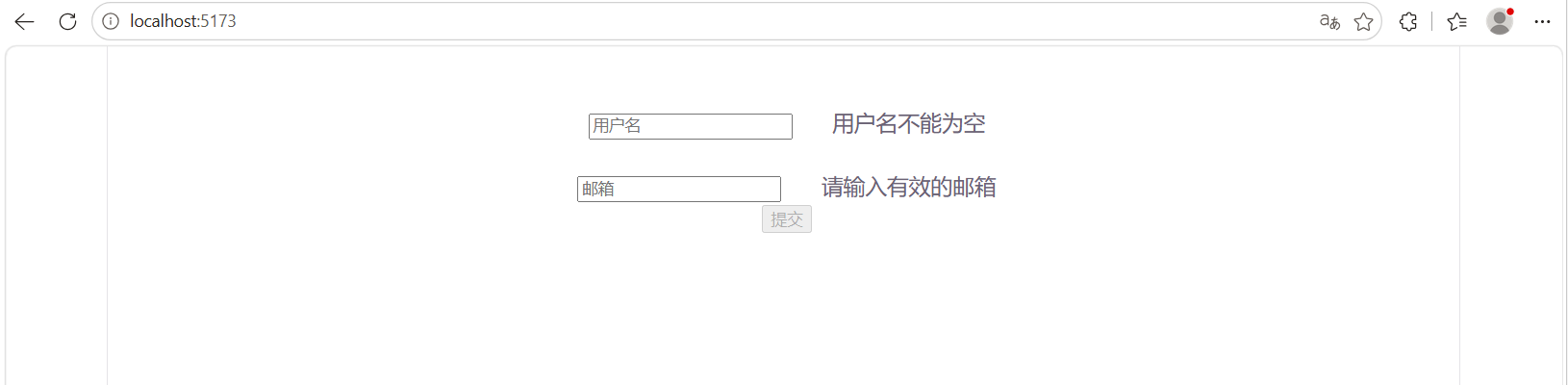
<form @submit.prevent="submit">
<div>
<input v-model="form.username" placeholder="用户名" />
<span v-if="errors.username" class="error">{{ errors.username }}</span>
</div>
<div>
<input v-model="form.email" placeholder="邮箱" />
<span v-if="errors.email" class="error">{{ errors.email }}</span>
</div>
<button type="submit" :disabled="!isValid">提交</button>
</form>
</template>所有校验逻辑都从组件中移除了,组件只负责渲染和触发校验,非常干净。而且 useFormValidation 可以被任何表单复用,无论字段如何变化。
五、为 Todo 应用抽离组合式函数
我们的 Todo 应用目前逻辑主要存放在 Pinia Store 中,但有一些与全局状态无关的 UI 交互细节,非常适合抽离成组合式函数。
5.1 输入防抖:useDebounce
Todo 的输入我们直接用 @keyup.enter 触发,但有时你可能想做一个搜索框,需要防抖。写一个通用的 useDebounce:
TypeScript
// src/composables/useDebounce.ts
import { ref, watch, type Ref } from 'vue'
export function useDebounce<T>(value: Ref<T>, delay: number = 300) {
  const debouncedValue = ref(value.value) as Ref<T>
  let timer: ReturnType<typeof setTimeout>
  watch(value, (newVal) => {
    clearTimeout(timer)
    timer = setTimeout(() => {
      debouncedValue.value = newVal
    }, delay)
  })
  return { debouncedValue }
}
5.2 操作节流:useThrottle
对于按钮点击,可以用节流防止重复提交:
TypeScript
// src/composables/useThrottle.ts
export function useThrottle(fn: (...args: any[]) => void, delay: number = 1000) {
  let lastTime = 0
  return function (this: any, ...args: any[]) {
    const now = Date.now()
    if (now - lastTime >= delay) {
      lastTime = now
      fn.apply(this, args)
    }
  }
}
5.3 在 TodoInput 中使用防抖(示例)
如果你希望用户输入时能实时显示搜索建议,但不想频繁更新,可以这样:
TypeScript
<script setup lang="ts">
import { ref } from 'vue'
import { useDebounce } from './composables/useDebounce'
const text = ref('')
const { debouncedValue } = useDebounce(text, 300)
// 用 watch 监听 debouncedValue 发出请求
watch(debouncedValue, (val) => {
  // 发送搜索请求
})
</script>
这样实际处理的 debouncedValue 会在用户停止输入 300 毫秒后更新,减少不必要的网络请求。
5.4 把本地存储操作封装成 useLocalStorage
在上一篇我们用了持久化插件,但有时候你可能想自己管理本地存储,提供更灵活的控制。可以写一个 useLocalStorage:
TypeScript
// src/composables/useLocalStorage.ts
import { ref, watch } from 'vue'
export function useLocalStorage<T>(key: string, defaultValue: T) {
  const stored = localStorage.getItem(key)
  const data = ref<T>(stored ? JSON.parse(stored) : defaultValue)
  watch(data, (newVal) => {
    localStorage.setItem(key, JSON.stringify(newVal))
  }, { deep: true })
  function remove() {
    localStorage.removeItem(key)
    data.value = defaultValue
  }
  return { data, remove }
}
现在你可以在任何地方创建独立的本地持久化状态,而不需要整个 Store 的粒度。
六、组合式函数的最佳实践
6.1 命名规范
-
函数名以
use开头,这是 Vue 社区的约定,也便于 ESLint 识别。 -
返回的对象属性建议使用
ref或reactive,以便在组件中解构时保持响应性。
6.2 副作用清理
在组合式函数中使用 watch、watchEffect、onMounted、onUnmounted 等时,一定要注意在组件销毁时清理副作用,避免内存泄漏。例如,addEventListener 必须在 onUnmounted 中移除;定时器需要用 clearInterval。
6.3 函数签名与 TypeScript
-
为参数和返回值提供明确的类型,尤其是泛型,这样使用者在调用时能获得良好的智能提示。
-
如果返回值是
ref或reactive,TypeScript 可以自动推导,但建议显式声明接口(如UseFetchReturn<T>),增强可读性。
6.4 组合式函数与 Pinia 配合
你可以在 Pinia Store 的 Action 中调用组合式函数,也可以在组合式函数中使用 Pinia Store。例如,一个"用户偏好"的组合式函数可能会把结果同步到 Store 中。确保不要形成循环依赖即可。
6.5 避免在组合式函数中直接修改 DOM
组合式函数应该保持纯净,通过返回响应式数据来影响视图。直接操作 DOM 会破坏组件与组合逻辑的边界。如果确实需要,应使用 template ref 传递进来,如之前 useMouse 接收目标元素。
七、综合案例:重构 Todo 应用的部分逻辑
我们以 Todo 应用为例,将一些已有的逻辑迁移到组合式函数中,体验代码清晰度的提升。
7.1 需求分析
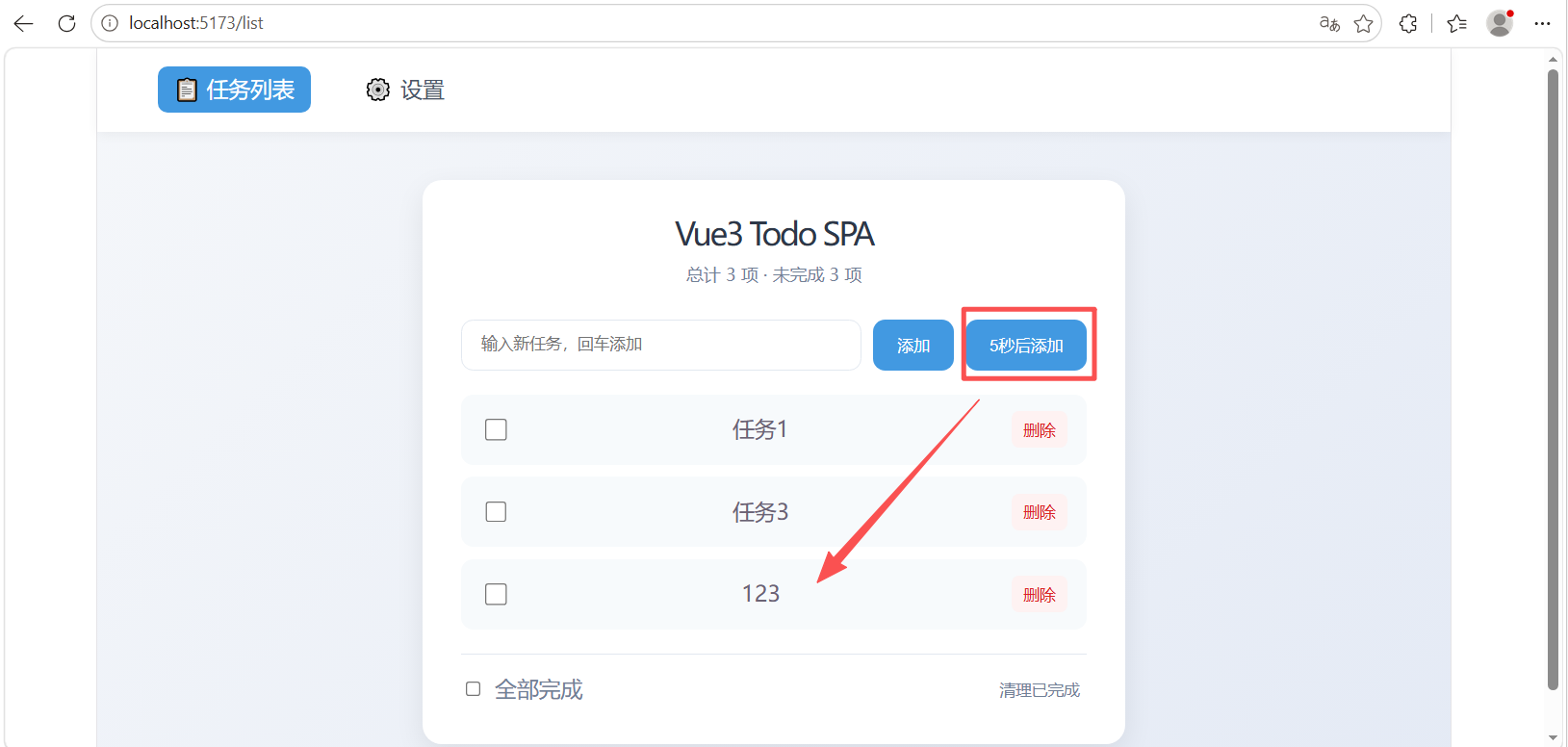
在 Todo 应用中,TodoInput 组件可能会增加一个"定时添加"按钮:点击后倒计时 5 秒,才真正添加任务。这个倒计时逻辑和 Todo 业务本身无关,可以抽离成一个 useCountdown 组合式函数。
7.2 实现 useCountdown
TypeScript
import { ref, onUnmounted } from 'vue'
export function useCountdown(duration: number = 5, finishCb?: () => void) {
  const countdown = ref(0)
  let timer: ReturnType<typeof setInterval> | null = null

  function start() {
    if (countdown.value > 0) return
    countdown.value = duration
    timer = setInterval(() => {
      countdown.value--
      if (countdown.value <= 0) {
        clearInterval(timer!)
        timer = null
        // 倒计时结束执行回调
        finishCb?.()
      }
    }, 1000)
  }

  function stop() {
    if (timer) {
      clearInterval(timer)
      timer = null
    }
    countdown.value = 0
  }

  onUnmounted(stop)
  return { countdown, start, stop }
}
7.3 在 TodoInput 中使用
修改 TodoInput.vue:
TypeScript
<script setup lang="ts">
import { ref } from 'vue'
import { useCountdown } from '../composables/useCountdown'
const text = ref('')
const emit = defineEmits<{ (e: 'add', val: string): void }>()

function submit() {
  const val = text.value.trim()
  if (!val) return
  emit('add', val)
  text.value = ''
}

// 倒计时结束自动执行submit
const { countdown, start } = useCountdown(5, submit)

function delayedAdd() {
  const val = text.value.trim()
  if (!val || countdown.value > 0) return
  start()
}
</script>

<template>
  <div class="todo-input">
    <input v-model="text" @keyup.enter="submit" placeholder="输入新任务,回车添加" />
    <button @click="submit">添加</button>
    <button @click="delayedAdd" :disabled="countdown > 0">
      {{ countdown > 0 ? `${countdown}秒后添加` : '5秒后添加' }}
    </button>
  </div>
</template>

<style scoped>
.todo-input {
  display: flex;
  gap: 10px;
  margin-bottom: 20px;
}
input {
  flex: 1;
  padding: 12px 16px;
  border: 1px solid #e2e8f0;
  border-radius: 10px;
  outline: none;
}
input:focus {
  border-color: #4299e1;
  box-shadow: 0 0 0 3px rgba(66,153,225,0.15);
}
button {
  padding: 12px 20px;
  background: #4299e1;
  color: #fff;
  border: none;
  border-radius: 10px;
  cursor: pointer;
}
button:hover {
  background: #3182ce;
}
button:disabled {
  background: #a0aec0;
  cursor: not-allowed;
}
</style>
你可以看到,倒计时的状态管理、定时器清理全部由 useCountdown 完成,组件内只关心何时触发开始和显示倒计时。而且这个 useCountdown 可以用于任何需要倒计时的场景(发送验证码、延迟操作等)。
7.4 抽离后的代码对比
重构前,你可能会在组件内写:
TypeScript
const timer = ref(0)
let intervalId: number
function startCountdown() { ... }
onUnmounted(() => clearInterval(intervalId))
这会让组件脚本块变得杂乱。抽离后组件职责更纯粹,可读性更好,而且可以在多个组件间复用。
八、总结
组合式函数是 Vue 3 组合式 API 的精髓之一。它不仅解决了 Mixin 时代逻辑复用的痛点,还让你能够以更细粒度的方式组织代码。我们学习了如何从具体业务中识别可复用逻辑,并将其封装成 useXxx 函数,这些函数可以独立于组件进行测试和维护。
-
组合式函数是使用
ref、computed、watch和生命周期钩子的普通函数,命名以use开头。 -
它与 Pinia Store 互补:全局共享状态用 Pinia,组件内逻辑复用用组合式函数。
-
我们实现了
useMouse、useFetch、useFormValidation、useCountdown等常见工具,掌握了编写组合式函数的基本模式。 -
通过将 Todo 应用中的倒计时逻辑抽离,你亲身体验了逻辑分离带来的简洁性和可维护性提升。
-
最佳实践:注意副作用清理、提供明确 TypeScript 类型、保持函数纯净。
如果这篇文章帮你解决了实操上的困惑,别忘记点击点赞、分享 ,也可以留言告诉我你遇到的其它问题,我会尽快回复。动手练习是掌握编程最快的方法,请务必亲手敲一遍本文的所有示例代码,并截图保存你的成果。你的关注是我坚持原创和细节共享的力量来源,谢谢大家。