鸿蒙Next实战:从零构建每日打卡应用(API 24)
一款支持自定义打卡项、连续天数统计和历史记录查询的纯鸿蒙原生应用
一、前言
1.1 为什么选择打卡应用
打卡应用的业务逻辑清晰------用户每天为某个目标做一次标记,系统自动统计连续天数------非常适合作为鸿蒙开发入门实战项目。它覆盖了移动开发中绝大多数基础能力:数据持久化、UI 列表渲染、组件通信、状态管理、手势交互。
如果你正在学习鸿蒙开发,希望找到一个「麻雀虽小五脏俱全」的项目,这篇文章就是为你准备的。
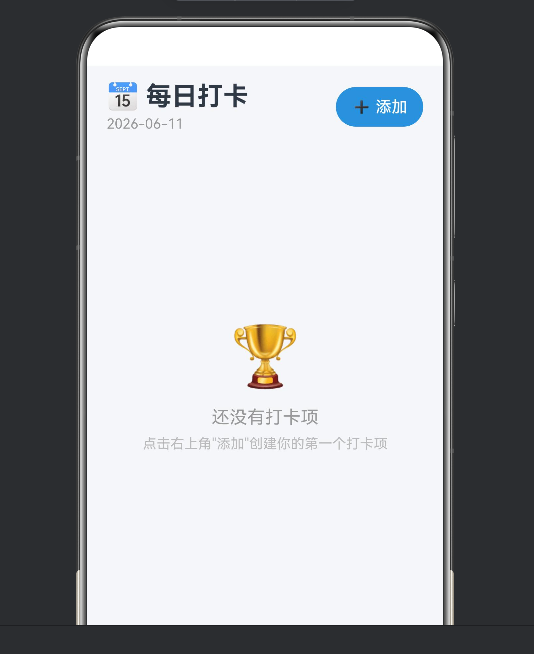
1.2 功能预览
- ✅ 创建自定义打卡项:选择 Emoji、输入名称、添加备注
- ✅ 每日打卡 / 取消打卡:一键标记今日完成
- ✅ 连续天数统计:自动计算连续打卡天数
- ✅ 总打卡天数:累计所有打卡记录
- ✅ 本周指示器:近 7 天打卡状态一目了然
- ✅ 月度日历:按月份查看打卡分布,蓝色高亮标记日
- ✅ 历史记录:按时间倒序展示全部打卡流水
- ✅ 编辑与删除:左滑手势删除
应用基于 HarmonyOS Next API 24(SDK 6.1.0),采用 Stage 模型和 ArkTS 语言开发,数据使用 Preferences 键值库持久化。
二、项目初始化
2.1 开发环境要求
| 工具 | 版本要求 |
|---|---|
| DevEco Studio | 5.0.3.600+ |
| HarmonyOS SDK | API 24 |
| Node.js | 18.x / 20.x LTS |
SDK 版本配置在 build-profile.json5 中:
json5
{
  "app": {
    "products": [{
      "name": "default",
      "targetSdkVersion": "6.1.0(24)",
      "compatibleSdkVersion": "6.1.0(24)",
      "runtimeOS": "HarmonyOS"
    }]
  }
}
2.2 创建项目
在 DevEco Studio 中:File → New → Create Project → Empty Ability,Compile SDK 选择 API 24,Model 选择 Stage(ArkTS)。
2.3 依赖管理
本应用只需引用两个 Kit,无需额外安装依赖:
typescript
import { preferences } from '@kit.ArkData';    // 数据持久化
import { router } from '@kit.ArkUI';            // 页面路由
HarmonyOS Next 引入了 Kit 化导入机制,推荐使用
@kit.ArkData而非旧的@ohos.data.preferences。
三、数据模型设计
3.1 接口定义
typescript
// 打卡项
export interface CheckInItem {
  id: string;
  name: string;
  emoji: string;
  description?: string;
  createdAt: number;
  sortOrder: number;
}

// 打卡记录
export interface CheckInRecord {
  itemId: string;
  date: string;      // YYYY-MM-DD
}

// 统计数据(实时计算)
export interface CheckInStats {
  consecutiveDays: number;
  totalDays: number;
  todayChecked: boolean;
  weekData: boolean[]; // 近7天
}
日期用 YYYY-MM-DD 字符串而非 Date 对象存储,便于 JSON 序列化、排序和比较。weekData 固定 7 个元素,索引 0 对应 7 天前,索引 6 对应今天。
3.2 ID 生成策略
typescript
export function generateId(): string {
  return Date.now().toString(36) + Math.random().toString(36).substring(2, 8);
}
时间戳转 36 进制 + 6 位随机字符,保证唯一性且长度适中。
四、数据持久化
4.1 Preferences 简介
HarmonyOS 的 Preferences 是一个异步 Key-Value 数据库,适合存储小型结构化数据。打卡应用数据量小、结构简单,Preferences 是最合适的选择。
4.2 封装工具函数
typescript
const PREFERENCES_NAME = 'daily_checkin_prefs';
let preferencesInstance: preferences.Preferences | null = null;

async function getPreferences(context: Context): Promise<preferences.Preferences> {
  if (preferencesInstance != null) return preferencesInstance;
  preferencesInstance = await preferences.getPreferences(context, PREFERENCES_NAME);
  return preferencesInstance;
}

async function saveData(context: Context, key: string, data: string): Promise<void> {
  const prefs = await getPreferences(context);
  await prefs.put(key, data);
  await prefs.flush();
}

async function getData(context: Context, key: string): Promise<string> {
  const prefs = await getPreferences(context);
  const val = await prefs.get(key, '[]');
  return val as string;
}
关键点:
- 单例模式 :缓存
preferencesInstance避免重复打开文件 - Context 参数 :通过
getContext(this)获取 - 类型断言 :
prefs.get()返回ValueType,需用as string断言
4.3 CRUD 实现
typescript
export async function getAllItems(context: Context): Promise<CheckInItem[]> {
  const json = await getData(context, 'checkin_items');
  try { return JSON.parse(json) as CheckInItem[]; }
  catch { return []; }
}

export async function addItem(context: Context, item: CheckInItem): Promise<void> {
  const items = await getAllItems(context);
  items.push(item);
  await saveData(context, 'checkin_items', JSON.stringify(items));
}

export async function updateItem(context: Context, updated: CheckInItem): Promise<void> {
  const items = await getAllItems(context);
  const idx = items.findIndex(i => i.id === updated.id);
  if (idx >= 0) items[idx] = updated;
  await saveData(context, 'checkin_items', JSON.stringify(items));
}

export async function deleteItem(context: Context, itemId: string): Promise<void> {
  const items = await getAllItems(context);
  await saveData(context, 'checkin_items', JSON.stringify(items.filter(i => i.id !== itemId)));
  const records = await getAllRecords(context);
  await saveData(context, 'checkin_records', JSON.stringify(records.filter(r => r.itemId !== itemId)));
}
打卡/取消打卡是同一个操作------切换今天的状态:
typescript
export async function toggleCheckIn(context: Context, itemId: string): Promise<boolean> {
  const today = getTodayDate();
  const records = await getAllRecords(context);
  const idx = records.findIndex(r => r.itemId === itemId && r.date === today);
  if (idx >= 0) {
    records.splice(idx, 1);
    await saveData(context, 'checkin_records', JSON.stringify(records));
    return false; // 取消打卡
  } else {
    records.push({ itemId, date: today });
    await saveData(context, 'checkin_records', JSON.stringify(records));
    return true;  // 打卡成功
  }
}
五、连续天数计算算法
5.1 算法思路
连续打卡天数(Streak)从今天(或昨天)开始向前遍历,直到遇到没有打卡的日期为止。
如果今天已打卡,从今天开始逆推;如果今天未打卡,从昨天开始逆推(因为用户可能还没来得及打卡)。
示例:
日期:   3/1  3/2  3/3  3/4  3/5  3/6  3/7
打卡:   ✅   ✅   ❌   ✅   ✅   ✅   ✅
                         ↑ 从3/7逆推 → 连续4天
5.2 代码实现
typescript
export async function getItemStats(context: Context, itemId: string): Promise<CheckInStats> {
  const records = await getAllRecords(context);
  const dates = records.filter(r => r.itemId === itemId).map(r => r.date).sort();
  const today = getTodayDate();
  const todayChecked = dates.indexOf(today) >= 0;

  let consecutive = 0;
  const startDate = new Date();
  if (!todayChecked) startDate.setDate(startDate.getDate() - 1);

  while (true) {
    const ds = getDateString(startDate);
    if (dates.indexOf(ds) >= 0) {
      consecutive++;
      startDate.setDate(startDate.getDate() - 1);
    } else break;
  }

  // 近7天数据
  const weekData: boolean[] = [];
  const weekDate = new Date();
  for (let i = 6; i >= 0; i--) {
    const d = new Date(weekDate);
    d.setDate(d.getDate() - i);
    weekData.push(dates.indexOf(getDateString(d)) >= 0);
  }

  return { consecutiveDays: consecutive, totalDays: dates.length, todayChecked, weekData };
}
getDateString 基于 Date 对象计算,自动处理月份和年份的边界,无需额外判断。
六、页面开发
6.1 @Builder 的关键限制
ArkTS 编译器对 @Builder 有严格限制:方法体内不允许声明局部变量。
typescript
// ❌ 编译错误
@Builder
MyCard(item: ItemType) {
  let title = item.title;
  Text(title)
}解决方案:在组件方法中预计算数据,通过参数传递给 @Builder。
定义承载数据的接口:
typescript
interface CardData {
  item: CheckInItem;
  stats: CheckInStats;
}
在 loadData() 中构建列表:
typescript
const list: CardData[] = [];
for (const item of this.items) {
  const stats = await getItemStats(ctx, item.id);
  list.push({ item, stats });
}
this.cardDataList = list;
在 @Builder 中直接引用 card 属性:
typescript
@Builder
CheckInCard(card: CardData) {
  Stack() {
    Row() {
      Text(card.item.emoji)
      Text(card.item.name)
      Text(String(card.stats.consecutiveDays))
    }
  }
}
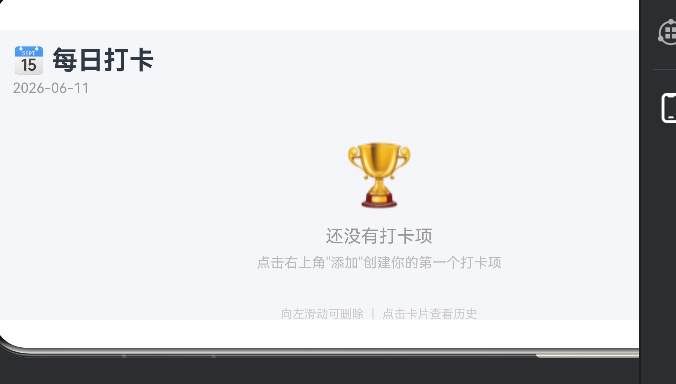
6.2 主页打卡列表
主页结构:标题栏 → 打卡项列表 → 底部提示。使用 List + ForEach 渲染:
typescript
List({ space: 12 }) {
  ForEach(this.cardDataList, (card: CardData) => {
    ListItem() { this.CheckInCard(card) }
  }, (card: CardData) => card.item.id)
}
每个卡片支持:
- 点击 → 跳转历史详情页
- 左滑 → 弹出删除确认(
PanGesture)
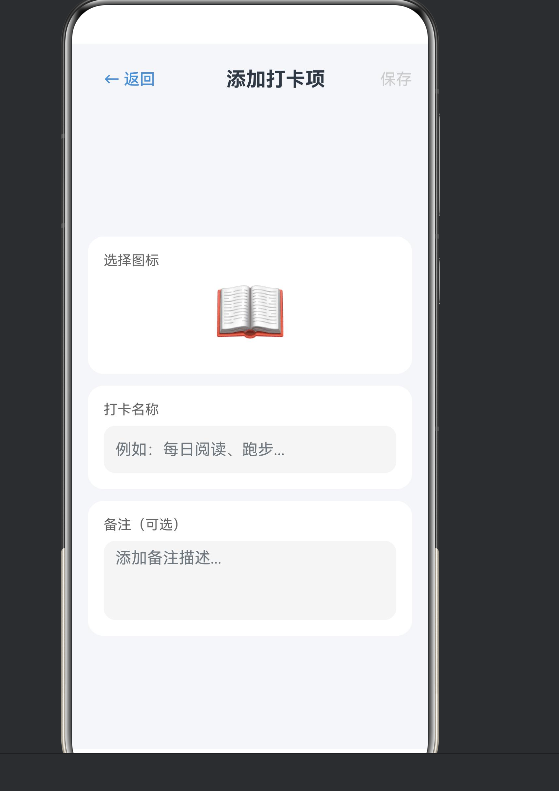
6.3 添加打卡项页
三个输入区:
- Emoji 选择器:24 个常用 Emoji,点击展开网格
- 名称输入 :
TextInput - 备注输入 :
TextArea,可选
保存时校验名称非空,调用 addItem 写入存储。
6.4 历史详情页
三块内容:
统计卡片:Emoji + 名称 + 连续天数(橙色大号数字)+ 总天数(蓝色大号数字)。
月度日历 :最复杂的 UI 组件。预计算 DayInfo[]:
typescript
interface DayInfo {
  dayNum: number;    // 0=占位
  checked: boolean;
  key: string;
}
用 Grid 网格布局,7 列等宽。已打卡日期蓝色圆形高亮。每个月用 ‹ › 按钮切换。
历史记录列表:时间倒序,最多 90 条,每条显示 ✅ + 日期 + 星期。
七、页面路由与传参
7.1 路由配置
json
{
  "src": ["pages/Index", "pages/AddItem", "pages/History"]
}
7.2 跳转与传参
typescript
// 跳转
router.pushUrl({
  url: 'pages/History',
  params: { itemId: item.id, itemName: item.name, itemEmoji: item.emoji }
});

// 接收
aboutToAppear(): void {
  const params = router.getParams() as Record<string, Object>;
  this.itemId = params['itemId'] as string || '';
  this.itemName = params['itemName'] as string || '';
}
八、ArkTS 编译避坑
8.1 import 必须在文件顶部
typescript
// ❌ 错误
export interface MyData {}
import { something } from '@kit.SomeKit';

// ✅ 正确
import { something } from '@kit.SomeKit';
export interface MyData {}
8.2 禁止 throw 任意类型
typescript
// ❌ 错误
throw 'error message';
// ✅ 正确
throw new Error('error message');
8.3 禁止 any / unknown
typescript
// ❌ 错误
let data: any = getData();
// ✅ 正确
let data = getData() as string;
8.4 Loading 组件不可用
API 24 中 <Loading> 已被移除,改用 LoadingProgress:
typescript
LoadingProgress().width(40).height(40)8.5 for...of 兼容性
某些版本不支持 for...of,推荐使用传统 for 循环:
typescript
for (let i = 0; i < items.length; i++) {
  const item = items[i];
}
九、构建与运行
9.1 构建命令
bash
hvigorw assembleHap --mode module -p product=default --no-daemon9.2 常见错误
app_name 冲突 :AppScope 和 entry 中重复定义,删除 entry 中的定义即可。
未配置签名:调试阶段用 DevEco Studio 自动签名。
9.3 完整项目结构
entry/src/main/ets/
├── model/
│   └── CheckInModel.ets       # 数据模型 + 持久化
├── pages/
│   ├── Index.ets              # 主页
│   ├── AddItem.ets            # 添加页
│   └── History.ets            # 历史页
└── entryability/
    └── EntryAbility.ets       # 入口
十、总结
10.1 功能回顾
本文基于 HarmonyOS Next API 24 构建了完整的每日打卡应用:Preferences 持久化存储、打卡/取消打卡、连续天数计算、周指示器、月度日历、历史记录。
10.2 扩展方向
- 数据备份与恢复(JSON 导入导出)
- 分布式多端同步
- 每日提醒通知
- 桌面 Widget 小组件
- 深色模式
10.3 开发体会
ArkTS + ArkUI 的声明式 UI 语法与 SwiftUI、Jetpack Compose 类似,上手快。ArkTS 对 JS 灵活语法的限制(禁止 any、限制 @Builder)在适应后能有效避免运行时错误。Kit 化生态使模块划分更清晰。
理论与代码结合是学习鸿蒙开发的最佳路径。当你亲手解决一个个编译错误、看到应用在模拟器上成功运行时,对 ArkTS 和 ArkUI 的理解会更深。