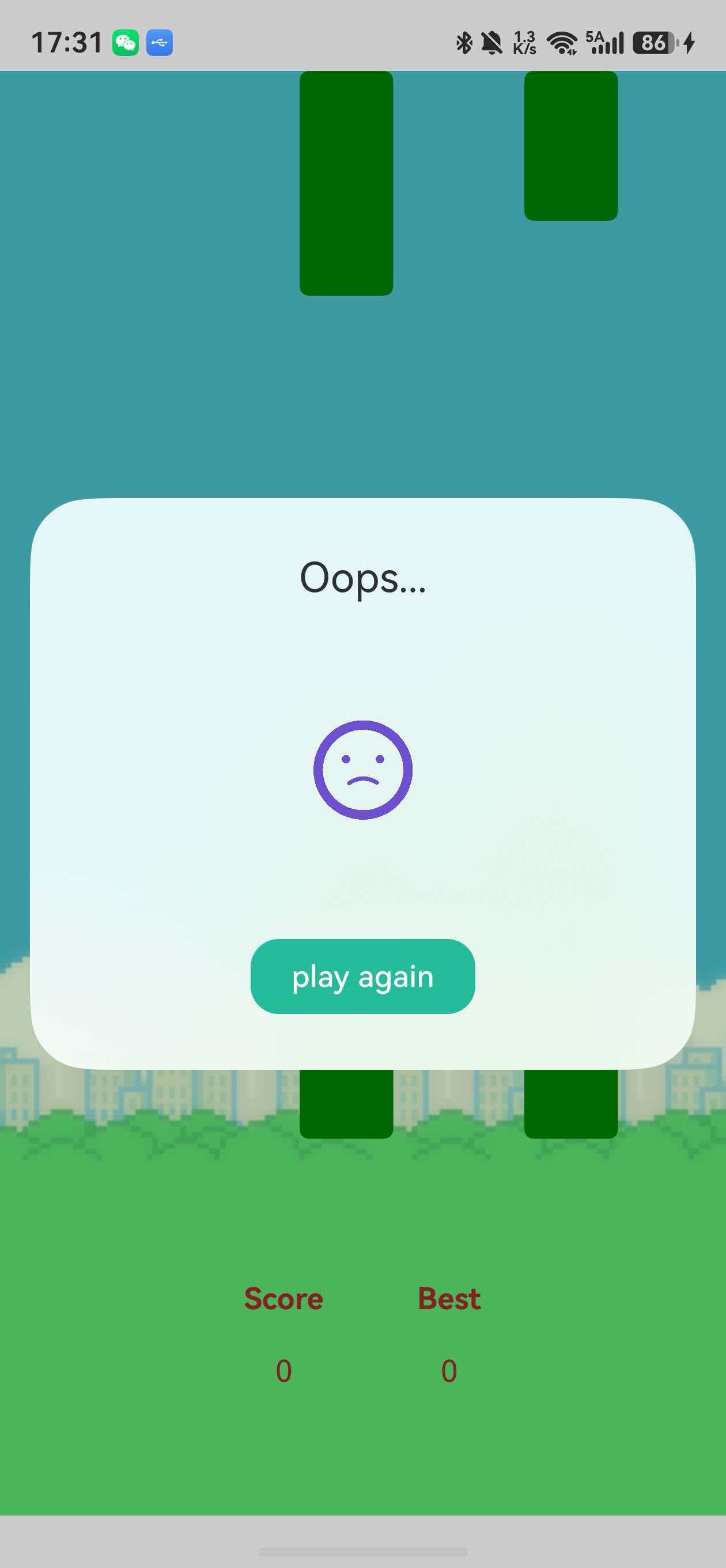
本文记录了在HarmonyOS 6.1项目中集成Lottie动画的完整过程,包括依赖配置、资源管理、Canvas渲染以及常见错误的排查方法。适合正在开发HarmonyOS应用的开发者参考。
📋 目录
- 前言
- Lottie简介与优势
- 环境准备
- 依赖配置详解
- rawfile资源管理
- Canvas渲染实战
- 常见错误排查
- 最佳实践
- 总结
一、前言
在HarmonyOS应用开发中,动画是提升用户体验的重要元素。Lottie作为一个跨平台的动画库,能够直接渲染After Effects导出的动画,极大地提高了开发效率。本文将详细介绍如何在HarmonyOS 6.1中正确集成和使用Lottie。
开发环境
- HarmonyOS版本:6.1
- DevEco Studio:最新版本
- Lottie版本:2.0.31
- 语言:ArkTS
二、Lottie简介与优势
什么是Lottie?
Lottie是Airbnb开源的一个动画库,可以解析Adobe After Effects导出的动画JSON文件,并在移动端实时渲染。
核心优势
- 设计师友好:设计师可以直接使用AE制作复杂动画
- 文件小:JSON格式,体积远小于GIF或视频
- 可交互:支持动态控制播放、暂停、速度等
- 跨平台:iOS、Android、Web、HarmonyOS均支持
- 高质量:矢量动画,任意分辨率都清晰
三、依赖配置详解
3.1 添加Lottie依赖
在项目的 entry/oh-package.json5 中添加依赖:
json
{
  "name": "entry",
  "version": "1.0.0",
  "description": "Please describe the basic information.",
  "main": "",
  "author": "",
  "license": "",
  "dependencies": {
    "@ohos/lottie": "^2.0.0"
  }
}
3.2 安装依赖
在项目根目录执行:
bash
ohpm install注意事项:
- 确保网络连接正常
- 如果安装失败,尝试清理缓存:
ohpm cache clean - 检查ohpm版本是否为最新
3.3 验证安装
安装成功后,会在 oh_modules/.ohpm/ 目录下看到 @ohos+lottie@2.0.31 文件夹。
四、rawfile资源管理
4.1 资源目录结构
HarmonyOS中,Lottie动画JSON文件需要放在 rawfile 目录下:
entry/src/main/resources/
└── rawfile/
    └── lottie/
        ├── success.json
        ├── failed.json
        └── loading.json
重要提示:
- rawfile是原始资源目录,文件会原样打包到应用中
- 路径大小写敏感
- 不要在路径前加斜杠
/
4.2 正确的路径写法
❌ 错误写法:
typescript
private animatePath: string = "/lottie/failed.json"; // 前导斜杠会导致加载失败✅ 正确写法:
typescript
private animatePath: string = "lottie/failed.json"; // 相对于rawfile目录4.3 获取Lottie动画资源
方式一:LottieFiles官网
- 访问:https://lottiefiles.com/
- 搜索需要的动画(如:success, error, loading)
- 下载JSON格式文件
- 放入
rawfile/lottie/目录
方式二:AE导出
如果有设计师配合,可以直接从After Effects导出Lottie JSON。
五、Canvas渲染实战
5.1 基础使用示例
在自定义对话框中使用Lottie动画:
typescript
import lottie, { AnimationItem } from '@ohos/lottie';

@CustomDialog
export struct GameOverDialog {
  private animateName: string = "gameOver";
  private animatePath: string = "lottie/failed.json";  // 注意:无前导斜杠
  private context: CanvasRenderingContext2D = new CanvasRenderingContext2D();
  private animateItem?: AnimationItem;
  controller: CustomDialogController;

  build() {
    Column() {
      Text('游戏结束').fontSize(22).margin({ top: 30, bottom: 30 })

      // Canvas组件承载Lottie动画
      Canvas(this.context)
        .width(120)
        .height(120)
        .backgroundColor(Color.Transparent)
        .onReady(() => {
          // 加载并播放动画
          this.animateItem = lottie.loadAnimation({
            container: this.context,
            renderer: "canvas",
            loop: true,
            autoplay: true,
            name: this.animateName,
            path: this.animatePath,
          })
        })

      Button('重新开始')
        .onClick(() => {
          this.controller.close()
        })
    }
  }
}
5.2 关键参数说明
typescript
lottie.loadAnimation({
  container: this.context,     // Canvas上下文,必填
  renderer: "canvas",          // 渲染器类型,HarmonyOS使用canvas
  loop: true,                  // 是否循环播放
  autoplay: true,              // 是否自动播放
  name: "animationName",       // 动画唯一标识,用于控制
  path: "lottie/animation.json" // 动画文件路径(相对rawfile)
})
5.3 控制动画播放
typescript
// 播放动画
lottie.play(this.animateName)

// 暂停动画
lottie.pause(this.animateName)

// 停止动画
lottie.stop(this.animateName)

// 销毁动画(释放资源)
lottie.destroy(this.animateName)
5.4 生命周期管理
typescript
@CustomDialog
export struct AnimationDialog {
  private animateName: string = "myAnimation";
  private animateItem?: AnimationItem;

  // 对话框显示时播放
  onPageShow() {
    lottie.play(this.animateName)
  }

  // 对话框隐藏时暂停
  onPageHide() {
    lottie.pause(this.animateName)
  }

  // 对话框销毁时释放资源
  aboutToDisappear() {
    lottie.destroy(this.animateName)
  }
}
六、常见错误排查
6.1 错误:Cannot find module '@ohos/lottie'
错误信息:
ERROR: Cannot find module '@ohos/lottie' or its corresponding type declarations.原因分析:
- 依赖未安装或安装失败
oh-package.json5配置错误
解决方案:
bash
# 1. 清理缓存
ohpm cache clean

# 2. 重新安装依赖
ohpm install

# 3. 检查oh-package.json5中是否正确添加依赖
{
  "dependencies": {
    "@ohos/lottie": "^2.0.0"
  }
}
6.2 错误:Failed to get rawfile
错误信息:
Failed to get rawfile
GetAsset failed: lottie/failed.json
原因分析:
- 动画文件路径错误(最常见)
- 文件不存在或路径不对
解决方案:
✅ 检查路径格式
typescript
// 错误:带前导斜杠
private animatePath: string = "/lottie/failed.json";

// 正确:相对路径
private animatePath: string = "lottie/failed.json";
✅ 检查文件位置
确保文件在正确的目录:
entry/src/main/resources/rawfile/lottie/failed.json6.3 错误:Lottie canvas indeterminate attached
错误信息:
<Coordinator> canvas(33) indeterminate attached or not, treat it as attached.原因分析:
Canvas组件的生命周期管理问题,通常不影响功能。
解决方案:
确保Canvas在onReady回调中初始化:
typescript
Canvas(this.context)
  .onReady(() => {
    // 在这里初始化Lottie
    this.animateItem = lottie.loadAnimation({...})
  })
6.4 动画不显示
可能原因:
- Canvas尺寸为0
- 动画文件损坏
- 路径错误
排查步骤:
typescript
Canvas(this.context)
  .width(120)  // 确保有明确的宽度
  .height(120) // 确保有明确的高度
  .backgroundColor('#FFCCCC') // 临时设置背景色以检查Canvas是否显示
  .onReady(() => {
    console.info('Canvas ready') // 添加日志
    this.animateItem = lottie.loadAnimation({
      container: this.context,
      renderer: "canvas",
      loop: true,
      autoplay: true,
      name: this.animateName,
      path: this.animatePath,
    })
    console.info('Lottie loaded') // 添加日志
  })
七、最佳实践
7.1 资源管理
建议的目录结构:
resources/rawfile/
├── lottie/
│   ├── ui/           # UI相关动画
│   │   ├── loading.json
│   │   └── success.json
│   ├── game/         # 游戏相关动画
│   │   ├── win.json
│   │   └── lose.json
│   └── effects/      # 特效动画
│       └── particle.json
7.2 性能优化
1. 及时销毁动画
typescript
aboutToDisappear() {
  if (this.animateItem) {
    lottie.destroy(this.animateName)
    this.animateItem = undefined
  }
}
2. 控制动画质量
对于复杂动画,可以适当降低尺寸:
typescript
Canvas(this.context)
  .width(100)  // 根据实际需求调整
  .height(100)
3. 避免同时播放过多动画
同时播放多个Lottie动画会影响性能,建议:
- 限制同屏动画数量
- 非活动状态时暂停动画
7.3 代码封装
创建Lottie组件封装:
typescript
@Component
export struct LottieAnimation {
  @Prop animationPath: string
  @Prop width: number = 100
  @Prop height: number = 100
  @Prop loop: boolean = true
  @Prop autoplay: boolean = true

  private context: CanvasRenderingContext2D = new CanvasRenderingContext2D()
  private animateItem?: AnimationItem
  private animateName: string = `lottie_${Date.now()}`

  build() {
    Canvas(this.context)
      .width(this.width)
      .height(this.height)
      .backgroundColor(Color.Transparent)
      .onReady(() => {
        this.animateItem = lottie.loadAnimation({
          container: this.context,
          renderer: "canvas",
          loop: this.loop,
          autoplay: this.autoplay,
          name: this.animateName,
          path: this.animationPath,
        })
      })
  }

  aboutToDisappear() {
    if (this.animateItem) {
      lottie.destroy(this.animateName)
    }
  }
}

// 使用示例
LottieAnimation({
  animationPath: "lottie/success.json",
  width: 120,
  height: 120
})
八、总结
本文详细介绍了在HarmonyOS 6.1中集成Lottie动画的完整流程,包括:
关键要点回顾
- 依赖配置 :在
oh-package.json5中添加@ohos/lottie依赖 - 资源管理 :动画文件放在
rawfile目录,路径不带前导斜杠 - Canvas渲染:使用Canvas组件承载Lottie动画
- 生命周期:及时销毁动画释放资源
- 错误排查:路径问题是最常见的错误
适用场景
- ✅ 加载动画
- ✅ 成功/失败反馈
- ✅ 空状态页面
- ✅ 引导动画
- ✅ 游戏特效
注意事项
- 动画文件不宜过大(建议<100KB)
- 复杂动画可能影响性能
- 及时释放资源避免内存泄漏
参考资料
作者简介:HarmonyOS开发者,专注于跨平台移动应用开发。
本文示例代码 :项目源码
如果本文对你有帮助,欢迎点赞、收藏、关注!