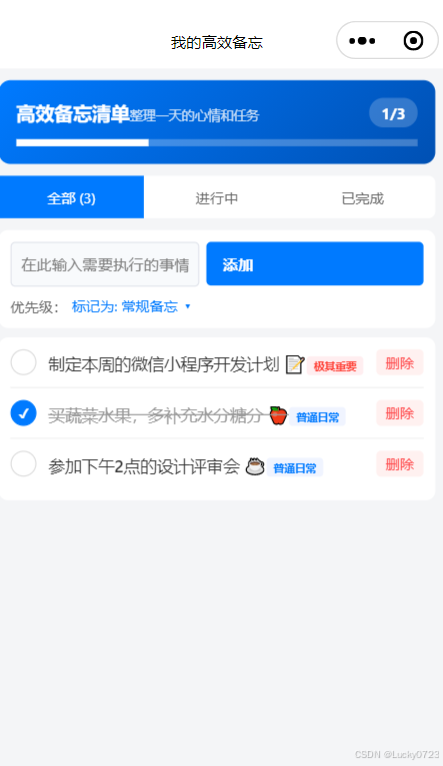
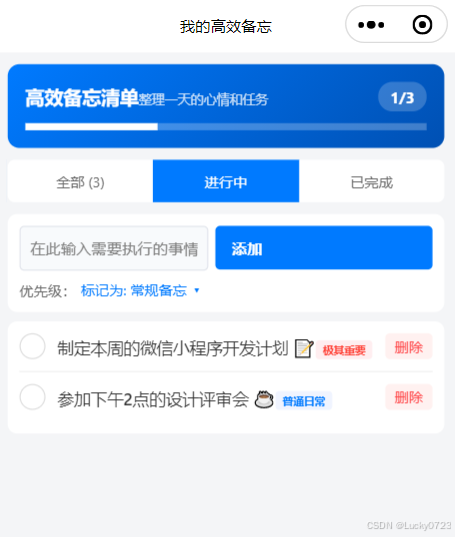
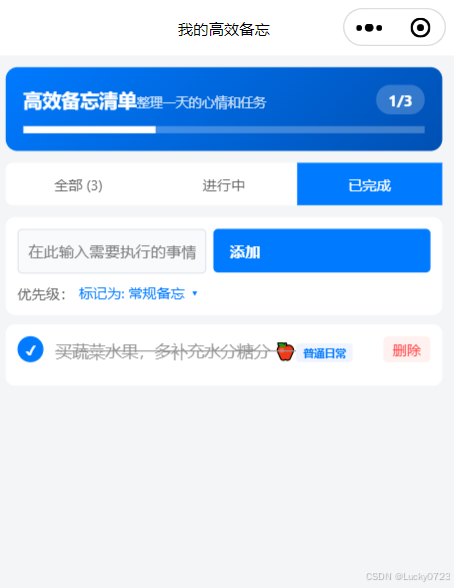
Index.html
<view class="container">
<!-- 头部进度概览 -->
<view class="tracker-card">
<view class="tracker-header">
<view>
<text class="hero-title">高效备忘清单</text>
<text class="hero-subtitle">整理一天的心情和任务</text>
</view>
<text class="score-card">{{completedCount}}/{{tasksList.length}}</text>
</view>
<view class="progress-bar">
<progress percent="{{taskProgress}}" stroke-width="6" activeColor="#FFF" backgroundColor="rgba(255,255,255,0.25)" />
</view>
</view>
<!-- 选项卡分类 -->
<view class="tabs-bar">
<view class="tab {{activeTab === 'all' ? 'active' : ''}}" bindtap="switchTab" data-tab="all">
全部 ({{tasksList.length}})
</view>
<view class="tab {{activeTab === 'active' ? 'active' : ''}}" bindtap="switchTab" data-tab="active">
进行中
</view>
<view class="tab {{activeTab === 'completed' ? 'active' : ''}}" bindtap="switchTab" data-tab="completed">
已完成
</view>
</view>
<!-- 输入条 -->
<view class="card add-card">
<view class="add-row">
<input class="add-input" value="{{newTaskText}}" bindinput="onNewTaskInput" placeholder="在此输入需要执行的事情..." />
<button class="btn-add" bindtap="createTask">添加</button>
</view>
<view class="priority-row">
<text class="label">优先级:</text>
<picker bindchange="onPriorityChange" value="{{priorityIndex}}" range="{{priorityRange}}" mode="selector">
<view class="picker-val">标记为: {{priorityRangepriorityIndex}} ▾</view>
</picker>
</view>
</view>
<!-- 任务列表 -->
<view class="card tasks-list-card">
<view class="empty-state" wx:if="{{filteredTasks.length === 0}}">
<text class="empty-icon">📝</text>
<text class="empty-text">今天也是轻松的一天,快添加一项任务吧!</text>
</view>
<!-- 任务展示 -->
<view class="tasks-list" wx:if="{{filteredTasks.length > 0}}">
<view class="task-row {{item.completed ? 'task-done' : ''}}" wx:for="{{filteredTasks}}" wx:key="id">
<!-- 仿Checkbox打勾状态 -->
<view class="checkbox {{item.completed ? 'checked' : ''}}" bindtap="toggleTask" data-id="{{item.id}}">
<text class="check-tick" wx:if="{{item.completed}}">✓</text>
</view>
<!-- 任务详情 -->
<view class="task-content">
<text class="task-title">{{item.text}}</text>
<text class="task-badge badge-{{item.priority}}">{{item.priority === 'urgent' ? '极其重要' : '普通日常'}}</text>
</view>
<!-- 删除 -->
<text class="btn-delete" bindtap="removeTask" data-id="{{item.id}}">删除</text>
</view>
</view>
</view>
</view>
index.wxss
page {
background-color: #f4f5f7;
}
.container {
padding: 20rpx;
}
.tracker-card {
background: linear-gradient(135deg, #007aff, #0050b3);
color: white;
border-radius: 20rpx;
padding: 30rpx;
margin-bottom: 20rpx;
}
.tracker-header {
display: flex;
justify-content: space-between;
align-items: center;
margin-bottom: 20rpx;
}
.hero-title {
font-size: 32rpx;
font-weight: bold;
}
.hero-subtitle {
font-size: 22rpx;
opacity: 0.8;
margin-top: 5rpx;
}
.score-card {
background-color: rgba(255, 255, 255, 0.2);
padding: 8rpx 20rpx;
border-radius: 40rpx;
font-size: 26rpx;
font-weight: bold;
}
.progress-bar {
margin-top: 10rpx;
}
.tabs-bar {
display: flex;
background: #fff;
border-radius: 12rpx;
margin-bottom: 20rpx;
width: 100%;
}
.tab {
flex: 1;
text-align: center;
font-size: 24rpx;
color: #666;
line-height: 70rpx;
}
.tab.active {
background-color: #007aff;
color: #fff;
}
.card {
background: #fff;
border-radius: 16rpx;
padding: 20rpx;
margin-bottom: 16rpx;
}
.add-card {
display: flex;
flex-direction: column;
}
.add-row {
display: flex;
gap: 12rpx;
margin-bottom: 16rpx;
}
.add-input {
flex: 1;
border: 1rpx solid #e1e4eb;
border-radius: 8rpx;
padding: 14rpx 16rpx;
font-size: 26rpx;
background: #f8fafc;
}
.btn-add {
background: #007aff;
color: #fff;
font-size: 26rpx;
padding: 0 28rpx;
border-radius: 8rpx;
height: 72rpx;
display: flex;
align-items: center;
}
.priority-row {
display: flex;
align-items: center;
}
.label {
font-size: 24rpx;
color: #666;
width: 100rpx;
}
.picker-val {
font-size: 24rpx;
color: #007aff;
}
.empty-state {
text-align: center;
padding: 60rpx 20rpx;
}
.empty-icon {
font-size: 60rpx;
margin-bottom: 20rpx;
}
.empty-text {
font-size: 24rpx;
color: #999;
}
.task-row {
display: flex;
align-items: center;
padding-bottom: 20rpx;
border-bottom: 1rpx solid #f0f0f0;
margin-bottom: 20rpx;
}
.task-row:last-child {
border-bottom: none;
margin-bottom: 0;
}
.checkbox {
width: 40rpx;
height: 40rpx;
border: 3rpx solid #ddd;
border-radius: 50%;
display: flex;
justify-content: center;
align-items: center;
margin-right: 20rpx;
}
.checkbox.checked {
background: #007aff;
border-color: #007aff;
}
.check-tick {
color: #fff;
font-size: 22rpx;
font-weight: bold;
}
.task-content {
flex: 1;
}
.task-title {
font-size: 28rpx;
color: #333;
font-weight: 500;
}
.task-done .task-title {
text-decoration: line-through;
color: #999;
}
.task-badge {
font-size: 18rpx;
font-weight: bold;
padding: 4rpx 12rpx;
border-radius: 6rpx;
margin-top: 8rpx;
}
.badge-urgent {
background: #ffeef0;
color: #ff3b30;
}
.badge-normal {
background: #f0f4ff;
color: #007aff;
}
.btn-delete {
font-size: 24rpx;
color: #ff4d4f;
background: #fff1f0;
padding: 6rpx 16rpx;
border-radius: 8rpx;
}
index.js
Page({
data: {
tasksList: \[\],
newTaskText: "",
priorityRange: "常规备忘", "突发重要",
priorityValues: "normal", "urgent",
priorityIndex: 0,
activeTab: "all",
completedCount: 0,
taskProgress: 0,
filteredTasks: \[\]
},
onLoad: function() {
console.log("微信高效清算工具初始化");
// Mock sample items
const defaultTasks = [
{ id: "1001", text: "制定本周的微信小程序开发计划 📝", priority: "urgent", completed: false },
{ id: "1002", text: "买蔬菜水果,多补充水分糖分 🍎", priority: "normal", completed: true },
{ id: "1003", text: "参加下午2点的设计评审会 ☕", priority: "normal", completed: false }
];
this.setData({
tasksList: defaultTasks
});
this.refreshComputed();
},
onNewTaskInput: function(e) {
this.setData({
newTaskText: e.detail.value
});
},
onPriorityChange: function(e) {
this.setData({
priorityIndex: parseInt(e.detail.value)
});
},
switchTab: function(e) {
const tabSelected = e.currentTarget.dataset.tab;
this.setData({
activeTab: tabSelected
});
this.refreshComputed();
},
createTask: function() {
const text = this.data.newTaskText.trim();
if (!text) {
wx.showToast({
title: "请填写任务内容",
icon: "warn"
});
return;
}
const priorityKey = this.data.priorityValuesthis.data.priorityIndex;
const newId = String(Date.now());
const newTask = {
id: newId,
text: text,
priority: priorityKey,
completed: false
};
const currentList = this.data.tasksList;
currentList.push(newTask);
this.setData({
tasksList: currentList,
newTaskText: "",
priorityIndex: 0
});
this.refreshComputed();
wx.showToast({
title: "任务已新增!",
icon: "success"
});
},
toggleTask: function(e) {
const id = e.currentTarget.dataset.id;
const currentList = this.data.tasksList;
for (let i = 0; i < currentList.length; i++) {
if (currentListi.id === id) {
currentListi.completed = !currentListi.completed;
const msg = currentListi.completed ? "打卡标志成功 ✓" : "标记为待办";
wx.showToast({
title: msg,
icon: "success"
});
break;
}
}
this.setData({
tasksList: currentList
});
this.refreshComputed();
},
removeTask: function(e) {
const id = e.currentTarget.dataset.id;
const that = this;
wx.showModal({
title: "确认删除?",
content: "该提醒将从您的日程库中永久移除",
showCancel: true,
success: function(res) {
if (!res.cancel) {
const currentList = that.data.tasksList.filter(t => t.id !== id);
that.setData({
tasksList: currentList
});
that.refreshComputed();
wx.showToast({
title: "已安全删除",
icon: "success"
});
}
}
});
},
refreshComputed: function() {
const list = this.data.tasksList;
const doneCount = list.filter(t => t.completed).length;
const progress = list.length > 0 ? Math.round((doneCount / list.length) * 100) : 0;
let filtered = \[\];
if (this.data.activeTab === "all") {
filtered = list;
} else if (this.data.activeTab === "active") {
filtered = list.filter(t => !t.completed);
} else {
filtered = list.filter(t => t.completed);
}
this.setData({
completedCount: doneCount,
taskProgress: progress,
filteredTasks: filtered
});
}
})