Getting Started Guide --- Zephyr Project Documentation
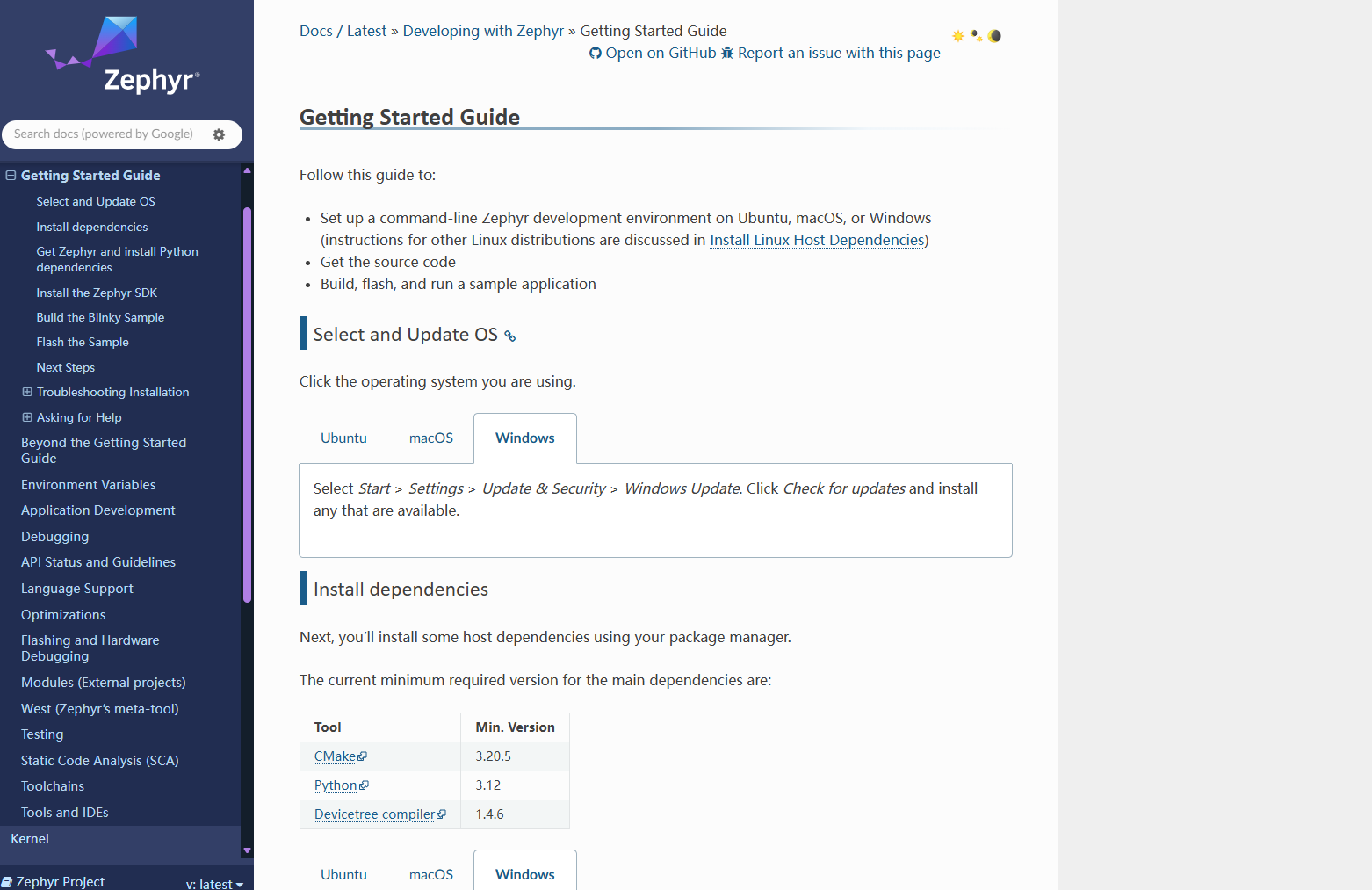
一、下载工具
1.1 cmake
1.2 python(3.12.10)
1.3 dts,首先下载MYS2,双击mingw64.exe,进入mingw64命令窗口,再使用pacman命令下载dts
Releases · msys2/msys2-installer
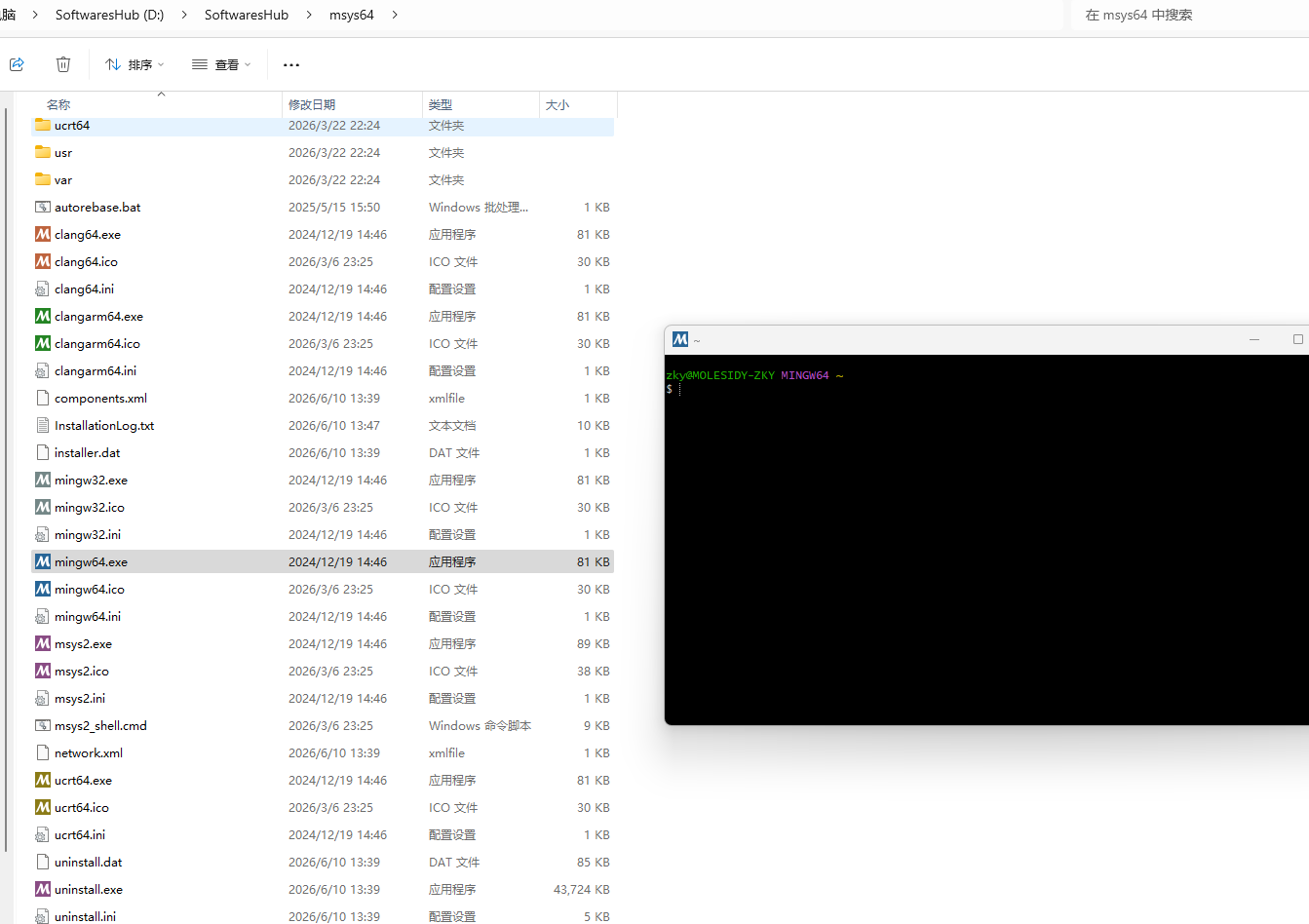
pacman -S --noconfirm mingw-w64-x86_64-dtc


dtc --version
1.4 首先在Windows系统中安装Chocolatey包管理器,再使用Chocolatey安装解压工具7z和wget工具
# 打开管理员PowerShell后,先敲下面这行命令,按回车,使得可以运行可执行程序
Set-ExecutionPolicy Bypass -Scope Process -Force

# 复制以下安装
[System.Net.ServicePointManager]::SecurityProtocol = [System.Net.ServicePointManager]::SecurityProtocol -bor 3072; iex ((New-Object System.Net.WebClient).DownloadString('https://community.chocolatey.org/install.ps1'))

# 习惯性的开新窗口,验证环境是否安装成功
choco --version

# 7zip
choco install 7zip -y

# wget
choco install wget -y

# 自行使用绝对路径去命令验证是否安装成功
C:\ProgramData\chocolatey\bin\wget.exe --version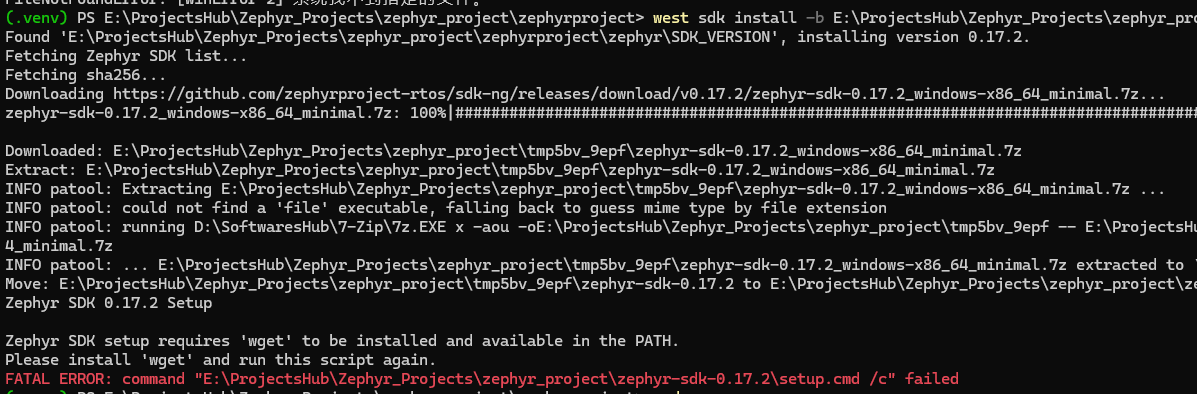
1.5 STM32CubeProgrammer
STM32CubeProg | Software - STMicroelectronics
二、步骤
2.1 创建文件夹

2.2 使用python将这个文件夹初始化为.venv,在这个文件夹中进入cmd窗口,使用python -m venv .venv,完成初始化
cmd激活虚拟环境
python -m venv .venv

.venv\Scripts\activate.bat
powershell
python -m venv .venv

.venv\Scripts\Activate.ps1
2.3 激活虚拟环境完毕就可以pip下载工具west
pip install west

west --version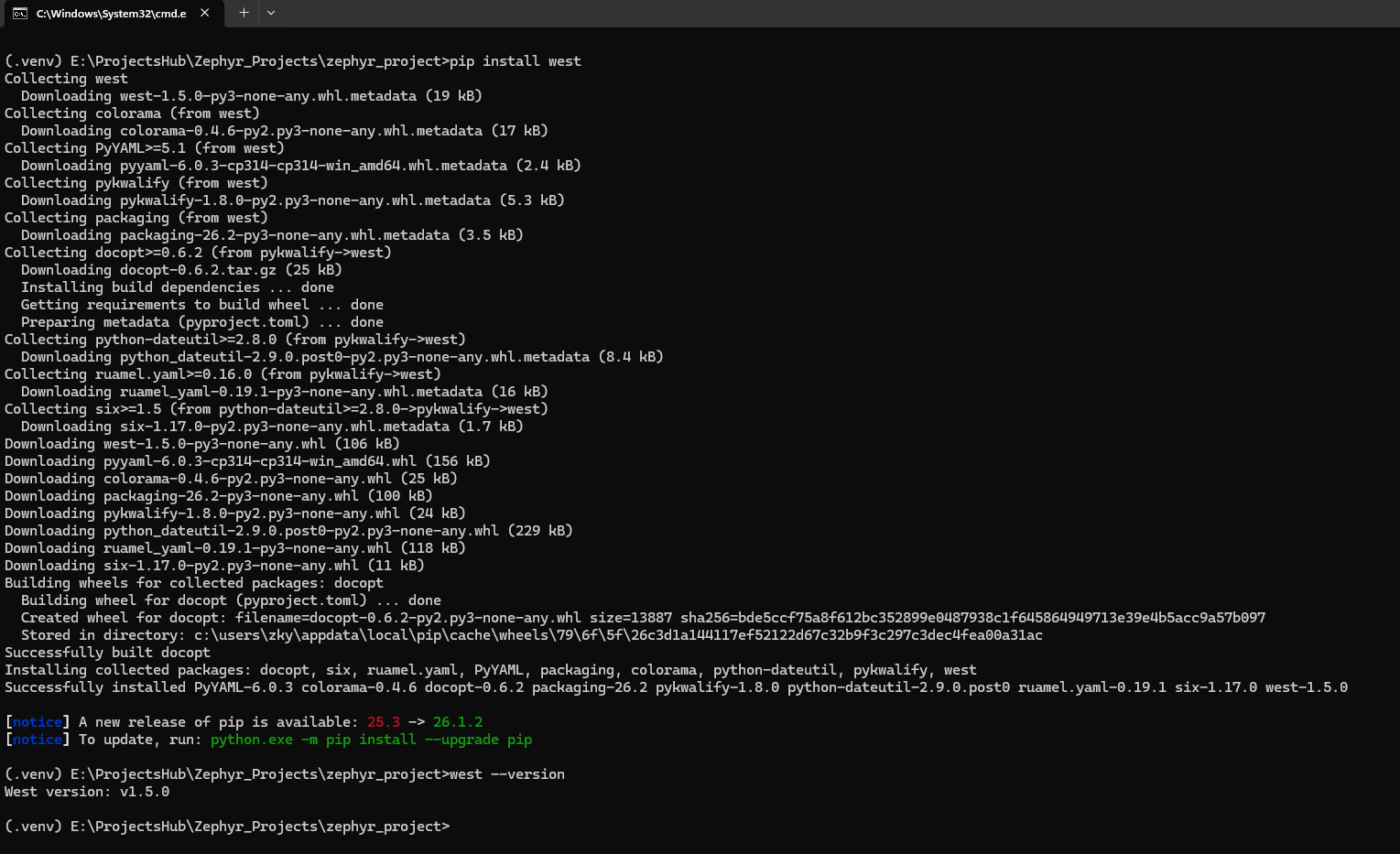
2.4 创建文件夹zephyrproject
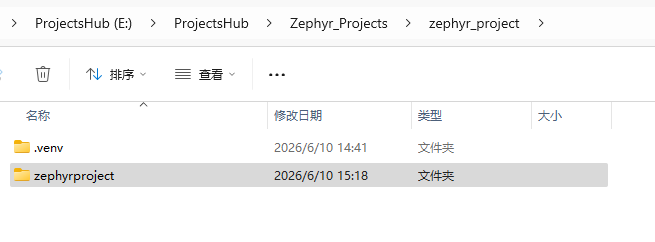
2.5 虚拟环境中有west,就需要激活虚拟环境.venv,在zephyrproject的上级文件夹使用west init zephyrproject,初始化zephyrproject
west init zephyrproject // 初始化zephyr环境并获取源码
cd zephyrproject        // 进入zephyrproject目录
west update				// 更新zephyr源码,更新同步子模块和工具,一定要保证网络良好,下载量较大


#或者使用国内镜像
west init -m https://gitee.com/zephyr-mirror/zephyr.git --mr main zephyrproject
cd zephyrproject
# 修改 manifest 仓库地址为国内镜像
west config manifest.url https://gitee.com/zephyr-mirror/zephyr.git
# 执行更新
west update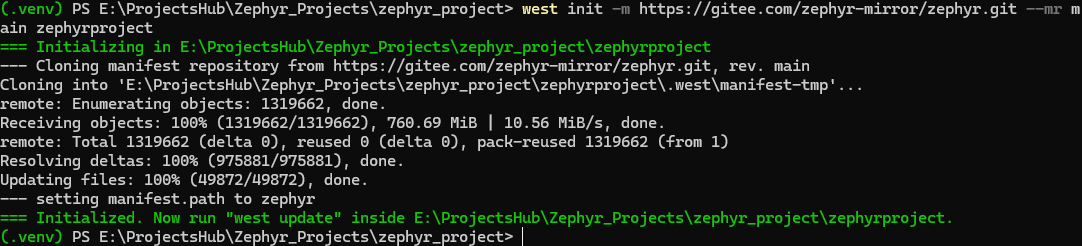
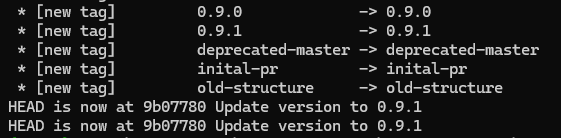
2.6 在cmd或者powershell中zephyrproject下,导出 Zephyr Cmake package
# package可以让Cmake自动加载构建Zephyr应用程序需要的样本代码
west zephyr-export

west packages pip --install
在用户注册表中

2.7 激活虚拟环境,在cmd或者powershell中zephyrproject下,使用pip补全依赖
pip install -r E:\ProjectsHub\Zephyr_Projects\zephyr_project\zephyrproject\zephyr\scripts\requirements.txt
2.8 将west工具添加到PATH中,因为west sdk install,需要在系统里调用west工具链,原本检测不到.venv里的工具。如果你是全局下pip了west就不用管了

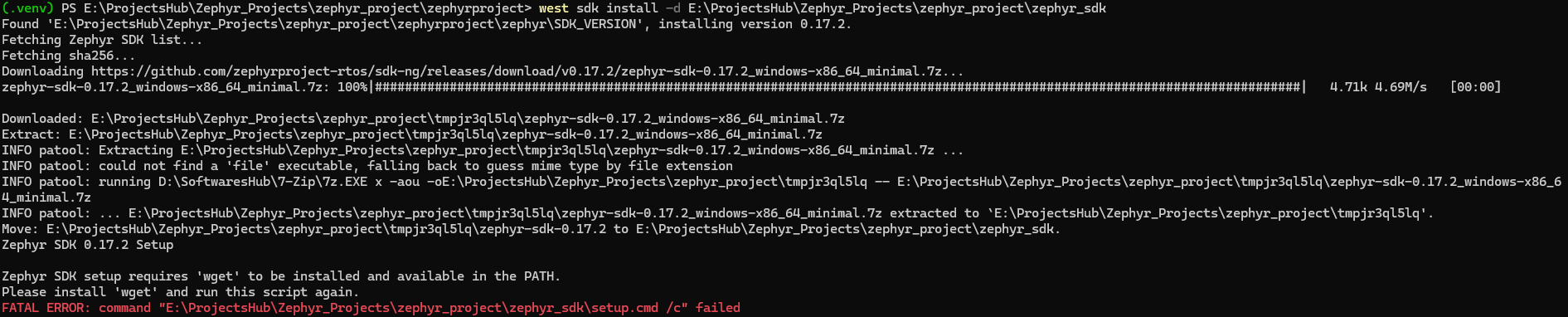
2.9 激活虚拟环境,下载SDK支持工具包,运行一次setup.cmd
cd E:\ProjectsHub\Zephyr_Projects\zephyr_project\zephyrproject\zephyr

# 默认在C盘
west sdk install
选项解释
(.venv) PS E:\ProjectsHub\Zephyr_Projects\zephyr_project\zephyr_project\zephyrproject> west sdk install --help
usage: west sdk install [-h] [--version [SDK_VER]] [-b BASE] [-d DIR] [-i] [-t toolchain_name [toolchain_name ...]] [-T] [-l] [-H] [--personal-access-token PERSONAL_ACCESS_TOKEN] [--api-url API_URL]

options:
  -h, --help            show this help message and exit
  --version [SDK_VER]   version of the Zephyr SDK to install. If not specified, the install version is detected from ${ZEPHYR_BASE}/SDK_VERSION file.
  -b BASE, --install-base BASE
                        Base directory to SDK install. The subdirectory created by extracting the archive in <BASE> will be the SDK installation directory. For example, -b /foo/bar will install the SDK in
                        '/foo/bar/zephyr-sdk-<version>'.
  -d DIR, --install-dir DIR
                        SDK install destination directory. The SDK will be installed on the specified path. The directory contained in the archive will be renamed and installed for the specified directory.
                        For example, if you specify -d /foo/bar/baz, The archive's zephyr-sdk-<version> directory will be renamed baz and placed under /foo/bar. If this option is specified, the --install-
                        base option is ignored.
  -i, --interactive     launches installer in interactive mode. --gnu-toolchains, --no-gnu-toolchains and --no-hosttools will be ignored if this option is enabled.
  -t toolchain_name [toolchain_name ...], --gnu-toolchains toolchain_name [toolchain_name ...]
                        GNU toolchain(s) to install (e.g. 'arm-zephyr-eabi'). If this option is not given, GNU toolchains for all architectures will be installed. If you are unsure which one to install,
                        install all GNU toolchains. This requires downloading several gigabytes and occupies significant disk space. Each Zephyr SDK release may include different GNU toolchains; see the
                        release notes at https://github.com/zephyrproject-rtos/sdk-ng/releases.
  -T, --no-gnu-toolchains
                        do not install GNU toolchains. --gnu-toolchains will be ignored if this option is enabled.
  -l, --llvm            install LLVM toolchain.
  -H, --no-hosttools    do not install host-tools.
  --personal-access-token PERSONAL_ACCESS_TOKEN
                        GitHub personal access token.
  --api-url API_URL     GitHub releases API endpoint used to look for Zephyr SDKs.

Installing SDK:

    Run 'west sdk install' to install Zephyr SDK.

    Set --version option to install a specific version of the SDK.
    If not specified, the install version is detected from ${ZEPHYR_BASE}/SDK_VERSION file.
    SDKs older than 0.14.1 are not supported.

    You can specify the installation directory with --install-dir or --install-base.
    If the specified version of the SDK is already installed,
    the already installed SDK will be used regardless of the settings of
    --install-dir and --install-base.

    Typically, Zephyr SDK archives contain only one directory named zephyr-sdk-<version>
    at the top level.
    The SDK archive is extracted to the home directory if both --install-dir and --install-base
    are not specified.
    In this case, SDK will install into ${HOME}/zephyr-sdk-<version>.
    If --install-base is specified, the archive will be extracted under the specified path.
    In this case, SDK will install into <BASE>/zephyr-sdk-<version> .
    If --install-dir is specified, the directory contained in the archive will be renamed
    and placed to the specified location.

    --interactive, --gnu-toolchains, --no-gnu-toolchains, --llvm and --no-hosttools
    options specify the behavior of the installer. Please see the description of each
    option.

    --personal-access-token specifies the GitHub personal access token.
    This helps to relax the limits on the number of REST API calls.

    --api-url specifies the REST API endpoint for GitHub releases information
    when installing the SDK from a different GitHub repository.
(.venv) PS E:\ProjectsHub\Zephyr_Projects\zephyr_project\zephyr_project\zephyrproject>注:zephyr_project可以看作用户主文件夹,pyhton在用户主文件夹下的.venv,在用户主文件夹下再创建一个工作区我文件夹zephyrproject,其中有文件夹Zephyr仓库,然后SDK下载在zephyr_project下
必须在.west下才能下载sdk
# 可能需要魔法,同时-b指定SDK的父目录,-d指定到具体SDK目录,以及建议使用指定不下载全部的工具链的选项(后续指定下载)

west sdk install -b E:\ProjectsHub\Zephyr_Projects\zephyr_project -t arm-zephyr-eabi

west sdk install -b E:\ProjectsHub\Zephyr_Projects\zephyr_project -T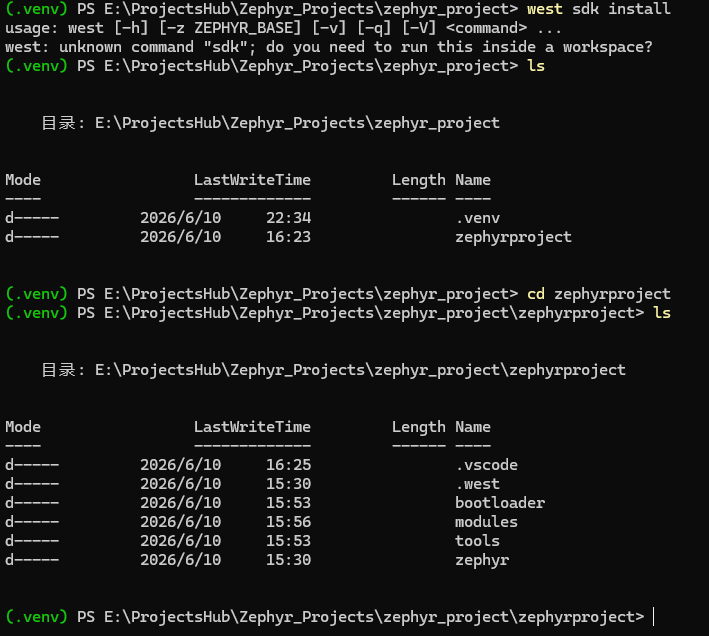
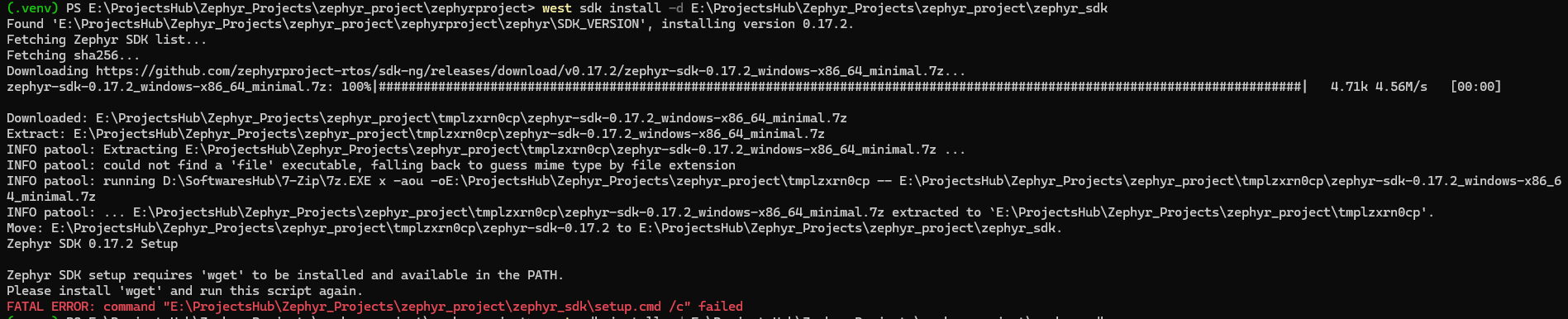

2.10 重点说明:运行setup.cmd后出现错误,(1)如果出现缺少工具链7z和wget工具,使用Chocolatey安装;(2)如果与GitHub断开,需要魔法;(3)如果出现系统找不到指定文件,是因为west sdk install使用了-d选项,由sdk.py程序可知是系统去找的是-d指定的SDK文件夹下不存在的setup.cmd,是因为我之前-d指定的是父文件夹(实际上应该用-b);(4)如果在成功到正常下载一半的sdk工具链,结果与GitHub断开连接,也会导致整个west sdk list检索失败。(5)在指定不下载工具链的前提下,必须是west sdk install执行到setup.cmd成功完毕,否则,只要导致在west sdk install过程中出现任何错误,都会导致验证语句west sdk list出现检索失败FATAL ERROR: No Zephyr SDK installed.
2.10.1 成功现象以及成功打印日志:
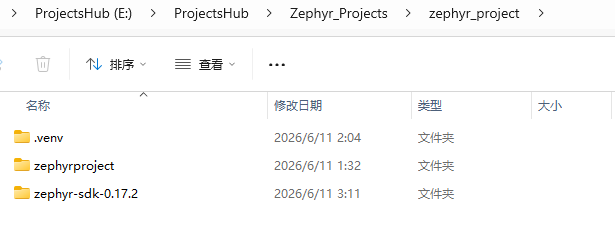
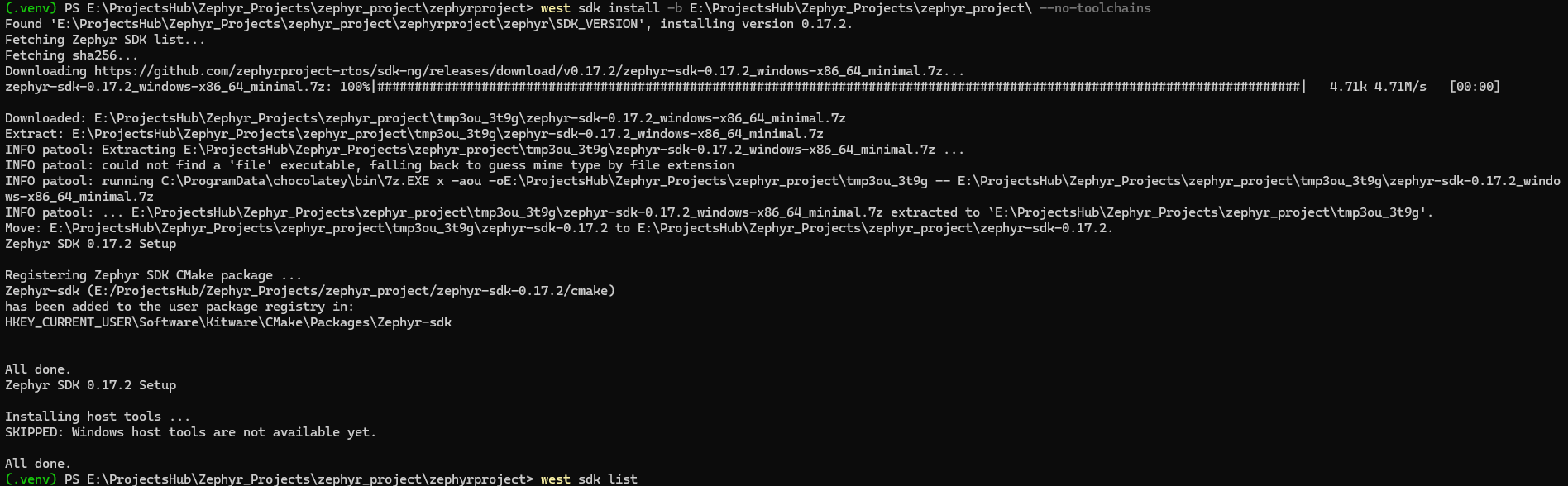
(.venv) PS E:\ProjectsHub\Zephyr_Projects\zephyr_project\zephyrproject> west sdk install -b E:\ProjectsHub\Zephyr_Projects\zephyr_project\ --no-toolchains
Found 'E:\ProjectsHub\Zephyr_Projects\zephyr_project\zephyrproject\zephyr\SDK_VERSION', installing version 0.17.2.
Fetching Zephyr SDK list...
Fetching sha256...
Downloading https://github.com/zephyrproject-rtos/sdk-ng/releases/download/v0.17.2/zephyr-sdk-0.17.2_windows-x86_64_minimal.7z...
zephyr-sdk-0.17.2_windows-x86_64_minimal.7z: 100%|############################################################################################################################|   4.71k 4.71M/s   [00:00]

Downloaded: E:\ProjectsHub\Zephyr_Projects\zephyr_project\tmp3ou_3t9g\zephyr-sdk-0.17.2_windows-x86_64_minimal.7z
Extract: E:\ProjectsHub\Zephyr_Projects\zephyr_project\tmp3ou_3t9g\zephyr-sdk-0.17.2_windows-x86_64_minimal.7z
INFO patool: Extracting E:\ProjectsHub\Zephyr_Projects\zephyr_project\tmp3ou_3t9g\zephyr-sdk-0.17.2_windows-x86_64_minimal.7z ...
INFO patool: could not find a 'file' executable, falling back to guess mime type by file extension
INFO patool: running C:\ProgramData\chocolatey\bin\7z.EXE x -aou -oE:\ProjectsHub\Zephyr_Projects\zephyr_project\tmp3ou_3t9g -- E:\ProjectsHub\Zephyr_Projects\zephyr_project\tmp3ou_3t9g\zephyr-sdk-0.17.2_windows-x86_64_minimal.7z
INFO patool: ... E:\ProjectsHub\Zephyr_Projects\zephyr_project\tmp3ou_3t9g\zephyr-sdk-0.17.2_windows-x86_64_minimal.7z extracted to `E:\ProjectsHub\Zephyr_Projects\zephyr_project\tmp3ou_3t9g'.
Move: E:\ProjectsHub\Zephyr_Projects\zephyr_project\tmp3ou_3t9g\zephyr-sdk-0.17.2 to E:\ProjectsHub\Zephyr_Projects\zephyr_project\zephyr-sdk-0.17.2.
Zephyr SDK 0.17.2 Setup

Registering Zephyr SDK CMake package ...
Zephyr-sdk (E:/ProjectsHub/Zephyr_Projects/zephyr_project/zephyr-sdk-0.17.2/cmake)
has been added to the user package registry in:
HKEY_CURRENT_USER\Software\Kitware\CMake\Packages\Zephyr-sdk


All done.
Zephyr SDK 0.17.2 Setup

Installing host tools ...
SKIPPED: Windows host tools are not available yet.

All done.
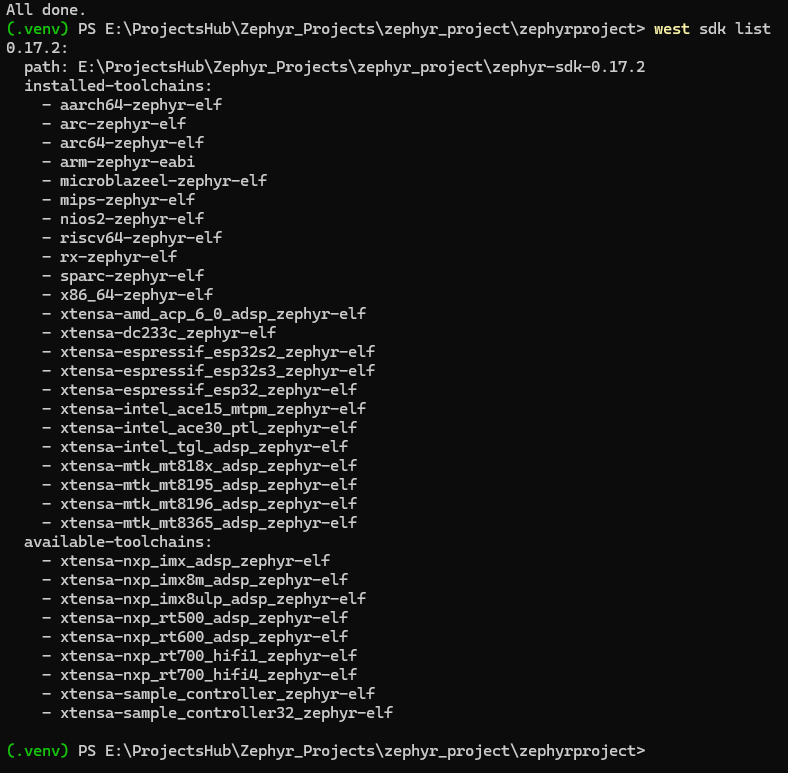
(.venv) PS E:\ProjectsHub\Zephyr_Projects\zephyr_project\zephyrproject> west sdk list
0.17.2:
  path: E:\ProjectsHub\Zephyr_Projects\zephyr_project\zephyr-sdk-0.17.2
  installed-toolchains:
    - aarch64-zephyr-elf
    - arc-zephyr-elf
    - arc64-zephyr-elf
    - arm-zephyr-eabi
    - microblazeel-zephyr-elf
    - mips-zephyr-elf
    - nios2-zephyr-elf
    - riscv64-zephyr-elf
    - rx-zephyr-elf
    - sparc-zephyr-elf
    - x86_64-zephyr-elf
    - xtensa-amd_acp_6_0_adsp_zephyr-elf
    - xtensa-dc233c_zephyr-elf
    - xtensa-espressif_esp32s2_zephyr-elf
    - xtensa-espressif_esp32s3_zephyr-elf
    - xtensa-espressif_esp32_zephyr-elf
    - xtensa-intel_ace15_mtpm_zephyr-elf
    - xtensa-intel_ace30_ptl_zephyr-elf
    - xtensa-intel_tgl_adsp_zephyr-elf
    - xtensa-mtk_mt818x_adsp_zephyr-elf
    - xtensa-mtk_mt8195_adsp_zephyr-elf
    - xtensa-mtk_mt8196_adsp_zephyr-elf
    - xtensa-mtk_mt8365_adsp_zephyr-elf
  available-toolchains:
    - xtensa-nxp_imx_adsp_zephyr-elf
    - xtensa-nxp_imx8m_adsp_zephyr-elf
    - xtensa-nxp_imx8ulp_adsp_zephyr-elf
    - xtensa-nxp_rt500_adsp_zephyr-elf
    - xtensa-nxp_rt600_adsp_zephyr-elf
    - xtensa-nxp_rt700_hifi1_zephyr-elf
    - xtensa-nxp_rt700_hifi4_zephyr-elf
    - xtensa-sample_controller_zephyr-elf
    - xtensa-sample_controller32_zephyr-elf

(.venv) PS E:\ProjectsHub\Zephyr_Projects\zephyr_project\zephyrproject>

# 二次测试

(.venv) PS E:\ProjectsHub\Zephyr_Projects\zephyr_project\zephyr_project\zephyrproject> west sdk install -b E:\ProjectsHub\Zephyr_Projects\zephyr_project\zephyr_project -t arm-zephyr-eabi
Found 'E:\ProjectsHub\Zephyr_Projects\zephyr_project\zephyr_project\zephyrproject\zephyr\SDK_VERSION', installing version 1.0.1.
Fetching Zephyr SDK list...
Fetching sha256...
Downloading https://github.com/zephyrproject-rtos/sdk-ng/releases/download/v1.0.1/zephyr-sdk-1.0.1_windows-x86_64_minimal.7z...
zephyr-sdk-1.0.1_windows-x86_64_minimal.7z: 100%|##############################################################################################################################|   104M 11.0M/s   [00:09]

Downloaded: E:\ProjectsHub\Zephyr_Projects\zephyr_project\zephyr_project\tmpdpzcyehr\zephyr-sdk-1.0.1_windows-x86_64_minimal.7z
Extract: E:\ProjectsHub\Zephyr_Projects\zephyr_project\zephyr_project\tmpdpzcyehr\zephyr-sdk-1.0.1_windows-x86_64_minimal.7z
INFO patool: Extracting E:\ProjectsHub\Zephyr_Projects\zephyr_project\zephyr_project\tmpdpzcyehr\zephyr-sdk-1.0.1_windows-x86_64_minimal.7z ...
INFO patool: could not find a 'file' executable, falling back to guess mime type by file extension
INFO patool: running C:\ProgramData\chocolatey\bin\7z.EXE x -aou -oE:\ProjectsHub\Zephyr_Projects\zephyr_project\zephyr_project\tmpdpzcyehr -- E:\ProjectsHub\Zephyr_Projects\zephyr_project\zephyr_project\tmpdpzcyehr\zephyr-sdk-1.0.1_windows-x86_64_minimal.7z
INFO patool: ... E:\ProjectsHub\Zephyr_Projects\zephyr_project\zephyr_project\tmpdpzcyehr\zephyr-sdk-1.0.1_windows-x86_64_minimal.7z extracted to `E:\ProjectsHub\Zephyr_Projects\zephyr_project\zephyr_project\tmpdpzcyehr'.
Move: E:\ProjectsHub\Zephyr_Projects\zephyr_project\zephyr_project\tmpdpzcyehr\zephyr-sdk-1.0.1 to E:\ProjectsHub\Zephyr_Projects\zephyr_project\zephyr_project\zephyr-sdk-1.0.1.
Zephyr SDK 1.0.1 Setup

Registering Zephyr SDK CMake package ...
Zephyr-sdk (E:/ProjectsHub/Zephyr_Projects/zephyr_project/zephyr_project/zephyr-sdk-1.0.1/cmake)
has been added to the user package registry in:
HKEY_CURRENT_USER\Software\Kitware\CMake\Packages\Zephyr-sdk


All done.
Zephyr SDK 1.0.1 Setup

Installing 'arm-zephyr-eabi' GNU toolchain ...
toolchain_gnu_windows-x86_64_arm-zephyr-eabi.7z      100%[===================================================================================================================>]  75.55M  11.1MB/s    in 7.3s

7-Zip 26.01 (x64) : Copyright (c) 1999-2026 Igor Pavlov : 2026-04-27

Scanning the drive for archives:
1 file, 79217349 bytes (76 MiB)

Extracting archive: toolchain_gnu_windows-x86_64_arm-zephyr-eabi.7z
--
Path = toolchain_gnu_windows-x86_64_arm-zephyr-eabi.7z
Type = 7z
Physical Size = 79217349
Headers Size = 37178
Method = LZMA2:24 BCJ
Solid = +
Blocks = 2

Everything is Ok

Folders: 591
Files: 4948
Size:       814050710
Compressed: 79217349
Installing host tools ...
SKIPPED: Windows host tools are not available yet.

All done.
(.venv) PS E:\ProjectsHub\Zephyr_Projects\zephyr_project\zephyr_project\zephyrproject> west sdk list
1.0.1:
  path: E:\ProjectsHub\Zephyr_Projects\zephyr_project\zephyr_project\zephyr-sdk-1.0.1
  hosttools: installed
  gnu-installed-toolchains:
    - arm-zephyr-eabi
  gnu-available-toolchains:
    - aarch64-zephyr-elf
    - arc64-zephyr-elf
    - arc-zephyr-elf
    - microblazeel-zephyr-elf
    - mips-zephyr-elf
    - or1k-zephyr-elf
    - riscv64-zephyr-elf
    - rx-zephyr-elf
    - sparc-zephyr-elf
    - x86_64-zephyr-elf
    - xtensa-amd_acp_6_0_adsp_zephyr-elf
    - xtensa-amd_acp_7_0_adsp_zephyr-elf
    - xtensa-amd_acp_7_3_adsp_zephyr-elf
    - xtensa-dc233c_zephyr-elf
    - xtensa-espressif_esp32_zephyr-elf
    - xtensa-espressif_esp32s2_zephyr-elf
    - xtensa-espressif_esp32s3_zephyr-elf
    - xtensa-intel_ace15_mtpm_zephyr-elf
    - xtensa-intel_ace30_ptl_zephyr-elf
    - xtensa-intel_ace40_zephyr-elf
    - xtensa-intel_tgl_adsp_zephyr-elf
    - xtensa-mtk_mt8195_adsp_zephyr-elf
    - xtensa-mtk_mt818x_adsp_zephyr-elf
    - xtensa-mtk_mt8196_adsp_zephyr-elf
    - xtensa-mtk_mt8365_adsp_zephyr-elf
    - xtensa-nxp_imx_adsp_zephyr-elf
    - xtensa-nxp_imx8m_adsp_zephyr-elf
    - xtensa-nxp_imx8ulp_adsp_zephyr-elf
    - xtensa-nxp_rt500_adsp_zephyr-elf
    - xtensa-nxp_rt600_adsp_zephyr-elf
    - xtensa-nxp_rt700_hifi1_zephyr-elf
    - xtensa-nxp_rt700_hifi4_zephyr-elf
    - xtensa-sample_controller_zephyr-elf
    - xtensa-sample_controller32_zephyr-elf

(.venv) PS E:\ProjectsHub\Zephyr_Projects\zephyr_project\zephyr_project\zephyrproject>
2.10.2 错误现象(可忽略):
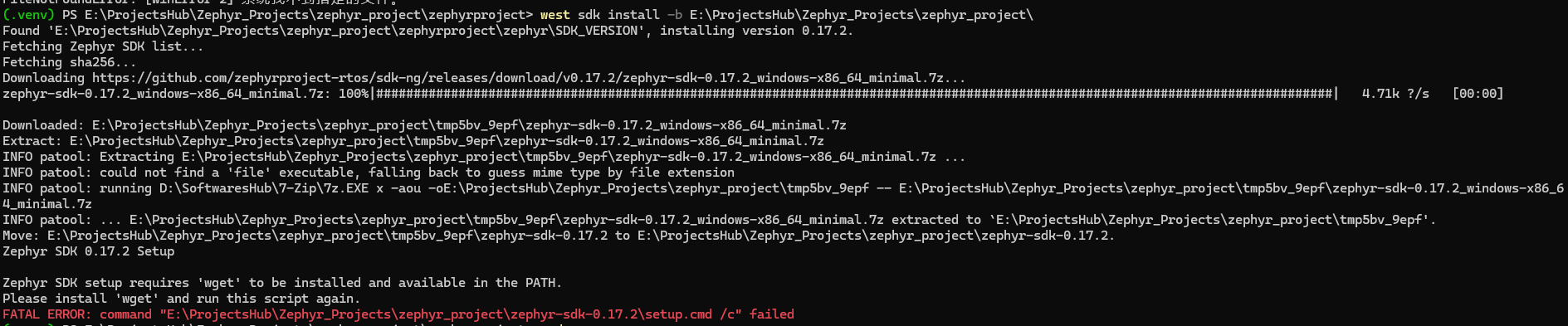
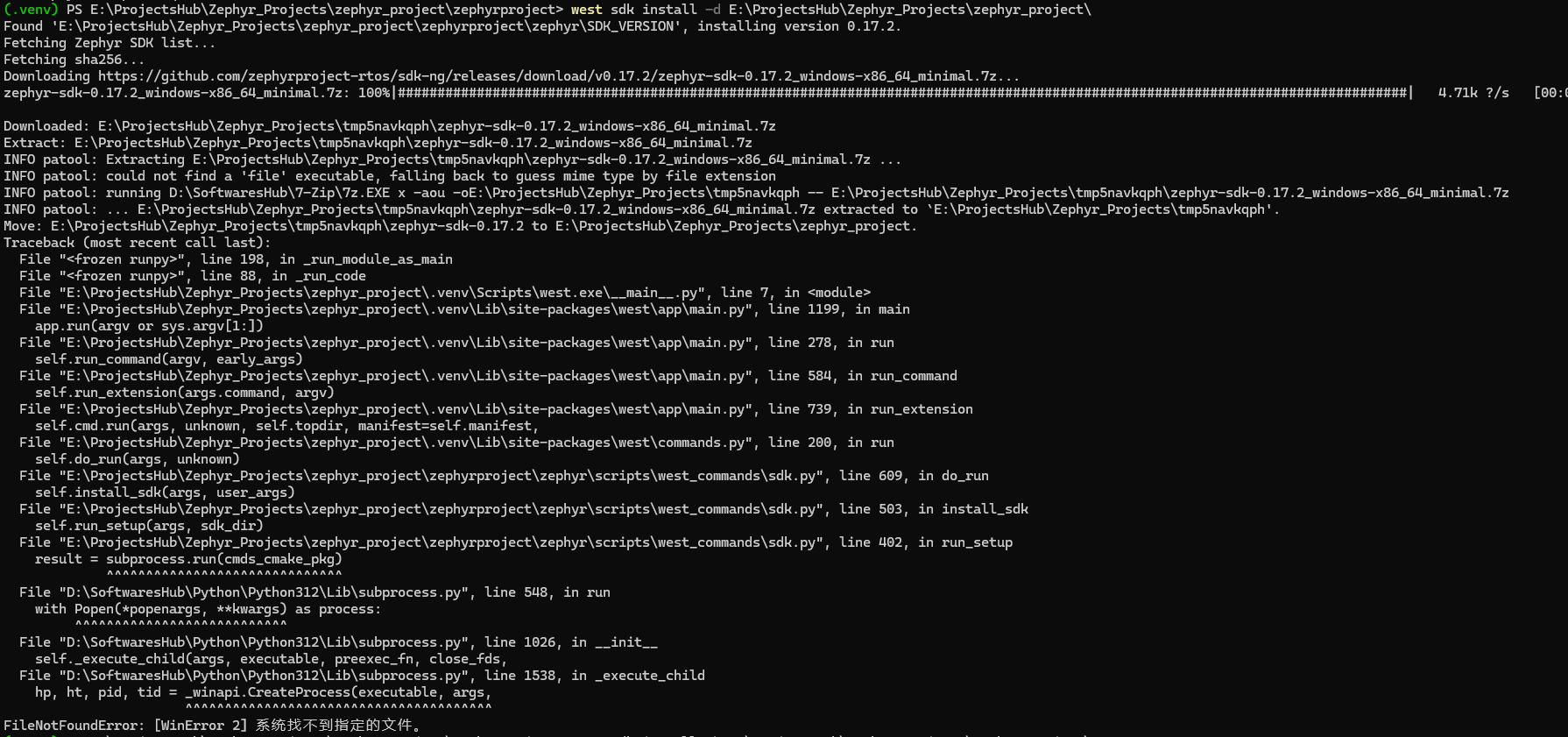
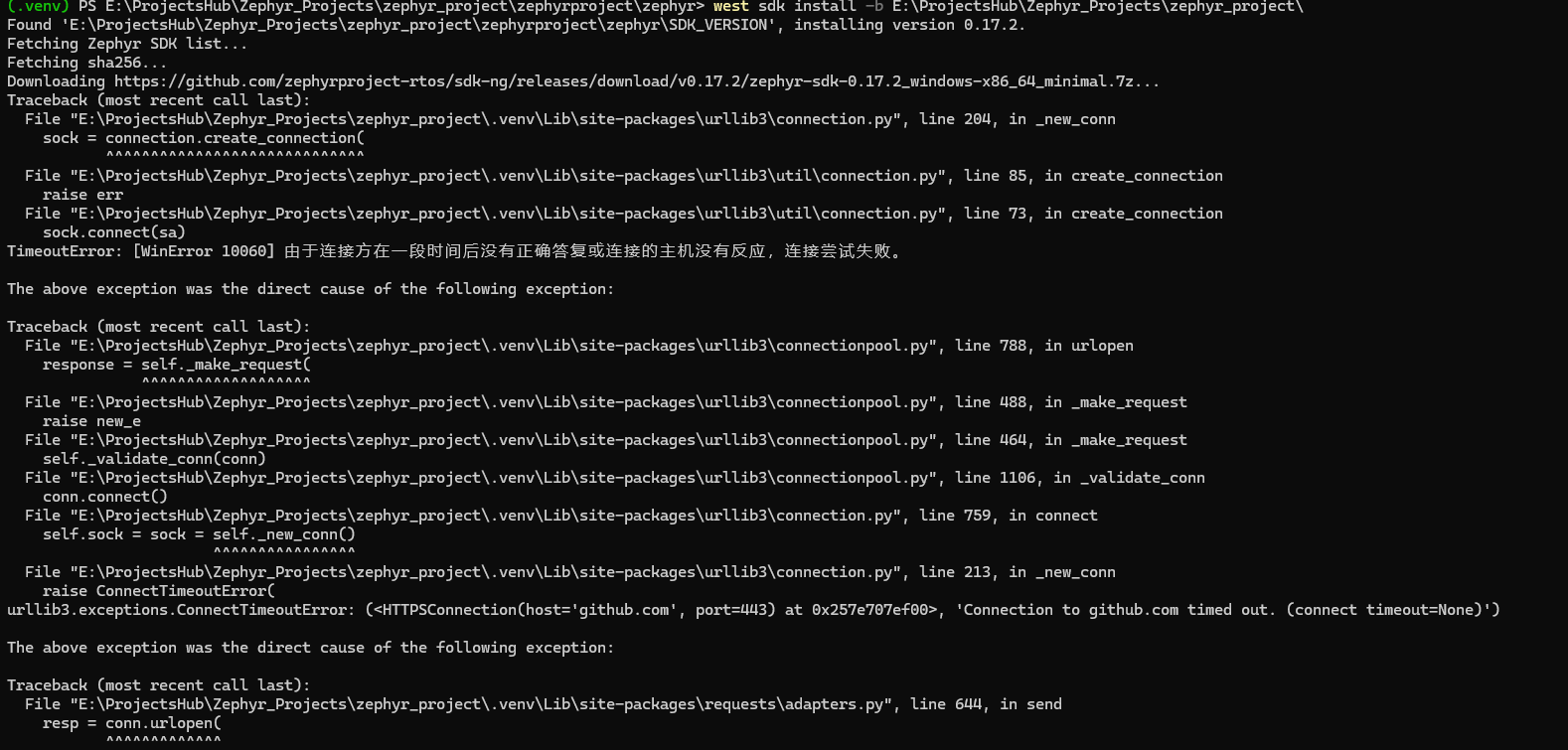
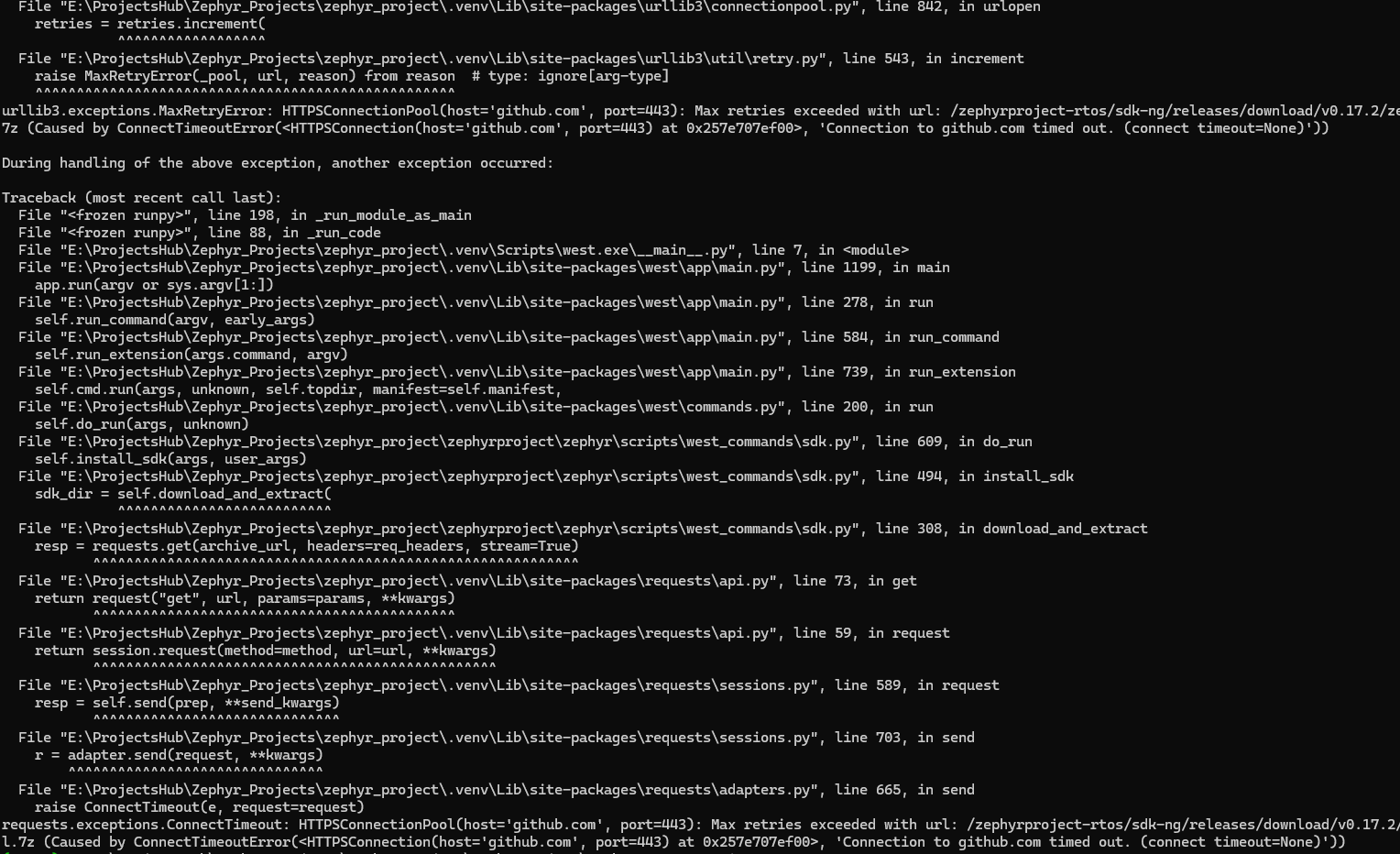
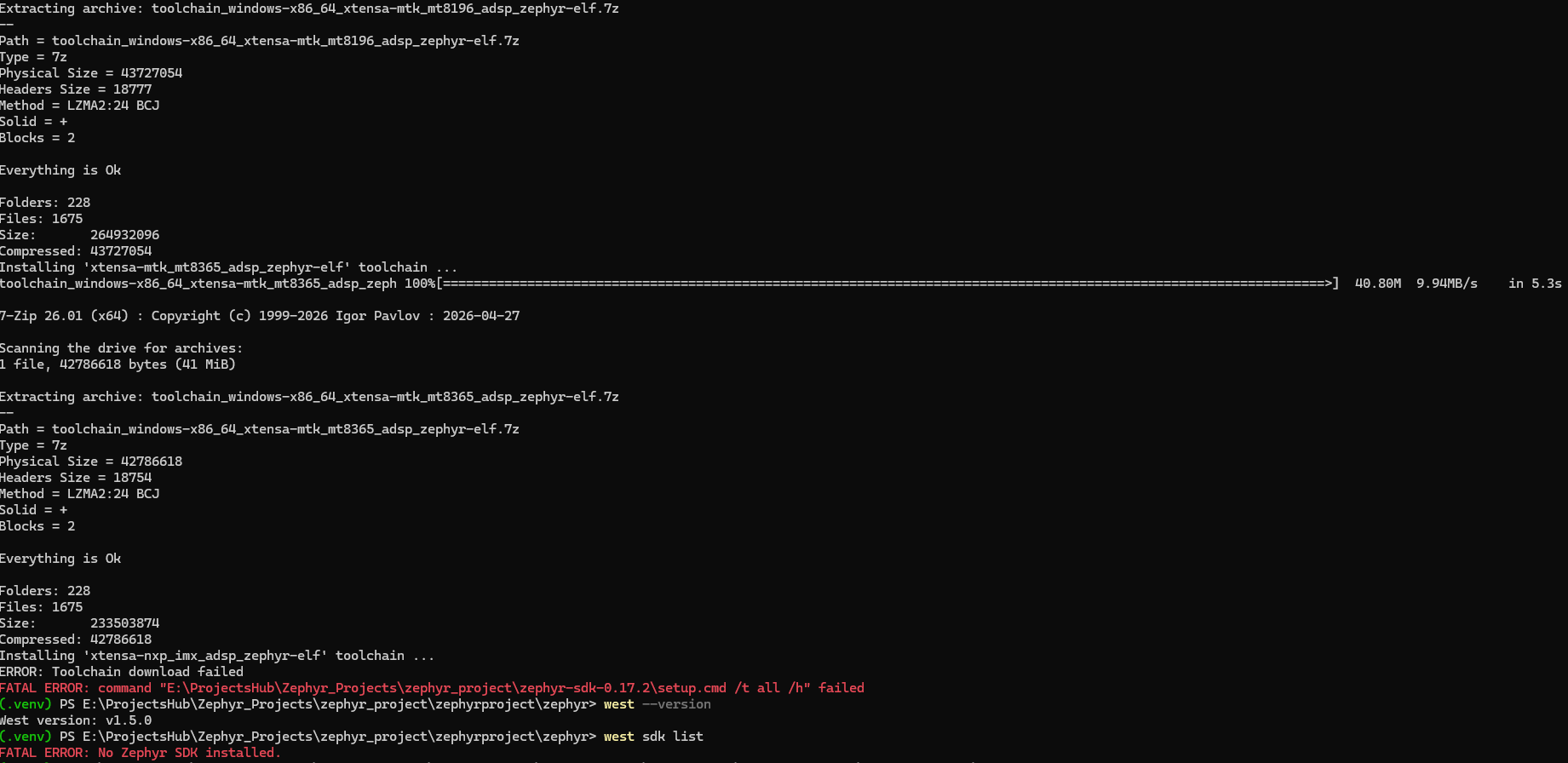
# 失败日志 距离成功最近的一次,由于是下载全部工具链导致中间断开,导致整个安装验证过程没有正确结束

(.venv) PS E:\ProjectsHub\Zephyr_Projects\zephyr_project\zephyrproject\zephyr> west sdk install -b E:\ProjectsHub\Zephyr_Projects\zephyr_project\
Found 'E:\ProjectsHub\Zephyr_Projects\zephyr_project\zephyrproject\zephyr\SDK_VERSION', installing version 0.17.2.
Fetching Zephyr SDK list...
Fetching sha256...
Downloading https://github.com/zephyrproject-rtos/sdk-ng/releases/download/v0.17.2/zephyr-sdk-0.17.2_windows-x86_64_minimal.7z...
zephyr-sdk-0.17.2_windows-x86_64_minimal.7z: 100%|################################################################################################################################|   4.71k ?/s   [00:00]

Downloaded: E:\ProjectsHub\Zephyr_Projects\zephyr_project\tmpi4yi0g3c\zephyr-sdk-0.17.2_windows-x86_64_minimal.7z
Extract: E:\ProjectsHub\Zephyr_Projects\zephyr_project\tmpi4yi0g3c\zephyr-sdk-0.17.2_windows-x86_64_minimal.7z
INFO patool: Extracting E:\ProjectsHub\Zephyr_Projects\zephyr_project\tmpi4yi0g3c\zephyr-sdk-0.17.2_windows-x86_64_minimal.7z ...
INFO patool: could not find a 'file' executable, falling back to guess mime type by file extension
INFO patool: running C:\ProgramData\chocolatey\bin\7z.EXE x -aou -oE:\ProjectsHub\Zephyr_Projects\zephyr_project\tmpi4yi0g3c -- E:\ProjectsHub\Zephyr_Projects\zephyr_project\tmpi4yi0g3c\zephyr-sdk-0.17.2_windows-x86_64_minimal.7z
INFO patool: ... E:\ProjectsHub\Zephyr_Projects\zephyr_project\tmpi4yi0g3c\zephyr-sdk-0.17.2_windows-x86_64_minimal.7z extracted to `E:\ProjectsHub\Zephyr_Projects\zephyr_project\tmpi4yi0g3c'.
Move: E:\ProjectsHub\Zephyr_Projects\zephyr_project\tmpi4yi0g3c\zephyr-sdk-0.17.2 to E:\ProjectsHub\Zephyr_Projects\zephyr_project\zephyr-sdk-0.17.2.
Zephyr SDK 0.17.2 Setup

Registering Zephyr SDK CMake package ...
Zephyr-sdk (E:/ProjectsHub/Zephyr_Projects/zephyr_project/zephyr-sdk-0.17.2/cmake)
has been added to the user package registry in:
HKEY_CURRENT_USER\Software\Kitware\CMake\Packages\Zephyr-sdk


All done.
Zephyr SDK 0.17.2 Setup

Installing 'aarch64-zephyr-elf' toolchain ...
toolchain_windows-x86_64_aarch64-zephyr-elf.7z       100%[===================================================================================================================>]  45.91M  6.83MB/s    in 6.3s

7-Zip 26.01 (x64) : Copyright (c) 1999-2026 Igor Pavlov : 2026-04-27

Scanning the drive for archives:
1 file, 48138522 bytes (46 MiB)

Extracting archive: toolchain_windows-x86_64_aarch64-zephyr-elf.7z
--
Path = toolchain_windows-x86_64_aarch64-zephyr-elf.7z
Type = 7z
Physical Size = 48138522
Headers Size = 20125
Method = LZMA2:24 BCJ
Solid = +
Blocks = 2

Everything is Ok

Folders: 233
Files: 1891
Size:       268421634
Compressed: 48138522
Installing 'arc64-zephyr-elf' toolchain ...
toolchain_windows-x86_64_arc64-zephyr-elf.7z         100%[===================================================================================================================>]  45.33M  10.2MB/s    in 6.0s

7-Zip 26.01 (x64) : Copyright (c) 1999-2026 Igor Pavlov : 2026-04-27

Scanning the drive for archives:
1 file, 47527852 bytes (46 MiB)

Extracting archive: toolchain_windows-x86_64_arc64-zephyr-elf.7z
--
Path = toolchain_windows-x86_64_arc64-zephyr-elf.7z
Type = 7z
Physical Size = 47527852
Headers Size = 20728
Method = LZMA2:24 BCJ
Solid = +
Blocks = 2

Everything is Ok

Folders: 259
Files: 2068
Size:       331228998
Compressed: 47527852
Installing 'arc-zephyr-elf' toolchain ...
toolchain_windows-x86_64_arc-zephyr-elf.7z           100%[===================================================================================================================>]  59.26M  11.1MB/s    in 7.0s

7-Zip 26.01 (x64) : Copyright (c) 1999-2026 Igor Pavlov : 2026-04-27

Scanning the drive for archives:
1 file, 62135184 bytes (60 MiB)

Extracting archive: toolchain_windows-x86_64_arc-zephyr-elf.7z
--
Path = toolchain_windows-x86_64_arc-zephyr-elf.7z
Type = 7z
Physical Size = 62135184
Headers Size = 31346
Method = LZMA2:24 BCJ
Solid = +
Blocks = 2

Everything is Ok

Folders: 460
Files: 3962
Size:       740361776
Compressed: 62135184
Installing 'arm-zephyr-eabi' toolchain ...
toolchain_windows-x86_64_arm-zephyr-eabi.7z          100%[===================================================================================================================>]  81.87M  7.78MB/s    in 48s

7-Zip 26.01 (x64) : Copyright (c) 1999-2026 Igor Pavlov : 2026-04-27

Scanning the drive for archives:
1 file, 85845915 bytes (82 MiB)

Extracting archive: toolchain_windows-x86_64_arm-zephyr-eabi.7z
--
Path = toolchain_windows-x86_64_arm-zephyr-eabi.7z
Type = 7z
Physical Size = 85845915
Headers Size = 36371
Method = LZMA2:24 BCJ
Solid = +
Blocks = 2

Everything is Ok

Folders: 521
Files: 4357
Size:       1162616181
Compressed: 85845915
Installing 'microblazeel-zephyr-elf' toolchain ...
toolchain_windows-x86_64_microblazeel-zephyr-elf.7z  100%[===================================================================================================================>]  46.10M  7.09MB/s    in 8.7s

7-Zip 26.01 (x64) : Copyright (c) 1999-2026 Igor Pavlov : 2026-04-27

Scanning the drive for archives:
1 file, 48337248 bytes (47 MiB)

Extracting archive: toolchain_windows-x86_64_microblazeel-zephyr-elf.7z
--
Path = toolchain_windows-x86_64_microblazeel-zephyr-elf.7z
Type = 7z
Physical Size = 48337248
Headers Size = 23013
Method = LZMA2:24 BCJ
Solid = +
Blocks = 2

Everything is Ok

Folders: 301
Files: 2607
Size:       452990023
Compressed: 48337248
Installing 'mips-zephyr-elf' toolchain ...
toolchain_windows-x86_64_mips-zephyr-elf.7z          100%[===================================================================================================================>]  48.28M  10.7MB/s    in 6.5s

7-Zip 26.01 (x64) : Copyright (c) 1999-2026 Igor Pavlov : 2026-04-27

Scanning the drive for archives:
1 file, 50621210 bytes (49 MiB)

Extracting archive: toolchain_windows-x86_64_mips-zephyr-elf.7z
--
Path = toolchain_windows-x86_64_mips-zephyr-elf.7z
Type = 7z
Physical Size = 50621210
Headers Size = 20959
Method = LZMA2:24 BCJ
Solid = +
Blocks = 2

Everything is Ok

Folders: 252
Files: 2071
Size:       346874345
Compressed: 50621210
Installing 'nios2-zephyr-elf' toolchain ...
toolchain_windows-x86_64_nios2-zephyr-elf.7z         100%[===================================================================================================================>]  41.40M  9.85MB/s    in 4.7s

7-Zip 26.01 (x64) : Copyright (c) 1999-2026 Igor Pavlov : 2026-04-27

Scanning the drive for archives:
1 file, 43411416 bytes (42 MiB)

Extracting archive: toolchain_windows-x86_64_nios2-zephyr-elf.7z
--
Path = toolchain_windows-x86_64_nios2-zephyr-elf.7z
Type = 7z
Physical Size = 43411416
Headers Size = 21210
Method = LZMA2:24 BCJ
Solid = +
Blocks = 2

Everything is Ok

Folders: 280
Files: 2222
Size:       360143869
Compressed: 43411416
Installing 'riscv64-zephyr-elf' toolchain ...
toolchain_windows-x86_64_riscv64-zephyr-elf.7z       100%[===================================================================================================================>] 102.05M  10.6MB/s    in 11s

7-Zip 26.01 (x64) : Copyright (c) 1999-2026 Igor Pavlov : 2026-04-27

Scanning the drive for archives:
1 file, 107006603 bytes (103 MiB)

Extracting archive: toolchain_windows-x86_64_riscv64-zephyr-elf.7z
--
Path = toolchain_windows-x86_64_riscv64-zephyr-elf.7z
Type = 7z
Physical Size = 107006603
Headers Size = 32231
Method = LZMA2:24 BCJ
Solid = +
Blocks = 2

Everything is Ok

Folders: 545
Files: 3351
Size:       1112726358
Compressed: 107006603
Installing 'rx-zephyr-elf' toolchain ...
toolchain_windows-x86_64_rx-zephyr-elf.7z            100%[===================================================================================================================>]  66.43M  10.5MB/s    in 8.2s

7-Zip 26.01 (x64) : Copyright (c) 1999-2026 Igor Pavlov : 2026-04-27

Scanning the drive for archives:
1 file, 69658471 bytes (67 MiB)

Extracting archive: toolchain_windows-x86_64_rx-zephyr-elf.7z
--
Path = toolchain_windows-x86_64_rx-zephyr-elf.7z
Type = 7z
Physical Size = 69658471
Headers Size = 31480
Method = LZMA2:24 BCJ
Solid = +
Blocks = 2

Everything is Ok

Folders: 441
Files: 3826
Size:       808804894
Compressed: 69658471
Installing 'sparc-zephyr-elf' toolchain ...
toolchain_windows-x86_64_sparc-zephyr-elf.7z         100%[===================================================================================================================>]  50.46M  9.13MB/s    in 6.6s

7-Zip 26.01 (x64) : Copyright (c) 1999-2026 Igor Pavlov : 2026-04-27

Scanning the drive for archives:
1 file, 52908424 bytes (51 MiB)

Extracting archive: toolchain_windows-x86_64_sparc-zephyr-elf.7z
--
Path = toolchain_windows-x86_64_sparc-zephyr-elf.7z
Type = 7z
Physical Size = 52908424
Headers Size = 23730
Method = LZMA2:24 BCJ
Solid = +
Blocks = 2

Everything is Ok

Folders: 315
Files: 2577
Size:       471658421
Compressed: 52908424
Installing 'x86_64-zephyr-elf' toolchain ...
toolchain_windows-x86_64_x86_64-zephyr-elf.7z        100%[===================================================================================================================>]  51.98M  7.76MB/s    in 6.2s

7-Zip 26.01 (x64) : Copyright (c) 1999-2026 Igor Pavlov : 2026-04-27

Scanning the drive for archives:
1 file, 54501220 bytes (52 MiB)

Extracting archive: toolchain_windows-x86_64_x86_64-zephyr-elf.7z
--
Path = toolchain_windows-x86_64_x86_64-zephyr-elf.7z
Type = 7z
Physical Size = 54501220
Headers Size = 21223
Method = LZMA2:24 BCJ
Solid = +
Blocks = 2

Everything is Ok

Folders: 238
Files: 2008
Size:       321318714
Compressed: 54501220
Installing 'xtensa-amd_acp_6_0_adsp_zephyr-elf' toolchain ...
toolchain_windows-x86_64_xtensa-amd_acp_6_0_adsp_zep 100%[===================================================================================================================>]  41.69M  9.49MB/s    in 5.8s

7-Zip 26.01 (x64) : Copyright (c) 1999-2026 Igor Pavlov : 2026-04-27

Scanning the drive for archives:
1 file, 43719726 bytes (42 MiB)

Extracting archive: toolchain_windows-x86_64_xtensa-amd_acp_6_0_adsp_zephyr-elf.7z
--
Path = toolchain_windows-x86_64_xtensa-amd_acp_6_0_adsp_zephyr-elf.7z
Type = 7z
Physical Size = 43719726
Headers Size = 18820
Method = LZMA2:24 BCJ
Solid = +
Blocks = 2

Everything is Ok

Folders: 228
Files: 1675
Size:       264121904
Compressed: 43719726
Installing 'xtensa-dc233c_zephyr-elf' toolchain ...
toolchain_windows-x86_64_xtensa-dc233c_zephyr-elf.7z 100%[===================================================================================================================>]  39.72M  6.17MB/s    in 7.2s

7-Zip 26.01 (x64) : Copyright (c) 1999-2026 Igor Pavlov : 2026-04-27

Scanning the drive for archives:
1 file, 41646130 bytes (40 MiB)

Extracting archive: toolchain_windows-x86_64_xtensa-dc233c_zephyr-elf.7z
--
Path = toolchain_windows-x86_64_xtensa-dc233c_zephyr-elf.7z
Type = 7z
Physical Size = 41646130
Headers Size = 18509
Method = LZMA2:24 BCJ
Solid = +
Blocks = 2

Everything is Ok

Folders: 228
Files: 1675
Size:       207201083
Compressed: 41646130
Installing 'xtensa-espressif_esp32_zephyr-elf' toolchain ...
toolchain_windows-x86_64_xtensa-espressif_esp32_zeph 100%[===================================================================================================================>]  39.95M  9.23MB/s    in 4.7s

7-Zip 26.01 (x64) : Copyright (c) 1999-2026 Igor Pavlov : 2026-04-27

Scanning the drive for archives:
1 file, 41887608 bytes (40 MiB)

Extracting archive: toolchain_windows-x86_64_xtensa-espressif_esp32_zephyr-elf.7z
--
Path = toolchain_windows-x86_64_xtensa-espressif_esp32_zephyr-elf.7z
Type = 7z
Physical Size = 41887608
Headers Size = 18785
Method = LZMA2:24 BCJ
Solid = +
Blocks = 2

Everything is Ok

Folders: 228
Files: 1675
Size:       210596780
Compressed: 41887608
Installing 'xtensa-espressif_esp32s2_zephyr-elf' toolchain ...
toolchain_windows-x86_64_xtensa-espressif_esp32s2_ze 100%[===================================================================================================================>]  39.90M  7.99MB/s    in 5.6s

7-Zip 26.01 (x64) : Copyright (c) 1999-2026 Igor Pavlov : 2026-04-27

Scanning the drive for archives:
1 file, 41835303 bytes (40 MiB)

Extracting archive: toolchain_windows-x86_64_xtensa-espressif_esp32s2_zephyr-elf.7z
--
Path = toolchain_windows-x86_64_xtensa-espressif_esp32s2_zephyr-elf.7z
Type = 7z
Physical Size = 41835303
Headers Size = 18814
Method = LZMA2:24 BCJ
Solid = +
Blocks = 2

Everything is Ok

Folders: 228
Files: 1675
Size:       209476528
Compressed: 41835303
Installing 'xtensa-espressif_esp32s3_zephyr-elf' toolchain ...
toolchain_windows-x86_64_xtensa-espressif_esp32s3_ze 100%[===================================================================================================================>]  39.84M  10.4MB/s    in 4.2s

7-Zip 26.01 (x64) : Copyright (c) 1999-2026 Igor Pavlov : 2026-04-27

Scanning the drive for archives:
1 file, 41773092 bytes (40 MiB)

Extracting archive: toolchain_windows-x86_64_xtensa-espressif_esp32s3_zephyr-elf.7z
--
Path = toolchain_windows-x86_64_xtensa-espressif_esp32s3_zephyr-elf.7z
Type = 7z
Physical Size = 41773092
Headers Size = 18810
Method = LZMA2:24 BCJ
Solid = +
Blocks = 2

Everything is Ok

Folders: 228
Files: 1675
Size:       215887819
Compressed: 41773092
Installing 'xtensa-intel_ace15_mtpm_zephyr-elf' toolchain ...
toolchain_windows-x86_64_xtensa-intel_ace15_mtpm_zep 100%[===================================================================================================================>]  40.74M  6.96MB/s    in 6.7s

7-Zip 26.01 (x64) : Copyright (c) 1999-2026 Igor Pavlov : 2026-04-27

Scanning the drive for archives:
1 file, 42714389 bytes (41 MiB)

Extracting archive: toolchain_windows-x86_64_xtensa-intel_ace15_mtpm_zephyr-elf.7z
--
Path = toolchain_windows-x86_64_xtensa-intel_ace15_mtpm_zephyr-elf.7z
Type = 7z
Physical Size = 42714389
Headers Size = 18850
Method = LZMA2:24 BCJ
Solid = +
Blocks = 2

Everything is Ok

Folders: 228
Files: 1675
Size:       231352333
Compressed: 42714389
Installing 'xtensa-intel_ace30_ptl_zephyr-elf' toolchain ...
toolchain_windows-x86_64_xtensa-intel_ace30_ptl_zeph 100%[===================================================================================================================>]  40.74M  9.86MB/s    in 5.2s

7-Zip 26.01 (x64) : Copyright (c) 1999-2026 Igor Pavlov : 2026-04-27

Scanning the drive for archives:
1 file, 42719035 bytes (41 MiB)

Extracting archive: toolchain_windows-x86_64_xtensa-intel_ace30_ptl_zephyr-elf.7z
--
Path = toolchain_windows-x86_64_xtensa-intel_ace30_ptl_zephyr-elf.7z
Type = 7z
Physical Size = 42719035
Headers Size = 18698
Method = LZMA2:24 BCJ
Solid = +
Blocks = 2

Everything is Ok

Folders: 228
Files: 1675
Size:       231805095
Compressed: 42719035
Installing 'xtensa-intel_tgl_adsp_zephyr-elf' toolchain ...
toolchain_windows-x86_64_xtensa-intel_tgl_adsp_zephy 100%[===================================================================================================================>]  39.82M  8.38MB/s    in 5.4s

7-Zip 26.01 (x64) : Copyright (c) 1999-2026 Igor Pavlov : 2026-04-27

Scanning the drive for archives:
1 file, 41751685 bytes (40 MiB)

Extracting archive: toolchain_windows-x86_64_xtensa-intel_tgl_adsp_zephyr-elf.7z
--
Path = toolchain_windows-x86_64_xtensa-intel_tgl_adsp_zephyr-elf.7z
Type = 7z
Physical Size = 41751685
Headers Size = 18736
Method = LZMA2:24 BCJ
Solid = +
Blocks = 2

Everything is Ok

Folders: 228
Files: 1675
Size:       219315841
Compressed: 41751685
Installing 'xtensa-mtk_mt8195_adsp_zephyr-elf' toolchain ...
toolchain_windows-x86_64_xtensa-mtk_mt8195_adsp_zeph 100%[===================================================================================================================>]  40.72M  8.92MB/s    in 5.8s

7-Zip 26.01 (x64) : Copyright (c) 1999-2026 Igor Pavlov : 2026-04-27

Scanning the drive for archives:
1 file, 42698301 bytes (41 MiB)

Extracting archive: toolchain_windows-x86_64_xtensa-mtk_mt8195_adsp_zephyr-elf.7z
--
Path = toolchain_windows-x86_64_xtensa-mtk_mt8195_adsp_zephyr-elf.7z
Type = 7z
Physical Size = 42698301
Headers Size = 18774
Method = LZMA2:24 BCJ
Solid = +
Blocks = 2

Everything is Ok

Folders: 228
Files: 1675
Size:       231585551
Compressed: 42698301
Installing 'xtensa-mtk_mt818x_adsp_zephyr-elf' toolchain ...
toolchain_windows-x86_64_xtensa-mtk_mt818x_adsp_zeph 100%[===================================================================================================================>]  41.69M  5.57MB/s    in 8.2s

7-Zip 26.01 (x64) : Copyright (c) 1999-2026 Igor Pavlov : 2026-04-27

Scanning the drive for archives:
1 file, 43715261 bytes (42 MiB)

Extracting archive: toolchain_windows-x86_64_xtensa-mtk_mt818x_adsp_zephyr-elf.7z
--
Path = toolchain_windows-x86_64_xtensa-mtk_mt818x_adsp_zephyr-elf.7z
Type = 7z
Physical Size = 43715261
Headers Size = 18780
Method = LZMA2:24 BCJ
Solid = +
Blocks = 2

Everything is Ok

Folders: 228
Files: 1675
Size:       264647322
Compressed: 43715261
Installing 'xtensa-mtk_mt8196_adsp_zephyr-elf' toolchain ...
toolchain_windows-x86_64_xtensa-mtk_mt8196_adsp_zeph 100%[===================================================================================================================>]  41.70M  9.36MB/s    in 5.9s

7-Zip 26.01 (x64) : Copyright (c) 1999-2026 Igor Pavlov : 2026-04-27

Scanning the drive for archives:
1 file, 43727054 bytes (42 MiB)

Extracting archive: toolchain_windows-x86_64_xtensa-mtk_mt8196_adsp_zephyr-elf.7z
--
Path = toolchain_windows-x86_64_xtensa-mtk_mt8196_adsp_zephyr-elf.7z
Type = 7z
Physical Size = 43727054
Headers Size = 18777
Method = LZMA2:24 BCJ
Solid = +
Blocks = 2

Everything is Ok

Folders: 228
Files: 1675
Size:       264932096
Compressed: 43727054
Installing 'xtensa-mtk_mt8365_adsp_zephyr-elf' toolchain ...
toolchain_windows-x86_64_xtensa-mtk_mt8365_adsp_zeph 100%[===================================================================================================================>]  40.80M  9.94MB/s    in 5.3s

7-Zip 26.01 (x64) : Copyright (c) 1999-2026 Igor Pavlov : 2026-04-27

Scanning the drive for archives:
1 file, 42786618 bytes (41 MiB)

Extracting archive: toolchain_windows-x86_64_xtensa-mtk_mt8365_adsp_zephyr-elf.7z
--
Path = toolchain_windows-x86_64_xtensa-mtk_mt8365_adsp_zephyr-elf.7z
Type = 7z
Physical Size = 42786618
Headers Size = 18754
Method = LZMA2:24 BCJ
Solid = +
Blocks = 2

Everything is Ok

Folders: 228
Files: 1675
Size:       233503874
Compressed: 42786618
Installing 'xtensa-nxp_imx_adsp_zephyr-elf' toolchain ...
ERROR: Toolchain download failed
FATAL ERROR: command "E:\ProjectsHub\Zephyr_Projects\zephyr_project\zephyr-sdk-0.17.2\setup.cmd /t all /h" failed
(.venv) PS E:\ProjectsHub\Zephyr_Projects\zephyr_project\zephyrproject\zephyr> west --version
West version: v1.5.0
(.venv) PS E:\ProjectsHub\Zephyr_Projects\zephyr_project\zephyrproject\zephyr> west sdk list
FATAL ERROR: No Zephyr SDK installed.
2.11 查看所有板子,可以验证所有文件下载完毕
# 来获取 Zephyr 支持的所有开发板的列表
west boards --help
west boards

cd \zephyrproject\zephyr
west build -p always -b <your-board-name> samples\basic\blinky
日志
# 如果没有正常输出,缺失报错需要重新west update所有文件

(.venv) PS E:\ProjectsHub\Zephyr_Projects\zephyr_project\zephyr_project\zephyrproject> west boards
esp32c3_042_oled
96b_aerocore2
96b_argonkey
96b_avenger96
96b_carbon
96b_meerkat96
96b_neonkey
96b_nitrogen
96b_stm32_sensor_mez
96b_wistrio
acn52832
acrn
acrn_ehl_crb
acrn_adl_crb
actinius_icarus
actinius_icarus_bee
actinius_icarus_som
actinius_icarus_som_dk
adafruit_feather_adalogger_rp2040
adafruit_feather_canbus_rp2040
adafruit_feather_esp32
adafruit_feather_esp32s2
adafruit_feather_esp32s2_tft
adafruit_feather_esp32s2_tft_reverse
adafruit_feather_esp32s3
adafruit_feather_esp32s3_tft
adafruit_feather_esp32s3_tft_reverse
adafruit_feather_m0_basic_proto
adafruit_feather_m0_lora
adafruit_feather_m4_express
adafruit_feather_nrf52840
adafruit_feather_propmaker_rp2040
adafruit_feather_rfm95_rp2040
adafruit_feather_rp2040
adafruit_feather_scorpio_rp2040
adafruit_feather_stm32f405
adafruit_grand_central_m4_express
adafruit_itsybitsy
adafruit_itsybitsy_m4_express
adafruit_itsybitsy_rp2040
adafruit_kb2040
adafruit_macropad_rp2040
adafruit_metro_rp2040
adafruit_metro_rp2350
nrf52_adafruit_feather
adafruit_qt_py_esp32s3
adafruit_qt_py_rp2040
adafruit_trinket_m0
adafruit_trinkey_qt2040
ad_swiot1l_sl
apard32690
adi_eval_adin1110ebz
adi_eval_adin2111d1z
adi_eval_adin2111ebz
max32650evkit
max32650fthr
max32655evkit
max32655fthr
max32657evkit
max32658evkit
max32660evsys
max32662evkit
max32666evkit
max32666fthr
max32670evkit
max32672evkit
max32672fthr
max32675evkit
max32680evkit
max32690evkit
max32690fthr
max78000evkit
max78000fthr
max78002evkit
adi_sdp_k1
elemrv
ai_m61_32s_kit
ai_m62_12f_kit
ai_wb2_12f_kit
esp32_cam
dnesp32s3b
pandora_stm32l475
balletto_b1_dk
ensemble_e1c_dk
ensemble_e8_dk
apollo2_evb
apollo3p_evb
apollo3_evb
apollo4p_blue_kxr_evb
apollo4p_evb
apollo510_evb
acp_6_0_adsp
acp_7_0_adsp
acp_7_x_adsp
kv260_r5
versal2_apu
versal2_rpu
versalnet_apu
versalnet_rpu
versal_apu
versal_rpu
adp_xc7k
myra_sip_baseboard
arduino_due
arduino_giga_r1
arduino_mkrzero
arduino_nano_33_ble
arduino_nano_33_iot
arduino_nano_connect
arduino_nano_matter
arduino_nesso_n1
arduino_nicla_sense_me
arduino_nicla_vision
arduino_opta
arduino_portenta_c33
arduino_portenta_h7
arduino_uno_q
arduino_uno_r4
arduino_zero
fvp_baser_aemv8r
fvp_base_revc_2xaem
mps2
mps3
mps4
v2m_beetle
v2m_musca_b1
v2m_musca_s1
armfly_stm32h743xih6
ast1030_evb
degu_evk
sam4e_xpro
sam4l_ek
sam4s_xplained
sam_e70_xplained
sam_v71_xult
samc21n_xpro
samd20_xpro
samd21_xpro
same54_xpro
saml21_xpro
samr21_xpro
samr34_xpro
bbc_microbit
bbc_microbit_v2
blueclover_plt_demo_v2
beaglebadge
beaglebone_ai64
beagleconnect_freedom
beagleplay
beaglev_fire
beagley_ai
pocketbeagle_2
pocketbeagle_2_industrial
bl604e_iot_dvk
bl618g0
bl706_iot_dvk
qnxhv_vm
cygnet
swan_r5
bcm958401m2
bcm958402m2
bytesensi_l
cdns_swerv
xt-sim
circuitdojo_feather
crd40l50
contextualelectronics_abc
p2d
pt2
croxel_cx1825
ctcc
cy8ckit_062_ble
cy8ckit_062_wifi_bt
maker_nano_rp2040
maker_pi_rp2040
maker_uno_rp2040
motion_2350_pro
beetle_esp32c3
beetle_rp2040
beetle_rp2350
arty_a7
zybo
dt_bl10_devkit
dt_xt_zb1_devkit
walter
dragino_lsn50
dragino_nbsn95
ebyte_e73_tbb
titanium_ti60_f225
egis_et171
32f967_dv
nrf52840_blip
nrf52840_papyr
warp7
tq_h503a
mercury_xu
kb1062_evb
kb1200_evb
litex_vexriscv
esp32c3_devkitc
esp32c3_devkitm
esp32c3_rust
esp32c5_devkitc
esp32c6_devkitc
esp32h2_devkitm
esp32p4_function_ev_board
esp32s2_devkitc
esp32s2_saola
esp32s3_devkitc
esp32s3_eye
esp32_devkitc
esp32_ethernet_kit
esp8684_devkitm
esp_threadbr
esp_wrover_kit
eurovibes_stm32g431_sertest-ng
bl5340_dvk
bl54l15_dvk
bl652_dvk
bl653_dvk
bl654_dvk
bl654_sensor_board
bl654_usb
bt510
bt610
lyra_24_dvk_p10
lyra_24_dvk_p20
lyra_24_dvk_p20rf
lyra_24_dvk_s10
lyra_dvk_p
lyra_dvk_s
mg100
pinnacle_100_dvk
rm126x_dvk_rm1261
rm126x_dvk_rm1262
rm1xx_dvk
fk723m1_zgt6
fk743m5_xih6
fk750m1_vbt6
fk7b0m1_vbt6
roc_rk3568_pc
roc_rk3588_pc
fs_i6s
quill_nrf52840_mesh
ft9001_eval
framework_ledmatrix
framework_laptop16_keyboard
esp32s2_franzininho
ucan
generic_leon3
gr716a_mini
sgrm
gd32a503v_eval
gd32e103v_eval
gd32e507v_start
gd32e507z_eval
gd32f350r_eval
gd32f403z_eval
gd32f407v_start
gd32f450i_eval
gd32f450v_start
gd32f450z_eval
gd32f470i_eval
gd32l233r_eval
gd32vf103c_starter
gd32vf103v_eval
google_dragonclaw
google_icetower
google_quincy
google_twinkie_v2
odroid_go
heltec_t114_v2
heltec_wifi_lora32_v2
heltec_wifi_lora32_v3
heltec_wireless_stick_lite_v3
heltec_wireless_tracker
holyiot_21014
holyiot_25008
holyiot_yj16019
holyiot_yj17095
stm32f429ii_aca
cy8ckit_041s_max
cy8ckit_062s2_ai
cy8ckit_062s4
cy8cproto_041tp
cy8cproto_062_4343w
cy8cproto_063_ble
cyw920829m2evk_02
kit_psc3m5_evk
kit_pse84_ai
kit_pse84_eval
kit_t2g_b_h_evk
kit_t2g_b_h_lite
kit_xmc72_evk
xmc45_relax_kit
xmc47_relax_kit
innblue21
innblue22
intel_adl_crb
intel_adl_rvp
intel_adsp
intel_btl_s_crb
intel_ehl_crb
intel_ish_5_4_1
intel_ish_5_6_0
intel_ish_5_8_0
niosv_g
niosv_m
intel_ptl_h_crb
intel_rpl_p_crb
intel_rpl_s_crb
intel_wcl_crb
intel_socfpga_agilex5_socdk
intel_socfpga_agilex_socdk
cyclonev_socdk
it51xxx_evb
it82xx2_evb
it8xxx2_evb
skystar_gd32f407vet6
khadas_edge2
khadas_edgev
kincony_kc868_a32
kincony_kc868_a8
tomu
pico2_spe
pico_spe
tdongle_s3
ttgo_lora32
ttgo_t7v1_5
ttgo_t8c3
ttgo_t8s3
ttgo_tbeam
ttgo_toiplus
twatch_s3
t_deck
canbed_rp2040
opentitan_earlgrey
esp32c3_luatos_core
esp32s3_luatos_core
pico_ultra
m5stack_atoms3
m5stack_atoms3_lite
m5stack_atom_lite
m5stack_core2
m5stack_cores3
m5stack_fire
m5stack_nanoc6
m5stack_paper_color
m5stack_stamps3
m5stickc_plus
stamp_c3
mm_feather
mm_swiftio
mks_canable_v10
mks_canable_v20
nrf52832_mdk
nrf52840_mdk
nrf52840_mdk_usb_dongle
mt8186
mt8188
mt8195
mt8196
mt8365
ev11l78a
m2gl025_miv
mec1501modular_assy6885
mec15xxevb_assy6853
mec172xevb_assy6906
mec172xmodular_assy6930
mec_assy6941
mpfs_icicle
pic64gx_curiosity_kit
pic32ck_gc01_cult
pic32cm_gc00_cpro
pic32cm_jh01_cnano
pic32cm_jh01_cpro
pic32cm_pl10_cnano
pic32cm_sg00_cpro
pic32cx_sg41_cult
pic32cx_sg61_cult
pic32cz_ca80_cult
pic32cz_ca90_cult
sama7d65_curiosity
sama7g54_ek
sam_e54_cult
sam_e54_xpro
mikroe_clicker_2
mikroe_clicker_ra4m1
hexiwear
mikroe_mini_m4_for_stm32
mikroe_quail
mikroe_stm32_m4_clicker
az3166_iotdevkit
native_sim
nrf52_bsim
nrf5340bsim
nrf54l15bsim
nrf54lm20bsim
nrf21540dk
nrf51dk
nrf51dongle
nrf52833dk
nrf52840dk
nrf52840dongle
nrf52dk
nrf5340dk
nrf5340_audio_dk
nrf54h20dk
nrf54l15dk
nrf54l15tag
nrf54lm20dk
nrf7002dk
nrf7120dk
nrf9131ek
nrf9151dk
nrf9160dk
nrf9161dk
nrf9280pdk
nrf93m1dk
thingy52
thingy53
octopus_io_board
octopus_som
nucode_nu32
nucode_nu40
npck3m8k_evb
npcm400_evb
npcx4m8f_evb
npcx7m6fb_evb
npcx9m6f_evb
numaker_gai_m55m1
numaker_m031ki
numaker_m2l31ki
numaker_m3334ki
numaker_m3351ki
numaker_m5531
numaker_m55m1
numaker_pfm_m467
numaker_pfm_m487
frdm_imx91
frdm_imx93
frdm_imxrt1186
frdm_k22f
frdm_k32l2b3
frdm_k64f
frdm_k82f
frdm_ke15z
frdm_ke16z
frdm_ke17z
frdm_ke17z512
frdm_kl25z
frdm_kw41z
frdm_mcxa153
frdm_mcxa156
frdm_mcxa344
frdm_mcxa577
frdm_mcxa266
frdm_mcxa346
frdm_mcxa366
frdm_mcxc242
frdm_mcxc444
frdm_mcxe247
frdm_mcxe31b
frdm_mcxl255
frdm_mcxn236
frdm_mcxn947
frdm_mcxw23
frdm_mcxw70
frdm_mcxw71
frdm_mcxw72
frdm_rw612
imx8mm_evk
imx8mn_evk
imx8mp_evk
imx8mq_evk
imx8qm_mek
imx8qxp_mek
imx8ulp_evk
imx91_evk
imx91_qsb
imx93_evk
imx943_evk
imx952_evk
imx95_evk
imx95_evk_15x15
lpcxpresso11u68
lpcxpresso51u68
lpcxpresso54114
lpcxpresso55s06
lpcxpresso55s16
lpcxpresso55s28
lpcxpresso55s36
lpcxpresso55s69
ls1046ardb
mcxw23_evk
mcxw72_evk
mcx_n9xx_evk
mcx_n5xx_evk
mimxrt1010_evk
mimxrt1015_evk
mimxrt1020_evk
mimxrt1024_evk
mimxrt1040_evk
mimxrt1050_evk
mimxrt1060_evk
mimxrt1062_fmurt6
mimxrt1064_evk
mimxrt1160_evk
mimxrt1170_evk
mimxrt1180_evk
mimxrt595_evk
mimxrt685_evk
mimxrt700_evk
mr_canhubk3
rddrone_fmuk66
rd_rw612_bga
s32k148_evb
s32k5xxcvb
s32z2xxdc2
twr_ke18f
twr_kv58f220m
ucans32k1sic
usb_kw24d512
vmu_rt1170
osd32mp1_brk
olimex_lora_stm32wl_devkit
olimexino_stm32
olimex_esp32_evb
olimex_stm32_e407
olimex_stm32_h103
olimex_stm32_h405
olimex_stm32_h407
olimex_stm32_p405
cv32a6_genesys_2
cv64a6_genesys_2
rv32m1_vega
black_f407ve
black_f407zg_pro
canbardo
candlelight
candlelightfd
doit_esp32_devkit_v1
esp32c3_lckfb
esp32c3_supermini
esp32h2_supermini
icev_wireless
neorv32
promicro_nrf52840
serpente
stm32f030_demo
stm32f103_mini
stm32f401_mini
stm32_min_dev
pan1770_evb
pan1780_evb
pan1781_evb
pan1782_evb
pan1783_evb
pan1783a_evb
pan1783a_pa_evb
panb611evb
particle_argon
particle_boron
nrf51_blenano
nrf52_blenano2
particle_xenon
glyph_c3
glyph_c6
glyph_h2
sam4l_wm400_cape
phyboard_atlas
phyboard_electra
phyboard_lyra
phyboard_nash
phyboard_polis
phyboard_pollux
reel_board
pico_plus2
tiny2040
pinetime_devkit0
teensy40
teensy41
teensymm
qcc744m_evk
qemu_arc
qemu_cortex_a53
qemu_cortex_a72
qemu_cortex_a9
qemu_cortex_m0
qemu_cortex_m3
qemu_cortex_r5
qemu_kvm_arm64
qemu_leon3
qemu_malta
qemu_or1k
qemu_riscv32
qemu_riscv32e
qemu_riscv32_xip
qemu_riscv64
qemu_rx
qemu_x86
qemu_x86_lakemont
qemu_x86_64
qemu_x86_tiny
qemu_xtensa
decawave_dwm1001_dev
decawave_dwm3001cdk
qomu
quick_feather
rak11160
rak11720
rak3112
rak3172
rak4631
rak5010
rpi_4b
rpi_5
rpi_debug_probe
rpi_pico
rpi_pico2
raytac_an54lq_db_15
raytac_an54lv_db_15
raytac_an7002q_db
raytac_mdbt50q_cx_40_dongle
raytac_mdbt50q_db_33
raytac_mdbt50q_db_40
raytac_mdbt53v_db_40
raytac_mdbt53_db_40
rtl8721f_evb
rtl872xda_evb
rtl872xd_evb
rtl8752h_evb
rtl87x2g_evb_a
rts5817_maa_evb
rts5912_evb
aik_ra8d1
cpkcor_ra8d1b
da14695_dk_usb
da1469x_dk_pro
ek_ra2a1
ek_ra2l1
ek_ra4c1
ek_ra4e2
ek_ra4l1
ek_ra4m1
ek_ra4m2
ek_ra4m3
ek_ra4w1
ek_ra6e2
ek_ra6m1
ek_ra6m2
ek_ra6m3
ek_ra6m4
ek_ra6m5
ek_ra8d1
ek_ra8d2
ek_ra8m1
ek_ra8m2
ek_ra8p1
ek_ra8t2
ek_rx261
fpb_ra0e1
fpb_ra4e1
fpb_ra6e1
fpb_ra6e2
fpb_ra8e1
fpb_rx140
fpb_rx14t
fpb_rx261
mcb_rx14t
mcb_rx26t
mck_ra4t1
mck_ra8t1
mck_ra8t2
rcar_h3ulcb
rcar_salvator_x
rcar_salvator_xs
rcar_spider_s4
rsk_rx130
rsk_rx140
rssk_ra2l1
rza2m_evk
rza3ul_smarc
rzg2lc_smarc
rzg2l_smarc
rzg2ul_smarc
rzg3e_smarc
rzg3s_smarc
rzn2h_evb
rzn2l_rsk
rzt2h_evb
rzt2l_rsk
rzt2m_rsk
rzv2h_evk
rzv2l_smarc
rzv2n_evk
voice_ra4e1
cortex_r8_virtual
riscv32_virtual
sparrowhawk_rcar_v4h
ronoth_lodev
art_pi
art_pi2
ra8d1_vision_board
ruuvi_ruuvitag
scobc_a1
scobc_v1
faze
legend
stm32f3_seco_d23
lora_e5_dev_board
lora_e5_mini
reterminal_e1001
reterminal_e1002
reterminal_e1003
seeeduino_xiao
wio_terminal
wio_tracker_l1
wio_wm1110_dev_kit
xiao_ble
xiao_esp32c3
xiao_esp32c5
xiao_esp32c6
xiao_esp32s3
xiao_mg24
xiao_nrf54l15
xiao_ra4m1
xiao_rp2040
xiao_rp2350
ip_k66f
segger_trb_stm32f407
ganymed_bob
ganymed_sk
hifive1
hifive1_revb
hifive_unleashed
hifive_unmatched
sf32lb52_devkit_lcd
pg23_pk2504a
pg28_pk2506a
sim3u1xx_dk
siwx917_dk2605a
sltb004a
sltb009a
sltb010a
xg24_dk2601b
xg24_ek2703a
xg26_dk2608a
xg27_dk2602a
bgm220_ek4314a
bg22_ek4108a
xg22_ek2710a
mgm260p_ek2713a
pg26_ek2711a
xg26_ek2709a
xg28_ek2705a
bg29_rb4420a
siwx917_rb4338a
siwx917_rb4342a
slwrb4104a
slwrb4161a
slwrb4170a
slwrb4180a
slwrb4180b
slwrb4250b
slwrb4255a
slwrb4321a
slwrb4182a
slwrb4311a
xg23_rb4210a
xg24_rb4186c
xg24_rb4187c
xgm240_rb4316a
xgm240_rb4317a
mgm260p_rb4350a
xg26_rb4118a
xg26_rb4120a
xg26_rb4121a
bg27_rb4110b
bg27_rb4111b
xg27_rb4194a
xg28_rb4401c
xg29_rb4412a
efm32tg_stk3300
efm32wg_stk3800
slstk3400a
slstk3401a
slstk3402a
slstk3701a
longan_nano
m0sense
m1s_dock
maix_m0s_dock
emsdp
em_starterkit
hsdk
hsdk4xd
iotdk
nsim
nsim_arc_v
inkplate_6color
micromod
nrf52_sparkfun
sparkfun_pro_micro_rp2040
sparkfun_red_v_things_plus
sparkfun_rp2040_mikrobus
sparkfun_samd21_breakout
sparkfun_thing_plus
sparkfun_thing_plus_matter_mgm240p
b_g474e_dpow1
b_l072z_lrwan1
b_l4s5i_iot01a
b_u585i_iot02a
disco_l475_iot1
nucleo_c031c6
nucleo_c071rb
nucleo_c092rc
nucleo_c542rc
nucleo_c562re
nucleo_c5a3zg
nucleo_f030r8
nucleo_f031k6
nucleo_f042k6
nucleo_f070rb
nucleo_f072rb
nucleo_f091rc
nucleo_f103rb
nucleo_f207zg
nucleo_f302r8
nucleo_f303k8
nucleo_f303re
nucleo_f334r8
nucleo_f401re
nucleo_f410rb
nucleo_f411re
nucleo_f412zg
nucleo_f413zh
nucleo_f429zi
nucleo_f439zi
nucleo_f446re
nucleo_f446ze
nucleo_f722ze
nucleo_f746zg
nucleo_f756zg
nucleo_f767zi
nucleo_g031k8
nucleo_g070rb
nucleo_g071rb
nucleo_g0b1re
nucleo_g431kb
nucleo_g431rb
nucleo_g474re
nucleo_g491re
nucleo_h503rb
nucleo_h533re
nucleo_h563zi
nucleo_h723zg
nucleo_h743zi
nucleo_h745zi_q
nucleo_h753zi
nucleo_h755zi_q
nucleo_h7a3zi_q
nucleo_h7s3l8
nucleo_l011k4
nucleo_l031k6
nucleo_l053r8
nucleo_l073rz
nucleo_l152re
nucleo_l412rb_p
nucleo_l432kc
nucleo_l433rc_p
nucleo_l452re
nucleo_l476rg
nucleo_l496zg
nucleo_l4a6zg
nucleo_l4r5zi
nucleo_l552ze_q
nucleo_n657x0_q
nucleo_u031r8
nucleo_u083rc
nucleo_u385rg_q
nucleo_u3c5zi_q
nucleo_u545re_q
nucleo_u575zi_q
nucleo_u5a5zj_q
nucleo_wb05kz
nucleo_wb07cc
nucleo_wb09ke
nucleo_wb55rg
nucleo_wba25ce1
nucleo_wba55cg
nucleo_wba65ri
nucleo_wl55jc
sensortile_box
sensortile_box_pro
st25dv_mb1283_disco
steval_fcu001v1
steval_stwinbx1
stm3210c_eval
stm32373c_eval
stm32c0116_dk
stm32f072b_disco
stm32f072_eval
stm32f0_disco
stm32f3_disco
stm32f411e_disco
stm32f412g_disco
stm32f413h_disco
stm32f429i_disc1
stm32f469i_disco
stm32f4_disco
stm32f723e_disco
stm32f746g_disco
stm32f7508_dk
stm32f769i_disco
stm32g0316_disco
stm32g071b_disco
stm32g081b_eval
stm32h573i_dk
stm32h5f5j_dk
stm32h735g_disco
stm32h745i_disco
stm32h747i_disco
stm32h750b_dk
stm32h757i_eval
stm32h7b3i_dk
stm32h7s78_dk
stm32l1_disco
stm32l152c_disco
stm32l476g_disco
stm32l496g_disco
stm32l4r9i_disco
stm32l562e_dk
stm32mp135f_dk
stm32mp157c_dk2
stm32mp215f_dk
stm32mp257f_dk
stm32mp257f_ev1
stm32n6570_dk
stm32u083c_dk
stm32u5a9j_dk
stm32u5g9j_dk1
stm32u5g9j_dk2
stm32vl_disco
stm32wb5mmg
stm32wb5mm_dk
stm32wba65i_dk1
visionfive2
apex_pro_mini
sr100_rdk
robokit1
pico_pi
tlsr9518adk80d
3r_tnh_sensor_lite
am243x_evm
am62l_evm
cc1312r1_launchxl
cc1352p1_launchxl
cc1352p7_lp
cc1352r1_launchxl
cc1352r_sensortag
cc26x2r1_launchxl
cc3220sf_launchxl
cc3235sf_launchxl
lp_em_cc2340r5
lp_mspm0g3507
lp_mspm0g3519
lp_mspm0l2228
msp_exp432p401r_launchxl
sk_am62
sk_am64
colibri_imx7d
verdin_am62
verdin_imx8mm
verdin_imx8mp
te0950
ubx_bmd300eval
ubx_bmd330eval
ubx_bmd340eval
ubx_bmd345eval
ubx_bmd360eval
ubx_bmd380eval
ubx_evkannab1
ubx_evkninab1
ubx_evkninab3
ubx_evkninab4
ubx_evkninab5
ubx_evknorab2
ubx_evk_iris_w1
udoo_neo_full
up_squared
up_squared_pro_7000
imx8mp_var_dart
imx8mp_var_som
imx93_var_dart
imx93_var_som
yd_esp32
yd_stm32h750vb
shrike_lite
uedx24240013_md50e
uedx24320028e_wb_a
uedx32480035e_wb_a
nrf51_vbluno51
nrf52_vbluno52
esp32s3_geek
esp32s3_matrix
esp32s3_rlcd_4_2
esp32s3_touch_lcd_1_28
nrf51_ble400
waveshare_open103z
rp2040_geek
rp2040_keyboard_3
rp2040_matrix
rp2040_plus
rp2040_zero
rp2350_zero
ch32v003evt
ch32v003f4p6_dev_board
ch32v006evt
ch32v203c8t6evt
ch32v303vct6_evt
ch32v307v_evt_r1
linkw
we_oceanus1ev
we_ophelia1ev
ophelia4ev
we_orthosie1ev
we_proteus2ev
we_proteus3ev
blackpill_f401cc
blackpill_f401ce
blackpill_f411ce
blackpill_h523ce
blackpill_u585ci
bluepillplus_ch32v203
can485dbv1
weact_esp32c3_mini
weact_esp32c6_mini
weact_esp32s3_b
weact_esp32s3_mini
mini_stm32h743
mini_stm32h7b0
weact_ra4m1_core
rp2350b_core
weact_stm32f405_core
weact_stm32f446_core
weact_stm32g030_core
weact_stm32g0b1_core
weact_stm32g431_core
weact_stm32h562_core
weact_stm32wb55_core
usb2canfdv1
usb2canfdv2
esp32s2_lolin_mini
lolin32_lite
linum
w5500_evb_pico
w5500_evb_pico2
w6100_evb_pico
w6100_evb_pico2
w6300_evb_pico2
xenvm
opi_zero
opi_zero2w
orangepi_5_ultra_rk3588
(.venv) PS E:\ProjectsHub\Zephyr_Projects\zephyr_project\zephyr_project\zephyrproject>
2.12 查看STM32的板子
west boards -n "stm32"2.13 板子:STM32F407VET6,在zephyrproject\zephyr\boards\st里找stm32f4相关的stm32f4_disco
west boards --board stm32f4_disco


(.venv) PS E:\ProjectsHub\Zephyr_Projects\zephyr_project\zephyr_project\zephyrproject\zephyr> west boards --board stm32f4_disco
stm32f4_disco
2.14 在zephyrproject\zephyr\boards\st复制一份stm32f4_disco重命名为stm32f407_mine,stm32f407_mine改为自己的配置
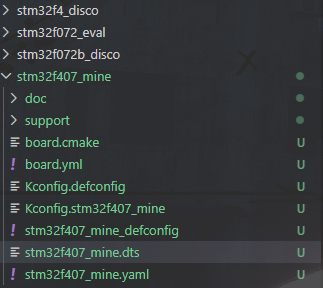
2.15 修改文件
原来的文件:
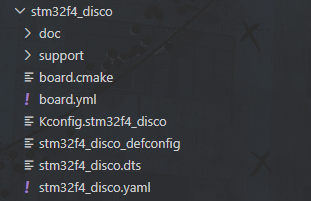
修改:
board.cmake
# SPDX-License-Identifier: Apache-2.0

# keep first
board_runner_args(stm32cubeprogrammer "--port=swd" "--reset-mode=hw")
board_runner_args(jlink "--device=STM32F407VG" "--speed=4000")

# keep first
include(${ZEPHYR_BASE}/boards/common/stm32cubeprogrammer.board.cmake)
include(${ZEPHYR_BASE}/boards/common/openocd-stm32.board.cmake)
include(${ZEPHYR_BASE}/boards/common/jlink.board.cmake)
include(${ZEPHYR_BASE}/boards/common/stlink_gdbserver.board.cmake)
board.yml
board:
  name: stm32f407_mine
  full_name: STM32F407 Mine
  vendor: st
  socs:
    - name: stm32f407xx
Kconfig.defconfig
# STM32F072B-DISCO board configuration

# Copyright (c) 2017 Clage GmbH
# SPDX-License-Identifier: Apache-2.0

if BOARD_STM32F407_MINE

endif #
Kconfig.stm32f407_mine
# Copyright (c) 2016 Linaro Limited.
# SPDX-License-Identifier: Apache-2.0

config BOARD_STM32F407_MINE
	select SOC_STM32F407XG
stm32f407_mine_defconfig
# SPDX-License-Identifier: Apache-2.0

# Enable MPU
CONFIG_ARM_MPU=n


# Enable HW stack protection
CONFIG_HW_STACK_PROTECTION=n

CONFIG_SERIAL=y

# console
CONFIG_CONSOLE=y
CONFIG_UART_CONSOLE=y

# enable GPIO
CONFIG_GPIO=y
stm32f407_mine.dts
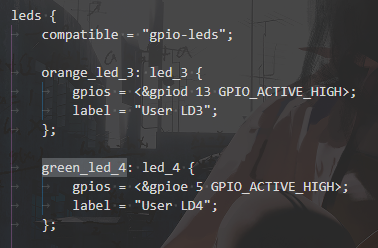
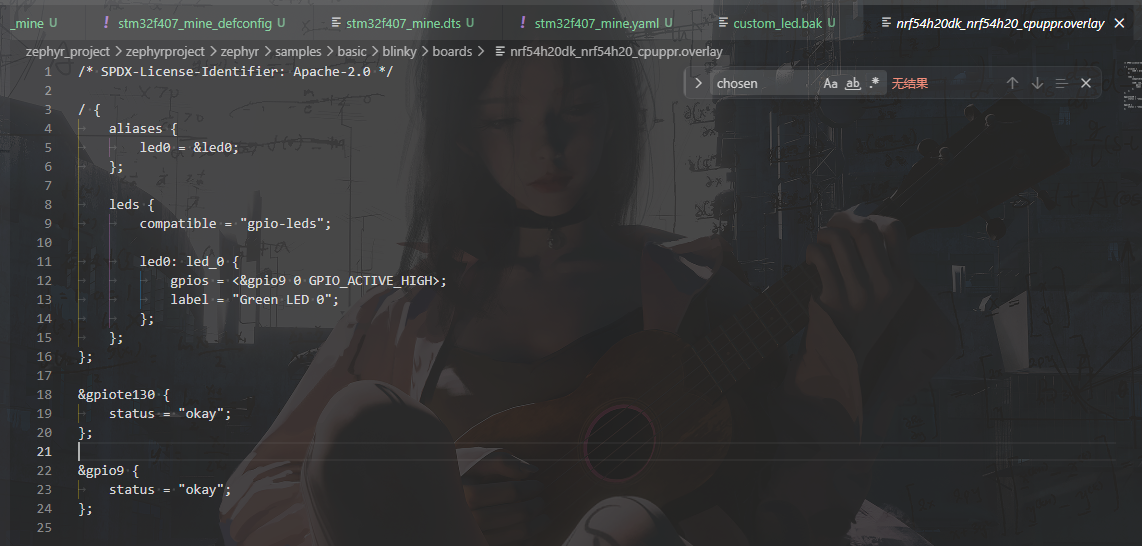
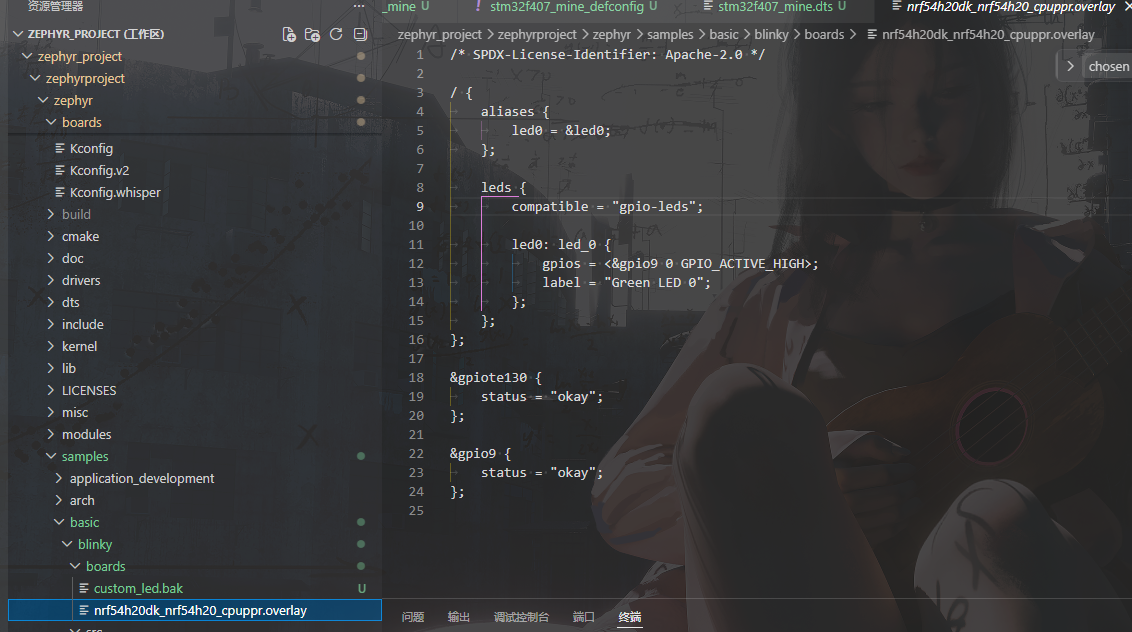
自己的LED是PE5,需要了解设备树一些知识,在点灯例程中默认的配置是zephyrproject\zephyr\samples\basic\blinky\boards\nrf54h20dk_nrf54h20_cpuppr.overlay
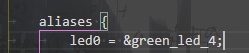
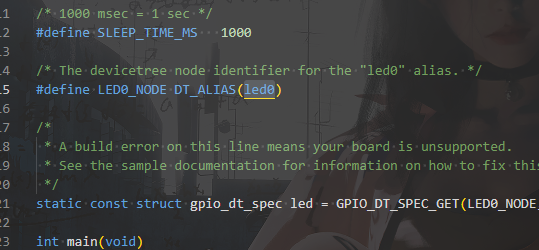
指定板子后,需要参考默认的配置的固定关键字,去匹配指定的boards中的板子中的stm32设备树的aliases的led0的green_led_4(对应到stm32设备树的led0 = &green_led_4;),再根据默认配置固定关键字compatible匹配到stm32设备树关键字compatible = "gpio-leds";,然后到有着该compatible的stm32设备树的leds节点中找到green_led_4如下
green_led_4: led_4 {
			gpios = <&gpioe 5 GPIO_ACTIVE_HIGH>;
			label = "User LD4";
		};
然后,进行自定义修改引脚,这个创建boards文件方法是一种,也可以修改nrf54h20dk_nrf54h20_cpuppr.overlay中的gpio,编译时再指定使用板子原始版本的stm32f4_disco,也可以达到一样的效果
green_led_4: led_4 {
gpios = <&gpioe 5 GPIO_ACTIVE_HIGH>;
label = "User LD4";
};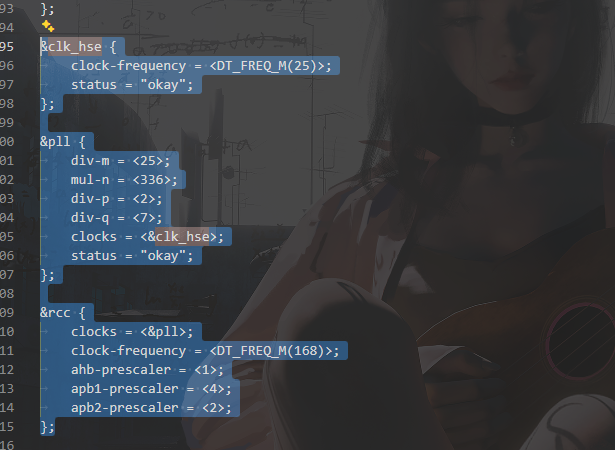
修改外部高速晶振25M,以及plli2s的div-m改为25
&clk_hse {
	clock-frequency = <DT_FREQ_M(25)>;
	status = "okay";
};

&pll {
	div-m = <25>;
	mul-n = <336>;
	div-p = <2>;
	div-q = <7>;
	clocks = <&clk_hse>;
	status = "okay";
};

&rcc {
	clocks = <&pll>;
	clock-frequency = <DT_FREQ_M(168)>;
	ahb-prescaler = <1>;
	apb1-prescaler = <4>;
	apb2-prescaler = <2>;
};


&plli2s {
	/* Minimize audio clock error (with i2s mck-enabled) for all of:
	 * - 22.05kHz / 16b, 24b or 32b
	 * - 44.1kHz  / 16b, 24b or 32b
	 * - 88.2kHz  / 16b or 24b
	 * Note: because the PLLI2S is dependent on the main PLL, the latter
	 *       should not be changed without checking impact on PLLI2S
	 */
	div-m = <25>;
	mul-n = <271>;
	div-r = <2>;
	clocks = <&clk_hse>;
	status = "okay";
};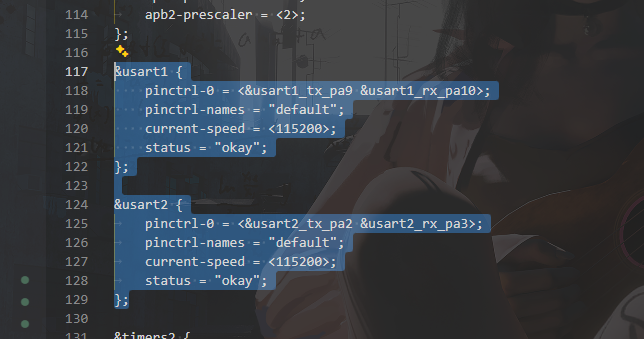
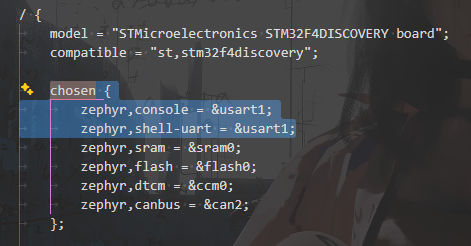
原本的默认printf是串口2输出,则这里添加串口1的节点,改为从串口1输出
chosen {
		zephyr,console = &usart1;
		zephyr,shell-uart = &usart1;

......

&usart1 {
    pinctrl-0 = <&usart1_tx_pa9 &usart1_rx_pa10>;
    pinctrl-names = "default";
    current-speed = <115200>;
    status = "okay";
};
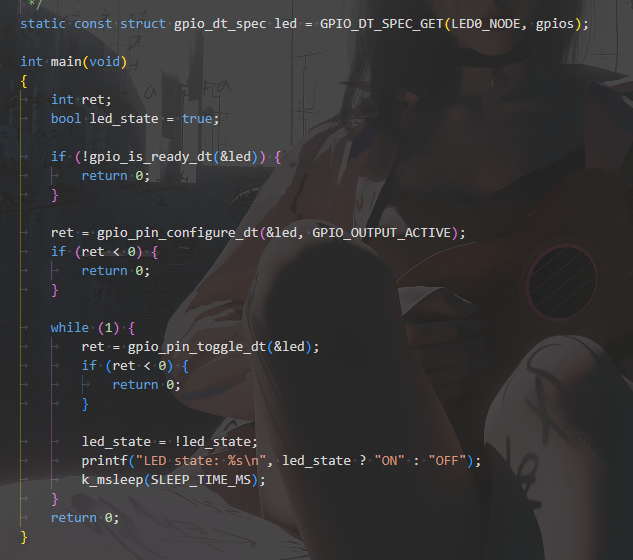
2.16 找到blinky示例点灯,zephyrproject\zephyr\samples\basic\blinky,参考默认配置nrf54h20dk_nrf54h20_cpuppr.overlay,检查需要改的,是否对应到了stm32f407_mine改动

2.16 构建编译,烧录
cd zephyr

# 指定清理build 板子型号 程序
west build --pristine always --board stm32f407_mine samples/basic/blinky

# 板子配置里有STLINK,且会自动调用STM32prog工具烧录
west flash

(.venv) PS E:\ProjectsHub\Zephyr_Projects\zephyr_project\zephyr_project\zephyrproject\zephyr>  west build --help
usage: west build [-h] [-b BOARD[@REV]] [-d BUILD_DIR]
           [-S SNIPPET] [--shield SHIELD]
           [-t TARGET] [-p {auto, always, never}] [-c] [--cmake-only]
           [--cmake-opt CMAKE_OPT] [-n] [-o BUILD_OPT] [-f]
           [--sysbuild | --no-sysbuild] [--domain DOMAIN]
           [--extra-conf FILE.conf]
           [--extra-dtc-overlay FILE.overlay]
           [source_dir] -- [cmake_opt [cmake_opt ...]]

Convenience wrapper for building Zephyr applications.

If the build directory is not given, the default is build/ unless the
build.dir-fmt configuration variable is set. The current directory is
checked after that. If either is a Zephyr build directory, it is used.

positional arguments:
  source_dir            application source directory
  cmake_opt             extra options to pass to cmake; implies -c
                        (these must come after "--" as shown above)

options:
  -h, --help            show this help message and exit
  -b BOARD, --board BOARD
                        board to build for with optional board revision
  -d BUILD_DIR, --build-dir BUILD_DIR
                        build directory to create or use
  -f, --force           ignore any errors and try to proceed

cmake and build tool:
  -c, --cmake           force a cmake run
  --cmake-opt CMAKE_OPTS
                        alternative to the end-of-options marker '--'. Can be given multiple times and 'argparse' should preserve the order for CMake. Not mutually exclusive with '--': options after '--' are
                        given last to CMake.
  --cmake-only          just run cmake; don't build (implies -c)
  --domain DOMAIN       execute build tool (make or ninja) only for given domain
  -t TARGET, --target TARGET
                        run build system target TARGET (try "-t usage")
  -T TEST_ITEM, --test-item TEST_ITEM
                        Build based on test data in test definition file. If source directory is not used an argument has to be defined as SOURCE_PATH/TEST_NAME. E.g.
                        samples/hello_world/sample.basic.helloworld. If source directory is passed then "TEST_NAME" is enough.
  -o BUILD_OPT, --build-opt BUILD_OPT
                        options to pass to the build tool (make or ninja); may be given more than once
  -n, --just-print, --dry-run, --recon
                        just print build commands; don't run them
  -S SNIPPET, --snippet SNIPPET
                        add the argument to SNIPPET; may be given multiple times. Forces CMake to run again if given. Do not use this option with manually specified -DSNIPPET... cmake arguments: the results
                        are undefined
  --shield SHIELD       add the argument to SHIELD; may be given multiple times. Forces CMake to run again if given. Do not use this option with manually specified -DSHIELD... cmake arguments: the results
                        are undefined
  --extra-conf EXTRA_CONF_FILE
                        add the argument to EXTRA_CONF_FILE; may be given multiple times. Forces CMake to run again if given. Do not use this option with manually specified -DEXTRA_CONF_FILE... cmake
                        arguments: the results are undefined
  --extra-dtc-overlay EXTRA_DTC_OVERLAY_FILE
                        add the argument to EXTRA_DTC_OVERLAY_FILE; may be given multiple times. Forces CMake to run again if given. Do not use this option with manually specified -DEXTRA_DTC_OVERLAY_FILE...
                        cmake arguments: the results are undefined
  --sysbuild, --no-sysbuild
                        create multi domain build system or disable it (default)

pristine builds:
  A "pristine" build directory is empty. The -p option controls
  whether the build directory is made pristine before the build
  is done. A bare '--pristine' with no value is the same as
  --pristine=always. Setting --pristine=auto uses heuristics to
  guess if a pristine build may be necessary.

  -p [{auto,always,never}], --pristine [{auto,always,never}]
                        pristine build folder setting
(.venv) PS E:\ProjectsHub\Zephyr_Projects\zephyr_project\zephyr_project\zephyrproject\zephyr>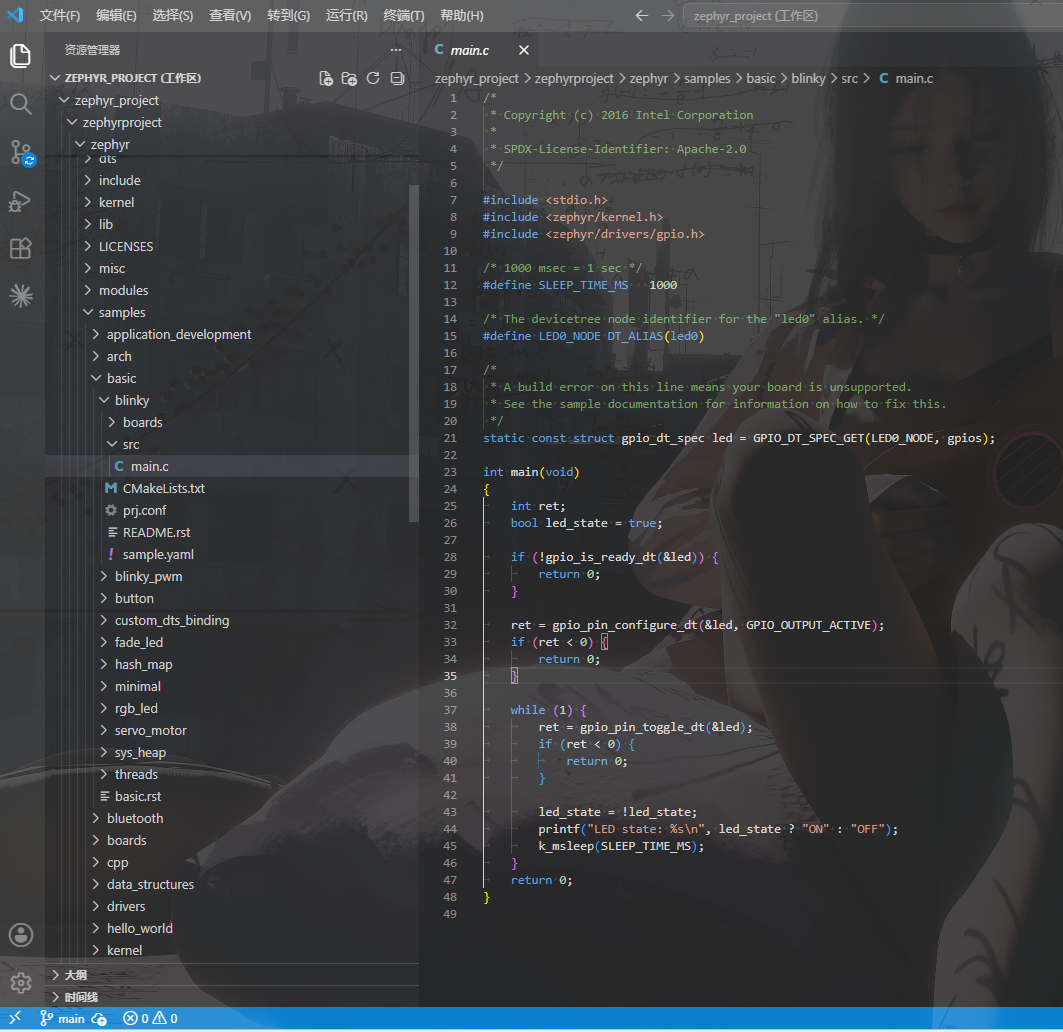
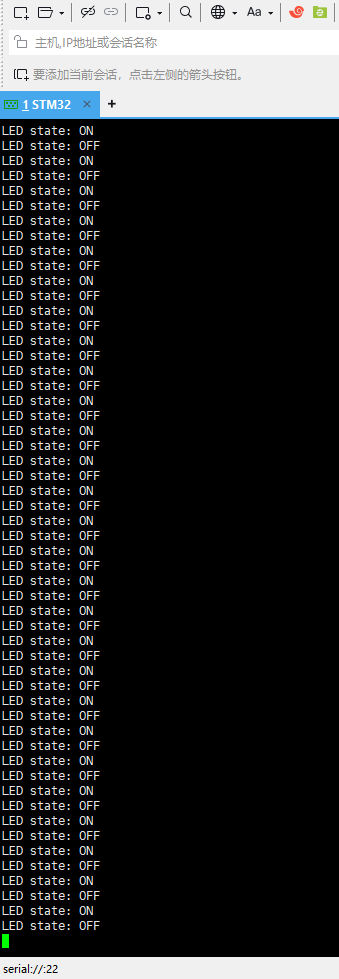
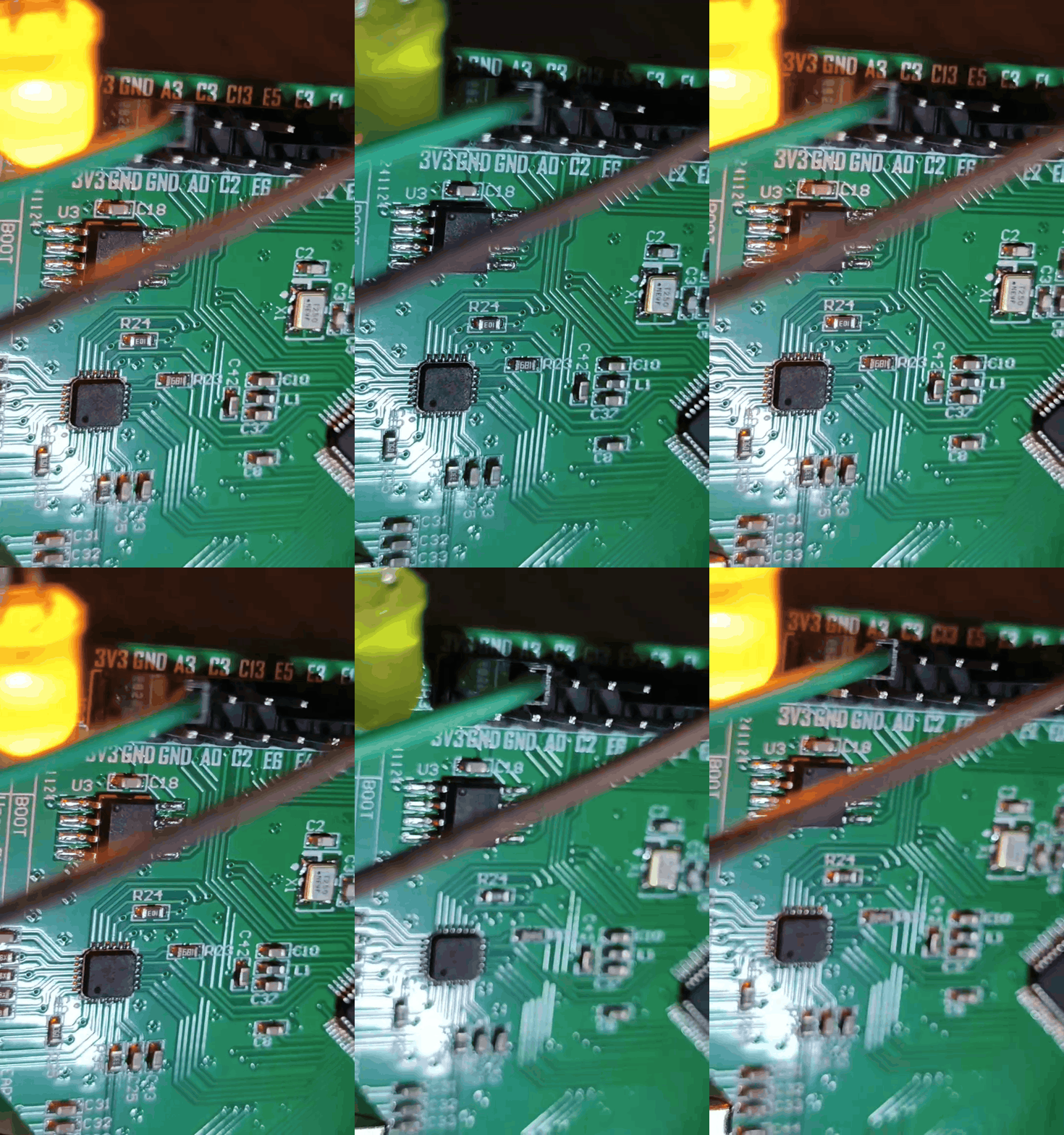
2.17 效果
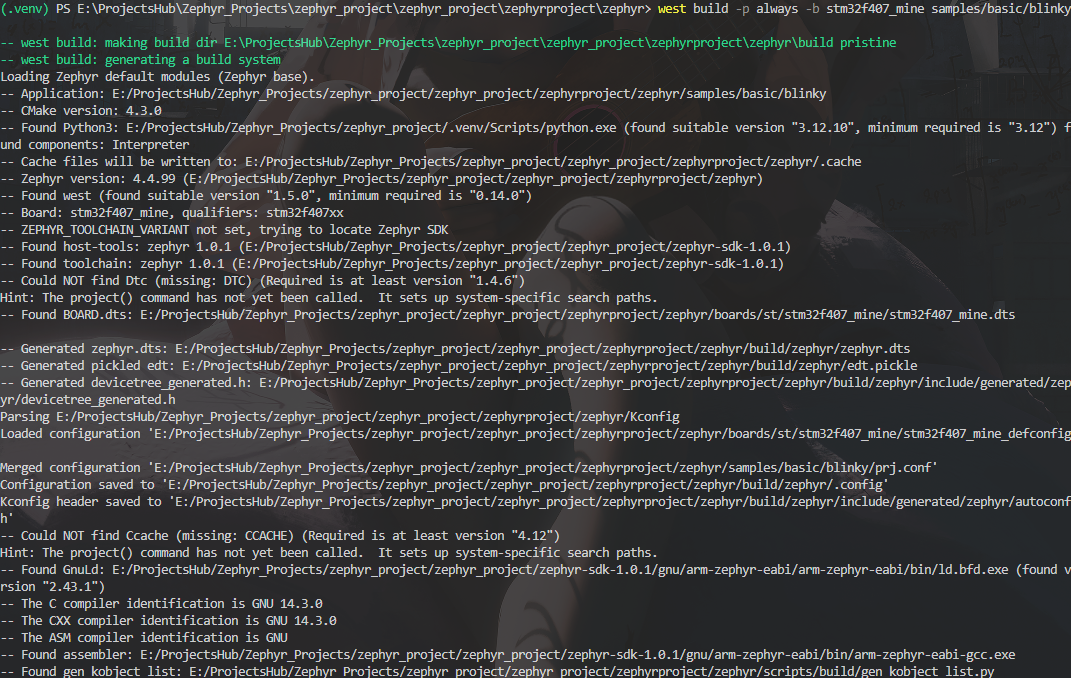
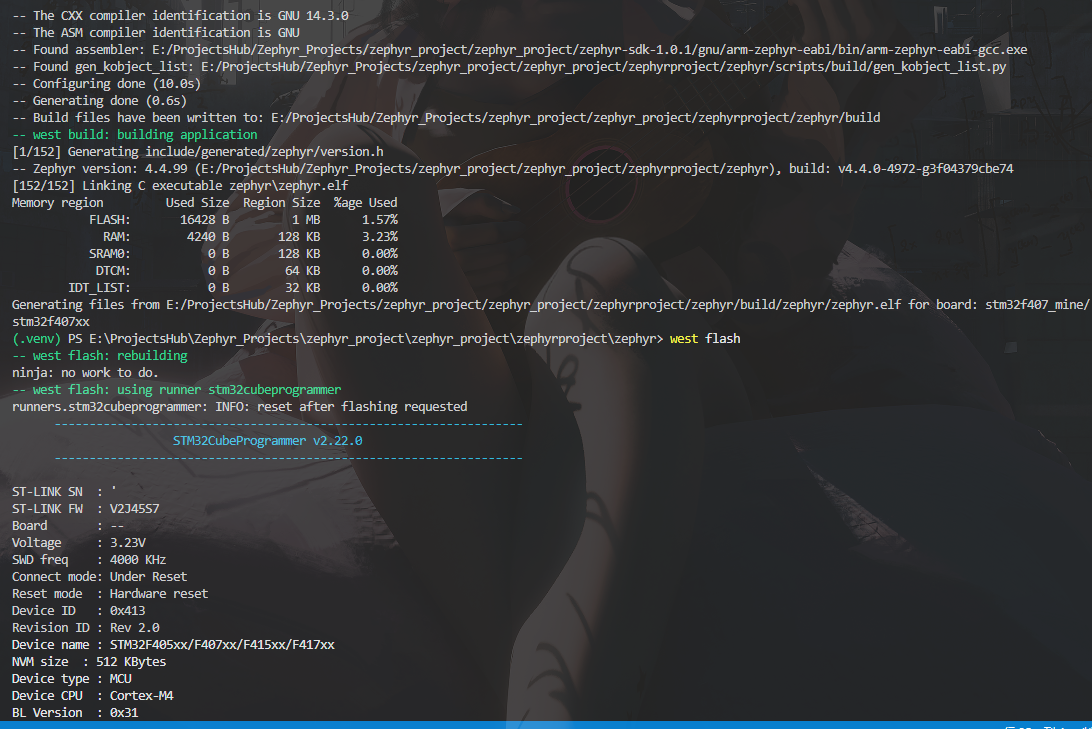
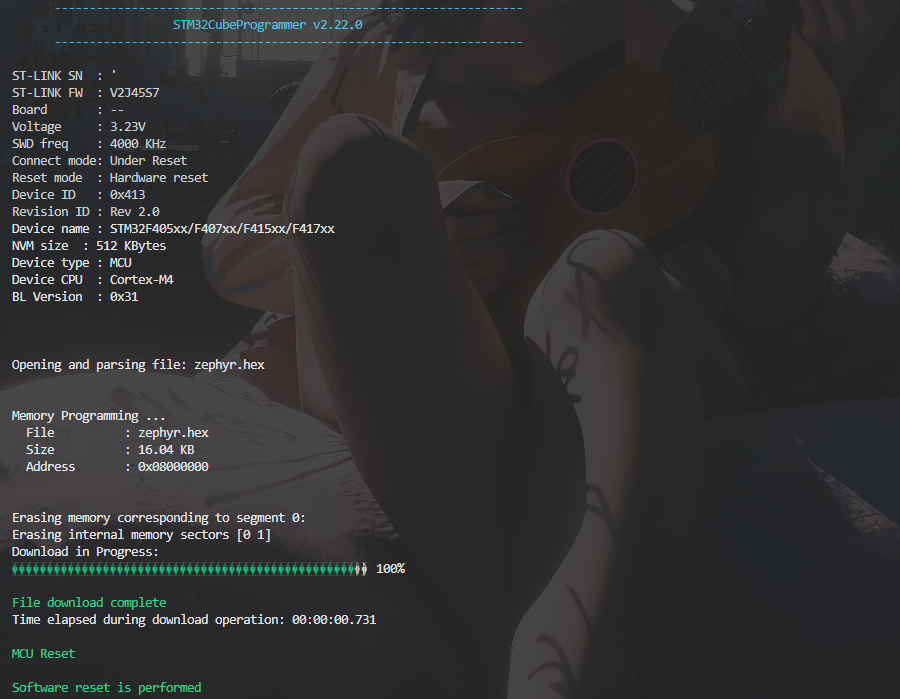
成功烧录
2.18 现象,led闪烁,打印
三、配置vscode
待更新
参考连接(如有侵权请联系删除)