HarmonyOS NEXT 新闻资讯应用 · 公共能力层 common 模块实现指南
开发环境 :DevEco Studio 6.1.0 Release
SDK版本 :HarmonyOS SDK 6.1.0(23) / API 23
开发语言 :ArkTS
状态管理 :V2(@ComponentV2系列装饰器)
前置阅读 :整体架构指南
本文是 HarmonyOS 新闻资讯应用系列指南的第一篇,聚焦公共能力层 common 模块的实现。common 是整个应用的地基,封装了数据模型、工具类、常量和通用组件,被所有上层 feature 模块依赖。理解 common 模块是掌握整个应用架构的第一步。
效果
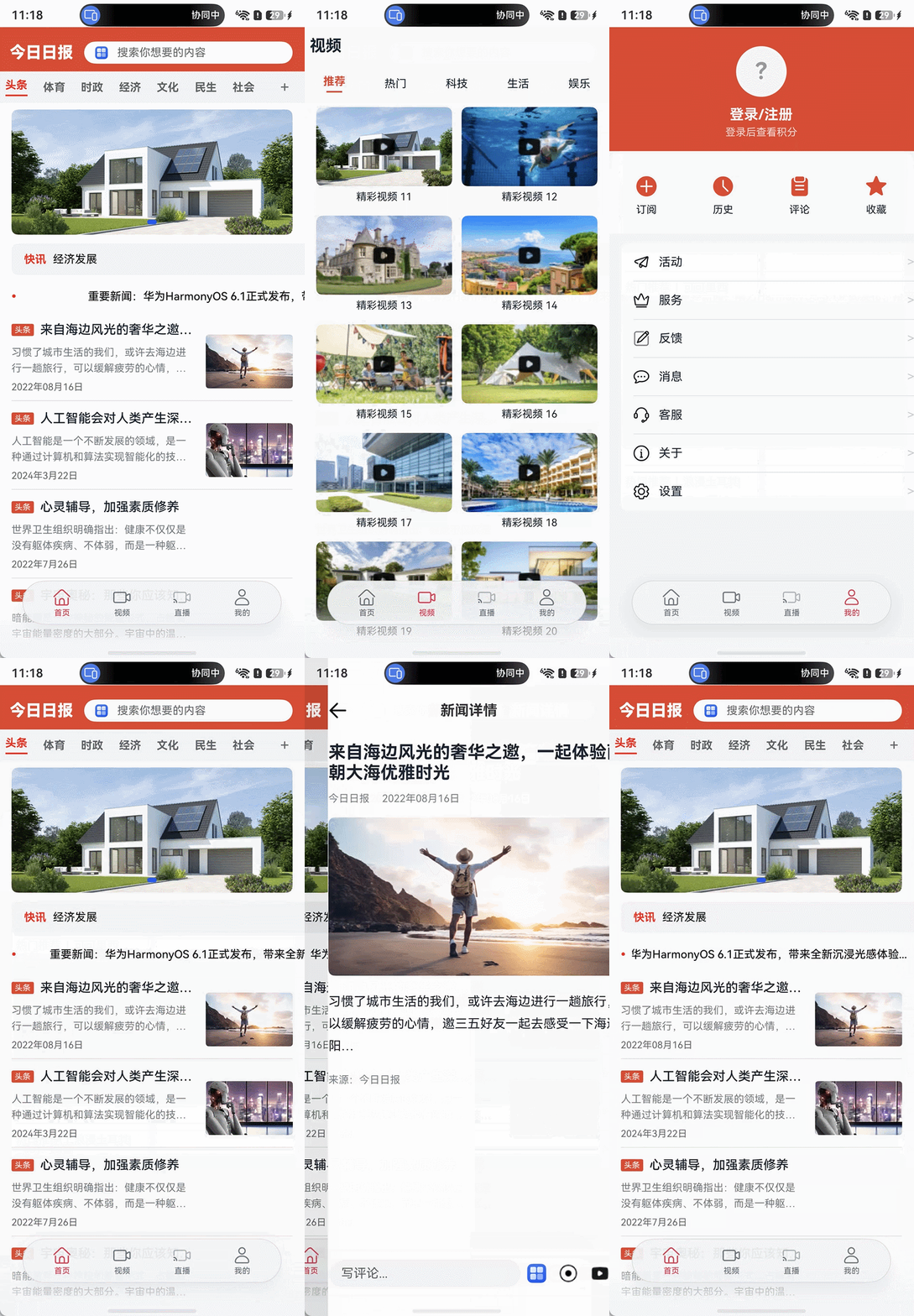
一、模块定位与架构角色
1.1 三层架构中的位置
┌─────────────────────────────────┐
│  产品定制层 (HAP)                 │  product/phone
├─────────────────────────────────┤
│  基础特性层 (HAR)                 │  features/news, video, live, personal, service
├─────────────────────────────────┤
│  公共能力层 (HAR)  ← 本模块        │  common
└─────────────────────────────────┘
common 是 HAR(Harmony Archive) 包,不能独立运行,编译后作为静态库被上层模块引用。
1.2 依赖方向
- 上层依赖下层:
features/news→common,product/phone→common+ 所有 features - 同层不互相依赖:
features/news不能依赖features/video - common 无外部依赖:是最底层的模块
1.3 common 的四大职责
| 职责 | 说明 | 涉及文件 |
|---|---|---|
| 数据模型 | 定义 NewsItem、VideoItem 等可观测数据类 | model/ 目录(5个文件) |
| 工具封装 | 日志、网络请求Mock、JSON解析 | utils/ 目录(3个文件) |
| 常量管理 | 全局配置常量、UI样式常量 | constants/ 目录(2个文件) |
| 通用组件 | Web组件、偏好存储 | components/ + preferences/ |
二、模块配置
2.1 oh-package.json5
json5
{
  "name": "common",
  "version": "1.0.0",
  "description": "Please describe the basic information.",
  "main": "Index.ets",
  "author": "",
  "license": "Apache-2.0",
  "dependencies": {}
}字段讲解:
"name": "common"--- 包名,其他模块通过此名称 import(如import { NewsItem } from 'common')"main": "Index.ets"--- 入口文件,所有对外导出的统一出口"dependencies": {}--- 无外部依赖,是最底层模块
2.2 module.json5
json5
{
  "module": {
    "name": "common",
    "type": "har",
    "deviceTypes": [
      "default"
    ]
  }
}字段讲解:
"type": "har"--- HAR 模块类型标识,编译为静态库"deviceTypes": ["default"]--- 支持所有设备类型(手机、平板、穿戴等)
三、完整文件结构
common/
├── Index.ets                              # 统一导出入口(15个export)
├── oh-package.json5                       # 包配置
├── build-profile.json5                    # 构建配置
└── src/main/
    ├── module.json5                        # 模块配置(type: "har")
    └── ets/
        ├── model/                          # 数据模型层
        │   ├── NewsItem.ets                # 新闻数据(10个@Trace属性)
        │   ├── VideoItem.ets               # 视频数据(8个@Trace属性)
        │   ├── LiveItem.ets                # 直播数据 + LIVE_DATA常量
        │   ├── CommentItem.ets             # 评论数据(6个@Trace属性)
        │   └── UserInfo.ets                # 用户信息(4个@Trace属性)
        ├── datasource/
        │   └── CommonDataSource.ets        # 泛型IDataSource实现(89行)
        ├── constants/
        │   ├── CommonConstants.ets         # 通用常量(含VIDEO_COVER_LIST)
        │   └── StyleConstants.ets          # UI样式常量
        ├── utils/
        │   ├── Logger.ets                  # hilog日志封装
        │   ├── HttpUtil.ets                # Mock网络请求
        │   └── MockDataUtil.ets            # rawfile JSON解析
        ├── preferences/
        │   └── PreferenceModel.ets         # Preferences持久化
        └── components/
            └── CommonWeb.ets               # 通用Web组件
四、数据模型层 ------ @ObservedV2 + @Trace 详解
common 模块定义了 5个数据模型类 ,全部使用状态管理V2的 @ObservedV2 + @Trace 装饰器。这是V2状态管理的核心机制,下面先讲解原理,再逐个模型分析。
4.1 V2装饰器原理
@ObservedV2 (替代V1的 @Observed):
- 标记整个类为"可观测对象"
- 框架自动为该类生成代理(Proxy),拦截属性的读写操作
- 只能在
@ComponentV2组件中使用
@Trace(V1无对应物,全新装饰器):
- 标记每个属性为独立的追踪单元
- 实现属性级细粒度更新 :修改
isGood时,只有读取isGood的UI组件会重渲染 - 对比V1:
@Observed的属性修改会触发所有 引用该对象的组件重渲染,而@Trace只触发读取了该特定属性的组件
4.2 NewsItem.ets --- 新闻数据模型
typescript
/**
 * 新闻数据模型
 * 使用状态管理V2的 @ObservedV2 + @Trace 实现细粒度响应式观测
 */
@ObservedV2
export class NewsItem {
  @Trace newsId: string = '';          // 新闻唯一标识
  @Trace newsTitle: string = '';       // 新闻标题
  @Trace newsContent: string = '';     // 新闻正文
  @Trace newsTime: string = '';        // 发布时间
  @Trace newsImage: string = '';       // 封面图片路径(rawfile相对路径)
  @Trace category: string = '头条';    // 新闻分类,默认"头条"
  @Trace isGood: boolean = false;      // 是否点赞(交互状态)
  @Trace isCollect: boolean = false;   // 是否收藏(交互状态)
  @Trace commentCount: number = 0;     // 评论数
  @Trace shareCount: number = 0;       // 分享数

  constructor(id: string, title: string, content: string,
    time: string, image: string, category: string = '头条') {
    this.newsId = id;
    this.newsTitle = title;
    this.newsContent = content;
    this.newsTime = time;
    this.newsImage = image;
    this.category = category;
  }
}设计要点:
- 10个
@Trace属性,每个属性变更只触发读取该属性的组件重渲染 category默认值'头条',构造器中可选传入isGood/isCollect是交互状态,在 NewsDetail 页面中被切换- 构造器:6个必选参数 + 1个可选参数(category)
4.3 VideoItem.ets --- 视频数据模型
typescript
/**
 * 视频数据模型
 * 使用 @ObservedV2 + @Trace 实现细粒度响应式
 */
@ObservedV2
export class VideoItem {
  @Trace videoId: string = '';         // 视频唯一标识
  @Trace title: string = '';           // 视频标题
  @Trace content: string = '';         // 视频描述
  @Trace coverImage: Resource = $r('app.media.preview');  // 封面图(Resource类型)
  @Trace videoSrc: string = '';        // 视频文件路径
  @Trace category: string = '推荐';    // 视频分类
  @Trace playCount: number = 0;        // 播放次数
  @Trace duration: string = '';        // 时长(如"03:45")

  constructor(id: string, title: string, cover: Resource,
    src: string = '', category: string = '推荐') {
    this.videoId = id;
    this.title = title;
    this.coverImage = cover;
    this.videoSrc = src;
    this.category = category;
  }
}设计要点:
coverImage: Resource类型 --- 使用$r('app.media.preview')作为默认资源引用- 构造器参数:id/title/cover 必选,src/category 可选
duration采用字符串格式存储(如 "03:45"),避免格式转换
4.4 LiveItem.ets --- 直播数据模型 + LIVE_DATA 常量
typescript
/**
 * 直播数据模型
 * 使用 @ObservedV2 + @Trace 实现细粒度响应式
 */
@ObservedV2
export class LiveItem {
  @Trace liveId: string = '';          // 直播唯一标识
  @Trace title: string = '';           // 直播标题
  @Trace content: string = '';         // 直播描述
  @Trace coverImage: Resource = $r('app.media.live_01');  // 封面图
  @Trace category: string = '关注';    // 分类(用于Tab筛选)
  @Trace isLive: boolean = false;      // 是否正在直播
  @Trace viewerCount: number = 0;      // 观看人数

  constructor(title: string, content: string, img: Resource, category: string = '关注') {
    this.title = title;
    this.content = content;
    this.coverImage = img;
    this.category = category;
  }
}

/**
 * 直播静态数据
 */
export const LIVE_DATA: LiveItem[] = [
  new LiveItem('我的关注', '大理洱海边', $r('app.media.live_01')),
  new LiveItem('我的关注', '可可里西', $r('app.media.live_02')),
  new LiveItem('我的关注', '浪漫土耳其', $r('app.media.live_03')),
  new LiveItem('热门推荐', '大理洱海边', $r('app.media.live_01')),
  new LiveItem('热门推荐', '可可里西', $r('app.media.live_02')),
  new LiveItem('热门推荐', '浪漫土耳其', $r('app.media.live_03')),
  new LiveItem('今日直播', '大理洱海边', $r('app.media.live_01')),
  new LiveItem('今日直播', '可可里西', $r('app.media.live_02')),
  new LiveItem('今日直播', '浪漫土耳其', $r('app.media.live_03')),
  new LiveItem('精彩回放', '大理洱海边', $r('app.media.live_01')),
  new LiveItem('精彩回放', '可可里西', $r('app.media.live_02')),
  new LiveItem('精彩回放', '浪漫土耳其', $r('app.media.live_03')),
]设计要点:
LIVE_DATA常量数组:12条数据,4个分类(我的关注/今日直播/热门推荐/精彩回放),每类3条category字段用于 LiveHome 中的filter筛选,按分类分配到不同Tab- 使用
$r('app.media.live_01')资源引用方式,图片放在 common/src/main/resources/base/media/
⚠️ 重要警告:LIVE_DATA 跨模块导入运行时不可用
虽然
LIVE_DATA从 common 模块正常导出,但在 feature 模块(如 live)的运行时中,对导入的LIVE_DATA执行.filter()会返回空数组。这是因为@ObservedV2代理对象数组在跨模块传递后,运行时行为异常。解决方案 :在 feature 模块内本地化定义数据常量(如
LOCAL_LIVE_DATA),结构与LIVE_DATA相同,确保运行时 filter 正常工作。common 中的LIVE_DATA仍保留导出,作为数据规范参考。
4.5 CommentItem.ets --- 评论数据模型
typescript
/**
 * 评论数据模型
 * 使用 @ObservedV2 + @Trace 实现细粒度响应式
 */
@ObservedV2
export class CommentItem {
  @Trace commentId: string = '';       // 评论唯一标识
  @Trace content: string = '';         // 评论内容
  @Trace author: string = '用户';      // 评论作者
  @Trace time: string = '';            // 评论时间
  @Trace newsTitle: string = '';       // 所属新闻标题
  @Trace likeCount: number = 0;        // 点赞数

  constructor(content: string, author: string = '用户',
    time: string = '', newsTitle: string = '') {
    this.content = content;
    this.author = author;
    this.time = time;
    this.newsTitle = newsTitle;
  }
}
设计要点 :简洁模型设计,6个 @Trace 属性,构造器中仅 content 为必选参数。
4.6 UserInfo.ets --- 用户信息模型
typescript
/**
 * 用户信息模型
 * 使用 @ObservedV2 + @Trace 实现细粒度响应式
 */
@ObservedV2
export class UserInfo {
  @Trace account: string = '';         // 手机号/账号
  @Trace nickname: string = '';        // 昵称
  @Trace score: number = 0;            // 积分
  @Trace isLoggedIn: boolean = false;  // 是否已登录

  constructor(account: string = '', nickname: string = '') {
    this.account = account;
    this.nickname = nickname;
    this.isLoggedIn = account !== '';  // 根据account自动计算登录状态
  }
}设计要点:
isLoggedIn在构造器中根据account自动计算:account !== ''即为已登录- 与
AppStorage配合使用:LoginPage 写入手机号,PersonalHome 读取并设置 user 属性
五、通用数据源 CommonDataSource
CommonDataSource 是 LazyForEach 的数据源实现,使用泛型设计,可适配任意数据类型。
typescript
/**
 * 通用懒加载数据源
 * 实现 IDataSource 接口,供 LazyForEach 使用
 * 支持泛型,可适配任意数据类型
 */
export class CommonDataSource<T> implements IDataSource {
  private dataArray: T[] = [];
  private listeners: DataChangeListener[] = [];

  constructor(elements: T[] = []) {
    this.dataArray = elements;
  }

  totalCount(): number {
    return this.dataArray.length;
  }

  getData(index: number): T {
    return this.dataArray[index];
  }

  pushData(data: T): void {
    this.dataArray.push(data);
    this.notifyDataAdd(this.dataArray.length - 1);
  }

  addData(index: number, data: T[]): void {
    this.dataArray = this.dataArray.concat(data);
    this.notifyDataAdd(index);
  }

  clear(): void {
    this.dataArray = [];
    this.notifyDataReload();
  }

  setData(data: T[]): void {
    this.dataArray = data;
    this.notifyDataReload();
  }

  getDataArray(): T[] {
    return this.dataArray;
  }

  registerDataChangeListener(listener: DataChangeListener): void {
    if (this.listeners.indexOf(listener) < 0) {
      this.listeners.push(listener);
    }
  }

  unregisterDataChangeListener(listener: DataChangeListener): void {
    const pos = this.listeners.indexOf(listener);
    if (pos >= 0) {
      this.listeners.splice(pos, 1);
    }
  }

  notifyDataReload(): void {
    this.listeners.forEach((listener: DataChangeListener) => {
      listener.onDataReloaded();
    })
  }

  notifyDataAdd(index: number): void {
    this.listeners.forEach((listener: DataChangeListener) => {
      listener.onDataAdd(index);
    })
  }

  notifyDataChange(index: number): void {
    this.listeners.forEach((listener: DataChangeListener) => {
      listener.onDataChange(index);
    })
  }

  notifyDataDelete(index: number): void {
    this.listeners.forEach((listener: DataChangeListener) => {
      listener.onDataDelete(index);
    })
  }

  notifyDataMove(from: number, to: number): void {
    this.listeners.forEach((listener: DataChangeListener) => {
      listener.onDataMove(from, to);
    })
  }
}
5.1 IDataSource 接口
| 方法 | 作用 | 调用时机 |
|---|---|---|
totalCount() |
返回数据总数 | LazyForEach 计算列表高度 |
getData(index) |
按索引返回数据 | LazyForEach 渲染可见项 |
registerDataChangeListener() |
注册监听器 | 框架自动调用 |
unregisterDataChangeListener() |
注销监听器 | 组件销毁时 |
5.2 泛型设计
typescript
// 新闻数据源
let newsSource = new CommonDataSource<NewsItem>();
// 视频数据源
let videoSource = new CommonDataSource<VideoItem>();
CommonDataSource<T> 中 T 可以是任意类型,getData() 返回 T 类型,编译期即可检查类型安全。
5.3 通知机制
| 方法 | 触发场景 | LazyForEach 行为 |
|---|---|---|
notifyDataReload() |
setData/clear | 重新加载所有数据 |
notifyDataAdd(index) |
pushData/addData | 在指定位置插入新项 |
notifyDataChange(index) |
手动调用 | 刷新指定项 |
notifyDataDelete(index) |
手动调用 | 删除指定项 |
notifyDataMove(from, to) |
排序场景 | 移动数据位置 |
5.4 LazyForEach 配合原理
框架渲染流程:
1. 调用 totalCount() 获取数据总数
2. 根据可视区域计算需要渲染的索引范围 [start, end]
3. 对范围内每个索引调用 getData(index) 获取数据
4. 使用 itemBuilder 回调渲染每个 ListItem
5. 滚动时动态加载/卸载不可见项
六、常量管理
6.1 CommonConstants.ets --- 通用常量
typescript
/**
 * 通用常量定义
 * 集中管理全局使用的常量值
 */
export class CommonConstants {
  /** 提示持续时间(毫秒) */
  static readonly DURATION: number = 3000;
  /** 日志标签 */
  static readonly TAG: string = '[NewsApp]';
  /** 偏好存储键名 */
  static readonly KEY_NAME: string = 'newsData';
  /** 偏好存储文件名 */
  static readonly PREFERENCES_NAME: string = 'newsData.db';
  /** 列表项间距 */
  static readonly LIST_SPACE: number = 3;
  /** 列表项内间距 */
  static readonly LIST_ITEM_SPACE: number = 14;
  /** 最大文本行数 */
  static readonly MAX_LINES: number = 3;
  /** 布局权重 */
  static readonly LAYOUT_WEIGHT: number = 1;
  /** 启动页延迟时间(毫秒) */
  static readonly SPLASH_DELAY: number = 1500;
  /** 搜索按钮文本 */
  static readonly SEARCH_BUTTON_TEXT: string = '搜索';
  /** 百分比:100% */
  static readonly FULL_PERCENT: string = '100%';
  /** Tab栏高度 */
  static readonly TAB_BAR_HEIGHT: number = 56;
  /** 新闻分类列表 */
  static readonly NEWS_CATEGORIES: string[] = ['头条', '体育', '时政', '经济', '文化', '民生', '社会'];
  /** 视频封面图片列表 */
  static readonly VIDEO_COVER_LIST: Resource[] = [
    $r('app.media.ic_picture_01'),
    $r('app.media.ic_picture_02'),
    $r('app.media.ic_picture_03'),
    $r('app.media.ic_picture_04'),
    $r('app.media.ic_picture_05'),
    $r('app.media.ic_picture_06'),
    $r('app.media.ic_picture_07'),
    $r('app.media.ic_picture_08'),
    $r('app.media.ic_picture_09'),
    $r('app.media.ic_picture_10'),
    $r('app.media.ic_picture_01'),
    $r('app.media.ic_picture_02'),
    $r('app.media.ic_picture_03'),
    $r('app.media.ic_picture_04'),
    $r('app.media.ic_picture_05'),
    $r('app.media.ic_picture_06'),
    $r('app.media.ic_picture_07'),
    $r('app.media.ic_picture_08'),
    $r('app.media.ic_picture_09'),
    $r('app.media.ic_picture_10')
  ];
}
设计思路 :集中管理所有常量,避免魔术数字(Magic Number)。修改 NEWS_CATEGORIES 一处,所有使用分类的地方自动更新。
6.2 StyleConstants.ets --- UI样式常量
typescript
/**
 * 样式常量定义
 * 集中管理UI样式相关常量
 */
export class StyleConstants {
  /** 宽度100% */
  static readonly FULL_WIDTH: string = '100%';
  /** 高度100% */
  static readonly FULL_HEIGHT: string = '100%';
  /** 图片宽高比 */
  static readonly IMAGE_ASPECT_RATIO: number = 2.25;
  /** 弹性增长 */
  static readonly FLEX_GROW: number = 1;
  /** 字体粗细:700 */
  static readonly FONT_WEIGHT_SEVEN: number = 700;
  /** 字体粗细:500 */
  static readonly FONT_WEIGHT_FIVE: number = 500;
  /** 字体粗细:400 */
  static readonly FONT_WEIGHT_FOUR: number = 400;
  /** 完全不透明 */
  static readonly FULL_OPACITY: number = 1;
  /** 60%透明度 */
  static readonly SIXTY_OPACITY: number = 0.6;
  /** 主题色:红色 */
  static readonly PRIMARY_COLOR: string = '#C7000B';
  /** 主题色:深灰 */
  static readonly TEXT_PRIMARY: string = '#182431';
  /** 文本次要色 */
  static readonly TEXT_SECONDARY: string = '#99182431';
  /** 分割线颜色 */
  static readonly DIVIDER_COLOR: string = '#33182431';
  /** 背景色 */
  static readonly BG_COLOR: string = '#F1F3F5';
  /** 卡片背景色 */
  static readonly CARD_BG: string = '#FFFFFF';
  /** 圆角小 */
  static readonly RADIUS_SMALL: number = 4;
  /** 圆角中 */
  static readonly RADIUS_MEDIUM: number = 8;
  /** 圆角大 */
  static readonly RADIUS_LARGE: number = 16;
}
设计思路 :统一UI风格。修改主题色 PRIMARY_COLOR 一处,全局颜色同步更新。颜色体系分为:主题红、文字深灰、文本次要色、分割线色、背景色、卡片白。
七、工具类
7.1 Logger.ets --- 日志封装
typescript
import { hilog } from '@kit.PerformanceAnalysisKit';

/**
 * 通用日志工具类
 * 基于 hilog 封装,统一管理日志输出
 */

const DOMAIN: number = 0xFF00;
const PREFIX: string = 'NewsApp';
const FORMAT: string = `%{public}s, %{public}s`;

export class Logger {
  static debug(...args: string[]) {
    hilog.debug(DOMAIN, PREFIX, FORMAT, args);
  }

  static info(...args: string[]) {
    hilog.info(DOMAIN, PREFIX, FORMAT, args);
  }

  static warn(...args: string[]) {
    hilog.warn(DOMAIN, PREFIX, FORMAT, args);
  }

  static error(...args: string[]) {
    hilog.error(DOMAIN, PREFIX, FORMAT, args);
  }

  static fatal(...args: string[]) {
    hilog.fatal(DOMAIN, PREFIX, FORMAT, args);
  }
}
要点 :基于 @kit.PerformanceAnalysisKit 的 hilog 封装,DOMAIN = 0xFF00(日志域),PREFIX = 'NewsApp'(日志前缀)。5个级别静态方法,使用时无需实例化:Logger.info('加载完成')。
7.2 HttpUtil.ets --- Mock网络请求
typescript
/**
 * 网络请求工具类(Mock实现)
 * 当前使用模拟数据,后续可替换为真实HTTP请求
 */
export class HttpUtil {
  /**
   * 模拟GET请求,返回延迟后的数据
   * @param data 要返回的数据
   * @param delay 延迟时间(毫秒),默认500ms
   */
  static async mockGet<T>(data: T[], delay: number = 500): Promise<T[]> {
    return new Promise((resolve) => {
      setTimeout(() => {
        resolve(data);
      }, delay);
    });
  }
}要点:泛型异步方法,Promise + setTimeout 模拟网络延迟。后续替换为真实HTTP请求只需修改此一个文件。
7.3 MockDataUtil.ets --- rawfile JSON解析
typescript
import { util } from '@kit.ArkTS';
import { NewsItem } from '../model/NewsItem';

/**
 * Mock JSON 数据项接口
 */
interface JsonNewsItem {
  newsId: string;
  newsTitle: string;
  newsContent: string;
  newsTime: string;
  newsImage: string;
}

interface JsonNewsList {
  newsList: JsonNewsItem[];
}

/**
 * Mock数据解析工具
 * 从 rawfile 中的 JSON 文件解析新闻数据
 */
export class MockDataUtil {
  /**
   * 从 rawfile 加载新闻数据
   * @param context 应用上下文
   * @param filePath rawfile 中的文件路径
   * @returns NewsItem 数组
   */
  static loadNewsFromRawfile(context: Context, filePath: string): NewsItem[] {
    try {
      let value = context.resourceManager.getRawFileContentSync(filePath);
      let textDecoder = util.TextDecoder.create('utf-8', { ignoreBOM: true });
      let text = textDecoder.decodeToString(new Uint8Array(value.buffer));
      let jsonObj: JsonNewsList = JSON.parse(text) as JsonNewsList;
      return jsonObj.newsList.map((item: JsonNewsItem): NewsItem =>
        new NewsItem(item.newsId, item.newsTitle, item.newsContent,
          item.newsTime, item.newsImage));
    } catch (e) {
      return [];
    }
  }
}
数据流 :rawfile → getRawFileContentSync → Uint8Array → TextDecoder → string → JSON.parse → NewsItem[]
容错设计:try-catch 包裹,解析失败返回空数组,不会导致应用崩溃。
八、偏好存储 PreferenceModel
typescript
import { preferences } from '@kit.ArkData';
import { Logger } from '../utils/Logger';
import { CommonConstants } from '../constants/CommonConstants';
import { Context } from '@kit.AbilityKit';

let preference: preferences.Preferences;

/**
 * 偏好存储模型
 * 使用 Preferences API 实现数据持久化
 */
export class PreferenceModel {
  /**
   * 从持久化文件读取 Preferences 实例
   */
  async getPreferencesFromStorage(context: Context): Promise<void> {
    try {
      preference = await preferences.getPreferences(context, CommonConstants.PREFERENCES_NAME);
    } catch (err) {
      Logger.error(`Failed to get preferences, Cause: ${err}`);
    }
  }

  /**
   * 保存数据到 Preferences
   */
  async putPreference(context: Context, key: string, value: string): Promise<void> {
    if (!preference) {
      await this.getPreferencesFromStorage(context);
    }
    try {
      await preference.put(key, value);
      await preference.flush();
    } catch (err) {
      Logger.error(`Failed to put value, Cause: ${err}`);
    }
  }

  /**
   * 从 Preferences 读取数据
   */
  async getPreference(context: Context, key: string): Promise<string> {
    if (!preference) {
      await this.getPreferencesFromStorage(context);
    }
    try {
      let data = (await preference.get(key, '')).toString();
      return data;
    } catch (err) {
      Logger.error(`Failed to get value, Cause: ${err}`);
      return '';
    }
  }

  /**
   * 删除 Preferences 持久化文件
   */
  async deletePreferences(context: Context): Promise<void> {
    try {
      await preferences.deletePreferences(context, CommonConstants.PREFERENCES_NAME);
    } catch (err) {
      Logger.error(`Failed to delete preferences, Cause: ${err}`);
    }
  }
}

export const preferenceModel = new PreferenceModel();
8.1 Preferences API 异步读写流程
| 操作 | 调用链路 |
|---|---|
| 写入 | getPreferences() → preference.put(key, value) → preference.flush() |
| 读取 | getPreferences() → preference.get(key, defaultValue) |
| 删除 | preferences.deletePreferences(context, name) |
懒初始化 :put/get 方法内部检查 if (!preference),首次调用时自动初始化。
单例导出 :export const preferenceModel = new PreferenceModel() --- 全局共享同一个实例。
九、通用组件 CommonWeb
typescript
import { webview } from '@kit.ArkWeb';

/**
 * 通用Web组件
 * 使用 @ComponentV2 + @Param 实现V2状态管理
 * 可嵌入任意页面展示网页内容
 */
@ComponentV2
export struct CommonWeb {
  @Param url: string = '';
  private controller: webview.WebviewController = new webview.WebviewController();

  build() {
    Column() {
      if (this.url !== '') {
        Web({ src: this.url, controller: this.controller })
          .width('100%')
          .height('100%')
          .javaScriptAccess(true)
      } else {
        Text('暂无内容')
          .fontSize(16)
          .fontColor('#999999')
      }
    }
    .width('100%')
    .height('100%')
  }
}要点:
@ComponentV2+@Param url:V2版本的父→子参数传递javaScriptAccess(true):启用JavaScript执行- 条件渲染:url为空时显示"暂无内容"占位
WebviewController:可用于后续扩展(进度监听、页面跳转拦截等)
十、Index.ets 统一导出规范
typescript
// 数据模型
export { NewsItem } from './src/main/ets/model/NewsItem';
export { VideoItem } from './src/main/ets/model/VideoItem';
export { LiveItem, LIVE_DATA } from './src/main/ets/model/LiveItem';  // 注意:LIVE_DATA 跨模块导入运行时不可用,feature 模块应本地化定义
export { CommentItem } from './src/main/ets/model/CommentItem';
export { UserInfo } from './src/main/ets/model/UserInfo';

// 数据源
export { CommonDataSource } from './src/main/ets/datasource/CommonDataSource';

// 常量
export { CommonConstants } from './src/main/ets/constants/CommonConstants';
export { StyleConstants } from './src/main/ets/constants/StyleConstants';

// 工具
export { Logger } from './src/main/ets/utils/Logger';
export { HttpUtil } from './src/main/ets/utils/HttpUtil';
export { MockDataUtil } from './src/main/ets/utils/MockDataUtil';

// 偏好存储
export { PreferenceModel, preferenceModel } from './src/main/ets/preferences/PreferenceModel';

// 组件
export { CommonWeb } from './src/main/ets/components/CommonWeb';导出规范:
- 所有对外暴露的类、组件、常量都必须在此导出
- 模块内部类型(如
JsonNewsItem接口)不需要导出 - 引用方式:
import { NewsItem, CommonDataSource, MockDataUtil } from 'common' - 共计 15个导出:数据模型(5) + 数据源(1) + 常量(2) + 工具(3) + 偏好存储(2) + 组件(1)
十一、V1→V2 装饰器映射对照表
| V1装饰器 | V2装饰器 | 用途 | 说明 |
|---|---|---|---|
@Observed |
@ObservedV2 |
类观测 | 标记整个类可观测 |
| --- | @Trace |
属性追踪 | V2新增,属性级细粒度更新 |
@State |
@Local |
组件本地状态 | 仅本组件内响应 |
@Prop |
@Param |
父→子单向传递 | 语义更明确:"这是参数" |
@Provide |
@Provider |
跨层级提供 | 需指定字符串key |
@Consume |
@Consumer |
跨层级消费 | key需与Provider匹配 |
@Watch |
@Monitor |
属性监听 | 触发时机有变化 |
@Component |
@ComponentV2 |
组件声明 | V2组件才能使用V2装饰器 |
十二、常见问题 Q&A
Q1:为什么数据模型要放在 common 而不是各 feature 模块?
A:因为多个 feature 模块可能共享同一数据模型。例如 NewsItem 被 features/news 和 features/personal 使用,放在 common 避免重复定义和循环依赖。如果放在 news 模块,personal 模块就需要依赖 news 模块,违反"同层不互相依赖"原则。
Q2:CommonDataSource 的泛型如何保证类型安全?
A:TypeScript 泛型在编译期检查类型。CommonDataSource<NewsItem>.getData() 返回 NewsItem 类型,访问不存在的属性会编译报错。运行时泛型被擦除,但编译期的类型检查已经足够保证安全。
Q3:rawfile 资源放在哪里?
A:rawfile 资源放在使用它的模块中。本项目中:
mockDataOne.json和新闻图片 →features/news/src/main/resources/rawfile/- 通用图片(ic_picture_、live_ )→
common/src/main/resources/base/media/ - 入口资源(splash_bg、back.svg)→
product/phone/src/main/resources/base/media/
Q4:@Trace 和 @ObservedV2 必须同时使用吗?
A:是的。@Trace 只能在 @ObservedV2 标记的类中使用。@ObservedV2 让类可观测,@Trace 让每个属性独立追踪。如果某个属性不需要响应式更新,可以不标记 @Trace(但通常建议全部标记)。
Q5:为什么 LIVE_DATA 从 common 导出后在 feature 模块中 filter 返回空数组?
A:这是 @ObservedV2 代理对象数组跨模块传递的已知问题。common 模块导出的 LIVE_DATA: LiveItem[] 中每个元素都是 @ObservedV2 代理对象,在跨模块传递后,运行时的 .filter() 方法无法正确匹配属性值。解决方案是在 feature 模块内本地化定义数据常量(如 LOCAL_LIVE_DATA),结构与 LIVE_DATA 完全相同。
十三、小结
common 模块作为三层架构的最底层,提供了4大核心能力:
- 数据模型:5个 @ObservedV2 + @Trace 响应式数据类,支持属性级细粒度更新
- 工具封装:日志(Logger)、网络请求Mock(HttpUtil)、JSON解析(MockDataUtil)
- 常量管理:全局配置常量(CommonConstants)+ UI样式常量(StyleConstants)
- 通用组件:泛型数据源(CommonDataSource)+ Web组件(CommonWeb)+ 偏好存储(PreferenceModel)
上层所有 feature 模块通过 import { xxx } from 'common' 引用这些能力,实现了代码的高度复用和统一维护。