📁 鸿蒙原生应用实战(七)ArkUI 文件管理器:目录浏览 + 文件操作 + 搜索筛选
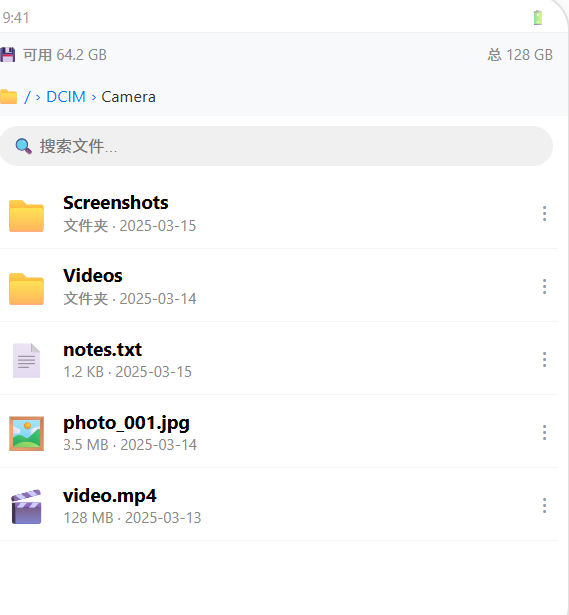
博主说: 每个手机里都住着一个"文件管理"的刚需------找照片、清理垃圾、移动文件......今天我们用 ArkUI 的 fileIo + filePicker API,从零实现一个支持目录树浏览、文件增删改查、搜索筛选、文件信息查看的完整文件管理器。
📱 应用场景
| 场景 | 说明 |
|---|---|
| 📂 本地文件浏览 | 按目录树浏览手机存储 |
| 🗑️ 文件清理 | 按类型/大小筛选并删除无用文件 |
| 🔍 文件搜索 | 按名称模糊搜索 |
| ℹ️ 文件属性 | 查看大小/修改时间/类型 |
| 📤 文件操作 | 复制/移动/重命名/删除 |
⚙️ 运行环境要求
| 项目 | 版本要求 |
|---|---|
| DevEco Studio | 5.0.3.800 及以上 |
| HarmonyOS SDK | API 12 |
| 核心 API | @ohos.file.fs + @ohos.file.statvfs |
| 权限 | ohos.permission.READ_MEDIA / WRITE_MEDIA |
🛠️ 实战:从零搭建文件管理器
Step 1:了解 fileIo 核心 API
typescript
import fileIo from '@ohos.file.fs';
import statvfs from '@ohos.file.statvfs';

// 列出目录
const files = fileIo.listDirectorySync(path);

// 获取文件信息
const stat = fileIo.statSync(path);
stat.size      // 文件大小
stat.mtime     // 修改时间
stat.isFile()  // 是否是文件
stat.isDirectory() // 是否是目录

// 创建目录
fileIo.mkdirSync(path, true); // recursive=true

// 复制/移动
fileIo.copyFile(src, dest);
fileIo.moveFile(src, dest);

// 删除
fileIo.rmdirSync(path);    // 删除空目录
fileIo.unlinkSync(path);   // 删除文件

// 存储空间
const total = statvfs.getTotalSize();
const free = statvfs.getFreeSize();
Step 2:完整代码
typescript
// pages/Index.ets --- 文件管理器
import fileIo from '@ohos.file.fs';
import statvfs from '@ohos.file.statvfs';

interface FileItem {
  name: string;        // 文件名
  path: string;        // 完整路径
  isDir: boolean;      // 是否是目录
  size: number;        // 大小(字节)
  mtime: number;       // 修改时间戳
  ext: string;         // 扩展名
}

@Entry
@Component
struct FileManager {
  @State currentPath: string = '/';      // 当前目录
  @State files: FileItem[] = [];         // 当前目录内容
  @State breadcrumb: string[] = ['/'];   // 面包屑
  @State searchText: string = '';        // 搜索关键字
  @State sortBy: 'name' | 'size' | 'mtime' = 'name';
  @State totalSpace: number = 0;
  @State freeSpace: number = 0;
  @State selectedFile: FileItem | null = null;
  @State showDetail: boolean = false;

  aboutToAppear() {
    this.loadStorageInfo();
    this.navigateTo('/');
  }

  loadStorageInfo() {
    try {
      this.totalSpace = statvfs.getTotalSize('/');
      this.freeSpace = statvfs.getFreeSize('/');
    } catch (err) {
      console.error('获取存储信息失败');
    }
  }

  // 导航到指定目录
  navigateTo(path: string) {
    try {
      this.currentPath = path;
      const entries = fileIo.listDirectorySync(path);
      const items: FileItem[] = [];

      for (const entry of entries) {
        if (entry === '.' || entry === '..') continue;
        const fullPath = path === '/' ? '/' + entry : path + '/' + entry;
        try {
          const stat = fileIo.statSync(fullPath);
          const extIdx = entry.lastIndexOf('.');
          items.push({
            name: entry,
            path: fullPath,
            isDir: stat.isDirectory(),
            size: stat.size,
            mtime: stat.mtime,
            ext: extIdx > -1 ? entry.substring(extIdx).toLowerCase() : ''
          });
        } catch { /* 跳过无法访问的文件 */ }
      }

      this.files = this.sortFiles(items);
      this.updateBreadcrumb(path);
    } catch (err) {
      AlertDialog.show({ message: '无法访问该目录' });
    }
  }

  updateBreadcrumb(path: string) {
    const parts = path.split('/').filter(p => p);
    this.breadcrumb = ['/', ...parts];
  }

  // 排序
  sortFiles(items: FileItem[]): FileItem[] {
    // 目录优先
    items.sort((a, b) => {
      if (a.isDir !== b.isDir) return a.isDir ? -1 : 1;
      switch (this.sortBy) {
        case 'name': return a.name.localeCompare(b.name);
        case 'size': return b.size - a.size;
        case 'mtime': return b.mtime - a.mtime;
        default: return 0;
      }
    });
    return items;
  }

  // 返回上级
  goUp() {
    if (this.currentPath === '/') return;
    const parent = this.currentPath.substring(0, this.currentPath.lastIndexOf('/'));
    this.navigateTo(parent || '/');
  }

  // 进入目录
  enterDir(item: FileItem) {
    if (item.isDir) {
      this.navigateTo(item.path);
    }
  }

  // 搜索过滤
  get filteredFiles(): FileItem[] {
    if (!this.searchText.trim()) return this.files;
    const kw = this.searchText.toLowerCase();
    return this.files.filter(f => f.name.toLowerCase().includes(kw));
  }

  // 格式化文件大小
  formatSize(bytes: number): string {
    if (bytes === 0) return '0 B';
    const units = ['B', 'KB', 'MB', 'GB', 'TB'];
    const i = Math.floor(Math.log(bytes) / Math.log(1024));
    return (bytes / Math.pow(1024, i)).toFixed(1) + ' ' + units[i];
  }

  formatTime(t: number): string {
    const d = new Date(t * 1000);
    return `${d.getFullYear()}-${String(d.getMonth()+1).padStart(2,'0')}-${String(d.getDate()).padStart(2,'0')} ${String(d.getHours()).padStart(2,'0')}:${String(d.getMinutes()).padStart(2,'0')}`;
  }

  getFileIcon(item: FileItem): string {
    if (item.isDir) return '📁';
    const iconMap: Record<string, string> = {
      '.jpg': '🖼️', '.jpeg': '🖼️', '.png': '🖼️', '.gif': '🖼️',
      '.mp4': '🎬', '.mov': '🎬',
      '.mp3': '🎵', '.wav': '🎵',
      '.pdf': '📄', '.doc': '📝', '.txt': '📃',
      '.zip': '📦', '.rar': '📦',
      '.apk': '📱'
    };
    return iconMap[item.ext] || '📄';
  }

  deleteItem(item: FileItem) {
    AlertDialog.show({
      title: '确认删除',
      message: `确定删除 ${item.name} 吗?`,
      primaryButton: { value: '取消', action: () => {} },
      secondaryButton: {
        value: '删除', fontColor: '#FF3B30',
        action: () => {
          try {
            if (item.isDir) fileIo.rmdirSync(item.path);
            else fileIo.unlinkSync(item.path);
            this.navigateTo(this.currentPath);
          } catch (err) {
            AlertDialog.show({ message: '删除失败,可能目录不为空' });
          }
        }
      }
    });
  }

  build() {
    Column() {
      // ---- 存储信息 ----
      Row() {
        Text(`💾 ${this.formatSize(this.freeSpace)} / ${this.formatSize(this.totalSpace)}`)
          .fontSize(13).fontColor('#888')
      }.width('94%').padding({ top: 8, bottom: 4 })

      // ---- 面包屑导航 ----
      Scroll({ scroller: new Scroller() }) {
        Row() {
          ForEach(this.breadcrumb, (item: string, idx: number) => {
            Text(item).fontSize(14).fontColor(idx === this.breadcrumb.length - 1 ? '#007AFF' : '#666')
            if (idx < this.breadcrumb.length - 1) {
              Text(' › ').fontSize(14).fontColor('#ccc')
            }
          }, (_, idx: number) => idx.toString())
        }.padding({ left: 12, right: 12 })
      }
      .height(30)

      // ---- 搜索 + 排序工具栏 ----
      Row() {
        TextInput({ placeholder: '🔍 搜索文件...', text: this.searchText })
          .layoutWeight(1).height(34).backgroundColor('#F0F0F0')
          .borderRadius(17).padding({ left: 12 }).fontSize(14)

        Select([{ value: '名称' }, { value: '大小' }, { value: '日期' }])
          .selected(0).width(80).height(34)
          .onSelect((_, val: string) => {
            const map: Record<string, 'name'|'size'|'mtime'> = { '名称': 'name', '大小': 'size', '日期': 'mtime' };
            this.sortBy = map[val] || 'name';
            this.files = this.sortFiles(this.files);
          })

        Button('↑').fontSize(16).backgroundColor('transparent').fontColor('#007AFF')
          .onClick(() => { this.goUp(); })
      }.width('94%').margin({ bottom: 6 })

      // ---- 文件列表 ----
      if (this.filteredFiles.length === 0) {
        Column() {
          Text('📂 空目录').fontSize(18).fontColor('#999')
          Text('此目录下没有文件').fontSize(14).fontColor('#bbb').margin({ top: 8 })
        }.layoutWeight(1).justifyContent(FlexAlign.Center)
      } else {
        List({ space: 2 }) {
          ForEach(this.filteredFiles, (item: FileItem) => {
            ListItem() {
              Row() {
                Text(this.getFileIcon(item)).fontSize(28).margin({ right: 10 })
                Column() {
                  Text(item.name).fontSize(15).fontWeight(FontWeight.Bold)
                    .textOverflow({ overflow: TextOverflow.Ellipsis }).maxLines(1)
                  Row() {
                    if (item.isDir) {
                      Text('文件夹').fontSize(12).fontColor('#888')
                    } else {
                      Text(this.formatSize(item.size)).fontSize(12).fontColor('#888')
                      Text(' · ').fontSize(12).fontColor('#ccc')
                      Text(this.formatTime(item.mtime)).fontSize(12).fontColor('#888')
                    }
                  }.margin({ top: 2 })
                }.layoutWeight(1).alignItems(HorizontalAlign.Start)

                Button('⋮').fontSize(18).backgroundColor('transparent').fontColor('#999')
                  .onClick(() => {
                    this.selectedFile = item;
                    this.showDetail = true;
                  })
              }
              .padding({ left: 16, right: 12, top: 10, bottom: 10 })
              .width('100%')
            }
            .onClick(() => { this.enterDir(item); })
          }, (item: FileItem) => item.path)
        }
        .layoutWeight(1).width('100%')
      }

      // ---- 底部选中信息 ----
      Row() {
        Text(`共 ${this.filteredFiles.length} 项`).fontSize(12).fontColor('#999')
      }.padding(8)
    }
    .width('100%').height('100%').backgroundColor('#F8F9FA')

    // ---- 文件详情弹窗 ----
    .bindSheet(this.showDetail, this.DetailSheet())
  }

  @Builder
  DetailSheet() {
    if (this.selectedFile) {
      Column() {
        Text(this.getFileIcon(this.selectedFile)).fontSize(52)
        Text(this.selectedFile.name).fontSize(18).fontWeight(FontWeight.Bold).margin(8)

        Column() {
          DetailRow('类型', this.selectedFile.isDir ? '文件夹' : '文件')
          DetailRow('大小', this.formatSize(this.selectedFile.size))
          DetailRow('路径', this.selectedFile.path)
          DetailRow('修改时间', this.formatTime(this.selectedFile.mtime))
          if (this.selectedFile.ext) {
            DetailRow('扩展名', this.selectedFile.ext)
          }
        }.width('100%').margin({ top: 16 })

        Row() {
          Button('🗑️ 删除').backgroundColor('#FF3B30').fontColor('#fff')
            .borderRadius(8).width('45%')
            .onClick(() => {
              this.deleteItem(this.selectedFile!);
              this.showDetail = false;
            })
          Button('✕ 关闭').backgroundColor('#E5E5EA').fontColor('#333')
            .borderRadius(8).width('45%')
            .onClick(() => { this.showDetail = false; })
        }.width('100%').margin({ top: 20 })
      }.padding(24).width('100%')
    }
  }
}

@Builder
function DetailRow(label: string, value: string) {
  Row() {
    Text(label).fontSize(14).fontColor('#888').width(80)
    Text(value).fontSize(14).fontColor('#333').layoutWeight(1)
  }.padding({ top: 6, bottom: 6 }).width('100%')
}
官方文档: HarmonyOS 应用开发文档
- 开发者社区: 华为开发者论坛
- 欢迎加入开源鸿蒙跨平台社区: https://openharmonycrossplatform.csdn.net/