鸿蒙原生应用开发实战(四):复杂页面与交互体验------鱼种百科、天气详情与钓点详情
前言
前三篇文章我们完成了App的基础页面,本篇文章将挑战项目中最复杂的三个页面:
- 鱼种百科(FishEncyclopediaPage):分类筛选 + 关键词搜索 + 详情卡片
- 天气详情(WeatherDetailPage):逐小时预报 + 7天预报 + 温度条可视化
- 钓点详情(SpotDetailPage):路由参数接收 + 交互评分 + 用户评价
这些页面涉及搜索过滤、数据可视化、交互反馈等进阶能力,是鸿蒙应用从"能用"到"好用"的关键。
一、鱼种百科:搜索 + 分类 + 列表的复合过滤
鱼种百科是本项目的数据量最大的页面,包含8种鱼类信息,支持分类筛选和关键词搜索。
1.1 数据模型
typescript
interface FishInfo {
  id: number;
  name: string;          // 中文名:鲫鱼
  englishName: string;   // 英文名:Goldfish
  category: string;      // 分类:淡水鱼/海水鱼/路亚目标鱼
  description: string;   // 描述
  bestSeason: string;    // 最佳季节
  maxWeight: string;     // 最大重量
  habitat: string;       // 栖息环境
  tips: string;          // 钓法技巧
  difficulty: number;    // 难度:1-5
}
1.2 分类筛选 + 搜索的组合过滤
这是页面最核心的交互逻辑------多条件组合过滤。我们通过一个计算属性(getter)实现:
typescript
get filteredFish(): FishInfo[] {
  let result: FishInfo[] = [];
  for (let fish of this.fishList) {
    // 条件1:分类匹配
    let matchCategory = this.selectedCategory === 0 ||
      fish.category === this.categories[this.selectedCategory];

    // 条件2:搜索匹配
    let matchQuery = this.searchQuery.length === 0 ||
      fish.name.indexOf(this.searchQuery) >= 0 ||
      fish.englishName.toLowerCase()
        .indexOf(this.searchQuery.toLowerCase()) >= 0;

    if (matchCategory && matchQuery) {
      result.push(fish);
    }
  }
  return result;
}设计要点:
selectedCategory为0时表示"全部",不做分类过滤- 搜索支持中文名和英文名模糊匹配
- 英文搜索忽略大小写(
.toLowerCase()) - 使用
for循环而非filter,在严格模式下更稳定
1.3 分类标签栏
分类标签使用横向排列的胶囊按钮,选中的使用主题色填充:
typescript
@State selectedCategory: number = 0;

private categories: string[] = ['全部', '淡水鱼', '海水鱼', '路亚目标鱼'];

Row() {
  ForEach(this.categories, (cat: string, index: number) => {
    Text(cat)
      .fontSize($r('app.float.small_font_size'))
      .fontColor(this.selectedCategory === index ? Color.White : $r('app.color.text_primary'))
      .backgroundColor(this.selectedCategory === index ? $r('app.color.primary') : $r('app.color.background'))
      .padding({ left: 14, right: 14, top: 6, bottom: 6 })
      .borderRadius(16)
      .margin({ right: 4, top: 8 })
      .onClick(() => {
        this.selectedCategory = index;  // 更新选中状态,触发重新渲染
      })
  }, (cat: string) => cat)
}
.width('90%')交互细节:
- 未选中:白色文字 + 灰色背景(背景色)
- 选中:白色文字 + 主题绿色背景
borderRadius(16)圆角效果onClick修改selectedCategory状态,触发filteredFish重新计算和UI更新
1.4 搜索输入框
typescript
@State searchQuery: string = '';

TextInput({ placeholder: '搜索鱼种名称', text: this.searchQuery })
  .width('90%')
  .height(40)
  .backgroundColor(Color.White)
  .borderRadius(20)
  .padding({ left: 16 })
  .onChange((value: string) => {
    this.searchQuery = value;  // 实时搜索
  })
TextInput 组件要点:
placeholder:占位提示文字text:绑定状态变量onChange:输入变化时触发,实现实时过滤- 圆角+白色背景,与分类标签风格一致
1.5 鱼种信息卡片
每张卡片展示丰富的信息:名称、英文名、分类标签、描述、难度星级、最大重量、旺季和钓法技巧:
typescript
ListItem() {
  Column() {
    // 标题行:中文名 + 英文名 + 分类标签
    Row() {
      Text(fish.name).fontSize(18).fontWeight(FontWeight.Bold)
      Text(fish.englishName).fontSize($r('app.float.small_font_size'))
        .fontColor($r('app.color.text_hint')).margin({ left: 8 })
      Blank()
      Text(fish.category)  // 分类标签
    }

    // 描述
    Text(fish.description).fontSize($r('app.float.small_font_size'))
      .fontColor($r('app.color.text_secondary'))
      .margin({ top: 8 }).lineHeight(20)

    // 难度 + 最大重量
    Row() {
      Text('🎯难度: ' + this.getDifficultyStars(fish.difficulty))
      Blank()
      Text('🏆最大: ' + fish.maxWeight)
    }
    .margin({ top: 8 })

    // 旺季
    Row() {
      Text('📅旺季: ' + fish.bestSeason)
    }
    .margin({ top: 4 })

    Divider().margin({ top: 8, bottom: 4 })

    // 钓法技巧
    Text('💡 ' + fish.tips)
      .fontSize($r('app.float.small_font_size'))
      .fontColor($r('app.color.primary'))
  }
  .padding(16)
  .backgroundColor($r('app.color.card_bg'))
  .borderRadius($r('app.float.card_corner_radius'))
}
1.6 难度星级生成器
我们用工具方法生成星级字符串:
typescript
getDifficultyStars(difficulty: number): string {
  let stars = '';
  for (let i = 0; i < 5; i++) {
    stars += i < difficulty ? '★' : '☆';
  }
  return stars;
}
为什么用方法而不是计算属性?
- 星级生成依赖参数
difficulty - 方法可以传递参数,getter无法传参
- 方法返回值可以直接在模板中渲染
1.7 空搜索结果
typescript
if (this.filteredFish.length === 0) {
  Column() {
    Text('🐟').fontSize(60)
    Text('没有找到匹配的鱼种')
  }
  .width('100%')
  .height('50%')
  .justifyContent(FlexAlign.Center)
  .alignItems(HorizontalAlign.Center)
}
二、天气详情:数据可视化实战
天气详情页将展示逐小时预报和7天预报,包含温度条这种可视化元素。
2.1 数据模型
typescript
// 逐小时
interface HourlyWeather {
  time: string;    // 06:00
  temp: number;    // 温度
  icon: string;    // 图标
  wind: string;    // 风力
}

// 每日预报
interface DailyForecast {
  date: string;
  weekDay: string;
  high: number;    // 最高温
  low: number;     // 最低温
  icon: string;
  desc: string;
  windLevel: string;
  humidity: string;
}
2.2 当前天气大卡片
typescript
Column() {
  Row() {
    Text('☀️').fontSize(48)
    Column() {
      Text('18°C').fontSize(36).fontWeight(FontWeight.Bold)
      Text('晴 · 体感舒适')
        .fontSize($r('app.float.body_font_size'))
        .fontColor($r('app.color.text_secondary'))
        .margin({ top: 4 })
    }
    .margin({ left: 16 })
  }
  .alignItems(VerticalAlign.Center)
}
2.3 逐小时横向滚动
使用 Row 实现水平排列的逐小时预报:
typescript
Row() {
  ForEach(this.hours, (hour: HourlyWeather) => {
    Column() {
      Text(hour.time).fontSize(12).fontColor($r('app.color.text_hint'))
      Text(hour.icon).fontSize(24).margin({ top: 6 })
      Text(hour.temp + '°').fontSize($r('app.float.body_font_size'))
        .fontWeight(FontWeight.Medium).margin({ top: 4 })
      Text(hour.wind).fontSize(11).fontColor($r('app.color.text_hint'))
        .margin({ top: 2 })
    }
    .layoutWeight(1)
    .alignItems(HorizontalAlign.Center)
  }, (hour: HourlyWeather) => hour.time)
}
每个时段通过 layoutWeight(1) 平分宽度。
2.4 7天预报 + 温度条
这是天气页最核心的可视化设计。我们用两个叠加的 Column 实现温度条:
typescript
ForEach(this.daily, (day: DailyForecast) => {
  Row() {
    // 星期 + 日期
    Column() {
      Text(day.weekDay).fontSize($r('app.float.small_font_size'))
        .fontWeight(FontWeight.Medium)
      Text(day.date).fontSize(11).fontColor($r('app.color.text_hint'))
        .margin({ top: 2 })
    }
    .width(50)

    // 天气描述
    Text(day.icon + ' ' + day.desc)
      .fontSize($r('app.float.small_font_size'))
      .width(90)

    Blank()

    // 最低温
    Text(day.low + '°').fontSize($r('app.float.small_font_size'))
      .fontColor($r('app.color.text_hint'))

    // 温度条
    Stack().width(60).height(6).margin({ left: 6, right: 6 }) {
      // 背景条
      Column().width('100%').height(6)
        .backgroundColor('#FFE0E0E0').borderRadius(3)
      // 前景条(表示温度范围)
      Column()
        .width(((day.high - day.low) / 14) * 60)
        .height(6)
        .backgroundColor($r('app.color.primary'))
        .borderRadius(3)
        .margin({ left: ((day.low - 6) / 14) * 60 })
    }

    // 最高温
    Text(day.high + '°').fontSize($r('app.float.small_font_size'))
      .fontColor($r('app.color.text_primary')).fontWeight(FontWeight.Medium)
  }
  .width('100%')
  .margin({ bottom: 10 })
}, (day: DailyForecast) => day.date)温度条实现原理:
假设温度范围 6°C ~ 20°C (跨度14°C)
某天 low=8°C, high=17°C

前景条宽度 = (17-8)/14 * 60 ≈ 38.6vp
左边距 = (8-6)/14 * 60 ≈ 8.6vp

Stack容器宽度固定60vp
背景条100%填充
前景条按比例定位和缩放
这种方案不需要第三方图表库,纯ArkUI组件实现,轻量且高效。
2.5 钓鱼建议
天气详情页的特色功能------基于天气的钓鱼建议:
typescript
private fishingAdvice: string = '今明两天天气适宜钓鱼,建议选择晴天时段出钓。周六有小雨,鱼口可能较好但不建议冒雨出行。';

get bestHours(): string {
  return '上午9:00 - 下午15:00';
}

Column() {
  Text('🎣 钓鱼建议')
  Text(this.fishingAdvice).lineHeight(22)

  Row() {
    Text('最佳出钓时段: ')
    Text(this.bestHours).fontColor($r('app.color.primary'))
  }

  Row() {
    Text('风力风向: ')
    Text('南风2-3级,适宜钓鱼')
  }

  Row() {
    Text('气压: ')
    Text('1023hPa 稳定')
  }
}
三、钓点详情:动态路由与交互
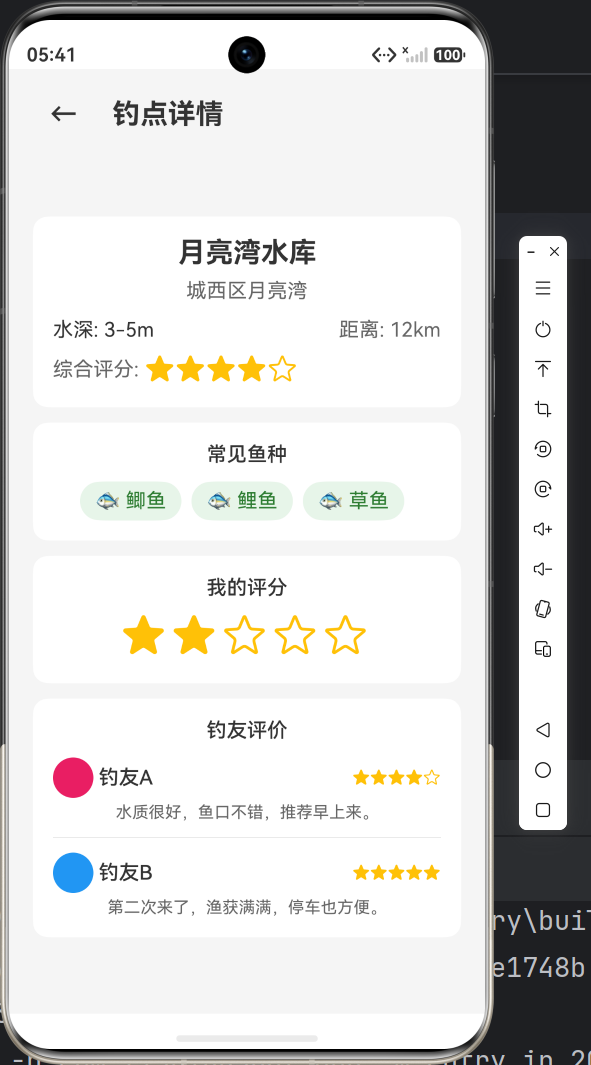
钓点详情页接收首页传递的钓点数据,展示详细信息,并支持用户评分和查看评价。
3.1 路由参数接收
这是页面数据流的重点------从首页接收参数:
typescript
interface SpotDetailParams {
  spotData: FishingSpot;
}

@State spot: FishingSpot = {
  id: 0, name: '', location: '', waterDepth: '',
  fishTypes: [], rating: 0, distance: ''
};

aboutToAppear(): void {
  const params = router.getParams() as SpotDetailParams;
  if (params && params.spotData) {
    this.spot = params.spotData;
  }
}生命周期时序:
aboutToAppear()--- 页面即将显示,最先执行build()--- 构建UIaboutToDisappear()--- 页面即将消失
aboutToAppear在build()之前执行,保证了数据在UI渲染前已准备好。
3.2 用户评分交互
用户评分是典型的交互反馈场景:
typescript
@State userRating: number = 0;

Row() {
  ForEach([1, 2, 3, 4, 5], (star: number) => {
    Text(star <= this.userRating ? '★' : '☆')
      .fontSize(36)
      .fontColor($r('app.color.rating_star'))
      .onClick(() => {
        this.userRating = star;  // 点击更新评分
      })
      .margin({ right: 4 })
  }, (star: number) => star.toString())
}交互流程:
- 用户点击第3颗星 →
this.userRating = 3 - @State 变化 → UI重新渲染
- 前3颗星显示实心★,后2颗显示空心☆
3.3 评价列表
typescript
Column() {
  Text('钓友评价').fontSize($r('app.float.body_font_size'))
    .fontWeight(FontWeight.Medium).margin({ bottom: 12 })

  // 评价1
  Column() {
    Row() {
      Circle().width(32).height(32).fill('#FFE91E63')
      Text(' 钓友A').fontSize($r('app.float.body_font_size'))
      Blank()
      Text('★★★★☆').fontSize(14).fontColor($r('app.color.rating_star'))
    }
    Text('水质很好,鱼口不错,推荐早上来。')
      .fontSize($r('app.float.small_font_size'))
      .fontColor($r('app.color.text_secondary'))
      .margin({ top: 4 })
  }

  Divider().margin({ top: 12, bottom: 12 })

  // 评价2
  Column() {
    Row() {
      Circle().width(32).height(32).fill('#FF2196F3')
      Text(' 钓友B')
      Blank()
      Text('★★★★★')
    }
    Text('第二次来了,渔获满满,停车也方便。')
  }
}
细节 :使用 Circle() 组件作为用户头像占位,不同的颜色区分不同用户。
3.4 常见鱼种展示
typescript
Row() {
  ForEach(this.spot.fishTypes, (fish: string) => {
    Text('🐟 ' + fish)
      .backgroundColor('#FFE8F5E9')
      .padding({ left: 12, right: 12, top: 6, bottom: 6 })
      .borderRadius(16)
      .margin({ right: 8 })
  }, (fish: string) => fish)
}
四、ArkTS 交互模式总结
通过这三个页面,我们总结了ArkTS中几种常见的交互模式:
4.1 过滤模式(Filter Pattern)
用户操作 → 状态变化 → 计算属性重新计算 → UI自动更新适用于搜索、分类筛选等场景。
4.2 交互模式(Interactive Pattern)
用户点击 → @State变量更新 → UI重新渲染 → 用户看到反馈适用于评分、开关、计数器等场景。
4.3 参数模式(Route Pattern)
首页 pushUrl(params) → 详情页 aboutToAppear 获取参数 → 页面渲染适用于页面间数据传递场景。
五、性能优化:getter 计算属性的妙用
在鱼种百科中,我们使用了 get filteredFish() 计算属性:
typescript
get filteredFish(): FishInfo[] {
  // 组合过滤逻辑
}
为什么要用 getter?
| 方式 | 特点 | 适用场景 |
|---|---|---|
| getter 属性 | 每次访问时计算,自动依赖 @State |
过滤、派生数据 |
| 普通方法 | 需要显式调用 | 有参数的转换逻辑 |
| @State 手动维护 | 需要手动更新 | 有异步逻辑时 |
getter 的自动依赖追踪 意味着:当 selectedCategory 或 searchQuery 变化时,框架会自动重新计算 filteredFish 并更新UI。
六、UI 细节与视觉一致性
6.1 卡片圆角统一
所有卡片使用统一的圆角值:
typescript
.borderRadius($r('app.float.card_corner_radius')) // 12vp6.2 颜色统一
- 主色调:
#FF2E7D32(森林绿) - 背景色:
#FFF5F5F5(浅灰) - 卡片背景:
#FFFFFF(白色) - 正文字色:
#FF333333 - 辅助文字:
#FF666666 - 提示文字:
#FF999999
6.3 间距栅格
使用 $r('app.float.padding_medium')(16vp)作为标准间距,保持页面呼吸感。
七、小结
本篇我们完成了项目中最复杂的三个页面:
| 页面 | 核心挑战 | 技术点 |
|---|---|---|
| 鱼种百科 FishEncyclopediaPage | 组合过滤 + 搜索 + 大列表 | getter过滤、TextInput、分类标签 |
| 天气详情 WeatherDetailPage | 数据可视化 | 温度条Stack叠加、逐小时/日布局 |
| 钓点详情 SpotDetailPage | 动态路由 + 交互 | router.getParams、评分交互、aboutToAppear |
至此,App的7个页面已经开发了6个。下一篇将迎来最终章 ------钓点地图的模拟实现、全局构建配置和性能优化总结!
项目源码 :基于 HarmonyOS API 23 + Stage模型 + ArkTS
系列目录:
- 第一篇:项目初始化与环境配置
- 第二篇:首页与钓点列表开发
- 第三篇:数据管理与多页面交互
- 第四篇:复杂页面与交互体验(本篇)
- 第五篇:地图可视化与性能优化