【鸿蒙原生应用开发实战】第五篇:收藏管理与个人中心 --- 收尾两个关键页面的完整实现
前言
这是本系列的最后一篇,我们将完成"宇宙探索"App的最后两个核心页面:FavPage(收藏列表页)和 ProfilePage(个人中心页)。
这两个页面虽然功能各有侧重,但共同构成了App的用户侧闭环:
- 用户在列表页/详情页收藏天体 → 在收藏页集中查看和管理
- 用户收藏的数据 → 在个人中心展示统计信息
- 个人中心提供功能入口和版权信息
本篇你将学到:
- 收藏列表的增删管理
- 空状态(Empty State)的优雅设计
- 个人中心的统计卡片布局
- 功能菜单列表的实现
- 页面生命周期与数据刷新的最佳实践
一、FavPage --- 收藏列表页
1.1 功能需求
| 功能 | 说明 |
|---|---|
| 收藏列表 | 展示所有已收藏的天体,按收藏顺序排列 |
| 取消收藏 | 点击"取消收藏"从列表中移除 |
| 清空所有 | 一键清空所有收藏 |
| 空状态 | 没有收藏时显示引导文案和"去探索"按钮 |
| 跳转详情 | 点击卡片跳转到详情页 |
1.2 完整代码
typescript
// entry/src/main/ets/pages/FavPage.ets
import router from '@ohos.router';
import { CelestialData, CELESTIAL_LIST, FavoriteManager } from '../model/CelestialData';

@Entry
@Component
struct FavPage {
  @State favList: CelestialData[] = [];

  // 首次加载
  aboutToAppear(): void {
    this.loadFavorites();
  }

  // 每次页面显示都刷新(从详情页返回时更新)
  onPageShow(): void {
    this.loadFavorites();
  }

  // 从 FavoriteManager 加载收藏数据
  loadFavorites(): void {
    const favIds = FavoriteManager.getAll();
    const result: CelestialData[] = [];
    for (let i = 0; i < CELESTIAL_LIST.length; i++) {
      if (favIds.indexOf(CELESTIAL_LIST[i].id) >= 0) {
        result.push(CELESTIAL_LIST[i]);
      }
    }
    this.favList = result;  // @State 更新 → UI 自动刷新
  }

  // 取消收藏
  removeFavorite(id: number): void {
    FavoriteManager.toggle(id);   // 切换收藏状态
    this.loadFavorites();         // 重新加载列表
  }

  // 清空所有收藏
  clearAll(): void {
    FavoriteManager.clear();
    this.favList = [];
  }

  build() {
    Column() {
      // ===== 顶部导航栏 =====
      Row() {
        Text('←')
          .fontSize(24)
          .fontColor($r('app.color.app_color_white'))
          .onClick(() => { router.back(); });

        Text($r('app.string.title_favorites'))
          .fontSize($r('app.float.app_subtitle_size'))
          .fontColor($r('app.color.app_color_white'))
          .fontWeight(FontWeight.Bold)
          .margin({ left: 12 });

        // 右侧清空按钮(右对齐)
        Flex({ direction: FlexDirection.RowReverse }) {
          if (this.favList.length > 0) {
            Text('清空')
              .fontSize($r('app.float.app_small_size'))
              .fontColor($r('app.color.app_color_text_secondary'))
              .onClick(() => { this.clearAll(); });
          }
        }
        .layoutWeight(1);
      }
      .width('100%')
      .padding({ left: 16, right: 16, top: 12, bottom: 12 });

      // ===== 数量统计 =====
      if (this.favList.length > 0) {
        Text('共收藏 ' + this.favList.length + ' 个天体')
          .fontSize($r('app.float.app_caption_size'))
          .fontColor($r('app.color.app_color_text_secondary'))
          .width('100%')
          .padding({ left: 16, bottom: 12 });
      }

      // ===== 列表 / 空状态 =====
      if (this.favList.length === 0) {
        // --- 空状态 ---
        Column() {
          Text('⭐')
            .fontSize(64)
            .margin({ bottom: 16 });
          Text('还没有收藏任何天体')
            .fontSize($r('app.float.app_body_size'))
            .fontColor($r('app.color.app_color_text_secondary'));
          Text('去天体列表中收藏你感兴趣的吧')
            .fontSize($r('app.float.app_caption_size'))
            .fontColor($r('app.color.app_color_text_secondary'))
            .margin({ top: 8 });

          Button() {
            Text('去探索')
              .fontSize($r('app.float.app_body_size'))
              .fontColor($r('app.color.app_color_white'));
          }
          .width(160).height(44)
          .backgroundColor($r('app.color.app_color_card'))
          .borderRadius($r('app.float.app_button_radius'))
          .margin({ top: 24 })
          .onClick(() => {
            router.pushUrl({ url: 'pages/CelestialPage' });
          });
        }
        .width('100%').height('70%')
        .justifyContent(FlexAlign.Center)
        .alignItems(HorizontalAlign.Center);
      } else {
        // --- 收藏列表 ---
        Scroll() {
          Column() {
            ForEach(this.favList, (item: CelestialData) => {
              Row() {
                // 首字母图标
                Row() {
                  Text(item.name[0])
                    .fontSize(20)
                    .fontColor($r('app.color.app_color_white'))
                    .fontWeight(FontWeight.Bold);
                }
                .width(50).height(50)
                .backgroundColor(item.color)
                .borderRadius(10)
                .justifyContent(FlexAlign.Center)
                .alignItems(VerticalAlign.Center);

                // 名称 + 类型
                Column() {
                  Text(item.name)
                    .fontSize($r('app.float.app_body_size'))
                    .fontColor($r('app.color.app_color_white'))
                    .fontWeight(FontWeight.Bold);
                  Text(item.englishName + ' · ' + item.type)
                    .fontSize($r('app.float.app_caption_size'))
                    .fontColor($r('app.color.app_color_text_secondary'))
                    .margin({ top: 2 });
                }
                .alignItems(HorizontalAlign.Start)
                .margin({ left: 12 })
                .layoutWeight(1);

                // 取消收藏按钮
                Text('取消收藏')
                  .fontSize($r('app.float.app_caption_size'))
                  .fontColor('#FF6B6B')
                  .padding({ left: 8, right: 8, top: 4, bottom: 4 })
                  .backgroundColor('rgba(255, 107, 107, 0.1)')
                  .borderRadius(8)
                  .onClick(() => { this.removeFavorite(item.id); });
              }
              .width('100%')
              .padding(12)
              .backgroundColor($r('app.color.app_color_card'))
              .borderRadius($r('app.float.app_card_radius'))
              .margin({ bottom: 12 })
              .onClick(() => {
                router.pushUrl({
                  url: 'pages/DetailPage',
                  params: { id: item.id }
                });
              });
            });
          }
          .width('100%')
          .padding({ left: 16, right: 16 });
        }
        .layoutWeight(1);
      }
    }
    .width('100%').height('100%')
    .backgroundColor($r('app.color.app_color_background'));
  }
}
1.3 空状态设计详解
当没有收藏时,展示友好的引导界面,而不是一个空白的列表。
为什么需要空状态?
用户打开"我的收藏"发现一片空白,会感到困惑。空状态用"文案+引导按钮"告诉用户:
- 发生了什么 --- "还没有收藏任何天体"
- 能做什么 --- "去天体列表中收藏你感兴趣的吧"
- 怎么做 --- "去探索"按钮直接跳转到天体列表页
实现方式:
typescript
if (this.favList.length === 0) {
  // 展示空状态
  Column() {
    Text('⭐').fontSize(64);       // Emoji装饰
    Text('还没有收藏任何天体');    // 主文案
    Text('去天体列表中收藏你感兴趣的吧'); // 副文案
    Button('去探索')...            // 行动按钮
  }
  .height('70%')                   // 垂直居中
  .justifyContent(FlexAlign.Center);
} else {
  // 展示列表
  Scroll() { ... }
}设计细节:
- 大号 Emoji ⭐ (64fp) 视觉吸引注意
- 两行文案,一主一副,层次分明
- "去探索"按钮使用卡片底色(
app_color_card),暗示可点击
1.4 清空操作的确认
当前的清空操作是直接执行的,没有二次确认。在实际项目中,你可以添加一个弹窗确认:
typescript
// 增强版清空(使用 AlertDialog)
clearAll(): void {
  AlertDialog.show({
    title: '清空收藏',
    message: '确定要清空所有收藏吗?此操作不可恢复。',
    primaryButton: {
      value: '取消',
      action: () => {}
    },
    secondaryButton: {
      value: '确定清空',
      fontColor: '#FF6B6B',
      action: () => {
        FavoriteManager.clear();
        this.favList = [];
      }
    }
  });
}
二、ProfilePage --- 个人中心
2.1 功能需求
| 模块 | 内容 |
|---|---|
| 用户头像 | Emoji 图标 + 用户名 + 签名 |
| 统计卡片 | 天体总数 + 收藏数量 |
| 功能菜单 | 设置、关于应用、联系我们 |
| 版权信息 | 底部版权文案 |
2.2 ProfileMenuItem 组件
typescript
@Component
struct ProfileMenuItem {
  icon: string = '';
  title: string = '';
  desc: string = '';

  build() {
    Row() {
      Text(this.icon)
        .fontSize(24)
        .margin({ right: 12 });

      Column() {
        Text(this.title)
          .fontSize($r('app.float.app_body_size'))
          .fontColor($r('app.color.app_color_white'))
          .fontWeight(FontWeight.Medium);
        Text(this.desc)
          .fontSize($r('app.float.app_caption_size'))
          .fontColor($r('app.color.app_color_text_secondary'))
          .margin({ top: 2 });
      }
      .alignItems(HorizontalAlign.Start);

      // 右侧箭头
      Flex({ direction: FlexDirection.RowReverse }) {
        Text('›')
          .fontSize(24)
          .fontColor($r('app.color.app_color_text_secondary'));
      }
      .layoutWeight(1);
    }
    .width('100%')
    .padding(16)
    .backgroundColor($r('app.color.app_color_card'))
    .borderRadius($r('app.float.app_card_radius'))
    .margin({ bottom: 12 })
    .alignItems(VerticalAlign.Center);
  }
}设计要点:
- 左侧图标(24fp)+ 中间标题/描述 + 右侧
›箭头 layoutWeight(1)让右侧箭头始终右对齐- 这种"左图标 + 中文本 + 右箭头"的布局是移动端功能菜单的标准设计模式
2.3 完整主页面
typescript
// entry/src/main/ets/pages/ProfilePage.ets
import router from '@ohos.router';
import { FavoriteManager } from '../model/CelestialData';

@Entry
@Component
struct ProfilePage {
  @State favCount: number = 0;

  aboutToAppear(): void {
    this.favCount = FavoriteManager.getCount();
  }

  // 每次页面显示更新收藏数量
  onPageShow(): void {
    this.favCount = FavoriteManager.getCount();
  }

  build() {
    Column() {
      // ===== 顶部导航栏 =====
      Row() {
        Text('←')
          .fontSize(24)
          .fontColor($r('app.color.app_color_white'))
          .onClick(() => { router.back(); });
        Text($r('app.string.title_profile'))
          .fontSize($r('app.float.app_subtitle_size'))
          .fontColor($r('app.color.app_color_white'))
          .fontWeight(FontWeight.Bold)
          .margin({ left: 12 });
      }
      .width('100%')
      .padding({ left: 16, top: 12, bottom: 12 });

      Scroll() {
        Column() {
          // ===== 头像与用户信息 =====
          Column() {
            // 圆形头像
            Row() {
              Text('🚀')
                .fontSize(48);
            }
            .width(90).height(90)
            .backgroundColor($r('app.color.app_color_card'))
            .borderRadius(45)           // 圆形(宽高的一半)
            .justifyContent(FlexAlign.Center)
            .alignItems(VerticalAlign.Center);

            Text('太空旅行者')
              .fontSize($r('app.float.app_body_size'))
              .fontColor($r('app.color.app_color_white'))
              .fontWeight(FontWeight.Bold)
              .margin({ top: 12 });
            Text('探索未知,永不止步')
              .fontSize($r('app.float.app_caption_size'))
              .fontColor($r('app.color.app_color_text_secondary'))
              .margin({ top: 4 });
          }
          .width('100%')
          .padding({ top: 20, bottom: 24 })
          .alignItems(HorizontalAlign.Center);

          // ===== 统计卡片 =====
          Row() {
            Column() {
              Text('10')   // 天体总数(固定值)
                .fontSize($r('app.float.app_subtitle_size'))
                .fontColor($r('app.color.app_color_accent'))
                .fontWeight(FontWeight.Bold);
              Text('天体总数')
                .fontSize($r('app.float.app_caption_size'))
                .fontColor($r('app.color.app_color_text_secondary'))
                .margin({ top: 4 });
            }
            .layoutWeight(1)
            .alignItems(HorizontalAlign.Center);

            Column() {
              Text(this.favCount.toString())  // 动态收藏数量
                .fontSize($r('app.float.app_subtitle_size'))
                .fontColor($r('app.color.app_color_accent'))
                .fontWeight(FontWeight.Bold);
              Text('收藏数量')
                .fontSize($r('app.float.app_caption_size'))
                .fontColor($r('app.color.app_color_text_secondary'))
                .margin({ top: 4 });
            }
            .layoutWeight(1)
            .alignItems(HorizontalAlign.Center);
          }
          .width('90%')
          .padding(20)
          .backgroundColor($r('app.color.app_color_card'))
          .borderRadius($r('app.float.app_card_radius'))
          .margin({ bottom: 24 });

          // ===== 功能菜单 =====
          Column() {
            ProfileMenuItem({
              icon: '⚙️',
              title: '设置',
              desc: '应用偏好设置'
            });
            ProfileMenuItem({
              icon: '📋',
              title: '关于应用',
              desc: '版本 1.0.0 · 宇宙探索'
            });
            ProfileMenuItem({
              icon: '📧',
              title: '联系我们',
              desc: 'feedback@cosmos.app'
            });
          }
          .width('100%')
          .padding({ left: 16, right: 16 });

          // ===== 版权信息 =====
          Text('宇宙探索 · 探索星辰大海')
            .fontSize($r('app.float.app_caption_size'))
            .fontColor($r('app.color.app_color_text_secondary'))
            .width('100%')
            .textAlign(TextAlign.Center)
            .margin({ top: 40, bottom: 20 });
        }
        .width('100%');
      }
      .layoutWeight(1);
    }
    .width('100%').height('100%')
    .backgroundColor($r('app.color.app_color_background'));
  }
}
2.4 统计卡片设计解剖
typescript
Row() {
  // 左:天体总数
  Column() {
    Text('10')              // 固定值
    Text('天体总数')
  }
  .layoutWeight(1)

  // 右:收藏数量
  Column() {
    Text(this.favCount.toString())  // 动态值
    Text('收藏数量')
  }
  .layoutWeight(1)
}
.width('90%')                // 留出左右边距
.padding(20)
.backgroundColor($r('app.color.app_color_card'))
.borderRadius($r('app.float.app_card_radius'))设计亮点:
layoutWeight(1)让左右各占50%,完美平分- 数字用金色 (
app_color_accent),突出统计数据 - 整张卡片用深蓝底色 (
app_color_card) 包裹,形成视觉区块 width('90%')留出左右边距,避免贴边
三、两个页面的生命周期对比
| 生命周期 | FavPage | ProfilePage |
|---|---|---|
aboutToAppear |
初始化加载收藏列表 | 初始化读取收藏数量 |
onPageShow |
每次显示重新加载(重要) | 每次显示重新读取(重要) |
为什么需要 onPageShow |
从详情页返回后,收藏状态可能已变化 | 从收藏页新增/删除收藏后,数量可能已变化 |
示例场景:
1. FavPage 显示收藏列表(有3项)
2. 点击某个天体进入 DetailPage
3. 在 DetailPage 取消了收藏
4. 点击返回 → FavPage.onPageShow()
5. loadFavorites() 重新读取 → favList 只剩2项
6. @State 更新 → UI 自动刷新为2项
如果没有 onPageShow,步骤4后页面仍然显示3项,造成数据不一致。
四、完整项目结构图
至此,整个App的5个页面全部完成。来看看完整的项目结构:
entry/src/main/ets/
├── entryability/
│   └── EntryAbility.ets         ← 应用入口
├── model/
│   └── CelestialData.ets        ← 数据模型 + 收藏管理
└── pages/
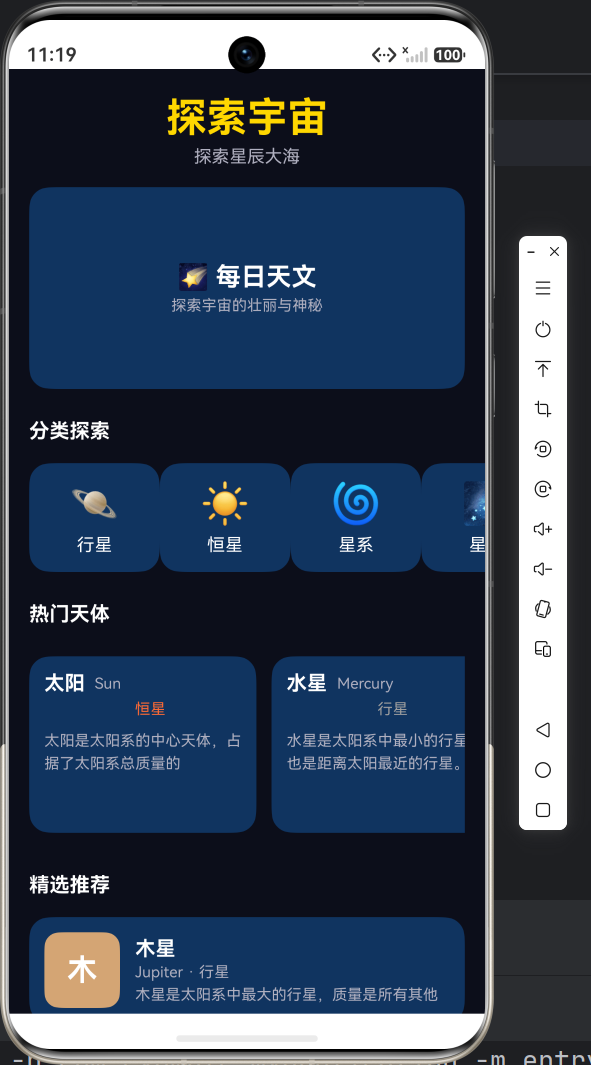
    ├── Index.ets                ← 首页(分类+热门+推荐)
    ├── CelestialPage.ets        ← 天体列表(标签筛选)
    ├── DetailPage.ets           ← 天体详情(动态切换)
    ├── FavPage.ets              ← 收藏管理(列表+空状态)
└── ProfilePage.ets ← 个人中心(统计+菜单)页面关系图:
                    ┌──────────────────┐
                    │    Index (首页)   │
                    │ 分类·热门·推荐    │
                    └──────┬───────────┘
                           │
              ┌────────────┼────────────┐
              ▼            ▼            ▼
     ┌────────────┐ ┌────────────┐ ┌────────────┐
     │CelestialPage│ │DetailPage  │ │ProfilePage │
     │ 天体列表    │ │ 天体详情   │ │ 个人中心   │
     │ 标签筛选    │ │ 动态切换   │ │ 统计·菜单  │
     └────────────┘ │ 收藏交互   │ └────────────┘
                    └────────────┘
                           │
              ┌────────────┘
              ▼
     ┌────────────┐
     │  FavPage   │
     │ 收藏管理   │
     │ 空状态设计 │
     └────────────┘
五、全系列知识点总结
5.1 技术栈总览
| 技术点 | 说明 | 涉及篇目 |
|---|---|---|
| Stage 模型 | 鸿蒙原生应用架构 | 第一篇 |
| ArkTS 组件化 | @Component + @Entry |
第一篇 |
| 资源引用 | $r() 语法 |
第一篇 |
| 路由管理 | router.pushUrl / router.back |
第一、四篇 |
| 数据接口 | interface 定义 |
第二篇 |
| 静态工具类 | FavoriteManager |
第二篇 |
| @State 装饰器 | 数据驱动UI | 第二、三篇 |
| ForEach 渲染 | 列表循环 | 第三篇 |
| 标签筛选 | 状态切换 + 数据过滤 | 第三篇 |
| 生命周期 | aboutToAppear / onPageShow |
第三、五篇 |
| 空状态设计 | Empty State 引导 | 第五篇 |
| 布局技巧 | layoutWeight / FlexAlign |
贯穿全系列 |
5.2 踩坑备忘
- router 导入路径 --- API 23 下必须从
@ohos.router导入 - app_name 不重复 --- 只在
AppScope中定义,entry 中不要重复定义 - 对象字面量标注类型 --- 严格模式要求显式类型,不能省略
- 组件属性必须默认值 ---
@Component struct内的属性必须有初始值 - 数组方法限制 --- 推荐用
for循环替代filter/map等 ES6+ 方法 - ForEach 参数类型 --- 回调参数必须显式标注类型
5.3 扩展方向
这个App虽然功能完整,但仍有很大的扩展空间:
| 扩展方向 | 实现思路 |
|---|---|
| 数据持久化 | 使用 AppStorage 或 Preferences 保存收藏数据 |
| 网络请求 | 接入真实天文API,动态获取天体数据 |
| 图片展示 | 为每个天体添加真实图片,使用 Image 组件 |
| 搜索功能 | 添加搜索框,按名称/类型搜索天体 |
| 深色/浅色主题 | 利用 dark/color.json 实现主题切换 |
| 国际化 | 利用 resources 多语言目录支持中英文 |
| 动画效果 | 使用显式动画 animateTo 增强交互体验 |
| 单元测试 | 使用 @ohos/hamock 和 @ohos/hypium 编写测试 |
六、结语
五篇文章,从项目搭建到5个完整页面,我们走完了一个鸿蒙原生应用从零到一的开发全流程。
这个过程中,我们不仅写了代码,更重要的是理解了鸿蒙应用开发的核心思想:
- 声明式UI:描述"UI应该是什么样的",而不是"如何一步步构建UI"
- 数据驱动:修改数据,框架自动刷新界面
- 组件化:将UI拆分为独立、可复用的组件
- 生命周期管理:理解页面何时创建、何时显示、何时销毁
- 资源管理:通过资源文件集中管理颜色、尺寸、文案
希望这五篇文章对你有所帮助,祝你鸿蒙开发之路顺利!🚀
所有源代码文件路径:
entry/src/main/ets/entryability/EntryAbility.etsentry/src/main/ets/model/CelestialData.etsentry/src/main/ets/pages/Index.etsentry/src/main/ets/pages/CelestialPage.etsentry/src/main/ets/pages/DetailPage.etsentry/src/main/ets/pages/FavPage.etsentry/src/main/ets/pages/ProfilePage.etsentry/src/main/resources/base/element/color.jsonentry/src/main/resources/base/element/float.jsonentry/src/main/resources/base/element/string.jsonentry/src/main/resources/base/profile/main_pages.jsonAppScope/resources/base/element/string.json