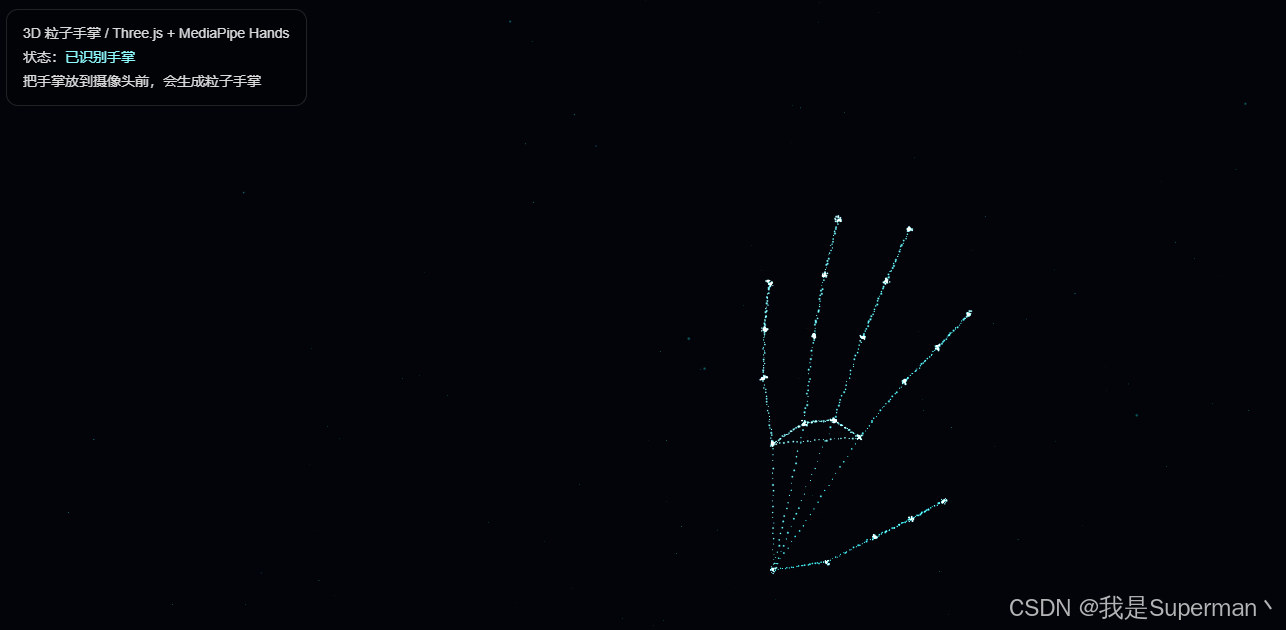
<!DOCTYPE html>
<html lang="zh-CN">
<head>
    <meta charset="UTF-8" />
    <title>Three.js 粒子手掌 - WebGL + 摄像头识别</title>
    <meta name="viewport" content="width=device-width, initial-scale=1.0" />

    <style>
        html, body {
            margin: 0;
            padding: 0;
            overflow: hidden;
            background: #02040a;
            font-family: Arial, sans-serif;
        }

        #container {
            width: 100vw;
            height: 100vh;
            position: relative;
            overflow: hidden;
        }

        canvas {
            display: block;
        }

        #video {
            position: fixed;
            right: 16px;
            bottom: 16px;
            width: 220px;
            height: 165px;
            object-fit: cover;
            border-radius: 12px;
            opacity: 0.35;
            transform: scaleX(-1);
            z-index: 10;
            border: 1px solid rgba(255,255,255,0.18);
        }

        #tips {
            position: fixed;
            left: 18px;
            top: 16px;
            z-index: 20;
            color: rgba(255,255,255,0.85);
            font-size: 14px;
            line-height: 1.7;
            background: rgba(0,0,0,0.28);
            backdrop-filter: blur(10px);
            padding: 12px 16px;
            border-radius: 12px;
            border: 1px solid rgba(255,255,255,0.12);
        }

        #status {
            color: #8efcff;
        }
    </style>
</head>

<body>
<div id="container"></div>

<video id="video" autoplay playsinline muted></video>

<div id="tips">
    <div>3D 粒子手掌 / Three.js + MediaPipe Hands</div>
    <div>状态:<span id="status">初始化中...</span></div>
    <div>把手掌放到摄像头前,会生成粒子手掌</div>
</div>

<!-- Three.js -->
<script src="https://cdn.jsdelivr.net/npm/three@0.160.0/build/three.min.js"></script>

<!-- MediaPipe Hands -->
<script src="https://cdn.jsdelivr.net/npm/@mediapipe/hands/hands.js"></script>
<script src="https://cdn.jsdelivr.net/npm/@mediapipe/camera_utils/camera_utils.js"></script>

<script>
    const container = document.getElementById('container');
    const video = document.getElementById('video');
    const statusEl = document.getElementById('status');

    let scene, camera, renderer;
    let handParticles, glowParticles;
    let particleGeometry, glowGeometry;
    let particleMaterial, glowMaterial;

    const PARTICLES_PER_BONE = 24;
    const RANDOM_FLOATING_PARTICLES = 500;
    const HAND_SCALE = 7.2;

    let targetPositions = [];
    let currentPositions = [];
    let hasHand = false;

    const HAND_CONNECTIONS = [
        [0,1], [1,2], [2,3], [3,4],
        [0,5], [5,6], [6,7], [7,8],
        [0,9], [9,10], [10,11], [11,12],
        [0,13], [13,14], [14,15], [15,16],
        [0,17], [17,18], [18,19], [19,20],
        [5,9], [9,13], [13,17], [5,17]
    ];

    initThree();
    initParticles();
    initMediaPipe();
    animate();

    function initThree() {
        scene = new THREE.Scene();
        scene.fog = new THREE.FogExp2(0x02040a, 0.08);

        camera = new THREE.PerspectiveCamera(
            55,
            window.innerWidth / window.innerHeight,
            0.1,
            100
        );
        camera.position.z = 12;

        renderer = new THREE.WebGLRenderer({
            antialias: true,
            alpha: true
        });

        renderer.setSize(window.innerWidth, window.innerHeight);
        renderer.setPixelRatio(Math.min(window.devicePixelRatio, 2));
        container.appendChild(renderer.domElement);

        const ambientLight = new THREE.AmbientLight(0xffffff, 0.8);
        scene.add(ambientLight);

        const pointLight = new THREE.PointLight(0x66ffff, 2, 30);
        pointLight.position.set(3, 4, 8);
        scene.add(pointLight);

        window.addEventListener('resize', onResize);
    }

    function initParticles() {
        const boneParticleCount = HAND_CONNECTIONS.length * PARTICLES_PER_BONE;
        const keyPointParticleCount = 21 * 18;
        const totalHandParticles = boneParticleCount + keyPointParticleCount;

        particleGeometry = new THREE.BufferGeometry();

        const positions = new Float32Array(totalHandParticles * 3);
        const colors = new Float32Array(totalHandParticles * 3);
        const sizes = new Float32Array(totalHandParticles);

        for (let i = 0; i < totalHandParticles; i++) {
            const x = (Math.random() - 0.5) * 2;
            const y = (Math.random() - 0.5) * 2;
            const z = (Math.random() - 0.5) * 2;

            positions[i * 3] = x;
            positions[i * 3 + 1] = y;
            positions[i * 3 + 2] = z;

            currentPositions.push(new THREE.Vector3(x, y, z));
            targetPositions.push(new THREE.Vector3(x, y, z));

            const t = i / totalHandParticles;

            colors[i * 3] = 0.2 + t * 0.4;
            colors[i * 3 + 1] = 0.75 + Math.random() * 0.25;
            colors[i * 3 + 2] = 1.0;

            sizes[i] = 0.045 + Math.random() * 0.055;
        }

        particleGeometry.setAttribute(
            'position',
            new THREE.BufferAttribute(positions, 3)
        );

        particleGeometry.setAttribute(
            'color',
            new THREE.BufferAttribute(colors, 3)
        );

        particleGeometry.setAttribute(
            'size',
            new THREE.BufferAttribute(sizes, 1)
        );

        particleMaterial = new THREE.ShaderMaterial({
            transparent: true,
            depthWrite: false,
            blending: THREE.AdditiveBlending,
            vertexColors: true,
            uniforms: {
                time: { value: 0 },
                opacity: { value: 1.0 }
            },
            vertexShader: `
          attribute float size;
          varying vec3 vColor;
          uniform float time;

          void main() {
            vColor = color;

            vec3 p = position;
            p.z += sin(time * 2.0 + position.x * 2.0 + position.y) * 0.025;

            vec4 mvPosition = modelViewMatrix * vec4(p, 1.0);
            gl_PointSize = size * 420.0 / -mvPosition.z;
            gl_Position = projectionMatrix * mvPosition;
          }
        `,
            fragmentShader: `
          varying vec3 vColor;
          uniform float opacity;

          void main() {
            float d = distance(gl_PointCoord, vec2(0.5));
            float alpha = smoothstep(0.5, 0.0, d);

            vec3 finalColor = vColor * (1.5 - d);
            gl_FragColor = vec4(finalColor, alpha * opacity);
          }
        `
        });

        handParticles = new THREE.Points(particleGeometry, particleMaterial);
        scene.add(handParticles);

        createBackgroundParticles();
    }

    function createBackgroundParticles() {
        glowGeometry = new THREE.BufferGeometry();

        const positions = new Float32Array(RANDOM_FLOATING_PARTICLES * 3);
        const colors = new Float32Array(RANDOM_FLOATING_PARTICLES * 3);
        const sizes = new Float32Array(RANDOM_FLOATING_PARTICLES);

        for (let i = 0; i < RANDOM_FLOATING_PARTICLES; i++) {
            positions[i * 3] = (Math.random() - 0.5) * 26;
            positions[i * 3 + 1] = (Math.random() - 0.5) * 16;
            positions[i * 3 + 2] = (Math.random() - 0.5) * 18;

            colors[i * 3] = 0.1;
            colors[i * 3 + 1] = 0.65 + Math.random() * 0.25;
            colors[i * 3 + 2] = 1.0;

            sizes[i] = 0.015 + Math.random() * 0.04;
        }

        glowGeometry.setAttribute(
            'position',
            new THREE.BufferAttribute(positions, 3)
        );

        glowGeometry.setAttribute(
            'color',
            new THREE.BufferAttribute(colors, 3)
        );

        glowGeometry.setAttribute(
            'size',
            new THREE.BufferAttribute(sizes, 1)
        );

        glowMaterial = particleMaterial.clone();
        glowMaterial.uniforms = {
            time: { value: 0 },
            opacity: { value: 0.35 }
        };

        glowParticles = new THREE.Points(glowGeometry, glowMaterial);
        scene.add(glowParticles);
    }

    function initMediaPipe() {
        const hands = new Hands({
            locateFile: file => {
                return `https://cdn.jsdelivr.net/npm/@mediapipe/hands/${file}`;
            }
        });

        hands.setOptions({
            maxNumHands: 1,
            modelComplexity: 1,
            minDetectionConfidence: 0.72,
            minTrackingConfidence: 0.72
        });

        hands.onResults(onHandResults);

        const cameraUtils = new Camera(video, {
            onFrame: async () => {
                await hands.send({ image: video });
            },
            width: 640,
            height: 480
        });

        cameraUtils.start()
            .then(() => {
                statusEl.textContent = '摄像头已开启,等待手掌';
            })
            .catch(err => {
                console.error(err);
                statusEl.textContent = '摄像头启动失败,请检查权限';
            });
    }

    function onHandResults(results) {
        if (
            results.multiHandLandmarks &&
            results.multiHandLandmarks.length > 0
        ) {
            hasHand = true;
            statusEl.textContent = '已识别手掌';

            const landmarks = results.multiHandLandmarks[0];
            buildParticleHandFromLandmarks(landmarks);
        } else {
            hasHand = false;
            statusEl.textContent = '未识别到手掌';
            scatterParticles();
        }
    }

    function landmarkToVector(lm) {
        /**
         * MediaPipe 坐标:
         * x: 0 - 1
         * y: 0 - 1
         * z: 相对深度
         *
         * 转成 Three.js 空间:
         * x 左右
         * y 上下
         * z 前后
         */
        const x = (0.5 - lm.x) * HAND_SCALE;
        const y = (0.5 - lm.y) * HAND_SCALE;
        const z = -lm.z * 8.5;

        return new THREE.Vector3(x, y, z);
    }

    function buildParticleHandFromLandmarks(landmarks) {
        const points = landmarks.map(landmarkToVector);

        let index = 0;

        // 手指骨骼上的粒子
        for (const [a, b] of HAND_CONNECTIONS) {
            const p1 = points[a];
            const p2 = points[b];

            for (let i = 0; i < PARTICLES_PER_BONE; i++) {
                const t = i / (PARTICLES_PER_BONE - 1);

                const p = new THREE.Vector3().lerpVectors(p1, p2, t);

                const spread = 0.04;
                p.x += (Math.random() - 0.5) * spread;
                p.y += (Math.random() - 0.5) * spread;
                p.z += (Math.random() - 0.5) * spread;

                if (targetPositions[index]) {
                    targetPositions[index].copy(p);
                }

                index++;
            }
        }

        // 每个关键点周围额外聚集一些粒子,让指尖和掌心更有光感
        for (let k = 0; k < points.length; k++) {
            const base = points[k];

            for (let j = 0; j < 18; j++) {
                const radius = k === 0 ? 0.18 : 0.11;

                const p = base.clone();
                p.x += (Math.random() - 0.5) * radius;
                p.y += (Math.random() - 0.5) * radius;
                p.z += (Math.random() - 0.5) * radius;

                if (targetPositions[index]) {
                    targetPositions[index].copy(p);
                }

                index++;
            }
        }
    }

    function scatterParticles() {
        for (let i = 0; i < targetPositions.length; i++) {
            const angle = i * 0.08;
            const radius = 2.5 + Math.sin(i * 0.1) * 1.2;

            targetPositions[i].x = Math.cos(angle) * radius + Math.sin(Date.now() * 0.0004 + i) * 0.8;
            targetPositions[i].y = Math.sin(angle * 0.7) * radius * 0.55;
            targetPositions[i].z = Math.sin(angle) * 1.2;
        }
    }

    function animate() {
        requestAnimationFrame(animate);

        const time = performance.now() * 0.001;

        particleMaterial.uniforms.time.value = time;
        glowMaterial.uniforms.time.value = time;

        const positions = particleGeometry.attributes.position.array;

        for (let i = 0; i < currentPositions.length; i++) {
            currentPositions[i].lerp(targetPositions[i], hasHand ? 0.32 : 0.035);

            positions[i * 3] = currentPositions[i].x;
            positions[i * 3 + 1] = currentPositions[i].y;
            positions[i * 3 + 2] = currentPositions[i].z;
        }

        particleGeometry.attributes.position.needsUpdate = true;

        handParticles.rotation.y = Math.sin(time * 0.35) * 0.08;
        handParticles.rotation.x = Math.sin(time * 0.25) * 0.04;

        glowParticles.rotation.y += 0.0008;
        glowParticles.rotation.x += 0.0004;

        renderer.render(scene, camera);
    }

    function onResize() {
        camera.aspect = window.innerWidth / window.innerHeight;
        camera.updateProjectionMatrix();

        renderer.setSize(window.innerWidth, window.innerHeight);
        renderer.setPixelRatio(Math.min(window.devicePixelRatio, 2));
    }
</script>
</body>
</html>