🏃 鸿蒙原生应用实战(十五)ArkUI 健康计步器:加速度传感器 + 峰值检测 + SQLite 存储 + 周报统计
博主说: 每天走多少步?消耗了多少卡路里?今天我们用 ArkUI 的加速度传感器 API + SQLite 数据库,从零实现一个带峰值检测算法、日/周统计图表、卡路里换算、目标设定的完整健康计步器。读完你将掌握传感器数据处理的全链路技能。
📱 应用场景
| 功能 | 说明 |
|---|---|
| 👟 实时计步 | 加速度传感器 + 峰值检测算法 |
| 📊 周报统计 | 柱状图展示 7 天步数趋势 |
| 🔥 卡路里估算 | 步数 → 卡路里 / 距离换算 |
| 🎯 目标设定 | 每日目标步数 + 完成进度环 |
| 📅 历史记录 | SQLite 持久化存储每日数据 |
⚙️ 运行环境要求
| 项目 | 版本要求 |
|---|---|
| DevEco Studio | 5.0.3.800 及以上 |
| HarmonyOS SDK | API 12 |
| 核心 API | @ohos.sensor + @ohos.data.relationalStore |
| 真机要求 | 必须真机(模拟器无加速度传感器) |
🛠️ 实战:从零搭建健康计步器
Step 1:计步算法原理(核心干货)
计步器最难的不是代码,而是算法------如何在走路/跑步的震动中准确识别出"一步"。
加速度传感器   →   三轴矢量合成   →   带通滤波   →   峰值检测   →   防抖   →   步数+1
  (50Hz)        sqrt(x²+y²+z²)     0.5~3Hz       >阈值       200ms
每一步的加速度波形特征:
幅值
↑
│       ╱╲
│      ╱  ╲        ╱╲          ← 每一步产生一个波峰
│     ╱    ╲      ╱  ╲
│    ╱      ╲    ╱    ╲
│   ╱        ╲  ╱      ╲
│  ╱          ╲╱        ╲
│ ╱                      ╲
└─────────────────────────────→ 时间
   ↑峰值       ↑防抖窗口(200ms)
   检测到一步    内不重复计数
关键参数调优:
| 参数 | 推荐值 | 说明 |
|---|---|---|
| 采样频率 | 50 Hz | 人正常步频 1~2Hz,50Hz 足够 |
| 加速度阈值 | 11 m/s² | 大于重力加速度 9.8 视为有动作 |
| 防抖时间 | 200ms | 小于这个时间算一步 |
| 带通滤波 | 0.5~3Hz | 过滤走路以外的高频噪声 |
Step 2:数据模型
typescript
// 每日步数记录
interface DailyStep {
  date: string;        // YYYY-MM-DD
  steps: number;       // 总步数
  goal: number;        // 当日目标
  calories: number;    // 卡路里
  distance: number;    // 距离(米)
}

// 运动换算常量
const CALORIE_PER_STEP = 0.04;   // 每步 0.04 千卡
const DISTANCE_PER_STEP = 0.65;  // 每步 0.65 米
const DEFAULT_GOAL = 8000;       // 默认每日目标 8000 步
Step 3:完整代码
typescript
// pages/Index.ets --- 健康计步器
import sensor from '@ohos.sensor';
import relationalStore from '@ohos.data.relationalStore';
import abilityAccessCtrl from '@ohos.abilityAccessCtrl';

@Entry
@Component
struct Pedometer {
  // ======== 状态变量 ========
  @State todaySteps: number = 0;
  @State dailyGoal: number = DEFAULT_GOAL;
  @State calories: number = 0;
  @State distance: number = 0;
  @State isTracking: boolean = false;
  @State weekData: { date: string; steps: number }[] = [];
  @State currentView: 'today' | 'week' = 'today';
  @State batteryLevel: number = 100;

  private store!: relationalStore.RdbStore;
  private lastPeakTime: number = 0;
  private lastMagnitude: number = 0;
  private accelBuffer: number[] = [];  // 滑动平均缓冲区
  private readonly BUFFER_SIZE = 5;

  aboutToAppear() {
    this.initDB();
    this.loadTodayData();
  }

  // ======== SQLite 初始化 ========
  async initDB() {
    try {
      const config = {
        name: 'pedometer.db',
        securityLevel: relationalStore.SecurityLevel.S1
      };
      this.store = await relationalStore.getRdbStore(getContext(this), config);
      await this.store.executeSql(
        `CREATE TABLE IF NOT EXISTS daily_steps (
          id INTEGER PRIMARY KEY AUTOINCREMENT,
          date TEXT UNIQUE,
          steps INTEGER DEFAULT 0,
          goal INTEGER DEFAULT ${DEFAULT_GOAL},
          calories REAL DEFAULT 0,
          distance REAL DEFAULT 0
        )`
      );
    } catch (err) {
      console.error('数据库初始化失败:', JSON.stringify(err));
    }
  }

  // ======== 加载今日数据 ========
  async loadTodayData() {
    const today = this.getTodayStr();
    try {
      const predicates = new relationalStore.RdbPredicates('daily_steps');
      predicates.equalTo('date', today);
      const result = await this.store.query(predicates, ['steps', 'goal', 'calories', 'distance']);

      if (result.goToFirstRow()) {
        this.todaySteps = result.getLong(result.getColumnIndex('steps'));
        this.dailyGoal = result.getLong(result.getColumnIndex('goal'));
      }
      result.close();
      this.calculateDerived();
    } catch (err) {
      console.error('加载今日数据失败:', JSON.stringify(err));
    }
  }

  getTodayStr(): string {
    const d = new Date();
    return `${d.getFullYear()}-${String(d.getMonth()+1).padStart(2,'0')}-${String(d.getDate()).padStart(2,'0')}`;
  }

  // ======== 保存步数到 SQLite ========
  async saveToDB() {
    const today = this.getTodayStr();
    try {
      const exists = await this.checkDateExists(today);
      if (exists) {
        const p = new relationalStore.RdbPredicates('daily_steps');
        p.equalTo('date', today);
        await this.store.update({
          steps: this.todaySteps,
          goal: this.dailyGoal,
          calories: this.calories,
          distance: this.distance
        }, p);
      } else {
        await this.store.insert('daily_steps', {
          date: today,
          steps: this.todaySteps,
          goal: this.dailyGoal,
          calories: this.calories,
          distance: this.distance
        });
      }
    } catch (err) {
      console.error('保存失败:', JSON.stringify(err));
    }
  }

  async checkDateExists(date: string): Promise<boolean> {
    const p = new relationalStore.RdbPredicates('daily_steps');
    p.equalTo('date', date);
    const r = await this.store.query(p, ['id']);
    const exists = r.goToFirstRow();
    r.close();
    return exists;
  }

  // ======== 加载周数据(柱状图用) ========
  async loadWeekData() {
    const list: { date: string; steps: number }[] = [];
    for (let i = 6; i >= 0; i--) {
      const d = new Date();
      d.setDate(d.getDate() - i);
      const dateStr = `${d.getFullYear()}-${String(d.getMonth()+1).padStart(2,'0')}-${String(d.getDate()).padStart(2,'0')}`;

      try {
        const p = new relationalStore.RdbPredicates('daily_steps');
        p.equalTo('date', dateStr);
        const r = await this.store.query(p, ['steps']);
        const steps = r.goToFirstRow() ? r.getLong(r.getColumnIndex('steps')) : 0;
        r.close();
        list.push({ date: `${d.getMonth()+1}/${d.getDate()}`, steps });
      } catch {
        list.push({ date: `${d.getMonth()+1}/${d.getDate()}`, steps: 0 });
      }
    }
    this.weekData = list;
  }

  // ======== 开始计步(加速度传感器监听) ========
  startTracking() {
    if (this.isTracking) return;
    this.isTracking = true;

    // 订阅加速度传感器
    sensor.on(sensor.SensorType.ACCELEROMETER, (data) => {
      // 1. 三轴矢量合成
      const magnitude = Math.sqrt(
        data.x * data.x + data.y * data.y + data.z * data.z
      );

      // 2. 滑动平均滤波(消除瞬时噪声)
      this.accelBuffer.push(magnitude);
      if (this.accelBuffer.length > this.BUFFER_SIZE) {
        this.accelBuffer.shift();
      }
      const avgMagnitude = this.accelBuffer.reduce((a, b) => a + b, 0) / this.accelBuffer.length;

      // 3. 峰值检测 + 防抖
      const now = Date.now();
      // 上升沿检测:当前值大于阈值 && 当前值小于前一次值(说明过了峰值)
      if (avgMagnitude > 11 && this.lastMagnitude > 10 && avgMagnitude < this.lastMagnitude) {
        // 防抖:200ms 内只算一步
        if (now - this.lastPeakTime > 200) {
          this.todaySteps++;
          this.lastPeakTime = now;
          this.calculateDerived();

          // 每 50 步自动存一次(防数据丢失)
          if (this.todaySteps % 50 === 0) {
            this.saveToDB();
          }
        }
      }
      this.lastMagnitude = avgMagnitude;
    });
  }

  // ======== 停止计步 ========
  stopTracking() {
    sensor.off(sensor.SensorType.ACCELEROMETER);
    this.isTracking = false;
    this.saveToDB(); // 停止时保存
  }

  // ======== 计算衍生数据 ========
  calculateDerived() {
    this.calories = Math.round(this.todaySteps * CALORIE_PER_STEP);
    this.distance = Math.round(this.todaySteps * DISTANCE_PER_STEP);
  }

  // ======== 进度百分比与颜色 ========
  getProgressPercent(): number {
    return Math.min(100, Math.round((this.todaySteps / this.dailyGoal) * 100));
  }

  getProgressColor(): string {
    const p = this.getProgressPercent();
    if (p < 30) return '#FF3B30';    // 红色:刚开始
    if (p < 60) return '#FF9500';    // 橙色:一半
    if (p < 85) return '#FFCC00';    // 黄色:接近
    return '#34C759';                // 绿色:达成
  }

  getProgressStatus(): string {
    const p = this.getProgressPercent();
    if (p === 0) return '还没开始,起来走走!🚶';
    if (p < 30) return '加油,还差很多呢 💪';
    if (p < 60) return '已经走了一半了!👍';
    if (p < 85) return '快要达成目标了!🔥';
    if (p < 100) return '马上就到了!冲刺 🏃';
    return '🎉 目标达成!太棒了!';
  }

  // ======== 格式化 ========
  formatSteps(n: number): string {
    return n >= 10000 ? (n / 10000).toFixed(1) + '万' : n.toString();
  }

  formatDistance(m: number): string {
    return m >= 1000 ? (m / 1000).toFixed(2) + 'km' : m + 'm';
  }

  // ======== 健康小贴士 ========
  getHealthTip(): string {
    const tips = [
      '每天走 8000 步可显著降低心血管疾病风险 🫀',
      '饭后散步 15 分钟有助消化 🍽️',
      '每小时起来走动 5 分钟,缓解久坐伤害 💺',
      '快步走比慢走燃脂多 2 倍 🔥',
      '坚持每天走 10000 步,一个月可减 1kg 🏋️'
    ];
    return tips[Math.floor(Math.random() * tips.length)];
  }

  // ======== UI 构建 ========
  build() {
    Column() {
      // Tab 切换
      Row() {
        Button('📊 今日').width('50%').height(42)
          .backgroundColor(this.currentView === 'today' ? '#34C759' : '#F0F0F0')
          .fontColor(this.currentView === 'today' ? '#fff' : '#333')
          .borderRadius(0).fontSize(16)
          .onClick(() => { this.currentView = 'today'; })
        Button('📈 周报').width('50%').height(42)
          .backgroundColor(this.currentView === 'week' ? '#34C759' : '#F0F0F0')
          .fontColor(this.currentView === 'week' ? '#fff' : '#333')
          .borderRadius(0).fontSize(16)
          .onClick(() => { this.currentView = 'week'; this.loadWeekData(); })
      }.width('100%')

      if (this.currentView === 'today') {
        this.TodayView()
      } else {
        this.WeekView()
      }
    }
    .width('100%').height('100%').backgroundColor('#F8F9FA')
  }

  @Builder
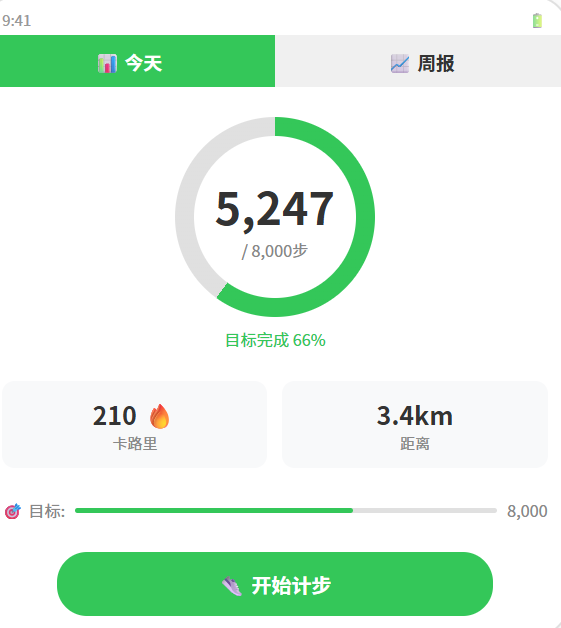
  TodayView() {
    Column() {
      // ---- 步数环形进度 ----
      Stack() {
        // 背景环
        Circle().width(180).height(180).fill('none')
          .stroke('#E8E8E8').strokeWidth(12)
        // 进度环(用 strokeDashArray 实现)
        Circle().width(180).height(180).fill('none')
          .stroke(this.getProgressColor()).strokeWidth(12)
          .strokeDashArray([this.getProgressPercent() / 100 * 502.65, 502.65])
          .rotate({ angle: -90 })

        // 中间数字
        Column() {
          Text(this.formatSteps(this.todaySteps))
            .fontSize(40).fontWeight(FontWeight.Bold).fontColor('#333')
          Text(`/ ${this.formatSteps(this.dailyGoal)}`)
            .fontSize(16).fontColor('#888').margin({ top: 2 })
          Text(`${this.getProgressPercent()}%`)
            .fontSize(14).fontColor(this.getProgressColor()).fontWeight(FontWeight.Bold)
            .margin({ top: 4 })
        }
        .alignItems(HorizontalAlign.Center)
      }
      .margin({ top: 20 })

      // ---- 状态提示 ----
      Text(this.getProgressStatus())
        .fontSize(14).fontColor(this.getProgressColor()).margin({ top: 8 })
        .fontWeight(FontWeight.Bold)

      // ---- 三数据卡片 ----
      Row() {
        this.DataCard('🔥', '卡路里', `${this.calories}`, 'kcal')
        this.DataCard('📏', '距离', `${this.formatDistance(this.distance)}`, '')
        this.DataCard('🎯', '完成度', `${this.getProgressPercent()}%`, '')
      }
      .width('94%').gap(8).margin({ top: 16 })

      // ---- 目标滑动条 ----
      Row() {
        Text('🎯 目标:').fontSize(14).fontColor('#555').width(60)
        Slider({
          value: this.dailyGoal,
          min: 2000,
          max: 20000,
          step: 500
        })
        .width('60%').height(30)
        .onChange((v: number) => {
          this.dailyGoal = v;
          this.saveToDB();
        })
        Text(`${this.formatSteps(this.dailyGoal)}`)
          .fontSize(14).fontColor('#34C759').fontWeight(FontWeight.Bold).width(50)
      }
      .width('90%').margin({ top: 12 })

      // ---- 控制按钮 ----
      Button(this.isTracking ? '⏹ 停止计步' : '👟 开始计步')
        .width('80%').height(52)
        .backgroundColor(this.isTracking ? '#FF3B30' : '#34C759')
        .fontColor('#fff').borderRadius(26).fontSize(18).fontWeight(FontWeight.Bold)
        .margin({ top: 16 })
        .onClick(() => {
          this.isTracking ? this.stopTracking() : this.startTracking();
        })

      // ---- 状态 + 健康小贴士 ----
      Text(this.isTracking ? '🔴 正在计步中...' : '⏸ 已暂停')
        .fontSize(13).fontColor('#888').margin({ top: 8 })

      if (!this.isTracking) {
        Text('💡 ' + this.getHealthTip())
          .fontSize(12).fontColor('#999').margin({ top: 8 }).padding({ left: 20, right: 20 })
          .textAlign(TextAlign.Center)
      }
    }
    .width('100%').alignItems(HorizontalAlign.Center).layoutWeight(1)
  }

  @Builder
  WeekView() {
    Column() {
      Text('📅 最近 7 天').fontSize(18).fontWeight(FontWeight.Bold).margin({ top: 16, bottom: 4 })

      // 周统计概要
      if (this.weekData.length > 0) {
        const total = this.weekData.reduce((s, i) => s + i.steps, 0);
        const avg = Math.round(total / this.weekData.length);
        Row() {
          this.StatBox('📊 总步数', `${total.toLocaleString()}`)
          this.StatBox('📈 日均', `${avg.toLocaleString()}`)
          this.StatBox('🏆 最高', `${Math.max(...this.weekData.map(i => i.steps)).toLocaleString()}`)
        }.width('94%').gap(8).margin({ bottom: 12 })
      }

      // 柱状图
      Scroll() {
        Column() {
          ForEach(this.weekData, (item: any) => {
            Row() {
              Text(item.date).fontSize(14).fontColor('#333').width(60)

              // 柱状条
              Column() {
                Column()
                  .width(28)
                  .height(Math.max(4, (item.steps / 12000) * 140))
                  .backgroundColor('#34C759')
                  .borderRadius(4)
                  .animation({ duration: 500, curve: Curve.EaseOut })
              }
              .height(150).justifyContent(FlexAlign.End)
              .margin({ left: 8 })

              Text(item.steps.toLocaleString())
                .fontSize(14).fontColor('#888').margin({ left: 8 }).width(50)
            }
            .padding({ left: 16, right: 16, top: 8, bottom: 8 })
            .width('96%').backgroundColor('#FFF').borderRadius(8)
            .shadow({ radius: 1, color: '#08000000', offsetY: 1 })
          }, (item: any) => item.date)
        }.width('100%').padding({ top: 4 })
      }.layoutWeight(1).width('100%')

      // 参考线
      Text('--- 虚线 = 日均步数 ---')
        .fontSize(12).fontColor('#999').padding(8)
    }
    .width('100%').layoutWeight(1)
  }

  @Builder
  DataCard(icon: string, label: string, value: string, unit: string) {
    Column() {
      Text(icon).fontSize(22)
      Text(value).fontSize(20).fontWeight(FontWeight.Bold).fontColor('#333').margin({ top: 4 })
      Text(label + ' ' + unit).fontSize(11).fontColor('#888').margin({ top: 2 })
    }
    .padding(12).backgroundColor('#FFF').borderRadius(10).layoutWeight(1)
    .shadow({ radius: 2, color: '#10000000', offsetY: 1 })
  }

  @Builder
  StatBox(label: string, value: string) {
    Column() {
      Text(value).fontSize(18).fontWeight(FontWeight.Bold).fontColor('#34C759')
      Text(label).fontSize(12).fontColor('#888').margin({ top: 2 })
    }
    .padding(10).backgroundColor('#FFF').borderRadius(8).layoutWeight(1)
    .shadow({ radius: 1, color: '#08000000', offsetY: 1 })
  }
}
📚 核心知识点深度解析
1. 峰值检测算法详解
原始信号: 1.02, 9.81, 10.5, 11.2, 12.1, 11.5, 10.8, 9.9...
                      ↑ 峰值点 (12.1 > 阈值11, 且开始下降)
                           ↓
                    检测到一步 + 防抖 200ms
三步检测条件(同时满足):
avgMagnitude > 11--- 当前值超过阈值(重力加速度 ≈ 9.8)avgMagnitude < this.lastMagnitude--- 过了峰值(开始下降)now - lastPeakTime > 200--- 防抖时间已过
2. 滑动平均滤波
缓冲区 [10.2, 10.8, 11.5, 12.1, 11.5]
            ↓
        平均值 = (10.2+10.8+11.5+12.1+11.5) / 5 = 11.22
消除单次噪声,让波峰检测更稳定。
3. 运动换算公式
卡路里 = 步数 × 0.04 kcal
距离   = 步数 × 0.65 m
目标完成度 = min(100%, 步数 / 目标 × 100)
📊 每日目标参考表
| 目标步数 | 对应距离 | 对应卡路里 | 适合人群 |
|---|---|---|---|
| 3000 | 1.95 km | 120 kcal | 办公室久坐族(最低活动量) |
| 6000 | 3.9 km | 240 kcal | 普通上班族 |
| 8000 | 5.2 km | 320 kcal | WHO 推荐每日活动量 |
| 10000 | 6.5 km | 400 kcal | 健身爱好者 |
| 15000 | 9.75 km | 600 kcal | 运动达人 |
⚠️ 避坑指南
| 坑 | 原因 | 正确做法 |
|---|---|---|
| 计步数偏多 | 颠簸路段误计 | 提高阈值到 12,或加方差检测 |
| 计步数偏少 | 阈值太高,慢走不触发 | 阈值降到 10,配合 500ms 防抖窗 |
| 传感器不回调 | 忘了调 sensor.on() |
在 aboutToAppear 中订阅 |
| 数据丢失 | 没保存就杀进程 | 每 50 步自动存 + onStop 存 |
| 柱状图不显示 | 数据全为 0 | 检查 SQLite 表结构(date TEXT UNIQUE) |
| 重复计步 | 防抖时间太短 | 设为 200~300ms |
| 耗电快 | 传感器常开 | 停止计步时 sensor.off() |
| 模拟器没数据 | 模拟器无加速度传感器 | 必须真机调试 |
| 数据库异常 | 并发写入 | 用事务包裹写入操作 |
| 周报日期错乱 | 时区问题 | 用 setHours(0,0,0,0) 对齐日期 |
🔥 最佳实践
- 滑动平均滤波:缓冲区大小 5~10,消除单次噪声
- 防抖窗口:200ms 避免一步被多次计算
- 自动保存:每 50 步自动持久化,防止进程被杀数据丢失
- 颜色反馈:进度环用红→橙→黄→绿渐变色
- 峰值检测优化:结合加速度方差检测,静止时不计数
- 目标达成动画:达到 100% 时播放庆祝动画
- 电量优化:计步时降低屏幕亮度,延长续航
- 后台计步 :用
backgroundTaskManager保持后台运行
🚀 扩展挑战
- 实时步频显示:计算最近 10 秒的步数 × 6 = 步频(步/分钟)
- 运动类型识别:走路 vs 跑步 vs 骑车(通过加速度频率区分)
- 楼层计算:结合气压传感器检测爬楼梯
- Widget 卡片:主屏幕卡片显示今日步数与进度环
- 社交排行:好友步数排行(分布式数据库同步)
官方文档: HarmonyOS 应用开发文档
- 开发者社区: 华为开发者论坛
- 欢迎加入开源鸿蒙跨平台社区: https://openharmonycrossplatform.csdn.net/