Tomcat的连接器核心组件,主要连接器是Tomcat的核心组件,主要对底层请求的处理,例如底层和socket和http协议的解析;
作为桥梁对接客户端和Servlet容器。将原始请求转换为标准的Tomcat Request对象,然后交于另一个组件容器,取处理具体放入业务逻辑;
容器处理之后的ServletResponse,转换为Tomcat Response对象,进行底层响应,最终返回给客户端。
主要流程
Tomcat 4中的默认连接器的工作原理
连接器在启动时,会创建serverSocket绑定端口,并实例化HttpProcessor对象池,关联一个Container对象
- 使用一个线程循环监听ServerSocket.accept()请求socket,再把socket交于HttpProcessor处理
- 在处理socket时,HttpProcessor中会调用Connector提供的方法创建request对象和response对象,解析socket的请求行和请求头后填充request
- 最后调用org.apache.catalina. Container接口的invokee(request, response)方法, 将request对象和response对象传给servlet容器。
- 调用servlet容器的invoke()方法,此方法会载入相应的servlet 类, 调用其service()方法, 管理session对象, 记录错误消息等操
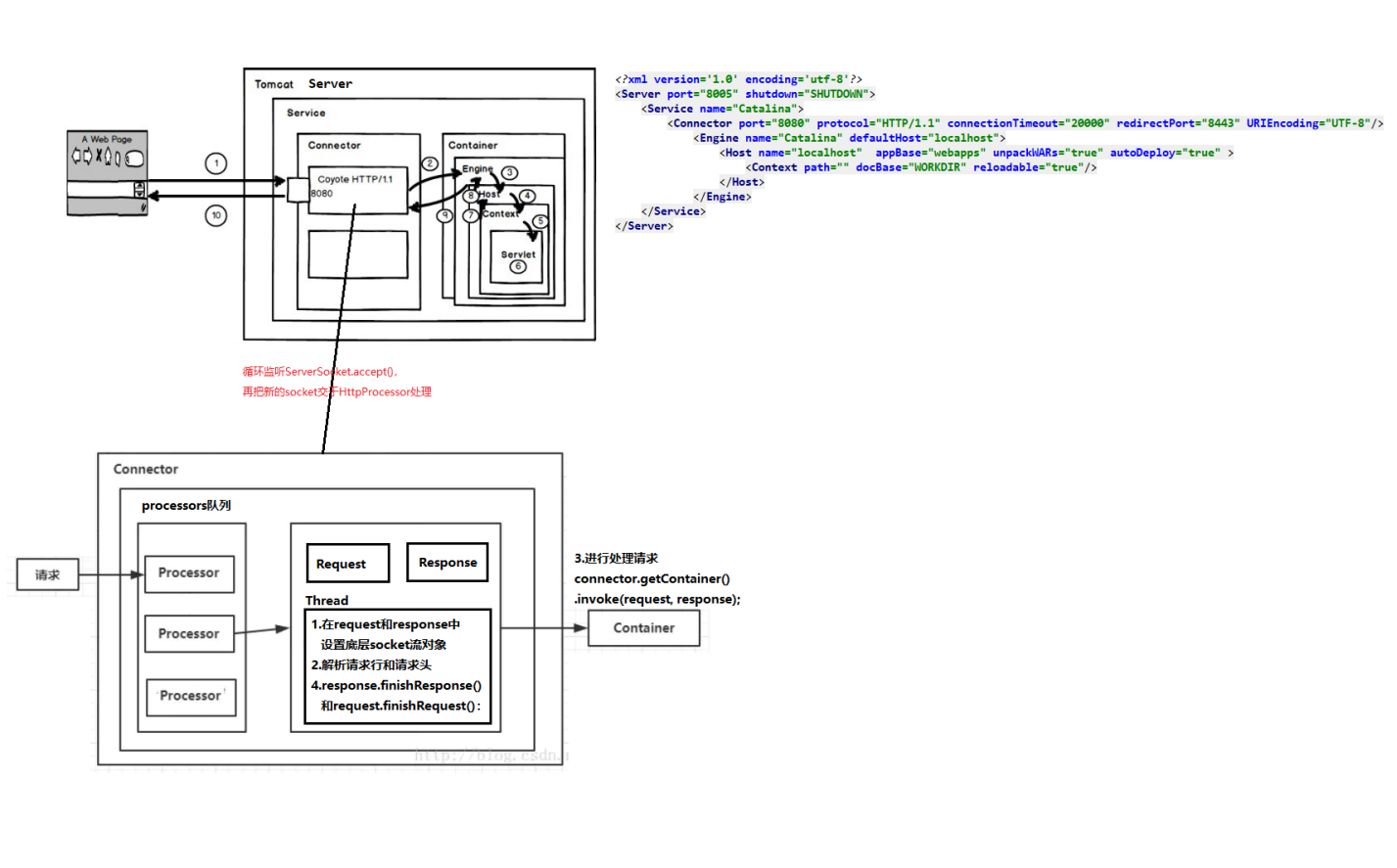
Connector
Connector接口
public interface Connector {
// 初始化方法
public void initialize() throws LifecycleException;
// 关联一个容器类对象
public Container getContainer();
public void setContainer(Container container);
//ServerSocketFactory 工厂类
public ServerSocketFactory getFactory();
public void setFactory(ServerSocketFactory factory);
// 创建 Request 和 Response 对象
public Request createRequest();
public Response createResponse();
//connection 的上一层容器
public Service getService();
public void setService(Service service);
// 一些 http 相关的配置
public boolean getEnableLookups();//DNS 寻找
public void setEnableLookups(boolean enableLookups);
public String getInfo();// 当前 connector 的描述信息
public int getRedirectPort();// 如果请求来自非 SSL 端口,并受到安全约束 , 返回请求应重定向到的端口号
public void setRedirectPort(int redirectPort);
public String getScheme();// 默认 http
public void setScheme(String scheme);
public boolean getSecure();// 安全连接标志 , 默认值为 "false"
public void setSecure(boolean secure);
}
HttpConnector实现类
作用
* 实现了initialize()接口方法
调用open()用于新创建serverSocket
* 实现了Runnable接口
run()方法内循环监听ServerSocket.accept(),再把socket交于HttpProcessor处理。processor.assign(socket);
加锁的从HttpProcessor对象池中获取一个空闲的HttpProcessor(有最大个数限制),如果获取不到则抛出异常。这样保证了HttpProcessor对象只有一个socket进入。
HttpProcessor内独占的一个后台线程会被唤醒以处理这个socket
* 实现了生命周期接口:主要为start()和stop()
start():开启一个后台线程运行run();初始化HttpProcessor对象池(创建HttpProcessor),并启动每一个HttpProcessor的后台run方法
stop():用于停止connector销毁HttpProcessor.stop的所有对象;关闭serverSocket;停止后台线程
* 提供创建request、Response对象的方法
此方法会在HttpProcessor中处理socket时调用;创建时并把当前连接器传递过去,因为这3个对象会遇到一个配置变量,是在本Connector进行get/setter的
public final class HttpConnector implements Connector, Lifecycle, Runnable {
// ----------------------------------------------------- Instance Variables
// 其他
private int debug = 0;
private String address = null ;
private int bufferSize = 2048;
// 容器层次相关
private Service service = null ;
protected Container container = null ; //connector 的下一层,一对一的关系
//Processors 相关
private Vector created = new Vector(); // 仅仅用于记录已经创建的 processor ,在 stop 方法内可以对此进行销毁
private int curProcessors = 0; // 当前的处理类的个数
protected int minProcessors = 5;
private int maxProcessors = 20;
private Stack processors = new Stack();// 当前空闲可用的 processor
//ServerSocket 相关
private int acceptCount = 10;//ServerSocket 中的接受队列长度
private ServerSocket serverSocket = null ;
private ServerSocketFactory factory = null ; // 默认 DefaultServerSocketFactory();
private static final String info = "org.apache.catalina.connector.http.HttpConnector/1.0" ;
//http 配置相关,大多是给 HTTPprocess 使用的
private boolean enableLookups = false ; //DNS 查询
private int connectionTimeout = Constants.DEFAULT_CONNECTION_TIMEOUT;
private int port = 9999;
private String proxyName = null ;
private int proxyPort = 0;
private int redirectPort = 443;
private String scheme = "http" ;
private boolean secure = false ;
private boolean allowChunking = true ;
private boolean tcpNoDelay = true ;
// 生命周期相关
private StringManager sm = StringManager.getManager(Constants.Package);
private boolean initialized = false ;
private boolean started = false ;
private boolean stopped = false ; // 外部控制的
private Thread thread = null ;
private String threadName = null ;
private Object threadSync = new Object();
protected LifecycleSupport lifecycle = new LifecycleSupport(this );
// --------------get/setter-----------------------------------------------------
public Service get/setXXX() {
//....
}
//---------- 创建 request/Response 对象,并把当前连接器传递过去 -----------------------
public Request createRequest() {
HttpRequestImpl request = new HttpRequestImpl();
request.setConnector(this );
return (request);
}
public Response createResponse() {
HttpResponseImpl response = new HttpResponseImpl();
response.setConnector(this );
return (response);
}
// ------------------ 生命周期方法 ------------------------------------
public void addLifecycleListener(LifecycleListener listener) {
lifecycle .addLifecycleListener(listener);
}
public LifecycleListener\[\] findLifecycleListeners() {
return lifecycle .findLifecycleListeners();
}
public void removeLifecycleListener(LifecycleListener listener) {
lifecycle .removeLifecycleListener(listener);
}
// 在启动 Catalina 时,会串联的调用 server->connection 的 initialize 、 start 初始化方法
//initialize 用于调用 open 用于开启 ServerSocket
public void initialize() throws LifecycleException {
if (initialized )
throw new LifecycleException ();
this .initialized =true ;
Exception eRethrow = null ;
try {
serverSocket = open();
} catch (IOException ioe) {
//...
eRethrow = kme;
}
if ( eRethrow != null )
throw new LifecycleException(threadName + ".open" , eRethrow);
}
//start 用于调用 threadStart() 开启后台,以监听 ServerSocket ;
// 初始化 HttpProcessor 对象池
public void start() throws LifecycleException {
if (started )
throw new LifecycleException();
threadName = "HttpConnector"**** + ****port**** + ****"" ;
lifecycle .fireLifecycleEvent(START_EVENT, null ); // 触发事件
started = true ;
// 开启后台线程
threadStart();
// 创建指定数量的 processors
while (curProcessors < minProcessors ) {
if ((maxProcessors > 0) && (curProcessors >= maxProcessors ))
break ;
HttpProcessor processor = newProcessor();
recycle(processor);
}
}
//stop 用于停止 connector
// 销毁 HttpProcessor.stop 的所有对象
// 关闭 serverSocket
// 停止后台线程
public void stop() throws LifecycleException {
if (!started )throw new LifecycleException (sm .getString("httpConnector.notStarted" ));
lifecycle .fireLifecycleEvent(STOP_EVENT, null );
started = false ;
for (int i = created .size() - 1; i >= 0; i--) {
HttpProcessor processor = (HttpProcessor) created .elementAt(i);
if (processor instanceof Lifecycle) {
try {
((Lifecycle) processor).stop();
} catch (LifecycleException e) {
}
}
}
synchronized (threadSync ) {
if (serverSocket != null ) {
try {
serverSocket .close();
} catch (IOException e) {
;
}
}
threadStop();
}
serverSocket = null ;
}
// -------------------- 后台线程方法 --------------------------
// 生命周期方法 start() 会调用这个方法
// 开启一个后台线程,调用本类的 run 方法
private void threadStart() {
thread = new Thread(this , threadName );
thread .setDaemon(true ); //Daemon 守护神
thread .start();
}
// 生命周期方法 stop() 会调用这个方法 , 关闭后台线程
// 先把 stopped = true; 接住就进行阻塞,以等待获得锁,这里的争用场景在:停用 serverSocket 和重启 serverSocket ( run 中)都依靠 stopped 变量
private void threadStop() {
stopped = true ;
try {
threadSync .wait(5000);
} catch (InterruptedException e) {
;
}
thread = null ;
}
// 线程不断循环的,阻塞接受进来的请求以创建 socket ,设置对应的配置 Timeout 、 TcpNoDelay 属性
// 如抛出安全性异常,则无需处理此请求, continue
// 如抛出 IO 异常,则对 serverSocket 进行重启 open() 。则无需处理此请求, continue
// 接受到一个正常的请求 socket ,当有空闲的 Processor 处理时就调用 processor.assign(socket) 处理,没有就关闭 socket , continue
public void run() {
while (!stopped ) {
Socket socket = null ;
try {
socket = serverSocket .accept();
if (connectionTimeout > 0) socket.setSoTimeout(connectionTimeout );
socket.setTcpNoDelay(tcpNoDelay );
} catch (AccessControlException ace) {
continue ;
} catch (IOException e) {
try {
synchronized (threadSync ) {
if (started && !stopped )
if (!stopped ) {
serverSocket .close();
serverSocket = open();
}
}
} catch (KeyManagementException kme) {
break ;
}
continue ;
}
// 接受到一个正常的请求 socket ,当没有空闲的 Processor 处理时,关闭 socket , continue
// 比如会关闭底层的 tcp ,此客户端的请求就拒绝了
HttpProcessor processor = createProcessor();
if (processor == null ) {
try {
socket.close();
} catch (IOException e) {}
continue ;
}
// 可是处理 socket
processor.assign(socket);
}
synchronized (threadSync ) {
threadSync .notifyAll();
}
}
// --------------HttpProcessorr 相关 --------------------------------------------
// 基于对象池创建 HttpProcessor
private HttpProcessor createProcessor() {
synchronized (processors ) {
if (processors .size() > 0) {
return ((HttpProcessor) processors .pop());
}
if ((maxProcessors > 0) && (curProcessors < maxProcessors )) {
return (newProcessor());
} else {
if (maxProcessors < 0) {
return (newProcessor());
} else {
return (null );
}
}
}
}
// 创建 HttpProcessor 对象,调用生命周期方法 start ,把对象计入 created 集合中
private HttpProcessor newProcessor() {
HttpProcessor processor = new HttpProcessor(this , curProcessors ++);
if (processor instanceof Lifecycle) {
try {
((Lifecycle) processor).start();
} catch (LifecycleException e) {
return (null );
}
}
// 仅仅用于记录已经创建的 processor ,在 stop 方法内可以对此进行销毁
created .addElement(processor);
return (processor);
}
// 把 HttpProcessor 回收
void recycle(HttpProcessor processor) {
processors .push(processor);
}
// --------------ServerSocket 相关 --------------------------------------------
// 默认的 ServerSocket 工厂类使用 ServerSocket 类进行创建。
private ServerSocket open() throws IOException, KeyStoreException, NoSuchAlgorithmException,
CertificateException, UnrecoverableKeyException, KeyManagementException {
ServerSocketFactory factory = getFactory();
// 不指定主机地址
if (address == null ) {
try {
return (factory.createSocket(port , acceptCount ));
} catch (BindException be) {
throw new BindException();
}
}
// 它显式指定服务器要绑定的 IP 地址 , 该构造方法适用于具有多个 IP 地址的主机
try {
InetAddress is = InetAddress.getByName(address );
try {
return (factory.createSocket(port , acceptCount , is));
} catch (BindException be) {
throw new BindException();
}
} catch (Exception e) {
try {
return (factory.createSocket(port , acceptCount ));
} catch (BindException be) {
throw new BindException(be.getMessage() + ":" + port );
}
}
}
}
HttpProcessor
主要作用
* 构造方法内借助HttpConnector创建了HttpRequestImpl和HttpResponseImpl对象
this.connector = connector;
this.request = (HttpRequestImpl) connector.createRequest();
this.response = (HttpResponseImpl) connector.createResponse();
* http协议的相关配置
-
接受从HttpConnector传递过来的配置:如proxyName、proxyPort 、serverPort、isChunkingAllowed()
-
默认的配置:如keepAlive(true)、http11 = true、sendAck(false)("HTTP/1.1 100 Continue)
* 使用一个自己独占的后台线程处理进来的socket(阻塞处理),核心处理方法process(socket)
-
把底层socket输入流装饰为SocketInputStream,以借助其解析请求行和请求头
-
在request和response中setStream底层流对象:
输入SocketInputStream(socket.getInputStream()) 和 输出socket.getOutputStream()
- 解析请求
解析连接:填充远程客户端IP、设置监听的端口、是否有代理服务器或端口
解析请求行和请求头
Http1.1下判断是否需要发送100状态码和设置块编码标识
-
请求解析成功时,使用connector关联的容器,调用对应的servlet实例进行处理请求connector.getContainer().invoke(request, response);
-
servlet处理完之后,需要对response进行响应,servlet也有可能在response中的流缓存填充响应体数据。所以就需要调用response.finishResponse()和request.finishRequest();
response.finishResponse():一些状响应态的预处理,有必要就拼接响应头(当在servlet使用wirte使得缓存buffer已经占满、或使用了flush()),刷新底层流对象进行响应数据
request.finishRequest():关闭输入流(包括Reader)
对output = socket.getOutputStream()再flush一次
-
重置HttpProcessor已经创建的HttpRequestImpl和HttpResponseImpl对象以供下次请求使用,如cookies.clear()、headers.clear()、bufferCount = 0等
-
如果在响应头添加了Connection:close,则表示断开长连接,就会跳出循环,断开连接,关闭socket
如果(SocketInputStream)input还有数据没有读取就需要skip下在close
注:在处理的过程中,如果发生错误,则会调用response.getResponse()).sendError(xxx),那么在finishResponse中会响应错误信息给请求端
final class HttpProcessor implements Lifecycle, Runnable {
// ---------------- 变量 -------------------------------------
// 当前 HttpConnector 的状态:当前处理器是否被占用了
private boolean available = false ;
private HttpConnector connector = null ;
private int id = 0;
private int status = Constants.PROCESSOR_IDLE;
//request 、 response 相关, http 配置变量、解析
private Socket socket = null ;
private HttpRequestImpl request = null ;
private HttpResponseImpl response = null ;
private static final String match = ";" + Globals.SESSION_PARAMETER_NAME + "=" ;
private static final char \[\] SESSION_ID = match .toCharArray();
private StringParser parser = new StringParser();
private String proxyName = null ;
private int proxyPort = 0; private int serverPort = 0;
private boolean keepAlive = false ;
private boolean http11 = true ;
private boolean sendAck = false ;
private static final byte \[\] ack = (new String("HTTP/1.1 100 Continue \r\n\r\n " )).getBytes();
private static final byte \[\] CRLF = (new String(" \r\n " )).getBytes();
//private char\[\] lineBuffer = new char4096;
private HttpRequestLine requestLine = new HttpRequestLine();
// 后台线程
private boolean started = false ;
private boolean stopped = false ;
private Thread thread = null ;
private String threadName = null ;
private Object threadSync = new Object();
// 其他
private static final String SERVER_INFO = ServerInfo.getServerInfo() + " (HTTP/1.1 Connector)" ;
private int debug = 0;
private LifecycleSupport lifecycle = new LifecycleSupport(this );
protected StringManager sm = StringManager.getManager(Constants.Package);
// ---------------------- 构造方法 ----------------------
// 配置变量、 Processor 池都在 connector 定义
// 通过 connector 提供的方法创建 Request 、 Response
public HttpProcessor(HttpConnector connector, int id) {
super ();
this .connector = connector;
this .debug = connector.getDebug();
this .id = id;
this .proxyName = connector.getProxyName();
this .proxyPort = connector.getProxyPort();
this .request = (HttpRequestImpl) connector.createRequest();
this .response = (HttpResponseImpl) connector.createResponse();
this .serverPort = connector.getPort();
this .threadName = "HttpProcessor"**** + connector.getPort() + ****""**** + id + ****"" ;
}
// -------------------- 阻塞处理进来的 socket---------------------------
// 阻塞的争议当前 Processor 对象
synchronized void assign(Socket socket) {
while (available ) { // 当前处理器对象是是否被 socket 占用, true 表示被占用了
try {
wait(); // 当前处理器是被占用了,只能等待
} catch (InterruptedException e) {
}
}
// 抢到锁了,把 this.socket 赋值为当前进来的 socket, 把 available = true; 使得 await() 方法能走下去
this .socket = socket;
available = true ;
notifyAll(); // 会通知 await() 方法里面的阻塞线程,如果后台线程还正在处理请求,此时又进来一个 socket ,会走到这一步,但是这里调用 notifyAll 没有用,因为后台线程还没回到 await() 方法
}
// 后台线程
// 阻塞的处理每一个进来的 socket, 使用 process(socket) 解析 socket 处理
// 处理之后把当前 Processor 对象返回到 stack 中,但是 run() 还是在运行的
public void run() {
while (!stopped ) {
// Wait for the next socket to be assigned ,线程阻塞等待。 socket
Socket socket = await();
if (socket == null )
continue ;
try {
process(socket);
} catch (Throwable t) {
}
// Finish up this request 。讲对象重新放入 stack 中
connector .recycle(this );
}
// 走到这一步,说明 run() 方法即将结束,此时在通知 threadStop ,才可以把 thread 置为 null
synchronized (threadSync ) {
threadSync .notifyAll();
}
}
// 阻塞等待进来的 socket, 并把 socket 交给后台线程去处理(单线程处理)
// 并把 available = false; 使得其他 socket 可以占用当前 Processor 对象。但是后台线程需要阻塞等待的
private synchronized Socket await() {
while (!available ) {
try {
wait();
} catch (InterruptedException e) {
}
}
Socket socket = this .socket ;
available = false ;
notifyAll();
return (socket);
}
//------------------ 核心方法 , 解析处理和响应请求 ---------------------
// 处理 socket
private void process(Socket socket) {
boolean ok = true ;
boolean finishResponse = true ;
SocketInputStream input = null ;
OutputStream output = null ;
// 把底层 socket 输入流装饰为 SocketInputStream ,以解析请求行和请求头
try {
input = new SocketInputStream(socket.getInputStream(),connector .getBufferSize());
} catch (Exception e) {
ok = false ;
}
keepAlive = true ;
while (!stopped && ok && keepAlive ) {
finishResponse = true ;
//request 和 response 封装流对象, setStream 设置底层流对象
try {
request .setStream(input);
request .setResponse(response );
output = socket.getOutputStream();
response .setStream(output);
response .setRequest(request );
((HttpServletResponse) response .getResponse()).setHeader("Server" , SERVER_INFO );
} catch (Exception e) {
ok = false ;
}
// 解析 request
try {
if (ok) {
// 填充客户端的 IP 地址、设置代理服务器端口
parseConnection(socket);
parseRequest(input, output);
if (!request .getRequest().getProtocol().startsWith("HTTP/0" ))
parseHeaders(input);// 解析请求头
if (http11 ) {// 默认为 ture, 即默认为 HTTP/1.1
ackRequest(output);// 直接向输入流发送 output.write(TTP/1.1 100 Continue\r\n\r\n")
if (connector .isChunkingAllowed())// 块编码
response .setAllowChunking(true );// 在 response 设置对应的属性值
}
}
} catch (EOFException e) {
ok = false ;
finishResponse = false ;
} catch (XXXception e) {
ok = false ;
((HttpServletResponse) response .getResponse()).sendError(xxx);
}
//...
// 如果解析请求行和请求头成功, ok=true ,则使用 Container().invoke() 处理请求
try {
if (ok) {
connector .getContainer().invoke(request , response ); // 找到对应的容器进行处理。
}
} catch (ServletException e) {
((HttpServletResponse) response .getResponse()).sendError(xxx);
ok = false ;
//...
}
// 请求处理成功
if (finishResponse) {
try {
response .finishResponse();
} catch (IOException/Throwabl ) {
ok = false ;
}
try {
request .finishRequest();
} catch (IOException/Throwable ) {
ok = false ;
}
try {
if (output != null )
output.flush();
} catch (IOException e) {
ok = false ;
}
}
// 如果在响应头添加了 Connection : close ,则会跳出循环,断开连接
if ( "close" .equals(response .getHeader("Connection" )) ) {
keepAlive = false ;
}
// End of request processing
status = Constants.PROCESSOR_IDLE;
// 重置对象信息,在长连接的情况下,可能每个请求息时不一样的
request .recycle();
response .recycle();
}
try {
// 如果 input 还没读完,需要 skip
shutdownInput(input);
socket.close();
} catch (IOException e) {
;
} catch (Throwable e) {
}
socket = null ;
}
// 当存在代码目标服务器时,在 request 中填充对应的属性
private void parseConnection(Socket socket)
throws IOException, ServletException {
((HttpRequestImpl) request ).setInet(socket.getInetAddress());
if (proxyPort != 0)
request .setServerPort(proxyPort );
else
request .setServerPort(serverPort );// 设置监听的端口
request .setSocket(socket);
}
// 发送 HTTP/1.1 100 continue
private void ackRequest(OutputStream output)
throws IOException {
if (sendAck )
output.write(ack );
}
//--------------------------- 生命周期方法 ------------------
// 开启 processor
public void start() throws LifecycleException {
lifecycle .fireLifecycleEvent(START_EVENT, null );
started = true ;
threadStart();
}
// 开始 processor 的后台线程
private void threadStart() {
thread = new Thread(this , threadName );
thread .setDaemon(true );
thread .start();
}
// 停止 processor 的后台线程
public void stop() throws LifecycleException {
lifecycle .fireLifecycleEvent(STOP_EVENT, null );
started = false ;
threadStop();
}
// 会通知后台线程的元凶
private void threadStop() {
stopped = true ;
assign(null );
if (status != Constants.PROCESSOR_IDLE) {
synchronized (threadSync ) {
try {
threadSync .wait(5000);
} catch (InterruptedException e) {
;
}
}
}
thread = null ;
}
public void addLifecycleListener(LifecycleListener listener) {
lifecycle .addLifecycleListener(listener);
}
public LifecycleListener\[\] findLifecycleListeners() {
return lifecycle .findLifecycleListeners();
}
public void removeLifecycleListener(LifecycleListener listener) {
lifecycle .removeLifecycleListener(listener);
}
}
从SocketInputStream流中获取数据
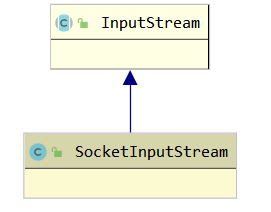
是InputStream字节流的包装类
主要作用是实现3个核心的方法
-
InputStream的抽象方法read,以缓冲区buf获取的方式失效底层数据流的获取
-
并提供readRequestLine和parseHeaders方法从buff中获取所有请求头内容,并封装号对象返回
这两个方法会在HttpProcessor中进行调用,对应出请求行和请求头
public class SockexxtInputStream extends InputStream {
public SocketInputStream(InputStream is, int bufferSize) {
this .is = is;
buf = new byte bufferSize;
}
public int read() throws IOException {} // 读取一个字节
public void readRequestLine(HttpRequestLine requestLine) throws IOException { ...} // 解析请求行
private void parseHeaders(SocketInputStream input) throws IOException, ServletException {...} // 解析请求头
}
读取一个字节 read()
* 读取一个字节
总不能每次都直接调用底层的原生socket.getInputStream(),这可能会造成系统调用,每次都进行系统调用就非常浪费性能
所以Tomcat使用一个缓冲区byte buf\[\],默认大小位2048,使用int count= is.read(buf, 0, buf.length)来一次尽量读取socke输入流多个内容,并缓存
这个缓存区是需要重复利用的,即缓存的内容读取之后,应该从缓存区的0位置借助存放socke输入流读取的数据
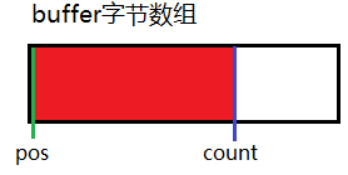
pos:可以读取的起始位置
count: 可以读取的最后位置
* 读取缓冲区的pos指定的值,如果已经读到最后的位置,那么需要从socke输入流读取接下来的的数据,post和count也会被重置
public int read() throws IOException {
if (pos >= count) {
fill(); // 重头开始填充缓存, pos = 0 且 count 为此次读取的字符数,一次性可能会读取非常多数据,可能也把请求头的数据也读到缓存了
if (pos >= count)
return -1;
}
return bufpos++ & 0xff; //byte 能够准确转为 int
}
protected void fill() throws IOException {
pos = 0;
count = 0;
int nRead = is.read(buf, 0, buf.length);// 注意这里从 0 开始存放内容
if (nRead > 0) {
count = nRead;
}
}
解析请求行
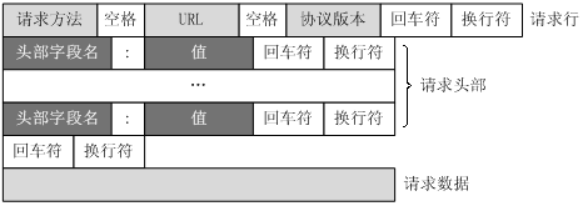
由于从套接字的输入流中处理字节流是指读取从第1个字节到最后1个字节(无法从后向前读取)的内容因此readRequestLine()方法必须在readHeader()方法之前调用,
每次调用readerHeader()都会返回一个名/值对, 所以应重复调用readHeader()方法, 直到读取了所有的请求头信息
主要流程
* 使用SocketInput.readRequestLine()方法获取StreamHttpRequestLine对象
通过对请求行数据的字符解析,按照协议规则的位置(空),从socket流中解析的请求行的3个部分,并保存到StreamHttpRequestLine中
如请求行实例: POST /index?id=kaka HTTP/1.1解析的HttpRequestLine 对象内容为
this.method = POST;this.methodEnd = 结束的位置
this.url = /index?id=kaka; this.methodEnd = xx
this.protocol = HTTP/1.1; this.protocolEnd = xx
final class HttpRequestLine {
public char \[\] method ;
public int methodEnd ;
public char \[\] uri ;
public int uriEnd ;
public char \[\] protocol ;
public int protocolEnd ;
}
* 通过上一步获取的StreamHttpRequestLine对象,对3个部分进行处理并存到HttpProcessor中HttpRequest对象的相关属性
-
截取url上的参数部分以填充HttpRequest对象的属性setQueryString
-
如果url不是以"/"开头,那么需要对url截断前部分,且对URL的格式进行修正,/../会退到上一目录、/./和//替换为/
-
处理会话id以url参数jsessionid形式的情况,以填充HttpRequest对象的相关属性
-
填充HttpRequest对象对应的method、url属性
//HttpProcessor
private void parseRequest(SocketInputStream input, OutputStream output)
throws IOException, ServletException {
//1 、解析请求行数据内容到 requestLine
input.readRequestLine(requestLine);
String method = new String(requestLine.method, 0, requestLine.methodEnd);
String uri = null ;
String protocol = new String(requestLine.protocol, 0, requestLine.protocolEnd);
// 获取 url 上的 QueryString 设置到 request 对象中
int question = requestLine.indexOf("?" );
if (question >= 0) {
request.setQueryString(new String(requestLine.uri, question + 1,requestLine.uriEnd - question - 1));
uri = new String(requestLine.uri, 0, question);
}
else {
request.setQueryString(null );
uri = new String(requestLine.uri, 0, requestLine.uriEnd);
}
// 如果 url 不是以 "/" 开头,那么需要对 url 截断前部分
if (!uri.startsWith("/" )) {
int pos = uri.indexOf("://" );
if (pos != -1) {
pos = uri.indexOf('/' , pos + 3);
if (pos == -1) {
uri = "" ;
}
else {
uri = uri.substring(pos);
}
}
}
// 处理会话 id 以 url 参数 jsessionid 形式的情况
String match = ";jsessionid=" ;
int semicolon = uri.indexOf(match);
if (semicolon >= 0) {
String rest = uri.substring(semicolon + match.length());
int semicolon2 = rest.indexOf(';' );
if (semicolon2 >= 0) {
request.setRequestedSessionId(rest.substring(0, semicolon2));
rest = rest.substring(semicolon2);
}
else {
request.setRequestedSessionId(rest);
rest = "" ;
}
request.setRequestedSessionURL(true );
uri = uri.substring(0, semicolon) + rest;
}
else {
request.setRequestedSessionId(null );
request.setRequestedSessionURL(false );
}
// 对 URL 的格式进行修正, /../ 会退到上一目录、 /./ 和 // 替换为 /
String normalizedUri = normalize(uri);
// 填充 HttpRequest 对象对应的 method 、 url 属性
((HttpRequest) request).setMethod(method);
request.setProtocol(protocol);
if (normalizedUri != null ) {
((HttpRequest) request).setRequestURI(normalizedUri);
}
else {
((HttpRequest) request).setRequestURI(uri);
}
if (normalizedUri == null ) {
throw new ServletException("Invalid URI: " + uri + "'" );
}
}
public void readRequestLine(HttpRequestLine requestLine)
throws IOException {
// ...
// 从 buff 缓存中的每一个字节值,知道空格符
int chr = 0;
do {
try {
chr = read();
} catch (IOException e) {
chr = -1;
}
} while ((chr == CR) || (chr == LF));// 定位到开头
if (chr == -1) throw new EOFException(sm.getString("requestStream.readline.error" ));
pos--; // 当前指针位置
// 解析 method
int maxRead = requestLine.method .length ;
int readStart = pos;
int readCount = 0; // 表示请求方法字符串的长度
boolean space = false ;
// 在这里 pos=1
while (!space) {
// 如果读取的 method 的长度大于入参指定的,那么就是要默认的最大的长度进行扩展
if (readCount >= maxRead) {
if ((2 * maxRead) <= HttpRequestLine.MAX_METHOD_SIZE) {
char \[\] newBuffer = new char 2 \* maxRead;
System.arraycopy (requestLine.method , 0, newBuffer, 0,maxRead);
requestLine.method = newBuffer;
maxRead = requestLine.method .length ;
} else {
throw new IOException (sm.getString("requestStream.readline.toolong" ));
}
}
// 缓存读到最后了,就需要接住从 socket 流中获取接下来的数据
if (pos >= count) { //count 为缓存中可读的数据的个数
int val = read();
if (val == -1) {
throw new IOException (sm.getString("requestStream.readline.error" ));
}
pos = 0;
readStart = 0;
}
// 发现当前字符是空格,说明 moethod 截取完毕了
if (bufpos == SP) {
space = true ;
}
requestLine.method readCount = (char ) bufpos;
readCount++;
pos++;
}
requestLine.methodEnd = readCount - 1;
//url 和协议的解析不做和 method 一样,接住在 buffer 进行获取数据并定位空格即可
}
解析请求头
POST /index?id=kaka HTTP/1.1 请求行
Host: localhost 请求头
User-Agent: Mozilla/5.0 (Windows NT 5.1; rv:10.0.2) Gecko/20100101 Firefox/10.0.2 Accept:text/html,application/xhtml+xml,application/xml;q=0.9,/;q=0.8
Accept-Language: zh-cn,zh;q=0.5
Accept-Encoding: gzip, deflate
Connection: keep-alive
Referer: http://localhost/
Content-Length:25
Content-Type:application/x-www-form-urlencoded
空行
username=aa&password=1234 请求体
解析完请求行之后,就在buffer上接着解析请求头,注这里需要多次调用
主要流程
* 使用SocketInput.readHeader()方法获取一个HttpHeader对象(处理逻辑类似HttpRequestLine)
这个对象为从socket流中解析出一个请求头信息:
如content-length:25
cname = content-length; this.nameEnd = xxx; this.value = 25; this.valueEnd = xxx;
把当前请求头的填充在HttpRequest对象的请求头集合属性中
* 处理cookie、content-length、content-type请求头的情况,且填充相关属性
//HttpProcessor
private void parseHeaders(SocketInputStream input)
throws IOException, ServletException {
// 这里需要循环从解析所有请求头
while (true ) {
HttpHeader header = new HttpHeader();;
// 从 buffer 获取数据并解析一行请求头
// 如果当前位置为空行,即为请求头和请求内容的分界,这停止读取数据
// 否则项读取出 name 、在读取 value ,期间还会处理一些空字符串的问题
// 如果遇到换行符且下一个字符非空说明当前的一个请求有已经读取完毕,返回 HttpHeader 即可
input.readHeader(header);
if (header.nameEnd == 0) {
if (header.valueEnd == 0) {
return ;// 结束循环
}
}
String name = new String(header.name, 0, header.nameEnd);
String value = new String(header.value, 0, header.valueEnd);
// 把当前请求头对填充相关属性到中
request.addHeader(name, value);
// 处理 cookie 请求头、 content-length 、 content-type 情况,且填充相关属性到 request 中
request.setContentLength(n);
}
} //end while
}
Request
Request接口 体系
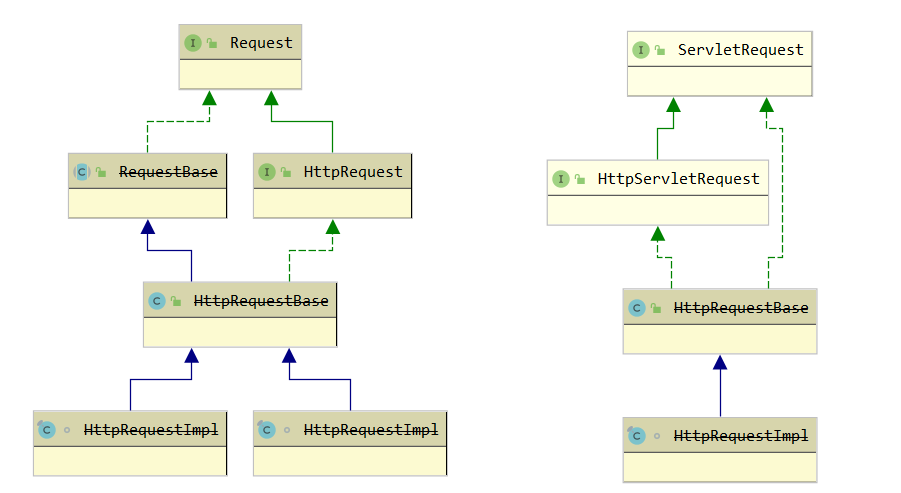
* Request接口
-
定义了需要关联的组件,如Connector、Context、Wrapper
-
输入流相关:Socket、InputStream、ServletInputStream的获取;关闭输入流
-
获取request实现类的外观对象:ServletRequest = RequestFacade(this)
-
网络协议的基本属性的设置Setter:Protocol、ContentLength、ContentType、ServerName等
* HttpRequest接口(在Request接口基础上增加了HTTP协议相关的属性)
-
Http基本属性的设置Setter,如Cookie、Header、Locale、Parameter、Method
-
安全认证属性的设置Setter,如UserPrincipal、AuthType(String type);
-
会话相关属性的设置Setter(在请求行解析时会调用赋值),如SessionCookie、SessionId、SessionURL
-
Url属性相关的设置Setter,如url上的分段QueryString、ContextPath、PathInfo、ServletPath等
* ServletRequest接口
-
输入流的获取:ServletInputStream和BufferedReader,底层都是基于socket输入流
-
参数相关变量的获取getter:如Attribute、Parameter、CharacterEncoding、Locale等
-
网络协议的基本属性的获取getter:如Protocol、Scheme、ServerName、ContentLength()、RemoteAddr
-
请求转发对象的获取getter:RequestDispatcher
* HttpServletRequest接口
-
Http基本属性的设置Getter,如Cookie、Header、Method
-
安全认证属性的设置Getter,如UserPrincipal、AuthType、UserInRole等
-
会话相关属性的设置Getter,如HttpSession、SessionId等
-
Url属性相关的设置Getter,如url上的分段QueryString、ContextPath、PathInfo、ServletPath等
* HttpRequestBase抽象类 (实现Request和ServletRequest接口方法)
-
主要组件的设置setter:Connector、Context、Wrapper
-
输入流的设置setter和获取getter:socket和socket输入流、ServletInputStream和BufferedReader的获取。
-
网络协议的基本属性的设置setter和获取getter
-
参数相关和RequestDispatcher为抽象方法,交于子类实现
* HttpRequestBase实现类 (在RequestBase基础上又实现了HttpRequest, HttpServletRequest 接口方法)
-
Http基本属性的设置Getter,如Cookie、Header、Method
-
安全认证属性的设置Getter,如UserPrincipal、AuthType、UserInRole等
-
会话相关属性的设置Getter,基于Manage实现HttpSession、SessionId等
-
Url属性相关的设置Getter,如url上的分段QueryString、ContextPath、PathInfo、ServletPath等
-
参数相关方法的实现,post方法且为undeceode类型时(表单)读取输入流,获取消息体内容解析参数;其他参数方法基于此内容实现
-
请求转发对象的获取getter:RequestDispatcher
* HttpRequestImpl (对HttpRequestBase进行增强)
-
基于HttpHeader\[\] headerPool实现请求头的增删改查
-
输入流程增强HttpRequestStream,继承RequestStream
RequestStream增强的是:如果在request中设置了contentlength的大小,那么不会读取超过这个值的数据大小
HttpRequestStream增强的是:进行块编码的读取
- 提供一个完成request输入流的方法,即关闭reader或stream
RequestBase抽象类
实现ServletRequest, Request两个接口的方法
主要有为:
- ServletInputStream getInputStream()
stream = createInputStream();//最终为流对象为SocketInputStream(socket.getInputStream()) -> new RequestStream(this) //RequestStream没有做什么特别的增强
- BufferedReader getReader()
InputStreamReader isr = new InputStreamReader(new RequestStream(this), encoding);
reader = new BufferedReader(isr);
public abstract class RequestBase implements ServletRequest, Request {
//================================== 变量 =====================================
//request 接口
protected String authorization = null ;
protected Connector connector = null ;
protected Context context = null ;
protected Wrapper wrapper = null ;
protected Response response = null ; //HttpResponseImpl
protected Socket socket = null ;
protected InputStream input = null ; //SocketInputStream(socket.getInputStream())
private transient HashMap notes = new HashMap();
//ServletRequest 接口
protected BufferedReader reader = null ;
protected HashMap attributes = new HashMap();
protected static Locale defaultLocale = Locale.getDefault();
protected ArrayList locales = new ArrayList();
protected String characterEncoding = null ; // 在 setContentType() 中解析获得
protected String remoteAddr = null ;
protected String remoteHost = null ;
// 公用
protected ServletInputStream stream = null ;
protected int contentLength = -1;
protected String contentType = null ;
protected String scheme = null ;
protected boolean secure = false ;
protected String serverName = null ;
protected int serverPort = -1;
protected String protocol = null ;
protected static final String info = "org.apache.catalina.connector.RequestBase/1.0" ;
// 其他
protected RequestFacade facade = new RequestFacade(this );
protected static StringManager sm = StringManager.getManager(Constants.Package);
//==========================Request 接口方法实现 ========================
//setter
public String set/getAuthorization/Connector/Context/Wrapper/Info/Note/ContentLength/ContentType
/setProtocol/RemoteAddr/RemoteHost/Scheme/Secure/ServerName/ServerPort()
{
// 处理对应的变量
//characterEncoding 中在 setContentType 中处理
}
// 流相关
public ServletRequest getRequest() {return (facade );}//facade = new RequestFacade(this);
public void set/gettResponse(Response response) { this .response = response;}
public void set/getSocket(Socket socket) {this .socket = socket; }
public void set/getStream(InputStream input) {this .input = input;}
// 最终为流对象为 SocketInputStream(socket.getInputStream())
//RequestStream 没有做什么特别的增强
public ServletInputStream createInputStream() throws IOException {
return (new RequestStream(this ));
}
public void finishRequest() throws IOException {
if (reader != null ) {
try {
reader .close();
} catch (IOException e) {
;
}
}
if (stream != null ) {
try {
stream .close();
} catch (IOException e) {
;
}
}
}
public void recycle() {
// 重置所有变量,除了 facade 、 connector
}
//==========================ServletRequest 接口方法实现 ========================
//getter
public Object get/Attributexx/CharacterEncoding/ContentLength/ContentTyp/Protocol/Locale
/getsetProtocol/RemoteAddr/RemoteHost/Scheme/Secure/ServerName/ServerPort()
{
// 处理对应的变量
}
public String getRealPath(String path) {
return (servletContext.getRealPath(path));
}
// 流相关
//reader 和 stream 不能重复获取,在调用 getInputStream 就会报错
public ServletInputStream getInputStream() throws IOException {
if (reader != null )
throw new IllegalStateException (sm .getString("requestBase.getInputStream.ise" ));
if (stream == null )
stream = createInputStream();// 最终为流对象为 SocketInputStream(socket.getInputStream())
return (stream );
}
// 使用底层流对象 SocketInputStream(socket.getInputStream()) 封装为 BufferedReader
public BufferedReader getReader() throws IOException {
if (stream != null )
throw new IllegalStateException(sm .getString("requestBase.getReader.ise" ));
if (reader == null ) {
String encoding = getCharacterEncoding();
if (encoding == null ) encoding = "ISO-8859-1" ;
InputStreamReader isr = new InputStreamReader(createInputStream(), encoding);
reader = new BufferedReader(isr);
}
return (reader );
}
// 抽象方法,均是 ServletRequest 接口方法
public abstract String getParameter(String name);
public abstract Map getParameterMap();
public abstract Enumeration getParameterNames();
public abstract String\[\] getParameterValues(String name);
public abstract RequestDispatcher getRequestDispatcher(String path);
}
HttpRequestBase实现类
在RequestBase基础上又实现了HttpRequest, HttpServletRequest 接口方法
主要实现:
- 请求参数的解析。基于parameters(Map)变量处理,有两个来源
获取url上的参数串;
处理消息体的参数,前提是post方法且内容不为空且输入流未读取过且内容原生 form 表单
- 根据路径获取转发对象RequestDispatcher,用户可以在servlet代码里获取进行请求转发
public class HttpRequestBase extends RequestBase implements HttpRequest, HttpServletRequest {
// ----------------------------------------------------- Instance Variables
//http 变量
protected ArrayList cookies = new ArrayList();
protected HashMap headers = new HashMap();
protected ParameterMap parameters = null ;
protected String method = null ;
// 安全认证
protected Principal userPrincipal = null ;
protected String authType = null ;
//url 上参数 Session 相关
protected String queryString = null ;
protected Session session = null ;
protected boolean requestedSessionCookie = false ;
protected String requestedSessionId = null ;
protected boolean requestedSessionURL = false ;
protected String requestURI = null ;
protected String decodedRequestURI = null ;
protected boolean secure = false ;
//url 路径
protected String contextPath = "" ;
protected String pathInfo = null ;
protected String servletPath = null ;
protected HttpRequestFacade facade = new HttpRequestFacade(this );
protected static ArrayList empty = new ArrayList();
protected SimpleDateFormat formats \[\] = {
new SimpleDateFormat("EEE, dd MMM yyyy HH:mm:ss zzz" , Locale.US),
new SimpleDateFormat("EEEEEE, dd-MMM-yy HH:mm:ss zzz" , Locale.US),
new SimpleDateFormat("EEE MMMM d HH:mm:ss yyyy" , Locale.US)
};
protected static final String info = "org.apache.catalina.connector.HttpRequestBase/1.0" ;
protected boolean parsed = false ;
// ------------------------------------------------------------- Properties
public ServletRequest getRequest() {return (facade );}
// 遍量的 setter/getter
public String getAuthType/Info/ContextPath/PathInfo/Method/...() { return (info );}
// 解析请求头时会调用
public void addCookie/addHeader(Cookie cookie) {}
public void clearCookies/Headers/Locales() {}
public void recycle() {
super .recycle();
// 处理 facede ,重置所有变量
}
// 参数的处理,基于 parameters 变量处理,会先调用 parseParameters()
public void addParametergetParameter/getParameterMap/getParameterNames/getParameterValues
/clearParameters(String name, String values\[\]) { }
// 填充 parameters 变量
protected void parseParameters() {
// 解析过了,就不用在解析了
if (parsed ) return ;
// 预处理下 ParameterMap
ParameterMap results = parameters ;
if (results == null ) results = new ParameterMap();
results.setLocked(false ); // 使 ParameterMap 暂时不可修改,但可以获取
String encoding = getCharacterEncoding();
if (encoding == null ) encoding = "ISO-8859-1" ;
// 获取 url 上的参数串
String queryString = getQueryString();
try {
RequestUtil.parseParameters(results, queryString, encoding);
} catch (UnsupportedEncodingException e) {
;
}
// 处理消息体的参数,前提是 post 方法且内容不为空且输入流未读取过且内容原生 form 表单
String contentType = getContentType();
if (contentType == null )
contentType = "" ;
int semicolon = contentType.indexOf(';' );
if (semicolon >= 0) {
contentType = contentType.substring(0, semicolon).trim();
} else {
contentType = contentType.trim();
}
if ("POST" .equals(getMethod()) && (getContentLength() > 0)
&& (this .stream == null )
&& "application/x-www-form-urlencoded" .equals(contentType)) {
try {
int max = getContentLength();
int len = 0;
byte buf\[\] = new byte getContentLength();
// 最终为流对象为 SocketInputStream(socket.getInputStream())
ServletInputStream is = getInputStream();
while (len < max) {
int next = is.read(buf, len, max - len);
// 这一步很重要,因为有时候实际接受总数 len 可能会小于 max ,这里判断以避免无限循环
if (next < 0 ) {
break ;
}
len += next;
}
is.close();// 关闭输入流
if (len < max) {
// 实际接受总数 len 可能会小于 max, 抛出异常
throw new RuntimeException(sm.getString("httpRequestBase.contentLengthMismatch" ));
}
RequestUtil.parseParameters(results, buf, encoding);
} catch (UnsupportedEncodingException ue) {
;
} catch (IOException e) {
throw new RuntimeException(sm.getString("httpRequestBase.contentReadFail" ) +
e.getMessage());
}
}
results.setLocked(true );
parsed = true ;
parameters = results;
}
// 根据路径获取转发对象
public RequestDispatcher getRequestDispatcher(String path) {
if (context == null )
return (null );
if (path == null )
return (null );
// 如果以 "/" 开头,则相对于当前 ServletContext 的根目录
else if (path.startsWith("/" ))return (context.getServletContext().getRequestDispatcher(path));
// 如果不 "/" 开头,则相对于当前 ServletContext 的父目录
String servletPath = (String) getAttribute(Globals.SERVLET_PATH_ATTR);
if (servletPath == null )
servletPath = getServletPath();
int pos = servletPath.lastIndexOf('/' );
String relative = null ;
if (pos >= 0) {
relative = RequestUtil.normalize
(servletPath.substring(0, pos + 1) + path);
} else {
relative = RequestUtil.normalize(servletPath + path);
}
return (context.getServletContext().getRequestDispatcher(relative));
}
public String getPathTranslated() {
if (context == null )
return (null );
if (pathInfo == null )
return (null );
else
return (context.getServletContext().getRealPath(pathInfo ));
}
public StringBuffer getRequestURL() {
StringBuffer url = new StringBuffer();
String scheme = getScheme();
int port = getServerPort();
if (port < 0)
port = 80; // Work around java.net.URL bug
url.append(scheme);
url.append("://" );
url.append(getServerName());
if ((scheme.equals("http" ) && (port != 80))
|| (scheme.equals("https" ) && (port != 443))) {
url.append(':' );
url.append(port);
}
url.append(getRequestURI());
return (url);
}
// 会话相关
protected class PrivilegedGetSession implements PrivilegedAction {
private boolean create ;
PrivilegedGetSession(boolean create) {
this .create = create;
}
public Object run() {
return doGetSession(create );
}
}
public HttpSession getSession() {
return (getSession(true ));
}
public HttpSession getSession(boolean create) {
if ( System.getSecurityManager () != null ) {
PrivilegedGetSession dp = new PrivilegedGetSession(create);
return (HttpSession)AccessController.doPrivileged(dp);
}
return doGetSession(create);
}
// 通过 Manager 创建会话
private HttpSession doGetSession(boolean create) {
if (context == null ) eturn (null );
if ((session != null ) && !session .isValid()) session = null ;
if (session != null ) return (session .getSession());
// Return the requested session if it exists and is valid
Manager manager = null ;
if (context != null ) manager = context.getManager();
if (manager == null ) return (null ); // Sessions are not supported
if (requestedSessionId != null ) {
try {
session = manager.findSession(requestedSessionId ); // 通过 SessionId 查找 Session 。
} catch (IOException e) { session = null ;
}
if ((session != null ) && !session .isValid()) session = null ;
if (session != null ) { return (session .getSession());
}
}
// Create a new session if requested and the response is not committed
if (!create) return (null );
if ((context != null ) && (response != null ) && context.getCookies() &&
response.getResponse().isCommitted()) {
throw new IllegalStateException (sm.getString("httpRequestBase.createCommitted" ));
}
session = manager.createSession();
if (session != null ) return (session .getSession());
else return (null );
}
// 通过 Manager 判断会话 idshif
public boolean isRequestedSessionIdValid() {
session = manager.findSession(requestedSessionId );
//..
}
// 安全认证
public boolean isUserInRole(String role) {
if (userPrincipal == null ) return (false );
if (context == null ) return (false );
Realm realm = context.getRealm();
if (realm == null )return (false );
if (wrapper != null ) {
String realRole = wrapper.findSecurityReference(role);
if ((realRole != null ) &&realm.hasRole(userPrincipal , realRole))return (true );
}
return (realm.hasRole(userPrincipal , role));
}
}
HttpRequestImpl
主要增强:
* 基于HttpHeader\[\] headerPool实现请求头的增删改查
* 对输入流增强为HttpRequestStream,继承RequestStream
-
RequestStream增强的是:如果在request中设置了contentlength的大小,那么不会读取超过这个值的数据大小
-
HttpRequestStream增强的是:进行块编码的读取
* 提供一个完成request输入流的方法,即关闭reader或stream
final class HttpRequestImpl extends HttpRequestBase {
// -------------------------------------------------------------- Constants
protected static final int INITIAL_POOL_SIZE = 10;
protected static final int POOL_SIZE_INCREMENT = 5;
protected InetAddress inet = null ;// 远程客户端地址
protected static final String info ="org.apache.catalina.connector.http.HttpRequestImpl/1.0" ;
protected HttpHeader\[\] headerPool = new HttpHeader******INITIAL_POOL_SIZE****** ;// 类型为 HttpHeader
protected int nextHeader = 0;
protected HttpHeader connectionHeader = null ;
protected HttpHeader transferEncodingHeader = null ;
// ------------------------------------------------------------- Properties
InetAddress get/setInet/RemoteAddr/RemoteHost((InetAddress inet) { this .inet = inet;}
public String getInfo() {return (info );}
// --------------------------------------------------------- Public Methods
public void recycle() {
super .recycle();
inet = null ;
nextHeader = 0;
connectionHeader = null ;
}
// 请求处理相关
// 分配当前请求头数组中的下一个可用内存
HttpHeader allocateHeader() {
if (nextHeader == headerPool .length ) {
HttpHeader\[\] newHeaderPool =
new HttpHeader****headerPool**** .****length**** + ******POOL_SIZE_INCREMENT****** ;
for (int i = 0; i < nextHeader ; i++) {
newHeaderPooli = headerPool i;
}
headerPool = newHeaderPool;
}
if (headerPool ****nextHeader**** == null )
headerPool ****nextHeader**** = new HttpHeader();
return headerPool ****nextHeader**** ;
}
void nextHeader() {
nextHeader ++;
}
// 在指定的下标位置存放 HttpHeader 对象。在进行请求头解析时也会调用
public void addHeader(String name, String value) {
if (nextHeader == headerPool .length ) {
HttpHeader\[\] newHeaderPool =
new HttpHeader****headerPool**** .****length**** + ******POOL_SIZE_INCREMENT****** ;
for (int i = 0; i < nextHeader ; i++) {
newHeaderPooli = headerPool i;
}
headerPool = newHeaderPool;
}
headerPool ****nextHeader**** ++ = new HttpHeader(name, value);
}
public void clearHeaders() {
nextHeader = 0;
}
// 基于 headerPool 数组查询
public HttpHeader getHeader/getHeaderNames(HttpHeader header) { }
// 流相关,一个增强输入流
public ServletInputStream createInputStream() throws IOException {
// 最终为流对象为 SocketInputStream(socket.getInputStream())
//RequestStream 增强的是:如果在 request 中设置了 contentlength 的大小,那么不会读取超过这个值的数据大小
//HttpRequestStream 增强的是:进行块编码的读取
return (new HttpRequestStream(this , (HttpResponseImpl) response));
}
// 对输入流进行完成关闭,如果流没打开则需要打开
public void finishRequest() throws IOException {
if ((reader == null ) && (stream == null ) && (getContentLength() != 0)
&& (getProtocol() != null ) && (getProtocol().equals("HTTP/1.1" )))
getInputStream(); // 最终为流对象为 SocketInputStream(socket.getInputStream())
super .finishRequest();// 关闭 reader 和 stream
}
}
输入流的装饰流程
HttpRequestStream
装饰的底层流是RequestStream,HttpRequestStream extends RequestStream
增强的是:进行块编码的读取
//ServletInputStream getInputStream() 和 BufferedReader getReader() 基于 createInputStream() 返回的进行装饰
public ServletInputStream createInputStream() throws IOException {
// 最终为流对象为 SocketInputStream(socket.getInputStream())
return (new HttpRequestStream(this , (HttpResponseImpl) response));
}
public class HttpRequestStream extends RequestStream {
// 继承 RequestStream :如果在 request 中设置了 contentlength 的大小,那么不会读取超过这个值的数据大小
// HttpRequestStream 自己增加块 chunk 的执行
public HttpRequestStream(HttpRequestImpl request, HttpResponseImpl response) {
super (request);// 这里进行流的传递
String transferEncoding = request.getHeader("Transfer-Encoding" );
http11 = request.getProtocol().equals("HTTP/1.1" );
chunk = ((transferEncoding != null ) && (transferEncoding.indexOf("chunked" ) != -1));
if ((!chunk) && (length == -1)) {//length 为请求中设置的内容长度
// Ask for connection close
response.addHeader("Connection" , "close" );
}
}
public int read() throws IOException {
if (closed )
throw new IOException(sm .getString("requestStream.read.closed" ));
if (chunk) {
if (endChunk)
return (-1);
if ((chunkBuffer == null )
|| (chunkPos >= chunkLength)) {
if (!fillChunkBuffer())
return (-1);
}
return (chunkBufferchunkPos++ & 0xff);
} else {
return (super .read());
}
}
}
RequestStream
装饰的底层流是SocketInputStream,即request.getStream(),stream = request.getStream();
增强的是:如果在request中设置了contentlength的大小,那么不会读取超过这个值的数据大小
public RequestStream(Request request) {
super ();// 这里进行流的传递
closed = false ;
count = 0;
length = request.getRequest().getContentLength();// 这里
stream = request.getStream();
}
public int read() throws IOException {
if (closed) throw new IOException(sm.getString("requestStream.read.closed" ));
if ((length >= 0) && (count >= length))
return (-1); // End of file indicator
int b = stream.read();// 这里借助了 stream 实现
if (b >= 0)
count++;
return (b);
}
SocketInputStream
装饰的底层流是Socket最底层原生输入流
增强的是:使用一个缓存数组buf,使用int nRead = is.read(buf, 0, buf.length);//is为socket.getInputStream()获取读取输入流的数据
request.setStream(input);
input = new SocketInputStream(socket.getInputStream(),connector.getBufferSize());
public class SocketInputStream extends InputStream {
//SocketInputStream 类
public SocketInputStream(InputStream is, int bufferSize) {
this .is = is;
buf = new byte bufferSize;
}
public int read() throws IOException {
if (pos >= count) {
fill(); // 重头开始填充缓存, pos = 0 且 count 为此次读取的字符数,一次性可能会读取非常多数据,可能也把请求头的数据也读到缓存了
if (pos >= count)
return -1;
}
return bufpos++ & 0xff; //byte 能够准确转为 int
}
protected void fill()
throws IOException {
pos = 0;
count = 0;
int nRead = is.read(buf, 0, buf.length);//is 为 socket.getInputStream()
if (nRead > 0) {
count = nRead;
}
}
}
ServletInputStream
* 直接继承了io的标准InputStream接口)
* 装饰的底层流是子类提供的read(),即RequestStream
增强的是:只对InputStream增强了一个读取一行的方法readLine
public abstract class ServletInputStream extends InputStream {
protected ServletInputStream() {
}
public int readLine(byte \[\] b, int off, int len) throws IOException {
if (len <= 0) {
return 0;
} else {
int count = 0;
int c;
while ((c = this .read()) != -1) {
boff++ = (byte )c;
++count;
if (c == 10 || count == len) {
break ;
}
}
return count > 0 ? count : -1;
}
}
}
Response
Response 接口体系
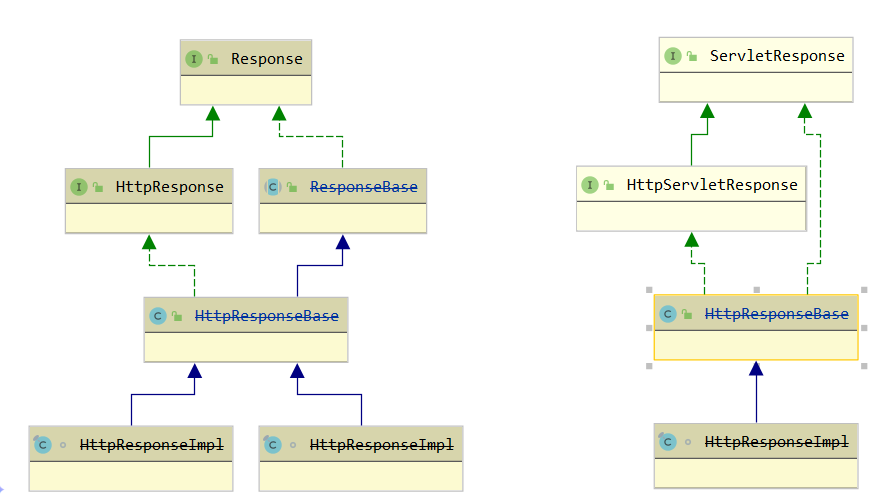
* Response
-
关联的组件get/set:Connector、Context
-
流相关:set/getRequest(); ServletResponse getResponse(); OutputStream set/getStream(); ServletOutputStream createOutputStream() throws IOException;
-
响应的相关变量:ContentCount、ContentType、提前响应标志AppCommitted、isError
-
其他:recycle(); resetBuffer()等
* HttpResponse接口
增加了Http协议属性的获取getter,如tCookies、Header、Status
* ServletResponse接口
-
获取输出流ServletOutputStream getOutputStream() 和 PrintWriter getWriter()
-
set/getter:Locale、ContentLength(int var1);
-
输出缓存Buffer相关:get/setBufferSize(int var1)、flushBuffer() 、 reseBuffer();
-
boolean isCommitted()、getCharacterEncoding();、reset();
* HttpServletResponse接口
-
定义了Http协议的响应码变量
-
http协议属性的设置,如addHeader、DateHeader、addCookie
-
响应码的设置,如setStatus、sendError
-
其他,encodeURL、重定向相关
ResponseBase
实现了Response, ServletResponse接口:
* 响应协议的基本属性的获取getter和设置setter,如contentLength,contentType等
* 响应状态相关:响应是否已经提交/暂停标志,以控制一些操作不可执行
* 相关组件的获取getter,如connector、context、外观对象ResponseFacade
* 提供一组基于缓存数组buffer的数据流write写方法,起到了对底层输出流的装饰(可以把ResponseBase当做输出流)
-
如write(int b)先写入缓存(如果 缓存满了会调用flushBuffer)
-
flushBuffer方法刷新缓存到输出流中,调用底层output.write(buffer, 0, bufferCount);
底层out在HttpProcessor进行process(Socket socket)设置的,output = socket.getOutputStream(); response.setStream(output);
- Buffer相关的处理方法,如resetBuffer、setBufferSize
* 输出流相关方法
-
getOutputStream()方法会返回ResponseStream new ResponseStream(this)),底层装饰的就是本对象提供的write等方法
-
getWriter()返回的ResponseWriter writer,装饰了ResponseStream,提供即时刷新的方法printXX和writer()
-
finishResponse()结束输出流,会调用writer和stream的 flush();close();
-
数据是否已经写入输出流标识committed(默认为flase),有3种途径修改setCommit(XX)
getOutputStream()方法创建返回的ResponseStream 默认是flase,即调用flush()方法是是不会刷新缓存写入输出流(即不会调用flushBuffer方法)
getWriter()返回的ResponseWriter write 默认是true,即调用flush()方法是会刷新缓存写入输出流
在write方法中,一旦缓存写满了,就一定会刷新缓存写入输出流,会committed = true;
public abstract class ResponseBase implements Response, ServletResponse {
//------------------------------------ 变量 ------------------------------------
// 响应是否已经提交 / 暂停标志,以控制一些操作不可执行
protected boolean appCommitted = false ;// 给 ResponseFacade 使用的,判断数据是否已经写入输出流
protected boolean committed = false ; // 数据是否已经写入输出流
protected boolean suspended = false ;
// 相关组件
protected Connector connector = null ;
protected Context context = null ;
protected ResponseFacade facade = new ResponseFacade(this );
protected static StringManager sm = StringManager.getManager (Constants.Package );
// 响应协议的基本属性
protected int contentCount = 0;// 输出流已经写入的数量
protected int contentLength = -1;
protected String contentType = null ;
protected String encoding = null ;
protected boolean included = false ;
protected static final String info = "org.apache.catalina.connector.ResponseBase/1.0" ;
protected Locale locale = Locale.getDefault();
protected boolean error = false ;
// 输出流相关
protected byte \[\] buffer = new byte 1024;
protected int bufferCount = 0;//buffer 中的数据数
protected OutputStream output = null ; // 底层输出流
protected Request request = null ;
protected ServletOutputStream stream = null ;//getOutputStream() ,装饰了底层流的 ResponseStream
protected PrintWriter writer = null ;//getWriter()
//------------------------------------ 方法 -----------------------------------
//getter/setter
public Connector getConnector/ContentCount/Context/Included/Info/Error()
getContentLength/ContentType/BufferSize/Locale/setLocale/ContentType()
{
return (this .xxx);
}
public void setAppCommitted(boolean appCommitted) { this .appCommitted = appCommitted;}
public boolean isAppCommitted() { return (this .appCommitted || this .committed ); }
public boolean isCommitted() { return (committed );}
public void setSuspended(boolean suspended) {
this .suspended = suspended;
if (stream != null )
((ResponseStream) stream ).setSuspended(suspended);
}
public void setContentLength(int length) {
if (isCommitted())return ;
if (included ) return ; // Ignore any call from an included servlet
this .contentLength = length;
}
// 重置对象
public void recycle() {
// buffer 和 connector 不需要重置
}
// 流相关
public void get/setRequest(Request request) { this .request = request;}
public ServletResponse getResponse() { return (facade );}
public void get/setStream(OutputStream stream) { this .output = stream;}
// 调用输出的 ResponseStream ,回回调 ResponseBase 的 write ,以写入 buffer 数组
public ServletOutputStream createOutputStream() throws IOException {
return (new ResponseStream(this ));
}
// 返回 ResponseStream 输出流
// 增强的是:通过 Commit 设置,当调用 flush() 时是否调用 ResponseBase 的 flushBuffer() 以刷新缓存到输出
// suspended 变量控制流程的停止操作
// contentlength 设置了写出的的大小,那么不会读取超过这个值的数据大小
public ServletOutputStream getOutputStream() throws IOException {
if (writer != null ) throw new IllegalStateException(sm .getString("responseBase.getOutputStream.ise" ));
if (stream == null ) stream = createOutputStream();
((ResponseStream) stream ).setCommit(true );// 这里设置了 true ,
return (stream );
}
public void finishResponse() throws IOException {
if (this .stream == null ) {
ServletOutputStream sos = getOutputStream();
sos.flush();
sos.close();
return ;
}
if ( ((ResponseStream) stream ).closed() )
return ;
if (writer != null ) {
writer .flush();
writer .close();
} else {
stream .flush();
stream .close();
}
}
public void flushBuffer() throws IOException {
committed = true ;
if (bufferCount > 0) {
try {
output .write(buffer , 0, bufferCount );//output 为最底层的输出流
} finally {
bufferCount = 0;
}
}
}
public PrintWriter getWriter() throws IOException {
if (writer != null ) return (writer );
if (stream != null ) throw new IllegalStateException (sm .getString("responseBase.getWriter.ise" ));
// 同时也生成一个 ServletOutputStream ,但是 setCommit(false); 调用 flush 时不会自动刷新缓存到输出流(防止与 ResponseWriter 的冲突)
ResponseStream newStream = (ResponseStream) createOutputStream();
newStream.setCommit(false );// 这里设置是为了下面的 stream = newStream;
OutputStreamWriter osr = new OutputStreamWriter(newStream, getCharacterEncoding());
writer = new ResponseWriter(osr, newStream);// 调用 flush 时自动会刷新缓存到输出流
stream = newStream;
return (writer );
}
// 缓存写相关
// 借助 buffers 数组,重写 write 方法先把数据写入缓存,如果缓存满了就调用 flushBuffer() 方法以写入输出流 output.write(buffer, 0, bufferCount);
public void write(int b) throws IOException {
if (suspended )
throw new IOException(sm .getString("responseBase.write.suspended" ));
if (bufferCount >= buffer .length )
flushBuffer();
buffer ****bufferCount**** ++ = (byte ) b;
contentCount ++;
}
public void write(byte b\[\]) throws IOException {
if (suspended ) throw new IOException(sm .getString("responseBase.write.suspended" ));
write(b, 0, b.length );
}
public void write(byte b\[\], int off, int len) throws IOException {
if (suspended ) throw new IOException (sm .getString("responseBase.write.suspended" ));
// If the whole thing fits in the buffer, just put it there
if (len == 0)
return ;
if (len <= (buffer .length - bufferCount )) {
System.arraycopy (b, off, buffer , bufferCount , len);
bufferCount += len;
contentCount += len;
return ;
}
// Flush the buffer and start writing full-buffer-size chunks
flushBuffer();
int iterations = len / buffer .length ;
int leftoverStart = iterations * buffer .length ;
int leftoverLen = len - leftoverStart;
for (int i = 0; i < iterations; i++)
write(b, off + (i * buffer .length ), buffer .length );
// Write the remainder (guaranteed to fit in the buffer)
if (leftoverLen > 0)
write(b, off + leftoverStart, leftoverLen);
}
public void resetBuffer() {
if (committed )
throw new IllegalStateException (sm .getString("responseBase.resetBuffer.ise" ));
bufferCount = 0;
}
public void setBufferSize(int size) {
if (committed || (bufferCount > 0))
throw new IllegalStateException (sm .getString("responseBase.setBufferSize.ise" ));
if (buffer .length >= size)
return ;
buffer = new byte size;
}
public void reset() {
if (committed ) throw new IllegalStateException(sm .getString("responseBase.reset.ise" ));
if (included )
return ; // Ignore any call from an included servlet
if (stream != null )
((ResponseStream) stream ).reset();
bufferCount = 0;
contentLength = -1;
contentType = null ;
}
}
// 增强了,使用一些状态位来控制方法是否执行
// 如 flush() 只有 commit 为 true 才会执行底层的 write 方法
public class ResponseStream extends ServletOutputStream {
public ResponseStream(Response response) {
super ();
closed = false ;
commit = false ;
count = 0;
this .response = response;
this .stream = response.getStream();
this .suspended = response.isSuspended();
}
public void flush() throws IOException {
if (suspended)
throw new IOException(sm.getString("responseStream.suspended" ));
if (closed)
throw new IOException(sm.getString("responseStream.flush.closed" ));
if (commit)
response.getResponse().flushBuffer();
}
public void write(int b) throws IOException {
if (suspended)
return ;
if (closed)
throw new IOException(sm.getString("responseStream.write.closed" ));
if ((length > 0) && (count >= length))
throw new IOException(sm.getString("responseStream.write.count" ));
((org.apache.catalina.connector.ResponseBase) response).write(b);
count++;
}
public void write(byte b\[\]) throws IOException {
if (suspended)
return ;
write(b, 0, b.length );
}
public void write(byte b\[\], int off, int len) throws IOException {
if (suspended)
return ;
if (closed)
throw new IOException(sm.getString("responseStream.write.closed" ));
int actual = len;
if ((length > 0) && ((count + len) >= length))
actual = length - count;
((org.apache.catalina.connector.ResponseBase) response).write(b, off, actual);
count += actual;
if (actual < len)
throw new IOException(sm.getString("responseStream.write.count" ));
}
}
public class ResponseWriter extends PrintWriter {
public ResponseWriter(OutputStreamWriter writer, org.apache.catalina.connector.ResponseStream stream) {
super (writer);
this .stream = stream;
this .stream.setCommit(false );
}
public void write(char ca\[\]) {
super .write(ca);
super .flush();
}
}
HttpResponseBase
继承ResponseBase,作用是:
* http响应相关变量的setter和getter,包括Cookies、Status(响应码)、Header等
* 输出流的完成处理finishResponse--在HttpProcessor的最后一步会调用此方法,进行响应输出
- 如果是异常的响应码,且没有提前提交时,返回一个默认的错误信息页面
(只要调用父类flushBuffer()方法,就为提前提交,如用户 使用getWriter()返回的ResponseWriter writer,执行printXX和writer() )
- 如果正常的响应码,判断需不需要添加请求行和头、刷新和关闭输出流
* 重写了属性缓存方法flushBuffer()
再写入缓存时,如果缓存满了是需要刷新缓存,把数据写入输出流,这是需要判断有没有必要添加请求行和头(根据commited变量)
* 暴露一个响应错误码方法sendError
-
用户可以在任何地方调用Response.sendError(HttpServletResponse.SC_FORBIDDEN);
-
会设置此HttpResponseBase的status属性,并suspended设为true
* 其他方法
-
把请求url关联上会话id参数
-
请求重定向处理
public class HttpResponseBase extends ResponseBase implements HttpResponse, HttpServletResponse {
// 构造方法
public HttpResponseBase() {
format .setTimeZone(TimeZone.getTimeZone("GMT" ));
}
//http 相关属性编码
protected ArrayList cookies = new ArrayList();
protected final SimpleDateFormat format = new SimpleDateFormat("EEE, dd MMM yyyy HH:mm:ss zzz" ,Locale.US);
protected static final TimeZone zone = TimeZone.getTimeZone("GMT" );
protected HttpResponseFacade facade = new HttpResponseFacade(this );
protected HashMap headers = new HashMap();
protected static final String info = "org.apache.catalina.connector.HttpResponseBase/1.0" ;
protected String message = getStatusMessage(HttpServletResponse.SC_OK);
protected int status = HttpServletResponse.SC_OK;
// --------------------------------------------------------- Public Methods
//http 响应相关变量的 setter 和 getter
public Cookie\[\] getsetCookies/Status/Message/addCookie/DateHeader/Protocol() {
//...
}
public void setContentLength/ContentType/Locale/Header/IntHeader/DateHeader(int length) {
// 设置需响应头
}
public ServletResponse getResponse() {return (facade );}
public void recycle() {
super .recycle();
cookies .clear();
headers .clear();
message = getStatusMessage(HttpServletResponse.SC_OK);
status = HttpServletResponse.SC_OK;
}
public void reset(int status, String message) {
reset(); // 对 cookies 、 headers 进行重置
setStatus(status, message);// 对 status 和 message 设置
}
// 把请求 url 关联上会话 id 参数
public String encode/URLRedirectURL(String url) {
if (isEncodeable(toAbsolute(url))) { // 把 url 转为绝对路径
HttpServletRequest hreq =
(HttpServletRequest) request.getRequest();
return (toEncoded(url, hreq.getSession().getId()));
} else
return (url);
}
// 核心方法,完成响应处理
public void finishResponse() throws IOException {
// error >= 400 没有打开响应流且内容为空,进行一些文字输出
if (!isCommitted() &&
(stream == null ) && (writer == null ) &&
(status >= HttpServletResponse.SC_BAD_REQUEST) &&
(contentType == null ) &&
(contentCount == 0)) {
try {
setContentType("text/html" );
PrintWriter writer = getWriter();
writer.println("<html>" );
writer.println("<head>" );
writer.println("<title>Tomcat Error Report</title>" );
writer.println("<br><br>" );
writer.println("<h1>HTTP Status " );
writer.print(status );
writer.print(" - " );
if (message != null )
writer.print(message );
else
writer.print(getStatusMessage(status ));
writer.println("</h1>" );
writer.println("</body>" );
writer.println("</html>" );
} catch (IOException e) {
throw e;
} catch (Throwable e) {
; // Just eat it
}
}
sendHeaders();// 添加响应头
super .finishResponse();// 刷新和关闭输出流 ,writer.flush()/close();stream.flush()/close();
}
// 写入响应行和响应头
// 如果输出已经提前输出内容了,就不必再写入响应行和响应头
protected void sendHeaders() throws IOException {
if (isCommitted()) return ;
if ("HTTP/0.9" .equals(request.getRequest().getProtocol())) {
committed = true ;
return ;
}
OutputStreamWriter osr = null ;
try {
osr = new OutputStreamWriter(getStream(), getCharacterEncoding());
} catch (UnsupportedEncodingException e) {
osr = new OutputStreamWriter(getStream());
}
final PrintWriter outputWriter = new PrintWriter(osr);
// 写入响应行
outputWriter.print(this .getProtocol());
outputWriter.print(status );
//...
// 写入响应头 ,Content-Type 、 headers 、 cookies 、 session ID
outputWriter.print("Content-Type: " + getContentType() + " \r\n " );
//...
outputWriter.print(" \r\n " );
outputWriter.flush();
committed = true ;
}
// 重写 flushBuffer 以判断有没有必要写入请求头
public void flushBuffer() throws IOException {
if ( System.getSecurityManager () != null ) {
try {
PrivilegedFlushBuffer dp = new PrivilegedFlushBuffer();
AccessController.doPrivileged(dp);
} catch ( PrivilegedActionException pe) {
throw (IOException)pe.getException();
}
} else {
doFlushBuffer();
}
}
private void doFlushBuffer() throws IOException {
if (!isCommitted())
sendHeaders();
super .flushBuffer();
}
// 设置异常响应码
public void sendError(int status, String message) throws IOException {
if (isCommitted()) throw new IllegalStateException(sm.getString("httpResponseBase.sendError.ise" ));
if (included) return ; // Ignore any call from an included servlet
setError();// 把 ResponseBase 中的 error = true;
this .status = status;
this .message = message;
// 设置 ResponseBase 中的 bufferCount = 0;
resetBuffer();
// 设置 ResponseStream 中的 suspended = suspended;
setSuspended(true );
}
// 请求重定向,客户端接受到 Location 响应头时会进行重定向处理
public void sendRedirect(String location) throws IOException {
if (isCommitted()) throw new IllegalStateException(sm.getString("httpResponseBase.sendRedirect.ise" ));
if (included)return ; // Ignore any call from an included servlet
resetBuffer();
try {
String absolute = toAbsolute(location);
setStatus(SC_MOVED_TEMPORARILY);
setHeader("Location" , absolute);// 设置请求重定向响应头
} catch (IllegalArgumentException e) {
setStatus(SC_NOT_FOUND);
}
setSuspended(true );
}
}
HttpResponseImpl
继承HttpResponseBase,增加了HTTP1.1新特性处理
-
重写reset()需要获取重置响应头Connection的值
-
在finishResponse()/sendErroe时,需要addHeader("Connection", "close");
-
重写setContentLength,增加responseStream.checkChunking(this);
-
重写createOutputStream使用HttpResponseStream进行装饰,增加的是使用块编码响应
final class HttpResponseImpl extends HttpResponseBase {
// ----------------------------------------------------- Instance Variables
protected static final String info = "org.apache.catalina.connector.http.HttpResponseImpl/1.0" ;
protected boolean allowChunking ;
protected HttpResponseStream responseStream ;
// -------------------------------------------------------------
public String set/isAllowChunking/Info/Protocol/isCloseConnection/isStreamInitialized(() { return (info );}
/// 重写 setStatus/ContentLength ,增强 Transfer-Encoding 和 Connection 头的处理
public void setStatus/ContentLength(int status) {
super .setStatus(status);
if (responseStream != null )
responseStream .checkChunking(this );
}
public void recycle() {
super .recycle();
responseStream = null ;
allowChunking = false ;
}
// 当需要错误时,增加关闭连接的处理
public void sendError(int status, String message) throws IOException {
addHeader("Connection" , "close" );
super .sendError(status, message);
}
// 重置,调用 super.reset(); ,保留 Connection 、 Transfer-Encoding 不变
public void reset() {
String connectionValue =(String) getHeader("Connection" );
String transferEncodingValue =(String) getHeader("Transfer-Encoding" );
super .reset();
if (connectionValue != null ) addHeader("Connection" , connectionValue);
if (transferEncodingValue != null ) addHeader("Transfer-Encoding" , transferEncodingValue);
}
// 使用 HttpResponseStream 进行装饰,增加的是使用块编码响应
public ServletOutputStream createOutputStream() throws IOException {
responseStream = new HttpResponseStream(this );
return (responseStream );
}
// 重写 finishResponse ,增加 setContentLength 和 Connection 头的处理
public void finishResponse() throws IOException {
if (getStatus() < HttpServletResponse.SC_BAD_REQUEST) {
if ((!isStreamInitialized()) && (getContentLength() == -1)
&& (getStatus() >= 200)
&& (getStatus() != SC_NOT_MODIFIED)
&& (getStatus() != SC_NO_CONTENT))
setContentLength(0);
} else {
setHeader("Connection" , "close" );
}
super .finishResponse();
}
// -------------------------------------------- HttpServletResponse Methods