鸿蒙原生ArkTS布局实战:Column 交叉轴对齐 HorizontalAlign.Start / Center / End
一、引言
HarmonyOS NEXT(API 24)全面采用 ArkTS 声明式 UI 范式,开发者通过 @Component 组合 Column、Row、Flex 等布局容器构建页面。
Column 是最常用的垂直布局容器。多数人只关注主轴(垂直方向)的子组件排列,却忽略了交叉轴(水平方向)对齐 。alignItems 直接影响子组件水平位置------子组件宽度不一时,差异尤为明显。
本文将围绕 Column.alignItems,剖析 HorizontalAlign.Start / Center / End 的原理与实战。
二、Column 布局基础
2.1 主轴与交叉轴
| 维度 | 方向 | 属性 |
|---|---|---|
| 主轴 | 垂直,从上到下 | justifyContent |
| 交叉轴 | 水平,从左到右 | alignItems |
- 主轴对齐 → 控制垂直间距分布
- 交叉轴对齐 → 控制水平位置偏移
2.2 alignItems 的枚举值
API 24 中 Column.alignItems() 接受 HorizontalAlign:
typescript
enum HorizontalAlign {
  Start  = 0,  // 左对齐
  Center = 1,  // 居中
  End    = 2,  // 右对齐
}
注意: 旧版教程用
ItemAlign,API 24 必须用HorizontalAlign。Row则用VerticalAlign,勿混淆。
三、三种对齐方式图解
3.1 HorizontalAlign.Start(左对齐)
┌─────────────────────┐
│ ┌───────────────┐   │  A(宽180)
│ └───────────────┘   │
│ ┌───────────┐       │  B(宽120,靠左)
│ └───────────┘       │
│ ┌─────┐             │  C(宽80,靠左)
│ └─────┘             │
└─────────────────────┘
效果: 子组件左边缘与 Column 左内边界对齐。
适用: 表单标签、列表图标。
3.2 HorizontalAlign.Center(居中)
┌─────────────────────┐
│   ┌─────────────┐   │  A(宽180,居中)
│   └─────────────┘   │
│   ┌─────────┐       │  B(宽120,居中)
│   └─────────┘       │
│     ┌───┐           │  C(宽80,居中)
│     └───┘           │
└─────────────────────┘
效果: 子组件几何中心与 Column 水平中线对齐。
适用: 弹窗、卡片标题、按钮组。
3.3 HorizontalAlign.End(右对齐)
┌─────────────────────┐
│ ┌───────────────┐   │  A(宽180)
│ └───────────────┘   │
│     ┌───────────┐   │  B(宽120,靠右)
│     └───────────┘   │
│       ┌─────┐       │  C(宽80,靠右)
│       └─────┘       │
└─────────────────────┘
效果: 子组件右边缘与 Column 右内边界对齐,与 Start 镜像对称。
适用: 操作菜单、金额、状态标签。
四、实战代码
4.1 主页面
typescript
@Entry
@Component
struct ColumnAlignDemo {
  build() {
    Scroll() {
      Column() {
        Text('Column 交叉轴对齐对比')
          .fontSize(20).fontWeight(FontWeight.Bold)
          .fontColor('#333333').margin({ top: 24, bottom: 8 })
        Text('子组件宽度不同时效果最明显')
          .fontSize(13).fontColor('#888888').margin({ bottom: 20 })

        Row() {
          // ---- 第一栏:左对齐 ----
          Column() {
            Text('HorizontalAlign.Start').fontSize(14)
              .fontWeight(FontWeight.Medium).fontColor('#ffffff')
              .backgroundColor('#0077FF').width('100%').height(36)
              .textAlign(TextAlign.Center)
              .borderRadius({ topLeft: 8, topRight: 8 })
            Column() {
              Text('A (180)').width(180).height(48)
                .backgroundColor('#FF6B6B').fontColor('#ffffff')
                .fontSize(14).textAlign(TextAlign.Center).margin({ top: 8 })
              Text('B (120)').width(120).height(48)
                .backgroundColor('#4ECDC4').fontColor('#ffffff')
                .fontSize(14).textAlign(TextAlign.Center).margin({ top: 8 })
              Text('C (80)').width(80).height(48)
                .backgroundColor('#FFD93D').fontColor('#333333')
                .fontSize(14).textAlign(TextAlign.Center)
                .margin({ top: 8, bottom: 8 })
            }
            .width('100%')
            .alignItems(HorizontalAlign.Start)  // ★ 左对齐
            .backgroundColor('#F0F4FF')
            .borderRadius({ bottomLeft: 8, bottomRight: 8 })
            .padding({ left: 4, right: 4 })
          }
          .layoutWeight(1).margin({ right: 6 })
          .borderRadius(8).border({ width: 1, color: '#DDDDDD' })

          // ---- 第二栏:居中 ----
          Column() {
            Text('HorizontalAlign.Center').fontSize(14)
              .fontWeight(FontWeight.Medium).fontColor('#ffffff')
              .backgroundColor('#00C853').width('100%').height(36)
              .textAlign(TextAlign.Center)
              .borderRadius({ topLeft: 8, topRight: 8 })
            Column() {
              Text('A (180)').width(180).height(48)
                .backgroundColor('#FF6B6B').fontColor('#ffffff')
                .fontSize(14).textAlign(TextAlign.Center).margin({ top: 8 })
              Text('B (120)').width(120).height(48)
                .backgroundColor('#4ECDC4').fontColor('#ffffff')
                .fontSize(14).textAlign(TextAlign.Center).margin({ top: 8 })
              Text('C (80)').width(80).height(48)
                .backgroundColor('#FFD93D').fontColor('#333333')
                .fontSize(14).textAlign(TextAlign.Center)
                .margin({ top: 8, bottom: 8 })
            }
            .width('100%')
            .alignItems(HorizontalAlign.Center)  // ★ 居中
            .backgroundColor('#F0FFF4')
            .borderRadius({ bottomLeft: 8, bottomRight: 8 })
            .padding({ left: 4, right: 4 })
          }
          .layoutWeight(1).margin({ left: 6, right: 6 })
          .borderRadius(8).border({ width: 1, color: '#DDDDDD' })

          // ---- 第三栏:右对齐 ----
          Column() {
            Text('HorizontalAlign.End').fontSize(14)
              .fontWeight(FontWeight.Medium).fontColor('#ffffff')
              .backgroundColor('#FF6D00').width('100%').height(36)
              .textAlign(TextAlign.Center)
              .borderRadius({ topLeft: 8, topRight: 8 })
            Column() {
              Text('A (180)').width(180).height(48)
                .backgroundColor('#FF6B6B').fontColor('#ffffff')
                .fontSize(14).textAlign(TextAlign.Center).margin({ top: 8 })
              Text('B (120)').width(120).height(48)
                .backgroundColor('#4ECDC4').fontColor('#ffffff')
                .fontSize(14).textAlign(TextAlign.Center).margin({ top: 8 })
              Text('C (80)').width(80).height(48)
                .backgroundColor('#FFD93D').fontColor('#333333')
                .fontSize(14).textAlign(TextAlign.Center)
                .margin({ top: 8, bottom: 8 })
            }
            .width('100%')
            .alignItems(HorizontalAlign.End)  // ★ 右对齐
            .backgroundColor('#FFF8F0')
            .borderRadius({ bottomLeft: 8, bottomRight: 8 })
            .padding({ left: 4, right: 4 })
          }
          .layoutWeight(1).margin({ left: 6 })
          .borderRadius(8).border({ width: 1, color: '#DDDDDD' })
        }
        .width('100%').padding({ left: 12, right: 12 })
        .margin({ bottom: 24 })
      }
      .width('100%').padding(8)
    }
    .width('100%').height('100%').backgroundColor('#F8F9FA')
  }
}
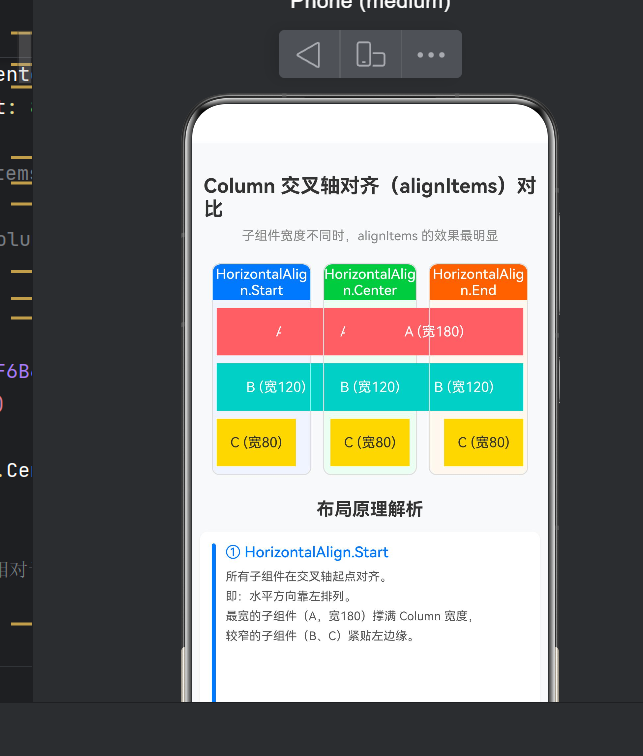
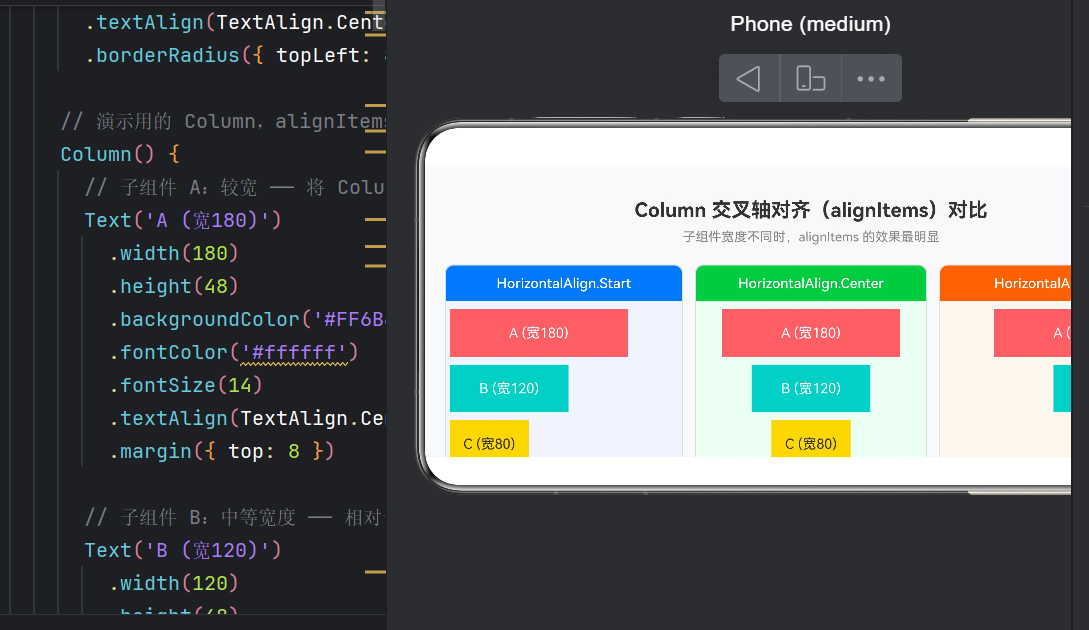
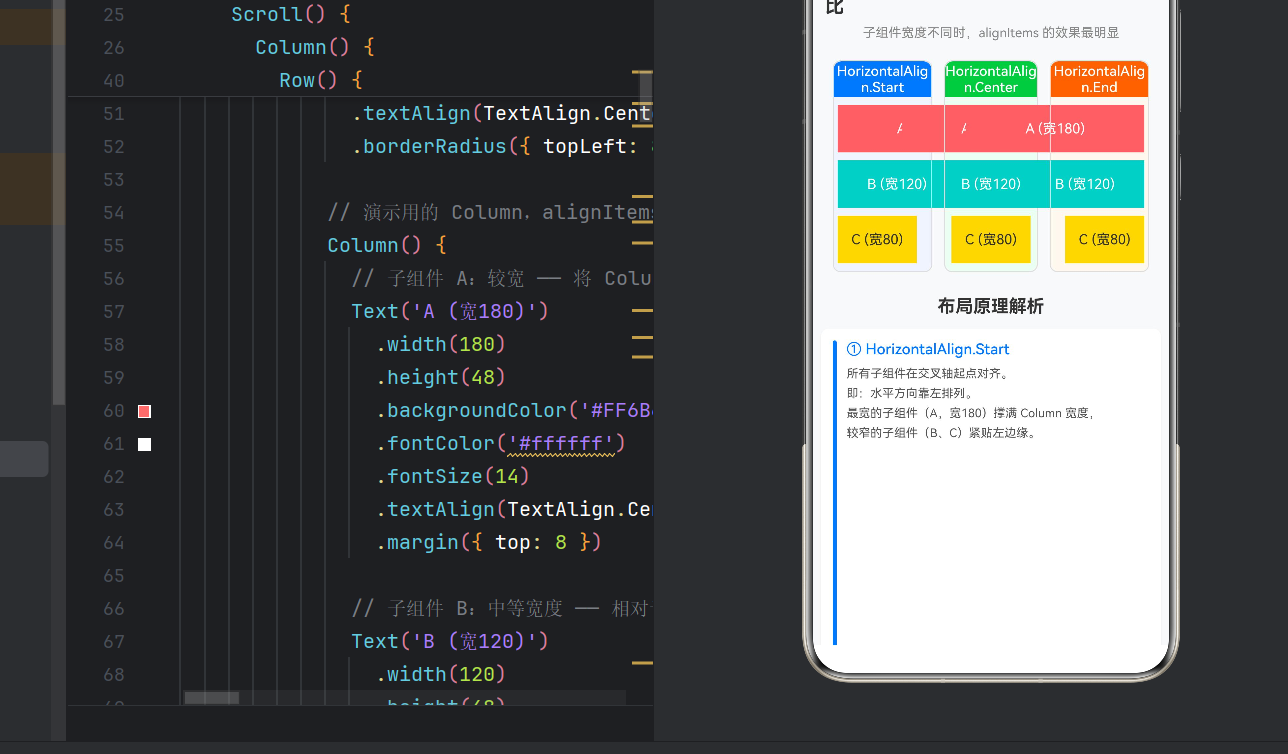
4.2 运行效果
| 栏目 | Start(蓝) | Center(绿) | End(橙) |
|---|---|---|---|
| A(红,180) | 撑满靠左 | 撑满居中 | 撑满靠右 |
| B(青,120) | 紧贴左缘 | 居中 | 紧贴右缘 |
| C(黄,80) | 紧贴左缘 | 居中 | 紧贴右缘 |
五、最佳实践
5.1 子组件宽度不同时效果更明显
alignItems 的本质是在可用水平空间内定位子组件 。若子组件均为 width('100%'),则无对齐差异。
法则: 使用 alignItems 前确认子组件宽度小于容器宽度。
5.2 layoutWeight 配合
外层 Column 用 .layoutWeight(1) 均分 Row 宽度,内层 Column 用 width('100%') 继承外层尺寸------这是鸿蒙中等分多栏的经典模式。
5.3 Column vs Row 不要混淆
Column.alignItems(HorizontalAlign.Start | Center | End)
Row.alignItems(VerticalAlign.Top | Center | Bottom)
5.4 Scroll 适配小屏
内容可能超屏时,用 Scroll 包裹------简单有效。
六、进阶:与 justifyContent 协同
| 模式 | alignItems | justifyContent | 效果 |
|---|---|---|---|
| 列表左对齐 | Start | Start | 左上角 |
| 垂直居中面板 | Center | Center | 完全居中 |
| 底部左对齐 | Start | End | 底部靠左 |
| 顶栏右对齐 | End | Start | 顶部靠右 |
示例:底部居中按钮
typescript
Column() {
  Button('确认').width(200)
  Button('取消').width(120)
}
.width('100%').height('100%')
.alignItems(HorizontalAlign.Center)
.justifyContent(FlexAlign.End)
七、常见错误
7.1 alignItems 没有生效
排查: 子组件是否 width('100%')?是否在正确层级设置?是否误用了 ItemAlign?
7.2 编译报错
Argument of type 'ItemAlign' is not assignable to 'HorizontalAlign'修复: 将 ItemAlign.Start 改为 HorizontalAlign.Start。
7.3 构建守护进程冲突
The current daemon process is in BUSY state.解决: hvigorw assembleHap --no-daemon 或删除 daemon-sec.json。
八、项目结构
app6155/
├── AppScope/app.json5
├── entry/src/main/ets/pages/Index.ets  ← 本文核心文件
├── hvigor/
├── build-profile.json5
└── oh-package.json5
九、总结
- Column 主轴垂直,交叉轴水平;
alignItems控制交叉轴对齐。 HorizontalAlign.Start左对齐、Center居中、End右对齐------子组件宽度不同时效果最明显。- 嵌套布局 +
layoutWeight可快速实现等宽多栏。 - 用
Scroll+backgroundColor+border辅助调试。
下一步: 学习 Row.alignItems(VerticalAlign)、Flex 弹性布局、justifyContent 六种分布。
布局是 UI 开发的「手部肌肉记忆」。打开 DevEco Studio,亲手修改
alignItems的值观察变化,才能真正内化。
bash
cd D:\hongmeng\app6155
hvigorw assembleHap --mode module -p product=default -p buildMode=debug --no-daemon