完整源码:SearchHistoryDemo 基于 ArkUI V2 状态管理,实现搜索框、输入联想、历史记录、多 Tab 热搜榜单。
一、效果展示与介绍
搜索页面是绝大多数应用的标配。一个好的搜索体验,应该包含实时联想、搜索历史、热点推荐 等能力。本文将带你从零开始,使用鸿蒙 ArkUI 的 V2 状态管理 (@ComponentV2、@Local、@ObservedV2、AppStorageV2)构建一个功能完备的搜索页面。
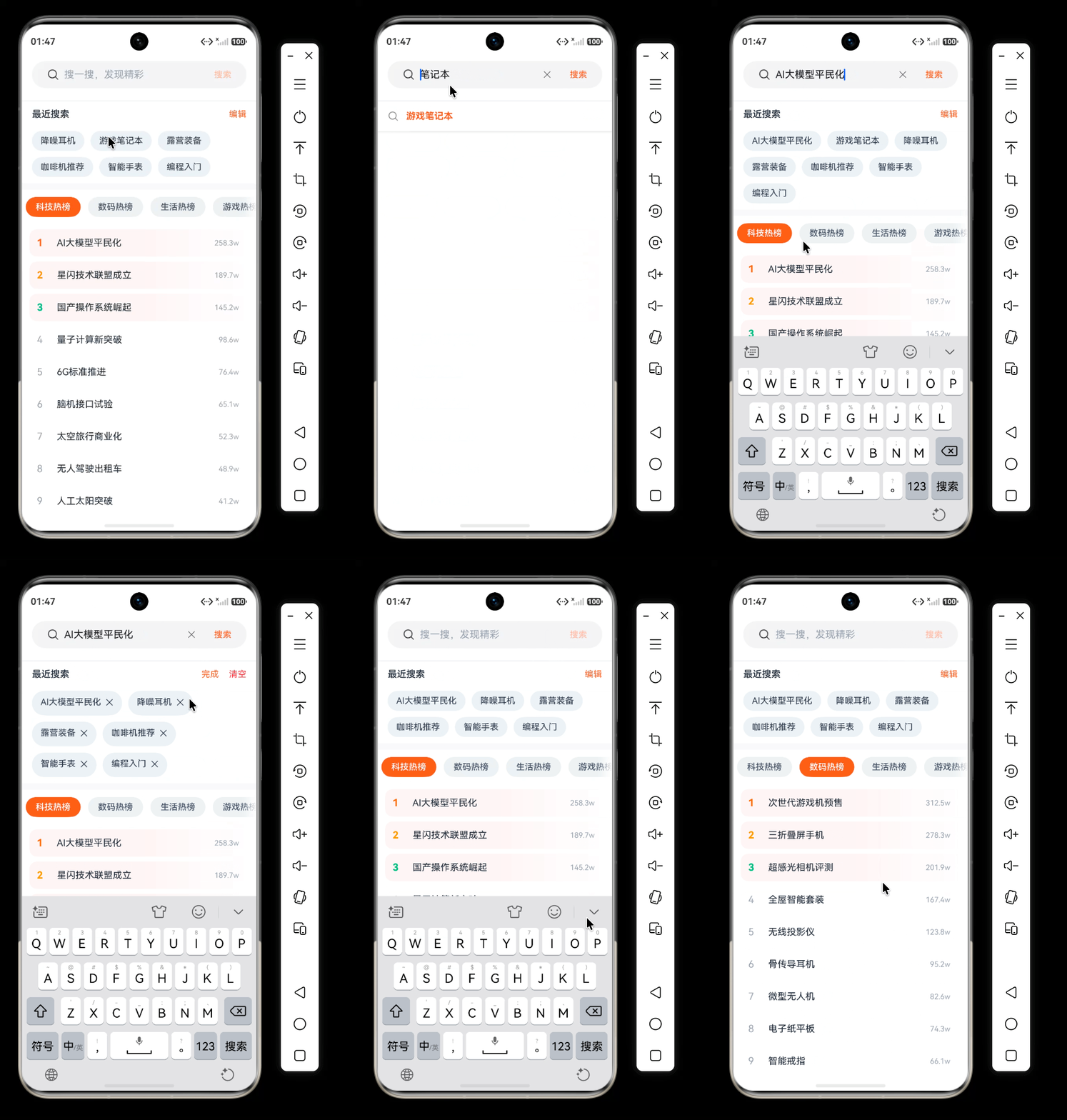
最终成果:
- 搜索框集成搜索图标和内嵌"搜索"按钮,无输入时按钮自动禁用。
- 输入关键字后实时展示联想词,匹配部分高亮加粗。
- 搜索历史支持单条删除、一键清空,普通模式点击直接搜索。
- 热搜榜单多 Tab 切换,前三名带有浅红渐变背景,排名数字彩色高亮。
- 完美适配状态栏和导航条
二、项目结构与核心文件
entry/src/main/ets/
├── common/SearchConstants.ets        // 全局常量(颜色、尺寸、配置)
├── model/
│   ├── SuggestWordModel.ets          // 联想词模型(含高亮分段 + 回调)
│   ├── HistoryItem.ets               // 历史记录模型
│   ├── HotTab.ets                    // 热搜分类模型
│   ├── HotContentItem.ets            // 热搜条目模型
│   └── WindowAvoidState.ets          // 窗口避让区域全局状态
├── mock/SearchDataSource.ets         // 模拟数据(联想词库、热搜榜单、默认历史)
├── pages/Index.ets                   // 搜索主页面
├── entryability/EntryAbility.ets      // 应用入口(初始化全局状态,监听窗口变化)
三、核心技术实现
3.1 V2 全局状态:窗口避让区域
为了让内容不被状态栏和导航条遮挡,我们需要在 EntryAbility 中监听 avoidAreaChange,并将高度存入全局共享状态。
定义全局状态类 (model/WindowAvoidState.ets):
javascript
@ObservedV2
export class WindowAvoidState {
  @Trace topHeight: number = 0;
  @Trace bottomHeight: number = 0;
}
在 EntryAbility 中初始化并监听:
javascript
async  onWindowStageCreate(windowStage: window.WindowStage): Promise<void> {
    // Main window is created, set main page for this ability
    hilog.log(DOMAIN, 'testTag', '%{public}s', 'Ability onWindowStageCreate');

    // 在 onWindowStageCreate 中,窗口创建后:
    try {
      let windowClass: window.Window = windowStage.getMainWindowSync();
      // 1. 初始化全局状态
      let avoidState = AppStorageV2.connect(WindowAvoidState, () => new WindowAvoidState())!;

      // 2. 设置窗口全屏
     await windowClass.setWindowLayoutFullScreen(true);

      // 3. 获取初始避让区域并更新状态
      let systemArea = windowClass.getWindowAvoidArea(window.AvoidAreaType.TYPE_SYSTEM);
      let naviArea = windowClass.getWindowAvoidArea(window.AvoidAreaType.TYPE_NAVIGATION_INDICATOR);
      avoidState.topHeight = systemArea.topRect.height;
      avoidState.bottomHeight = naviArea.bottomRect.height;

      // 4. 监听变化并更新状态
      windowClass.on('avoidAreaChange', (data) => {
        if (data.type === window.AvoidAreaType.TYPE_SYSTEM) {
          avoidState.topHeight = data.area.topRect.height;
        } else if (data.type === window.AvoidAreaType.TYPE_NAVIGATION_INDICATOR) {
          avoidState.bottomHeight = data.area.bottomRect.height;
        }
      });


      windowStage.loadContent('pages/Index', (err) => {
        if (err.code) {
          hilog.error(DOMAIN, 'testTag', 'Failed to load the content. Cause: %{public}s', JSON.stringify(err));
          return;
        }
      });

    } catch (error) {
      // TODO: Implement error handling.
    }

  }
页面中直接连接并使用:
javascript
@Local windowAvoid: WindowAvoidState = AppStorageV2.connect(WindowAvoidState, () => new WindowAvoidState())!;

 build() {
    Column() {
      this.SearchHeader();

      if (this.showSuggest) {
        Column() {
          ForEach(this.suggestList, (item: SuggestWordModel) => {
            this.SuggestItem(item);
            Divider()
              .height(0.5)
              .color("#E5E7EB")
              .margin({ left: 52 })
          })
        }
        .width(SearchConstants.FULL_WIDTH)
        .backgroundColor(SearchConstants.BG_WHITE)
        .shadow({ radius: 8, color: "#1A000000", offsetY: 4 })

      }
      else {
        Scroll() {
          Column() {

            this.HistorySection();
            Divider().strokeWidth(10).color(SearchConstants.BG_GRAY)
            Tabs({ barPosition: BarPosition.Start, controller: this.tabController, index: this.currentTabIndex }) {
              ForEach(hotTabs, (tab: HotTab, idx: number) => {
                TabContent() {
                  this.HotContentList(idx);
                }
                .tabBar(this.HotTabBar(idx, tab.title))
              })
            }
            .vertical(false)
            .barMode(BarMode.Fixed)
            .barMode(BarMode.Scrollable)
            .animationDuration(SearchConstants.ANIMATION_DURATION)
            .onChange((index: number) => {
              this.currentTabIndex = index;
            })
            .width(SearchConstants.FULL_WIDTH)
            .backgroundColor(SearchConstants.BG_WHITE)

          }
          .width('100%')
        }
        .scrollBar(BarState.Off)
        .backgroundColor(Color.White)
        .width(SearchConstants.FULL_WIDTH)
        .layoutWeight(1)
      }
    }
    .width(SearchConstants.FULL_WIDTH)
    .height(SearchConstants.FULL_WIDTH)
    .backgroundColor(Color.White)
    .padding({
      top: this.uiContext.px2vp(this.windowAvoid.topHeight),
      bottom: this.uiContext.px2vp(this.windowAvoid.bottomHeight)
    })
  }
3.2 搜索框:使用系统 Search 组件
鸿蒙提供了专用的 Search 组件,内置搜索图标和按钮,比组合 TextInput + Image + Button 更简洁。
javascript
  @Builder
  SearchHeader() {
    Row() {
      Search({
        placeholder: "搜一搜,发现精彩",
        value: this.keyword,
      })
        .width(SearchConstants.FULL_WIDTH)
        .height(44)
        .textFont({size:16})
        .placeholderColor("#9CA3AF")
        .backgroundColor("#F3F4F6")
        .borderRadius(24)
        .searchIcon({
          src: $r("app.media.ic_search"),
          size: 20
        })
        .searchButton("搜索", {
          fontColor: SearchConstants.HIGHLIGHT_COLOR,
          autoDisable: true
        })
        .padding({ left: 12, right: 8 })
        .onChange((value: string) => {
          this.keyword = value;
          this.updateSuggest(value);
        })
        .onSubmit(() => {
          if (this.keyword.trim().length > 0) {
            this.doSearch(this.keyword);
          }
        })
    }
    .width(SearchConstants.FULL_WIDTH)
    .padding({ left: 16, right: 16, top: 12, bottom: 12 })
    .backgroundColor(SearchConstants.BG_WHITE)
    .border({ width: { bottom: 1 }, color: '#E5E7EB', style: BorderStyle.Solid })
  }
autoDisable: true避免用户点击空白按钮,提升体验。- 通过
onSubmit监听键盘回车,支持直接搜索。
3.3 实时联想 + 关键词高亮
联想词模型(带回调)
由于 @Builder 中直接调用组件方法可能丢失 this 上下文,我们让模型持有一个回调函数,在点击时触发。
javascript
@ObservedV2
export class SuggestWordModel {
  @Trace fullWord: string;
  @Trace prefix: string = '';
  @Trace matchedPart: string = '';
  @Trace suffix: string = '';
  onClickCallback?: (word: string) => void;

  // 处理搜索词
  constructor(fullWord: string, keyword: string, onClick?: (word: string) => void) {
    this.fullWord = fullWord;
    this.onClickCallback = onClick;
    const idx = fullWord.toLowerCase().indexOf(keyword.toLowerCase());
    if (idx >= 0) {
      this.prefix = fullWord.substring(0, idx);
      this.matchedPart = fullWord.substring(idx, idx + keyword.length);
      this.suffix = fullWord.substring(idx + keyword.length);
    } else {
      this.prefix = fullWord;
    }
  }

  executeSearch() {
    this.onClickCallback?.(this.fullWord);
  }
}
更新联想列表
在 updateSuggest 中为每个联想词注入 doSearch 回调:
javascript
  updateSuggest(key: string) {
    if (key.trim().length === 0) {
      this.showSuggest = false;
      this.suggestList = [];
      return;
    }
    const lowerKey = key.toLowerCase();
    const filtered = suggestDataSource.filter(item =>
    item.toLowerCase().includes(lowerKey)
    ).slice(0, 10);
    this.suggestList = filtered.map(item => new SuggestWordModel(item, key));
    this.showSuggest = this.suggestList.length > 0 ? true :false ;
  }
搜索词高亮(使用 Span)
javascript
Text() {
  if (item.prefix) {
    Span(item.prefix)
      .fontColor(SearchConstants.NORMAL_COLOR)
      .fontSize(15)
  }
  if (item.matchedPart) {
    Span(item.matchedPart)
      .fontColor(SearchConstants.HIGHLIGHT_COLOR)
      .fontSize(15)
      .fontWeight(FontWeight.Bold)
  }
  if (item.suffix) {
    Span(item.suffix)
      .fontColor(SearchConstants.NORMAL_COLOR)
      .fontSize(15)
  }
}
点击整个行时调用 item.executeSearch() 即可。
3.4 搜索历史(编辑/删除/清空)
- 历史数组
@Local historyItems: HistoryItem[]。 addHistory去重、保持最新、限制最大条数。isDeleteMode控制编辑模式。
每个历史标签的渲染(分离文字和删除按钮):
javascript
 @Builder
  HistorySection() {
    Column() {
      Row() {
        Text("最近搜索")
          .fontSize(15)
          .fontWeight(FontWeight.Medium)
          .fontColor("#1F2937")
        Blank()
        if (!this.isDeleteMode) {
          Text("编辑")
            .fontSize(14)
            .fontColor(SearchConstants.HIGHLIGHT_COLOR)
            .onClick(() => {
              this.isDeleteMode = true;
            })
        } else {
          Row() {
            Text("完成")
              .fontSize(14)
              .fontColor(SearchConstants.HIGHLIGHT_COLOR)
              .margin({ right: 16 })
              .onClick(() => {
                this.isDeleteMode = false;
              })
            Text("清空")
              .fontSize(14)
              .fontColor("#EF4444")
              .onClick(() => {
                this.clearAllHistory();
              })
          }
        }
      }
      .width(SearchConstants.FULL_WIDTH)
      .padding({ left: 16, right: 16, top: 12, bottom: 8 })

      Flex({ wrap: FlexWrap.Wrap, alignItems: ItemAlign.Center }) {
        ForEach(this.historyItems, (item: HistoryItem) => {
          Text(this.isDeleteMode ? `${item.word}  ✕` : item.word)
            .fontSize(14)
            .fontColor(SearchConstants.HISTORY_TEXT)
            .padding({ left: 14, right: 14, top: 8, bottom: 8 })
            .backgroundColor(SearchConstants.HISTORY_BG)
            .borderRadius(20)
            .margin({ right: 10, bottom: 10 })
            .onClick(() => {
              if (this.isDeleteMode) {
                this.deleteHistory(item.word);
              } else {
                this.doSearch(item.word);
              }
            })
        })
      }
      .width(SearchConstants.FULL_WIDTH)
      .padding({ left: 16, right: 16,top:10 })
    }
    .width(SearchConstants.FULL_WIDTH)
    .backgroundColor(SearchConstants.BG_WHITE)
  }
3.5 热搜榜单:Tabs + List + 条件渐变
热搜数据按分类组织(科技、数码、生活、游戏),每个分类 10 条数据。
使用 Tabs 配合 Scrollable 模式实现滑动切换:
javascript
Tabs({ barPosition: BarPosition.Start, controller: this.tabController, index: this.currentTabIndex }) {
  ForEach(hotTabs, (tab: HotTab, idx: number) => {
    TabContent() {
      this.HotContentList(idx);
    }
    .tabBar(this.HotTabBar(idx, tab.title))
  })
}
.barMode(BarMode.Scrollable)
前三名渐变背景
javascript
  @Builder
  HotContentList(index: number) {
    List({ space: 8 }) {
      ForEach(hotContents[index], (item: HotContentItem) => {
        ListItem() {
          Row() {
            Text(item.rank.toString())
              .fontSize(16)
              .fontWeight(item.rank <= 3 ? FontWeight.Bold : FontWeight.Normal)
              .fontColor(item.rank === 1 ? "#F97316" : (item.rank === 2 ? "#F59E0B" : (item.rank === 3 ? "#10B981" : "#9CA3AF")))
              .width(32)

            Text(item.title)
              .fontSize(15)
              .fontColor("#1F2937")
              .layoutWeight(1)
              .maxLines(1)
              .textOverflow({ overflow: TextOverflow.Ellipsis })

            Text(item.heat)
              .fontSize(12)
              .fontColor("#9CA3AF")
              .margin({ right: 4 })
          }
          .width(SearchConstants.FULL_WIDTH)
          .height(44)
          .padding({ left: 12, right: 12 })
          .borderRadius(12)
          // 条件渐变:仅前三条应用渐变背景
          .linearGradient(
            item.rank <= 3
              ? {
              angle: SearchConstants.GRADIENT_ANGLE,
              colors: [
                [SearchConstants.GRADIENT_RED, SearchConstants.GRADIENT_START],
                [SearchConstants.GRADIENT_WHITE, SearchConstants.GRADIENT_END]
              ]
            }
              : undefined
          )
          .backgroundColor(item.rank > 3 ? SearchConstants.BG_WHITE : undefined)
          .onClick(() => {
            this.doSearch(item.title);
          })
        }
      })
    }
    .width(SearchConstants.FULL_WIDTH)
    .height(SearchConstants.FULL_HIGHT)
    .padding({ top: 8, left: 12, right: 12 })
    .scrollBar(BarState.Auto)
  }
排名数字颜色
javascript
.fontColor(
  item.rank === 1 ? "#F97316" :
  item.rank === 2 ? "#F59E0B" :
  item.rank === 3 ? "#10B981" : "#9CA3AF"
)
3.6 数据源设计
完整数据均在mock/SearchDataSource.ets中。
- 联想词库:60+ 条,覆盖笔记本电脑系列、数码、智能家居、户外、美妆等。
- 热搜分类:科技热榜、数码热榜、生活热榜、游戏热榜。
- 热搜内容:每个分类 10 条,热度值模拟真实场景(如"AI大模型平民化 258.3w")。
- 默认历史 :
["降噪耳机", "游戏笔记本", "露营装备", "咖啡机推荐", "智能手表", "编程入门"]。
四、常见问题与扩展
Q:搜索图标不显示?
检查资源是否存在,或改用系统图标 $ohos:ic_public_search。
Q:如何接入真实搜索接口?
替换 suggestDataSource 和 hotContents 的数据来源,在 updateSuggest 中改为异步请求即可。
Q:点击联想词不执行搜索?
1.确保 SuggestWordModel 构造时传入了回调,且 SuggestItem 的 onClick 调用了 item.executeSearch()。
2.确保点击后搜索词不清空
六、总结
本文从零开始,100% 基于 ArkUI V2 实现了一个企业级搜索页面,涵盖了:
- V2 状态管理最佳实践(
@Local+AppStorageV2.connect) - 窗口避让区域的全屏适配
- 搜索组件的正确用法
- 联想词高亮与点击回调设计
- 历史记录的编辑/删除/清空
- 热搜榜单 Tab 切换与条件渐变背景
整个代码结构清晰、可复用,你可以直接应用到自己的鸿蒙应用中。
希望这篇实战文章对你有所帮助。如果你有任何问题或改进建议,欢迎留言交流。