一、应用概述与设计理念
桌面便签小应用是一款实用的彩色便签记录工具,灵感来源于现实生活中贴在桌面上的便利贴。在办公和学习场景中,人们经常需要快速记录一些临时信息,比如待办事项、重要提醒、临时笔记等。传统的纸质便签虽然方便,但容易丢失、不易管理。电子化的便签应用则可以很好地解决这些问题,既保留了便签的直观性,又增加了数字化管理的优势。
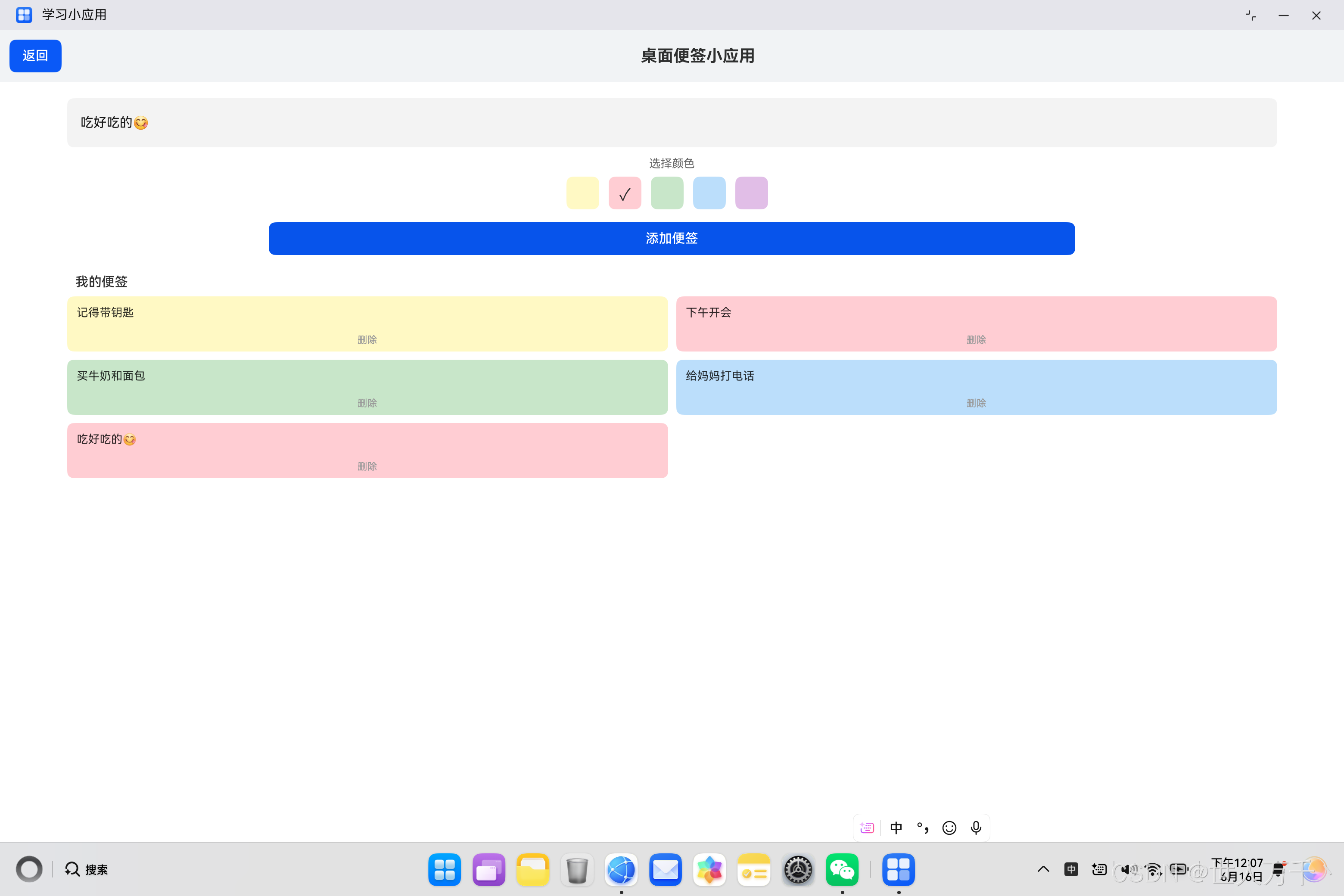
这款应用基于HarmonyOS ArkUI框架开发,采用了声明式UI开发范式。用户可以选择不同的颜色创建便签,记录重要事项。便签以网格形式展示,视觉效果类似于真实的彩色便签纸。应用界面简洁直观,操作便捷,适合日常记录使用。
从技术角度来看,这个应用涵盖了HarmonyOS开发中的多个核心知识点:自定义数据模型、状态管理、Grid布局、ForEach循环渲染、颜色选择器实现、列表数据操作等。通过学习这个应用的开发过程,开发者可以深入理解ArkTS语言的面向对象特性和ArkUI框架的布局系统。
二、功能特性详解
2.1 核心功能列表
桌面便签小应用提供了以下核心功能:
| 功能模块 | 功能描述 | 技术实现 |
|---|---|---|
| 便签输入 | TextInput组件输入便签内容 | TextInput + onChange |
| 颜色选择 | 五种颜色可选,点击切换 | ForEach + Stack |
| 便签创建 | 创建新的彩色便签 | Button + onClick |
| 便签展示 | 网格布局展示所有便签 | Grid + GridItem |
| 便签删除 | 删除指定便签 | Button + filter |
| 数据管理 | 便签数据的增删操作 | 数组操作方法 |
2.2 用户交互流程
#mermaid-svg-9yqurReabpqt5pKy{font-family:"trebuchet ms",verdana,arial,sans-serif;font-size:16px;fill:#333;}@keyframes edge-animation-frame{from{stroke-dashoffset:0;}}@keyframes dash{to{stroke-dashoffset:0;}}#mermaid-svg-9yqurReabpqt5pKy .edge-animation-slow{stroke-dasharray:9,5!important;stroke-dashoffset:900;animation:dash 50s linear infinite;stroke-linecap:round;}#mermaid-svg-9yqurReabpqt5pKy .edge-animation-fast{stroke-dasharray:9,5!important;stroke-dashoffset:900;animation:dash 20s linear infinite;stroke-linecap:round;}#mermaid-svg-9yqurReabpqt5pKy .error-icon{fill:#552222;}#mermaid-svg-9yqurReabpqt5pKy .error-text{fill:#552222;stroke:#552222;}#mermaid-svg-9yqurReabpqt5pKy .edge-thickness-normal{stroke-width:1px;}#mermaid-svg-9yqurReabpqt5pKy .edge-thickness-thick{stroke-width:3.5px;}#mermaid-svg-9yqurReabpqt5pKy .edge-pattern-solid{stroke-dasharray:0;}#mermaid-svg-9yqurReabpqt5pKy .edge-thickness-invisible{stroke-width:0;fill:none;}#mermaid-svg-9yqurReabpqt5pKy .edge-pattern-dashed{stroke-dasharray:3;}#mermaid-svg-9yqurReabpqt5pKy .edge-pattern-dotted{stroke-dasharray:2;}#mermaid-svg-9yqurReabpqt5pKy .marker{fill:#333333;stroke:#333333;}#mermaid-svg-9yqurReabpqt5pKy .marker.cross{stroke:#333333;}#mermaid-svg-9yqurReabpqt5pKy svg{font-family:"trebuchet ms",verdana,arial,sans-serif;font-size:16px;}#mermaid-svg-9yqurReabpqt5pKy p{margin:0;}#mermaid-svg-9yqurReabpqt5pKy .label{font-family:"trebuchet ms",verdana,arial,sans-serif;color:#333;}#mermaid-svg-9yqurReabpqt5pKy .cluster-label text{fill:#333;}#mermaid-svg-9yqurReabpqt5pKy .cluster-label span{color:#333;}#mermaid-svg-9yqurReabpqt5pKy .cluster-label span p{background-color:transparent;}#mermaid-svg-9yqurReabpqt5pKy .label text,#mermaid-svg-9yqurReabpqt5pKy span{fill:#333;color:#333;}#mermaid-svg-9yqurReabpqt5pKy .node rect,#mermaid-svg-9yqurReabpqt5pKy .node circle,#mermaid-svg-9yqurReabpqt5pKy .node ellipse,#mermaid-svg-9yqurReabpqt5pKy .node polygon,#mermaid-svg-9yqurReabpqt5pKy .node path{fill:#ECECFF;stroke:#9370DB;stroke-width:1px;}#mermaid-svg-9yqurReabpqt5pKy .rough-node .label text,#mermaid-svg-9yqurReabpqt5pKy .node .label text,#mermaid-svg-9yqurReabpqt5pKy .image-shape .label,#mermaid-svg-9yqurReabpqt5pKy .icon-shape .label{text-anchor:middle;}#mermaid-svg-9yqurReabpqt5pKy .node .katex path{fill:#000;stroke:#000;stroke-width:1px;}#mermaid-svg-9yqurReabpqt5pKy .rough-node .label,#mermaid-svg-9yqurReabpqt5pKy .node .label,#mermaid-svg-9yqurReabpqt5pKy .image-shape .label,#mermaid-svg-9yqurReabpqt5pKy .icon-shape .label{text-align:center;}#mermaid-svg-9yqurReabpqt5pKy .node.clickable{cursor:pointer;}#mermaid-svg-9yqurReabpqt5pKy .root .anchor path{fill:#333333!important;stroke-width:0;stroke:#333333;}#mermaid-svg-9yqurReabpqt5pKy .arrowheadPath{fill:#333333;}#mermaid-svg-9yqurReabpqt5pKy .edgePath .path{stroke:#333333;stroke-width:2.0px;}#mermaid-svg-9yqurReabpqt5pKy .flowchart-link{stroke:#333333;fill:none;}#mermaid-svg-9yqurReabpqt5pKy .edgeLabel{background-color:rgba(232,232,232, 0.8);text-align:center;}#mermaid-svg-9yqurReabpqt5pKy .edgeLabel p{background-color:rgba(232,232,232, 0.8);}#mermaid-svg-9yqurReabpqt5pKy .edgeLabel rect{opacity:0.5;background-color:rgba(232,232,232, 0.8);fill:rgba(232,232,232, 0.8);}#mermaid-svg-9yqurReabpqt5pKy .labelBkg{background-color:rgba(232, 232, 232, 0.5);}#mermaid-svg-9yqurReabpqt5pKy .cluster rect{fill:#ffffde;stroke:#aaaa33;stroke-width:1px;}#mermaid-svg-9yqurReabpqt5pKy .cluster text{fill:#333;}#mermaid-svg-9yqurReabpqt5pKy .cluster span{color:#333;}#mermaid-svg-9yqurReabpqt5pKy div.mermaidTooltip{position:absolute;text-align:center;max-width:200px;padding:2px;font-family:"trebuchet ms",verdana,arial,sans-serif;font-size:12px;background:hsl(80, 100%, 96.2745098039%);border:1px solid #aaaa33;border-radius:2px;pointer-events:none;z-index:100;}#mermaid-svg-9yqurReabpqt5pKy .flowchartTitleText{text-anchor:middle;font-size:18px;fill:#333;}#mermaid-svg-9yqurReabpqt5pKy rect.text{fill:none;stroke-width:0;}#mermaid-svg-9yqurReabpqt5pKy .icon-shape,#mermaid-svg-9yqurReabpqt5pKy .image-shape{background-color:rgba(232,232,232, 0.8);text-align:center;}#mermaid-svg-9yqurReabpqt5pKy .icon-shape p,#mermaid-svg-9yqurReabpqt5pKy .image-shape p{background-color:rgba(232,232,232, 0.8);padding:2px;}#mermaid-svg-9yqurReabpqt5pKy .icon-shape .label rect,#mermaid-svg-9yqurReabpqt5pKy .image-shape .label rect{opacity:0.5;background-color:rgba(232,232,232, 0.8);fill:rgba(232,232,232, 0.8);}#mermaid-svg-9yqurReabpqt5pKy .label-icon{display:inline-block;height:1em;overflow:visible;vertical-align:-0.125em;}#mermaid-svg-9yqurReabpqt5pKy .node .label-icon path{fill:currentColor;stroke:revert;stroke-width:revert;}#mermaid-svg-9yqurReabpqt5pKy :root{--mermaid-font-family:"trebuchet ms",verdana,arial,sans-serif;} 不为空
为空
删除
打开应用
输入便签内容
选择便签颜色
点击添加按钮
内容是否为空
创建便签
添加到列表
网格展示便签
不创建便签
点击删除按钮
从列表移除
2.3 界面设计说明
应用的界面设计遵循简洁直观的原则,主要分为以下几个区域:
- 顶部标题栏:包含返回按钮和应用标题,采用灰色背景,与内容区域形成视觉层次
- 输入区域:TextInput组件用于输入便签内容,高度设置为60,提供舒适的输入体验
- 颜色选择区:五种颜色的选择器,使用Stack叠加显示选中标记
- 添加按钮:蓝色按钮,宽度60%,居中显示
- 便签展示区:Grid网格布局,两列展示,便签以卡片形式呈现
三、数据模型设计
3.1 便签数据模型
在ArkTS中,我们可以使用class来定义数据模型。便签数据模型包含两个属性:便签内容和便签颜色:
typescript
class NoteItem_1 {
  text_1: string = '';
  color_1: string = '';

  constructor(text_1: string, color_1: string) {
    this.text_1 = text_1;
    this.color_1 = color_1;
  }
}
数据模型分析:
| 属性 | 类型 | 说明 | 示例值 |
|---|---|---|---|
| text_1 | string | 便签文本内容 | '记得带钥匙' |
| color_1 | string | 便签背景颜色 | '#FFF9C4' |
构造函数说明:
- 构造函数接收两个参数:文本内容和颜色值
- 使用构造函数可以方便地创建新的便签实例
- 初始值设置为空字符串,确保属性初始化
3.2 数据模型的优势
使用class定义数据模型有以下优势:
- 类型安全:明确定义属性类型,避免类型错误
- 代码复用:可以在多个地方使用相同的数据结构
- 易于扩展:可以方便地添加新属性和方法
- 语义清晰:数据模型名称直观表达数据含义
3.3 数据模型扩展方向
如果需要扩展便签功能,可以在数据模型中添加更多属性:
typescript
class EnhancedNoteItem {
  id: string = '';              // 便签唯一标识
  text: string = '';            // 便签内容
  color: string = '';           // 便签颜色
  createTime: Date = new Date(); // 创建时间
  isPinned: boolean = false;    // 是否置顶
  category: string = '';        // 便签分类
}
四、状态管理实现
4.1 状态变量声明
应用使用了多个状态变量来管理数据:
typescript
@State noteText_1: string = '';
@State notes_1: NoteItem_1[] = [
  new NoteItem_1('记得带钥匙', '#FFF9C4'),
  new NoteItem_1('下午开会', '#FFCDD2'),
  new NoteItem_1('买牛奶和面包', '#C8E6C9'),
  new NoteItem_1('给妈妈打电话', '#BBDEFB')
];
@State selectedColor_1: string = '#FFF9C4';
状态变量说明表:
| 状态变量 | 类型 | 初始值 | 作用 |
|---|---|---|---|
| noteText_1 | string | '' | 存储用户输入的便签内容 |
| notes_1 | NoteItem_1\[\] | ... | 存储所有便签的数组 |
| selectedColor_1 | string | '#FFF9C4' | 当前选中的便签颜色 |
4.2 颜色配置
应用提供了五种便签颜色,每种颜色对应不同的用途:
typescript
colors_1: string[] = ['#FFF9C4', '#FFCDD2', '#C8E6C9', '#BBDEFB', '#E1BEE7'];颜色方案表:
| 颜色代码 | 颜色名称 | 视觉效果 | 建议用途 |
|---|---|---|---|
| #FFF9C4 | 淡黄色 | 温暖明亮 | 一般提醒 |
| #FFCDD2 | 淡红色 | 柔和醒目 | 重要事项 |
| #C8E6C9 | 淡绿色 | 清新自然 | 待办任务 |
| #BBDEFB | 淡蓝色 | 清爽宁静 | 工作笔记 |
| #E1BEE7 | 淡紫色 | 优雅柔和 | 个人事项 |
4.3 状态变量响应机制
当状态变量的值发生变化时,ArkUI框架会自动触发UI更新:
界面组件 状态变量 TextInput 用户 界面组件 状态变量 TextInput 用户 #mermaid-svg-0ui7pDJW1O55CuJ8{font-family:"trebuchet ms",verdana,arial,sans-serif;font-size:16px;fill:#333;}@keyframes edge-animation-frame{from{stroke-dashoffset:0;}}@keyframes dash{to{stroke-dashoffset:0;}}#mermaid-svg-0ui7pDJW1O55CuJ8 .edge-animation-slow{stroke-dasharray:9,5!important;stroke-dashoffset:900;animation:dash 50s linear infinite;stroke-linecap:round;}#mermaid-svg-0ui7pDJW1O55CuJ8 .edge-animation-fast{stroke-dasharray:9,5!important;stroke-dashoffset:900;animation:dash 20s linear infinite;stroke-linecap:round;}#mermaid-svg-0ui7pDJW1O55CuJ8 .error-icon{fill:#552222;}#mermaid-svg-0ui7pDJW1O55CuJ8 .error-text{fill:#552222;stroke:#552222;}#mermaid-svg-0ui7pDJW1O55CuJ8 .edge-thickness-normal{stroke-width:1px;}#mermaid-svg-0ui7pDJW1O55CuJ8 .edge-thickness-thick{stroke-width:3.5px;}#mermaid-svg-0ui7pDJW1O55CuJ8 .edge-pattern-solid{stroke-dasharray:0;}#mermaid-svg-0ui7pDJW1O55CuJ8 .edge-thickness-invisible{stroke-width:0;fill:none;}#mermaid-svg-0ui7pDJW1O55CuJ8 .edge-pattern-dashed{stroke-dasharray:3;}#mermaid-svg-0ui7pDJW1O55CuJ8 .edge-pattern-dotted{stroke-dasharray:2;}#mermaid-svg-0ui7pDJW1O55CuJ8 .marker{fill:#333333;stroke:#333333;}#mermaid-svg-0ui7pDJW1O55CuJ8 .marker.cross{stroke:#333333;}#mermaid-svg-0ui7pDJW1O55CuJ8 svg{font-family:"trebuchet ms",verdana,arial,sans-serif;font-size:16px;}#mermaid-svg-0ui7pDJW1O55CuJ8 p{margin:0;}#mermaid-svg-0ui7pDJW1O55CuJ8 .actor{stroke:hsl(259.6261682243, 59.7765363128%, 87.9019607843%);fill:#ECECFF;}#mermaid-svg-0ui7pDJW1O55CuJ8 text.actor>tspan{fill:black;stroke:none;}#mermaid-svg-0ui7pDJW1O55CuJ8 .actor-line{stroke:hsl(259.6261682243, 59.7765363128%, 87.9019607843%);}#mermaid-svg-0ui7pDJW1O55CuJ8 .innerArc{stroke-width:1.5;stroke-dasharray:none;}#mermaid-svg-0ui7pDJW1O55CuJ8 .messageLine0{stroke-width:1.5;stroke-dasharray:none;stroke:#333;}#mermaid-svg-0ui7pDJW1O55CuJ8 .messageLine1{stroke-width:1.5;stroke-dasharray:2,2;stroke:#333;}#mermaid-svg-0ui7pDJW1O55CuJ8 #arrowhead path{fill:#333;stroke:#333;}#mermaid-svg-0ui7pDJW1O55CuJ8 .sequenceNumber{fill:white;}#mermaid-svg-0ui7pDJW1O55CuJ8 #sequencenumber{fill:#333;}#mermaid-svg-0ui7pDJW1O55CuJ8 #crosshead path{fill:#333;stroke:#333;}#mermaid-svg-0ui7pDJW1O55CuJ8 .messageText{fill:#333;stroke:none;}#mermaid-svg-0ui7pDJW1O55CuJ8 .labelBox{stroke:hsl(259.6261682243, 59.7765363128%, 87.9019607843%);fill:#ECECFF;}#mermaid-svg-0ui7pDJW1O55CuJ8 .labelText,#mermaid-svg-0ui7pDJW1O55CuJ8 .labelText>tspan{fill:black;stroke:none;}#mermaid-svg-0ui7pDJW1O55CuJ8 .loopText,#mermaid-svg-0ui7pDJW1O55CuJ8 .loopText>tspan{fill:black;stroke:none;}#mermaid-svg-0ui7pDJW1O55CuJ8 .loopLine{stroke-width:2px;stroke-dasharray:2,2;stroke:hsl(259.6261682243, 59.7765363128%, 87.9019607843%);fill:hsl(259.6261682243, 59.7765363128%, 87.9019607843%);}#mermaid-svg-0ui7pDJW1O55CuJ8 .note{stroke:#aaaa33;fill:#fff5ad;}#mermaid-svg-0ui7pDJW1O55CuJ8 .noteText,#mermaid-svg-0ui7pDJW1O55CuJ8 .noteText>tspan{fill:black;stroke:none;}#mermaid-svg-0ui7pDJW1O55CuJ8 .activation0{fill:#f4f4f4;stroke:#666;}#mermaid-svg-0ui7pDJW1O55CuJ8 .activation1{fill:#f4f4f4;stroke:#666;}#mermaid-svg-0ui7pDJW1O55CuJ8 .activation2{fill:#f4f4f4;stroke:#666;}#mermaid-svg-0ui7pDJW1O55CuJ8 .actorPopupMenu{position:absolute;}#mermaid-svg-0ui7pDJW1O55CuJ8 .actorPopupMenuPanel{position:absolute;fill:#ECECFF;box-shadow:0px 8px 16px 0px rgba(0,0,0,0.2);filter:drop-shadow(3px 5px 2px rgb(0 0 0 / 0.4));}#mermaid-svg-0ui7pDJW1O55CuJ8 .actor-man line{stroke:hsl(259.6261682243, 59.7765363128%, 87.9019607843%);fill:#ECECFF;}#mermaid-svg-0ui7pDJW1O55CuJ8 .actor-man circle,#mermaid-svg-0ui7pDJW1O55CuJ8 line{stroke:hsl(259.6261682243, 59.7765363128%, 87.9019607843%);fill:#ECECFF;stroke-width:2px;}#mermaid-svg-0ui7pDJW1O55CuJ8 :root{--mermaid-font-family:"trebuchet ms",verdana,arial,sans-serif;} 输入文本更新noteText_1点击颜色更新selectedColor_1点击添加更新notes_1数组触发重新渲染显示新便签
五、颜色选择器实现
5.1 颜色选择器UI结构
颜色选择器使用Row横向布局,每个颜色选项使用Stack叠加显示:
typescript
Row() {
  ForEach(this.colors_1, (color_1: string) => {
    Stack() {
      Text('')
        .width(40)
        .height(40)
        .backgroundColor(color_1)
        .borderRadius(8)
      if (this.selectedColor_1 === color_1) {
        Text('✓')
          .fontSize(20)
          .fontColor('#333333')
      }
    }
    .onClick(() => {
      this.selectedColor_1 = color_1;
    })
    .margin({ right: 12 })
  })
}
.margin({ top: 8 })
5.2 Stack组件详解
Stack组件是层叠布局容器,可以将多个子组件叠加在一起:
#mermaid-svg-ijgjZUNxwAiEMYRT{font-family:"trebuchet ms",verdana,arial,sans-serif;font-size:16px;fill:#333;}@keyframes edge-animation-frame{from{stroke-dashoffset:0;}}@keyframes dash{to{stroke-dashoffset:0;}}#mermaid-svg-ijgjZUNxwAiEMYRT .edge-animation-slow{stroke-dasharray:9,5!important;stroke-dashoffset:900;animation:dash 50s linear infinite;stroke-linecap:round;}#mermaid-svg-ijgjZUNxwAiEMYRT .edge-animation-fast{stroke-dasharray:9,5!important;stroke-dashoffset:900;animation:dash 20s linear infinite;stroke-linecap:round;}#mermaid-svg-ijgjZUNxwAiEMYRT .error-icon{fill:#552222;}#mermaid-svg-ijgjZUNxwAiEMYRT .error-text{fill:#552222;stroke:#552222;}#mermaid-svg-ijgjZUNxwAiEMYRT .edge-thickness-normal{stroke-width:1px;}#mermaid-svg-ijgjZUNxwAiEMYRT .edge-thickness-thick{stroke-width:3.5px;}#mermaid-svg-ijgjZUNxwAiEMYRT .edge-pattern-solid{stroke-dasharray:0;}#mermaid-svg-ijgjZUNxwAiEMYRT .edge-thickness-invisible{stroke-width:0;fill:none;}#mermaid-svg-ijgjZUNxwAiEMYRT .edge-pattern-dashed{stroke-dasharray:3;}#mermaid-svg-ijgjZUNxwAiEMYRT .edge-pattern-dotted{stroke-dasharray:2;}#mermaid-svg-ijgjZUNxwAiEMYRT .marker{fill:#333333;stroke:#333333;}#mermaid-svg-ijgjZUNxwAiEMYRT .marker.cross{stroke:#333333;}#mermaid-svg-ijgjZUNxwAiEMYRT svg{font-family:"trebuchet ms",verdana,arial,sans-serif;font-size:16px;}#mermaid-svg-ijgjZUNxwAiEMYRT p{margin:0;}#mermaid-svg-ijgjZUNxwAiEMYRT .label{font-family:"trebuchet ms",verdana,arial,sans-serif;color:#333;}#mermaid-svg-ijgjZUNxwAiEMYRT .cluster-label text{fill:#333;}#mermaid-svg-ijgjZUNxwAiEMYRT .cluster-label span{color:#333;}#mermaid-svg-ijgjZUNxwAiEMYRT .cluster-label span p{background-color:transparent;}#mermaid-svg-ijgjZUNxwAiEMYRT .label text,#mermaid-svg-ijgjZUNxwAiEMYRT span{fill:#333;color:#333;}#mermaid-svg-ijgjZUNxwAiEMYRT .node rect,#mermaid-svg-ijgjZUNxwAiEMYRT .node circle,#mermaid-svg-ijgjZUNxwAiEMYRT .node ellipse,#mermaid-svg-ijgjZUNxwAiEMYRT .node polygon,#mermaid-svg-ijgjZUNxwAiEMYRT .node path{fill:#ECECFF;stroke:#9370DB;stroke-width:1px;}#mermaid-svg-ijgjZUNxwAiEMYRT .rough-node .label text,#mermaid-svg-ijgjZUNxwAiEMYRT .node .label text,#mermaid-svg-ijgjZUNxwAiEMYRT .image-shape .label,#mermaid-svg-ijgjZUNxwAiEMYRT .icon-shape .label{text-anchor:middle;}#mermaid-svg-ijgjZUNxwAiEMYRT .node .katex path{fill:#000;stroke:#000;stroke-width:1px;}#mermaid-svg-ijgjZUNxwAiEMYRT .rough-node .label,#mermaid-svg-ijgjZUNxwAiEMYRT .node .label,#mermaid-svg-ijgjZUNxwAiEMYRT .image-shape .label,#mermaid-svg-ijgjZUNxwAiEMYRT .icon-shape .label{text-align:center;}#mermaid-svg-ijgjZUNxwAiEMYRT .node.clickable{cursor:pointer;}#mermaid-svg-ijgjZUNxwAiEMYRT .root .anchor path{fill:#333333!important;stroke-width:0;stroke:#333333;}#mermaid-svg-ijgjZUNxwAiEMYRT .arrowheadPath{fill:#333333;}#mermaid-svg-ijgjZUNxwAiEMYRT .edgePath .path{stroke:#333333;stroke-width:2.0px;}#mermaid-svg-ijgjZUNxwAiEMYRT .flowchart-link{stroke:#333333;fill:none;}#mermaid-svg-ijgjZUNxwAiEMYRT .edgeLabel{background-color:rgba(232,232,232, 0.8);text-align:center;}#mermaid-svg-ijgjZUNxwAiEMYRT .edgeLabel p{background-color:rgba(232,232,232, 0.8);}#mermaid-svg-ijgjZUNxwAiEMYRT .edgeLabel rect{opacity:0.5;background-color:rgba(232,232,232, 0.8);fill:rgba(232,232,232, 0.8);}#mermaid-svg-ijgjZUNxwAiEMYRT .labelBkg{background-color:rgba(232, 232, 232, 0.5);}#mermaid-svg-ijgjZUNxwAiEMYRT .cluster rect{fill:#ffffde;stroke:#aaaa33;stroke-width:1px;}#mermaid-svg-ijgjZUNxwAiEMYRT .cluster text{fill:#333;}#mermaid-svg-ijgjZUNxwAiEMYRT .cluster span{color:#333;}#mermaid-svg-ijgjZUNxwAiEMYRT div.mermaidTooltip{position:absolute;text-align:center;max-width:200px;padding:2px;font-family:"trebuchet ms",verdana,arial,sans-serif;font-size:12px;background:hsl(80, 100%, 96.2745098039%);border:1px solid #aaaa33;border-radius:2px;pointer-events:none;z-index:100;}#mermaid-svg-ijgjZUNxwAiEMYRT .flowchartTitleText{text-anchor:middle;font-size:18px;fill:#333;}#mermaid-svg-ijgjZUNxwAiEMYRT rect.text{fill:none;stroke-width:0;}#mermaid-svg-ijgjZUNxwAiEMYRT .icon-shape,#mermaid-svg-ijgjZUNxwAiEMYRT .image-shape{background-color:rgba(232,232,232, 0.8);text-align:center;}#mermaid-svg-ijgjZUNxwAiEMYRT .icon-shape p,#mermaid-svg-ijgjZUNxwAiEMYRT .image-shape p{background-color:rgba(232,232,232, 0.8);padding:2px;}#mermaid-svg-ijgjZUNxwAiEMYRT .icon-shape .label rect,#mermaid-svg-ijgjZUNxwAiEMYRT .image-shape .label rect{opacity:0.5;background-color:rgba(232,232,232, 0.8);fill:rgba(232,232,232, 0.8);}#mermaid-svg-ijgjZUNxwAiEMYRT .label-icon{display:inline-block;height:1em;overflow:visible;vertical-align:-0.125em;}#mermaid-svg-ijgjZUNxwAiEMYRT .node .label-icon path{fill:currentColor;stroke:revert;stroke-width:revert;}#mermaid-svg-ijgjZUNxwAiEMYRT :root{--mermaid-font-family:"trebuchet ms",verdana,arial,sans-serif;} Stack容器
底层: 颜色方块
顶层: 选中标记
Text组件
width: 40
height: 40
backgroundColor: color
borderRadius: 8
条件渲染
选中时显示✓
Stack组件特点:
| 特点 | 说明 | 应用场景 |
|---|---|---|
| 层叠显示 | 子组件按顺序叠加 | 图标叠加、选中标记 |
| 对齐方式 | 可设置子组件对齐 | 居中、左上、右下等 |
| 尺寸继承 | 子组件可继承父容器尺寸 | 填充式布局 |
5.3 ForEach循环渲染
ForEach是ArkUI提供的循环渲染组件,用于渲染数组数据:
typescript
ForEach(this.colors_1, (color_1: string) => {
  // 渲染内容
})
ForEach参数说明:
| 参数 | 类型 | 说明 |
|---|---|---|
| arr | Array | 要遍历的数组 |
| itemGenerator | (item: any, index?: number) => void | 渲染每个元素的函数 |
| keyGenerator? | (item: any, index?: number) => string | 生成唯一key的函数 |
5.4 条件渲染实现
选中标记使用条件渲染,只在选中时显示:
typescript
if (this.selectedColor_1 === color_1) {
  Text('✓')
    .fontSize(20)
    .fontColor('#333333')
}
条件渲染说明:
- 使用if语句判断当前颜色是否选中
- 选中时显示勾选标记
- 未选中时不渲染标记组件
- 条件渲染可以减少不必要的组件创建
六、便签添加功能
6.1 添加按钮实现
添加按钮使用Button组件,点击时创建新便签:
typescript
Button('添加便签')
  .width('60%')
  .height(40)
  .margin({ top: 16 })
  .backgroundColor('#0A59F7')
  .onClick(() => {
    if (this.noteText_1 !== '') {
      let newNote_1 = new NoteItem_1(this.noteText_1, this.selectedColor_1);
      this.notes_1 = this.notes_1.concat([newNote_1]);
      this.noteText_1 = '';
    }
  })
6.2 添加流程分析
#mermaid-svg-EKdxXaSpxutn0J0I{font-family:"trebuchet ms",verdana,arial,sans-serif;font-size:16px;fill:#333;}@keyframes edge-animation-frame{from{stroke-dashoffset:0;}}@keyframes dash{to{stroke-dashoffset:0;}}#mermaid-svg-EKdxXaSpxutn0J0I .edge-animation-slow{stroke-dasharray:9,5!important;stroke-dashoffset:900;animation:dash 50s linear infinite;stroke-linecap:round;}#mermaid-svg-EKdxXaSpxutn0J0I .edge-animation-fast{stroke-dasharray:9,5!important;stroke-dashoffset:900;animation:dash 20s linear infinite;stroke-linecap:round;}#mermaid-svg-EKdxXaSpxutn0J0I .error-icon{fill:#552222;}#mermaid-svg-EKdxXaSpxutn0J0I .error-text{fill:#552222;stroke:#552222;}#mermaid-svg-EKdxXaSpxutn0J0I .edge-thickness-normal{stroke-width:1px;}#mermaid-svg-EKdxXaSpxutn0J0I .edge-thickness-thick{stroke-width:3.5px;}#mermaid-svg-EKdxXaSpxutn0J0I .edge-pattern-solid{stroke-dasharray:0;}#mermaid-svg-EKdxXaSpxutn0J0I .edge-thickness-invisible{stroke-width:0;fill:none;}#mermaid-svg-EKdxXaSpxutn0J0I .edge-pattern-dashed{stroke-dasharray:3;}#mermaid-svg-EKdxXaSpxutn0J0I .edge-pattern-dotted{stroke-dasharray:2;}#mermaid-svg-EKdxXaSpxutn0J0I .marker{fill:#333333;stroke:#333333;}#mermaid-svg-EKdxXaSpxutn0J0I .marker.cross{stroke:#333333;}#mermaid-svg-EKdxXaSpxutn0J0I svg{font-family:"trebuchet ms",verdana,arial,sans-serif;font-size:16px;}#mermaid-svg-EKdxXaSpxutn0J0I p{margin:0;}#mermaid-svg-EKdxXaSpxutn0J0I .label{font-family:"trebuchet ms",verdana,arial,sans-serif;color:#333;}#mermaid-svg-EKdxXaSpxutn0J0I .cluster-label text{fill:#333;}#mermaid-svg-EKdxXaSpxutn0J0I .cluster-label span{color:#333;}#mermaid-svg-EKdxXaSpxutn0J0I .cluster-label span p{background-color:transparent;}#mermaid-svg-EKdxXaSpxutn0J0I .label text,#mermaid-svg-EKdxXaSpxutn0J0I span{fill:#333;color:#333;}#mermaid-svg-EKdxXaSpxutn0J0I .node rect,#mermaid-svg-EKdxXaSpxutn0J0I .node circle,#mermaid-svg-EKdxXaSpxutn0J0I .node ellipse,#mermaid-svg-EKdxXaSpxutn0J0I .node polygon,#mermaid-svg-EKdxXaSpxutn0J0I .node path{fill:#ECECFF;stroke:#9370DB;stroke-width:1px;}#mermaid-svg-EKdxXaSpxutn0J0I .rough-node .label text,#mermaid-svg-EKdxXaSpxutn0J0I .node .label text,#mermaid-svg-EKdxXaSpxutn0J0I .image-shape .label,#mermaid-svg-EKdxXaSpxutn0J0I .icon-shape .label{text-anchor:middle;}#mermaid-svg-EKdxXaSpxutn0J0I .node .katex path{fill:#000;stroke:#000;stroke-width:1px;}#mermaid-svg-EKdxXaSpxutn0J0I .rough-node .label,#mermaid-svg-EKdxXaSpxutn0J0I .node .label,#mermaid-svg-EKdxXaSpxutn0J0I .image-shape .label,#mermaid-svg-EKdxXaSpxutn0J0I .icon-shape .label{text-align:center;}#mermaid-svg-EKdxXaSpxutn0J0I .node.clickable{cursor:pointer;}#mermaid-svg-EKdxXaSpxutn0J0I .root .anchor path{fill:#333333!important;stroke-width:0;stroke:#333333;}#mermaid-svg-EKdxXaSpxutn0J0I .arrowheadPath{fill:#333333;}#mermaid-svg-EKdxXaSpxutn0J0I .edgePath .path{stroke:#333333;stroke-width:2.0px;}#mermaid-svg-EKdxXaSpxutn0J0I .flowchart-link{stroke:#333333;fill:none;}#mermaid-svg-EKdxXaSpxutn0J0I .edgeLabel{background-color:rgba(232,232,232, 0.8);text-align:center;}#mermaid-svg-EKdxXaSpxutn0J0I .edgeLabel p{background-color:rgba(232,232,232, 0.8);}#mermaid-svg-EKdxXaSpxutn0J0I .edgeLabel rect{opacity:0.5;background-color:rgba(232,232,232, 0.8);fill:rgba(232,232,232, 0.8);}#mermaid-svg-EKdxXaSpxutn0J0I .labelBkg{background-color:rgba(232, 232, 232, 0.5);}#mermaid-svg-EKdxXaSpxutn0J0I .cluster rect{fill:#ffffde;stroke:#aaaa33;stroke-width:1px;}#mermaid-svg-EKdxXaSpxutn0J0I .cluster text{fill:#333;}#mermaid-svg-EKdxXaSpxutn0J0I .cluster span{color:#333;}#mermaid-svg-EKdxXaSpxutn0J0I div.mermaidTooltip{position:absolute;text-align:center;max-width:200px;padding:2px;font-family:"trebuchet ms",verdana,arial,sans-serif;font-size:12px;background:hsl(80, 100%, 96.2745098039%);border:1px solid #aaaa33;border-radius:2px;pointer-events:none;z-index:100;}#mermaid-svg-EKdxXaSpxutn0J0I .flowchartTitleText{text-anchor:middle;font-size:18px;fill:#333;}#mermaid-svg-EKdxXaSpxutn0J0I rect.text{fill:none;stroke-width:0;}#mermaid-svg-EKdxXaSpxutn0J0I .icon-shape,#mermaid-svg-EKdxXaSpxutn0J0I .image-shape{background-color:rgba(232,232,232, 0.8);text-align:center;}#mermaid-svg-EKdxXaSpxutn0J0I .icon-shape p,#mermaid-svg-EKdxXaSpxutn0J0I .image-shape p{background-color:rgba(232,232,232, 0.8);padding:2px;}#mermaid-svg-EKdxXaSpxutn0J0I .icon-shape .label rect,#mermaid-svg-EKdxXaSpxutn0J0I .image-shape .label rect{opacity:0.5;background-color:rgba(232,232,232, 0.8);fill:rgba(232,232,232, 0.8);}#mermaid-svg-EKdxXaSpxutn0J0I .label-icon{display:inline-block;height:1em;overflow:visible;vertical-align:-0.125em;}#mermaid-svg-EKdxXaSpxutn0J0I .node .label-icon path{fill:currentColor;stroke:revert;stroke-width:revert;}#mermaid-svg-EKdxXaSpxutn0J0I :root{--mermaid-font-family:"trebuchet ms",verdana,arial,sans-serif;} 内容为空
内容不为空
点击添加按钮
检查内容
不执行操作
创建便签实例
添加到数组
清空输入框
触发UI更新
显示新便签
6.3 数组操作方法
应用使用了concat方法来添加便签:
typescript
this.notes_1 = this.notes_1.concat([newNote_1]);数组操作方法对比:
| 方法 | 语法 | 是否修改原数组 | 返回值 |
|---|---|---|---|
| push | arr.push(item) | 是 | 新长度 |
| concat | arr.concat(item) | 否 | 新数组 |
| splice | arr.splice(index, 0, item) | 是 | 删除的元素 |
为什么使用concat:
在ArkUI中,状态变量的更新需要触发重新渲染。使用concat方法创建新数组,可以确保状态变量被正确更新:
typescript
// 正确做法:创建新数组
this.notes_1 = this.notes_1.concat([newNote_1]);

// 不推荐做法:直接修改原数组
this.notes_1.push(newNote_1);  // 可能不触发UI更新
6.4 输入验证
添加便签前会验证输入内容:
typescript
if (this.noteText_1 !== '') {
  // 创建便签
}
验证逻辑说明:
- 检查输入内容是否为空字符串
- 空字符串时不创建便签
- 避免创建空白便签
- 提升用户体验
七、Grid布局详解
7.1 Grid组件基础
Grid是网格布局容器,可以将子组件按网格排列:
typescript
Grid() {
  ForEach(this.notes_1, (note_1: NoteItem_1, index_1: number) => {
    GridItem() {
      // 便签内容
    }
  })
}
.columnsTemplate('1fr 1fr')
.columnsGap(10)
.rowsGap(10)
.width('90%')
.margin({ top: 8 })
7.2 Grid属性说明
| 属性 | 值 | 说明 |
|---|---|---|
| columnsTemplate | '1fr 1fr' | 两列布局,每列等宽 |
| columnsGap | 10 | 列间距10px |
| rowsGap | 10 | 行间距10px |
| width | '90%' | Grid宽度为父容器的90% |
7.3 columnsTemplate详解
columnsTemplate定义了列的布局方式:
typescript
.columnsTemplate('1fr 1fr')模板语法说明:
| 语法 | 说明 | 效果 |
|---|---|---|
| '1fr 1fr' | 两列等宽 | 每列占50% |
| '1fr 2fr' | 两列不等宽 | 第一列33%,第二列67% |
| '1fr 1fr 1fr' | 三列等宽 | 每列占33% |
7.4 GridItem组件
GridItem是Grid的子组件,代表网格中的一个单元格:
typescript
GridItem() {
  Column() {
    Text(note_1.text_1)
      .fontSize(14)
      .padding(12)
      .width('100%')
    Button('删除')
      .width('100%')
      .height(28)
      .fontSize(12)
      .backgroundColor('transparent')
      .fontColor('#999999')
      .onClick(() => {
        this.notes_1 = this.notes_1.filter((_, i_1: number) => i_1 !== index_1);
      })
  }
  .backgroundColor(note_1.color_1)
  .borderRadius(8)
  .width('100%')
}
7.5 Grid布局优势
| 优势 | 说明 | 应用场景 |
|---|---|---|
| 网格排列 | 组件整齐排列 | 卡片展示、图片列表 |
| 自适应 | 自动换行排列 | 动态内容展示 |
| 间距控制 | 可设置行列间距 | 视觉效果优化 |
| 性能优化 | 支持懒加载 | 大数据量列表 |
八、便签删除功能
8.1 删除按钮实现
每个便签都有删除按钮,点击时删除该便签:
typescript
Button('删除')
  .width('100%')
  .height(28)
  .fontSize(12)
  .backgroundColor('transparent')
  .fontColor('#999999')
  .onClick(() => {
    this.notes_1 = this.notes_1.filter((_, i_1: number) => i_1 !== index_1);
  })
8.2 filter方法详解
filter是数组过滤方法,用于删除指定元素:
typescript
this.notes_1 = this.notes_1.filter((_, i_1: number) => i_1 !== index_1);filter方法说明:
| 参数 | 说明 |
|---|---|
| callback | 过滤条件函数 |
| element | 当前元素(使用_忽略) |
| index | 当前索引 |
过滤逻辑:
- 遍历数组中的每个元素
- 保留索引不等于目标索引的元素
- 删除索引等于目标索引的元素
- 返回过滤后的新数组
8.3 删除流程分析
#mermaid-svg-HN7Ho7VvfwJq8ntd{font-family:"trebuchet ms",verdana,arial,sans-serif;font-size:16px;fill:#333;}@keyframes edge-animation-frame{from{stroke-dashoffset:0;}}@keyframes dash{to{stroke-dashoffset:0;}}#mermaid-svg-HN7Ho7VvfwJq8ntd .edge-animation-slow{stroke-dasharray:9,5!important;stroke-dashoffset:900;animation:dash 50s linear infinite;stroke-linecap:round;}#mermaid-svg-HN7Ho7VvfwJq8ntd .edge-animation-fast{stroke-dasharray:9,5!important;stroke-dashoffset:900;animation:dash 20s linear infinite;stroke-linecap:round;}#mermaid-svg-HN7Ho7VvfwJq8ntd .error-icon{fill:#552222;}#mermaid-svg-HN7Ho7VvfwJq8ntd .error-text{fill:#552222;stroke:#552222;}#mermaid-svg-HN7Ho7VvfwJq8ntd .edge-thickness-normal{stroke-width:1px;}#mermaid-svg-HN7Ho7VvfwJq8ntd .edge-thickness-thick{stroke-width:3.5px;}#mermaid-svg-HN7Ho7VvfwJq8ntd .edge-pattern-solid{stroke-dasharray:0;}#mermaid-svg-HN7Ho7VvfwJq8ntd .edge-thickness-invisible{stroke-width:0;fill:none;}#mermaid-svg-HN7Ho7VvfwJq8ntd .edge-pattern-dashed{stroke-dasharray:3;}#mermaid-svg-HN7Ho7VvfwJq8ntd .edge-pattern-dotted{stroke-dasharray:2;}#mermaid-svg-HN7Ho7VvfwJq8ntd .marker{fill:#333333;stroke:#333333;}#mermaid-svg-HN7Ho7VvfwJq8ntd .marker.cross{stroke:#333333;}#mermaid-svg-HN7Ho7VvfwJq8ntd svg{font-family:"trebuchet ms",verdana,arial,sans-serif;font-size:16px;}#mermaid-svg-HN7Ho7VvfwJq8ntd p{margin:0;}#mermaid-svg-HN7Ho7VvfwJq8ntd .label{font-family:"trebuchet ms",verdana,arial,sans-serif;color:#333;}#mermaid-svg-HN7Ho7VvfwJq8ntd .cluster-label text{fill:#333;}#mermaid-svg-HN7Ho7VvfwJq8ntd .cluster-label span{color:#333;}#mermaid-svg-HN7Ho7VvfwJq8ntd .cluster-label span p{background-color:transparent;}#mermaid-svg-HN7Ho7VvfwJq8ntd .label text,#mermaid-svg-HN7Ho7VvfwJq8ntd span{fill:#333;color:#333;}#mermaid-svg-HN7Ho7VvfwJq8ntd .node rect,#mermaid-svg-HN7Ho7VvfwJq8ntd .node circle,#mermaid-svg-HN7Ho7VvfwJq8ntd .node ellipse,#mermaid-svg-HN7Ho7VvfwJq8ntd .node polygon,#mermaid-svg-HN7Ho7VvfwJq8ntd .node path{fill:#ECECFF;stroke:#9370DB;stroke-width:1px;}#mermaid-svg-HN7Ho7VvfwJq8ntd .rough-node .label text,#mermaid-svg-HN7Ho7VvfwJq8ntd .node .label text,#mermaid-svg-HN7Ho7VvfwJq8ntd .image-shape .label,#mermaid-svg-HN7Ho7VvfwJq8ntd .icon-shape .label{text-anchor:middle;}#mermaid-svg-HN7Ho7VvfwJq8ntd .node .katex path{fill:#000;stroke:#000;stroke-width:1px;}#mermaid-svg-HN7Ho7VvfwJq8ntd .rough-node .label,#mermaid-svg-HN7Ho7VvfwJq8ntd .node .label,#mermaid-svg-HN7Ho7VvfwJq8ntd .image-shape .label,#mermaid-svg-HN7Ho7VvfwJq8ntd .icon-shape .label{text-align:center;}#mermaid-svg-HN7Ho7VvfwJq8ntd .node.clickable{cursor:pointer;}#mermaid-svg-HN7Ho7VvfwJq8ntd .root .anchor path{fill:#333333!important;stroke-width:0;stroke:#333333;}#mermaid-svg-HN7Ho7VvfwJq8ntd .arrowheadPath{fill:#333333;}#mermaid-svg-HN7Ho7VvfwJq8ntd .edgePath .path{stroke:#333333;stroke-width:2.0px;}#mermaid-svg-HN7Ho7VvfwJq8ntd .flowchart-link{stroke:#333333;fill:none;}#mermaid-svg-HN7Ho7VvfwJq8ntd .edgeLabel{background-color:rgba(232,232,232, 0.8);text-align:center;}#mermaid-svg-HN7Ho7VvfwJq8ntd .edgeLabel p{background-color:rgba(232,232,232, 0.8);}#mermaid-svg-HN7Ho7VvfwJq8ntd .edgeLabel rect{opacity:0.5;background-color:rgba(232,232,232, 0.8);fill:rgba(232,232,232, 0.8);}#mermaid-svg-HN7Ho7VvfwJq8ntd .labelBkg{background-color:rgba(232, 232, 232, 0.5);}#mermaid-svg-HN7Ho7VvfwJq8ntd .cluster rect{fill:#ffffde;stroke:#aaaa33;stroke-width:1px;}#mermaid-svg-HN7Ho7VvfwJq8ntd .cluster text{fill:#333;}#mermaid-svg-HN7Ho7VvfwJq8ntd .cluster span{color:#333;}#mermaid-svg-HN7Ho7VvfwJq8ntd div.mermaidTooltip{position:absolute;text-align:center;max-width:200px;padding:2px;font-family:"trebuchet ms",verdana,arial,sans-serif;font-size:12px;background:hsl(80, 100%, 96.2745098039%);border:1px solid #aaaa33;border-radius:2px;pointer-events:none;z-index:100;}#mermaid-svg-HN7Ho7VvfwJq8ntd .flowchartTitleText{text-anchor:middle;font-size:18px;fill:#333;}#mermaid-svg-HN7Ho7VvfwJq8ntd rect.text{fill:none;stroke-width:0;}#mermaid-svg-HN7Ho7VvfwJq8ntd .icon-shape,#mermaid-svg-HN7Ho7VvfwJq8ntd .image-shape{background-color:rgba(232,232,232, 0.8);text-align:center;}#mermaid-svg-HN7Ho7VvfwJq8ntd .icon-shape p,#mermaid-svg-HN7Ho7VvfwJq8ntd .image-shape p{background-color:rgba(232,232,232, 0.8);padding:2px;}#mermaid-svg-HN7Ho7VvfwJq8ntd .icon-shape .label rect,#mermaid-svg-HN7Ho7VvfwJq8ntd .image-shape .label rect{opacity:0.5;background-color:rgba(232,232,232, 0.8);fill:rgba(232,232,232, 0.8);}#mermaid-svg-HN7Ho7VvfwJq8ntd .label-icon{display:inline-block;height:1em;overflow:visible;vertical-align:-0.125em;}#mermaid-svg-HN7Ho7VvfwJq8ntd .node .label-icon path{fill:currentColor;stroke:revert;stroke-width:revert;}#mermaid-svg-HN7Ho7VvfwJq8ntd :root{--mermaid-font-family:"trebuchet ms",verdana,arial,sans-serif;} 不匹配
匹配
完成
点击删除按钮
获取便签索引
调用filter方法
遍历数组
索引是否匹配
保留元素
过滤掉元素
继续遍历
遍历完成
返回新数组
更新状态变量
触发UI更新
便签消失
8.4 删除按钮样式设计
删除按钮采用透明背景设计,视觉效果低调:
| 属性 | 值 | 设计意图 |
|---|---|---|
| backgroundColor | 'transparent' | 透明背景,不抢眼 |
| fontColor | '#999999' | 灰色文字,次要信息 |
| fontSize | 12 | 小字号,不占空间 |
| height | 28 | 小高度,紧凑布局 |
九、UI布局结构
9.1 整体布局结构
应用采用Column垂直布局作为根容器:
#mermaid-svg-HGu3wGiCnVL35pLq{font-family:"trebuchet ms",verdana,arial,sans-serif;font-size:16px;fill:#333;}@keyframes edge-animation-frame{from{stroke-dashoffset:0;}}@keyframes dash{to{stroke-dashoffset:0;}}#mermaid-svg-HGu3wGiCnVL35pLq .edge-animation-slow{stroke-dasharray:9,5!important;stroke-dashoffset:900;animation:dash 50s linear infinite;stroke-linecap:round;}#mermaid-svg-HGu3wGiCnVL35pLq .edge-animation-fast{stroke-dasharray:9,5!important;stroke-dashoffset:900;animation:dash 20s linear infinite;stroke-linecap:round;}#mermaid-svg-HGu3wGiCnVL35pLq .error-icon{fill:#552222;}#mermaid-svg-HGu3wGiCnVL35pLq .error-text{fill:#552222;stroke:#552222;}#mermaid-svg-HGu3wGiCnVL35pLq .edge-thickness-normal{stroke-width:1px;}#mermaid-svg-HGu3wGiCnVL35pLq .edge-thickness-thick{stroke-width:3.5px;}#mermaid-svg-HGu3wGiCnVL35pLq .edge-pattern-solid{stroke-dasharray:0;}#mermaid-svg-HGu3wGiCnVL35pLq .edge-thickness-invisible{stroke-width:0;fill:none;}#mermaid-svg-HGu3wGiCnVL35pLq .edge-pattern-dashed{stroke-dasharray:3;}#mermaid-svg-HGu3wGiCnVL35pLq .edge-pattern-dotted{stroke-dasharray:2;}#mermaid-svg-HGu3wGiCnVL35pLq .marker{fill:#333333;stroke:#333333;}#mermaid-svg-HGu3wGiCnVL35pLq .marker.cross{stroke:#333333;}#mermaid-svg-HGu3wGiCnVL35pLq svg{font-family:"trebuchet ms",verdana,arial,sans-serif;font-size:16px;}#mermaid-svg-HGu3wGiCnVL35pLq p{margin:0;}#mermaid-svg-HGu3wGiCnVL35pLq .label{font-family:"trebuchet ms",verdana,arial,sans-serif;color:#333;}#mermaid-svg-HGu3wGiCnVL35pLq .cluster-label text{fill:#333;}#mermaid-svg-HGu3wGiCnVL35pLq .cluster-label span{color:#333;}#mermaid-svg-HGu3wGiCnVL35pLq .cluster-label span p{background-color:transparent;}#mermaid-svg-HGu3wGiCnVL35pLq .label text,#mermaid-svg-HGu3wGiCnVL35pLq span{fill:#333;color:#333;}#mermaid-svg-HGu3wGiCnVL35pLq .node rect,#mermaid-svg-HGu3wGiCnVL35pLq .node circle,#mermaid-svg-HGu3wGiCnVL35pLq .node ellipse,#mermaid-svg-HGu3wGiCnVL35pLq .node polygon,#mermaid-svg-HGu3wGiCnVL35pLq .node path{fill:#ECECFF;stroke:#9370DB;stroke-width:1px;}#mermaid-svg-HGu3wGiCnVL35pLq .rough-node .label text,#mermaid-svg-HGu3wGiCnVL35pLq .node .label text,#mermaid-svg-HGu3wGiCnVL35pLq .image-shape .label,#mermaid-svg-HGu3wGiCnVL35pLq .icon-shape .label{text-anchor:middle;}#mermaid-svg-HGu3wGiCnVL35pLq .node .katex path{fill:#000;stroke:#000;stroke-width:1px;}#mermaid-svg-HGu3wGiCnVL35pLq .rough-node .label,#mermaid-svg-HGu3wGiCnVL35pLq .node .label,#mermaid-svg-HGu3wGiCnVL35pLq .image-shape .label,#mermaid-svg-HGu3wGiCnVL35pLq .icon-shape .label{text-align:center;}#mermaid-svg-HGu3wGiCnVL35pLq .node.clickable{cursor:pointer;}#mermaid-svg-HGu3wGiCnVL35pLq .root .anchor path{fill:#333333!important;stroke-width:0;stroke:#333333;}#mermaid-svg-HGu3wGiCnVL35pLq .arrowheadPath{fill:#333333;}#mermaid-svg-HGu3wGiCnVL35pLq .edgePath .path{stroke:#333333;stroke-width:2.0px;}#mermaid-svg-HGu3wGiCnVL35pLq .flowchart-link{stroke:#333333;fill:none;}#mermaid-svg-HGu3wGiCnVL35pLq .edgeLabel{background-color:rgba(232,232,232, 0.8);text-align:center;}#mermaid-svg-HGu3wGiCnVL35pLq .edgeLabel p{background-color:rgba(232,232,232, 0.8);}#mermaid-svg-HGu3wGiCnVL35pLq .edgeLabel rect{opacity:0.5;background-color:rgba(232,232,232, 0.8);fill:rgba(232,232,232, 0.8);}#mermaid-svg-HGu3wGiCnVL35pLq .labelBkg{background-color:rgba(232, 232, 232, 0.5);}#mermaid-svg-HGu3wGiCnVL35pLq .cluster rect{fill:#ffffde;stroke:#aaaa33;stroke-width:1px;}#mermaid-svg-HGu3wGiCnVL35pLq .cluster text{fill:#333;}#mermaid-svg-HGu3wGiCnVL35pLq .cluster span{color:#333;}#mermaid-svg-HGu3wGiCnVL35pLq div.mermaidTooltip{position:absolute;text-align:center;max-width:200px;padding:2px;font-family:"trebuchet ms",verdana,arial,sans-serif;font-size:12px;background:hsl(80, 100%, 96.2745098039%);border:1px solid #aaaa33;border-radius:2px;pointer-events:none;z-index:100;}#mermaid-svg-HGu3wGiCnVL35pLq .flowchartTitleText{text-anchor:middle;font-size:18px;fill:#333;}#mermaid-svg-HGu3wGiCnVL35pLq rect.text{fill:none;stroke-width:0;}#mermaid-svg-HGu3wGiCnVL35pLq .icon-shape,#mermaid-svg-HGu3wGiCnVL35pLq .image-shape{background-color:rgba(232,232,232, 0.8);text-align:center;}#mermaid-svg-HGu3wGiCnVL35pLq .icon-shape p,#mermaid-svg-HGu3wGiCnVL35pLq .image-shape p{background-color:rgba(232,232,232, 0.8);padding:2px;}#mermaid-svg-HGu3wGiCnVL35pLq .icon-shape .label rect,#mermaid-svg-HGu3wGiCnVL35pLq .image-shape .label rect{opacity:0.5;background-color:rgba(232,232,232, 0.8);fill:rgba(232,232,232, 0.8);}#mermaid-svg-HGu3wGiCnVL35pLq .label-icon{display:inline-block;height:1em;overflow:visible;vertical-align:-0.125em;}#mermaid-svg-HGu3wGiCnVL35pLq .node .label-icon path{fill:currentColor;stroke:revert;stroke-width:revert;}#mermaid-svg-HGu3wGiCnVL35pLq :root{--mermaid-font-family:"trebuchet ms",verdana,arial,sans-serif;} Column 根容器
Row 标题栏
Column 内容区
Button 返回
Text 标题
TextInput 输入框
Text 选择颜色提示
Row 颜色选择器
Button 添加便签
Text 我的便签提示
Grid 便签网格
ForEach 颜色循环
Stack 颜色项
ForEach 便签循环
GridItem 便签项
Column 便签内容
Text 便签文本
Button 删除按钮
9.2 标题栏实现
标题栏采用Row横向布局:
typescript
Row() {
  Button('返回')
    .onClick(() => router.back())
  Text('桌面便签小应用')
    .fontSize(20)
    .fontWeight(FontWeight.Bold)
    .layoutWeight(1)
    .textAlign(TextAlign.Center)
}
.width('100%')
.padding(12)
.backgroundColor('#F1F3F5')
9.3 输入区域实现
输入区域使用TextInput组件:
typescript
TextInput({ placeholder: '写下便签内容...' })
  .width('90%')
  .height(60)
  .margin({ top: 20 })
  .onChange((value_1: string) => {
    this.noteText_1 = value_1;
  })
TextInput属性说明:
| 属性 | 值 | 说明 |
|---|---|---|
| placeholder | '写下便签内容...' | 占位提示文本 |
| width | '90%' | 宽度为父容器90% |
| height | 60 | 高度60px,舒适输入 |
| onChange | 回调函数 | 输入内容变化时触发 |
9.4 响应式布局考虑
布局设计考虑了响应式特性:
- 百分比宽度:使用'90%'而非固定像素
- 布局权重:使用layoutWeight自适应
- 弹性间距:使用margin而非固定位置
- 网格自适应:Grid自动换行排列
十、TextInput组件详解
10.1 TextInput基本用法
TextInput是文本输入组件,用于接收用户输入:
typescript
TextInput({ placeholder: '写下便签内容...' })
  .onChange((value_1: string) => {
    this.noteText_1 = value_1;
  })
10.2 TextInput属性列表
| 属性 | 类型 | 说明 | 示例 |
|---|---|---|---|
| placeholder | string | 占位提示文本 | '请输入...' |
| text | string | 输入文本内容 | '已有内容' |
| type | InputType | 输入类型 | InputType.Normal |
| maxLength | number | 最大输入长度 | 100 |
| enterKeyType | EnterKeyType | 回车键类型 | EnterKeyType.Done |
10.3 onChange回调
onChange是TextInput的核心回调方法:
typescript
.onChange((value_1: string) => {
  this.noteText_1 = value_1;
})
回调参数说明:
- 参数value_1:当前输入的文本内容
- 每次输入变化都会触发
- 可以实时获取输入内容
- 用于更新状态变量
10.4 输入类型设置
TextInput支持多种输入类型:
| InputType | 说明 | 应用场景 |
|---|---|---|
| Normal | 普通文本 | 便签内容 |
| Password | 密码输入 | 登录密码 |
| 邮箱输入 | 邮箱地址 | |
| Number | 数字输入 | 数量金额 |
| PhoneNumber | 电话输入 | 电话号码 |
十一、数组操作详解
11.1 数组常用方法
本应用使用了多种数组操作方法:
| 方法 | 用途 | 示例 |
|---|---|---|
| concat | 添加元素 | notes.concat(newNote) |
| filter | 过滤元素 | notes.filter(item => item.id !== targetId) |
| forEach | 遍历元素 | notes.forEach(item => console.log(item)) |
| map | 映射转换 | notes.map(item => item.text) |
11.2 concat方法详解
concat用于合并数组,创建新数组:
typescript
let arr1: number[] = [1, 2, 3];
let arr2: number[] = [4, 5];
let result: number[] = arr1.concat(arr2);  // [1, 2, 3, 4, 5]
concat特点:
- 不修改原数组
- 返回新数组
- 可以合并多个数组
- 适合状态变量更新
11.3 filter方法详解
filter用于过滤数组元素:
typescript
let arr: number[] = [1, 2, 3, 4, 5];
let result: number[] = arr.filter(item => item > 3);  // [4, 5]
filter特点:
- 不修改原数组
- 返回满足条件的元素
- 条件函数返回boolean
- 适合删除元素操作
11.4 数组操作最佳实践
在ArkUI中使用数组操作的最佳实践:
typescript
// 添加元素:使用concat
this.notes_1 = this.notes_1.concat([newNote_1]);

// 删除元素:使用filter
this.notes_1 = this.notes_1.filter((_, i_1: number) => i_1 !== index_1);

// 修改元素:使用map
this.notes_1 = this.notes_1.map((item_1, i_1: number) => {
  if (i_1 === index_1) {
    return new NoteItem_1(newText_1, item_1.color_1);
  }
  return item_1;
});
十二、应用扩展方向
12.1 便签编辑功能
当前应用只能删除便签,可以添加编辑功能:
typescript
@State editingIndex_1: number = -1;
@State editingText_1: string = '';

// 编辑按钮
Button('编辑')
  .onClick(() => {
    this.editingIndex_1 = index_1;
    this.editingText_1 = note_1.text_1;
  })

// 编辑输入框
TextInput({ text: this.editingText_1 })
  .onChange((value_1: string) => {
    this.editingText_1 = value_1;
  })

// 保存编辑
Button('保存')
  .onClick(() => {
    this.notes_1 = this.notes_1.map((item_1, i_1: number) => {
      if (i_1 === this.editingIndex_1) {
        return new NoteItem_1(this.editingText_1, item_1.color_1);
      }
      return item_1;
    });
    this.editingIndex_1 = -1;
  })
12.2 便签置顶功能
添加置顶功能,让重要便签排在前面:
typescript
class EnhancedNoteItem {
  text: string = '';
  color: string = '';
  isPinned: boolean = false;
  createTime: Date = new Date();
}

// 置顶按钮
Button('置顶')
  .onClick(() => {
    this.notes_1 = this.notes_1.map((item_1, i_1: number) => {
      if (i_1 === index_1) {
        item_1.isPinned = !item_1.isPinned;
      }
      return item_1;
    });
    // 按置顶状态排序
    this.notes_1 = this.notes_1.sort((a, b) => {
      if (a.isPinned && !b.isPinned) return -1;
      if (!a.isPinned && b.isPinned) return 1;
      return 0;
    });
  })
12.3 数据持久化
使用Preferences存储便签数据:
typescript
import preferences from '@ohos.data.preferences';

// 保存便签
async saveNotes() {
  let prefs = await preferences.getPreferences(context, 'sticky_notes');
  let notesJson: string = JSON.stringify(this.notes_1);
  await prefs.put('notes', notesJson);
  await prefs.flush();
}

// 加载便签
async loadNotes() {
  let prefs = await preferences.getPreferences(context, 'sticky_notes');
  let notesJson: string = await prefs.get('notes', '[]') as string;
  this.notes_1 = JSON.parse(notesJson);
}
12.4 便签分类功能
添加分类功能,按类型管理便签:
typescript
class CategoryNoteItem {
  text: string = '';
  color: string = '';
  category: string = 'default';  // default, work, personal, shopping
}

categories: string[] = ['default', 'work', 'personal', 'shopping'];

// 分类选择器
Select(this.categories)
  .onSelect((index: number) => {
    this.selectedCategory = this.categories[index];
  })

// 按分类过滤
getFilteredNotes(): CategoryNoteItem[] {
  if (this.selectedCategory === 'all') {
    return this.notes_1;
  }
  return this.notes_1.filter(item => item.category === this.selectedCategory);
}
12.5 搜索功能
添加搜索功能,快速查找便签:
typescript
@State searchText_1: string = '';

// 搜索输入框
TextInput({ placeholder: '搜索便签...' })
  .onChange((value_1: string) => {
    this.searchText_1 = value_1;
  })

// 搜索过滤
getFilteredNotes(): NoteItem_1[] {
  if (this.searchText_1 === '') {
    return this.notes_1;
  }
  return this.notes_1.filter(item =>
    item.text_1.includes(this.searchText_1)
  );
}
十三、性能优化建议
13.1 渲染优化
- 使用唯一key:ForEach中提供唯一key,提高渲染效率
typescript
ForEach(this.notes_1, (note_1: NoteItem_1, index_1: number) => {
  GridItem() {
    // ...
  }
}, (note_1: NoteItem_1, index_1: number) => index_1.toString())- 条件渲染:避免渲染不必要的组件
typescript
if (this.notes_1.length > 0) {
  Grid() {
    // 便签列表
  }
} else {
  Text('暂无便签')
}
13.2 数据优化
- 限制便签数量:避免数据过多影响性能
typescript
if (this.notes_1.length < 100) {
  this.notes_1 = this.notes_1.concat([newNote_1]);
} else {
  // 提示用户删除部分便签
}- 分页加载:大数据量时分页展示
typescript
@State currentPage: number = 1;
pageSize: number = 20;

getCurrentPageNotes(): NoteItem_1[] {
  let start: number = (this.currentPage - 1) * this.pageSize;
  let end: number = start + this.pageSize;
  return this.notes_1.slice(start, end);
}
13.3 内存管理
- 及时清理:删除便签时释放内存
- 避免重复创建:复用已有组件实例
- 合理使用状态变量:减少不必要的状态变量
十四、完整代码清单
14.1 主组件完整代码
typescript
import { router } from '@kit.ArkUI';

class NoteItem_1 {
  text_1: string = '';
  color_1: string = '';

  constructor(text_1: string, color_1: string) {
    this.text_1 = text_1;
    this.color_1 = color_1;
  }
}

@Entry
@Component
struct StickyNoteApp {
  @State noteText_1: string = '';
  @State notes_1: NoteItem_1[] = [
    new NoteItem_1('记得带钥匙', '#FFF9C4'),
    new NoteItem_1('下午开会', '#FFCDD2'),
    new NoteItem_1('买牛奶和面包', '#C8E6C9'),
    new NoteItem_1('给妈妈打电话', '#BBDEFB')
  ];

  colors_1: string[] = ['#FFF9C4', '#FFCDD2', '#C8E6C9', '#BBDEFB', '#E1BEE7'];
  @State selectedColor_1: string = '#FFF9C4';

  build() {
    Column() {
      Row() {
        Button('返回')
          .onClick(() => router.back())
        Text('桌面便签小应用')
          .fontSize(20)
          .fontWeight(FontWeight.Bold)
          .layoutWeight(1)
          .textAlign(TextAlign.Center)
      }
      .width('100%')
      .padding(12)
      .backgroundColor('#F1F3F5')

      Column() {
        TextInput({ placeholder: '写下便签内容...' })
          .width('90%')
          .height(60)
          .margin({ top: 20 })
          .onChange((value_1: string) => {
            this.noteText_1 = value_1;
          })

        Text('选择颜色')
          .fontSize(14)
          .fontColor('#666666')
          .margin({ top: 12 })

        Row() {
          ForEach(this.colors_1, (color_1: string) => {
            Stack() {
              Text('')
                .width(40)
                .height(40)
                .backgroundColor(color_1)
                .borderRadius(8)
              if (this.selectedColor_1 === color_1) {
                Text('✓')
                  .fontSize(20)
                  .fontColor('#333333')
              }
            }
            .onClick(() => {
              this.selectedColor_1 = color_1;
            })
            .margin({ right: 12 })
          })
        }
        .margin({ top: 8 })

        Button('添加便签')
          .width('60%')
          .height(40)
          .margin({ top: 16 })
          .backgroundColor('#0A59F7')
          .onClick(() => {
            if (this.noteText_1 !== '') {
              let newNote_1 = new NoteItem_1(this.noteText_1, this.selectedColor_1);
              this.notes_1 = this.notes_1.concat([newNote_1]);
              this.noteText_1 = '';
            }
          })

        Text('我的便签')
          .fontSize(16)
          .fontWeight(FontWeight.Medium)
          .margin({ top: 24, left: 20 })
          .width('90%')

        Grid() {
          ForEach(this.notes_1, (note_1: NoteItem_1, index_1: number) => {
            GridItem() {
              Column() {
                Text(note_1.text_1)
                  .fontSize(14)
                  .padding(12)
                  .width('100%')
                Button('删除')
                  .width('100%')
                  .height(28)
                  .fontSize(12)
                  .backgroundColor('transparent')
                  .fontColor('#999999')
                  .onClick(() => {
                    this.notes_1 = this.notes_1.filter((_, i_1: number) => i_1 !== index_1);
                  })
              }
              .backgroundColor(note_1.color_1)
              .borderRadius(8)
              .width('100%')
            }
          })
        }
        .columnsTemplate('1fr 1fr')
        .columnsGap(10)
        .rowsGap(10)
        .width('90%')
        .margin({ top: 8 })
      }
      .width('100%')
      .layoutWeight(1)
    }
    .width('100%')
    .height('100%')
    .backgroundColor('#FFFFFF')
  }
}
14.2 代码结构说明
| 代码区域 | 行数 | 功能说明 |
|---|---|---|
| 导入声明 | 1 | 导入router模块 |
| 数据模型 | 3-11 | 定义NoteItem类 |
| 状态声明 | 16-26 | 声明状态变量和颜色数组 |
| build方法 | 28-134 | UI构建方法 |
十五、开发经验总结
15.1 技术要点回顾
通过开发这个便签应用,我们掌握了以下技术要点:
- 数据模型设计:使用class定义数据结构
- 状态管理:使用@State装饰器管理响应式数据
- Grid布局:网格布局展示便签列表
- ForEach循环:循环渲染数组数据
- 数组操作:concat、filter等数组方法的使用
- Stack布局:层叠布局实现选中标记
15.2 常见问题解决
| 问题 | 原因 | 解决方案 |
|---|---|---|
| UI不更新 | 直接修改数组 | 使用concat/filter创建新数组 |
| 选中标记不显示 | 条件渲染逻辑错误 | 检查条件表达式 |
| Grid布局错乱 | columnsTemplate设置错误 | 使用'1fr 1fr'两列布局 |
| 便签颜色不显示 | backgroundColor未设置 | 检查color属性传递 |
15.3 最佳实践建议
- 数据管理:使用class定义数据模型,提高代码可维护性
- 状态更新:使用数组方法创建新数组,确保UI更新
- 布局设计:合理使用Grid布局,优化视觉效果
- 用户体验:提供颜色选择和快捷操作,提升交互体验
十六、总结
桌面便签小应用是一个实用的记录工具,展示了HarmonyOS ArkUI框架在数据管理和UI布局方面的强大能力。应用采用了彩色便签的设计理念,视觉效果直观美观,操作便捷高效。
从技术实现角度来看,应用涵盖了自定义数据模型、状态管理、Grid布局、ForEach循环渲染、数组操作等核心技术点。通过学习这个应用的开发过程,开发者可以深入理解ArkTS语言的面向对象特性和ArkUI框架的布局系统。
应用的核心价值在于提供便捷的便签记录功能,用户可以快速创建、管理和删除便签。五种颜色选择让便签分类更加直观,网格布局让便签展示更加整齐。未来可以进一步扩展应用的功能,如添加编辑功能、置顶功能、分类管理、搜索功能、数据持久化等特性,使其成为一个更加完善的便签管理工具。
这个应用也可以作为学习HarmonyOS开发的入门项目,帮助开发者快速掌握ArkTS和ArkUI的基础知识,理解声明式UI开发范式和状态管理机制。