当 localStorage 的 5MB 上限成为瓶颈,当同步读写拖慢页面响应,IndexedDB 就是那个你该认真对待的方案。
前言
在前端开发中,本地存储是一个绕不开的话题。从最早的 Cookie,到后来广泛使用的 localStorage,再到 Session Storage,浏览器为我们提供了多种选择。但在面对大容量数据存储 、离线应用 、复杂查询等场景时,这些方案往往力不从心。
IndexedDB 正是为此而生。它是浏览器内置的一个完整的 NoSQL 数据库系统,支持结构化数据存储、索引查询、事务操作,容量可达数 GB 级别。本文将从核心概念、基础用法到实战场景,帮你系统掌握 IndexedDB。
一、IndexedDB 是什么
IndexedDB 是浏览器提供的一种本地非关系型(NoSQL)数据库,允许在用户浏览器中存储大量结构化数据,包括对象、数组甚至二进制文件(Blob、ArrayBuffer)。它的核心特性包括:
- 大容量存储:没有统一的硬性上限,由浏览器根据设备磁盘空间动态分配,通常可达数 GB,远超 localStorage 的 5MB
- 异步操作:所有读写操作都是异步的,不会阻塞主线程
- 事务支持:所有数据操作必须在事务中执行,保证原子性
- 索引机制:可对指定字段创建索引,支持高效查询
- 结构化数据:直接存储 JavaScript 对象,无需手动序列化
与其他存储方案的对比
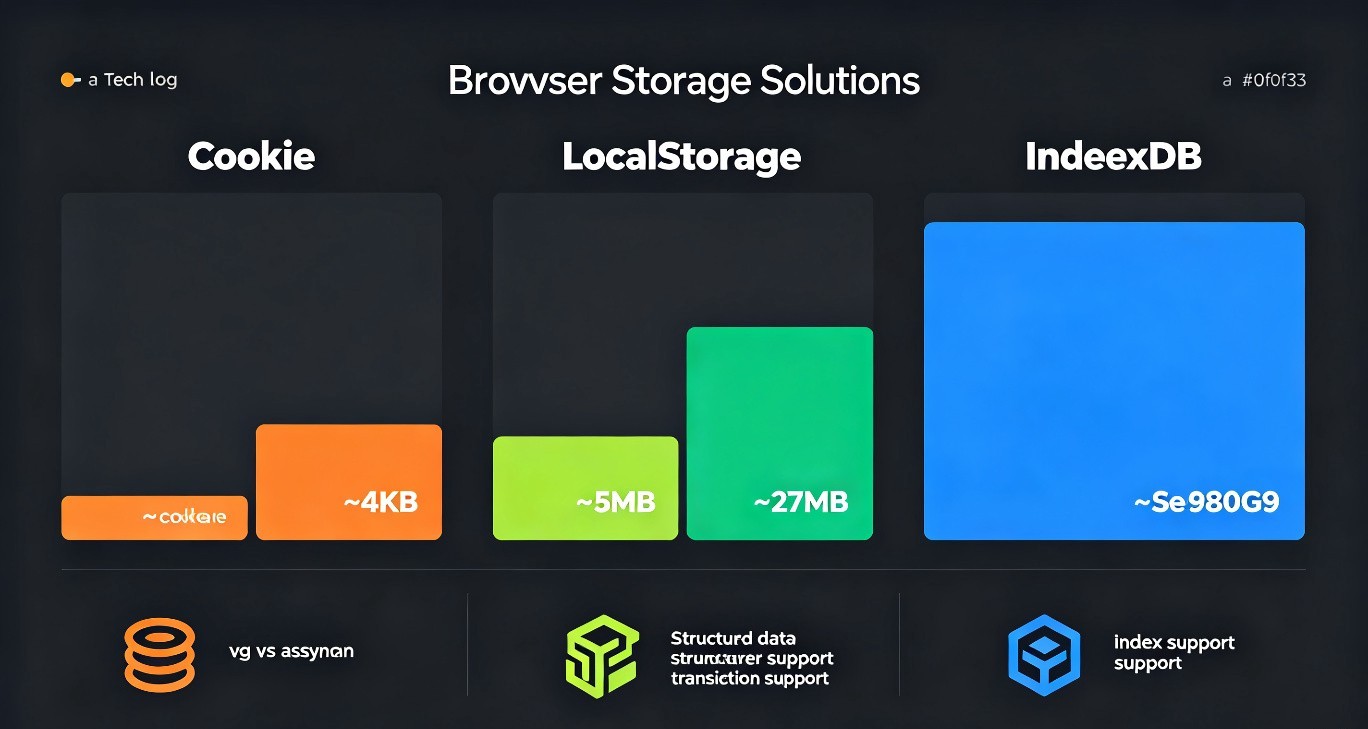
| 特性 | Cookie | localStorage | IndexedDB |
|---|---|---|---|
| 容量 | 约 4KB | 约 5MB | 数 GB 级别 |
| 数据类型 | 仅字符串 | 仅字符串 | 对象、数组、Blob 等 |
| 操作方式 | 同步 | 同步 | 异步 |
| 事务支持 | 不支持 | 不支持 | 支持 |
| 索引查询 | 不支持 | 不支持 | 支持 |
| 主线程阻塞 | 会 | 会 | 不会 |
从表格可以看出,IndexedDB 在容量、数据类型、性能方面都有明显优势。代价是 API 相对复杂------不过通过合理的封装,这个问题可以很好地解决。
二、核心概念
在动手写代码之前,需要先理解 IndexedDB 的几个核心概念。它们与传统数据库的术语有对应关系:
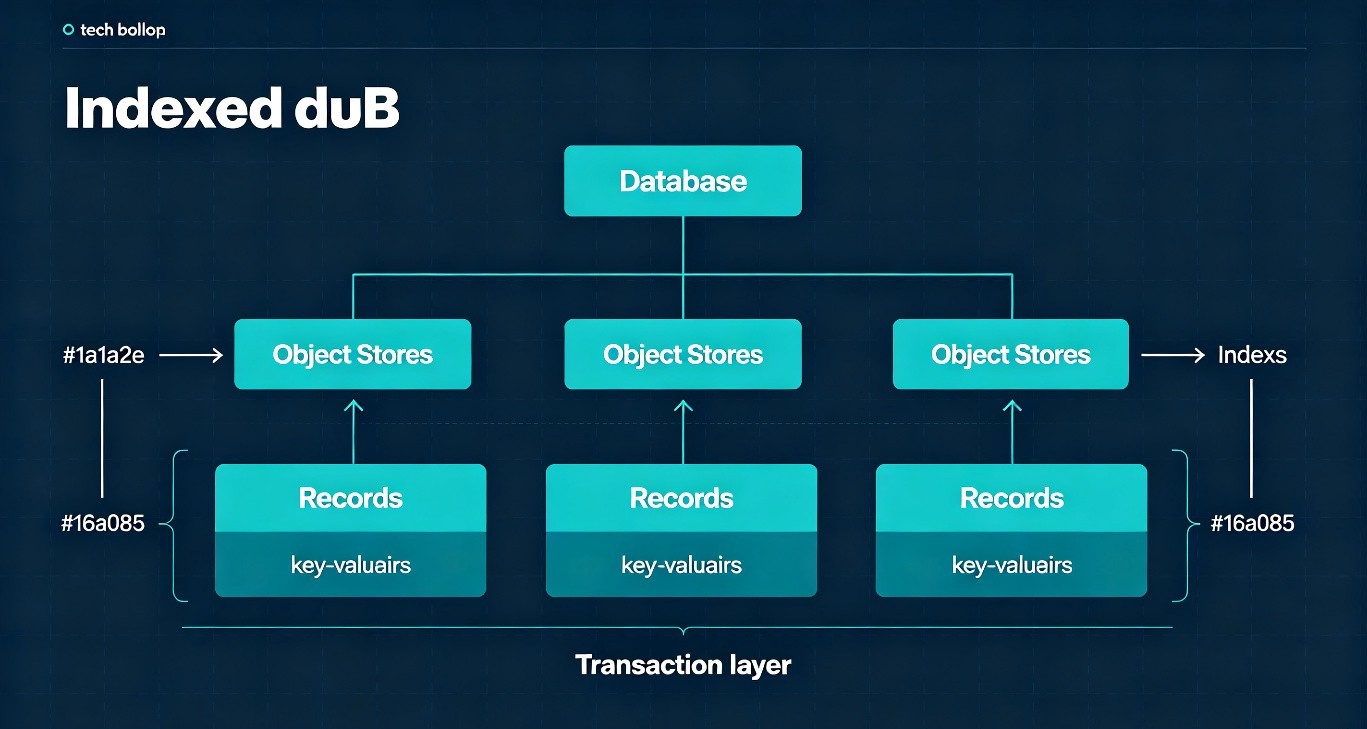
数据库(Database):每个域名下可以创建多个独立的数据库,每个数据库有唯一的名称和版本号。
对象仓库(Object Store):相当于关系型数据库中的"表",是存储数据的基本容器。数据以键值对(key-value)形式存储,每条记录必须有一个主键。
索引(Index) :建立在对象仓库之上的辅助数据结构,用于加速基于非主键字段的查询。可以创建唯一索引(unique: true)或普通索引。
事务(Transaction):IndexedDB 中所有数据操作都必须在事务中执行。事务有三种模式:
readonly:只读事务,查询数据时使用,多个 readonly 事务可以并行readwrite:读写事务,增删改数据时使用,同一对象仓库上同时只能有一个 readwrite 事务versionchange:版本变更事务,仅在数据库升级时触发,用于创建或删除对象仓库和索引
版本号:数据库的版本号是一个正整数,只能递增不能回退。修改数据库结构(增删对象仓库、创建索引)只能在版本升级时完成。
三、基础 API 与 Promise 封装
原生 IndexedDB API 基于事件回调,代码嵌套较深。在实际项目中,我们通常会封装一层 Promise 版本,用 async/await 来简化异步流程。
3.1 打开数据库
javascript
function openDB(name, version, upgradeCallback) {
  return new Promise((resolve, reject) => {
    const request = indexedDB.open(name, version);

    // 版本升级或首次创建时触发
    request.onupgradeneeded = (event) => {
      const db = event.target.result;
      upgradeCallback(db);
    };

    request.onsuccess = (event) => {
      resolve(event.target.result);
    };

    request.onerror = (event) => {
      reject(event.target.error);
    };
  });
}
在 onupgradeneeded 回调中创建对象仓库和索引:
javascript
const db = await openDB('appDB', 1, (db) => {
  if (!db.objectStoreNames.contains('users')) {
    const store = db.createObjectStore('users', {
      keyPath: 'id',
      autoIncrement: true
    });
    // 创建索引
    store.createIndex('name', 'name', { unique: false });
    store.createIndex('email', 'email', { unique: true });
  }
});
3.2 CRUD 操作封装
将事务创建和请求处理统一封装,减少重复代码:
javascript
function withTransaction(db, storeName, mode, callback) {
  return new Promise((resolve, reject) => {
    const tx = db.transaction(storeName, mode);
    const store = tx.objectStore(storeName);
    const result = callback(store);

    if (result instanceof IDBRequest) {
      result.onsuccess = () => resolve(result.result);
      result.onerror = () => reject(result.error);
    } else {
      tx.oncomplete = () => resolve(result);
      tx.onerror = () => reject(tx.error);
    }
  });
}

// 新增数据
function add(db, storeName, data) {
  return withTransaction(db, storeName, 'readwrite', (store) => {
    return store.add(data);
  });
}

// 根据主键查询
function get(db, storeName, key) {
  return withTransaction(db, storeName, 'readonly', (store) => {
    return store.get(key);
  });
}

// 更新数据(put 方法:主键存在则更新,不存在则新增)
function put(db, storeName, data) {
  return withTransaction(db, storeName, 'readwrite', (store) => {
    return store.put(data);
  });
}

// 删除数据
function remove(db, storeName, key) {
  return withTransaction(db, storeName, 'readwrite', (store) => {
    return store.delete(key);
  });
}

// 查询所有数据
function getAll(db, storeName) {
  return withTransaction(db, storeName, 'readonly', (store) => {
    return store.getAll();
  });
}

// 通过索引查询
function getByIndex(db, storeName, indexName, value) {
  return withTransaction(db, storeName, 'readonly', (store) => {
    const index = store.index(indexName);
    return index.get(value);
  });
}
使用起来非常简洁:
javascript
// 新增用户
const id = await add(db, 'users', {
  name: '张三',
  email: 'zhangsan@example.com',
  age: 28
});

// 通过主键查询
const user = await get(db, 'users', id);

// 通过索引查询
const userByEmail = await getByIndex(db, 'users', 'email', 'zhangsan@example.com');

// 更新
await put(db, 'users', { ...user, age: 29 });

// 删除
await remove(db, 'users', id);
3.3 版本升级
当需要新增对象仓库或索引时,递增版本号即可:
javascript
const dbV2 = await openDB('appDB', 2, (db) => {
  // 版本 2:新增 orders 仓库
  if (!db.objectStoreNames.contains('orders')) {
    const store = db.createObjectStore('orders', { keyPath: 'orderId' });
    store.createIndex('userId', 'userId', { unique: false });
    store.createIndex('status', 'status', { unique: false });
  }
  // 为已有的 users 仓库新增索引
  if (db.objectStoreNames.contains('users')) {
    const userStore = db.transaction.objectStore('users');
    if (!userStore.indexNames.contains('age')) {
      userStore.createIndex('age', 'age', { unique: false });
    }
  }
});
四、实战场景
4.1 离线应用数据缓存
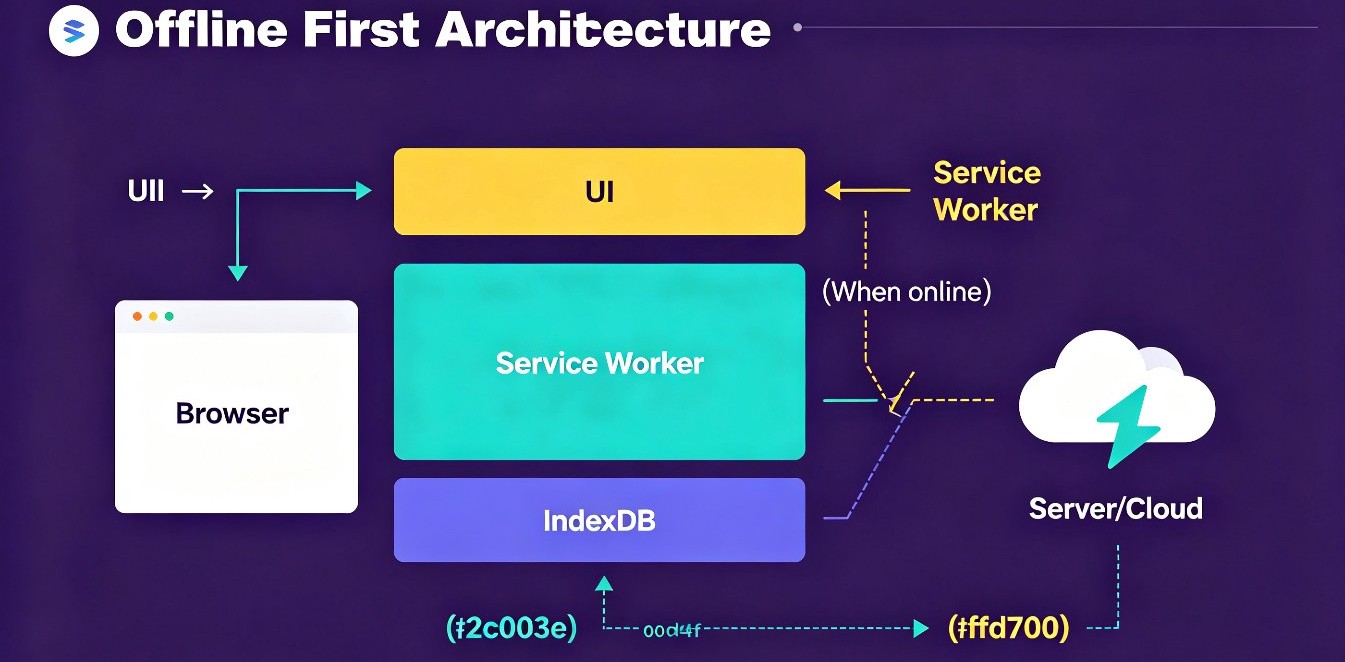
在 PWA 或需要离线能力的应用中,IndexedDB 承担着核心的数据持久化角色。结合 Service Worker,可以实现"离线可用、上线同步"的完整体验。
核心思路是:应用启动时优先从 IndexedDB 加载数据渲染页面,同时后台发起网络请求更新数据并写入 IndexedDB。离线时直接使用本地数据,用户操作产生的变更记录在同步队列中,恢复网络后批量提交到服务端。
javascript
// 离线数据管理器
class OfflineDataManager {
  constructor(db) {
    this.db = db;
    this.syncQueue = [];
    this.isOnline = navigator.onLine;

    window.addEventListener('online', () => {
      this.isOnline = true;
      this.flushSyncQueue();
    });
    window.addEventListener('offline', () => {
      this.isOnline = false;
    });
  }

  // 加载数据:优先本地,其次网络
  async loadData(storeName, fetchUrl) {
    // 先从本地读取
    const localData = await getAll(this.db, storeName);
    if (localData.length > 0) {
      // 有本地数据,先渲染,后台静默更新
      this.backgroundSync(storeName, fetchUrl);
      return localData;
    }

    // 无本地数据,走网络
    if (this.isOnline) {
      const response = await fetch(fetchUrl);
      const data = await response.json();
      // 批量写入 IndexedDB
      const tx = this.db.transaction(storeName, 'readwrite');
      const store = tx.objectStore(storeName);
      for (const item of data) {
        store.put(item);
      }
      return data;
    }

    return [];
  }

  // 后台静默同步
  async backgroundSync(storeName, fetchUrl) {
    if (!this.isOnline) return;
    try {
      const response = await fetch(fetchUrl);
      const data = await response.json();
      const tx = this.db.transaction(storeName, 'readwrite');
      const store = tx.objectStore(storeName);
      store.clear();
      for (const item of data) {
        store.put(item);
      }
    } catch (e) {
      console.warn('后台同步失败,下次重试', e);
    }
  }

  // 离线操作入队
  enqueueSync(storeName, operation, data) {
    this.syncQueue.push({ storeName, operation, data, timestamp: Date.now() });
    if (this.isOnline) this.flushSyncQueue();
  }

  // 恢复网络后批量同步
  async flushSyncQueue() {
    if (this.syncQueue.length === 0) return;
    const tasks = [...this.syncQueue];
    this.syncQueue = [];
    for (const task of tasks) {
      try {
        await fetch('/api/sync', {
          method: 'POST',
          headers: { 'Content-Type': 'application/json' },
          body: JSON.stringify(task)
        });
      } catch (e) {
        // 同步失败,重新入队
        this.syncQueue.push(task);
      }
    }
  }
}
4.2 大数据量本地缓存
在聊天应用、日志系统、数据看板等场景中,前端可能需要处理数千甚至数万条数据。直接存储在内存中会导致页面性能下降,而 IndexedDB 可以很好地解决这个问题。
关键实践:合理设计索引 + 游标分页查询。
javascript
// 游标分页查询
function getPage(db, storeName, indexName, pageSize, offset) {
  return new Promise((resolve, reject) => {
    const tx = db.transaction(storeName, 'readonly');
    const store = tx.objectStore(storeName);
    const index = indexName ? store.index(indexName) : store;
    const request = index.openCursor(null, 'prev'); // 按时间倒序
    const results = [];
    let skipped = 0;

    request.onsuccess = (event) => {
      const cursor = event.target.result;
      if (!cursor) {
        resolve(results);
        return;
      }
      if (skipped < offset) {
        skipped++;
        cursor.continue();
      } else if (results.length < pageSize) {
        results.push(cursor.value);
        cursor.continue();
      } else {
        resolve(results);
      }
    };

    request.onerror = () => reject(request.error);
  });
}

// 使用示例:加载第 3 页,每页 20 条
const messages = await getPage(db, 'messages', 'timestamp', 20, 40);
4.3 图片与文件缓存
IndexedDB 支持直接存储 Blob 和 ArrayBuffer,适合做图片、文档等文件的本地缓存,减少重复请求,提升用户体验。
javascript
// 缓存图片到 IndexedDB
async function cacheImage(db, url) {
  const response = await fetch(url);
  const blob = await response.blob();
  await put(db, 'imageCache', {
    url,
    blob,
    timestamp: Date.now()
  });
}

// 从 IndexedDB 读取缓存的图片
async function getCachedImage(db, url) {
  const record = await getByIndex(db, 'imageCache', 'url', url);
  if (record) {
    return URL.createObjectURL(record.blob);
  }
  return null;
}

// 使用
const imageUrl = await getCachedImage(db, 'https://example.com/photo.jpg');
if (imageUrl) {
  img.src = imageUrl; // 直接使用本地缓存
} else {
  img.src = 'https://example.com/photo.jpg';
  cacheImage(db, 'https://example.com/photo.jpg'); // 后台缓存
}
五、常见踩坑与解决方案
坑 1:版本升级被阻塞
当数据库版本发生变化时,如果旧版本的连接尚未关闭(比如其他标签页还持有连接),onupgradeneeded 事件会被阻塞,onblocked 事件触发。
解决方案 :在关闭数据库或页面卸载时,主动关闭数据库连接;升级前监听 onblocked 事件并提示用户关闭其他标签页。
javascript
request.onblocked = () => {
  console.warn('数据库升级被阻塞,请关闭其他使用该数据库的标签页');
};
坑 2:事务自动提交
IndexedDB 的事务会在微任务队列清空后自动提交。如果你在事件回调之外使用 await 等异步操作,事务可能在你完成操作之前就已经提交了。
解决方案 :在事务创建后,立即同步地发起所有请求,不要在事务中间插入 await。
javascript
// 错误写法:await 导致事务提前提交
const tx = db.transaction('users', 'readwrite');
const store = tx.objectStore('users');
const user = await fetch('/api/user'); // 事务可能在这里已提交
store.put(user); // 抛出 TransactionInactiveError

// 正确写法:同步发起请求
const tx = db.transaction('users', 'readwrite');
const store = tx.objectStore('users');
store.put(data1);
store.put(data2);
store.put(data3);
await new Promise((resolve) => {
  tx.oncomplete = resolve;
  tx.onerror = () => reject(tx.error);
});
坑 3:并发写入冲突
同一对象仓库上同时只能有一个 readwrite 事务。如果多个异步操作同时尝试写入,后续事务会排队等待,甚至可能因超时而失败。
解决方案:将批量操作合并到同一个事务中执行,避免创建过多并发写事务。
javascript
// 批量写入:在同一个事务中完成
function batchPut(db, storeName, items) {
  return new Promise((resolve, reject) => {
    const tx = db.transaction(storeName, 'readwrite');
    const store = tx.objectStore(storeName);
    for (const item of items) {
      store.put(item);
    }
    tx.oncomplete = () => resolve();
    tx.onerror = () => reject(tx.error);
  });
}
坑 4:存储配额超限
虽然 IndexedDB 容量很大,但并非无限。当存储接近浏览器分配的上限时,写入操作会失败,触发 QuotaExceededError。
解决方案:主动监控存储用量,定期清理过期数据;在写入时捕获配额错误并给用户提示。
javascript
// 检查存储用量
async function checkStorageUsage() {
  if (navigator.storage && navigator.storage.estimate) {
    const { usage, quota } = await navigator.storage.estimate();
    const percentage = ((usage / quota) * 100).toFixed(2);
    console.log(`已使用 ${percentage}%(${(usage / 1024 / 1024).toFixed(1)}MB / ${(quota / 1024 / 1024).toFixed(1)}MB)`);
    return percentage;
  }
  return null;
}

// 写入时捕获配额错误
try {
  await put(db, 'largeData', hugeObject);
} catch (e) {
  if (e.name === 'QuotaExceededError') {
    console.warn('存储空间不足,请清理过期数据');
  }
}
坑 5:浏览器兼容性差异
主流现代浏览器(Chrome、Firefox、Edge、Safari)均已支持 IndexedDB,但在一些细节上存在差异。例如 Safari 在隐私模式下会禁用 IndexedDB,部分移动端浏览器对存储配额的限制更严格。
解决方案:使用前做特性检测,对不支持的环境提供降级方案。
javascript
if (!window.indexedDB) {
  // 降级到 localStorage 或提示用户升级浏览器
  console.warn('当前浏览器不支持 IndexedDB');
}
六、总结
IndexedDB 是前端本地存储体系中能力最强的方案。当你的应用需要存储大量结构化数据、支持离线访问、或者进行复杂查询时,它几乎是唯一的选择。
选型建议:
- 简单的键值配置、用户偏好设置 → localStorage 足够
- 需要携带到服务端的少量标识信息 → Cookie
- 大容量数据存储、离线应用、复杂查询 → IndexedDB
- 网络请求缓存、静态资源缓存 → Cache API(可与 IndexedDB 配合使用)
掌握 IndexedDB 的核心概念和封装技巧,是每个有经验的前端开发者都值得投入的事情。希望这篇文章能帮助你在实际项目中更自信地使用它。