一、需求来源
最近遇到一个需求:
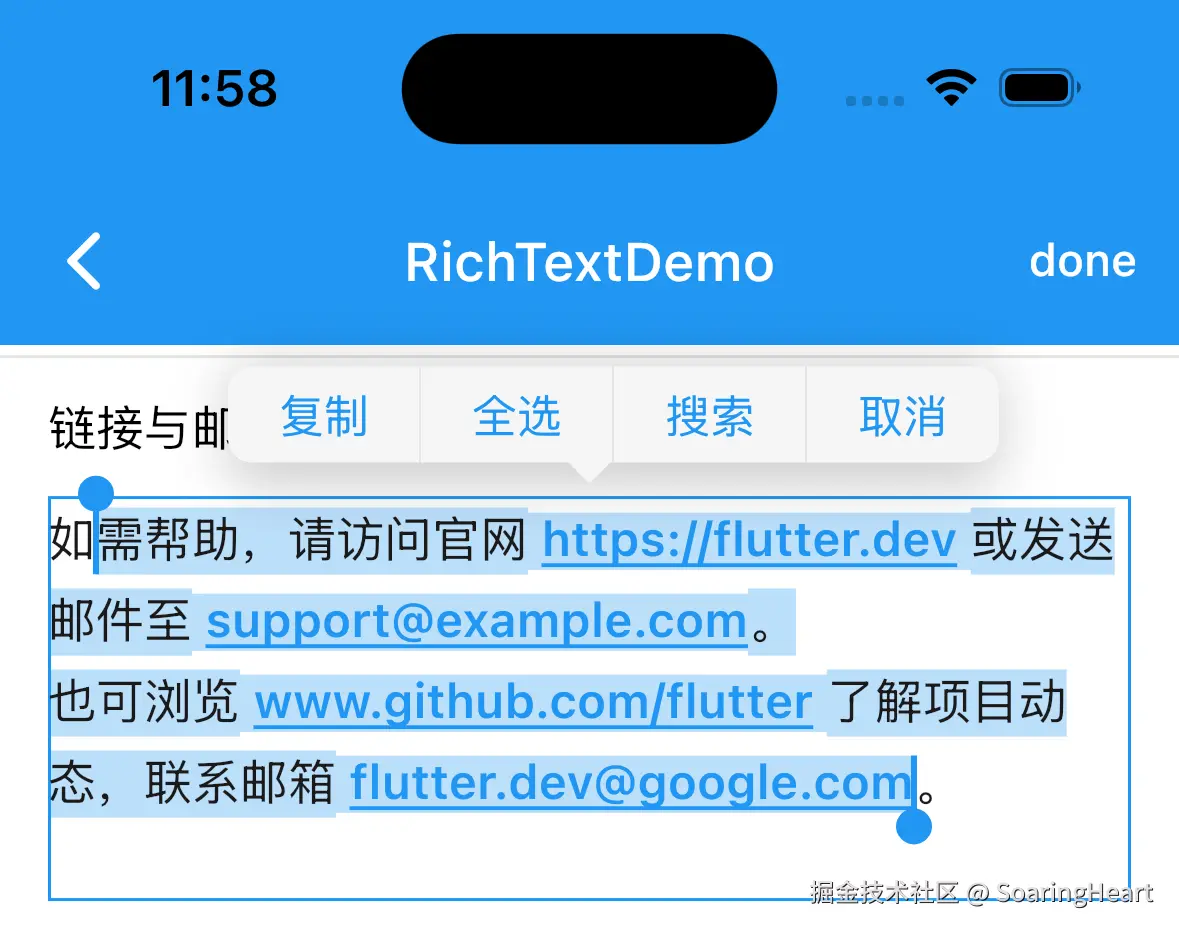
1、IM模块聊天消息链接自动识别跳转,需要识别邮箱,识别网络连接等。
2、同时可以长按选择文字。
最终效果如下:
二、使用示例
1、封装 RichTextExt 静态函数 createTextSpansByRegExp 基于正则匹配链接与邮箱。
2、SelectableText 实现长按拖选文字及长按菜单自定义,当 onSelectionChanged: null 时,长按选择无效。
dart
  final String autoLinkText = '''
如需帮助,请访问官网 https://flutter.dev 或发送邮件至 support@example.com。
也可浏览 www.github.com/flutter 了解项目动态,联系邮箱 flutter.dev@google.com。
''';

/// 自动识别链接与邮箱
Widget buildAutoLinkRichText() {
 //正则匹配链接与邮箱
  final linkRegExp = RegExp(
    r'(?:https?://|www.)[^\s,。;、<>[]""]+|[a-zA-Z0-9._%+-]+@[a-zA-Z0-9.-]+.[a-zA-Z]{2,}',
    caseSensitive: false,
  );
  DLog.d('linkRegExp 识别结果: $linkRegExp');
  return SelectableText.rich(
    TextSpan(
      style: TextStyle(
        fontSize: 16,
      ),
      children: RichTextExt.createTextSpansByRegExp(
        text: autoLinkText,
        regExp: linkRegExp,
        linkStyle: const TextStyle(
          fontSize: 16,
          color: Colors.blue,
          fontWeight: FontWeight.w600,
          decorationColor: Colors.blue,
          decoration: TextDecoration.underline,
        ),
        onLink: (v) {
          DLog.d('自定义高亮: $v');
          if (v.startsWith('http')) {
            openLink(v);
          } else {
            openEmail(v);
          }
        },
      ),
    ),
    contextMenuBuilder: SelectableRegionExt.editableTextContextMenu,
    // onSelectionChanged: null,
  );
}

Future<void> openUrl(Uri uri) async {
  try {
    final launched = await launchUrl(uri, mode: LaunchMode.externalApplication);
    if (!launched) {
      ToastUtil.info('打开链接失败: $uri');
      return;
    }
    DLog.d('打开链接: $uri');
  } catch (e) {
    ToastUtil.info('打开链接失败: $uri');
  }
}

Future<void> openLink(String url) async {
  final uri = url.startsWith('http') ? Uri.parse(url) : Uri.parse('https://$url');
  await openUrl(uri);
}

Future<void> openEmail(String email) async {
  final uri = Uri(scheme: 'mailto', path: email);
  await openUrl(uri);
}
三、源码
rich_text_ext.dart
dart
//
//  rich_text_ext.dart
//  flutter_templet_project
//
//  Created by shang on 7/31/21 1:48 PM.
//  Copyright © 7/31/21 shang. All rights reserved.
//

import 'package:flutter/gestures.dart';
import 'package:flutter/material.dart';
import 'package:flutter/services.dart';

extension RichTextExt on RichText {
  /// 创建 List<TextSpan>
  ///
  /// text 整个段落
  /// textTaps 高亮字符串数组
  /// style 段落样式
  /// linkStyle 高亮样式
  /// prefix 切割符号,避免和文章包含字符串重复
  /// suffix 切割符号,避免和文章包含字符串重复
  /// onLink 高亮部分点击事件
  static List<TextSpan> createTextSpans({
    required String text,
    required List<String> textTaps,
    TextStyle? style,
    TextStyle? linkStyle,
    String prefix = "_&t",
    String suffix = "_&t",
    void Function(String v)? onLink,
  }) {
    final pattern = textTaps.map((d) => RegExp.escape(d)).join('|');
    final regExp = RegExp(pattern, multiLine: true, caseSensitive: false);
    final textNew = text.splitMapJoin(
      regExp,
      onMatch: (m) => '$prefix${m[0]}$suffix', // (or no onMatch at all)
      onNonMatch: (n) => n,
    );

    final list = textNew.split(RegExp('$prefix|$suffix'));
    return list.map((e) {
      if (e.isNotEmpty) {
        final isEquel =
            textTaps.contains(e) || textTaps.contains(e.toLowerCase()) || textTaps.contains(e.toUpperCase());
        if (isEquel) {
          return TextSpan(
            text: e,
            style: linkStyle ?? TextStyle(color: Colors.blue),
            recognizer: onLink == null ? null : TapGestureRecognizer()
              ?..onTap = () {
                onLink?.call(e);
              },
          );
        }
      }
      return TextSpan(text: e, style: style);
    }).toList();
  }

  /// 根据正则表达式创建 TextSpan
  ///
  /// text 整个段落
  /// regExp 正则表达式
  /// style 段落样式
  /// linkStyle 高亮样式
  /// prefix 切割符号,避免和文章包含字符串重复
  /// suffix 切割符号,避免和文章包含字符串重复
  /// onLink 高亮部分点击事件
  static List<TextSpan> createTextSpansByRegExp({
    required String text,
    required RegExp regExp,
    TextStyle? style,
    TextStyle? linkStyle,
    String prefix = "_&t",
    String suffix = "_&t",
    void Function(String v)? onLink,
  }) {
    final links = regExp.allMatches(text).map((e) => e.group(0)).where((e) => e != null).map((e) => e!).toList();
    return RichTextExt.createTextSpans(
      text: text,
      textTaps: links,
      style: style,
      linkStyle: linkStyle,
      prefix: prefix,
      suffix: suffix,
      onLink: onLink,
    );
  }
}
selectable_region_ext.dart 源码
dart
//
//  SelectableRegionExt.dart
//  flutter_templet_project
//
//  Created by shang on 2026/6/16 18:36.
//  Copyright © 2026/6/16 shang. All rights reserved.
//

import 'package:flutter/cupertino.dart';
import 'package:flutter/material.dart';
import 'package:flutter_templet_project/extension/extension_local.dart';

extension SelectableRegionExt on SelectableRegion {
  /// 文字消息上下文菜单
  static Widget editableTextContextMenu(BuildContext context, EditableTextState state) {
    final anchors = state.contextMenuAnchors;
    final style = TextStyle(color: context.themeData.colorScheme.primary);
    final children = [
      TextButton(
        onPressed: () {
          state.copySelection(SelectionChangedCause.toolbar);
        },
        child: Text('复制', style: style),
      ),
      TextButton(
        onPressed: () {
          state.selectAll(SelectionChangedCause.toolbar);
        },
        child: Text('全选', style: style),
      ),
      TextButton(
        onPressed: () {
          state.searchWebForSelection(SelectionChangedCause.toolbar);
        },
        child: Text('搜索', style: style),
      ),
      TextButton(
        onPressed: () {
          FocusManager.instance.primaryFocus?.unfocus();
          state.hideToolbar();
        },
        child: Text('取消', style: style),
      ),
    ];
    return CupertinoTextSelectionToolbar(
      anchorAbove: anchors.primaryAnchor,
      anchorBelow: anchors.secondaryAnchor == null ? anchors.primaryAnchor : anchors.secondaryAnchor!,
      children: children,
    );
    // return AdaptiveTextSelectionToolbar(
    //   anchors: editableTextState.contextMenuAnchors,
    //   children: children
    // );
  }

  /// 文字消息上下文菜单
  static Widget selectableRegionContextMenu(BuildContext context, SelectableRegionState state) {
    final anchors = state.contextMenuAnchors;
    return CupertinoTextSelectionToolbar(
      anchorAbove: anchors.primaryAnchor,
      anchorBelow: anchors.secondaryAnchor ?? anchors.primaryAnchor,
      children: [
        CupertinoTextSelectionToolbarButton.text(
          onPressed: () {
            state.copySelection(SelectionChangedCause.toolbar);
          },
          text: '复制',
        ),
        CupertinoTextSelectionToolbarButton.text(
          onPressed: () {
            state.selectAll(SelectionChangedCause.toolbar);
          },
          text: '全选',
        ),
        CupertinoTextSelectionToolbarButton.text(
          onPressed: () {
            FocusManager.instance.primaryFocus?.unfocus();
            state.hideToolbar();
          },
          text: '取消',
        ),
      ],
    );
  }
}
总结
1、核心基于富文本 SelectableText.rich 实现,用正则将连接匹配为特殊样式的 TextSpan进行渲染。如果需要支持更多的场景,自己扩展正则支持即可。
2、通过第三方库也可以实现同样的效果。 flutter_linkify
3、 github