--check Runlevel: 3 or 5
runlevel
N 5
---检查disk scheduler
cat /sys/block/${ASM_DISK}/queue/scheduler
In general, Oracle recommends that you set the I/O Scheduler to mq-deadline for rotating storage devices (HDDs) and to none for non-rotating storage devices such as SSDs and NVMe on Oracle Linux 8 and later, RHEL 8 and later, and SUSE Linux Enterprise Server 15 and later systems.
--total Memory
grep MemTotal /proc/meminfo
--swap
grep SwapTotal /proc/meminfo
--determine system architecture
uname -m
---if oracle user exists, consider to delete it. and run 'dnf install -y oracle-ai-database-preinstall-26ai'
id oracle
userdel -r oracle
groupdel oracle
建议用官方的oracle-ai-database-preinstall-26ai,自动设置。
dnf install -y oracle-ai-database-preinstall-26ai
--RPM log
/var/log/oracle-ai-database-preinstall-26ai/backup/timestamp/orakernel.log
--check umask in oracle user environment
umask
--configure HugePages
--https://docs.oracle.com/en/database/oracle/oracle-database/26/ladbi/configuring_hugepages.html
--Oracle recommends that you reserve a minimum of 30 percent of the total memory for standard pages and not more than 70 percent of the total memory for HugePages.
--for example, SGA 6G then: (1024*6+256)/2
vi /etc/sysctl.conf
vm.nr_hugepages = 3200
--让配置生效
sysctl -p
--解除 oracle 用户的内存锁定限制,这个值为最大锁定大小
--Specify the memlock setting in KB. Set the maximum locked memory limit to at least 90 percent of the current RAM when you enable HugePages memory and at least to 3145728 KB (3 GB) if you disable HugePages.
vi /etc/security/limits.conf
oracle soft memlock 11000000
oracle hard memlock 11000000
--Log in as the oracle user again and run the ulimit -l command to verify the new memlock setting
$ ulimit -l
--检查是否生效,没有的话要重启一下
grep Huge /proc/meminfo
grep Huge /proc/meminfo
AnonHugePages: 0 kB
ShmemHugePages: 0 kB
FileHugePages: 141312 kB
HugePages_Total: 3200
HugePages_Free: 3189
HugePages_Rsvd: 64
HugePages_Surp: 0
Hugepagesize: 2048 kB
Hugetlb: 6553600 kB
--root--
mkdir -p /u01/app/oracle/product/26.1.0/db_home
chown -R oracle:oinstall /u01
chmod -R 775 /u01
su - oracle
cd /u01/app/oracle/product/26.1.0/db_home
unzip /tmp/LINUX.X64_2326100_db_home.zip
export ORACLE_BASE=/u01/app/oracle
export ORACLE_HOME=$ORACLE_BASE/product/26.1.0/db_home
export PATH=ORACLE_HOME/bin:PATH
启用图形界面
有2种方法:用MobaXterm好处是不用装其它软件,坏处是图形显示,在下拉框时,有时出不来。VNC则不会。但VNC还需要装,麻烦。
1)Mobaxterm,确保它自带X server是运行的。(碰到一个坑,公司的软件管理策略,新版本的X Server一直是stopped状态,后来换成旧版本才能用。所以有必要先检查一下X server是起来的。)
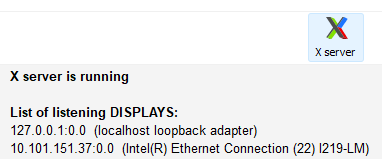
--10.101.151.37为你本机的ip,检查
export DISPLAY=10.101.151.37:0.0
cd $ORACLE_HOME
./runInstaller
如果oracle用户能直连,则不用这么麻烦,export DISPLAY都不用设,直接./runInstaller就可以。
2)vnc
--# 以 root 用户安装并启动
yum install tigervnc-server -y
vncserver :1
在你的 Windows 电脑上下载 VNC Viewer 客户端
连接 你的服务器IP:1,输入密码后进入 Linux 的完整图形桌面
echo $DISPLAY
xhost +
su - oracle
$ export DISPLAY=:1
装完后,清理vnc
ps -ef|grep vnc
vncserver -kill :1
yum remove tigervnc-server -y
rm -rf /root/.vnc