第一部分:基础核心(P0)
1. Spring AI 框架集成
1.1 设计理念
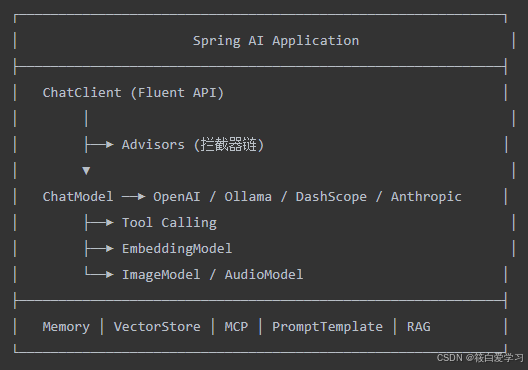
Spring AI 是 Spring 官方推出的 AI 应用开发框架,目标是为 Spring 生态提供一套统一的 AI 集成抽象:
-
可移植 API:同一套 API 对接 OpenAI、Anthropic、Ollama、通义千问、DeepSeek 等数十种模型
-
Spring 风格:自动配置、Starter 依赖、Bean 注入
-
面向生产:集成 VectorStore、Observability、Retry、Memory
-
支持高级特性:Function Calling、RAG、Advisors、MCP、Graph
1.2 核心架构
1.3 Maven 集成
XML
<dependencyManagement>
    <dependencies>
        <dependency>
            <groupId>org.springframework.ai</groupId>
            <artifactId>spring-ai-bom</artifactId>
            <version>1.0.0</version>
            <type>pom</type>
            <scope>import</scope>
        </dependency>
    </dependencies>
</dependencyManagement>

<dependencies>
    <!-- 保留其一即可(需要springboot的支持,版本必须3.3+) -->
    <!-- 原生 -->
    <!--        <dependency>-->
    <!--            <groupId>org.springframework.ai</groupId>-->
    <!--            <artifactId>spring-ai-starter-model-openai</artifactId>-->
    <!--        </dependency>-->
    <!-- 智普的 -->
    <dependency>
        <groupId>org.springframework.ai</groupId>
        <artifactId>spring-ai-starter-model-zhipuai</artifactId>
    </dependency>
    <dependency>
        <groupId>org.springframework.boot</groupId>
        <artifactId>spring-boot-starter-web</artifactId>
    </dependency>
</dependencies>
1.4 配置
集成使用不同厂家的模型有对应的说明,可以参考Spring AI Alibaba SpringAIAlibaba官网查看。
java
spring:
  ai:
    retry:
      max-attempts: 4
#    openai:
#      api-key: ${OPENAI_API_KEY}
#      base-url: https://api.openai.com
#      chat:
#        completions-path: /api/paas/v4/chat/completions    # 兼容的关键!必须显式指定
#        options:
#          model: gpt-4o-mini
#          temperature: 0.7
    zhipuai:
#      api-key: ${GLM_API_KEY}                                  # 在 bigmodel.cn 控制台获取
      base-url: https://open.bigmodel.cn/api/paas
      chat:
        options:
          model: glm-5
          temperature: 0.7
          max-tokens: 2000
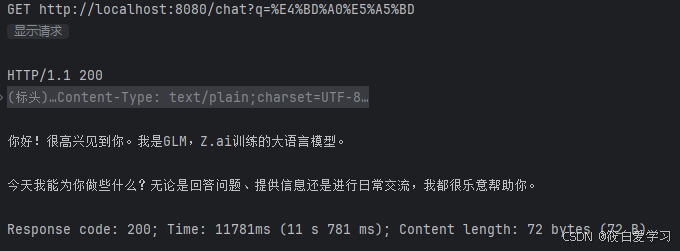
1.5 最小可运行示例
java
@RestController
public class HelloController {
    private final ChatClient chatClient;

    public HelloController(ChatClient.Builder builder) {
        this.chatClient = builder.build();
    }

    @GetMapping("/hi")
    public String hi(@RequestParam String q) {
        return chatClient.prompt().user(q).call().content();
    }
}
结果:
2. Message 使用
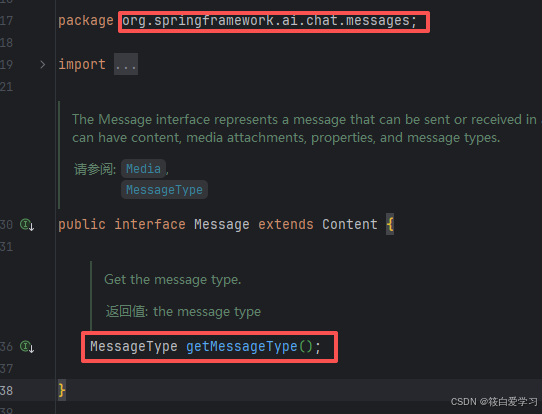
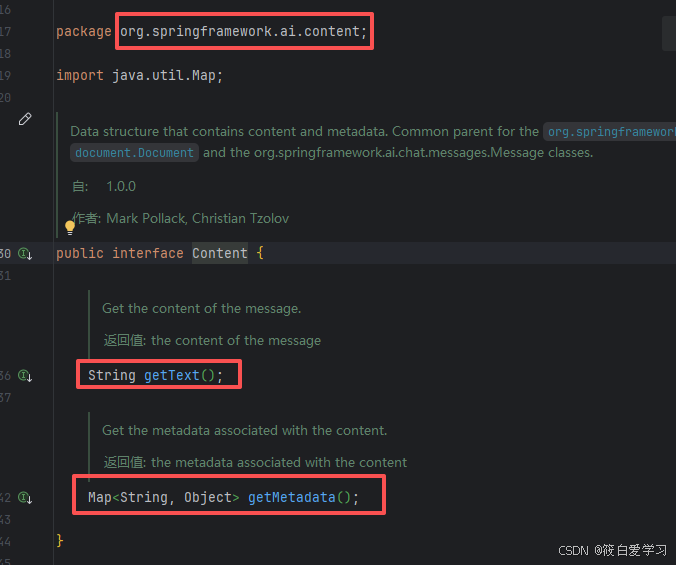
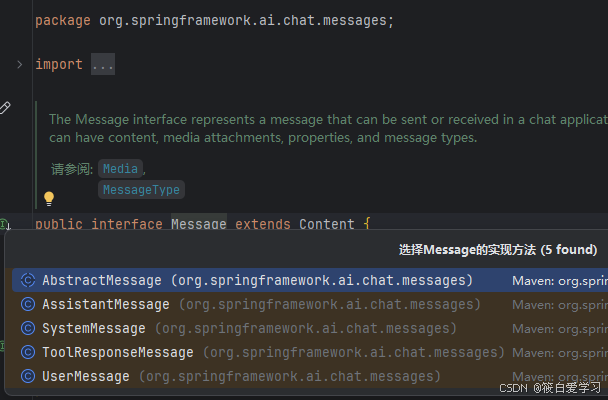
2.1 消息类型体系
源码:
java
public interface Message {
    String getText();
    MessageType getMessageType();   // SYSTEM / USER / ASSISTANT / TOOL
    Map<String, Object> getMetadata();
}
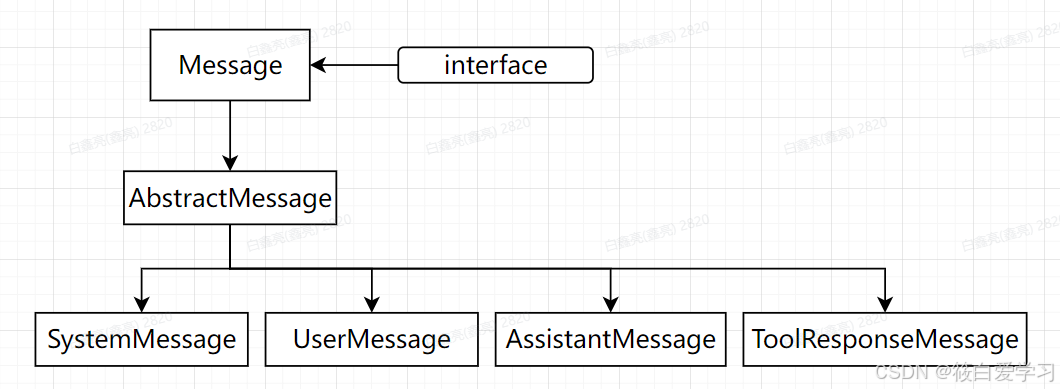
五种实现:
| 类型 | 角色 | 用途 |
|---|---|---|
AbstractMessage |
是Message接口的抽象实现 | |
SystemMessage |
system | 全局设定(人设、规则) |
UserMessage |
user | 用户输入(可含图片) |
AssistantMessage |
assistant | 模型回答 |
ToolResponseMessage |
tool | 工具调用结果回传 |
2.2 类图
2.3 创建示例
java
SystemMessage sys = new SystemMessage("你是一名 Java 架构师");

UserMessage user = new UserMessage("解释 RAG");

// 多模态:图片 + 文本
UserResource image = new FileSystemResource("D:/data/diagram.png");
UserMessage multi = UserMessage.builder()
        .text("描述这张图")
        .media(image)
        .build();

AssistantMessage ans = new AssistantMessage("RAG 是检索增强生成");

// 元数据
Map<String, Object> meta = Map.of("userId", "u-1001");
UserMessage msg = new UserMessage("帮我总结", meta);
测试demo:
java
private final ChatClient chatClient;

public GlmController(ChatClient.Builder builder) {
    this.chatClient = builder.build();
}

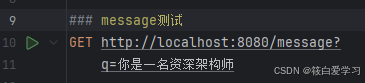
@GetMapping("/message")
public String message(@RequestParam String q) {
    SystemMessage sys = new SystemMessage("你是面试官");
    UserMessage user = new UserMessage(q);

    // 2. 把 Message 组装成 Prompt(可以加参数)
    Prompt prompt = new Prompt(List.of(sys, user));

    // 3. 方式 A: 直接交给 ChatModel(底层)
    // ChatResponse resp = chatModel.call(prompt);

    // 3. 方式 B: 通过 ChatClient(推荐,可加 advisor/tool)
    // 但 ChatClient 接收 Prompt 的方式:
    return chatClient.prompt(prompt)        // 直接传 Prompt 对象
        .call()
        .content();
}
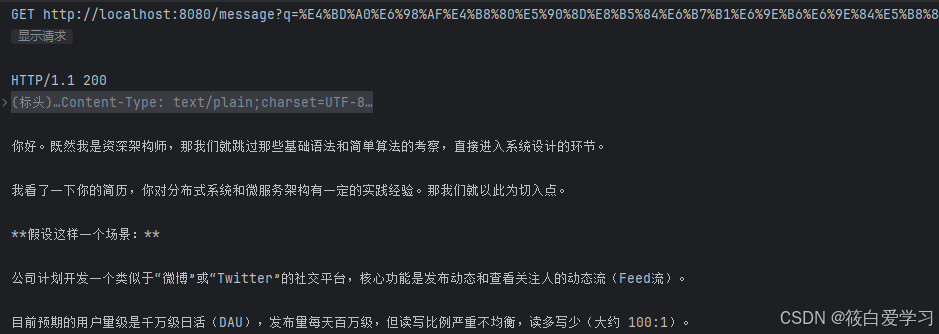
测试结果:
3. Prompt 使用
3.1 结构
java
Prompt
  ├── messages: List<Message>
  ├── chatOptions: ChatOptions
  └── metadata: Map<String,Object>
3.2 创建
java
// 字符串
Prompt p1 = new Prompt("讲个笑话");

// 多消息
Prompt p2 = new Prompt(List.of(
    new SystemMessage("你是相声演员"),
    new UserMessage("讲一段")
));

// 消息 + 参数
Prompt p3 = new Prompt(
    List.of(new UserMessage("写诗")),
    OpenAiChatOptions.builder()
        .model("gpt-4o")
        .temperature(0.8d)
        .build()
);

// 模板变量替换
Prompt p4 = new Prompt(
    "讲一个关于 {topic} 的故事",
    Map.of("topic", "程序员")
);
3.3 配合 ChatModel
java
@Resource
private ChatModel chatModel;

public String chat(String userInput) {
    Prompt prompt = new Prompt(List.of(
        new SystemMessage("你是资深架构师"),
        new UserMessage(userInput)
    ));
    ChatResponse resp = chatModel.call(prompt);
    return resp.getResult().getOutput().getText();
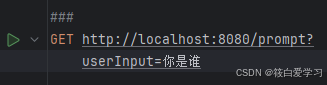
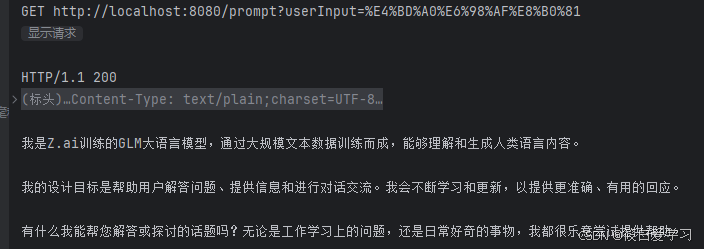
}
4. ChatResponse 使用
4.1 结构
java
public class ChatResponse implements ModelResponse<Generation> {
    private final ChatMetadata metadata;     // 模型、token 用量
    private final List<Generation> results;  // 候选答案
}

public class Generation {
    private final AssistantMessage output;
    private final ChatGenerationMetadata metadata;  // finishReason
}
4.2 访问关键字段
java
ChatResponse resp = chatClient.prompt().user("你好").call().chatResponse();

String text = resp.getResult().getOutput().getText();

resp.getResults().forEach(g -> System.out.println(g.getOutput().getText()));

Usage usage = resp.getMetadata().getUsage();
long prompt = usage.getPromptTokens();
long gen = usage.getCompletionTokens();
long total = usage.getTotalTokens();

System.out.println(resp.getMetadata().getModel());
4.3 流转图
java
Prompt ──► ChatModel.call() ──► HTTP/SDK
                                      │
                                      ▼
                              原始 JSON 返回
                                      │
                            ┌─────────┴────────┐
                            ▼                  ▼
                    解析为 Generation    解析 Usage
                            └────────┬─────────┘
                                     ▼
                                ChatResponse
5. ChatModel 使用
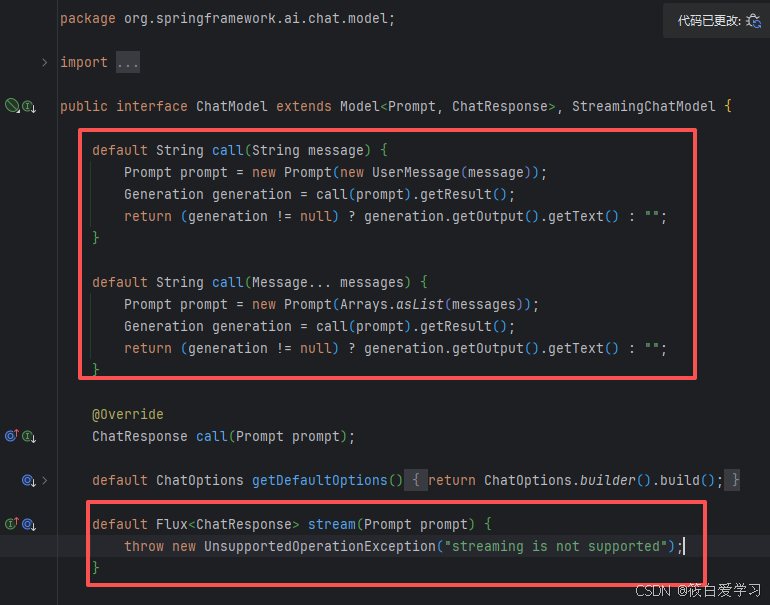
5.1 接口
java
public interface ChatModel extends Model<Prompt, ChatResponse> {
    ChatResponse call(String message);
    ChatResponse call(Prompt prompt);
    default Flux<ChatResponse> stream(Prompt prompt) { ... }
}
5.2 注入与调用
java
@Service
public class RawService {

    private final ChatModel chatModel;

    public RawService(ChatModel chatModel) {
        this.chatModel = chatModel;
    }

    public String chat(String input) {
        return chatModel.call(input);
    }

    public Flux<String> stream(String input) {
        return chatModel.stream(new Prompt(input))
                .map(r -> r.getResult().getOutput().getText());
    }
}
5.3 ChatModel vs ChatClient
| 维度 | ChatModel | ChatClient |
|---|---|---|
| 层级 | 底层,贴近 SDK | 高层,Fluent API |
| 风格 | call(Prompt) |
prompt().user().call() |
| Advisors | 不支持 | 内置 |
| 系统提示 | 无 | 可设 defaultSystem |
6. ChatClient 使用
6.1 创建
java
ChatClient client = ChatClient.builder(chatModel)
        .defaultSystem("你是智能助手")
        .defaultAdvisors(new MessageChatMemoryAdvisor(memory))
        .build();
6.2 四种返回方式
6.2.1 返回纯字符串
java
String answer = chatClient.prompt()
        .system("你是一名资深 SQL 专家")
        .user("写查询昨日销量的 SQL")
        .call()
        .content();
6.2.2 返回 ChatResponse
java
ChatResponse resp = chatClient.prompt()
        .user("推荐 5 本 SpringBoot 书")
        .call()
        .chatResponse();
6.2.3 响应转为实体
java
public record Book(String title, String author, double price) {}

Book book = chatClient.prompt()
        .user("推荐 SpringBoot 书,JSON 输出 title/author/price")
        .call()
        .entity(Book.class);

List<Book> books = chatClient.prompt()
        .user("推荐 5 本")
        .call()
        .entity(new ParameterizedTypeReference<List<Book>>() {});
6.2.4 流式输出
java
@GetMapping(value = "/chat/stream", produces = MediaType.TEXT_EVENT_STREAM_VALUE)
public Flux<String> stream(@RequestParam String q) {
    return chatClient.prompt()
            .user(q)
            .stream()
            .content();
}
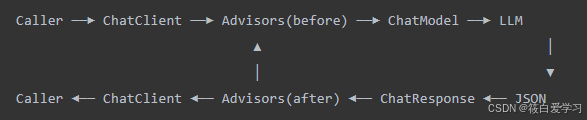
6.3 完整时序
7. PromptTemplate 使用
7.1 用法
java
// 字符串模板
PromptTemplate tpl = new PromptTemplate("你是 {role}。请用 {lang} 解释 {topic}。");
Prompt prompt = tpl.create(Map.of("role", "老师", "lang", "中文", "topic", "RAG"));

// 资源文件 resources/prompts/code-review.st
String tplText = new ClassPathResource("prompts/code-review.st").getContentAsString();
PromptTemplate tpl2 = new PromptTemplate(tplText);
Prompt prompt2 = tpl2.create(Map.of("code", "void foo(){}", "language", "java"));
7.2 模板文件示例
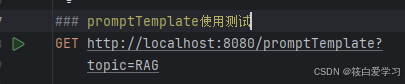
java
@GetMapping("/promptTemplate")
    public String PromptTemplate(@RequestParam String topic) {

        // 1. 定义模板,{xxx} 是占位符
        String tpl = "请用中文简要解释 {topic},控制在 50 字以内";
        PromptTemplate promptTemplate = new PromptTemplate(tpl);

        // 2. 填充变量
        Map<String, Object> vars = new HashMap<>();
        vars.put("topic", topic);

        // 3. 渲染成 Prompt
        Prompt prompt = promptTemplate.create(vars);

        // 4. 调用模型
        return chatModel.call(prompt).getResult().getOutput().getText();
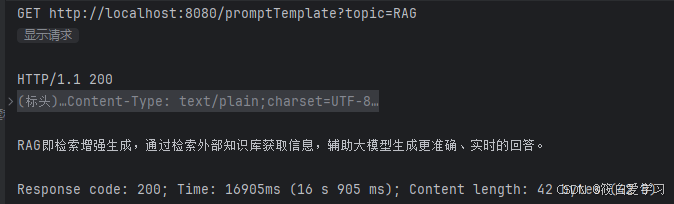
    }
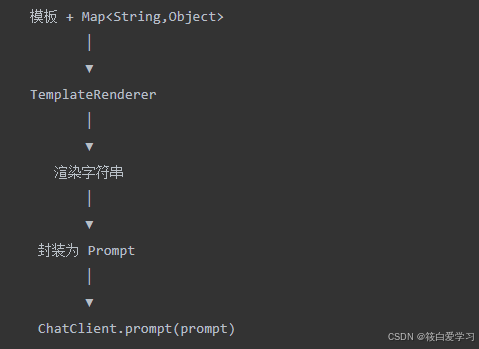
7.3 渲染流程
作者:筱白爱学习!!
欢迎关注转发评论点赞沟通,您的支持是筱白的动力!