本文,结合前面的几篇博客内容,扩展实现了 imx6ull开发板的 OTA 远程升级。
电脑或者手机,给开发板 发送控制指令,开发板接收指令后,下载升级包,烧录系统,重启,运行新的系统,数据区与系统隔离,用户数据不受系统升级的影响。
/etc/ /bin/ /sbin/ /usr/ /lib/ /root/ /home/ 都属于系统配置文件,和用户数据无关。每次buildroot 重新编译后,整个根文件系统被新 rootfs 覆盖,解决方案:写进 overlay。overlay 只放你需要额外配置的文件,系统默认的不用管,Buildroot 会自动生成。怎么创建 overlay? 可以问 ai ,或者参考我以前的博客。
/data/ /tmp/ 不会丢失:
| 目录 | 原因 |
|---|---|
/data/ |
独立分区,OTA 不碰 |
/tmp/ |
内存文件系统,每次重启清空 |
可以参考一下我的 rootfs_overlay 关于开机自动挂载和配置ip的文件,
rootfs_overlay/etc/init.d 目录下,添加 1 个 脚本,开机自动运行,用于自动配置 ip ,chmod +x 执行权限

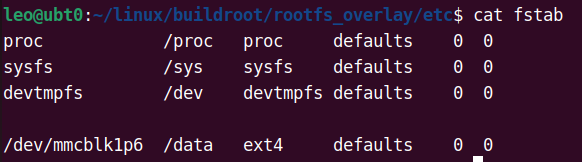
rootfs_overlay/etc 目录下,添加 1 个 fstab 文件,用于开机自动挂载:
proc /proc proc defaults 0 0
sysfs /sys sysfs defaults 0 0
devtmpfs /dev devtmpfs defaults 0 0
/dev/mmcblk1p6 /data ext4 defaults 0 0
经过测试,开发板 解析指令 + 下载 + 校验 + 烧录 + 切换分区 :
升级内核、设备树,需要约4秒,
升级根文件系统需要约20秒,rootfs.tar 压缩包大小是 62M
升级速度还是很快的。影响升级速度的最大因素是: 网络环境,网速不好的话,会卡在下载环节。 我用的网线 直连电脑和开发板。
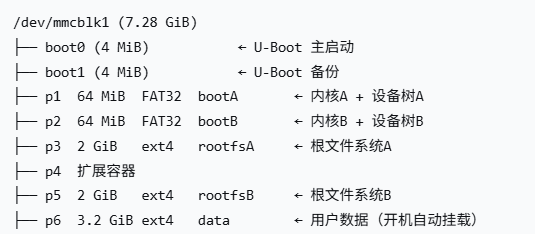
一、eMMC 分区布局
二、核心设计理念
boot A/B 与 rootfs A/B 完全独立切换。
| 升级内容 | 写入分区 | 修改变量 | 影响 |
|---|---|---|---|
| dtb + zImage | 目标 boot 分区 | bootpart |
下次从新内核启动 |
| rootfs.tar | 目标 rootfs 分区 | rootpart |
下次从新根文件系统启动 |
| U-Boot | boot0 + boot1 硬件分区 | 同时烧录,立即生效 |
三、U-Boot 环境变量
bootpart=2 # 当前 boot 分区
rootpart=3 # 当前 rootfs 分区
bootcmd=fatload mmc 1:{bootpart} 0x80800000 zImage;fatload mmc 1:{bootpart} 0x83000000 imx6ull-alientek-emmc.dtb;setenv bootargs console=ttymxc0,115200 root=/dev/mmcblk1p${rootpart} rootwait rw;bootz 0x80800000 - 0x83000000


bootcmd 动态使用变量,脚本改 bootpart / rootpart 即可切槽。
四、架构:多线程 + 消息驱动
main()
├── mosquitto_loop_start() ← MQTT 网络线程
├── pthread_create(ota_worker) ← OTA 工作线程
└── 主循环(5 秒周期)
├── publish_ota_status() ← 上报 OTA 状态
└── publish_temp() ← 每 60 秒上报温度
C 主控进程:持有 MQTT 长连接、维护升级状态机、做 解析和参数校验、负责回滚逻辑和状态上报。
脚本只做 升级包下载、校验 SHA256、刷写、fw_setenv 等执行层工作。
关键设计:
OTA 在子线程中 fork + exec 脚本,不阻塞 MQTT 消息处理
queue_ota_job() 加互斥锁,防止重复触发 OTA
write_file_atomic() 原子写入状态文件,C 主控和 Shell 脚本通过文件通信
msg->retain 过滤历史消息,避免重复执行
五、OTA 升级脚本(ota_update.sh)
-
文件锁(防重入)
-
基础工具检查
-
识别当前 boot/root 槽位(三重兜底)
-
下载升级包 + SHA256 校验
-
校验通过 → 刷写目标分区 → fw_setenv 切槽
校验失败 → exit 1(不切槽)
操作参考:
升级包 、sha256 文件 、MQTT 程序、2个脚本, 全部发送到 Windows 的自定义目录里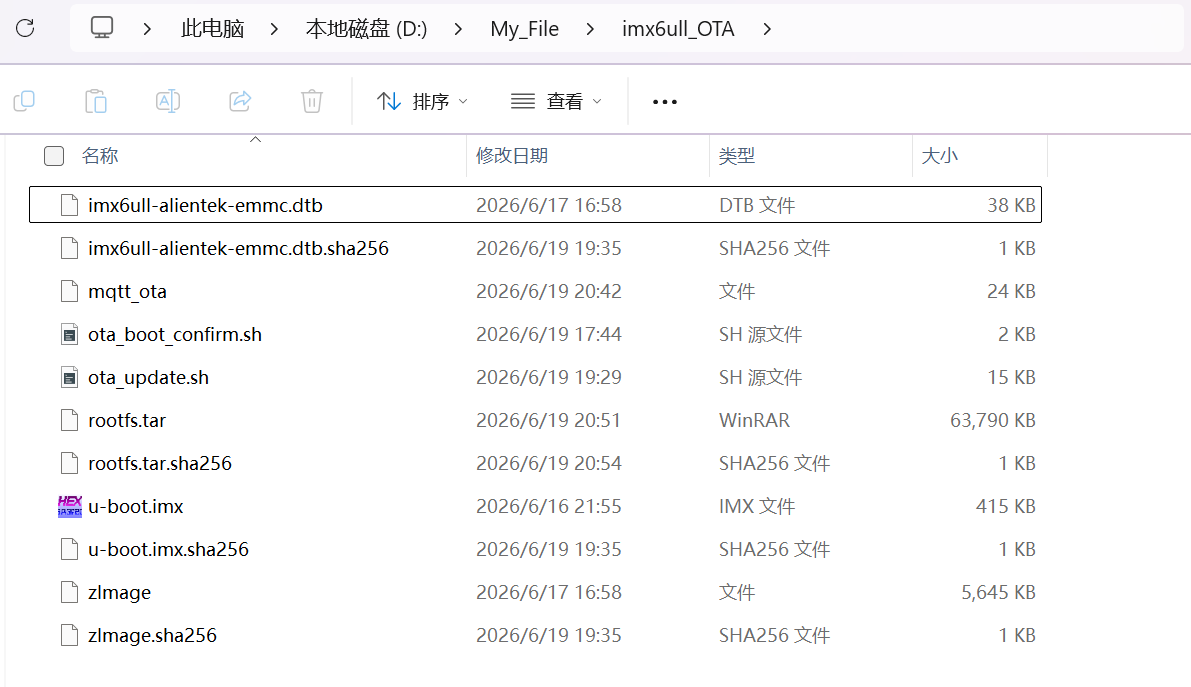
打开 Windows 的 powershell :
进入 Windows 的自定义目录,启动 HTTP 服务: python -m http.server 8080
MQTT 程序代码 mqtt_ota.c , 不会编译的话,我写过一篇buildroot sdk 的文章,里面有编译方法。
#include <stdio.h>
#include <stdlib.h>
#include <string.h>
#include <unistd.h>
#include <fcntl.h>
#include <signal.h>
#include <pthread.h>
#include <sys/wait.h>
#include <sys/reboot.h>
#include <sys/stat.h>
#include <errno.h>
#include <stdbool.h>
//include </home/leo/sdk/buildroot-sdk/arm-buildroot-linux-gnueabihf_sdk-buildroot/arm-buildroot-linux-gnueabihf/sysroot/usr/include/mosquitto.h>
#include <mosquitto.h>

#define BROKER_ADDRESS   "192.168.137.1"    // 电脑 ip
#define BROKER_PORT      1883
#define CLIENTID         "imx6ull_client"

#define WILL_TOPIC       "mqtt/will"
#define LED_TOPIC        "mqtt/led"
#define TEMP_TOPIC       "mqtt/temperature"
#define OTA_TOPIC        "mqtt/ota"
#define REBOOT_TOPIC     "mqtt/reboot"
#define OTA_STATUS_TOPIC "mqtt/ota_status"


#define OTA_STATUS_FILE  "/tmp/ota_status"
#define OTA_BOOT_OK_FILE "/tmp/ota_boot_ok"
#define OTA_SCRIPT_PATH  "/data/imx6ull_OTA/ota_update.sh"

static volatile sig_atomic_t g_stop = 0;
static struct mosquitto *g_mosq = NULL;

static pthread_t ota_thread;    // 线程 ID
static pthread_mutex_t ota_mutex = PTHREAD_MUTEX_INITIALIZER; //互斥锁
static pthread_cond_t ota_cond = PTHREAD_COND_INITIALIZER;  //条件变量

static int g_pending_cmd = 0;
static int g_has_pending = 0;
static int g_ota_running = 0;

static char g_last_published_status[50] = {0};
static int g_boot_ok_written = 0;

volatile int mqtt_online = 0;
volatile int ota_confirm_done = 0;

/* 去除字符串末尾的空白字符(换行、回车、空格、制表符)
 * 防止 fgets 读入的 \n 导致 printf 输出多余空行,
 * 同时避免 strcmp 因不可见字符而比较失败 */
static void trim_newline(char *s)
{
    if (!s) return;
    size_t n = strlen(s);
    while (n > 0 && (s[n - 1] == '\n' || s[n - 1] == '\r' ||
            s[n - 1] == ' '  || s[n - 1] == '\t'))
    {
        s[n - 1] = '\0';
        n--;
    }
}

/* 原子写入文件: 写临时文件 → fsync → 重命名 → 断电发生在重命名之前 → 原文件完好
任何时候断电:最坏结果 原文件完好,临时文件丢失,不会出现 原文件被破坏
此项目里: OTA 状态文件被 C 主控和 Shell 脚本同时读写,
如果没有原子写入,Shell 可能读到写了一半的 SUCC,导致误判。*/
static int write_file_atomic(const char *path, const char *str)
{
    char tmp_path[128];
    /* 生成临时文件名 */
    snprintf(tmp_path, sizeof(tmp_path), "%s.tmp", path);
    /* 创建/覆盖临时文件 */
    int fd = open(tmp_path, O_WRONLY | O_CREAT | O_TRUNC, 0644);
    if (fd < 0) {
        perror("open tmp file");
        return -1;
    }

    size_t len = strlen(str);
    ssize_t wr = write(fd, str, len);
    if (wr < 0 || (size_t)wr != len) {
        perror("write tmp file");
        close(fd);
        unlink(tmp_path);   // 删除文件
        return -1;
    }
    /* 强制刷盘: 确保数据从内核缓冲区真正写入 eMMC,不是只写在内存里。这是原子操作的关键 */
    fsync(fd);
    close(fd);

    /* rename 在 Linux 上是原子操作:
    如果 rename 成功,旧文件被替换,新内容立即生效
    如果 rename 之前断电,原文件完好,临时文件消失
    不会出现"文件存在但内容是旧的"或"文件存在但内容不完整 */
    if (rename(tmp_path, path) != 0) {
        perror("rename tmp file");
        unlink(tmp_path);
        return -1;
    }

    return 0;
}

static int read_first_line(const char *path, char *buf, size_t size)
{
    FILE *fp = fopen(path, "r");
    if (!fp)
        return -1;

    if (!fgets(buf, (int)size, fp)) { // 读第一行
        fclose(fp);
        return -1;
    }

    fclose(fp);
    trim_newline(buf);
    return 0;
}

static void handle_sigint(int sig)
{
    (void)sig;
    g_stop = 1;
}

static void ensure_boot_ok_marker(void)
{
    if (!g_boot_ok_written) {
        write_file_atomic(OTA_BOOT_OK_FILE, "OK");
        g_boot_ok_written = 1;
    }
}

static void set_led_mode(const char *payload)
{
    int fd;

    // 如果报错,检查自己开发板的trigger路径
    if (strcmp(payload, "2") == 0) {
        fd = open("/sys/class/leds/red/trigger", O_WRONLY);
        if (fd >= 0) {
            write(fd, "heartbeat\n", 10);
            close(fd);
        }
        return;
    }

    fd = open("/sys/class/leds/red/trigger", O_WRONLY);
    if (fd >= 0) {
        write(fd, "none\n", 5);
        close(fd);
    }

    fd = open("/sys/class/leds/red/brightness", O_WRONLY);
    if (fd >= 0) {
        if (strcmp(payload, "1") == 0) {
            write(fd, "1\n", 2);
        } else if (strcmp(payload, "0") == 0) {
            write(fd, "0\n", 2);
        }
        close(fd);
    }
}

static int queue_ota_job(int cmd)
{
    int ret = 0;

    // 同时只能一个线程进入临界区
    pthread_mutex_lock(&ota_mutex);
    // 两个都是 0 时,才能接收新任务。 防止重复触发 OTA
    if (g_ota_running || g_has_pending) {
        ret = -1;
    }
    else {
        g_pending_cmd = cmd;    // 保存指令(1/2/3/4)
        g_has_pending = 1;      // 标记有新任务
        pthread_cond_signal(&ota_cond); // 发送信号, 唤醒 OTA 工作线程
    }

    pthread_mutex_unlock(&ota_mutex);
    return ret;
}

/* 子线程, 专门处理 OTA 下载和烧录 */
static void *ota_worker_thread(void *arg)
{
    (void)arg;  // 消除编译警告

    while (!g_stop) {
        int cmd = 0;

        pthread_mutex_lock(&ota_mutex);
        while (!g_stop && !g_has_pending) {
            pthread_cond_wait(&ota_cond, &ota_mutex); // 条件变量等待
        }

        if (g_stop && !g_has_pending) {
            pthread_mutex_unlock(&ota_mutex);
            break;
        }

        cmd = g_pending_cmd;    // OTA 指令(1/2/3/4)
        g_pending_cmd = 0;
        g_has_pending = 0;
        g_ota_running = 1;  // 标记OTA正在运行
        pthread_mutex_unlock(&ota_mutex);

        write_file_atomic(OTA_STATUS_FILE, "UPGRADING"); //写入升级状态

        pid_t pid = fork();
        if (pid == 0) {
            char cmd_buf[8];
            snprintf(cmd_buf, sizeof(cmd_buf), "%d", cmd);
            execl("/bin/sh", "sh", OTA_SCRIPT_PATH, cmd_buf, (char *)NULL);
            // 等价于执行:/bin/sh /data/imx6ull_OTA/ota_update.sh cmd
            _exit(127); // 只有 exec 失败才会走到这里, Linux标准错误码
        }

        if (pid < 0) {
            perror("fork ota");
            write_file_atomic(OTA_STATUS_FILE, "FAILED");
        }
        else {
            int status = 0;
            if (waitpid(pid, &status, 0) < 0) {
                perror("waitpid ota");
                write_file_atomic(OTA_STATUS_FILE, "FAILED");
            }
            else {
                /* 判断脚本结果: 脚本正常退出 返回值=0 */
                if (WIFEXITED(status) && WEXITSTATUS(status) == 0) {
                    write_file_atomic(OTA_STATUS_FILE, "SUCCESS");
                }
                else {
                    write_file_atomic(OTA_STATUS_FILE, "FAILED");
                }
            }
        }

        pthread_mutex_lock(&ota_mutex);
        g_ota_running = 0;  // OTA 结束
        pthread_mutex_unlock(&ota_mutex);
    }

    return NULL;
}

static void publish_temp(struct mosquitto *mosq)
{
    char temp_str[32] = {0};
    int fd = open("/sys/class/thermal/thermal_zone0/temp", O_RDONLY);
    if (fd < 0) {
        return;
    }

    ssize_t n = read(fd, temp_str, sizeof(temp_str) - 1);
    close(fd);

    if (n > 0) {
        temp_str[n] = '\0';
        trim_newline(temp_str);

        if (mosquitto_publish(mosq, NULL, TEMP_TOPIC,
                              (int)strlen(temp_str), temp_str, 0, true) == MOSQ_ERR_SUCCESS) {
            printf("上报温度: %s\n", temp_str);
            ensure_boot_ok_marker();
        }
    }
}

static void publish_ota_status_if_changed(struct mosquitto *mosq)
{
    char status[50] = {0};

    /* 读取状态文件 */
    if (read_first_line(OTA_STATUS_FILE, status, sizeof(status)) != 0) {
        return;
    }

    if (status[0] == '\0') {
        return;
    }

    /* 避免重复上报 OTA 状态 */
    if (strcmp(status, g_last_published_status) == 0) {
        return;
    }

    if (mosquitto_publish(mosq, NULL, OTA_STATUS_TOPIC,
                (int)strlen(status), status, 0, false) == MOSQ_ERR_SUCCESS)
    {
        printf("客户端上报 OTA 状态: %s\n", status);
        /* 记录已发送状态 */
        strncpy(g_last_published_status, status, sizeof(g_last_published_status) - 1);

        if (strcmp(status, "SUCCESS") == 0 || strcmp(status, "FAILED") == 0) {
            unlink(OTA_STATUS_FILE); // 删除状态文件,已经发给服务器,没必要一直保留。
        }
    }
}

static void on_message(struct mosquitto *mosq, void *userdata, const struct mosquitto_message *msg)
{
    (void)mosq;
    (void)userdata;

    // 防止空指针和空载荷
    if (!msg || !msg->topic || !msg->payload || msg->payloadlen <= 0) {
        return;
    }

    char payload_str[64] = {0};
    size_t copy_len = (size_t)msg->payloadlen;
    if (copy_len >= sizeof(payload_str)) {
        copy_len = sizeof(payload_str) - 1;
    }

    memcpy(payload_str, msg->payload, copy_len);
    payload_str[copy_len] = '\0';
    trim_newline(payload_str); // 处理字符串,以 '\0' 结尾

    // LED 指令
    if (strcmp(msg->topic, LED_TOPIC) == 0) {
        if (strcmp(payload_str, "0") == 0 ||
            strcmp(payload_str, "1") == 0 ||
            strcmp(payload_str, "2") == 0) {
            set_led_mode(payload_str);
            printf("LED 指令: %s\n", payload_str);
        }
        return;
    }
    // OTA 指令
    if (strcmp(msg->topic, OTA_TOPIC) == 0) {
        if (msg->retain)    // 过滤服务器保留的历史消息,避免重复执行
        {
            printf("忽略服务器保留的历史 OTA 消息\n");
            return;
        }

        if (strcmp(payload_str, "1") != 0 &&
            strcmp(payload_str, "2") != 0 &&
            strcmp(payload_str, "3") != 0 &&
            strcmp(payload_str, "4") != 0)
        {
            mosquitto_publish(mosq, NULL, OTA_STATUS_TOPIC,
                (int)strlen("1(uboot) 2(dtb zImage) 3(rootfs)"),
                "1(uboot) 2(dtb zImage) 3(rootfs)", 0, false);
            printf("无效 OTA 指令 %s: 1(uboot) 2(dtb zImage) 3(rootfs) \n", payload_str);

            return;
        }

        int cmd = atoi(payload_str);
        if (queue_ota_job(cmd) != 0) {
            printf("OTA 正在进行中,忽略新请求: %s\n", payload_str);
        } else {
            printf("已接收 OTA 指令: %s\n", payload_str);
        }
        return;
    }

    if (strcmp(msg->topic, REBOOT_TOPIC) == 0) {
        if (msg->retain)    // 过滤服务器保留的历史消息,避免重复执行
        {
            printf("忽略服务器保留的历史 reboot 消息\n");
            return;
        }

        if (strcmp(payload_str, "reboot") == 0) {
            mosquitto_publish(mosq, NULL, OTA_STATUS_TOPIC,
            (int)strlen("REBOOTING"), "REBOOTING", 0, false);
            printf("收到重启指令,准备重启...\n");
            sync();
            reboot(RB_AUTOBOOT);
        }
        else {
            mosquitto_publish(mosq, NULL, OTA_STATUS_TOPIC,
                (int)strlen("INVALID_CMD"),
                "INVALID_CMD", 0, false);
            printf("无效重启指令: %s , reboot 重启\n", payload_str);
        }
        return;
    }
}

static void on_connect(struct mosquitto *mosq, void *userdata, int rc)
{
    (void)userdata;

    if (rc == 0) {
        mqtt_online = 1;
        printf("MQTT 服务器连接成功\n");

        /* NULL 表示不追踪, 0:订阅的 QoS 级别, true:Retain(保留消息) */
        mosquitto_publish(mosq, NULL, WILL_TOPIC,
                          (int)strlen("Online"), "Online", 0, true);

        /* 订阅主题, NULL 表示不追踪, 0:订阅的 QoS 级别 */
        mosquitto_subscribe(mosq, NULL, LED_TOPIC, 0);
        mosquitto_subscribe(mosq, NULL, OTA_TOPIC, 0);
        mosquitto_subscribe(mosq, NULL, REBOOT_TOPIC, 0);

        printf("已订阅: %s, %s, %s\n", LED_TOPIC, OTA_TOPIC, REBOOT_TOPIC);

        ensure_boot_ok_marker();
    } else {
        printf("MQTT 连接失败, 错误码:%d\n", rc);
    }
}

int main(void)
{
    int ret;

    /* 捕获 Ctrl+C  kill 信号 */
    signal(SIGINT, handle_sigint);
    signal(SIGTERM, handle_sigint);

    /* 初始化 MQTT 库的运行环境 */
    mosquitto_lib_init();

    /* 创建一个 MQTT 客户端实例(对象),
    true:表示这是一个全新的干净连接,服务器不保存该设备之前的订阅和离线消息,断线即丢
    false:表示这是一个持久会话,断线后服务器会帮你暂存消息,重连后还能收到消息 */
    g_mosq = mosquitto_new(CLIENTID, true, NULL);
    if (!g_mosq) {
        fprintf(stderr, "无法创建 MQTT 客户端\n");
        mosquitto_lib_cleanup();
        return 1;
    }

    /* 设置遗嘱消息: 发到 WILL_TOPIC 主题
    遗嘱内容的长度, 遗嘱的具体内容(载荷)
    0:QoS(服务质量), true:Retain(保留消息)服务器会保留这条死讯 */
    mosquitto_will_set(g_mosq, WILL_TOPIC,(int)strlen("Device disconnected"),
                       "Device disconnected", 0, true);

    /* 注册"连接成功"的回调函数 */
    mosquitto_connect_callback_set(g_mosq, on_connect);
    /* 注册"收到消息"时的回调函数 */
    mosquitto_message_callback_set(g_mosq, on_message);

    /* 向服务器发起连接请求,  30:Keep Alive(心跳时间),单位是秒
    返回 0:表示底层网络握手请求成功发出(注意,只是拨号成功,不代表服务器验证通过)
    真正的连接成功与否,是上面注册的 on_connect 回调函数来通知的 */
    if (mosquitto_connect(g_mosq, BROKER_ADDRESS, BROKER_PORT, 30)) {
        fprintf(stderr, "无法连接 MQTT 服务器\n");
        mosquitto_destroy(g_mosq);  // 销毁
        mosquitto_lib_cleanup();    // 清理资源
        return 1;
    }

    /* MQTT 回调(on_message)不能阻塞太久,否则心跳超时,服务器踢下线。
        OTA 升级包下载时间久,必须放在子线程里,主线程继续处理 MQTT 心跳。 */
    if (pthread_create(&ota_thread, NULL, ota_worker_thread, NULL)) {
        perror("pthread_create");
        mosquitto_destroy(g_mosq);
        mosquitto_lib_cleanup();
        return 1;
    }

    /* 在后台启动一个新线程,专门负责处理所有的网络通信,
    调用这个函数后,libmosquitto库 会调用操作系统的 pthread 接口,创建一个新的线程 */
    ret = mosquitto_loop_start(g_mosq);
    if(ret != MOSQ_ERR_SUCCESS)
    {
        fprintf(stderr,"mosquitto_loop_start failed: %d (%s)\n",
            ret,mosquitto_strerror(ret));

        g_stop = 1;
    }

    int temp_cnt = 0;
    while (!g_stop) {
        publish_ota_status_if_changed(g_mosq);  // 5秒上报OTA状态

        if(++temp_cnt >= 12){   // 60秒上报温度
            temp_cnt = 0;
            publish_temp(g_mosq);
        }

        if(mqtt_online && !ota_confirm_done)
        {
            static int online_cnt = 0;

            online_cnt++;
            if(online_cnt >= 6)
            {
                ota_confirm_done = 1;
                printf("OTA boot confirm...\n");
                system("/data/imx6ull_OTA/ota_boot_confirm.sh");
            }
        }

        sleep(5);
    }

    pthread_mutex_lock(&ota_mutex);
    pthread_cond_broadcast(&ota_cond); // 唤醒所有正在等待这个条件变量的线程
    pthread_mutex_unlock(&ota_mutex);

    pthread_join(ota_thread, NULL); // 回收资源

    printf("正在断开连接 MQTT 服务器...\n");
    mosquitto_loop_stop(g_mosq, true);  // 停止后台线程
    mosquitto_destroy(g_mosq);
    mosquitto_lib_cleanup();
    return 0;
}
脚本 ota_update.sh
#!/bin/sh
# OTA 升级脚本:boot A/B 与 rootfs A/B 独立切换
set -u

# =========================
# 基础配置:定义成变量,方便快速修改
# =========================
SERVER_URL="http://192.168.137.1:8080"    # OTA 服务器
TMP_DIR="/tmp/ota_download"
LOCK_DIR="/var/lock/imx6ull_ota.lock"   # 避免两个OTA同时运行

UBOOT_FILE="u-boot.imx"
DTB_FILE="imx6ull-alientek-emmc.dtb"
KERNEL_FILE="zImage"
ROOTFS_FILE="rootfs.tar"

MMC_DEV="mmcblk1"

BOOT_MNT="/mnt/boot"
ROOTFS_MNT="/mnt/rootfs"

# boot 分区 A/B
BOOT_A_PART=1
BOOT_B_PART=2

# rootfs 分区 A/B
ROOTFS_A_PART=3
ROOTFS_B_PART=5

# 分区节点
BOOT_A="/dev/${MMC_DEV}p${BOOT_A_PART}"
BOOT_B="/dev/${MMC_DEV}p${BOOT_B_PART}"
ROOTFS_A="/dev/${MMC_DEV}p${ROOTFS_A_PART}"
ROOTFS_B="/dev/${MMC_DEV}p${ROOTFS_B_PART}"

BOOT_MOUNTED=0
ROOTFS_MOUNTED=0

# =========================
# 基础工具检查
# =========================
command -v fw_setenv >/dev/null 2>&1 || exit 1
command -v fw_printenv >/dev/null 2>&1 || exit 1
command -v wget >/dev/null 2>&1 || exit 1
command -v sha256sum >/dev/null 2>&1 || exit 1
command -v tar >/dev/null 2>&1 || exit 1
command -v mkfs.ext4 >/dev/null 2>&1 || exit 1


# =========================
# OTA运行锁
# 防止同时执行多个OTA
# =========================
mkdir -p /var/lock
command -v sha256sum >/dev/null 2>&1 || exit 1

# =========================
# 清理函数,脚本退出时自动执行: 卸载 删除
# =========================
cleanup() {
    if [ "$BOOT_MOUNTED" = "1" ]; then
        umount "$BOOT_MNT" >/dev/null 2>&1
    fi

    if [ "$ROOTFS_MOUNTED" = "1" ]; then
        umount "$ROOTFS_MNT" >/dev/null 2>&1
    fi

    rm -rf "$TMP_DIR" >/dev/null 2>&1
    if [ -d "$LOCK_DIR" ]; then
        rmdir "$LOCK_DIR" >/dev/null 2>&1
    fi
}

# 正常退出 Ctrl+C kill ,都会执行cleanup
trap cleanup EXIT INT TERM

# =========================
# 获取当前正在运行的 rootfs 分区号,用三重兜底策略确保在各种情况下都能正确识别。
# 优先级:
# 1. fw_printenv rootpart
# 2. /proc/cmdline
# 3. mount
# =========================
get_current_root_part() {
    CUR_PART_NUM=""
    # 第一层:读 U-Boot 环境变量(最可靠)
    CUR_PART_NUM="$(fw_printenv rootpart 2>/dev/null | awk -F= 'NR==1{print $2}')"
    if [ -n "$CUR_PART_NUM" ]; then
        echo "$CUR_PART_NUM"
        return 0
    fi
    # 第二层:读内核命令行(备用),示例:提取 root=/dev/mmcblk1p3 中的 3
    CUR_PART_NUM="$(sed -n "s/.*root=\/dev\/${MMC_DEV}p\([0-9][0-9]*\).*/\1/p" /proc/cmdline | head -n 1)"
    if [ -n "$CUR_PART_NUM" ]; then
        echo "$CUR_PART_NUM"
        return 0
    fi
    # 第三层:读当前挂载信息(兜底),去掉 /dev/mmcblk1p 前缀,只留数字
    CUR_PART_NUM="$(mount | awk -v dev="$MMC_DEV" '$3=="/" { if ($1 ~ dev "p[0-9]+") { sub(/^.*p/, "", $1); print $1 } }' | head -n 1)"
    echo "$CUR_PART_NUM"
}

# =========================
# 获取当前正在运行的 boot 分区号
# 优先读 bootpart,读不到则按 rootpart 推断
# =========================
get_current_boot_part() {
    CUR_BOOT_PART=""

    CUR_BOOT_PART="$(fw_printenv bootpart 2>/dev/null | awk -F= 'NR==1{print $2}')"
    if [ -n "$CUR_BOOT_PART" ]; then
        echo "$CUR_BOOT_PART"
        return 0
    fi
    # 根据 rootfs 槽位推断
    CUR_ROOT_PART="$(get_current_root_part)"
    if [ "$CUR_ROOT_PART" = "$ROOTFS_A_PART" ]; then
        echo "$BOOT_A_PART"
        return 0
    fi

    if [ "$CUR_ROOT_PART" = "$ROOTFS_B_PART" ]; then
        echo "$BOOT_B_PART"
        return 0
    fi

    echo ""
}

# =========================
# boot 槽信息
# 当前 boot 分区 -> 目标 boot 分区
# =========================
get_boot_slot_info() {
    CUR_BOOT_PART="$1"

    if [ "$CUR_BOOT_PART" = "$BOOT_A_PART" ]; then
        TARGET_BOOT_PART="$BOOT_B_PART"
        TARGET_BOOT="$BOOT_B"
        return 0
    fi

    if [ "$CUR_BOOT_PART" = "$BOOT_B_PART" ]; then
        TARGET_BOOT_PART="$BOOT_A_PART"
        TARGET_BOOT="$BOOT_A"
        return 0
    fi

    return 1
}

# =========================
# rootfs 槽信息
# 当前 rootfs 分区 -> 目标 rootfs 分区
# =========================
get_root_slot_info() {
    CUR_ROOT_PART="$1"

    if [ "$CUR_ROOT_PART" = "$ROOTFS_A_PART" ]; then
        TARGET_ROOT_PART="$ROOTFS_B_PART"
        TARGET_ROOTFS="$ROOTFS_B"
        return 0
    fi

    if [ "$CUR_ROOT_PART" = "$ROOTFS_B_PART" ]; then
        TARGET_ROOT_PART="$ROOTFS_A_PART"
        TARGET_ROOTFS="$ROOTFS_A"
        return 0
    fi

    return 1
}

# =========================
# 下载文件 ,函数参数 $1 $2
# =========================
download_file() {
    URL="$1"
    OUT="$2"

    wget --timeout=15 --tries=3 -q -O "$OUT" "$URL"
    return $?
}

# =========================
# U-Boot 升级:同时写 boot0 / boot1
# =========================
upgrade_uboot() {
    echo "[INFO] 烧写 U-Boot 到 boot0/boot1 ..."

    echo 0 > /sys/block/${MMC_DEV}boot0/force_ro
    dd if="$FILE_NAME" of=/dev/${MMC_DEV}boot0 bs=512 seek=2 conv=fsync || {
        echo "[ERROR] boot0 烧写失败"
        echo 1 > /sys/block/${MMC_DEV}boot0/force_ro
        return 1
    }
    echo 1 > /sys/block/${MMC_DEV}boot0/force_ro

    echo 0 > /sys/block/${MMC_DEV}boot1/force_ro
    dd if="$FILE_NAME" of=/dev/${MMC_DEV}boot1 bs=512 seek=2 conv=fsync || {
        echo "[ERROR] boot1 烧写失败"
        echo 1 > /sys/block/${MMC_DEV}boot1/force_ro
        return 1
    }
    echo 1 > /sys/block/${MMC_DEV}boot1/force_ro

    sync
    echo "[INFO] U-Boot 烧写完成"
    return 0
}

# =========================
# 切 boot 槽:只改 bootpart ,函数参数 $1 $2
# =========================
switch_boot_slot() {
    OLD_BOOT_PART="$1"   # 当前 boot 分区号(1 或 2)
    NEW_BOOT_PART="$2"   # 目标 boot 分区号(2 或 1)

    sync        # 确保之前的写入落盘
    sleep 1

    fw_setenv ota_old_bootpart "$OLD_BOOT_PART" || return 1 # 保存旧值,用于回滚
    fw_setenv ota_boot_pending 1 || return 1                # 标记"boot 升级未确认"
    fw_setenv ota_boot_state pending || return 1            # 状态
    fw_setenv bootpart "$NEW_BOOT_PART" || return 1         # 切换到新 boot 分区
    # 效果:重启后 U-Boot 从新 boot 分区加载内核。pending=1 表示"还没确认启动成功"。
    return 0
}

# =========================
# 切 root 槽:只改 rootpart ,函数参数 $1 $2
# =========================
switch_root_slot() {
    OLD_ROOT_PART="$1"
    NEW_ROOT_PART="$2"

    sync
    sleep 1

    fw_setenv ota_old_rootpart "$OLD_ROOT_PART" || return 1
    fw_setenv ota_root_pending 1 || return 1
    fw_setenv ota_root_state pending || return 1
    fw_setenv rootpart "$NEW_ROOT_PART" || return 1
    # 效果:重启后从新 rootfs 分区挂载根文件系统。
    return 0
}

# =========================
# 解析 C 主控程序传进来的参数
# =========================
CMD="${1:-}"

case "$CMD" in
    1) FILE_NAME="$UBOOT_FILE" ;;
    2) FILE_NAME="" ;;   # boot 包:会同时下载 dtb 和 zImage
    3) FILE_NAME="$ROOTFS_FILE" ;;
    *)
        echo "[ERROR] 用法: $0 1|2|3"
        echo "[INFO] 1: U-Boot(boot0/boot1 同时写)"
        echo "[INFO] 2: boot包(zImage + dtb 一起更新)"
        echo "[INFO] 3: rootfs.tar(只切 root 槽)"
        exit 1
        ;;
esac

echo "[INFO] start OTA: $CMD"

mkdir -p "$TMP_DIR" || exit 1
cd "$TMP_DIR" || exit 1

# =========================
# 识别当前 boot / root 槽位
# =========================
CUR_ROOT_PART="$(get_current_root_part)"
CUR_BOOT_PART="$(get_current_boot_part)"

# 检查是否 空字符串
if [ -z "$CUR_ROOT_PART" ]; then
    echo "[ERROR] 当前 root 分区识别失败"
    exit 1
fi

if ! get_root_slot_info "$CUR_ROOT_PART"; then
    echo "[ERROR] 当前 root 分区不在支持范围内: p${CUR_ROOT_PART}"
    echo "[ERROR] 只支持 rootfsA(p${ROOTFS_A_PART}) / rootfsB(p${ROOTFS_B_PART})"
    exit 1
fi

# 字符串非空,如果拿到的分区号,不是系统存在的分区号,报错
if [ -n "$CUR_BOOT_PART" ]; then
    if ! get_boot_slot_info "$CUR_BOOT_PART"; then
        echo "[ERROR] 当前 boot 分区不在支持范围内: p${CUR_BOOT_PART}"
        echo "[ERROR] 只支持 bootA(p${BOOT_A_PART}) / bootB(p${BOOT_B_PART})"
        exit 1
    fi
fi

echo "[INFO] 当前 rootfs 分区: p${CUR_ROOT_PART}"
echo "[INFO] 目标 rootfs 分区: p${TARGET_ROOT_PART}"
echo "[INFO] 当前 boot 分区:  p${CUR_BOOT_PART}"
echo "[INFO] 目标 boot 分区:  p${TARGET_BOOT_PART}"

# =========================
# 执行升级
# =========================
case "$CMD" in
    1)
        # U-Boot 升级
        echo "[INFO] download $UBOOT_FILE ..."
        download_file "$SERVER_URL/$UBOOT_FILE" "$UBOOT_FILE" || {
            echo "[ERROR] download failed: $UBOOT_FILE"
            exit 1
        }

        echo "[INFO] download $UBOOT_FILE.sha256 ..."
        download_file "$SERVER_URL/$UBOOT_FILE.sha256" "$UBOOT_FILE.sha256" || {
            echo "[ERROR] download failed: $UBOOT_FILE.sha256"
            exit 1
        }

        echo "[INFO] 校验 sha256 ..."
        EXPECTED="$(awk '{print $1}' "$UBOOT_FILE.sha256")"
        ACTUAL="$(sha256sum "$UBOOT_FILE" | awk '{print $1}')"

        if [ "$EXPECTED" != "$ACTUAL" ]; then
            echo "[ERROR] sha256 不一致"
            echo "[ERROR] expected: $EXPECTED"
            echo "[ERROR] actual  : $ACTUAL"
            exit 1
        fi

        upgrade_uboot || exit 1
        ;;

    2)
        # boot 包:dtb + kernel 一起更新
        echo "[INFO] 检查目标 boot 分区是否已挂载 ..."
        if mount | grep -q "^$TARGET_BOOT "; then
            echo "[ERROR] $TARGET_BOOT 已被挂载"
            exit 1
        fi

        echo "[INFO] download $DTB_FILE ..."
        download_file "$SERVER_URL/$DTB_FILE" "$DTB_FILE" || {
            echo "[ERROR] download failed: $DTB_FILE"
            exit 1
        }

        echo "[INFO] download $DTB_FILE.sha256 ..."
        download_file "$SERVER_URL/$DTB_FILE.sha256" "$DTB_FILE.sha256" || {
            echo "[ERROR] download failed: $DTB_FILE.sha256"
            exit 1
        }

        echo "[INFO] 校验 DTB sha256 ..."
        EXPECTED="$(awk '{print $1}' "$DTB_FILE.sha256")"
        ACTUAL="$(sha256sum "$DTB_FILE" | awk '{print $1}')"

        if [ "$EXPECTED" != "$ACTUAL" ]; then
            echo "[ERROR] DTB sha256 不一致"
            echo "[ERROR] expected: $EXPECTED"
            echo "[ERROR] actual  : $ACTUAL"
            exit 1
        fi

        echo "[INFO] download $KERNEL_FILE ..."
        download_file "$SERVER_URL/$KERNEL_FILE" "$KERNEL_FILE" || {
            echo "[ERROR] download failed: $KERNEL_FILE"
            exit 1
        }

        echo "[INFO] download $KERNEL_FILE.sha256 ..."
        download_file "$SERVER_URL/$KERNEL_FILE.sha256" "$KERNEL_FILE.sha256" || {
            echo "[ERROR] download failed: $KERNEL_FILE.sha256"
            exit 1
        }

        echo "[INFO] 校验 Kernel sha256 ..."
        EXPECTED="$(awk '{print $1}' "$KERNEL_FILE.sha256")"
        ACTUAL="$(sha256sum "$KERNEL_FILE" | awk '{print $1}')"

        if [ "$EXPECTED" != "$ACTUAL" ]; then
            echo "[ERROR] Kernel sha256 不一致"
            echo "[ERROR] expected: $EXPECTED"
            echo "[ERROR] actual  : $ACTUAL"
            exit 1
        fi

        echo "[INFO] 更新 dtb + zImage 到目标 boot 分区,并一次性切换 boot 槽 ..."

        mkdir -p "$BOOT_MNT"
        mount "$TARGET_BOOT" "$BOOT_MNT" || {
            echo "[ERROR] 挂载失败: $TARGET_BOOT"
            exit 1
        }
        BOOT_MOUNTED=1

        cp -f "$DTB_FILE" "$BOOT_MNT/$DTB_FILE" || {
            echo "[ERROR] 复制 dtb 失败"
            exit 1
        }

        cp -f "$KERNEL_FILE" "$BOOT_MNT/$KERNEL_FILE" || {
            echo "[ERROR] 复制 zImage 失败"
            exit 1
        }

        sync
        umount "$BOOT_MNT" || exit 1
        BOOT_MOUNTED=0

        switch_boot_slot "$CUR_BOOT_PART" "$TARGET_BOOT_PART" || {
            echo "[ERROR] 更新 boot 环境变量失败"
            exit 1
        }

        echo "[INFO] boot 槽已切换到 p${TARGET_BOOT_PART}"
        ;;

    3)
        # rootfs 升级
        echo "[INFO] download $ROOTFS_FILE ..."
        download_file "$SERVER_URL/$ROOTFS_FILE" "$ROOTFS_FILE" || {
            echo "[ERROR] download failed: $ROOTFS_FILE"
            exit 1
        }

        echo "[INFO] download $ROOTFS_FILE.sha256 ..."
        download_file "$SERVER_URL/$ROOTFS_FILE.sha256" "$ROOTFS_FILE.sha256" || {
            echo "[ERROR] download failed: $ROOTFS_FILE.sha256"
            exit 1
        }

        echo "[INFO] 校验 sha256 ..."
        EXPECTED="$(awk '{print $1}' "$ROOTFS_FILE.sha256")"
        ACTUAL="$(sha256sum "$ROOTFS_FILE" | awk '{print $1}')"

        if [ "$EXPECTED" != "$ACTUAL" ]; then
            echo "[ERROR] sha256 不一致"
            echo "[ERROR] expected: $EXPECTED"
            echo "[ERROR] actual  : $ACTUAL"
            exit 1
        fi

        echo "[INFO] 检查目标 rootfs 分区是否已挂载 ..."
        if mount | grep -q "on $TARGET_ROOTFS "; then
            echo "[ERROR] $TARGET_ROOTFS 已被挂载"
            exit 1
        fi

        echo "[INFO] 格式化目标 rootfs 分区 ..."
        mkfs.ext4 -F "$TARGET_ROOTFS" || {
            echo "[ERROR] 格式化失败: $TARGET_ROOTFS"
            exit 1
        }

        mkdir -p "$ROOTFS_MNT"
        mount "$TARGET_ROOTFS" "$ROOTFS_MNT" || {
            echo "[ERROR] 挂载失败: $TARGET_ROOTFS"
            exit 1
        }
        ROOTFS_MOUNTED=1

        echo "[INFO] 解压 rootfs ..."
        tar -xpf "$ROOTFS_FILE" -C "$ROOTFS_MNT" || {
            echo "[ERROR] 解压 rootfs 失败"
            exit 1
        }

        echo "[INFO] 校验 rootfs ..."
        if [ ! -x "$ROOTFS_MNT/sbin/init" ]; then
            echo "[ERROR] rootfs 缺少 /sbin/init"
            exit 1
        fi

        if [ ! -d "$ROOTFS_MNT/etc" ]; then
            echo "[ERROR] rootfs 缺少 /etc"
            exit 1
        fi

        echo "[INFO] rootfs 校验通过"

        sync
        umount "$ROOTFS_MNT" || exit 1
        ROOTFS_MOUNTED=0

        switch_root_slot "$CUR_ROOT_PART" "$TARGET_ROOT_PART" || {
            echo "[ERROR] 更新 root 环境变量失败"
            exit 1
        }

        echo "[INFO] root 槽已切换到 p${TARGET_ROOT_PART}"
        ;;
esac

sync
rm -rf "$TMP_DIR"
echo "[INFO] OTA 成功完成"
exit 0
脚本 ota_boot_confirm.sh 代码
#!/bin/sh
# OTA 启动成功确认脚本
# 作用:系统启动成功后,清掉 boot/root 的 pending 标记
# 建议在系统完全启动后执行一次

set -u

# 检查基础工具
command -v fw_setenv >/dev/null 2>&1 || {
    echo "[ERROR] fw_setenv not found"
    exit 1
}

command -v fw_printenv >/dev/null 2>&1 || {
    echo "[ERROR] fw_printenv not found"
    exit 1
}

# 确认 boot 升级成功, 清除标记
clear_boot_flag() {
    # 读取 pending 标记
    BOOT_PENDING="$(fw_printenv ota_boot_pending 2>/dev/null | awk -F= 'NR==1{print $2}')"

    if [ "$BOOT_PENDING" = "1" ]; then
        fw_setenv ota_boot_pending 0 || return 1        # 清除 pending
        fw_setenv ota_boot_state success || return 1    # 标记成功
        echo "[INFO] boot OTA 标记已清除"
    fi

    return 0
}

# 确认 rootfs 升级成功, 清除标记
clear_root_flag() {
    # 读取 pending 标记
    ROOT_PENDING="$(fw_printenv ota_root_pending 2>/dev/null | awk -F= 'NR==1{print $2}')"

    if [ "$ROOT_PENDING" = "1" ]; then
        fw_setenv ota_root_pending 0 || return 1        # 清除 pending
        fw_setenv ota_root_state success || return 1    # 标记成功
        echo "[INFO] root OTA 标记已清除"
    fi

    return 0
}

clear_boot_flag || {
    echo "[ERROR] 清除 boot OTA 标记失败"
    exit 1
}

clear_root_flag || {
    echo "[ERROR] 清除 root OTA 标记失败"
    exit 1
}

sync
echo "[INFO] OTA 启动确认完成"
exit 0
开发板 emmc 启动:
下载 MQTT 主程序、2个脚本 到开发板的自定义目录里,根据自己的路径,修改 MQTT 主程序。
3个文件要放在一起,因为MQTT 主程序要调用2个脚本。

3个文件 chmod +x 执行权限

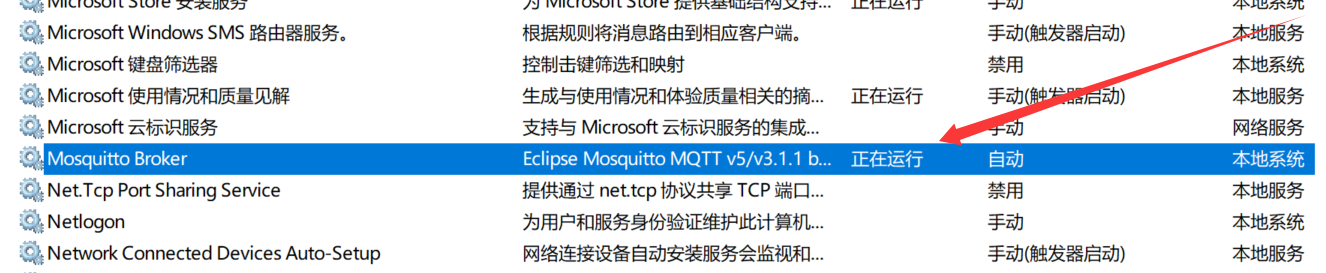
运行 MQTT 服务器
打开 MQTTX 在 Windows 的客户端,也可以手机 安装客户端,订阅主题,给开发板 发送命令
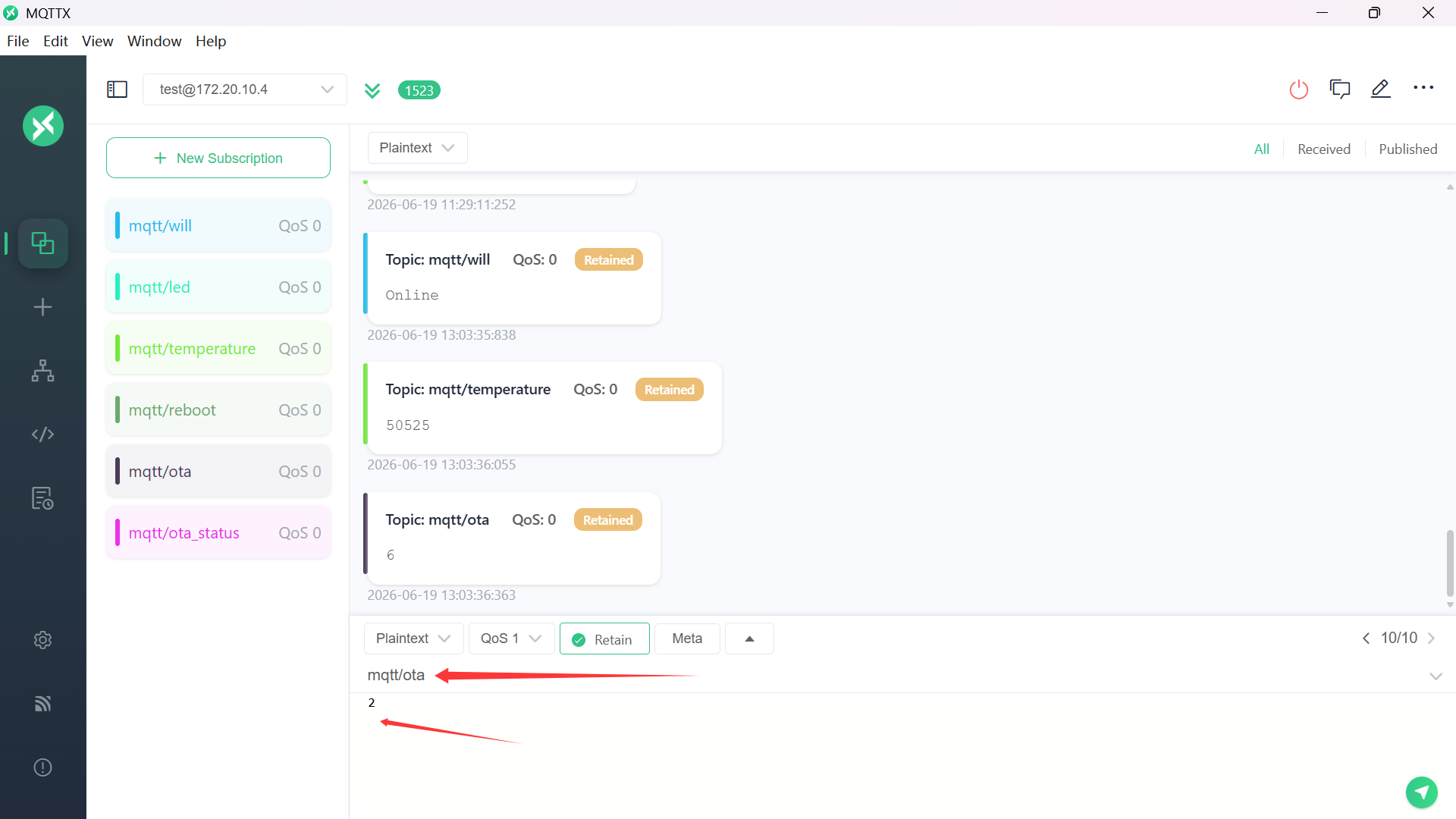
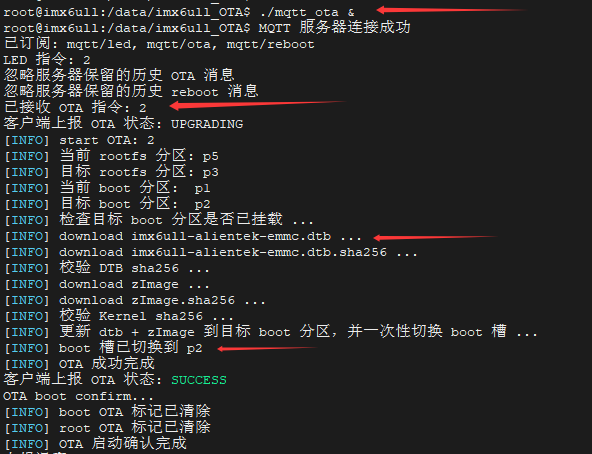
电脑客户端 向 mqtt/ota 主题 发送命令 2,代表 升级 内核和设备树
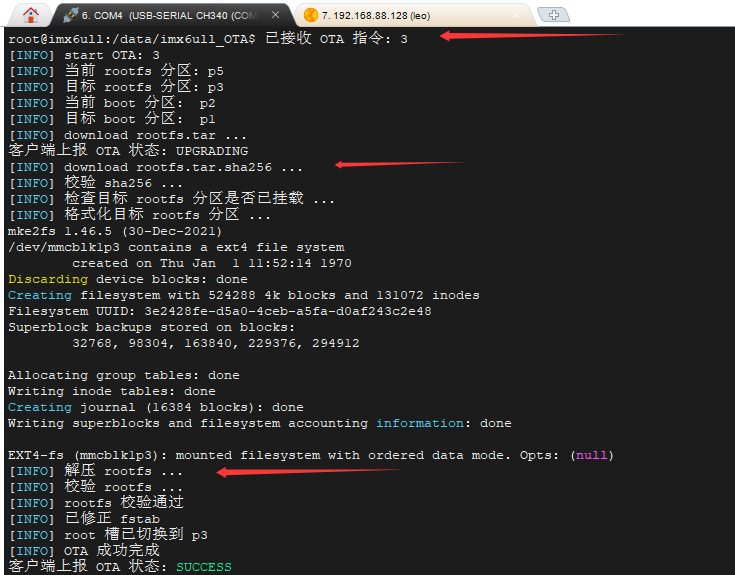
升级 根文件系统
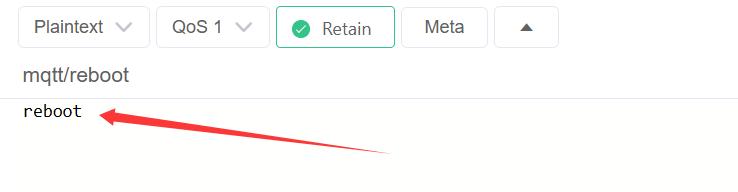
开发板 重启命令
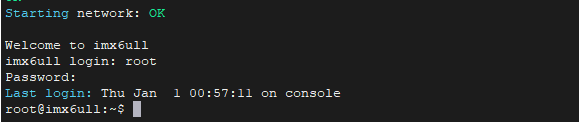
开发板,重启了,自动切换到升级的系统分区
上面的代码,提供了回滚的基础(保存旧分区号 + pending 标记),但 U-Boot 端的自动回滚逻辑还没有实现。
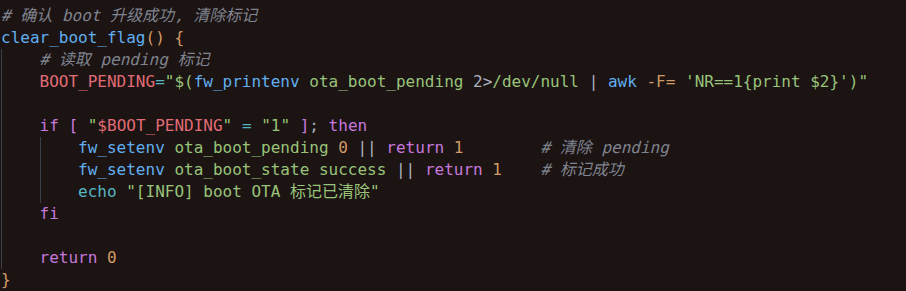
ota_boot_confirm.sh 脚本,代码片段
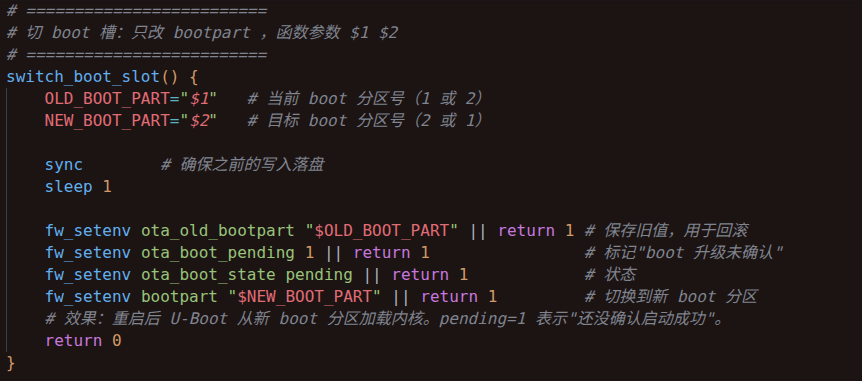
ota_update.sh 脚本,代码片段
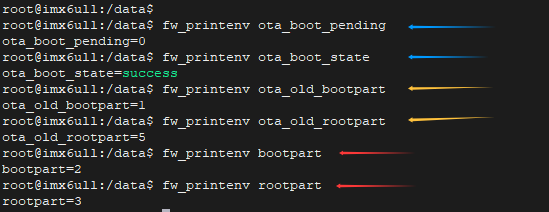
| 阶段 | 操作 | 变量 |
|---|---|---|
| 升级时 | 保存旧分区号 | ota_old_bootpart=1 |
| 升级时 | 标记未确认 | ota_boot_pending=1 |
| 启动成功 | 清除标记 | ota_boot_pending=0 |
| 组件 | 状态 |
|---|---|
| 保存旧分区号 | ✅ 已实现 |
| pending 标记 | ✅ 已实现 |
| 启动确认清除 | ✅ 已实现 |
| U-Boot 自动回滚 | ❌ 未实现 |
回滚框架搭好了,U-Boot 端的自动回滚是最后一步。
回滚:系统每次启动自动计数,连续 3 次启动失败触发回滚。回滚自动恢复为升级前的内核和根文件系统,设备不会变砖。
文章内容,做到这里,已经实现了A/B 分区升级机制:校验 SHA256, 升级时写入"非当前运行分区" ,当前系统运行时不会被覆盖,用户数据区被保护,boot/root 解耦切换,可以独立升级 kernel dtb 或 rootfs ,重启后 生效新的系统。
核心 OTA 链路已全部跑通,剩余的(自动回滚)算是锦上添花吧。
补充信息:
ota_boot_confirm.sh 脚本:只需要在升级系统后,开发板重启时,运行一次这个脚本,清除 ota_boot_pending 和 ota_root_pending, 标记 ota_boot_state success 。如果开发板重启不是因为升级系统时,是正常的重启,那就不需要运行ota_boot_confirm.sh 脚本。
ota_boot_confirm.sh 脚本,本身就是设计成 "无操作即跳过" 的,所以脚本也可以每次开机后都运行,不需要判断重启原因。pending=0 时它什么都不做,pending=1 时才清除标记。我设置为了开机自动运行。