Paging 3 分页加载架构解析:从 DataSource 到 LazyColumn 的完整数据流
一行受益 :彻底理解 Paging 3 的分层架构与响应式数据流,消灭 OOM、重复加载和状态丢失三大痛点。 适用版本 :Paging 3.x(paging-runtime:3.3.x)| Kotlin 1.9+ | Android API 21+ 阅读时间 :约 18 分钟 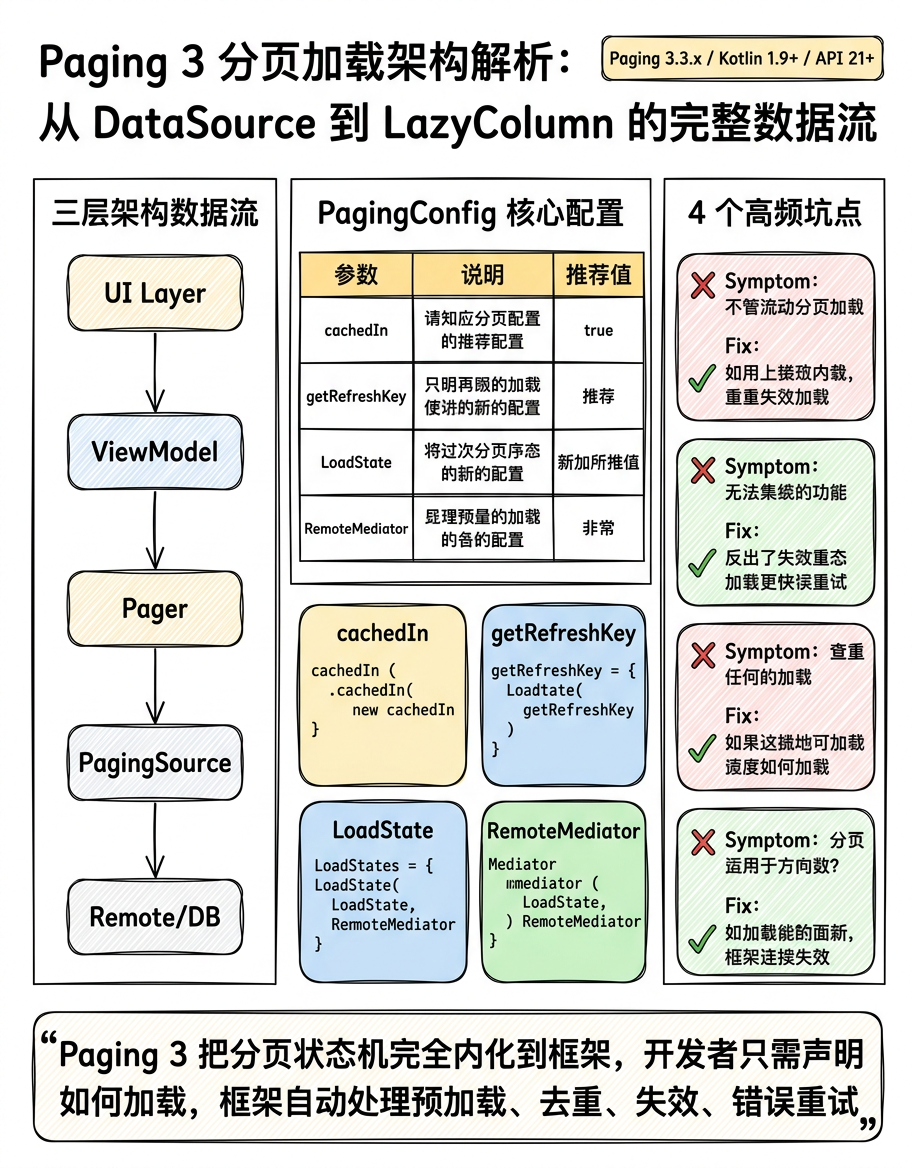
场景引入
你接手一个信息流页面:后端返回 cursor-based 分页接口,初始一切正常,但随着列表滚动,内存占用线性增长,滑回顶部时数据重新加载,网络错误后重试逻辑一片混乱------RecyclerView.Adapter 里塞满了 page、hasMore、isLoading 三个全局变量,互相掌控生命周期。这正是 Paging 3 要解决的问题域。
1. 核心架构:三层数据流
┌──────────────────────────────────────────────────────────────┐

│                      UI Layer                                │


│   LazyColumn / RecyclerView                                  │


│         ↑  collectAsLazyPagingItems()                        │


│   LazyPagingItems

     / PagingDataAdapter                     │


│         ↑  submitData()                                       │


│   ViewModel: Flow


     >                             │


└───────────────────────────┬──────────────────────────────────┘


│  Pager(...).flow


┌───────────────────────────▼──────────────────────────────────┐


│                   Paging Layer                               │


│   Pager  ──→  PagingSource

                           │


│               load(LoadParams) → LoadResult                  │


│                                                              │


│   RemoteMediator (可选)                                       │


│     loadSingle() → MediatorResult                            │


└───────────────────────────┬──────────────────────────────────┘


│


┌───────────────────────────▼──────────────────────────────────┐


│                  Repository / Data Layer                      │


│   Network: Retrofit / OkHttp                                 │


│   Local DB: Room PagingSource (自动生成)                      │


│   Cache: RemoteKeys 表(用于 RemoteMediator)                 │


└──────────────────────────────────────────────────────────────┘
三层职责边界极为清晰:
-
PagingSource:单一数据源的加载逻辑,知道"如何加载第 N 页"。
-
RemoteMediator:协调网络与数据库,实现离线优先(network + db 双源)。
-
Pager / PagingConfig:控制预加载距离、页大小、初始加载量,驱动整条流水线。
2. PagingSource 深度解析
2.1 核心接口定义
PagingSource 是抽象类,位于 androidx.paging.PagingSource,两个核心方法:
abstract suspend fun load(params: LoadParams

   ): LoadResult


abstract fun getRefreshKey(state: PagingState

      ): Key?
LoadParams 有三个子类对应三种加载类型:
-
LoadParams.Refresh:初始加载或刷新 -
LoadParams.Append:向后加载更多 -
LoadParams.Prepend:向前加载(双向分页时使用)
2.2 基于 Cursor 的 PagingSource 实现
错误写法 → 问题 → 正确写法
// ❌ 错误:直接暴露 Exception,未区分网络错误类型

class BadArticlePagingSource(private val api: ArticleApi) :


PagingSource

    () {


override suspend fun load(params: LoadParams

    ): LoadResult

      {


return try {


val cursor = params.key  // 第一次加载时 key 为 null,这里会崩溃


val response = api.getArticles(cursor = cursor!!, limit = params.loadSize)


LoadResult.Page(


data = response.items,


prevKey = null,


nextKey = response.nextCursor


)


} catch (e: Exception) {


LoadResult.Error(e)


}


}


override fun getRefreshKey(state: PagingState

    ): String? = null


}
问题 : params.key 在初始 Refresh 时为 null,用 !! 直接崩溃; getRefreshKey 返回 null 导致刷新后始终从第一页加载,滑到中间刷新后跳回顶部。
// ✅ 正确:处理 null key + 实现精准 getRefreshKey

class ArticlePagingSource(


private val api: ArticleApi,


private val initialCursor: String? = null


) : PagingSource

    () {


override suspend fun load(params: LoadParams

    ): LoadResult

      {


// params.key 为 null 时使用初始 cursor(第一次加载)


val cursor = params.key ?: initialCursor


return try {


val response = api.getArticles(


cursor = cursor,          // null 表示从头加载


limit = params.loadSize   // 框架自动处理 pageSize / initialLoadSize


)


LoadResult.Page(


data = response.items,


prevKey = null,           // cursor-based 通常不支持向前翻页


nextKey = if (response.hasMore) response.nextCursor else null


)


} catch (e: IOException) {


// 网络错误:允许重试


LoadResult.Error(e)


} catch (e: HttpException) {


// HTTP 错误:4xx/5xx 区分处理


LoadResult.Error(e)


}


}


// getRefreshKey 决定刷新时从哪里开始,实现"刷新不跳顶"


override fun getRefreshKey(state: PagingState

    ): String? {


// 找到当前可见区域附近的 page,从其 prevKey 或 nextKey 推算 refresh cursor


return state.anchorPosition?.let { anchor ->


val anchorPage = state.closestPageToPosition(anchor)


// 优先用 prevKey,其次用 nextKey 的前一页


anchorPage?.prevKey ?: anchorPage?.nextKey


}


}


}
2.3 PagingConfig 配置要点
val pager = Pager(

config = PagingConfig(


pageSize = 20,              // 每次 Append/Prepend 加载量


initialLoadSize = 40,       // 首次 Refresh 加载量,建议 2~3 倍 pageSize


prefetchDistance = 5,       // 距列表末尾多少条时触发预加载


enablePlaceholders = false  // 占位符:true 需要知道总数,cursor-based 通常 false


),


pagingSourceFactory = { ArticlePagingSource(api) }


)
prefetchDistance 的陷阱 :设置过大(如等于 pageSize)会在列表未到底时频繁触发加载,造成流量浪费;设置为 0 会导致用户到达底部才开始加载,出现空白闪烁。经验值:pageSize 的 1/4 到 1/2。
3. RemoteMediator:网络 + 数据库双源架构
当需要离线缓存时,单纯的 PagingSource 不够用。RemoteMediator 充当"加载触发器",由框架在本地数据不足时自动调用。
3.1 RemoteMediator 工作原理
用户滚动到底部

│


▼


Room PagingSource 检测到数据不足


│


▼


框架调用 RemoteMediator.load(LoadType.APPEND, state)


│


├─→ 请求网络 API


│


├─→ 写入 Room(文章表 + RemoteKeys 表)


│


└─→ 返回 MediatorResult.Success(endOfPaginationReached = !hasMore)


│


▼


Room PagingSource 自动通知更新(Flow invalidation)


│


▼


UI 自动呈现新数据
3.2 RemoteKeys 表设计
@Entity(tableName = "remote_keys")

data class RemoteKey(


@PrimaryKey val articleId: String,


val prevKey: String?,   // 该条目所在页的 prevCursor


val nextKey: String?    // 该条目所在页的 nextCursor


)


@Dao


interface RemoteKeyDao {


@Insert(onConflict = OnConflictStrategy.REPLACE)


suspend fun insertAll(keys: List

    )


@Query("SELECT * FROM remote_keys WHERE articleId = :id")


suspend fun remoteKeyByArticleId(id: String): RemoteKey?


@Query("DELETE FROM remote_keys")


suspend fun clearAll()


}
3.3 RemoteMediator 完整实现
@OptIn(ExperimentalPagingApi::class)

class ArticleRemoteMediator(


private val api: ArticleApi,


private val db: ArticleDatabase


) : RemoteMediator

    () {


// initialize() 控制首次进入时是否强制刷新


override suspend fun initialize(): InitializeAction {


val cacheTimeout = TimeUnit.HOURS.toMillis(1)


return if (System.currentTimeMillis() - db.articleDao().lastUpdated() < cacheTimeout) {


InitializeAction.SKIP_INITIAL_REFRESH


} else {


InitializeAction.LAUNCH_INITIAL_REFRESH


}


}


override suspend fun load(


loadType: LoadType,


state: PagingState


): MediatorResult {


val cursor: String? = when (loadType) {


LoadType.REFRESH -> null


LoadType.PREPEND -> {


val remoteKey = state.pages.firstOrNull()?.data?.firstOrNull()


?.let { db.remoteKeyDao().remoteKeyByArticleId(it.id) }


remoteKey?.prevKey ?: return MediatorResult.Success(endOfPaginationReached = true)


}


LoadType.APPEND -> {


val remoteKey = state.pages.lastOrNull()?.data?.lastOrNull()


?.let { db.remoteKeyDao().remoteKeyByArticleId(it.id) }


remoteKey?.nextKey ?: return MediatorResult.Success(endOfPaginationReached = true)


}


}


return try {


val response = api.getArticles(cursor = cursor, limit = state.config.pageSize)


val endOfPagination = !response.hasMore


db.withTransaction {


if (loadType == LoadType.REFRESH) {


db.remoteKeyDao().clearAll()


db.articleDao().clearAll()


}


val keys = response.items.map { article ->


RemoteKey(


articleId = article.id,


prevKey = cursor,


nextKey = if (endOfPagination) null else response.nextCursor


)


}


db.remoteKeyDao().insertAll(keys)


db.articleDao().insertAll(response.items)


}


MediatorResult.Success(endOfPaginationReached = endOfPagination)


} catch (e: IOException) {


MediatorResult.Error(e)


} catch (e: HttpException) {


MediatorResult.Error(e)


}


}


}
4. ViewModel 与 Flow 集成
class ArticleViewModel(

private val repository: ArticleRepository


) : ViewModel() {


// cachedIn(viewModelScope) 缓存 PagingData,避免屏幕旋转时重新请求网络


val articles: Flow


  `> = repository.getArticleStream()`


`
`

.cachedIn(viewModelScope)
`
`

}
`
`
cachedIn 的重要性 :不加 cachedIn,每次 collectAsLazyPagingItems() 重新订阅(如旋转屏幕、Fragment 重建)都会触发新的网络请求;加了之后 PagingData 在 viewModelScope 生命周期内被缓存,重新订阅直接复用内存中的数据。
4.1 结合搜索过滤器(避免重复订阅)
class ArticleViewModel(private val repository: ArticleRepository) : ViewModel() {


private val searchQuery = MutableStateFlow("")


val articles: Flow


  `> = searchQuery`


`
`

.debounce(300)
`
`

.distinctUntilChanged()
`
`

.flatMapLatest { query ->
`
`

// flatMapLatest 取消前一个 Flow,只保留最新搜索结果
`
`

repository.getArticleStream(query)
`
`

}
`
`

.cachedIn(viewModelScope)
`

`

fun search(query: String) {
`
`

searchQuery.value = query
`
`

}
`
`

}
`
`
flatMapLatest vs flatMapMerge :搜索场景必须用 flatMapLatest------当用户快速输入时,旧搜索请求立即取消,否则旧结果可能在新结果之后到达,造成数据倒序显示的 bug。
5. Compose UI 层集成
5.1 LazyColumn + collectAsLazyPagingItems
@Composable

fun ArticleListScreen(viewModel: ArticleViewModel = hiltViewModel()) {


val articles = viewModel.articles.collectAsLazyPagingItems()


LazyColumn {


items(


count = articles.itemCount,


key = articles.itemKey { it.id }  // 提供稳定 key,避免不必要重组


) { index ->


val article = articles[index]


if (article != null) {


ArticleItem(article = article)


} else {


ArticlePlaceholder()


}


}


when (val state = articles.loadState.append) {


is LoadState.Loading -> item { LoadingIndicator() }


is LoadState.Error -> item {


ErrorItem(


message = state.error.localizedMessage ?: "加载失败",


onRetry = { articles.retry() }


)


}


is LoadState.NotLoading -> {


if (state.endOfPaginationReached) {


item { EndOfListIndicator() }


}


}


}


}


articles.loadState.refresh.let { refreshState ->


if (refreshState is LoadState.Error && articles.itemCount == 0) {


FullScreenError(


error = refreshState.error,


onRetry = { articles.refresh() }


)


}


}


}
5.2 刷新状态与 SwipeRefresh 联动
val isRefreshing by remember {

derivedStateOf {


articles.loadState.refresh is LoadState.Loading


}


}


SwipeRefresh(


state = rememberSwipeRefreshState(isRefreshing),


onRefresh = { articles.refresh() }


) {


// LazyColumn ...


}
6. 最佳实践
6.1 Room PagingSource 不要手写
Room 3.x 支持直接返回 PagingSource ,自动处理失效通知:
@Dao

interface ArticleDao {


// Room 自动生成 PagingSource,数据库变化时自动 invalidate


@Query("SELECT * FROM articles WHERE query = :query ORDER BY publishedAt DESC")


fun pagingSource(query: String): PagingSource


}
为什么不手写 :Room 自动生成的 PagingSource 内置了 InvalidationTracker 监听,任何对 articles 表的写操作都会自动触发 invalidate(),通知 Pager 重新加载。手写版本需要自行实现这个机制,容易遗漏导致数据不刷新。
6.2 PagingData.map 做数据转换
val articles: Flow


    > = repository.getArticleStream()


.map { pagingData ->


pagingData.map { entity ->


entity.toUiModel()  // Entity → UiModel,关注点分离


}


}


.cachedIn(viewModelScope)
不这样做的后果 :在 Adapter/Composable 里做转换,每次重组/绑定都重复执行转换逻辑,且转换结果无法被 DiffUtil 正确识别(对象引用不稳定),导致列表频繁整体刷新。
6.3 正确处理 endOfPaginationReached
LoadResult.Page(

data = items,


prevKey = null,


// 只有真正没有更多数据时才返回 null


nextKey = if (response.items.isEmpty() || !response.hasMore) null else response.nextCursor


)
错误后果 :如果在数据未耗尽时返回 nextKey = null,Pager 认为分页结束,不再触发 APPEND 加载,用户看到的列表被截断但不知原因。
7. 常见陷阱
陷阱 1:多次 collect 导致多份网络请求
症状 :同一个列表发出了多条相同 API 请求,日志里看到重复的网络调用。 原因 :多个地方 collectAsLazyPagingItems() 订阅了同一个 Flow ,但没有 cachedIn,每次订阅都创建新的 Pager 实例。 复现 :在两个不同 Composable 中订阅同一 ViewModel 的 articles Flow,去掉 cachedIn。 解决 :在 ViewModel 声明处加 .cachedIn(viewModelScope),保证 Flow 是热流,所有订阅者共享同一份数据。
陷阱 2:数据库刷新后 UI 不更新
症状 :调用 articles.refresh() 后,网络请求成功,数据库写入了新数据,但 UI 列表没有变化。 原因 :手写了 PagingSource 但未在数据写入后调用 invalidate();或者 Room DAO 返回的 PagingSource 查询条件与写入数据的表不匹配(查询 view,更新 table,未触发 tracker)。 解决 :
// 在 RemoteMediator 写入数据库后,Room 自动触发 invalidate

// 如果是手写 PagingSource,在 DAO 写入后手动调用:


pagingSourceFactory.invalidate()
陷阱 3:Compose 中 key 缺失导致列表抖动
症状 :加载更多后,已有 item 发生闪烁或位置跳动。 原因 : items() 未提供 key 参数,Compose 用位置 index 作为默认 key,新数据插入后所有 item 的 index 变化,触发全量重组。 解决 :
items(

count = articles.itemCount,


key = articles.itemKey { article -> article.id }  // 用业务 ID 作为稳定 key


) { index -> ... }
陷阱 4:LoadState 状态机理解错误
症状 :在 append 加载完成后, endOfPaginationReached 一直为 false,底部始终显示"加载中"。 原因 :混淆了 loadState.append.endOfPaginationReached(布尔属性,仅在 NotLoading 时有意义)和 loadState.append is LoadState.NotLoading(状态判断)。
// ❌ 错误用法:直接访问 endOfPaginationReached,未检查状态类型

if (articles.loadState.append.endOfPaginationReached) { ... }


// ✅ 正确用法:先确认是 NotLoading 状态,再读取标志位


val appendState = articles.loadState.append


if (appendState is LoadState.NotLoading && appendState.endOfPaginationReached) {


// 真正到达末尾


}
8. 总结
-
三层分离是核心:PagingSource 负责加载,ViewModel 负责缓存,UI 层只订阅状态------任何一层的职责泄漏都会导致难以排查的 bug。
-
cachedIn不可省 :屏幕旋转、Fragment 重建场景下,缺少cachedIn是最常见的性能问题根源。 -
getRefreshKey决定用户体验 :实现精准的getRefreshKey让用户刷新后停留在原位,而不是跳回顶部。 -
区分 refresh / append / prepend 错误 :三种
LoadState应对应不同 UI 策略,不能混用。 -
Room 生成 PagingSource > 手写 :利用 Room 的
InvalidationTracker机制获得自动失效通知,是最可靠的本地分页方案。
核心结论 :Paging 3 的设计哲学是把"分页状态机"完全内化到框架内,开发者只需声明"如何加载"(PagingSource)和"加载多少"(PagingConfig),框架自动处理预加载、去重、失效、错误重试------理解这一点,才能真正用好而不是绕过它。
参考资料
-
AOSP 源码路径:
frameworks/support/paging/paging-runtime/src/main/java/androidx/paging/ -
PagingSource.kt -
RemoteMediator.kt -
Pager.kt -
PagingDataDiffer.kt(UI 层差分引擎)