文章前言
前置文章中,通过代码方式,使用ollama和chroma DB完成了本地RAG知识库搭建与检索。这篇文章将利用现有的开源平台N8N来实现RAG检索的搭建,体验开源平台的魅力。
环境清单:Docker 、Ollama、n8n (Docker 镜像)、ChromaDB 向量数据库
目标:实现两大流水线,文档入库向量化流水线 + 用户提问检索问答流水线
一、前置环境安装
1.1 安装 Ollama 本地大模型框架
官网下载:https://ollama.com/ 终端拉取 RAG 必需两个模型:
# 向量嵌入模型,文本向量化核心
ollama pull dengcao/Qwen3-Embedding-0.6B:Q8_0
# 对话大模型,生成最终回答
ollama pull qwen:7b验证:ollama list 能看到两个模型代表安装成功。
1.2 Docker Desktop 配置国内镜像加速(解决 n8n 镜像拉取慢)
-
顶部 Docker 图标 → Settings → Docker Engine
-
全量替换 JSON 配置:
{"registry-mirrors": ["https://docker.xuanyuan.me","https://docker.1ms.run","https://docker.m.daocloud.io","https://docker.mirrors.ustc.edu.cn"],"builder": {"gc": {"defaultKeepStorage": "20GB"}},"experimental": false}
-
点击 Apply & Restart 重启 Docker。
1.3 Docker 启动N8N 容器(关键 host 映射)
常规启动命令无法让容器访问 Mac 本机 Ollama,必须添加--add-host参数打通宿主机网络:
docker run -d \--name n8n \-p 5678:5678 \-v ~/.n8n:/root/.n8n \
  --add-host=host.docker.internal:host-gateway \-e N8N_SECURE_COOKIE=false \-e N8N_HOST=localhost \
n8nio/n8n启动完成浏览器访问:http://localhost:5678,注册管理员账号进入画布。
1.4 安装 ChromaDB 独立向量服务(解决 n8n 无内置嵌入式 Chroma)
新版 N8N 移除本地内置 Chroma,必须启动独立服务,先安装 Python 客户端:
# 安装chromadb服务端
pip3 install chromadb
# 创建向量存储目录并启动,--host 0.0.0.0允许Docker容器访问mkdir -p ~/n8n_chroma
chroma run --host 0.0.0.0 --port 8000 --path ~/n8n_chroma
新开终端验证服务连通:
curl http://127.0.0.1:8000/api/v2/heartbeat返回 JSON 即服务正常。
二、N8N 凭证统一配置
2.1 Ollama 凭证配置(嵌入 + 大模型共用)
-
左侧 Credentials → New → 搜索 Ollama account
-
Base URL 必须填写:
http://host.docker.internal:11434
- API Key 留空,保存,点击 Retry 确认连接成功。
2.2 ChromaDB Self-Hosted 凭证配置
-
新建凭证:ChromaDB Self-Hosted account
-
Base URL:
http://host.docker.internal:8000 -
API Key 留空保存。
三、RAG 流水线搭建(可视化无代码)
3.1 文档入库向量化流水线
-
流水线配置json文件(可以直接导入画布)
{
"name": "save_to_vectordb",
"nodes": [
{
"parameters": {},
"type": "n8n-nodes-base.manualTrigger",
"typeVersion": 1,
"position": [
-400,
-112
],
"id": "19a961f1-84f4-430a-ac49-99d26722ae0d",
"name": "When clicking 'Execute workflow'"
},
{
"parameters": {
"jsCode": "return [{"doc_id": "work-schedule-001","content": "我的工作时间是周一至周五,上午9点到下午5点。时区是澳大利亚东部标准时间(AEST)。"},{"doc_id": "off-hours-policy-001","content": "在非工作时间(包括周末和公共假期),我无法立即回复邮件。"},{"doc_id": "auto-reply-instruction-001","content": "如果邮件是在非工作时间收到的,AI助手应该告知发件人,邮件已收到,我会在下一个工作日的9点到5点之间尽快处理并回复。"}];"
},
"type": "n8n-nodes-base.code",
"typeVersion": 2,
"position": [
-192,
-112
],
"id": "b26a7651-21cb-4e6f-a8ff-68f8bb3bba52",
"name": "Code in JavaScript"
},
{
"parameters": {
"model": "dengcao/Qwen3-Embedding-0.6B:Q8_0"
},
"type": "@n8n/n8n-nodes-langchain.embeddingsOllama",
"typeVersion": 1,
"position": [
-112,
112
],
"id": "f6890fac-6bdd-4263-bccb-8e8ea7c2880f",
"name": "Embeddings Ollama",
"credentials": {
"ollamaApi": {
"id": "VMC3CRAxGAYTVVpn",
"name": "Ollama account"
}
}
},
{
"parameters": {
"mode": "insert",
"chromaCollection": {
"__rl": true,
"value": "={{ "knowledge_base" }}",
"mode": "id"
},
"options": {}
},
"type": "@n8n/n8n-nodes-langchain.vectorStoreChromaDB",
"typeVersion": 1.3,
"position": [
16,
-112
],
"id": "f755e56d-196b-4e59-8c6f-dfcb8b322c7c",
"name": "Chroma Vector Store",
"credentials": {
"chromaSelfHostedApi": {
"id": "KkV2dAvQruAkAA3U",
"name": "ChromaDB Self-Hosted account"
}
}
},
{
"parameters": {
"options": {}
},
"type": "@n8n/n8n-nodes-langchain.documentDefaultDataLoader",
"typeVersion": 1.1,
"position": [
160,
96
],
"id": "e1c36d64-d905-47dc-b82c-1c36d04c0512",
"name": "Default Data Loader"
}
],
"pinData": {},
"connections": {
"When clicking 'Execute workflow'": {
"main": [
[
{
"node": "Code in JavaScript",
"type": "main",
"index": 0
}
]
]
},
"Code in JavaScript": {
"main": [
[
{
"node": "Chroma Vector Store",
"type": "main",
"index": 0
}
]
]
},
"Embeddings Ollama": {
"ai_embedding": [
[
{
"node": "Chroma Vector Store",
"type": "ai_embedding",
"index": 0
}
]
]
},
"Default Data Loader": {
"ai_document": [
[
{
"node": "Chroma Vector Store",
"type": "ai_document",
"index": 0
}
]
]
}
},
"active": false,
"settings": {
"executionOrder": "v1",
"binaryMode": "separate",
"availableInMCP": false
},
"versionId": "3ddb43b2-8be0-4e78-917e-a72887b7370d",
"meta": {
"templateCredsSetupCompleted": true,
"instanceId": "bc9200897c1fdd302b508b731e3eaf0596d4601fc30283ee2658680e94f3cb55"
},
"nodeGroups": [],
"id": "mfK6KCf1v9JoTEjR",
"tags": []
} -
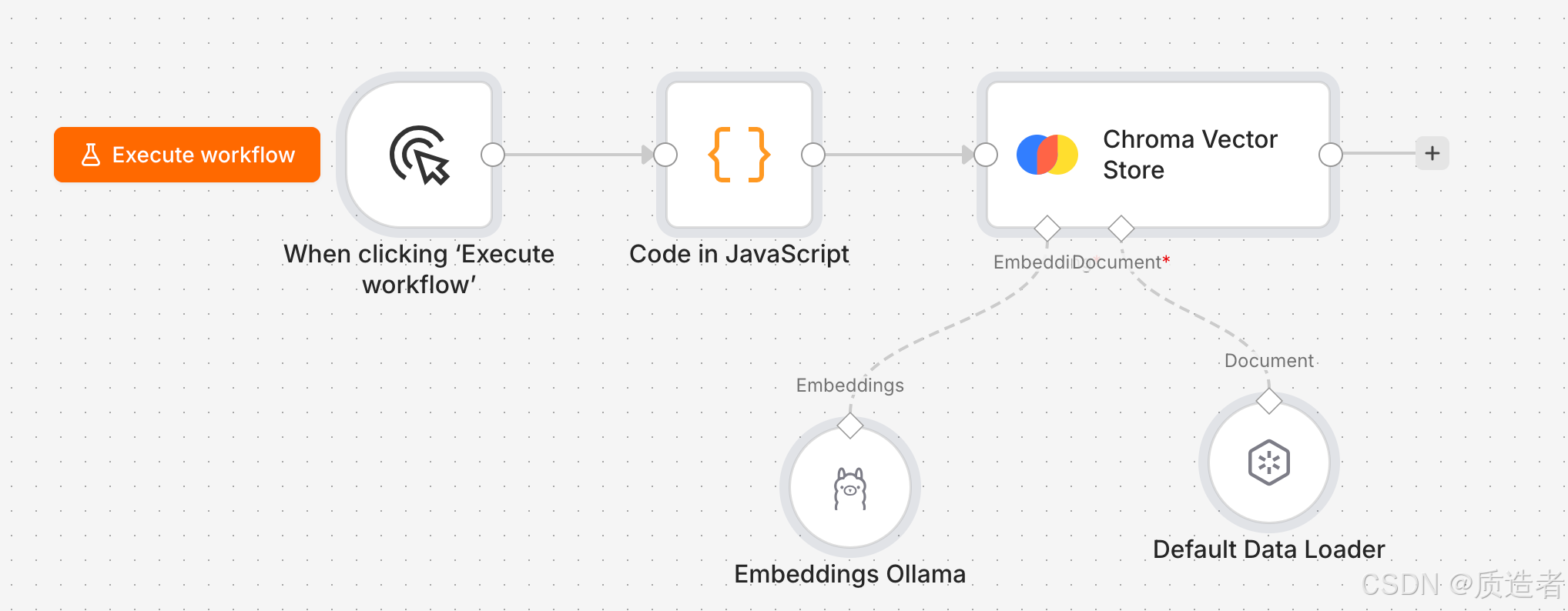
画布结构
-
画布解析
-
Code in JavaScript负责模拟生成待检索文件,后续可以优化替换为文件上传等外部知识库
-
Chroma Vector Store负责存储向量化后的文件,向量化采用ollama调用本地"dengcao/Qwen3-Embedding-0.6B:Q8_0"模型
-
3.2用户提问检索问答流水线
-
流水线配置json文件(可以直接导入画布)
{
"name": "retrieval",
"nodes": [
{
"parameters": {},
"type": "n8n-nodes-base.manualTrigger",
"typeVersion": 1,
"position": [
0,
0
],
"id": "605dcd64-0222-4968-a2df-500022941e76",
"name": "When clicking 'Execute workflow'"
},
{
"parameters": {
"assignments": {
"assignments": [
{
"id": "e39e3819-c5df-49e1-852e-f212d1552ae2",
"name": "chatInput",
"value": "邮件处理时间",
"type": "string"
}
]
},
"options": {}
},
"type": "n8n-nodes-base.set",
"typeVersion": 3.4,
"position": [
208,
0
],
"id": "2f65f1b2-108e-4ddc-ad6e-c74a5c3f4747",
"name": "Edit Fields"
},
{
"parameters": {
"model": "dengcao/Qwen3-Embedding-0.6B:Q8_0"
},
"type": "@n8n/n8n-nodes-langchain.embeddingsOllama",
"typeVersion": 1,
"position": [
320,
208
],
"id": "8c88d695-35f6-40bc-bc07-22e80ae95108",
"name": "Embeddings Ollama",
"credentials": {
"ollamaApi": {
"id": "VMC3CRAxGAYTVVpn",
"name": "Ollama account"
}
}
},
{
"parameters": {},
"type": "@n8n/n8n-nodes-langchain.retrieverVectorStore",
"typeVersion": 1,
"position": [
496,
-16
],
"id": "928f09d8-c391-460f-8d4b-965d32222ac0",
"name": "Vector Store Retriever"
},
{
"parameters": {
"chromaCollection": {
"__rl": true,
"value": "knowledge_base",
"mode": "list",
"cachedResultName": "knowledge_base"
},
"options": {}
},
"type": "@n8n/n8n-nodes-langchain.vectorStoreChromaDB",
"typeVersion": 1.3,
"position": [
512,
144
],
"id": "ace4db01-6546-4770-adcc-f8a8d22060ca",
"name": "Chroma Vector Store",
"credentials": {
"chromaSelfHostedApi": {
"id": "KkV2dAvQruAkAA3U",
"name": "ChromaDB Self-Hosted account"
}
}
},
{
"parameters": {
"options": {}
},
"type": "@n8n/n8n-nodes-langchain.chainRetrievalQa",
"typeVersion": 1.7,
"position": [
416,
-224
],
"id": "4d3f4b71-bea6-4f05-8944-e14dc14efe45",
"name": "Question and Answer Chain"
},
{
"parameters": {
"model": "qwen:7b",
"options": {
"think": false
}
},
"type": "@n8n/n8n-nodes-langchain.lmOllama",
"typeVersion": 1,
"position": [
384,
-48
],
"id": "885672b6-50d9-4cb7-947b-569f7484a4d9",
"name": "Ollama Model",
"credentials": {
"ollamaApi": {
"id": "VMC3CRAxGAYTVVpn",
"name": "Ollama account"
}
}
}
],
"pinData": {},
"connections": {
"When clicking 'Execute workflow'": {
"main": [
[
{
"node": "Edit Fields",
"type": "main",
"index": 0
}
]
]
},
"Chroma Vector Store": {
"ai_vectorStore": [
[
{
"node": "Vector Store Retriever",
"type": "ai_vectorStore",
"index": 0
}
]
]
},
"Embeddings Ollama": {
"ai_embedding": [
[
{
"node": "Chroma Vector Store",
"type": "ai_embedding",
"index": 0
}
]
]
},
"Vector Store Retriever": {
"ai_retriever": [
[
{
"node": "Question and Answer Chain",
"type": "ai_retriever",
"index": 0
}
]
]
},
"Ollama Model": {
"ai_languageModel": [
[
{
"node": "Question and Answer Chain",
"type": "ai_languageModel",
"index": 0
}
]
]
},
"Edit Fields": {
"main": [
[
{
"node": "Question and Answer Chain",
"type": "main",
"index": 0
}
]
]
}
},
"active": false,
"settings": {
"executionOrder": "v1",
"binaryMode": "separate",
"availableInMCP": false
},
"versionId": "025ba577-7db1-4efb-ab1f-2b2905c478bd",
"meta": {
"templateCredsSetupCompleted": true,
"instanceId": "bc9200897c1fdd302b508b731e3eaf0596d4601fc30283ee2658680e94f3cb55"
},
"nodeGroups": [],
"id": "IzRkSTm4NgH9IGDQ",
"tags": []
} -
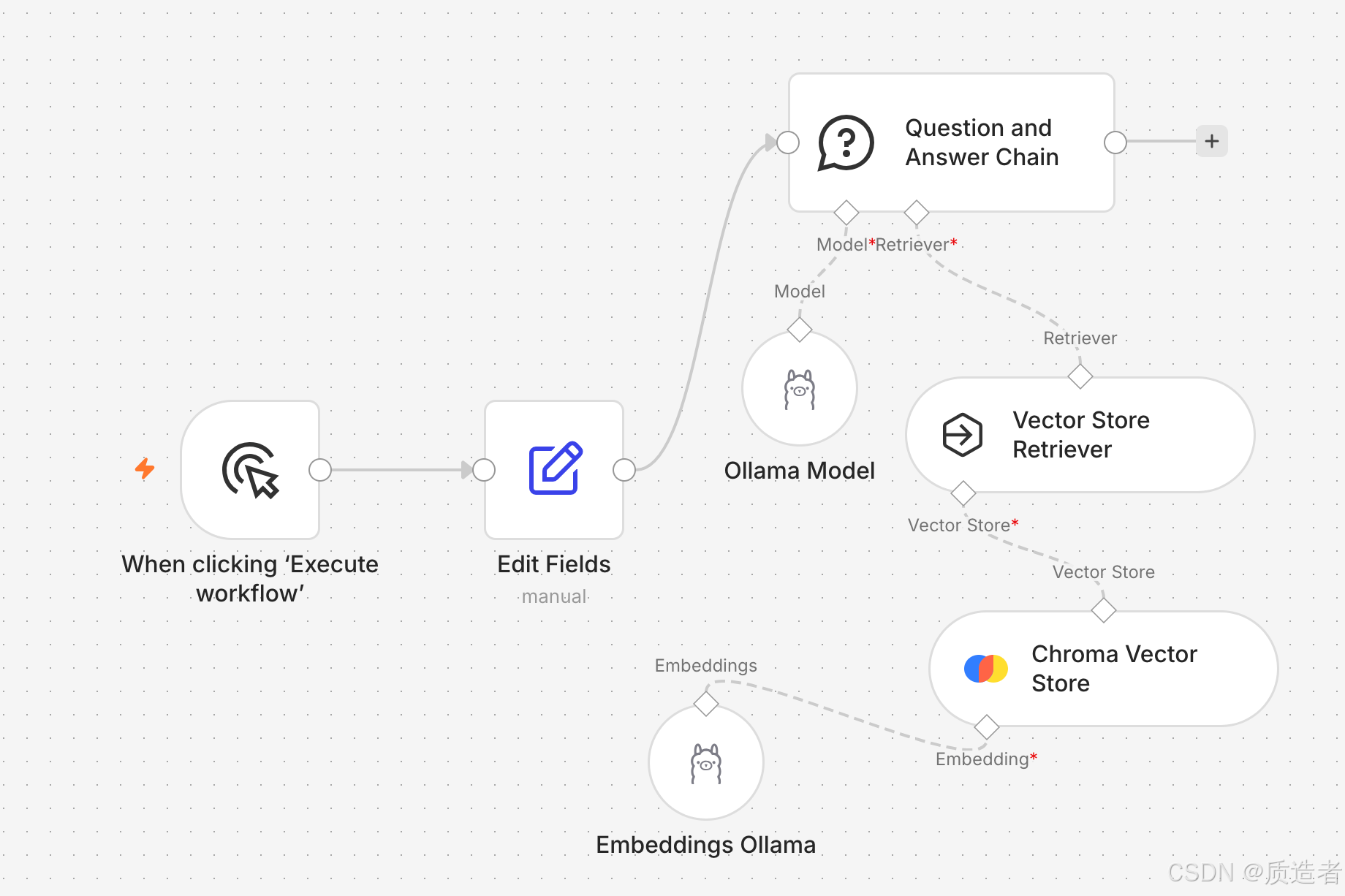
画布结构
-
画布解析
-
Edit Fields:用于进行用户原始问题输入
-
Question and Answer Chain:集成了输入向量化,向量库检索等能力,能够检索知识库中的内容并给予输出,方便快捷完成功能实现
-
四、全流程调试 & 执行方法
-
双击 Edit Fields 修改chatInput为需要提问的内容,保存
-
检查所有节点无红色叉号(红叉代表凭证 / 绑定缺失)
-
左上角 Execute Workflow 运行整条工作流
-
点开 Question and Answer Chain 节点输出,查看基于本地知识库生成的回答
五、高频踩坑汇总(全文核心避坑)
-
Ollama 连接失败:URL 填成localhost,改为
host.docker.internal:11434,n8n 启动必须带--add-host参数 -
Chroma 无法加载集合列表:首次使用无集合,手动填写集合名执行入库自动创建
-
n8n 容器访问 Chroma 超时:启动 chroma 必须加
--host 0.0.0.0,仅 127.0.0.1 监听容器无法访问 -
Manual Trigger 无法输入问题:不能直接在触发器加字段,必须后置 Edit Fields 节点自定义 chatInput
六、方案优势总结
-
完全本地离线:Ollama 大模型 + Chroma 向量库,无外网、无 API 费用、数据不外泄
-
低代码可视化:不用写 LangChain 代码,拖拽节点完成 RAG 全链路,易修改维护
-
轻量化部署:普通 Mac 即可运行,Docker 一键启动 n8n,资源占用低