SpringBoot(08):Redis 集成------5 分钟给你的项目加上缓存
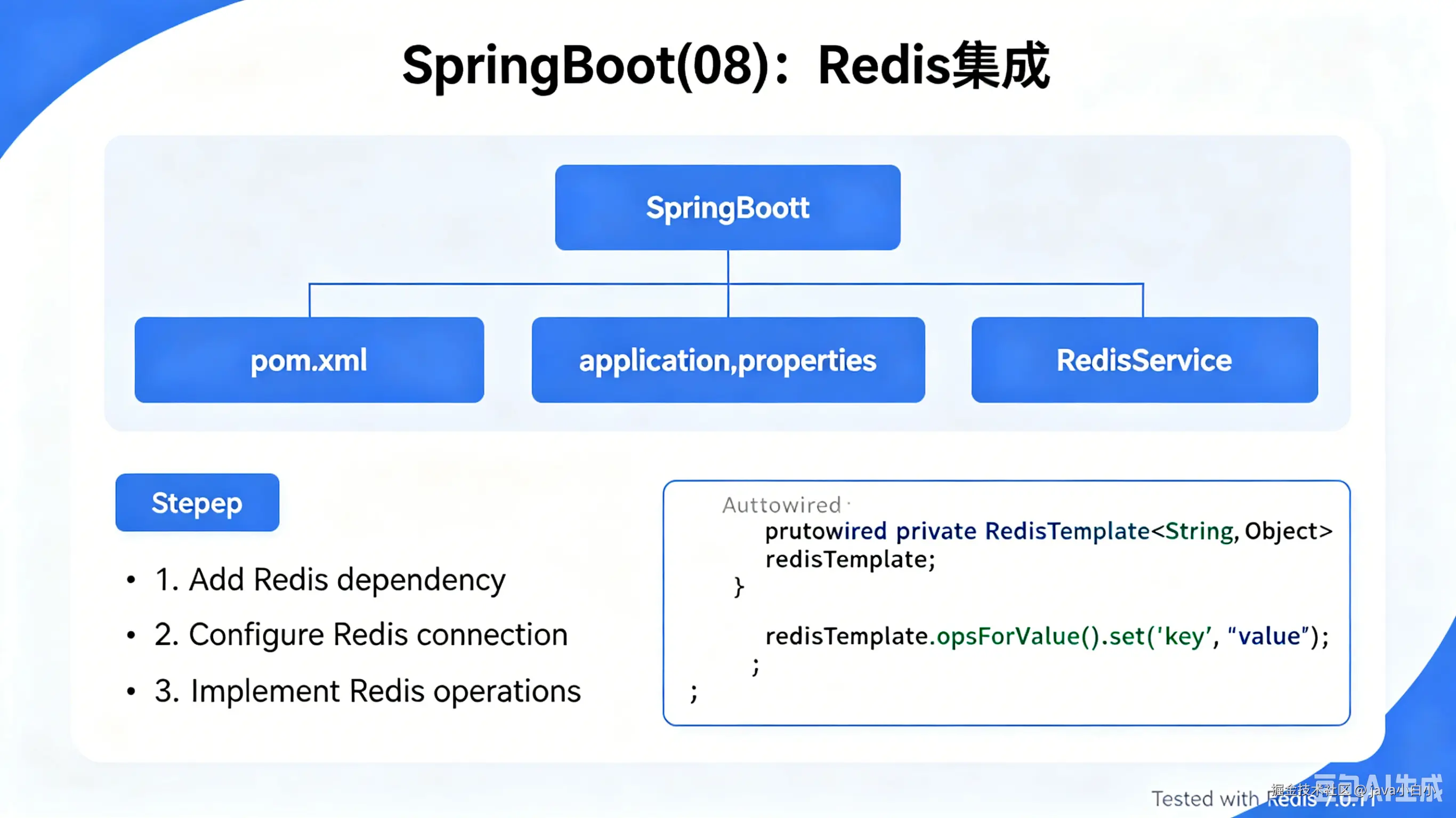
生产环境查一个用户信息要 200ms,数据库 CPU 飙到 80%。加了一层 Redis 缓存,同样的接口降到 5ms,数据库 CPU 降到 20%。改动不到 20 行代码。这不是段子,是大多数项目接入 Redis 缓存后的真实数据。SpringBoot 集成 Redis 用 spring-boot-starter-data-redis 加上几个配置就行。但实际用下来,经常碰到这些问题:为什么有时候缓存没生效?@Cacheable 和直接用 RedisTemplate 有什么区别?序列化方式怎么选?连接池怎么配?集群模式下要注意什么?
问题:不缓存会怎样
一个典型的电商商品详情接口:
ini
@Service
public class ProductService {

    @Autowired
    private ProductMapper productMapper;
    @Autowired
    private CategoryMapper categoryMapper;
    @Autowired
    private SkuMapper skuMapper;
    @Autowired
    private SpecMapper specMapper;
    @Autowired
    private CommentMapper commentMapper;

    public ProductDetailVO getProductDetail(Long productId) {
        Product product = productMapper.selectById(productId);
        Category category = categoryMapper.selectById(product.getCategoryId());
        List<Sku> skus = skuMapper.selectByProductId(productId);
        List<Spec> specs = specMapper.selectByProductId(productId);
        List<Comment> comments = commentMapper.selectTopNByProductId(productId, 10);

        return ProductDetailVO.build(product, category, skus, specs, comments);
    }
}
一个接口 5 次数据库查询。QPS 500 的时候,数据库每秒吃 2500 条 SQL。大促的时候 QPS 飙到 5000,数据库直接被打挂。
加上 Redis 缓存后:
kotlin
@Service
public class ProductService {

    @Autowired
    private ProductMapper productMapper;
    @Autowired
    private StringRedisTemplate redisTemplate;

    public ProductDetailVO getProductDetail(Long productId) {
        String cacheKey = "product:detail:" + productId;
        String cached = redisTemplate.opsForValue().get(cacheKey);

        if (cached != null) {
            return JSON.parseObject(cached, ProductDetailVO.class);
        }

        ProductDetailVO detail = loadFromDb(productId);
        redisTemplate.opsForValue().set(cacheKey, JSON.toJSONString(detail), 30, TimeUnit.MINUTES);
        return detail;
    }
}
第一次查数据库,后续请求直接从 Redis 取。5 次查询变 0 次,接口耗时从 200ms 降到 5ms。
但这是手动缓存的写法,代码多而且容易遗漏。Spring 提供了 @Cacheable 注解,加一个注解就自动搞定。
Spring Boot Redis 集成架构
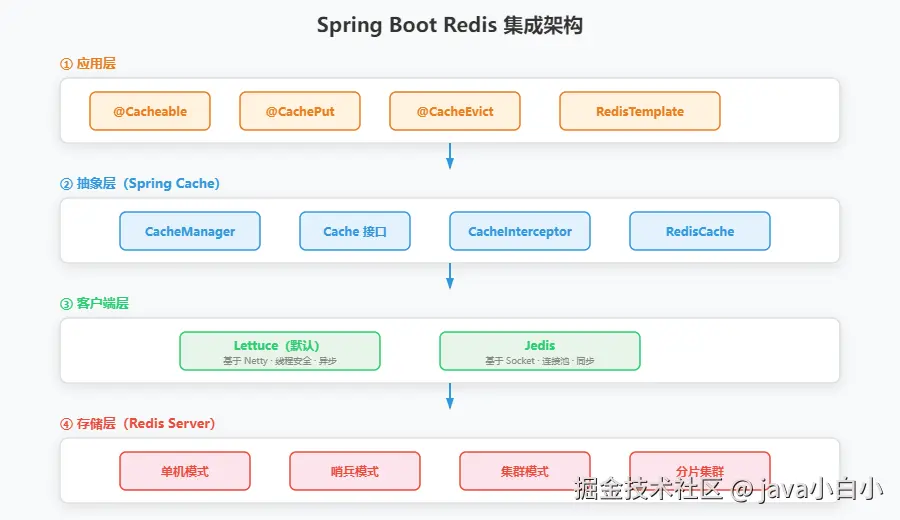 Spring Boot 集成 Redis 的核心组件分四层:
- 应用层 --- 你的业务代码,通过 @Cacheable 或 RedisTemplate 操作缓存
- 抽象层 --- Spring Cache 抽象(CacheManager / Cache 接口),屏蔽底层缓存实现
- 客户端层 --- Lettuce(默认)或 Jedis,负责与 Redis Server 通信
- 存储层 --- Redis Server,单机 / 哨兵 / 集群模式
调用链路:@Cacheable → CacheManager.getCache() → RedisCache.get() → Lettuce 连接 → Redis Server。
快速开始:5 分钟集成
1. 引入依赖
xml
<dependency>
    <groupId>org.springframework.boot</groupId>
    <artifactId>spring-boot-starter-data-redis</artifactId>
</dependency>

<!-- 如果要用连接池,需要引入 commons-pool2 -->
<dependency>
    <groupId>org.apache.commons</groupId>
    <artifactId>commons-pool2</artifactId>
</dependency>
Spring Boot 2.x 之后默认用 Lettuce 作为 Redis 客户端。Lettuce 基于 Netty,支持同步、异步和响应式操作,线程安全,一个连接就能处理并发请求。
如果要换成 Jedis:
xml
<dependency>
    <groupId>org.springframework.boot</groupId>
    <artifactId>spring-boot-starter-data-redis</artifactId>
    <exclusions>
        <exclusion>
            <groupId>io.lettuce</groupId>
            <artifactId>lettuce-core</artifactId>
        </exclusion>
    </exclusions>
</dependency>
<dependency>
    <groupId>redis.clients</groupId>
    <artifactId>jedis</artifactId>
</dependency>
2. 配置连接
yaml
spring:
  redis:
    host: 127.0.0.1
    port: 6379
    password: your_password
    database: 0
    timeout: 3000ms
    lettuce:
      pool:
        max-active: 20
        max-idle: 10
        min-idle: 5
        max-wait: 3000ms
3. 使用 RedisTemplate
typescript
@SpringBootApplication
public class Application {
    public static void main(String[] args) {
        SpringApplication.run(Application.class, args);
    }
}

@Service
public class UserService {

    @Autowired
    private StringRedisTemplate redisTemplate;

    public void setUser(String userId, String userInfo) {
        redisTemplate.opsForValue().set("user:" + userId, userInfo, 30, TimeUnit.MINUTES);
    }

    public String getUser(String userId) {
        return redisTemplate.opsForValue().get("user:" + userId);
    }
}
三步搞定。引入依赖、写配置、注入 RedisTemplate,直接用。
RedisTemplate 详解
RedisTemplate 是 Spring Data Redis 的核心类,封装了 Redis 的所有操作。
五大数据结构操作
typescript
@Service
public class RedisService {

    @Autowired
    private StringRedisTemplate redis;

    // ====== String 操作 ======
    public void stringOps() {
        redis.opsForValue().set("name", "张三");
        redis.opsForValue().set("counter", "100");
        redis.opsForValue().increment("counter");           // 101
        redis.opsForValue().set("token", "abc123", 1, TimeUnit.HOURS);

        String name = redis.opsForValue().get("name");
        Long counter = redis.opsForValue().increment("counter", 10); // 111
    }

    // ====== Hash 操作 ======
    public void hashOps() {
        redis.opsForHash().put("user:1001", "name", "张三");
        redis.opsForHash().put("user:1001", "age", "28");
        redis.opsForHash().put("user:1001", "email", "zhangsan@example.com");

        String name = (String) redis.opsForHash().get("user:1001", "name");
        Map<Object, Object> user = redis.opsForHash().entries("user:1001");
        redis.opsForHash().delete("user:1001", "email");
    }

    // ====== List 操作 ======
    public void listOps() {
        redis.opsForList().leftPush("task:queue", "task1");
        redis.opsForList().leftPush("task:queue", "task2");
        redis.opsForList().leftPush("task:queue", "task3");

        String task = redis.opsForList().rightPop("task:queue"); // task1(FIFO)
        List<String> all = redis.opsForList().range("task:queue", 0, -1);
        Long size = redis.opsForList().size("task:queue");
    }

    // ====== Set 操作 ======
    public void setOps() {
        redis.opsForSet().add("tag:article:1", "Java", "Spring", "Redis");
        redis.opsForSet().add("tag:article:2", "Java", "MySQL", "MyBatis");

        Set<String> intersection = redis.opsForSet().intersect("tag:article:1", "tag:article:2"); // [Java]
        Set<String> union = redis.opsForSet().union("tag:article:1", "tag:article:2");
        Boolean isMember = redis.opsForSet().isMember("tag:article:1", "Java"); // true
    }

    // ====== ZSet(有序集合)操作 ======
    public void zSetOps() {
        redis.opsForZSet().add("rank:score", "张三", 95.0);
        redis.opsForZSet().add("rank:score", "李四", 88.0);
        redis.opsForZSet().add("rank:score", "王五", 92.0);

        Set<String> top3 = redis.opsForZSet().reverseRange("rank:score", 0, 2); // [张三, 王五, 李四]
        Double score = redis.opsForZSet().score("rank:score", "张三"); // 95.0
        Long rank = redis.opsForZSet().reverseRank("rank:score", "李四"); // 2(第3名)
    }
}
常用操作汇总
| 操作 | 方法 | 使用场景 |
|---|---|---|
| 设置过期时间 | redisTemplate.expire(key, timeout, unit) |
缓存、Session |
| 删除 Key | redisTemplate.delete(key) |
主动失效 |
| 批量删除 | redisTemplate.delete(keys) |
批量清理 |
| 判断存在 | redisTemplate.hasKey(key) |
防止重复操作 |
| 设置值+过期 | opsForValue().set(key, value, timeout, unit) |
最常用 |
| 自增 | opsForValue().increment(key, delta) |
计数器、限流 |
| 分布式锁(简易版) | setIfAbsent(key, value, timeout, unit) |
防重复提交 |
分布式锁示例
typescript
@Service
public class OrderService {

    @Autowired
    private StringRedisTemplate redisTemplate;

    public boolean tryLock(String lockKey, String requestId, long expireSeconds) {
        Boolean result = redisTemplate.opsForValue()
                .setIfAbsent(lockKey, requestId, expireSeconds, TimeUnit.SECONDS);
        return Boolean.TRUE.equals(result);
    }

    public void unlock(String lockKey, String requestId) {
        String value = redisTemplate.opsForValue().get(lockKey);
        if (requestId.equals(value)) {
            redisTemplate.delete(lockKey);
        }
    }

    public void processOrder(String orderId) {
        String lockKey = "lock:order:" + orderId;
        String requestId = UUID.randomUUID().toString();

        if (!tryLock(lockKey, requestId, 30)) {
            throw new BusinessException("订单正在处理中,请稍后再试");
        }

        try {
            doProcess(orderId);
        } finally {
            unlock(lockKey, requestId);
        }
    }
}
这是基于 Redis 的简易分布式锁。生产环境建议用 Redisson,它提供了可重入锁、读写锁、红锁等更完善的实现。
序列化配置
Spring Boot 默认的 RedisTemplate 用 JDK 序列化,存到 Redis 里的值是一堆二进制乱码:
scss
\xac\xed\x00\x05sr\x00(com.example.User\x8a...改成 JSON 序列化,Redis 里存的就是可读的 JSON 字符串:
ini
@Configuration
public class RedisConfig {

    @Bean
    public RedisTemplate<String, Object> redisTemplate(RedisConnectionFactory factory) {
        RedisTemplate<String, Object> template = new RedisTemplate<>();
        template.setConnectionFactory(factory);

        // Key 用 String 序列化
        StringRedisSerializer stringSerializer = new StringRedisSerializer();
        template.setKeySerializer(stringSerializer);
        template.setHashKeySerializer(stringSerializer);

        // Value 用 JSON 序列化
        Jackson2JsonRedisSerializer<Object> jsonSerializer =
                new Jackson2JsonRedisSerializer<>(Object.class);

        ObjectMapper om = new ObjectMapper();
        om.setVisibility(PropertyAccessor.ALL, JsonAutoDetect.Visibility.ANY);
        om.activateDefaultTyping(
                LaissezFaireSubTypeValidator.instance,
                ObjectMapper.DefaultTyping.NON_FINAL,
                JsonFormat.Feature.EXCEPT_FOR_ANNOTATIONS
        );
        jsonSerializer.setObjectMapper(om);

        template.setValueSerializer(jsonSerializer);
        template.setHashValueSerializer(jsonSerializer);

        template.afterPropertiesSet();
        return template;
    }
}| 序列化方式 | 优点 | 缺点 | 适用场景 |
|---|---|---|---|
| JdkSerializationRedisSerializer | 默认,无需配置 | 不可读、体积大、有安全风险 | 不推荐 |
| StringRedisSerializer | 可读、紧凑 | 只能存字符串 | Key、简单值 |
| Jackson2JsonRedisSerializer | 可读、跨语言 | 需要配置 ObjectMapper | 通用推荐 |
| GenericJackson2JsonRedisSerializer | 自动带类型信息 | 体积稍大 | 需要反序列化回原类型 |
建议:Key 一律用 StringRedisSerializer,Value 用 Jackson2JsonRedisSerializer。如果只是存取字符串,直接用 StringRedisTemplate,不用额外配置。
@Cacheable 注解缓存
手动操作 RedisTemplate 虽然灵活,但每个方法都要写"查缓存→查数据库→写缓存"的三段式代码。Spring Cache 提供了基于注解的缓存抽象,加一个注解就搞定。
开启缓存
less
@EnableCaching
@SpringBootApplication
public class Application {
    public static void main(String[] args) {
        SpringApplication.run(Application.class, args);
    }
}
配置 CacheManager
arduino
@Configuration
public class CacheConfig {

    @Bean
    public CacheManager cacheManager(RedisConnectionFactory factory) {
        RedisCacheConfiguration config = RedisCacheConfiguration.defaultCacheConfig()
                .entryTtl(Duration.ofMinutes(30))
                .serializeKeysWith(RedisSerializationContext.SerializationPair
                        .fromSerializer(new StringRedisSerializer()))
                .serializeValuesWith(RedisSerializationContext.SerializationPair
                        .fromSerializer(new GenericJackson2JsonRedisSerializer()))
                .disableCachingNullValues();

        return RedisCacheManager.builder(factory)
                .cacheDefaults(config)
                .withInitialCacheConfigurations(getCacheConfigurations())
                .build();
    }

    private Map<String, RedisCacheConfiguration> getCacheConfigurations() {
        Map<String, RedisCacheConfiguration> map = new HashMap<>();
        map.put("product", RedisCacheConfiguration.defaultCacheConfig()
                .entryTtl(Duration.ofHours(1)));
        map.put("user", RedisCacheConfiguration.defaultCacheConfig()
                .entryTtl(Duration.ofMinutes(10)));
        map.put("config", RedisCacheConfiguration.defaultCacheConfig()
                .entryTtl(Duration.ofDays(1)));
        return map;
    }
}
四个缓存注解
typescript
@Service
public class ProductService {

    @Autowired
    private ProductMapper productMapper;

    // @Cacheable:查缓存,没有就查数据库并写入缓存
    @Cacheable(value = "product", key = "#id")
    public Product getProduct(Long id) {
        return productMapper.selectById(id);
    }

    // @CachePut:总是执行方法,把结果更新到缓存
    @CachePut(value = "product", key = "#product.id")
    public Product updateProduct(Product product) {
        productMapper.updateById(product);
        return product;
    }

    // @CacheEvict:删除缓存
    @CacheEvict(value = "product", key = "#id")
    public void deleteProduct(Long id) {
        productMapper.deleteById(id);
    }

    // @CacheEvict:清空整个缓存区域
    @CacheEvict(value = "product", allEntries = true)
    public void clearProductCache() {
    }

    // 组合使用:列表查询也加缓存
    @Cacheable(value = "product", key = "'list:' + #category + ':' + #page + ':' + #size")
    public Page<Product> listProducts(String category, int page, int size) {
        return productMapper.selectByCategory(category, page, size);
    }
}
@Cacheable 执行流程

- 方法被调用,Spring Cache 切面拦截
- 根据 value(缓存名)和 key(SpEL 表达式)生成 Redis Key
- 查 Redis,缓存名和 key 拼接后的格式是
缓存名::key,例如product::1001 - 命中 → 直接返回缓存值,不执行方法
- 未命中 → 执行方法,把返回值写入 Redis(带 TTL)
Key 的 SpEL 表达式
| 表达式 | 含义 | 示例 |
|---|---|---|
#id |
方法参数 id | product::1001 |
#p0 |
第一个参数 | product::1001 |
#user.id |
参数的属性 | product::1001 |
#result.id |
返回值的属性(仅 @CachePut) | product::1001 |
'list:' + #category |
字符串拼接 | product::list:electronics |
condition 和 unless
kotlin
// condition:满足条件才缓存(方法执行前判断)
@Cacheable(value = "product", key = "#id", condition = "#id > 100")
public Product getProduct(Long id) {
    return productMapper.selectById(id);
}

// unless:满足条件不缓存(方法执行后判断)
@Cacheable(value = "product", key = "#id", unless = "#result == null")
public Product getProduct(Long id) {
    return productMapper.selectById(id);
}

// 组合:id > 100 且结果不为空才缓存
@Cacheable(value = "product", key = "#id",
        condition = "#id > 100",
        unless = "#result == null || #result.status == 'DELETED'")
public Product getProduct(Long id) {
    return productMapper.selectById(id);
}
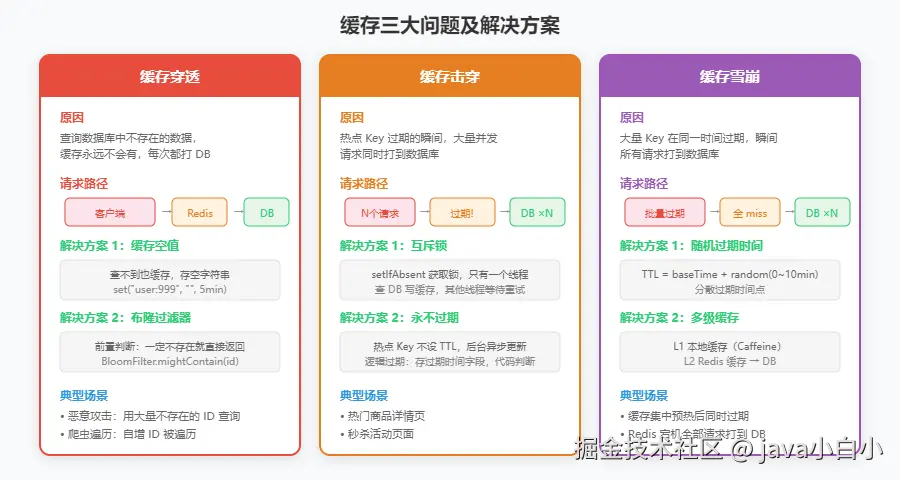
缓存常见问题
1. 缓存穿透
查询一个数据库里不存在的数据,缓存里当然也没有。每次请求都打到数据库。
解决方案一:缓存空值
kotlin
@Cacheable(value = "product", key = "#id", unless = "#result == null")
public Product getProduct(Long id) {
    return productMapper.selectById(id);
}

// 需要配合 CacheManager 配置,允许缓存 null 值
// 默认配置 .disableCachingNullValues() 要去掉
解决方案二:布隆过滤器
kotlin
@Service
public class ProductService {

    @Autowired
    private StringRedisTemplate redisTemplate;

    private final BloomFilter<Long> productBloomFilter;

    public ProductService(ProductMapper productMapper) {
        List<Long> allIds = productMapper.selectAllIds();
        productBloomFilter = BloomFilter.create(
                Funnels.longFunnel(), allIds.size() * 10, 0.01);
        allIds.forEach(productBloomFilter::put);
    }

    public Product getProduct(Long id) {
        if (!productBloomFilter.mightContain(id)) {
            return null; // 布隆过滤器说一定不存在,直接返回
        }
        // 可能存在,走正常缓存逻辑
        String cacheKey = "product:" + id;
        String cached = redisTemplate.opsForValue().get(cacheKey);
        if (cached != null) {
            return JSON.parseObject(cached, Product.class);
        }
        Product product = productMapper.selectById(id);
        if (product != null) {
            redisTemplate.opsForValue().set(cacheKey, JSON.toJSONString(product), 30, TimeUnit.MINUTES);
        }
        return product;
    }
}
2. 缓存击穿
某个热点 Key 过期的瞬间,大量并发请求同时打到数据库。
解决方案:互斥锁
kotlin
@Service
public class ProductService {

    @Autowired
    private StringRedisTemplate redisTemplate;
    @Autowired
    private ProductMapper productMapper;

    public Product getProduct(Long id) {
        String cacheKey = "product:" + id;
        String cached = redisTemplate.opsForValue().get(cacheKey);

        if (cached != null) {
            return JSON.parseObject(cached, Product.class);
        }

        // 缓存不存在,用分布式锁防止并发穿透
        String lockKey = "lock:product:" + id;
        try {
            Boolean locked = redisTemplate.opsForValue()
                    .setIfAbsent(lockKey, "1", 10, TimeUnit.SECONDS);
            if (Boolean.TRUE.equals(locked)) {
                // 拿到锁,查数据库并写缓存
                Product product = productMapper.selectById(id);
                if (product != null) {
                    redisTemplate.opsForValue().set(cacheKey,
                            JSON.toJSONString(product), 30, TimeUnit.MINUTES);
                }
                return product;
            } else {
                // 没拿到锁,等一下再试
                Thread.sleep(100);
                return getProduct(id);
            }
        } catch (InterruptedException e) {
            Thread.currentThread().interrupt();
            throw new RuntimeException("获取产品信息失败", e);
        } finally {
            redisTemplate.delete(lockKey);
        }
    }
}
3. 缓存雪崩
大量 Key 在同一时间过期,瞬间所有请求打到数据库。
解决方案:过期时间加随机值
java
@Service
public class ProductService {

    @Autowired
    private StringRedisTemplate redisTemplate;

    private final Random random = new Random();

    public void cacheProduct(Product product) {
        String cacheKey = "product:" + product.getId();
        int baseMinutes = 30;
        int randomMinutes = random.nextInt(10); // 0~10 分钟随机
        redisTemplate.opsForValue().set(cacheKey,
                JSON.toJSONString(product),
                baseMinutes + randomMinutes, TimeUnit.MINUTES);
    }
}
三种问题对比
| 问题 | 原因 | 解决方案 |
|---|---|---|
| 缓存穿透 | 查不存在的数据 | 缓存空值 / 布隆过滤器 |
| 缓存击穿 | 热点 Key 过期 | 互斥锁 / 永不过期 |
| 缓存雪崩 | 大量 Key 同时过期 | 过期时间加随机值 / 多级缓存 |
源码分析:Spring Data Redis 的底层实现
1. 自动配置:RedisAutoConfiguration
less
// org.springframework.boot.autoconfigure.data.redis.RedisAutoConfiguration
@AutoConfiguration
@ConditionalOnClass(RedisOperations.class)
@EnableConfigurationProperties(RedisProperties.class)
@Import({ LettuceConnectionConfiguration.class, JedisConnectionConfiguration.class })
public class RedisAutoConfiguration {

    @Bean
    @ConditionalOnMissingBean(name = "redisTemplate")
    @ConditionalOnSingleCandidate(RedisConnectionFactory.class)
    public RedisTemplate<Object, Object> redisTemplate(RedisConnectionFactory redisConnectionFactory) {
        RedisTemplate<Object, Object> template = new RedisTemplate<>();
        template.setConnectionFactory(redisConnectionFactory);
        return template;
    }

    @Bean
    @ConditionalOnMissingBean
    @ConditionalOnSingleCandidate(RedisConnectionFactory.class)
    public StringRedisTemplate stringRedisTemplate(RedisConnectionFactory redisConnectionFactory) {
        return new StringRedisTemplate(redisConnectionFactory);
    }
}
关键点:
- 只要在 classpath 下有
RedisOperations类(spring-data-redis 里的),自动配置就生效 - 默认创建了两个 Bean:
redisTemplate和stringRedisTemplate @ConditionalOnMissingBean意味着你自定义了 RedisTemplate,默认的就不会创建
2. Lettuce 连接工厂:LettuceConnectionFactory
scala
// org.springframework.data.redis.connection.lettuce.LettuceConnectionFactory
public class LettuceConnectionFactory extends AbstractRedisConnectionFactory
        implements InitializingBean, DisposableBean {

    private LettuceClientConfiguration clientConfiguration;
    private LettuceConnectionProvider connectionProvider;
    private RedisStandaloneConfiguration standaloneConfig;

    @Override
    public RedisConnection getConnection() {
        LettuceConnection connection = new LettuceConnection(
                getSharedConnection(), getConnectionProvider(), getTimeout(), getDatabase());
        return connection;
    }

    @Override
    protected RedisConnection getSharedConnection() {
        // Lettuce 的特点:共享一个线程安全的连接
        StatefulRedisConnection<byte[], byte[]> connection =
                ((LettuceConnectionProvider) this.connectionProvider)
                        .getConnection();
        return new LettuceConnection(connection, getTimeout());
    }
}
Lettuce 和 Jedis 最大的区别:
| 对比项 | Lettuce | Jedis |
|---|---|---|
| 连接方式 | 单连接多线程共享 | 每个线程一个连接 |
| 线程安全 | 是 | 否 |
| 异步支持 | 支持(基于 Netty) | 不支持 |
| 连接池 | 需要(用于扩容和冗余) | 必须(线程不安全) |
| 性能 | 高并发下更优 | 简单场景足够 |
3. RedisTemplate 执行流程
csharp
// org.springframework.data.redis.core.RedisTemplate
public class RedisTemplate<K, V> extends RedisAccessor implements RedisOperations<K, V> {

    private RedisSerializer<?> keySerializer = new JdkSerializationRedisSerializer();
    private RedisSerializer<?> valueSerializer = new JdkSerializationRedisSerializer();

    @Override
    public V opsForValue() {
        if (valueOps == null) {
            valueOps = new DefaultValueOperations<>(this);
        }
        return (V) valueOps;
    }

    // DefaultValueOperations.set() 内部实现
    // org.springframework.data.redis.core.DefaultValueOperations
    public void set(K key, V value, long timeout, TimeUnit unit) {
        execute((RedisCallback<Void>) connection -> {
            byte[] rawKey = rawKey(key);           // Key 序列化
            byte[] rawValue = rawValue(value);     // Value 序列化
            connection.set(rawKey, rawValue);      // 发送 SET 命令
            if (timeout > 0) {
                connection.expire(rawKey, unit.toSeconds(timeout));  // 设置过期
            }
            return null;
        }, true);
    }
}执行链路:redisTemplate.opsForValue().set() → DefaultValueOperations.set() → RedisTemplate.execute() → LettuceConnection.set() → Redis Server。
4. @Cacheable 的切面:CacheInterceptor
java
// org.springframework.cache.interceptor.CacheInterceptor
public class CacheInterceptor extends CacheAspectSupport implements MethodInterceptor, Serializable {

    @Override
    @Nullable
    public Object invoke(MethodInvocation invocation) throws Throwable {
        Method method = invocation.getMethod();
        CacheOperationInvoker aopInvoker = () -> {
            try {
                return invocation.proceed();
            } catch (Throwable ex) {
                throw new CacheOperationInvoker.ThrowableWrapper(ex);
            }
        };

        // 获取方法的缓存操作(@Cacheable 等)
        CacheOperationSource cacheOperationSource = getCacheOperationSource();
        if (cacheOperationSource != null) {
            Collection<CacheOperation> operations =
                    cacheOperationSource.getCacheOperations(method, invocation.getThis().getClass());
            if (!CollectionUtils.isEmpty(operations)) {
                return execute(aopInvoker, invocation.getThis(), method, new Object[]{}, operations);
            }
        }
        return aopInvoker.invoke();
    }
}

// 父类 CacheAspectSupport 的核心逻辑
public abstract class CacheAspectSupport {

    @Nullable
    protected Object execute(CacheOperationInvoker invoker, Object target, Method method,
            Object[] args, Collection<CacheOperation> operations) {

        // 1. 解析缓存注解属性
        CacheOperationContexts contexts = createOperationContexts(operations, method, args, target);

        // 2. 检查缓存(@Cacheable)
        Object cachedValue = findCachedItem(contexts);
        if (cachedValue != null) {
            return cachedValue; // 缓存命中,直接返回
        }

        // 3. 缓存未命中,执行方法
        Object result = invoker.invoke();

        // 4. 把结果写入缓存(@Cacheable / @CachePut)
        cacheResult(contexts, result);

        // 5. 清除缓存(@CacheEvict)
        processEvict(contexts);

        return result;
    }
}
这段源码把 @Cacheable 的完整流程写清楚了:
- 解析方法上的缓存注解
- 根据注解属性生成 Cache Key
- 从 CacheManager 获取对应的 Cache 实现(RedisCache)
- 查 Redis:命中就直接返回,不执行方法
- 未命中就执行方法,把结果写入 Redis
5. RedisCache 的实现
typescript
// org.springframework.data.redis.cache.RedisCache
public class RedisCache implements Cache {

    private final String name;
    private final RedisCacheWriter cacheWriter;
    private final RedisCacheConfiguration cacheConfig;

    @Override
    public byte[] get(Object key) {
        byte[] cacheKey = createCacheKey(key);
        return cacheWriter.get(name, cacheKey);
    }

    @Override
    public void put(Object key, @Nullable byte[] value) {
        byte[] cacheKey = createCacheKey(key);
        cacheWriter.put(name, cacheKey, value, cacheConfig.getTtl());
    }

    @Override
    public byte[] createCacheKey(Object key) {
        // 实际的 Redis Key 格式:缓存名::key
        // 例如:product::1001
        String convertedKey = convertKey(key);
        if (!cacheConfig.usePrefix()) {
            return convertedKey.getBytes(StandardCharsets.UTF_8);
        }
        return cacheConfig.getKeyPrefixFor(name).getBytes(StandardCharsets.UTF_8)
                + convertedKey.getBytes(StandardCharsets.UTF_8);
    }
}
实际存到 Redis 里的 Key 格式是 缓存名::key。比如 @Cacheable(value = "product", key = "#id"),id=1001 时,Redis 里的 Key 就是 product::1001。
实战:完整的缓存方案
场景:商品详情页缓存
typescript
@Service
public class ProductDetailService {

    @Autowired
    private ProductMapper productMapper;
    @Autowired
    private StringRedisTemplate redisTemplate;
    @Autowired
    private RedisTemplate<String, Object> jsonRedisTemplate;

    private static final String PRODUCT_KEY = "product:detail:";
    private static final long CACHE_TTL_MINUTES = 30;

    public ProductDetailVO getProductDetail(Long productId) {
        String cacheKey = PRODUCT_KEY + productId;

        // 1. 查缓存
        String cached = redisTemplate.opsForValue().get(cacheKey);
        if (cached != null) {
            return JSON.parseObject(cached, ProductDetailVO.class);
        }

        // 2. 缓存未命中,查数据库
        ProductDetailVO detail = loadFromDatabase(productId);

        // 3. 写缓存(随机过期时间防雪崩)
        if (detail != null) {
            int ttl = CACHE_TTL_MINUTES + new Random().nextInt(10);
            redisTemplate.opsForValue().set(cacheKey, JSON.toJSONString(detail), ttl, TimeUnit.MINUTES);
        } else {
            // 缓存空值防穿透,但过期时间短一点
            redisTemplate.opsForValue().set(cacheKey, "", 5, TimeUnit.MINUTES);
        }

        return detail;
    }

    private ProductDetailVO loadFromDatabase(Long productId) {
        Product product = productMapper.selectById(productId);
        if (product == null) {
            return null;
        }
        List<Sku> skus = productMapper.selectSkusByProductId(productId);
        List<Spec> specs = productMapper.selectSpecsByProductId(productId);
        return ProductDetailVO.build(product, skus, specs);
    }

    // 更新商品时删除缓存
    public void updateProduct(Product product) {
        productMapper.updateById(product);
        String cacheKey = PRODUCT_KEY + product.getId();
        redisTemplate.delete(cacheKey);
    }

    // 删除商品时删除缓存
    public void deleteProduct(Long productId) {
        productMapper.deleteById(productId);
        String cacheKey = PRODUCT_KEY + productId;
        redisTemplate.delete(cacheKey);
    }

    // 批量预热缓存
    public void warmUpCache(List<Long> productIds) {
        for (Long id : productIds) {
            try {
                getProductDetail(id);
            } catch (Exception e) {
                // 预热失败不影响流程,记录日志即可
                log.warn("预热商品缓存失败, productId={}", id, e);
            }
        }
    }
}
场景:接口限流
typescript
@Service
public class RateLimitService {

    @Autowired
    private StringRedisTemplate redisTemplate;

    public boolean isAllowed(String userId, String api, int maxCount, int windowSeconds) {
        String key = "rate:" + userId + ":" + api;
        Long count = redisTemplate.opsForValue().increment(key);

        if (count != null && count == 1) {
            redisTemplate.expire(key, windowSeconds, TimeUnit.SECONDS);
        }

        return count != null && count <= maxCount;
    }
}

@RestController
@RequestMapping("/api")
public class ApiController {

    @Autowired
    private RateLimitService rateLimitService;

    @PostMapping("/sendSms")
    public Result sendSms(@RequestParam String phone, @RequestHeader String userId) {
        if (!rateLimitService.isAllowed(userId, "sendSms", 5, 60)) {
            return Result.fail("操作太频繁,请稍后再试");
        }
        smsService.send(phone);
        return Result.success();
    }
}
场景:排行榜
typescript
@Service
public class RankService {

    @Autowired
    private StringRedisTemplate redisTemplate;

    private static final String RANK_KEY = "rank:score";

    public void addScore(String userId, double score) {
        redisTemplate.opsForZSet().add(RANK_KEY, userId, score);
    }

    public void incrementScore(String userId, double delta) {
        redisTemplate.opsForZSet().incrementScore(RANK_KEY, userId, delta);
    }

    public List<RankVO> getTopN(int n) {
        Set<ZSetOperations.TypedTuple<String>> tuples =
                redisTemplate.opsForZSet().reverseRangeWithScores(RANK_KEY, 0, n - 1);

        if (tuples == null) {
            return Collections.emptyList();
        }

        List<RankVO> result = new ArrayList<>();
        int rank = 1;
        for (ZSetOperations.TypedTuple<String> tuple : tuples) {
            RankVO vo = new RankVO();
            vo.setRank(rank++);
            vo.setUserId(tuple.getValue());
            vo.setScore(tuple.getScore());
            result.add(vo);
        }
        return result;
    }

    public Long getUserRank(String userId) {
        return redisTemplate.opsForZSet().reverseRank(RANK_KEY, userId);
    }

    public Double getUserScore(String userId) {
        return redisTemplate.opsForZSet().score(RANK_KEY, userId);
    }
}
连接池与集群配置
单机配置(开发环境)
yaml
spring:
  redis:
    host: 127.0.0.1
    port: 6379
    password: your_password
    database: 0
    timeout: 3000ms
    lettuce:
      pool:
        max-active: 20
        max-idle: 10
        min-idle: 5
        max-wait: 3000ms
      shutdown-timeout: 100ms
哨兵配置(高可用)
yaml
spring:
  redis:
    password: your_password
    sentinel:
      master: mymaster
      nodes: 192.168.1.101:26379,192.168.1.102:26379,192.168.1.103:26379
    lettuce:
      pool:
        max-active: 20
        max-idle: 10
        min-idle: 5
集群配置(高并发)
yaml
spring:
  redis:
    password: your_password
    cluster:
      nodes: 192.168.1.101:6379,192.168.1.102:6379,192.168.1.103:6379,
             192.168.1.104:6379,192.168.1.105:6379,192.168.1.106:6379
      max-redirects: 3
    lettuce:
      pool:
        max-active: 50
        max-idle: 20
        min-idle: 10
连接池参数说明
| 参数 | 默认值 | 说明 |
|---|---|---|
| max-active | 8 | 最大活跃连接数 |
| max-idle | 8 | 最大空闲连接数 |
| min-idle | 0 | 最小空闲连接数 |
| max-wait | -1(无限等待) | 获取连接最大等待时间 |
| timeout | 2000ms | Redis 命令超时时间 |
调优建议:
- max-active 设为应用最大并发数的 1.5 倍
- max-idle 和 max-active 保持一致,避免连接频繁创建销毁
- max-wait 设为 3~5 秒,超过就快速失败
- 生产环境 min-idle 设为 max-active 的一半
最佳实践
1. Key 命名规范
arduino
public class RedisKeyConstants {
    // 业务:实体:ID
    public static final String PRODUCT_DETAIL = "product:detail:";
    public static final String USER_INFO = "user:info:";
    public static final String ORDER_STATUS = "order:status:";

    // 业务:操作:参数
    public static final String RATE_LIMIT = "rate:%s:%s";
    public static final String LOCK = "lock:";

    // 项目前缀(多项目共用 Redis 时)
    public static final String PREFIX = "myapp:";
}
用冒号 : 分隔层级,和 Redis 的 keyspace 通知机制配合使用。
2. 统一 TTL 管理
java
@Configuration
public class CacheTTLConfig {
    public static final Duration PRODUCT_TTL = Duration.ofMinutes(30);
    public static final Duration USER_TTL = Duration.ofMinutes(10);
    public static final Duration CONFIG_TTL = Duration.ofHours(24);
    public static final Duration LOCK_TTL = Duration.ofSeconds(30);
}
不要在代码里到处写魔法数字。TTL 集中管理,改起来方便。
3. 选择 RedisTemplate 还是 @Cacheable
| 对比项 | RedisTemplate | @Cacheable |
|---|---|---|
| 灵活性 | 高,支持所有 Redis 命令 | 低,只支持 get/put/evict |
| 侵入性 | 高,业务代码里混着缓存逻辑 | 低,一个注解搞定 |
| 控制粒度 | 精细(字段级、条件缓存) | 粗(方法级) |
| 适用场景 | 分布式锁、限流、排行榜 | CRUD 缓存 |
| 学习成本 | 需要了解 Redis 命令 | 只需理解注解 |
简单 CRUD 缓存用 @Cacheable,复杂场景用 RedisTemplate。两者可以共存。
4. 防止大 Key
scss
// 不好:把整个列表存成一个 Key
redisTemplate.opsForValue().set("order:list", JSON.toJSONString(thousandsOfOrders));

// 好:分页存储
for (int i = 0; i < pages; i++) {
    List<Order> page = orders.subList(i * pageSize, (i + 1) * pageSize);
    redisTemplate.opsForValue().set("order:list:" + i, JSON.toJSONString(page), 30, TimeUnit.MINUTES);
}
单个 Key 的 Value 不要超过 10KB。大 Key 会导致 Redis 阻塞,影响所有请求。
5. 批量操作用 Pipeline
typescript
@Service
public class BatchService {

    @Autowired
    private StringRedisTemplate redisTemplate;

    public void batchSet(Map<String, String> kvMap) {
        redisTemplate.executePipelined((RedisCallback<Object>) connection -> {
            StringRedisConnection stringRedisConn = (StringRedisConnection) connection;
            for (Map.Entry<String, String> entry : kvMap.entrySet()) {
                stringRedisConn.set(entry.getKey(), entry.getValue());
            }
            return null;
        });
    }

    public List<String> batchGet(List<String> keys) {
        return redisTemplate.executePipelined((RedisCallback<String>) connection -> {
            StringRedisConnection stringRedisConn = (StringRedisConnection) connection;
            for (String key : keys) {
                stringRedisConn.get(key);
            }
            return null;
        });
    }
}
Pipeline 把多个命令打包一次发送,减少网络往返。批量操作必须用 Pipeline,否则 1000 次 get 就是 1000 次网络往返。
Lettuce vs Jedis 详细对比
| 对比项 | Lettuce | Jedis |
|---|---|---|
| 线程安全 | 是 | 否 |
| 连接方式 | 单连接多线程复用 | 连接池 |
| 异步 | 支持 | 不支持 |
| 响应式 | 支持(Reactive) | 不支持 |
| 集群 | 支持 | 支持 |
| 哨兵 | 支持 | 支持 |
| Pipeline | 支持 | 支持 |
| 事务 | 支持 | 支持 |
| 底层 | Netty | Socket |
| Spring Boot 默认 | 是 | 否 |
| 适用场景 | 高并发、异步操作 | 简单场景、老项目 |
Spring Boot 默认选 Lettuce,大部分情况不用换。
总结
| 知识点 | 要点 |
|---|---|
| 核心组件 | RedisTemplate、StringRedisTemplate、CacheManager |
| 连接客户端 | Lettuce(默认,线程安全)/ Jedis |
| 序列化 | Key 用 String,Value 用 JSON(Jackson2JsonRedisSerializer) |
| 注解缓存 | @Cacheable / @CachePut / @CacheEvict / @Caching |
| 缓存问题 | 穿透(空值+布隆过滤器)、击穿(互斥锁)、雪崩(随机过期) |
| 源码链路 | RedisAutoConfiguration → LettuceConnectionFactory → RedisTemplate → LettuceConnection |
| @Cacheable 链路 | CacheInterceptor → CacheAspectSupport → RedisCache → RedisCacheWriter |
| 数据结构 | String(缓存)、Hash(对象)、List(队列)、Set(去重)、ZSet(排行榜) |
| 最佳实践 | Key 命名规范、TTL 统一管理、防大 Key、批量用 Pipeline |
Redis 集成就这些内容。核心是搞清楚两条链路:RedisTemplate 的底层调用链路和 @Cacheable 的切面执行链路。理解了这两条链路,遇到缓存不生效、序列化乱码、连接超时这些问题,就知道从哪里查。