目录
[1. YOLOv8 Face Landmarks](#1. YOLOv8 Face Landmarks)
[2. C# 实现 Mel 频谱](# 实现 Mel 频谱)
[3. Wav2Lip ONNX 推理](#3. Wav2Lip ONNX 推理)
[4. 人脸融合与边缘羽化](#4. 人脸融合与边缘羽化)
[5. GFPGAN 人脸修复](#5. GFPGAN 人脸修复)
[6. FFmpeg 音视频合并](#6. FFmpeg 音视频合并)
说明
只需要一张正脸照片和一段语音,就能生成自然开口说话的视频。
这次分享的是一套基于 C# WinForms 开发的数字人口型同步 Demo。项目不依赖 Python,集成人脸检测、Mel 频谱提取、Wav2Lip 推理、人脸修复、视频生成及音视频合并,可直接在 Windows 环境运行。
效果
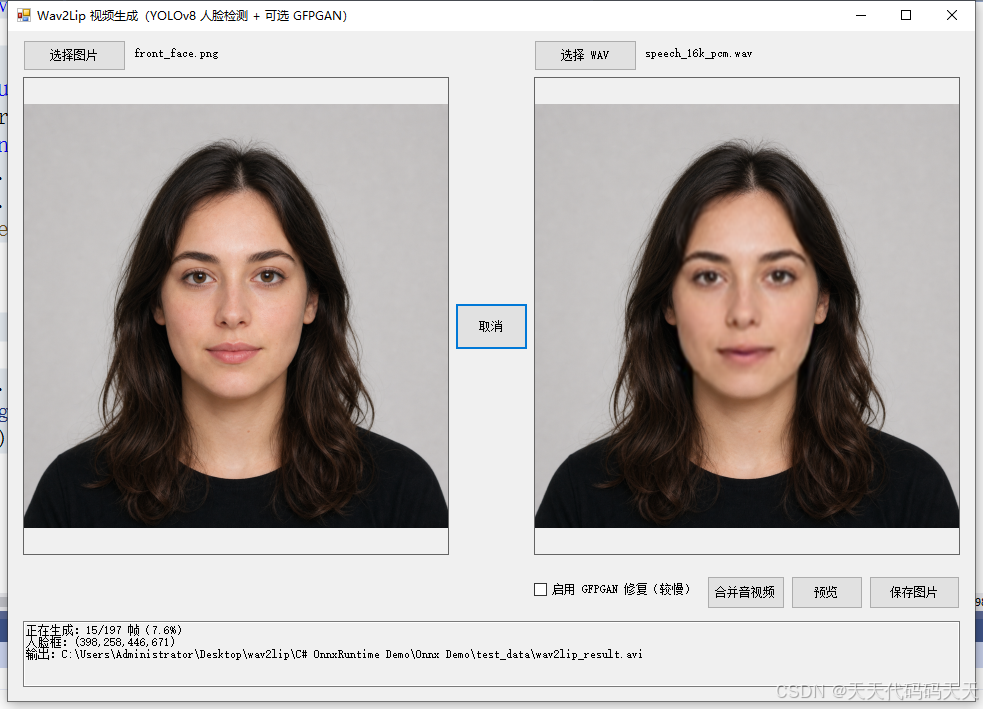
C# OnnxRuntime Wav2Lip
核心功能
项目打通了完整的数字人口型同步流程:
-
选择一张人物正脸图片
-
导入 PCM WAV 音频
-
自动检测并裁剪人脸区域
-
根据音频逐帧生成匹配的嘴型
-
将生成人脸融合回原图
-
可选 GFPGAN 人脸修复
-
生成 AVI 视频
-
调用 FFmpeg 合并音视频
-
使用 FFplay 一键预览结果
整个流程通过图形界面完成,无需编写命令,也无需配置 Python 环境。
技术方案
1. YOLOv8 Face Landmarks
首先使用 YOLOv8 Face Landmarks 检测图片中的人脸。
程序会自动选择面积最大的人脸,并根据检测框截取适合 Wav2Lip 推理的区域,解决了手动裁图不准确导致的人脸变形、脖子伪影等问题。
2. C# 实现 Mel 频谱
项目直接使用 C# 读取 PCM WAV,并完成:
-
单声道转换
-
16 kHz 重采样
-
预加重处理
-
STFT 频谱计算
-
80 维 Mel 滤波
-
Wav2Lip 标准归一化
-
80×16 Mel 窗口切分
音频按照 25 FPS 滑动取样,为每一帧生成对应的模型输入。
3. Wav2Lip ONNX 推理
推理部分使用 Microsoft ONNX Runtime,支持普通 Wav2Lip 与 Wav2Lip GAN 模型。
程序优先加载画质更好的 wav2lip_gan.onnx,输入和输出分别为:
-
Mel 输入:
[1, 1, 80, 16] -
人脸输入:
[1, 6, 96, 96] -
预测结果:
[1, 3, 96, 96]
模型生成的嘴型会随着音频内容逐帧变化。
4. 人脸融合与边缘羽化
生成结果不会直接以96×96的小图片输出,而是重新缩放并贴回原图中的人脸位置。
针对下巴和脖子处容易出现的矩形接缝,项目加入了四边渐隐融合,并扩大底部羽化范围,使生成区域能够平滑过渡回原图。
5. GFPGAN 人脸修复
对于清晰度不足的结果,可以勾选 GFPGAN 修复。
GFPGAN 能够改善面部纹理和细节,但逐帧执行512×512模型会增加处理时间,也可能带来轻微的帧间变化,因此项目将其设计为可选功能。
6. FFmpeg 音视频合并
Wav2Lip 推理完成后,程序先生成无声 AVI,再通过 C# 调用 FFmpeg 命令,将原始 WAV 与视频合成为带声音的 MP4。
生成完成后,还可以直接调用 FFplay 进行预览。
项目特点
-
纯 C# 实现,不依赖 Python
-
基于 WinForms,操作简单
-
ONNX Runtime CPU 推理
-
自动人脸检测,无需手工裁图
-
支持 Wav2Lip GAN
-
支持 GFPGAN 修复
-
支持取消长时间任务
-
自动显示处理进度
-
支持音视频合并与一键预览
-
各功能按类拆分,方便二次开发
应用场景
这套方案可以用于:
-
数字人播报
-
虚拟主播
-
短视频配音
-
教学内容制作
-
企业宣传视频
-
游戏角色对话
-
AI 数字员工原型验证
wav2lip.onnx模型信息
Model Properties
-------------------------
---------------------------------------------------------------

Inputs
-------------------------
name:mel_spectrogram
tensor:Float[-1, 1, 80, 16]
name:video_frames
tensor:Float[-1, 6, 96, 96]
---------------------------------------------------------------

Outputs
-------------------------
name:predicted_frames
tensor:Float[-1, 3, 96, 96]
---------------------------------------------------------------
C#代码
using Microsoft.ML.OnnxRuntime;
using Microsoft.ML.OnnxRuntime.Tensors;
using OpenCvSharp;
using OpenCvSharp.Dnn;
using System;
using System.Collections.Generic;
using System.Drawing;
using System.Drawing.Drawing2D;
using System.Drawing.Imaging;
using System.Diagnostics;
using System.IO;
using System.Linq;
using System.Text;
using System.Windows.Forms;
namespace Onnx_Demo
{
public partial class Form1 : Form
{
private string imagePath;
private string wavPath;
private string gfpganModelPath;
private Wav2LipInference wav2Lip;
private YoloFaceDetector faceDetector;
private GfpganEnhancer gfpgan;
private bool isGenerating;
private bool cancelRequested;
private string lastSilentVideoPath;
private string lastMergedVideoPath;
private const double VideoFps = 25.0;
public Form1()
{
InitializeComponent();
}
private void Form1_Load(object sender, EventArgs e)
{
try
{
string ganPath = Path.Combine(Application.StartupPath, "model", "wav2lip_gan.onnx");
string wav2LipPath = File.Exists(ganPath)
? ganPath
: Path.Combine(Application.StartupPath, "model", "wav2lip.onnx");
string detectorPath = Path.Combine(Application.StartupPath, "model", "yolov8-face-landmarks.onnx");
gfpganModelPath = Path.Combine(Application.StartupPath, "model", "GFPGANv1.4.onnx");
if (!File.Exists(wav2LipPath)) throw new FileNotFoundException("未找到 Wav2Lip 模型。", wav2LipPath);
if (!File.Exists(detectorPath)) throw new FileNotFoundException("未找到人脸检测模型。", detectorPath);
using (var options = new SessionOptions())
{
options.LogSeverityLevel = OrtLoggingLevel.ORT_LOGGING_LEVEL_WARNING;
options.AppendExecutionProvider_CPU(0);
wav2Lip = new Wav2LipInference(wav2LipPath, options);
}
faceDetector = new YoloFaceDetector(detectorPath);
checkGfpgan.Enabled = File.Exists(gfpganModelPath);
textBox1.Text = "已加载 " + Path.GetFileName(wav2LipPath) +
" 和 YOLOv8 Face Landmarks。GFPGAN 可按需启用。";
LoadBundledSamples();
string sampleVideo = Path.Combine(Application.StartupPath, "test_data", "wav2lip_result.avi");
if (File.Exists(sampleVideo)) lastSilentVideoPath = sampleVideo;
}
catch (Exception ex)
{
button2.Enabled = false;
MessageBox.Show(ex.Message, "模型加载失败", MessageBoxButtons.OK, MessageBoxIcon.Error);
}
}
private void LoadBundledSamples()
{
string sampleImage = Path.Combine(Application.StartupPath, "test_data", "front_face.png");
string sampleAudio = Path.Combine(Application.StartupPath, "test_data", "speech_16k_pcm.wav");
if (File.Exists(sampleImage))
{
imagePath = sampleImage;
ReplacePicture(pictureBox1, new Bitmap(sampleImage));
labelImage.Text = Path.GetFileName(sampleImage);
}
if (File.Exists(sampleAudio))
{
wavPath = sampleAudio;
labelAudio.Text = Path.GetFileName(sampleAudio);
}
}
private void button1_Click(object sender, EventArgs e)
{
using (var dialog = new OpenFileDialog())
{
dialog.Filter = "图片|*.bmp;*.jpg;*.jpeg;*.png;*.tif;*.tiff";
if (dialog.ShowDialog() != DialogResult.OK) return;
imagePath = dialog.FileName;
ReplacePicture(pictureBox1, new Bitmap(imagePath));
labelImage.Text = Path.GetFileName(imagePath);
}
}
private void buttonAudio_Click(object sender, EventArgs e)
{
using (var dialog = new OpenFileDialog())
{
dialog.Filter = "PCM WAV 音频|*.wav";
if (dialog.ShowDialog() != DialogResult.OK) return;
wavPath = dialog.FileName;
labelAudio.Text = Path.GetFileName(wavPath);
}
}
private void button2_Click(object sender, EventArgs e)
{
if (isGenerating)
{
cancelRequested = true;
button2.Enabled = false;
button2.Text = "正在取消...";
return;
}
if (wav2Lip == null || faceDetector == null || string.IsNullOrEmpty(imagePath) || string.IsNullOrEmpty(wavPath))
{
MessageBox.Show("请先选择图片和 WAV 音频。", "缺少输入");
return;
}
string videoPath;
using (var dialog = new SaveFileDialog())
{
dialog.Title = "保存 Wav2Lip 视频";
dialog.Filter = "AVI 视频|*.avi";
dialog.DefaultExt = "avi";
dialog.FileName = "wav2lip_result.avi";
if (dialog.ShowDialog() != DialogResult.OK) return;
videoPath = dialog.FileName;
}
isGenerating = true;
cancelRequested = false;
button2.Text = "取消";
Cursor = Cursors.WaitCursor;
Application.DoEvents();
try
{
DateTime started = DateTime.Now;
textBox1.Text = "正在检测人脸并提取 Mel 频谱...";
Application.DoEvents();
float[,] fullMel = WavMelProcessor.LoadMelSpectrogram(wavPath);
var starts = WavMelProcessor.GetWindowStartColumns(fullMel, VideoFps);
if (checkGfpgan.Checked && gfpgan == null) gfpgan = new GfpganEnhancer(gfpganModelPath);
using (var original = new Bitmap(imagePath))
using (Bitmap source = EnsureEvenSize(original))
using (Mat sourceMat = BitmapToMat(source))
{
Rect faceRect = faceDetector.DetectLargest(sourceMat);
using (Bitmap detectedFace = CropBitmap(source, faceRect))
using (Bitmap face96 = ResizeBitmap(detectedFace, 96, 96))
using (var writer = new VideoWriter(videoPath, FourCC.MJPG, VideoFps,
new OpenCvSharp.Size(source.Width, source.Height)))
{
if (!writer.IsOpened()) throw new InvalidOperationException("无法创建 AVI 视频文件。 ");
for (int i = 0; i < starts.Count; i++)
{
if (cancelRequested) break;
float[,] melWindow = WavMelProcessor.GetMelWindow(fullMel, starts[i]);
using (Bitmap generated = wav2Lip.Run(face96, melWindow))
{
Bitmap restored = null;
try
{
Bitmap faceOutput = generated;
if (checkGfpgan.Checked)
{
restored = gfpgan.Run(generated);
faceOutput = restored;
}
using (Bitmap composed = ComposeFrame(source, faceOutput, faceRect))
using (Mat frame = BitmapToMat(composed))
{
writer.Write(frame);
ReplacePicture(pictureBox2, new Bitmap(composed));
}
}
finally
{
if (restored != null) restored.Dispose();
}
}
textBox1.Text = string.Format(
"正在生成:{0}/{1} 帧({2:F1}%){3}\r\n人脸框:({4},{5},{6},{7})\r\n输出:{8}",
i + 1, starts.Count, 100.0 * (i + 1) / starts.Count,
checkGfpgan.Checked ? ",GFPGAN 已启用" : string.Empty,
faceRect.X, faceRect.Y, faceRect.Width, faceRect.Height, videoPath);
Application.DoEvents();
}
}
}
textBox1.Text = cancelRequested
? "已取消;已生成的部分保存在:" + videoPath
: string.Format("生成完成:{0} 帧,{1:F1} 秒;耗时 {2:F1} 秒。\r\n输出:{3}\r\nAVI 当前不含音轨。",
starts.Count, starts.Count / VideoFps, (DateTime.Now - started).TotalSeconds, videoPath);
lastSilentVideoPath = videoPath;
lastMergedVideoPath = null;
}
catch (Exception ex)
{
textBox1.Text = "生成失败:" + ex.Message;
MessageBox.Show(ex.ToString(), "生成失败", MessageBoxButtons.OK, MessageBoxIcon.Error);
}
finally
{
Cursor = Cursors.Default;
isGenerating = false;
cancelRequested = false;
button2.Enabled = true;
button2.Text = "生成视频";
}
}
private void buttonMerge_Click(object sender, EventArgs e)
{
if (string.IsNullOrEmpty(lastSilentVideoPath) || !File.Exists(lastSilentVideoPath))
{
MessageBox.Show("请先生成无声 AVI 视频。", "缺少视频");
return;
}
if (string.IsNullOrEmpty(wavPath) || !File.Exists(wavPath))
{
MessageBox.Show("请先选择 WAV 音频。", "缺少音频");
return;
}
string outputPath;
using (var dialog = new SaveFileDialog())
{
dialog.Title = "保存带音轨视频";
dialog.Filter = "MP4 视频|*.mp4";
dialog.DefaultExt = "mp4";
dialog.FileName = "wav2lip_result_with_audio.mp4";
if (dialog.ShowDialog() != DialogResult.OK) return;
outputPath = dialog.FileName;
}
try
{
string ffmpeg = GetFfmpegTool("ffmpeg.exe");
string arguments = "-y -i " + Quote(lastSilentVideoPath) + " -i " + Quote(wavPath) +
" -c:v mpeg4 -q:v 2 -c:a aac -b:a 192k -shortest " + Quote(outputPath);
textBox1.Text = "正在通过 FFmpeg 合并音视频...";
Application.DoEvents();
string error = RunCommand(ffmpeg, arguments, true);
if (!File.Exists(outputPath)) throw new InvalidOperationException("FFmpeg 未生成输出文件。\r\n" + error);
lastMergedVideoPath = outputPath;
textBox1.Text = "音视频合并完成:" + outputPath;
}
catch (Exception ex)
{
MessageBox.Show(ex.Message, "合并失败", MessageBoxButtons.OK, MessageBoxIcon.Error);
textBox1.Text = "合并失败:" + ex.Message;
}
}
private void buttonPreview_Click(object sender, EventArgs e)
{
string video = !string.IsNullOrEmpty(lastMergedVideoPath) && File.Exists(lastMergedVideoPath)
? lastMergedVideoPath : lastSilentVideoPath;
if (string.IsNullOrEmpty(video) || !File.Exists(video))
{
MessageBox.Show("当前没有可预览的视频。", "预览");
return;
}
try
{
string ffplay = GetFfmpegTool("ffplay.exe");
var startInfo = new ProcessStartInfo
{
FileName = ffplay,
Arguments = "-autoexit -window_title \"Wav2Lip Preview\" " + Quote(video),
UseShellExecute = false,
CreateNoWindow = false,
WorkingDirectory = Path.GetDirectoryName(ffplay)
};
Process.Start(startInfo);
}
catch (Exception ex)
{
MessageBox.Show(ex.Message, "预览失败", MessageBoxButtons.OK, MessageBoxIcon.Error);
}
}
private static string GetFfmpegTool(string fileName)
{
string path = Path.Combine(Application.StartupPath, "ffmpeg", fileName);
if (!File.Exists(path)) throw new FileNotFoundException("未找到 FFmpeg 工具。", path);
return path;
}
private static string Quote(string value)
{
return"\"" + value.Replace("\"", "\\\"") + "\"";
}
private static string RunCommand(string executable, string arguments, bool hidden)
{
var startInfo = new ProcessStartInfo
{
FileName = executable,
Arguments = arguments,
UseShellExecute = false,
RedirectStandardError = true,
RedirectStandardOutput = false,
CreateNoWindow = hidden,
WorkingDirectory = Path.GetDirectoryName(executable)
};
using (Process process = Process.Start(startInfo))
{
string error = process.StandardError.ReadToEnd();
process.WaitForExit();
if (process.ExitCode != 0)
throw new InvalidOperationException("FFmpeg 退出码:" + process.ExitCode + "\r\n" + error);
return error;
}
}
private static unsafe Bitmap ComposeFrame(Bitmap source, Bitmap face, Rect target)
{
// Wav2Lip/GFPGAN 会轻微改变整个人脸框的颜色。直接矩形覆盖时,底边通常
// 落在下巴或脖子上,接缝会很明显。这里使用四边平滑羽化,底边使用更宽
// 的过渡区,使生成脸逐渐融合回原图。
var result = new Bitmap(source.Width, source.Height, PixelFormat.Format24bppRgb);
using (Graphics graphics = Graphics.FromImage(result))
{
graphics.InterpolationMode = InterpolationMode.HighQualityBicubic;
graphics.DrawImageUnscaled(source, 0, 0);
}
using (Bitmap resizedFace = ResizeBitmap(face, target.Width, target.Height))
{
Rectangle resultArea = new Rectangle(0, 0, result.Width, result.Height);
Rectangle faceArea = new Rectangle(0, 0, resizedFace.Width, resizedFace.Height);
BitmapData resultData = result.LockBits(resultArea, ImageLockMode.ReadWrite, PixelFormat.Format24bppRgb);
BitmapData faceData = resizedFace.LockBits(faceArea, ImageLockMode.ReadOnly, PixelFormat.Format24bppRgb);
try
{
int sideFeather = Math.Max(4, (int)(target.Width * 0.08));
int topFeather = Math.Max(4, (int)(target.Height * 0.08));
int bottomFeather = Math.Max(8, (int)(target.Height * 0.22));
for (int y = 0; y < target.Height; y++)
{
byte* destinationRow = (byte*)resultData.Scan0 + (target.Y + y) * resultData.Stride + target.X * 3;
byte* faceRow = (byte*)faceData.Scan0 + y * faceData.Stride;
float vertical = Math.Min(EdgeWeight(y, topFeather),
EdgeWeight(target.Height - 1 - y, bottomFeather));
for (int x = 0; x < target.Width; x++)
{
float horizontal = Math.Min(EdgeWeight(x, sideFeather),
EdgeWeight(target.Width - 1 - x, sideFeather));
float alpha = SmoothStep(Math.Min(horizontal, vertical));
int offset = x * 3;
for (int channel = 0; channel < 3; channel++)
{
float original = destinationRow[offset + channel];
float generated = faceRow[offset + channel];
destinationRow[offset + channel] = (byte)Math.Round(
original + (generated - original) * alpha);
}
}
}
}
finally
{
resizedFace.UnlockBits(faceData);
result.UnlockBits(resultData);
}
}
return result;
}
private static float EdgeWeight(int distance, int feather)
{
return Math.Max(0f, Math.Min(1f, (float)distance / feather));
}
private static float SmoothStep(float value)
{
return value * value * (3f - 2f * value);
}
private static Bitmap CropBitmap(Bitmap source, Rect crop)
{
var result = new Bitmap(crop.Width, crop.Height);
using (Graphics graphics = Graphics.FromImage(result))
graphics.DrawImage(source, new Rectangle(0, 0, crop.Width, crop.Height),
new Rectangle(crop.X, crop.Y, crop.Width, crop.Height), GraphicsUnit.Pixel);
return result;
}
private static Bitmap EnsureEvenSize(Bitmap source)
{
int width = source.Width - source.Width % 2;
int height = source.Height - source.Height % 2;
return ResizeBitmap(source, width, height);
}
private static Bitmap ResizeBitmap(Bitmap source, int width, int height)
{
var result = new Bitmap(width, height, PixelFormat.Format24bppRgb);
using (Graphics graphics = Graphics.FromImage(result))
{
graphics.InterpolationMode = InterpolationMode.HighQualityBicubic;
graphics.DrawImage(source, new Rectangle(0, 0, width, height));
}
return result;
}
private static Mat BitmapToMat(Bitmap bitmap)
{
using (var formatted = new Bitmap(bitmap.Width, bitmap.Height, PixelFormat.Format24bppRgb))
{
using (Graphics graphics = Graphics.FromImage(formatted)) graphics.DrawImageUnscaled(bitmap, 0, 0);
Rectangle area = new Rectangle(0, 0, formatted.Width, formatted.Height);
BitmapData data = formatted.LockBits(area, ImageLockMode.ReadOnly, PixelFormat.Format24bppRgb);
try
{
using (var view = new Mat(formatted.Height, formatted.Width, MatType.CV_8UC3,
data.Scan0, data.Stride))
return view.Clone();
}
finally
{
formatted.UnlockBits(data);
}
}
}
private void pictureBox1_DoubleClick(object sender, EventArgs e) { ShowImage(pictureBox1.Image); }
private void pictureBox2_DoubleClick(object sender, EventArgs e) { ShowImage(pictureBox2.Image); }
private static void ShowImage(Image image)
{
if (image == null) return;
using (var window = new Form())
using (var view = new PictureBox())
{
window.Text = "图片预览";
window.StartPosition = FormStartPosition.CenterParent;
window.ClientSize = new System.Drawing.Size(Math.Min(1000, image.Width), Math.Min(800, image.Height));
view.Dock = DockStyle.Fill;
view.SizeMode = PictureBoxSizeMode.Zoom;
view.Image = image;
window.Controls.Add(view);
window.ShowDialog();
view.Image = null;
}
}
private void button3_Click(object sender, EventArgs e)
{
if (pictureBox2.Image == null) return;
using (var dialog = new SaveFileDialog())
{
dialog.Filter = "PNG 图片|*.png|JPEG 图片|*.jpg";
dialog.DefaultExt = "png";
if (dialog.ShowDialog() != DialogResult.OK) return;
pictureBox2.Image.Save(dialog.FileName,
dialog.FilterIndex == 2 ? ImageFormat.Jpeg : ImageFormat.Png);
}
}
protected override void OnFormClosed(FormClosedEventArgs e)
{
cancelRequested = true;
if (gfpgan != null) gfpgan.Dispose();
if (faceDetector != null) faceDetector.Dispose();
if (wav2Lip != null) wav2Lip.Dispose();
if (pictureBox1.Image != null) pictureBox1.Image.Dispose();
if (pictureBox2.Image != null) pictureBox2.Image.Dispose();
base.OnFormClosed(e);
}
private static void ReplacePicture(PictureBox box, Image image)
{
Image old = box.Image;
box.Image = image;
if (old != null) old.Dispose();
}
}
}