开头:
我一开始学习 Spring AI 聊天模型时,以为只要能调用大模型接口就算学会了。结果真正写接口时才发现:同样是聊天,SpringAI里既有 ChatClient,又有 ChatModel,还有流式输出、SSE、Flux、结构化返回、Advisor 日志等概念。
这篇文章就围绕:我在实践中遇到的问题是,什么时候用 ChatClient,什么时候用 ChatModel,以及如何把大模型回答做成类似 ChatGPT 那样的流式输出。
一、背景:不是先背概念,而是先看我遇到的问题
我最开始写 Spring AI 接口时,代码大概是这样的:
@GetMapping("/chat")
public String generate(String message) {
    return openAiChatModel.call(message);
}
这个接口确实能跑,但很快会遇到几个问题:
- 想给 AI 预设角色,比如"你是一个 Java 助教"。
- 想让 AI 返回结构化对象,而不是一大段字符串。
- 想让回答逐字输出,避免用户一直等待。
- 想打印请求和响应日志,方便排查 Prompt 是否生效。
- 不知道
ChatClient和ChatModel到底该用哪个。
这就是本文要解决的核心问题。
二、具体案例:我要做一个 Spring AI 问答接口
目标很简单:用户访问接口,输入一句话,AI 返回回答。
如果用 ChatClient,代码会更像业务接口:
java
@GetMapping("/call")
public String generation(String userInput) {
    return this.chatClient.prompt()
            .user(userInput)
            .call()
            .content();
}这里我一开始容易忽略的是:prompt() 不是简单拼字符串,而是在构建一次完整的 AI 请求。
它的流程可以这样理解:
#mermaid-svg-52rrA9EuIIvWKOND{font-family:"trebuchet ms",verdana,arial,sans-serif;font-size:16px;fill:#333;}@keyframes edge-animation-frame{from{stroke-dashoffset:0;}}@keyframes dash{to{stroke-dashoffset:0;}}#mermaid-svg-52rrA9EuIIvWKOND .edge-animation-slow{stroke-dasharray:9,5!important;stroke-dashoffset:900;animation:dash 50s linear infinite;stroke-linecap:round;}#mermaid-svg-52rrA9EuIIvWKOND .edge-animation-fast{stroke-dasharray:9,5!important;stroke-dashoffset:900;animation:dash 20s linear infinite;stroke-linecap:round;}#mermaid-svg-52rrA9EuIIvWKOND .error-icon{fill:#552222;}#mermaid-svg-52rrA9EuIIvWKOND .error-text{fill:#552222;stroke:#552222;}#mermaid-svg-52rrA9EuIIvWKOND .edge-thickness-normal{stroke-width:1px;}#mermaid-svg-52rrA9EuIIvWKOND .edge-thickness-thick{stroke-width:3.5px;}#mermaid-svg-52rrA9EuIIvWKOND .edge-pattern-solid{stroke-dasharray:0;}#mermaid-svg-52rrA9EuIIvWKOND .edge-thickness-invisible{stroke-width:0;fill:none;}#mermaid-svg-52rrA9EuIIvWKOND .edge-pattern-dashed{stroke-dasharray:3;}#mermaid-svg-52rrA9EuIIvWKOND .edge-pattern-dotted{stroke-dasharray:2;}#mermaid-svg-52rrA9EuIIvWKOND .marker{fill:#333333;stroke:#333333;}#mermaid-svg-52rrA9EuIIvWKOND .marker.cross{stroke:#333333;}#mermaid-svg-52rrA9EuIIvWKOND svg{font-family:"trebuchet ms",verdana,arial,sans-serif;font-size:16px;}#mermaid-svg-52rrA9EuIIvWKOND p{margin:0;}#mermaid-svg-52rrA9EuIIvWKOND .label{font-family:"trebuchet ms",verdana,arial,sans-serif;color:#333;}#mermaid-svg-52rrA9EuIIvWKOND .cluster-label text{fill:#333;}#mermaid-svg-52rrA9EuIIvWKOND .cluster-label span{color:#333;}#mermaid-svg-52rrA9EuIIvWKOND .cluster-label span p{background-color:transparent;}#mermaid-svg-52rrA9EuIIvWKOND .label text,#mermaid-svg-52rrA9EuIIvWKOND span{fill:#333;color:#333;}#mermaid-svg-52rrA9EuIIvWKOND .node rect,#mermaid-svg-52rrA9EuIIvWKOND .node circle,#mermaid-svg-52rrA9EuIIvWKOND .node ellipse,#mermaid-svg-52rrA9EuIIvWKOND .node polygon,#mermaid-svg-52rrA9EuIIvWKOND .node path{fill:#ECECFF;stroke:#9370DB;stroke-width:1px;}#mermaid-svg-52rrA9EuIIvWKOND .rough-node .label text,#mermaid-svg-52rrA9EuIIvWKOND .node .label text,#mermaid-svg-52rrA9EuIIvWKOND .image-shape .label,#mermaid-svg-52rrA9EuIIvWKOND .icon-shape .label{text-anchor:middle;}#mermaid-svg-52rrA9EuIIvWKOND .node .katex path{fill:#000;stroke:#000;stroke-width:1px;}#mermaid-svg-52rrA9EuIIvWKOND .rough-node .label,#mermaid-svg-52rrA9EuIIvWKOND .node .label,#mermaid-svg-52rrA9EuIIvWKOND .image-shape .label,#mermaid-svg-52rrA9EuIIvWKOND .icon-shape .label{text-align:center;}#mermaid-svg-52rrA9EuIIvWKOND .node.clickable{cursor:pointer;}#mermaid-svg-52rrA9EuIIvWKOND .root .anchor path{fill:#333333!important;stroke-width:0;stroke:#333333;}#mermaid-svg-52rrA9EuIIvWKOND .arrowheadPath{fill:#333333;}#mermaid-svg-52rrA9EuIIvWKOND .edgePath .path{stroke:#333333;stroke-width:2.0px;}#mermaid-svg-52rrA9EuIIvWKOND .flowchart-link{stroke:#333333;fill:none;}#mermaid-svg-52rrA9EuIIvWKOND .edgeLabel{background-color:rgba(232,232,232, 0.8);text-align:center;}#mermaid-svg-52rrA9EuIIvWKOND .edgeLabel p{background-color:rgba(232,232,232, 0.8);}#mermaid-svg-52rrA9EuIIvWKOND .edgeLabel rect{opacity:0.5;background-color:rgba(232,232,232, 0.8);fill:rgba(232,232,232, 0.8);}#mermaid-svg-52rrA9EuIIvWKOND .labelBkg{background-color:rgba(232, 232, 232, 0.5);}#mermaid-svg-52rrA9EuIIvWKOND .cluster rect{fill:#ffffde;stroke:#aaaa33;stroke-width:1px;}#mermaid-svg-52rrA9EuIIvWKOND .cluster text{fill:#333;}#mermaid-svg-52rrA9EuIIvWKOND .cluster span{color:#333;}#mermaid-svg-52rrA9EuIIvWKOND div.mermaidTooltip{position:absolute;text-align:center;max-width:200px;padding:2px;font-family:"trebuchet ms",verdana,arial,sans-serif;font-size:12px;background:hsl(80, 100%, 96.2745098039%);border:1px solid #aaaa33;border-radius:2px;pointer-events:none;z-index:100;}#mermaid-svg-52rrA9EuIIvWKOND .flowchartTitleText{text-anchor:middle;font-size:18px;fill:#333;}#mermaid-svg-52rrA9EuIIvWKOND rect.text{fill:none;stroke-width:0;}#mermaid-svg-52rrA9EuIIvWKOND .icon-shape,#mermaid-svg-52rrA9EuIIvWKOND .image-shape{background-color:rgba(232,232,232, 0.8);text-align:center;}#mermaid-svg-52rrA9EuIIvWKOND .icon-shape p,#mermaid-svg-52rrA9EuIIvWKOND .image-shape p{background-color:rgba(232,232,232, 0.8);padding:2px;}#mermaid-svg-52rrA9EuIIvWKOND .icon-shape .label rect,#mermaid-svg-52rrA9EuIIvWKOND .image-shape .label rect{opacity:0.5;background-color:rgba(232,232,232, 0.8);fill:rgba(232,232,232, 0.8);}#mermaid-svg-52rrA9EuIIvWKOND .label-icon{display:inline-block;height:1em;overflow:visible;vertical-align:-0.125em;}#mermaid-svg-52rrA9EuIIvWKOND .node .label-icon path{fill:currentColor;stroke:revert;stroke-width:revert;}#mermaid-svg-52rrA9EuIIvWKOND :root{--mermaid-font-family:"trebuchet ms",verdana,arial,sans-serif;} 用户输入 userInput
ChatClient.prompt
user 设置用户消息
call 发送给大模型
content 提取文本结果
返回给浏览器
这张图的用途是说明 ChatClient 的调用链。关键节点是 user()、call()、content(),分别对应构建用户消息、请求模型、提取响应文本。
三、问题原因:为什么只会 call(message) 不够用?
openAiChatModel.call(message) 适合入门,但它隐藏了太多细节。
例如:
java
return openAiChatModel.call("你是谁");这行代码的问题是:
| 需求 | 直接 call(message) 的问题 |
更推荐的方式 |
|---|---|---|
| 设置角色 | 不直观 | ChatClient.defaultSystem() 或 SystemMessage |
| 结构化输出 | 需要手动解析字符串 | ChatClient.entity(Class) |
| 流式输出 | 不能直接逐段返回 | stream() + Flux |
| 日志排查 | 不方便看请求和响应 | SimpleLoggerAdvisor |
| 精细控制 Prompt | 封装太简单 | ChatModel.call(Prompt) |
所以我更推荐学习时先用 ChatClient 提高开发效率,再理解 ChatModel 的底层能力。
四、解决方案一:使用 ChatClient 快速构建聊天接口
1. 创建 ChatClient
java
private final ChatClient chatClient;

public ChatController(ChatClient.Builder chatClientBuilder) {
    this.chatClient = chatClientBuilder.build();
}
也可以单独配置成 Bean:
java
@Configuration
public class ChatClientConfig {

    @Bean
    public ChatClient chatClient(ChatClient.Builder chatClientBuilder) {
        return chatClientBuilder
                .defaultSystem("你叫小特,是一个精通 Java 的智能助教")
                .build();
    }
}
这里的 defaultSystem() 就是系统提示词。它会影响每次对话的回答风格和身份。
2. 编写普通聊天接口
java
@RestController
@RequestMapping("/chat")
public class ChatController {

    @Autowired
    private ChatClient chatClient;

    @GetMapping("/call")
    public String generation(String userInput) {
        return this.chatClient.prompt()
                .user(userInput)
                .call()
                .content();
    }
}
测试地址:
http://127.0.0.1:8080/chat/call?userInput=你是谁
五、解决方案二:让 AI 返回结构化对象
我一开始以为大模型只能返回字符串,后来发现 ChatClient 可以直接映射成实体类。
比如生成一个食谱对象:
java
record Recipe(String dish, List<String> ingredients) {}接口代码:
java
@GetMapping("/entity")
public String entity(String userInput) {
    Recipe recipe = this.chatClient.prompt()
            .user(String.format("请帮我生成%s的食谱", userInput))
            .call()
            .entity(Recipe.class);

    return recipe.toString();
}
测试地址:
http://127.0.0.1:8080/chat/entity?userInput=鱼香肉丝
这里容易忽略一点:模型输出必须尽量符合 JSON 结构,否则实体映射可能失败。所以 Prompt 最好写得更明确:
请帮我生成鱼香肉丝的食谱,返回 JSON,字段包含 dish 和 ingredients。六、解决方案三:用 Advisor 打印请求和响应日志
当 AI 回答不符合预期时,第一件事不是怀疑模型,而是先看请求到底发了什么。
Spring AI 可以用 SimpleLoggerAdvisor:
java
@Bean
public ChatClient chatClient(ChatClient.Builder chatClientBuilder) {
    return chatClientBuilder
            .defaultSystem("你是命运石之门里的Amadeus,是一个智能助手")
            .defaultAdvisors(new SimpleLoggerAdvisor())
            .build();
}
配置日志级别:
logging:
  level:
    org.springframework.ai.chat.client.advisor: debug
也可以只给某一次调用加 Advisor:
java
@GetMapping("/call")
public String generation(String userInput) {
    return this.chatClient.prompt()
            .user(userInput)
            .advisors(new SimpleLoggerAdvisor())
            .call()
            .content();
}
我的建议是:开发调试阶段打开日志,线上环境注意脱敏,尤其不要把 API Key、用户隐私和敏感 Prompt 打出来。
七、解决方案四:用 SSE 和 Flux 实现流式输出
普通接口会等模型完整生成后再返回。文本很长时,用户会感觉页面卡住。
SSE 的作用就是:服务端保持 HTTP 连接,不断向浏览器推送数据。
大模型 Spring 接口 浏览器 EventSource 大模型 Spring 接口 浏览器 EventSource #mermaid-svg-EvkiKlPqCqZmG4G8{font-family:"trebuchet ms",verdana,arial,sans-serif;font-size:16px;fill:#333;}@keyframes edge-animation-frame{from{stroke-dashoffset:0;}}@keyframes dash{to{stroke-dashoffset:0;}}#mermaid-svg-EvkiKlPqCqZmG4G8 .edge-animation-slow{stroke-dasharray:9,5!important;stroke-dashoffset:900;animation:dash 50s linear infinite;stroke-linecap:round;}#mermaid-svg-EvkiKlPqCqZmG4G8 .edge-animation-fast{stroke-dasharray:9,5!important;stroke-dashoffset:900;animation:dash 20s linear infinite;stroke-linecap:round;}#mermaid-svg-EvkiKlPqCqZmG4G8 .error-icon{fill:#552222;}#mermaid-svg-EvkiKlPqCqZmG4G8 .error-text{fill:#552222;stroke:#552222;}#mermaid-svg-EvkiKlPqCqZmG4G8 .edge-thickness-normal{stroke-width:1px;}#mermaid-svg-EvkiKlPqCqZmG4G8 .edge-thickness-thick{stroke-width:3.5px;}#mermaid-svg-EvkiKlPqCqZmG4G8 .edge-pattern-solid{stroke-dasharray:0;}#mermaid-svg-EvkiKlPqCqZmG4G8 .edge-thickness-invisible{stroke-width:0;fill:none;}#mermaid-svg-EvkiKlPqCqZmG4G8 .edge-pattern-dashed{stroke-dasharray:3;}#mermaid-svg-EvkiKlPqCqZmG4G8 .edge-pattern-dotted{stroke-dasharray:2;}#mermaid-svg-EvkiKlPqCqZmG4G8 .marker{fill:#333333;stroke:#333333;}#mermaid-svg-EvkiKlPqCqZmG4G8 .marker.cross{stroke:#333333;}#mermaid-svg-EvkiKlPqCqZmG4G8 svg{font-family:"trebuchet ms",verdana,arial,sans-serif;font-size:16px;}#mermaid-svg-EvkiKlPqCqZmG4G8 p{margin:0;}#mermaid-svg-EvkiKlPqCqZmG4G8 .actor{stroke:hsl(259.6261682243, 59.7765363128%, 87.9019607843%);fill:#ECECFF;}#mermaid-svg-EvkiKlPqCqZmG4G8 text.actor>tspan{fill:black;stroke:none;}#mermaid-svg-EvkiKlPqCqZmG4G8 .actor-line{stroke:hsl(259.6261682243, 59.7765363128%, 87.9019607843%);}#mermaid-svg-EvkiKlPqCqZmG4G8 .innerArc{stroke-width:1.5;stroke-dasharray:none;}#mermaid-svg-EvkiKlPqCqZmG4G8 .messageLine0{stroke-width:1.5;stroke-dasharray:none;stroke:#333;}#mermaid-svg-EvkiKlPqCqZmG4G8 .messageLine1{stroke-width:1.5;stroke-dasharray:2,2;stroke:#333;}#mermaid-svg-EvkiKlPqCqZmG4G8 #arrowhead path{fill:#333;stroke:#333;}#mermaid-svg-EvkiKlPqCqZmG4G8 .sequenceNumber{fill:white;}#mermaid-svg-EvkiKlPqCqZmG4G8 #sequencenumber{fill:#333;}#mermaid-svg-EvkiKlPqCqZmG4G8 #crosshead path{fill:#333;stroke:#333;}#mermaid-svg-EvkiKlPqCqZmG4G8 .messageText{fill:#333;stroke:none;}#mermaid-svg-EvkiKlPqCqZmG4G8 .labelBox{stroke:hsl(259.6261682243, 59.7765363128%, 87.9019607843%);fill:#ECECFF;}#mermaid-svg-EvkiKlPqCqZmG4G8 .labelText,#mermaid-svg-EvkiKlPqCqZmG4G8 .labelText>tspan{fill:black;stroke:none;}#mermaid-svg-EvkiKlPqCqZmG4G8 .loopText,#mermaid-svg-EvkiKlPqCqZmG4G8 .loopText>tspan{fill:black;stroke:none;}#mermaid-svg-EvkiKlPqCqZmG4G8 .loopLine{stroke-width:2px;stroke-dasharray:2,2;stroke:hsl(259.6261682243, 59.7765363128%, 87.9019607843%);fill:hsl(259.6261682243, 59.7765363128%, 87.9019607843%);}#mermaid-svg-EvkiKlPqCqZmG4G8 .note{stroke:#aaaa33;fill:#fff5ad;}#mermaid-svg-EvkiKlPqCqZmG4G8 .noteText,#mermaid-svg-EvkiKlPqCqZmG4G8 .noteText>tspan{fill:black;stroke:none;}#mermaid-svg-EvkiKlPqCqZmG4G8 .activation0{fill:#f4f4f4;stroke:#666;}#mermaid-svg-EvkiKlPqCqZmG4G8 .activation1{fill:#f4f4f4;stroke:#666;}#mermaid-svg-EvkiKlPqCqZmG4G8 .activation2{fill:#f4f4f4;stroke:#666;}#mermaid-svg-EvkiKlPqCqZmG4G8 .actorPopupMenu{position:absolute;}#mermaid-svg-EvkiKlPqCqZmG4G8 .actorPopupMenuPanel{position:absolute;fill:#ECECFF;box-shadow:0px 8px 16px 0px rgba(0,0,0,0.2);filter:drop-shadow(3px 5px 2px rgb(0 0 0 / 0.4));}#mermaid-svg-EvkiKlPqCqZmG4G8 .actor-man line{stroke:hsl(259.6261682243, 59.7765363128%, 87.9019607843%);fill:#ECECFF;}#mermaid-svg-EvkiKlPqCqZmG4G8 .actor-man circle,#mermaid-svg-EvkiKlPqCqZmG4G8 line{stroke:hsl(259.6261682243, 59.7765363128%, 87.9019607843%);fill:#ECECFF;stroke-width:2px;}#mermaid-svg-EvkiKlPqCqZmG4G8 :root{--mermaid-font-family:"trebuchet ms",verdana,arial,sans-serif;} 建立 SSE 连接发送用户 Prompt分段返回内容data: 第一段data: 第二段data: 第三段
这张图的用途是说明流式响应链路。关键点是浏览器用 EventSource 建立连接,服务端用 text/event-stream 持续推送。
1. SSE 数据格式
data: 第一段内容\n\n
data: 第二段内容\n\n
event: end
data: done\n\n
常见字段:
| 字段 | 作用 |
|---|---|
data |
必填,真正的数据内容 |
event |
自定义事件类型 |
id |
消息编号 |
retry |
断线重连时间 |
: comment |
注释行 |
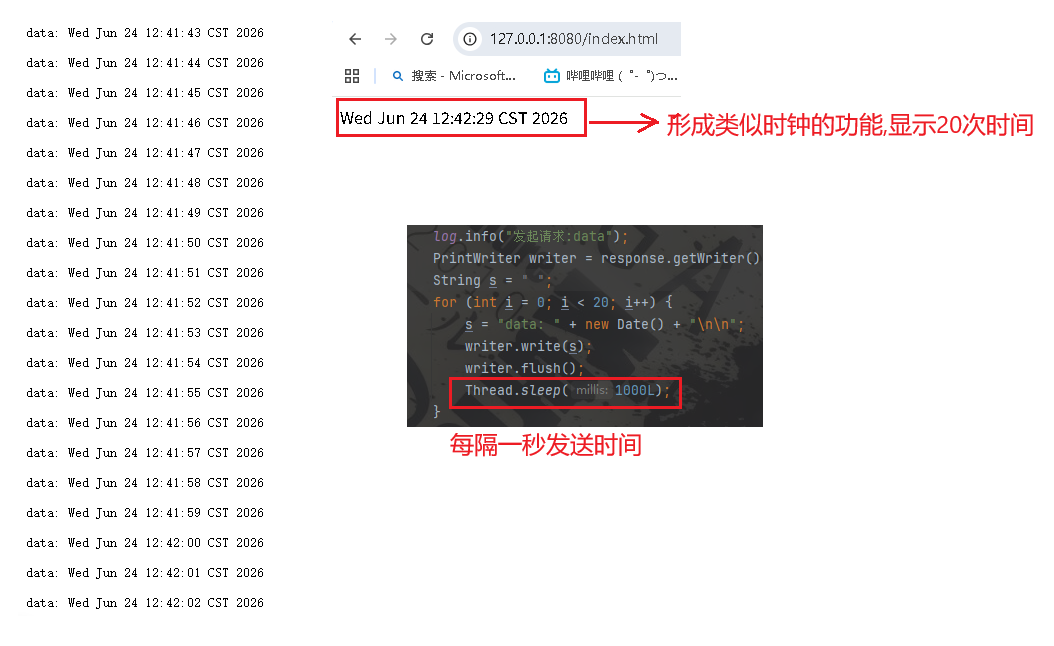
2. 服务端手写 SSE 示例
java
@RestController
@RequestMapping("/sse")
public class SseController {

    private static final Logger log = LoggerFactory.getLogger(SseController.class);

    @GetMapping("/data")
    public void data(HttpServletResponse response) throws Exception {
        response.setContentType("text/event-stream;charset=utf-8");
        log.info("发起请求:data");
        PrintWriter writer = response.getWriter();
        for (int i = 0; i < 20; i++) {
            String s = "data: " + new Date() + "\n\n";
            writer.write(s);
            writer.flush();
            Thread.sleep(1000L);
        }
    }

    @GetMapping("/retry")
    public void retry(HttpServletResponse response) throws Exception {
        response.setContentType("text/event-stream;charset=utf-8");
        PrintWriter writer = response.getWriter();
        log.info("发起请求:retry");
        for (int i = 0; i < 20; i++) {
            String s = "data: retry" + new Date() + "\n\n";
            writer.write(s);
            writer.flush();
            Thread.sleep(2000L);
        }
    }

    @GetMapping("/event")
    public void end(HttpServletResponse response) throws Exception{
        response.setContentType("text/event-stream;charset=utf-8");
        PrintWriter writer = response.getWriter();
        log.info("发起请求:event");
        // 先发送事件类型声明
        writer.write("event: foo\n\n");
        writer.flush();
        for (int i = 0; i < 10; i++) {
            String s = "data: event" + new Date() + "\n\n";
            writer.write(s);
            writer.flush();
            Thread.sleep(1000L);
        }
        // 流式请求的结束
        writer.write("event: end\ndata: EOF\n\n");
        writer.flush();
    }
}
3. 浏览器客户端示例
html
<div id = "sse"></div>

<script>
    let eventSource = new EventSource("/sse/data");
    eventSource.addEventListener("foo", function (event) {
        document.getElementById("sse").innerHTML = event.data;
    });

    eventSource.addEventListener("end", function (event) {
        document.getElementById("sse").innerHTML = event.data + " - 连接已关闭";
        eventSource.close();
    });

    eventSource.onerror = function (event) {
        document.getElementById("sse").innerHTML = "连接出错";
    };
</script>
4. 测试
流式请求测试
retry重连机制测试
let es = new EventSource("http://127.0.0.1:8080/sse/retry");
es.onmessage = function(e) { console.log("收到:", e.data); };
es.onerror = function(e) { console.log("连接状态:", es.readyState); };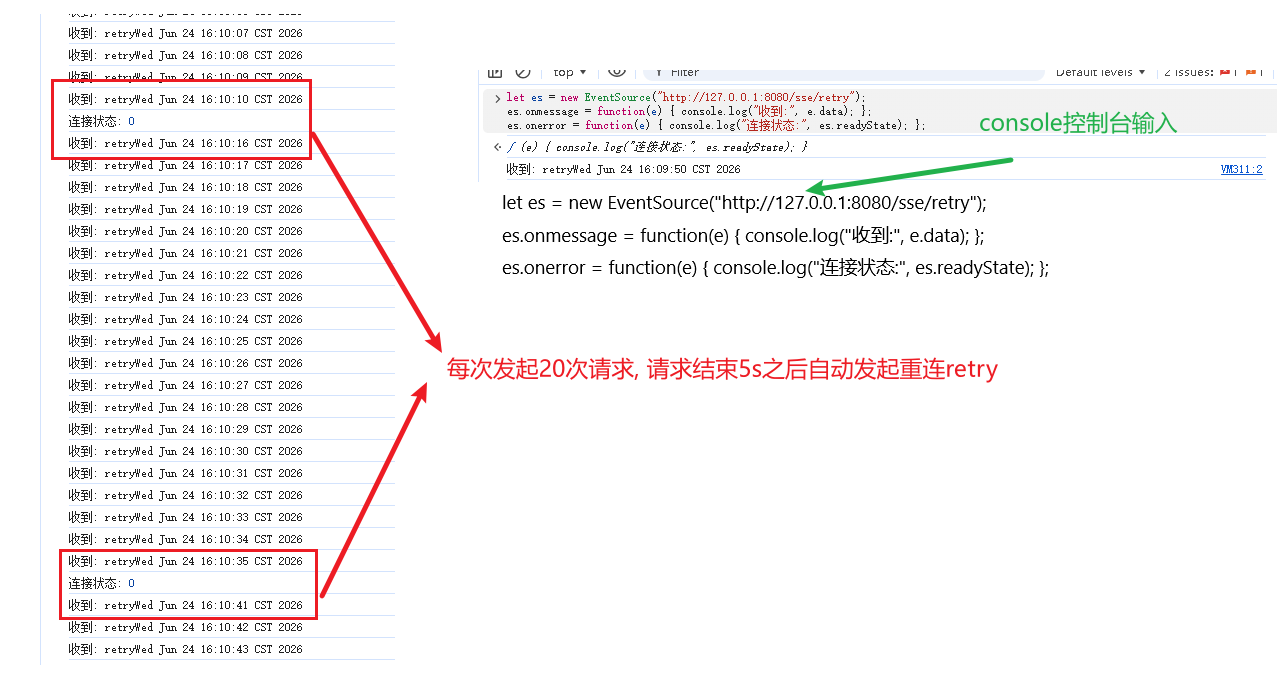
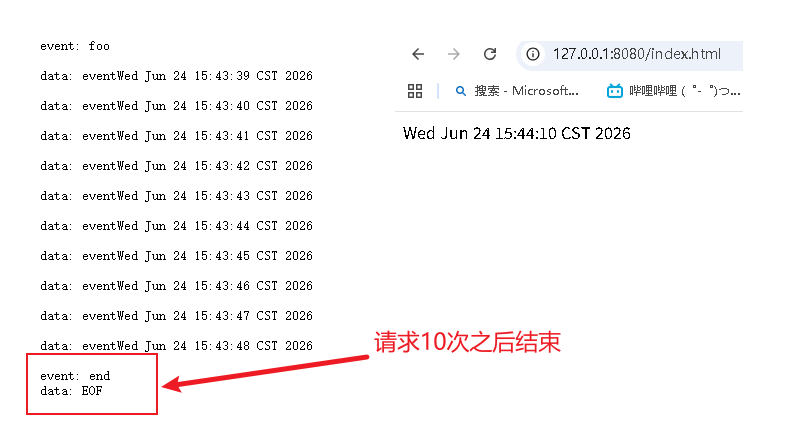
请求结束测试
八、Spring 中更推荐用 Flux 实现流式接口
Spring 5 之后,可以用 WebFlux 的 Flux 更优雅地处理流式数据。
FLux 流可以想象成一个传送带, response类似传送带上的物品, Flux可以把请求依次响应给客户端
一个简单例子, 先创建Flux流 :
java
Flux<String> fruitFlux = Flux.just("Apple", "Banana", "Cherry")
        .delayElements(Duration.ofSeconds(1));

fruitFlux.map(String::toUpperCase)
        .subscribe(System.out::println);
常见操作符:
| 操作符 | 作用 | 示例 |
|---|---|---|
map() |
转换元素 | .map(String::toUpperCase) |
filter() |
条件过滤 | .filter(s -> s.length() > 5) |
take() |
限制数量 | .take(2) |
merge() |
合并多个 Flux,不保证顺序 | Flux.merge(a, b) |
concat() |
顺序拼接多个 Flux | Flux.concat(a, b) |
delayElements() |
延迟发送元素 | .delayElements(Duration.ofSeconds(1)) |
实现每秒返回当前时间:
java
@RequestMapping(value = "/stream", produces = MediaType.TEXT_EVENT_STREAM_VALUE)
public Flux<String> stream() {
    return Flux.interval(Duration.ofSeconds(1))
            .map(sequence -> new Date().toString());
}
结合 ChatClient 实现大模型流式输出:
java
@GetMapping(value = "/stream", produces = "text/html;charset=utf-8")
public Flux<String> stream(String userInput) {
    return this.chatClient.prompt()
            .user(userInput)
            .stream()
            .content();
}
九、ChatModel:更底层,也更灵活
ChatModel 是 Spring AI 中更底层的聊天模型接口。
简单调用:
java
@GetMapping("/chat")
public String generate(String message) {
    return openAiChatModel.call(message);
}
但它本质上会把字符串包装成 Prompt:
java
default String call(String message) {
    Prompt prompt = new Prompt(new UserMessage(message));
    Generation generation = call(prompt).getResult();
    return generation != null ? generation.getOutput().getText() : "";
}
如果想自己控制 Prompt,可以这样写:
java
@GetMapping("/callByPrompt")
public String callByPrompt(String message) {
    ChatResponse response = openAiChatModel.call(new Prompt(message));
    return response.getResult().getOutput().getText();
}
角色预设
java
@GetMapping("/role")
public String role(String message) {
    SystemMessage systemMsg = new SystemMessage("你是一只凑企鹅,只会咕咕嘎嘎");
    UserMessage userMsg = new UserMessage(message);

    Prompt prompt = new Prompt(List.of(systemMsg, userMsg));

    ChatResponse response = openAiChatModel.call(prompt);
    return response.getResult().getOutput().getText();
}
ChatModel 流式输出
java
@GetMapping(value = "/callByStream", produces = "text/html;charset=utf-8")
public Flux<String> callByStream(String message) {
    Flux<ChatResponse> response = openAiChatModel.stream(new Prompt(message));

    return response.map(x -> x.getResult().getOutput().getText());
}
十、ChatClient 和 ChatModel 到底怎么选?
#mermaid-svg-hkcaspVzaFGE981Z{font-family:"trebuchet ms",verdana,arial,sans-serif;font-size:16px;fill:#333;}@keyframes edge-animation-frame{from{stroke-dashoffset:0;}}@keyframes dash{to{stroke-dashoffset:0;}}#mermaid-svg-hkcaspVzaFGE981Z .edge-animation-slow{stroke-dasharray:9,5!important;stroke-dashoffset:900;animation:dash 50s linear infinite;stroke-linecap:round;}#mermaid-svg-hkcaspVzaFGE981Z .edge-animation-fast{stroke-dasharray:9,5!important;stroke-dashoffset:900;animation:dash 20s linear infinite;stroke-linecap:round;}#mermaid-svg-hkcaspVzaFGE981Z .error-icon{fill:#552222;}#mermaid-svg-hkcaspVzaFGE981Z .error-text{fill:#552222;stroke:#552222;}#mermaid-svg-hkcaspVzaFGE981Z .edge-thickness-normal{stroke-width:1px;}#mermaid-svg-hkcaspVzaFGE981Z .edge-thickness-thick{stroke-width:3.5px;}#mermaid-svg-hkcaspVzaFGE981Z .edge-pattern-solid{stroke-dasharray:0;}#mermaid-svg-hkcaspVzaFGE981Z .edge-thickness-invisible{stroke-width:0;fill:none;}#mermaid-svg-hkcaspVzaFGE981Z .edge-pattern-dashed{stroke-dasharray:3;}#mermaid-svg-hkcaspVzaFGE981Z .edge-pattern-dotted{stroke-dasharray:2;}#mermaid-svg-hkcaspVzaFGE981Z .marker{fill:#333333;stroke:#333333;}#mermaid-svg-hkcaspVzaFGE981Z .marker.cross{stroke:#333333;}#mermaid-svg-hkcaspVzaFGE981Z svg{font-family:"trebuchet ms",verdana,arial,sans-serif;font-size:16px;}#mermaid-svg-hkcaspVzaFGE981Z p{margin:0;}#mermaid-svg-hkcaspVzaFGE981Z .edge{stroke-width:3;}#mermaid-svg-hkcaspVzaFGE981Z .section--1 rect,#mermaid-svg-hkcaspVzaFGE981Z .section--1 path,#mermaid-svg-hkcaspVzaFGE981Z .section--1 circle,#mermaid-svg-hkcaspVzaFGE981Z .section--1 polygon,#mermaid-svg-hkcaspVzaFGE981Z .section--1 path{fill:hsl(240, 100%, 76.2745098039%);}#mermaid-svg-hkcaspVzaFGE981Z .section--1 text{fill:#ffffff;}#mermaid-svg-hkcaspVzaFGE981Z .node-icon--1{font-size:40px;color:#ffffff;}#mermaid-svg-hkcaspVzaFGE981Z .section-edge--1{stroke:hsl(240, 100%, 76.2745098039%);}#mermaid-svg-hkcaspVzaFGE981Z .edge-depth--1{stroke-width:17;}#mermaid-svg-hkcaspVzaFGE981Z .section--1 line{stroke:hsl(60, 100%, 86.2745098039%);stroke-width:3;}#mermaid-svg-hkcaspVzaFGE981Z .disabled,#mermaid-svg-hkcaspVzaFGE981Z .disabled circle,#mermaid-svg-hkcaspVzaFGE981Z .disabled text{fill:lightgray;}#mermaid-svg-hkcaspVzaFGE981Z .disabled text{fill:#efefef;}#mermaid-svg-hkcaspVzaFGE981Z .section-0 rect,#mermaid-svg-hkcaspVzaFGE981Z .section-0 path,#mermaid-svg-hkcaspVzaFGE981Z .section-0 circle,#mermaid-svg-hkcaspVzaFGE981Z .section-0 polygon,#mermaid-svg-hkcaspVzaFGE981Z .section-0 path{fill:hsl(60, 100%, 73.5294117647%);}#mermaid-svg-hkcaspVzaFGE981Z .section-0 text{fill:black;}#mermaid-svg-hkcaspVzaFGE981Z .node-icon-0{font-size:40px;color:black;}#mermaid-svg-hkcaspVzaFGE981Z .section-edge-0{stroke:hsl(60, 100%, 73.5294117647%);}#mermaid-svg-hkcaspVzaFGE981Z .edge-depth-0{stroke-width:14;}#mermaid-svg-hkcaspVzaFGE981Z .section-0 line{stroke:hsl(240, 100%, 83.5294117647%);stroke-width:3;}#mermaid-svg-hkcaspVzaFGE981Z .disabled,#mermaid-svg-hkcaspVzaFGE981Z .disabled circle,#mermaid-svg-hkcaspVzaFGE981Z .disabled text{fill:lightgray;}#mermaid-svg-hkcaspVzaFGE981Z .disabled text{fill:#efefef;}#mermaid-svg-hkcaspVzaFGE981Z .section-1 rect,#mermaid-svg-hkcaspVzaFGE981Z .section-1 path,#mermaid-svg-hkcaspVzaFGE981Z .section-1 circle,#mermaid-svg-hkcaspVzaFGE981Z .section-1 polygon,#mermaid-svg-hkcaspVzaFGE981Z .section-1 path{fill:hsl(80, 100%, 76.2745098039%);}#mermaid-svg-hkcaspVzaFGE981Z .section-1 text{fill:black;}#mermaid-svg-hkcaspVzaFGE981Z .node-icon-1{font-size:40px;color:black;}#mermaid-svg-hkcaspVzaFGE981Z .section-edge-1{stroke:hsl(80, 100%, 76.2745098039%);}#mermaid-svg-hkcaspVzaFGE981Z .edge-depth-1{stroke-width:11;}#mermaid-svg-hkcaspVzaFGE981Z .section-1 line{stroke:hsl(260, 100%, 86.2745098039%);stroke-width:3;}#mermaid-svg-hkcaspVzaFGE981Z .disabled,#mermaid-svg-hkcaspVzaFGE981Z .disabled circle,#mermaid-svg-hkcaspVzaFGE981Z .disabled text{fill:lightgray;}#mermaid-svg-hkcaspVzaFGE981Z .disabled text{fill:#efefef;}#mermaid-svg-hkcaspVzaFGE981Z .section-2 rect,#mermaid-svg-hkcaspVzaFGE981Z .section-2 path,#mermaid-svg-hkcaspVzaFGE981Z .section-2 circle,#mermaid-svg-hkcaspVzaFGE981Z .section-2 polygon,#mermaid-svg-hkcaspVzaFGE981Z .section-2 path{fill:hsl(270, 100%, 76.2745098039%);}#mermaid-svg-hkcaspVzaFGE981Z .section-2 text{fill:#ffffff;}#mermaid-svg-hkcaspVzaFGE981Z .node-icon-2{font-size:40px;color:#ffffff;}#mermaid-svg-hkcaspVzaFGE981Z .section-edge-2{stroke:hsl(270, 100%, 76.2745098039%);}#mermaid-svg-hkcaspVzaFGE981Z .edge-depth-2{stroke-width:8;}#mermaid-svg-hkcaspVzaFGE981Z .section-2 line{stroke:hsl(90, 100%, 86.2745098039%);stroke-width:3;}#mermaid-svg-hkcaspVzaFGE981Z .disabled,#mermaid-svg-hkcaspVzaFGE981Z .disabled circle,#mermaid-svg-hkcaspVzaFGE981Z .disabled text{fill:lightgray;}#mermaid-svg-hkcaspVzaFGE981Z .disabled text{fill:#efefef;}#mermaid-svg-hkcaspVzaFGE981Z .section-3 rect,#mermaid-svg-hkcaspVzaFGE981Z .section-3 path,#mermaid-svg-hkcaspVzaFGE981Z .section-3 circle,#mermaid-svg-hkcaspVzaFGE981Z .section-3 polygon,#mermaid-svg-hkcaspVzaFGE981Z .section-3 path{fill:hsl(300, 100%, 76.2745098039%);}#mermaid-svg-hkcaspVzaFGE981Z .section-3 text{fill:black;}#mermaid-svg-hkcaspVzaFGE981Z .node-icon-3{font-size:40px;color:black;}#mermaid-svg-hkcaspVzaFGE981Z .section-edge-3{stroke:hsl(300, 100%, 76.2745098039%);}#mermaid-svg-hkcaspVzaFGE981Z .edge-depth-3{stroke-width:5;}#mermaid-svg-hkcaspVzaFGE981Z .section-3 line{stroke:hsl(120, 100%, 86.2745098039%);stroke-width:3;}#mermaid-svg-hkcaspVzaFGE981Z .disabled,#mermaid-svg-hkcaspVzaFGE981Z .disabled circle,#mermaid-svg-hkcaspVzaFGE981Z .disabled text{fill:lightgray;}#mermaid-svg-hkcaspVzaFGE981Z .disabled text{fill:#efefef;}#mermaid-svg-hkcaspVzaFGE981Z .section-4 rect,#mermaid-svg-hkcaspVzaFGE981Z .section-4 path,#mermaid-svg-hkcaspVzaFGE981Z .section-4 circle,#mermaid-svg-hkcaspVzaFGE981Z .section-4 polygon,#mermaid-svg-hkcaspVzaFGE981Z .section-4 path{fill:hsl(330, 100%, 76.2745098039%);}#mermaid-svg-hkcaspVzaFGE981Z .section-4 text{fill:black;}#mermaid-svg-hkcaspVzaFGE981Z .node-icon-4{font-size:40px;color:black;}#mermaid-svg-hkcaspVzaFGE981Z .section-edge-4{stroke:hsl(330, 100%, 76.2745098039%);}#mermaid-svg-hkcaspVzaFGE981Z .edge-depth-4{stroke-width:2;}#mermaid-svg-hkcaspVzaFGE981Z .section-4 line{stroke:hsl(150, 100%, 86.2745098039%);stroke-width:3;}#mermaid-svg-hkcaspVzaFGE981Z .disabled,#mermaid-svg-hkcaspVzaFGE981Z .disabled circle,#mermaid-svg-hkcaspVzaFGE981Z .disabled text{fill:lightgray;}#mermaid-svg-hkcaspVzaFGE981Z .disabled text{fill:#efefef;}#mermaid-svg-hkcaspVzaFGE981Z .section-5 rect,#mermaid-svg-hkcaspVzaFGE981Z .section-5 path,#mermaid-svg-hkcaspVzaFGE981Z .section-5 circle,#mermaid-svg-hkcaspVzaFGE981Z .section-5 polygon,#mermaid-svg-hkcaspVzaFGE981Z .section-5 path{fill:hsl(0, 100%, 76.2745098039%);}#mermaid-svg-hkcaspVzaFGE981Z .section-5 text{fill:black;}#mermaid-svg-hkcaspVzaFGE981Z .node-icon-5{font-size:40px;color:black;}#mermaid-svg-hkcaspVzaFGE981Z .section-edge-5{stroke:hsl(0, 100%, 76.2745098039%);}#mermaid-svg-hkcaspVzaFGE981Z .edge-depth-5{stroke-width:-1;}#mermaid-svg-hkcaspVzaFGE981Z .section-5 line{stroke:hsl(180, 100%, 86.2745098039%);stroke-width:3;}#mermaid-svg-hkcaspVzaFGE981Z .disabled,#mermaid-svg-hkcaspVzaFGE981Z .disabled circle,#mermaid-svg-hkcaspVzaFGE981Z .disabled text{fill:lightgray;}#mermaid-svg-hkcaspVzaFGE981Z .disabled text{fill:#efefef;}#mermaid-svg-hkcaspVzaFGE981Z .section-6 rect,#mermaid-svg-hkcaspVzaFGE981Z .section-6 path,#mermaid-svg-hkcaspVzaFGE981Z .section-6 circle,#mermaid-svg-hkcaspVzaFGE981Z .section-6 polygon,#mermaid-svg-hkcaspVzaFGE981Z .section-6 path{fill:hsl(30, 100%, 76.2745098039%);}#mermaid-svg-hkcaspVzaFGE981Z .section-6 text{fill:black;}#mermaid-svg-hkcaspVzaFGE981Z .node-icon-6{font-size:40px;color:black;}#mermaid-svg-hkcaspVzaFGE981Z .section-edge-6{stroke:hsl(30, 100%, 76.2745098039%);}#mermaid-svg-hkcaspVzaFGE981Z .edge-depth-6{stroke-width:-4;}#mermaid-svg-hkcaspVzaFGE981Z .section-6 line{stroke:hsl(210, 100%, 86.2745098039%);stroke-width:3;}#mermaid-svg-hkcaspVzaFGE981Z .disabled,#mermaid-svg-hkcaspVzaFGE981Z .disabled circle,#mermaid-svg-hkcaspVzaFGE981Z .disabled text{fill:lightgray;}#mermaid-svg-hkcaspVzaFGE981Z .disabled text{fill:#efefef;}#mermaid-svg-hkcaspVzaFGE981Z .section-7 rect,#mermaid-svg-hkcaspVzaFGE981Z .section-7 path,#mermaid-svg-hkcaspVzaFGE981Z .section-7 circle,#mermaid-svg-hkcaspVzaFGE981Z .section-7 polygon,#mermaid-svg-hkcaspVzaFGE981Z .section-7 path{fill:hsl(90, 100%, 76.2745098039%);}#mermaid-svg-hkcaspVzaFGE981Z .section-7 text{fill:black;}#mermaid-svg-hkcaspVzaFGE981Z .node-icon-7{font-size:40px;color:black;}#mermaid-svg-hkcaspVzaFGE981Z .section-edge-7{stroke:hsl(90, 100%, 76.2745098039%);}#mermaid-svg-hkcaspVzaFGE981Z .edge-depth-7{stroke-width:-7;}#mermaid-svg-hkcaspVzaFGE981Z .section-7 line{stroke:hsl(270, 100%, 86.2745098039%);stroke-width:3;}#mermaid-svg-hkcaspVzaFGE981Z .disabled,#mermaid-svg-hkcaspVzaFGE981Z .disabled circle,#mermaid-svg-hkcaspVzaFGE981Z .disabled text{fill:lightgray;}#mermaid-svg-hkcaspVzaFGE981Z .disabled text{fill:#efefef;}#mermaid-svg-hkcaspVzaFGE981Z .section-8 rect,#mermaid-svg-hkcaspVzaFGE981Z .section-8 path,#mermaid-svg-hkcaspVzaFGE981Z .section-8 circle,#mermaid-svg-hkcaspVzaFGE981Z .section-8 polygon,#mermaid-svg-hkcaspVzaFGE981Z .section-8 path{fill:hsl(150, 100%, 76.2745098039%);}#mermaid-svg-hkcaspVzaFGE981Z .section-8 text{fill:black;}#mermaid-svg-hkcaspVzaFGE981Z .node-icon-8{font-size:40px;color:black;}#mermaid-svg-hkcaspVzaFGE981Z .section-edge-8{stroke:hsl(150, 100%, 76.2745098039%);}#mermaid-svg-hkcaspVzaFGE981Z .edge-depth-8{stroke-width:-10;}#mermaid-svg-hkcaspVzaFGE981Z .section-8 line{stroke:hsl(330, 100%, 86.2745098039%);stroke-width:3;}#mermaid-svg-hkcaspVzaFGE981Z .disabled,#mermaid-svg-hkcaspVzaFGE981Z .disabled circle,#mermaid-svg-hkcaspVzaFGE981Z .disabled text{fill:lightgray;}#mermaid-svg-hkcaspVzaFGE981Z .disabled text{fill:#efefef;}#mermaid-svg-hkcaspVzaFGE981Z .section-9 rect,#mermaid-svg-hkcaspVzaFGE981Z .section-9 path,#mermaid-svg-hkcaspVzaFGE981Z .section-9 circle,#mermaid-svg-hkcaspVzaFGE981Z .section-9 polygon,#mermaid-svg-hkcaspVzaFGE981Z .section-9 path{fill:hsl(180, 100%, 76.2745098039%);}#mermaid-svg-hkcaspVzaFGE981Z .section-9 text{fill:black;}#mermaid-svg-hkcaspVzaFGE981Z .node-icon-9{font-size:40px;color:black;}#mermaid-svg-hkcaspVzaFGE981Z .section-edge-9{stroke:hsl(180, 100%, 76.2745098039%);}#mermaid-svg-hkcaspVzaFGE981Z .edge-depth-9{stroke-width:-13;}#mermaid-svg-hkcaspVzaFGE981Z .section-9 line{stroke:hsl(0, 100%, 86.2745098039%);stroke-width:3;}#mermaid-svg-hkcaspVzaFGE981Z .disabled,#mermaid-svg-hkcaspVzaFGE981Z .disabled circle,#mermaid-svg-hkcaspVzaFGE981Z .disabled text{fill:lightgray;}#mermaid-svg-hkcaspVzaFGE981Z .disabled text{fill:#efefef;}#mermaid-svg-hkcaspVzaFGE981Z .section-10 rect,#mermaid-svg-hkcaspVzaFGE981Z .section-10 path,#mermaid-svg-hkcaspVzaFGE981Z .section-10 circle,#mermaid-svg-hkcaspVzaFGE981Z .section-10 polygon,#mermaid-svg-hkcaspVzaFGE981Z .section-10 path{fill:hsl(210, 100%, 76.2745098039%);}#mermaid-svg-hkcaspVzaFGE981Z .section-10 text{fill:black;}#mermaid-svg-hkcaspVzaFGE981Z .node-icon-10{font-size:40px;color:black;}#mermaid-svg-hkcaspVzaFGE981Z .section-edge-10{stroke:hsl(210, 100%, 76.2745098039%);}#mermaid-svg-hkcaspVzaFGE981Z .edge-depth-10{stroke-width:-16;}#mermaid-svg-hkcaspVzaFGE981Z .section-10 line{stroke:hsl(30, 100%, 86.2745098039%);stroke-width:3;}#mermaid-svg-hkcaspVzaFGE981Z .disabled,#mermaid-svg-hkcaspVzaFGE981Z .disabled circle,#mermaid-svg-hkcaspVzaFGE981Z .disabled text{fill:lightgray;}#mermaid-svg-hkcaspVzaFGE981Z .disabled text{fill:#efefef;}#mermaid-svg-hkcaspVzaFGE981Z .section-root rect,#mermaid-svg-hkcaspVzaFGE981Z .section-root path,#mermaid-svg-hkcaspVzaFGE981Z .section-root circle,#mermaid-svg-hkcaspVzaFGE981Z .section-root polygon{fill:hsl(240, 100%, 46.2745098039%);}#mermaid-svg-hkcaspVzaFGE981Z .section-root text{fill:#ffffff;}#mermaid-svg-hkcaspVzaFGE981Z .section-root span{color:#ffffff;}#mermaid-svg-hkcaspVzaFGE981Z .section-2 span{color:#ffffff;}#mermaid-svg-hkcaspVzaFGE981Z .icon-container{height:100%;display:flex;justify-content:center;align-items:center;}#mermaid-svg-hkcaspVzaFGE981Z .edge{fill:none;}#mermaid-svg-hkcaspVzaFGE981Z .mindmap-node-label{dy:1em;alignment-baseline:middle;text-anchor:middle;dominant-baseline:middle;text-align:center;}#mermaid-svg-hkcaspVzaFGE981Z :root{--mermaid-font-family:"trebuchet ms",verdana,arial,sans-serif;} Spring AI 聊天模型
ChatClient
链式 API
快速开发
结构化输出
Advisor 日志
适合业务接口
ChatModel
底层接口
手动 Prompt
手动解析响应
精细控制参数
适合模型实验
SSE 和 Flux
流式返回
提升体验
EventSource 接收
text/event-stream
这张图的用途是做学习路线总结。关键结论是:业务开发优先 ChatClient,需要底层控制时再用 ChatModel,需要逐段返回时结合 SSE 和 Flux。
对比表:
| 维度 | ChatModel | ChatClient |
|---|---|---|
| 定位 | 底层模型接口 | 高阶封装 API |
| 调用方式 | 手动构建 Prompt |
链式调用 |
| 响应处理 | 手动从 ChatResponse 中取值 |
.content() 直接取文本 |
| 结构化输出 | 通常要自己解析 | 支持 .entity(Class) |
| 扩展能力 | 依赖额外组件 | 内置 Advisor 机制 |
| 适合场景 | 模型实验、参数调优 | 快速构建 AI 应用 |
十一、避坑总结
ChatClient更适合业务开发,不要一上来就手动解析ChatResponse。defaultSystem()是系统角色设定,不是普通用户输入。.entity(Class)依赖模型输出格式,Prompt 要明确要求返回 JSON。- SSE 必须设置
Content-Type: text/event-stream;charset=utf-8。 Flux只有订阅后数据才会流动,学习时别忘了subscribe()。- 流式接口适合长文本生成,短文本没必要强行使用。
SimpleLoggerAdvisor很适合调试,但线上日志要注意隐私和脱敏。ChatModel更灵活,但代码会更繁琐,适合需要精细控制 Prompt 的场景。
结尾总结:
这部分学习下来,我最大的收获不是"记住了几个 API",而是理清了 Spring AI 聊天开发的层次:
- 想快速做聊天接口,优先用
ChatClient。 - 想设置 AI 身份,用
defaultSystem()或SystemMessage。 - 想返回对象,优先考虑
.entity(Class)。 - 想实现类似 ChatGPT 的逐字输出,就用
stream()+Flux+ SSE。 - 想排查 Prompt 和响应,就加
SimpleLoggerAdvisor。 - 想精细控制底层输入输出,再使用
ChatModel。 - 学习路线建议是:先跑通普通聊天,再加角色预设,然后做流式输出,最后比较
ChatClient和ChatModel的取舍。