4.数据操作语言DML
- DML : 数据操作语言 ,用来对数据库表中的数据进行 增删改
4.1 DML-添加数据(INSERT)
给指定字段添加数据
INSERT INTO 表名 (字段名1,字段名2,...) VALUES (值1,值2,...);//insert into 表名 (字段名1,字段名2,...) values (值1,值2,...);
给全部字段添加数据
INSERT INTO 表名 VALUES (值1,值2,...);//insert into 表名 values (值1,值2,...);
批量添加数据
为当前表中给定字段批量添加数据 INSERT INTO 表名 (字段名1,字段名2,...) VALUES (值1,值2,...),(值1,值2,...),...,(值1,值2,...);
//为当前表中全部字段批量添加数据INSERT INTO 表名 VALUES (值1,值2,...),(值1,值2,...),...,(值1,值2,...);
细节:
-
插入数据时,指定的字段顺序需要与值的顺序是一一对应的
-
字符串和日期型数据应该包含在单引号中
-
插入的数据大小,应该在字段的规定范围内
4.2 DML-修改数据
- UPDATE 表名 SET 字段1=值1,字段2=值2,...[WHERE 条件];
//update 表名 set 字段1=值1,字段2=值2,...[where 条件];
注意:如果没有加where条件,会修改整张表的所有数据
4.3 DML-删除数据
DELETE FROM 表名 [WHERE 条件];//delete from 表名 [where 条件];
细节:
-
DELETE如果 没有指定条件,会删除整张表的所有数据
-
DELETE 不能删除某一个字段的值 (可以 使用UPDATE )
-
DELETE仅仅删除表中的数据,DROP会把整张表和数据一起删除
5.数据查询语言DQL
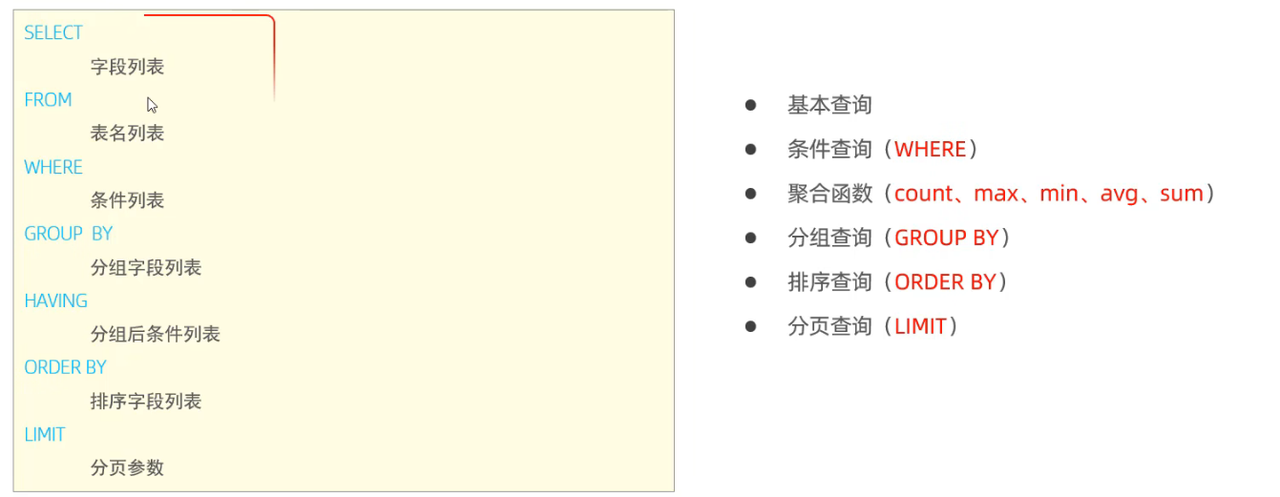
- DQL: 数据查询语言 ,用来 查询数据库中表的记录
5.1 DQL-语法
sql
SELECT                 //select
        字段列表
FROM                   //from
        表名列表
WHERE                  //where
        条件列表
GROUP BY                 // group by
        分组字段列表
HAVING                    //having
        分组后条件列表
ORDER BY                  //order by
        排序字段列表

LIMIT                    //limit
        分页参数
5.2 DQL-基本查询
1、查询多个字段
SELECT 字段1,字段2,... FROM 表名;SELECT * FROM 表名; --*是通配符代表所有字段,因为不够直观,不建议使用
2、设置别名
SELECT 字段1 [AS 别名1],字段2 [AS 别名2]... FROM 表名;-- AS可以省略 //select workadress as '工作地址' from employees;
3、去除重复记录
SELECT DISTINCT 字段列表 FROM 表名;//select distinct 字段列表 from 表名;
5.3 DQL-条件查询
- SELECT 字段列表 FROM 表名 WHERE 条件列表;
//select 字段列表 from 表名 where 条件列表;
条件:
| 比较运算符 | 说明 |
|---|---|
| > | 大于 |
| >= | 大于等于 |
| < | 小于 |
| <= | 小于等于 |
| = | 等于 |
| <>或!= | 不等于 |
| BETWEEN 最小值 AND 最大值 | 在最小值和最大值之间(包含最小值和最大值) |
| IN(...) | 在in之后的列表中的值,多选一 |
| LIKE 占位符 | 模糊匹配(_匹配单个字符, %匹配任意个字符) |
| IS NULL | 是NULL |
| IS NOT NULL | 不是NULL |
|---|---|
| | |
| 逻辑运算符 | 说明 |
|---|---|
| AND 或 && | 并且 (多个条件同时成立) |
| OR 或 || | 或者 (多个条件任意一个成立) |
| NOT 或 ! | 非 , 不是 |
- LIKE 后如果要表示单纯的
_或%,需要用到转义字符\- like 模糊匹配
- 一个'_'表示一个元素,一个'%'表示多个元素
sql
--  ------------------DQL基本查询------------------
-- 1、查询指定字段
select name,workID,age from employees;
select name,entrydate from employees;

-- 2、查询所有字段
select * from employees;

-- 3、查询所有员工的工作地址,起别名
select workaddress as '工作地址' from employees;
select workaddress '工作地址' from employees;

-- 4、查询所有员工的上班地址(不要重复)
select distinct workaddress from employees;

-- ------------------DQL条件查询---------------
select * from employees where age = 88;

select * from employees where age <= 20;

select * from employees where age < 20;

select * from employees where IDcard is null;
select * from employees where IDcard is not null;

select * from employees where age != 88;
select * from employees where age <> 88;

select * from employees where age >=15 && age<=20;
select * from employees where age >=15 and age<=20;
select * from employees where age between 15 and 20;

select * from employees where age = 18 || age = 20 || age = 40;
select * from employees where age in(18,20,40);
select * from employees where age = 18 or age = 20 or age = 40;

-- 查询姓名为两个字的员工 用到like模糊匹配 __
select * from employees where name like '__';

-- 查询身份证号最后一位是X的员工信息 用到like %
select * from employees where IDcard like '%X';
select * from employees where IDcard like '_________________X'
sql
@Overridepublic
List<Location> findByNameLike(String keyword) {
List<Location> list = new ArrayList<>();
String sql = "SELECT * FROM location WHERE name LIKE CONCAT('%', ?, '%')";
try (Connection conn = DBUtil.getConnection();
PreparedStatement pstmt = conn.prepareStatement(sql)) {
pstmt.setString(1, keyword);
ResultSet rs = pstmt.executeQuery();
while (rs.next()) {
list.add(mapRow(rs));}
} catch (SQLException e) {
 e.printStackTrace();}return list;}
5.4 DQL-聚合函数
聚合函数:将一列数据作为一个整体,进行纵向计算。
- SELECT 聚合函数(字段列表) FROM 表名;
//select 聚合函数(字段列表) from 表名;
常见聚合函数
| 函数 | 功能 |
|---|---|
| COUNT | 统计个数 |
| MAX | 最大值 |
| MIN | 最小值 |
| AVG | 平均值 |
| SUM | 求和 |
注意: NULL值不参与聚合函数的运算
count(*)默认统计总行数
sql
--  --------------------聚合函数-------------
-- 1、统计员工数量
select count(*) from employees;

select count(id) from employees;
select count(IDcard) from employees; -- null不参与聚合函数运算

select avg(age) from employees;

select max(age) from employees;

select min(age) from employees;

-- 统计所有西安地区员工的年龄之和
select sum(age) from employees where workaddress = '西安';
5.5 DQL-分组查询
sql
SELECT 字段列表 FROM 表名 [WHERE 条件] GROUP BY 分组字段名 [HAVING 分组后的过滤条件];
//select 字段列表 from 表名 [where 条件] group by 分组字段名 [having 分组后的过滤条件];
WHERE和HAVING的区别
WHERE和HAVING的区别
-
执行时机不同 :WHERE是分组之前进行过滤,不满足WHERE条件,不参与分组;而HAVING是分组之后对结果进行过滤
-
判断条件不同 :WHERE不能对聚合函数进行判断,而HAVING可以
注意:
-
执行顺序: where > 聚合函数 > having
-
分组之后,查询的字段一般为聚合函数和分组字段,查询其他字段无任何意义
sql
-- ------------------分组查询-----------------
-- 1、根据性别分组,统计男性员工 和 女性员工的数量
select gender,count(*) from employees group by gender;
-- 2、根据性别分组,统计男性员工 和 女性员工的平均年龄
select gender,avg(age) from employees group by gender;
-- 3、查询年龄小于45的员工,并根据工作地址分组,获取员工数量大于等于3的工作地址
select workaddress,count(*) from employees where age < 45 group by workaddress having count(*) >= 3;
-- 注意:聚合函数也可以设置别名
select workaddress,count(*) as address_count from employees where age < 45 group by workaddress having address_count >= 3;
5.6 DQL-排序查询
sql
SELECT 字段列表 FROM 表名 ORDER BY 字段1 排序方式1,字段2 排序方式2...;
//select 字段列表 from 表名 order by 字段1 排序方式2,字段2 排序方式2...;**排序方式:**ASC升序排列(默认值),DESC降序排列
注意:如果是多字段排序,当第一个字段值相同时,才会根据第二个字段进行排序
sql
-- -------------------排序查询--------------
select * from employees order by age ASC;
select * from employees order by age;

select * from employees order by entrydate desc;

-- 根据年龄对公司的员工进行升序排序,年龄相同,再按照入职时间进行降序排序
select * from employees order by age asc, entrydate desc
-- 4、查询所有年龄小于等于35岁员工的姓名和年龄,并对查询结果按年龄升序排序,如果年龄相同按入职时间降序排序。
select name,age from employees where age <= 35 order by age asc, entrydate desc;
5.7 DQL-分页查询
sql
SELECT 字段列表 FROM 表名 LIMIT 起始索引,查询记录数;
//select 字段列表 from 表名 limit 起始索引m,查询记录数;-
起始索引从0开始,
起始索引 = (查询页码 - 1)* 每页显示记录数 -
分页查询是 数据库的方言 ,不同的数据库有不同的实现,MySQL中是 LIMIT
-
如果查询的是 第一页数据,起始索引可以省略 ,直接简写为 limit n;
sql
-- --------------分页查询-----------------
-- 1、查询第1页元仍是数据,每页展示10条记录
select * from employees limit 0,10;
select * from employees limit 10;

-- 2、查询第2页员工数据,每页展示10条记录 ------->起始索引=(页码数-1)* 页展示数
select * from employees limit 10,10;
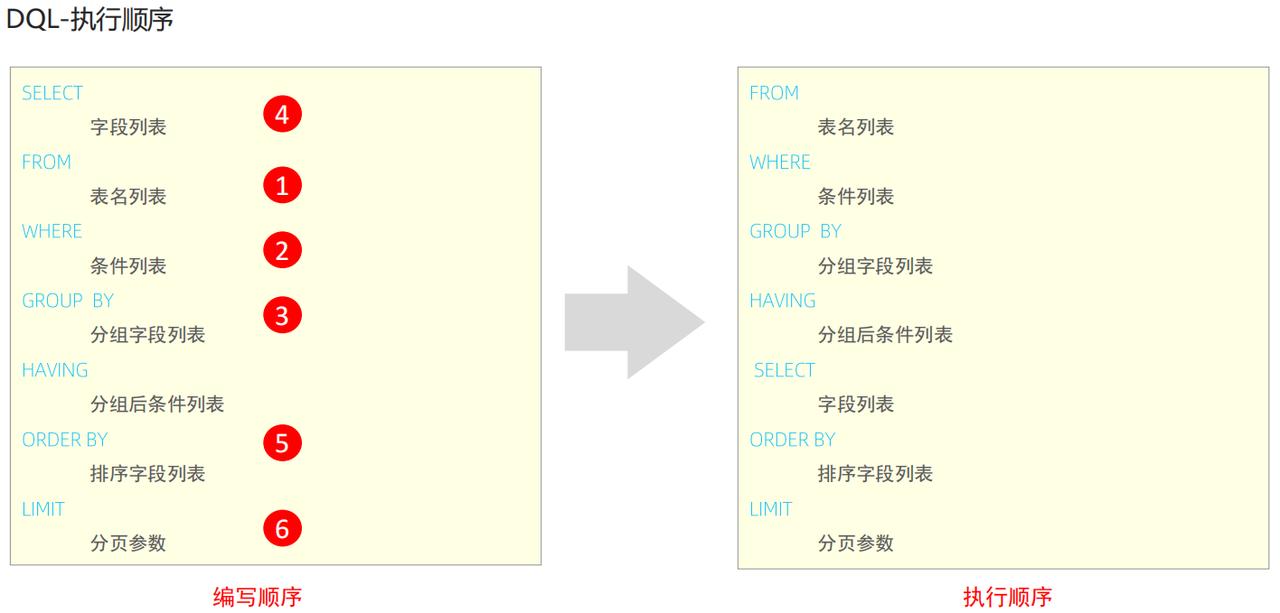
5.8 DQL-执行顺序
5.9 DQL-练习
sql
-- -------------------DQL练习-------------------
select * from employees where gender = '女' and age in(20,21,22,23);

-- 2、查询性别为 男,并且年龄在20-40岁以内的姓名为三个字的员工;

select * from employees where gender = '男' and age between 20 and 40 and name like '___';

select * from employees where gender = '男' and (age between 20 and 40) and name like '___';

-- 3、统计员工表中,年龄小于60岁的,男性员工和女性员工的数量

select gender,count(*) from employees where age < 60 group by gender;

-- 4、查询所有年龄小于等于35岁员工的姓名和年龄,并对查询结果按年龄升序排序,如果年龄相同按入职时间降序排序。

select name,age from employees where age <= 35 order by age asc, entrydate desc;

-- 5、 查询性别为男,且年龄在20-40岁以内的前5个员工信息,查询结果按年龄升序排序,年龄相同按入职时间升序排序。

select * from employees where gender = '男' and (age between 20 and 40)
order by age asc, entrydate asc limit 0,5;

-- 6、 查询年龄大于15的员工的姓名,年龄,并根据年龄进行升序排序(验证DQL语句执行顺序)

select e.name as ename,e.age as eage from employees as e where e.age > 15 order by eage asc;