效果:
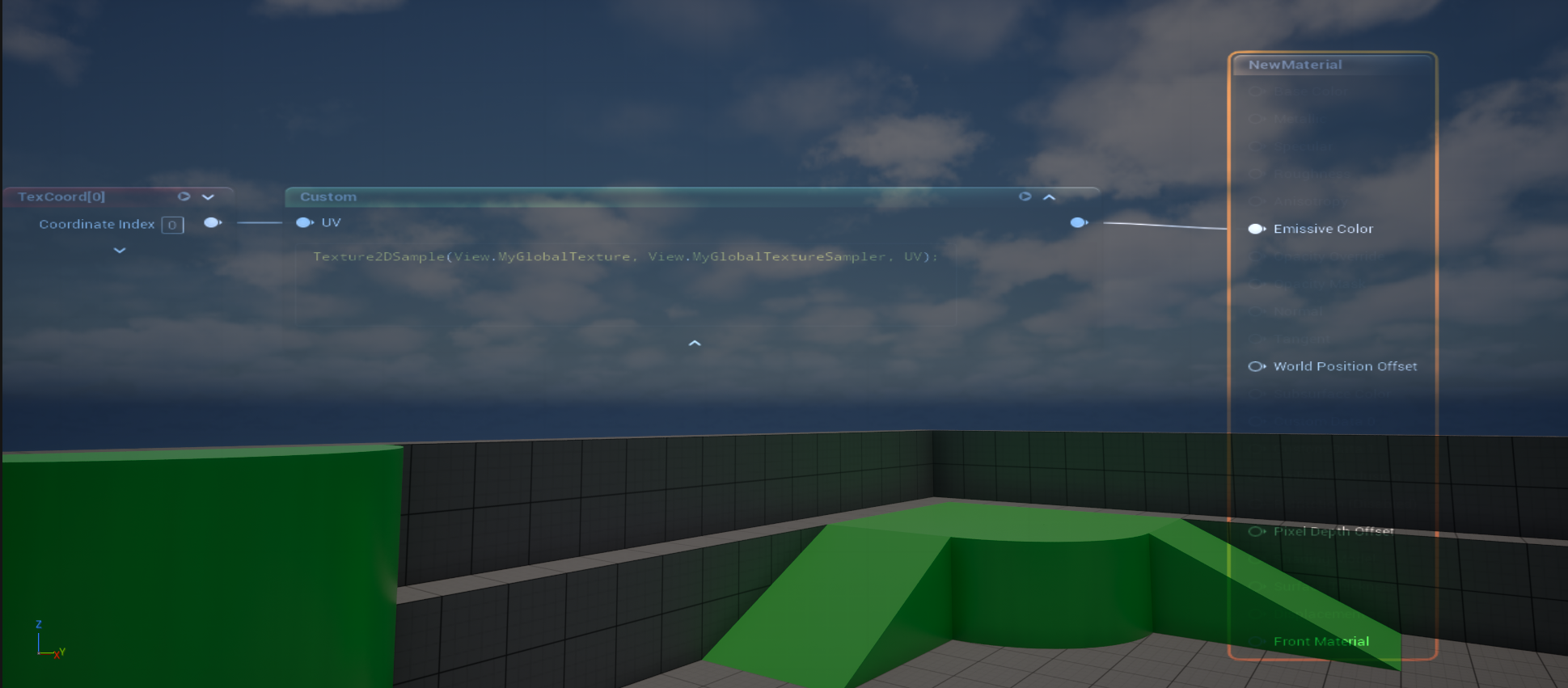
PostProcessing.cpp:决定这个 pass 是否在后处理链里执行,以及执行顺序
PostProcessMyGlobalTexture.cpp:真正创建一个 RDG fullscreen pass
PostProcessMyGlobalTexture.usf:GPU 真正执行的 shader 代码
经过上一节如果将新增变量到view.xxx上,我已经成功添加了一张贴图到FViewUniformShaderParameters内了,就不赘述,讲之后的操作:
1. 注册 Shader 类型
自己创建文件,在Engine\Source\Runtime\Renderer\Private\PostProcess\的目录下面:
PostProcessMyGlobalTexture.cpp
这里定义:
class FMyGlobalTexturePS : public FGlobalShader
{
public:
	DECLARE_GLOBAL_SHADER(FMyGlobalTexturePS);
	SHADER_USE_PARAMETER_STRUCT(FMyGlobalTexturePS, FGlobalShader);

	BEGIN_SHADER_PARAMETER_STRUCT(FParameters, )
		SHADER_PARAMETER_STRUCT_REF(FViewUniformShaderParameters, ViewUniformBuffer)

		SHADER_PARAMETER_STRUCT(FScreenPassTextureViewportParameters, Input)
		SHADER_PARAMETER_STRUCT(FScreenPassTextureViewportParameters, Output)

		SHADER_PARAMETER_RDG_TEXTURE(Texture2D, InputTexture)
		SHADER_PARAMETER_SAMPLER(SamplerState, InputSampler)

		SHADER_PARAMETER(float, Intensity)

		RENDER_TARGET_BINDING_SLOTS()
	END_SHADER_PARAMETER_STRUCT()

	static bool ShouldCompilePermutation(const FGlobalShaderPermutationParameters& Parameters)
	{
		return IsFeatureLevelSupported(Parameters.Platform, ERHIFeatureLevel::SM5);
	}
};
这个 shader 运行时需要哪些参数
这个 Shader 在哪些平台 / Feature Level 下需要编译
为什么要继承 FGlobalShader
因为你写的是一个不依赖材质系统的独立 shader。
它不是材质球 shader:
不是 BaseColor / Roughness / Normal 那套 Material
也不是 mesh 材质 shader:
不是某个 StaticMesh / SkeletalMesh 的材质绘制
1. FGlobalShader
你现在写的就是这个。
用途:
1、后处理
2、Compute Shader
3、屏幕空间 Pass
4、Debug 可视化
5、拷贝纹理 / Blur / Downsample
6、引擎级工具 shader
特点:
不依赖 Material 不依赖 Mesh 由 C++ 显式调用 参数自己定义
2. FMaterialShader
材质相关 shader。
用途:
材质系统内部使用 需要访问 UMaterial / Material 参数 跟 BaseColor、Roughness、Normal 等材质属性有关
特点:
依赖 Material 但不一定直接依赖具体 Mesh 绘制
3. FMeshMaterialShader
这个更常见于真正画模型。
用途:
BasePass DepthPass ShadowDepth Velocity Mesh 绘制相关 pass
特点:
依赖 Material 依赖 Mesh / VertexFactory 用于画具体几何体
Compute / Pixel / Vertex 不是同一层概念
这个容易混。
比如:
FMyGlobalTexturePS : public FGlobalShader
这里的 PS 表示 Pixel Shader。
但如果你写:
FMyComputeCS : public FGlobalShader
它仍然可以是 FGlobalShader,只是注册时写:
SF_Compute
所以分类要分两层:
Shader 归属类型: GlobalShader / MaterialShader / MeshMaterialShader Shader
执行阶段: Vertex / Pixel / Compute / RayGen / Miss / ClosestHit
RayGen 发射光线
-> 光线在场景 BVH 里查找命中
-> 如果没打到东西,进 Miss
-> 如果打到东西,进 ClosestHit
RayGen Shader
RayGen 是光线追踪的入口。
类似:
每个像素 / 每个 sample 启动一次
负责生成 ray
调用 TraceRay()
最后写结果到输出纹理
现在写的:
归属类型:GlobalShader
执行阶段:Pixel Shade
IMPLEMENT_GLOBAL_SHADER(
	FMyGlobalTexturePS,
	"/Engine/Private/PostProcessMyGlobalTexture.usf",
	"MainPS",
	SF_Pixel);
注册一个全局 Pixel Shader
它的 HLSL 文件是 PostProcessMyGlobalTexture.usf
入口函数是 MainPS
shader 类型是 Pixel Shader
static TAutoConsoleVariable<int32> CVarMyGlobalTexturePass(
	TEXT("r.MyGlobalTexturePass"),
	1,
	TEXT("Enable MyGlobalTexture post process pass."),
	ECVF_RenderThreadSafe);

static TAutoConsoleVariable<float> CVarMyGlobalTextureIntensity(
	TEXT("r.MyGlobalTexturePass.Intensity"),
	0.5f,
	TEXT("Intensity of MyGlobalTexture post process pass."),
	ECVF_RenderThreadSafe);

FScreenPassTexture AddMyGlobalTexturePass(
	FRDGBuilder& GraphBuilder,
	const FViewInfo& View,
	const FMyGlobalTextureInputs& Inputs)
{
	check(Inputs.SceneColor.IsValid());

	if (CVarMyGlobalTexturePass.GetValueOnRenderThread() == 0)
	{
		return Inputs.SceneColor;
	}

	FScreenPassRenderTarget Output = Inputs.OverrideOutput;

	if (!Output.IsValid())
	{
		Output = FScreenPassRenderTarget::CreateFromInput(
			GraphBuilder,
			Inputs.SceneColor,
			View.GetOverwriteLoadAction(),
			TEXT("MyGlobalTexturePass"));
	}

	const FScreenPassTextureViewport InputViewport(Inputs.SceneColor);
	const FScreenPassTextureViewport OutputViewport(Output);

	FMyGlobalTexturePS::FParameters* PassParameters =
		GraphBuilder.AllocParameters<FMyGlobalTexturePS::FParameters>();

	PassParameters->ViewUniformBuffer = View.ViewUniformBuffer;
	PassParameters->Input = GetScreenPassTextureViewportParameters(InputViewport);
	PassParameters->Output = GetScreenPassTextureViewportParameters(OutputViewport);
	PassParameters->InputTexture = Inputs.SceneColor.Texture;
	PassParameters->InputSampler =
		TStaticSamplerState<SF_Bilinear, AM_Clamp, AM_Clamp, AM_Clamp>::GetRHI();
	PassParameters->Intensity = CVarMyGlobalTextureIntensity.GetValueOnRenderThread();
	PassParameters->RenderTargets[0] = Output.GetRenderTargetBinding();

	TShaderMapRef<FMyGlobalTexturePS> PixelShader(View.ShaderMap);

	AddDrawScreenPass(
		GraphBuilder,
		RDG_EVENT_NAME("MyGlobalTexturePass"),
		View,
		OutputViewport,
		InputViewport,
		PixelShader,
		PassParameters);

	return MoveTemp(Output);
}
最开始的是命令行给的值
例如:
static TAutoConsoleVariable<int32> CVarMyGlobalTexturePass(
TEXT("r.MyGlobalTexturePass"),
1,
TEXT("Enable MyGlobalTexture post process pass."),
ECVF_RenderThreadSafe);
命令行参数为r.MyGlobalTexturePass触发,默认值是1
ECVF_RenderThreadSafe 是 UE 的 Console Variable 标记,意思是:
这个 CVar 可以安全地在 Render Thread 读取。
if (CVarMyGlobalTexturePass.GetValueOnRenderThread() == 0)
值为0就不开启,输出原来的scenecolor不做之后的图像操作
FScreenPassRenderTarget给 ScreenPass / 后处理 fullscreen pass 用的"输出 RT 包装类型"
FScreenPassRenderTarget::CreateFromInput(
GraphBuilder,
Inputs.SceneColor,
View.GetOverwriteLoadAction(),
TEXT("MyGlobalTexturePass"));
这句是在 创建一张新的输出 RT,大小/格式等规格参考 Inputs.SceneColor。
源码实际做的是:
FRDGTextureDesc OutputDesc = Input.Texture->Desc; OutputDesc.Reset(); return FScreenPassRenderTarget( GraphBuilder.CreateTexture(OutputDesc, OutputName), Input.ViewRect, OutputLoadAction);
所以它的意思是:
拿输入 SceneColor 的纹理描述 -> 生成一张同规格的新 RDG 纹理 -> 用 Input.ViewRect 作为输出区域 -> 包装成 FScreenPassRenderTarget
const FScreenPassTextureViewport InputViewport(Inputs.SceneColor);
const FScreenPassTextureViewport OutputViewport(Output);
我有一张 4K 的输入纹理
但当前有效画面可能只有其中的 2K 区域
InputViewport 告诉 shader:只从这块有效区域取像素
这些像素经过 .usf shader 处理
结果写到 OutputViewport 指定的输出区域
Inputs.SceneColor 纹理
|
| InputViewport:读哪一块
v
.usf Pixel Shader 处理
|
| OutputViewport:写到哪一块
v
Output 纹理
FMyGlobalTexturePS中的RENDER_TARGET_BINDING_SLOTS()会对应生成PassParameters->RenderTargets
PassParameters->RenderTargets0 = Output.GetRenderTargetBinding();
这里让Output和Rendertarget0进行绑定
Pixel Shader return 的颜色 -> SV_Target0 -> RenderTargets0 -> Output 纹理
void MainPS(
	noperspective float4 UVAndScreenPos : TEXCOORD0,
	float4 SvPosition : SV_POSITION,
	out float4 OutColor : SV_Target0)
或者
float4 MainPS(...) : SV_Target0
{
    return Color;
}
第一段代码代表OutColor最后的输出给到RenderTarget的第0号位
第二段代码代表最终float4的输出给到RenderTarget的第0号位
如果SV_Target0变成SV_Target1就代表输出给到RenderTarget的第1号位
TShaderMapRef<FMyGlobalTexturePS> PixelShader(View.ShaderMap);从当前 View 的 ShaderMap 里取出 FMyGlobalTexturePS 这个 Pixel Shader 的已编译版本
把两件事分开:
编译 shader = 生成一段 GPU 程序 执行 shader = 运行这段 GPU 程序,并给它真实参数
.usf 里可能写的是:
Texture2D InputTexture; SamplerState InputSampler; float Intensity; float4 MainPS(float2 UV : TEXCOORD0) : SV_Target0 { float4 Color = InputTexture.Sample(InputSampler, UV); return Color * Intensity; }
编译时,编译器只需要知道:
有一个 InputTexture 有一个 InputSampler 有一个 float Intensity 最后输出到 SV_Target0
它不需要知道:
InputTexture 具体是哪张图 Intensity 当前是多少 SV_Target0 具体写到哪张 Output
这些是运行时才绑定的。
所以 C++ 这边:
PassParameters->InputTexture = Inputs.SceneColor.Texture; PassParameters->InputSampler = ...; PassParameters->Intensity = ...; PassParameters->RenderTargets[0] = Output.GetRenderTargetBinding();
不是为了让 shader "能编译",而是为了让 shader "执行时有东西可用"。
如果你不赋值:
PassParameters->InputTexture = ...
shader 仍然可能已经编译成功,但执行时它不知道该采样哪张纹理,结果可能是黑的、错误的、触发 UE 校验报错,甚至崩溃。
所以关系是:
.usf 编译成功: 说明代码语法、类型、资源声明没问题 PassParameters 赋值正确: 说明这次运行时输入纹理、采样器、输出 RT 都绑定好了
一句话:
编译只检查"这个 shader 需要什么参数"; 赋值是在执行前告诉它"这次具体用哪些参数"。
就像 C++ 函数:
float Add(float A, float B) { return A + B; }
这个函数可以先编译成功,但你真正调用时还得传:
Add(1.0f, 2.0f);
shader 也是类似的:
.usf = 函数定义 PassParameters = 本次调用传进去的实参
AddDrawScreenPass(
	GraphBuilder,
	RDG_EVENT_NAME("MyGlobalTexturePass"),
	View,
	OutputViewport,
	InputViewport,
	PixelShader,
	PassParameters);
我要画一个全屏 Pass。
输入是 Inputs.SceneColor 的 InputViewport 区域。
输出写到 OutputViewport 区域。
处理逻辑用 FMyGlobalTexturePS。
参数在 PassParameters 里。
把这个 Pass 加进 GraphBuilder,等 Render Graph 执行时真正跑它。
之前是准备好资源,但是没有执行它

首先在PostProcess.cpp加上之前写代码的头文件
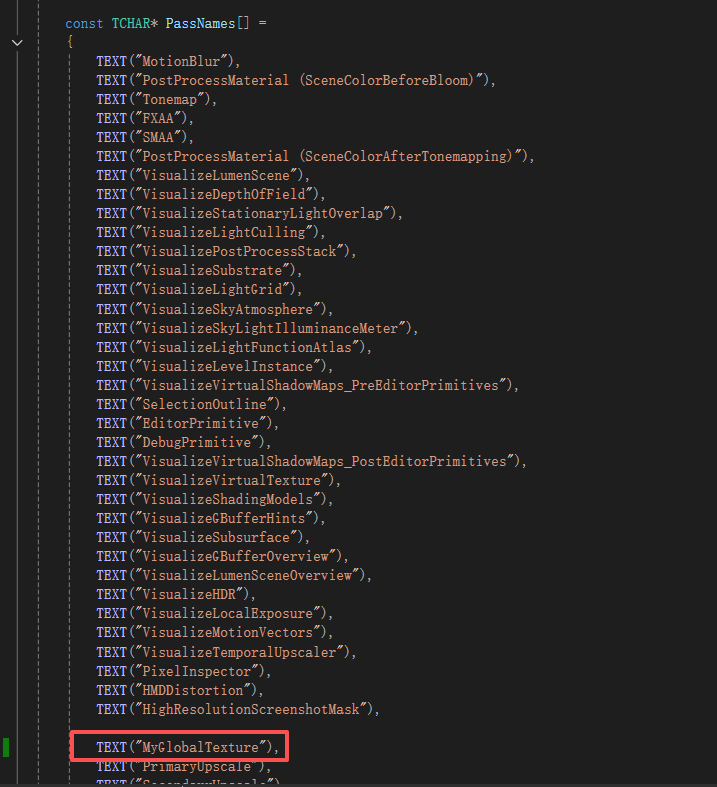
在postprocess.cpp中增加上面内容
后处理链里多了一个叫 MyGlobalTexture 的 pass
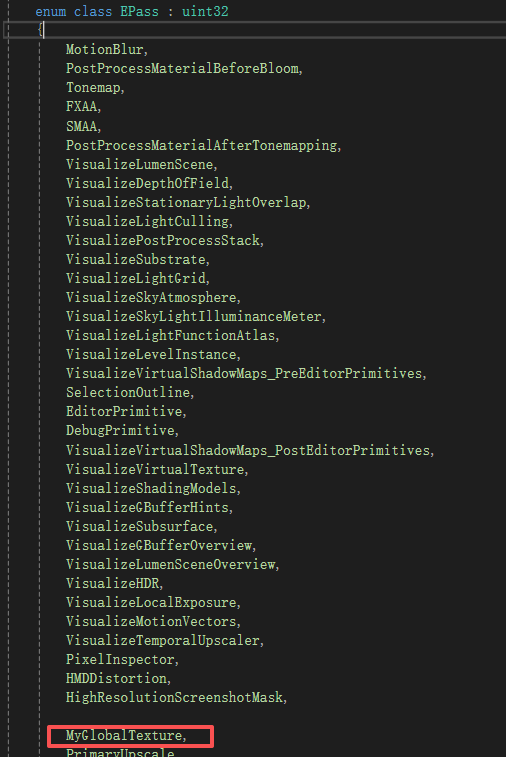
EPass 是什么?
它是 UE 后处理链的 pass 枚举。 UE 用它描述这一帧有哪些后处理步骤,以及它们的顺序。
EPass 里枚举从上到下,代表 UE 后处理 pass 的逻辑顺序。
epass和passname也必须顺序一一对应

并在这里告诉它启用这个pass!
PassSequence 是什么?
它是 UE 后处理 pass 的调度器。 它知道哪些 pass 开启,哪些 pass 关闭。 它还能判断哪个 pass 是最后一个有效 pass。

在这里调用之前写的pass
PassSequence.AcceptOverrideIfLastPass(...)
它的意思是:
如果 MyGlobalTexture 是最后一个有效后处理 pass,
那就让它直接写最终输出 ViewFamilyOutput。
如果不是最后一个,它不会给你最终输出,你的 pass 就自己创建中间 RT,然后继续传给后面的 pass。
#include "Common.ush"
#include "PostProcessCommon.ush"
#include "ScreenPass.ush"

SCREEN_PASS_TEXTURE_VIEWPORT(Input)
SCREEN_PASS_TEXTURE_VIEWPORT(Output)

Texture2D InputTexture;
SamplerState InputSampler;

float Intensity;

void MainPS(
	noperspective float4 UVAndScreenPos : TEXCOORD0,
	float4 SvPosition : SV_POSITION,
	out float4 OutColor : SV_Target0)
{

	int2 PixelPos = int2(SvPosition.xy);

	float4 SceneColor = InputTexture.Load(int3(PixelPos, 0));

	float2 ViewportUV =
		(PixelPos - Input_ViewportMin + 0.5f) * Input_ViewportSizeInverse;

	float3 GlobalTex =
		Texture2DSample(View.MyGlobalTexture, View.MyGlobalTextureSampler, ViewportUV).rgb;

	float3 ModulatedColor = SceneColor.rgb * lerp(1.0.xxx, GlobalTex * 2.0f, saturate(Intensity));
	OutColor = float4(ModulatedColor, SceneColor.a);
}
SCREEN_PASS_TEXTURE_VIEWPORT(Input) 这个宏的意思是:
在 HLSL 里声明一组和 Input viewport 相关的变量。
它会展开成类似这些变量:
float2 Input_Extent; float2 Input_ExtentInverse; float2 Input_ScreenPosToViewportScale; float2 Input_ScreenPosToViewportBias; uint2 Input_ViewportMin; uint2 Input_ViewportMax; float2 Input_ViewportSize; float2 Input_ViewportSizeInverse; float2 Input_UVViewportMin; float2 Input_UVViewportMax; ...
noperspective 是 HLSL 的插值修饰符
这个从 Vertex Shader 传到 Pixel Shader 的变量,不做透视校正插值。
noperspective float4 UVAndScreenPos : TEXCOORD0
表示 UVAndScreenPos 在三角形内部插值时,用屏幕空间线性插值,不按深度做透视修正。
普通情况下,如果不写 noperspective,GPU 会做 perspective-correct interpolation:
考虑顶点深度 W 插值结果会受透视影响
float2 ViewportUV =
    (PixelPos - Input_ViewportMin + 0.5f) * Input_ViewportSizeInverse;
这句是在把 像素坐标 转成 0 到 1 的 UV 坐标。
原代码:
float2 ViewportUV = (PixelPos - Input_ViewportMin + 0.5f) * Input_ViewportSizeInverse;
先看每个东西。
PixelPos
当前像素坐标。
比如现在 shader 正在处理屏幕上的这个像素:
PixelPos = (110, 60)
Input_ViewportMin
当前 Viewport 的左上角坐标。
比如当前有效区域不是从 (0, 0) 开始,而是从:
Input_ViewportMin = (100, 50)
那说明:
当前 View 的左上角在整张纹理的 (100, 50)
所以:
PixelPos - Input_ViewportMin
就是把坐标变成"相对于当前 Viewport 左上角"的坐标:
(110, 60) - (100, 50) = (10, 10)
也就是:
当前像素在 viewport 内部第 10,10 个像素
然后:
+ 0.5f
是为了取像素中心。
像素 (10, 10) 的中心不是 (10, 10),而是:
(10.5, 10.5)
所以变成:
(10.5, 10.5)
最后:
* Input_ViewportSizeInverse
Input_ViewportSizeInverse 是 viewport 尺寸的倒数。
如果 viewport 大小是:
Input_ViewportSize = (200, 100)
那:
Input_ViewportSizeInverse = (1/200, 1/100)
所以:
(10.5, 10.5) * (1/200, 1/100) = (0.0525, 0.105)
这就是 UV。
也就是说:
当前像素在 viewport 宽度方向 5.25% 的位置 当前像素在 viewport 高度方向 10.5% 的位置
完整例子:
PixelPos = (110, 60) Input_ViewportMin = (100, 50) Input_ViewportSize = (200, 100) ViewportUV = ((110, 60) - (100, 50) + 0.5) / (200, 100) = (10.5, 10.5) / (200, 100) = (0.0525, 0.105)
所以这一句等价于:
float2 LocalPixelPos = PixelPos - Input_ViewportMin + 0.5f; float2 ViewportUV = LocalPixelPos / Input_ViewportSize;
只是 UE 预先给了倒数:
Input_ViewportSizeInverse
所以用乘法:
LocalPixelPos * Input_ViewportSizeInverse
比除法更快一点。
一句话:
这句代码是在算:当前像素位于当前 Viewport 内部的归一化 UV 坐标。
剩下就是根据这个UV进行采样,然后和原来的scenecolor进行融合了!
加一个简单版本的,方便阅读:
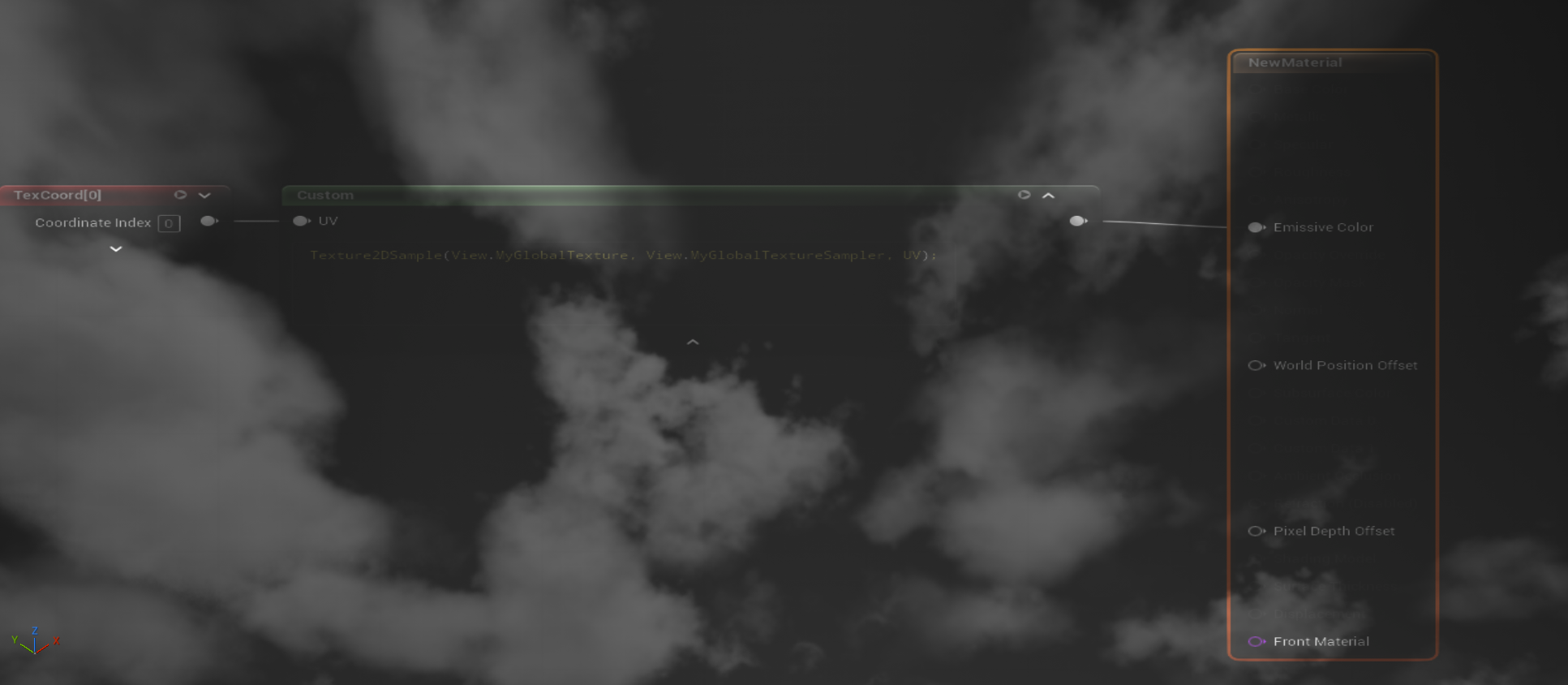
路径:Engine\Source\Runtime\Renderer\Private\PostProcess\
新建文件夹:PostProcessGraySceneColor.cpp & PostProcessGraySceneColor.h
PostProcessGraySceneColor.h:
#pragma once

#include "ScreenPass.h"

struct FGraySceneColorInputs
{
	FScreenPassTexture SceneColor;
	FScreenPassRenderTarget OverrideOutput;
	float Intensity = 0.5f;
};

FScreenPassTexture AddGraySceneColorPass(
	FRDGBuilder& GraphBuilder,
	const FViewInfo& View,
	const FGraySceneColorInputs& Inputs
);

bool IsGraySceneColorPassEnabled();
PostProcessGraySceneColor.cpp:
#include "PostProcess/PostProcessGraySceneColor.h"
#include "SceneRendering.h"
#include "PostProcessGraySceneColor.h"
#include "DataDrivenShaderPlatformInfo.h"

static TAutoConsoleVariable<int32> CVarGraySceneColorPass(
	TEXT("r.GraySceneColorPass"),
	1,
	TEXT("Enable GraySceneColor post process pass."),
	ECVF_RenderThreadSafe);

static TAutoConsoleVariable<float> CVarGraySceneColorIntensity(
	TEXT("r.GraySceneColorPass.Intensity"),
	0.5f,
	TEXT("Intensity of MyGlobalTexture post process pass."),
	ECVF_RenderThreadSafe);

bool IsGraySceneColorPassEnabled()
{
	return CVarGraySceneColorPass.GetValueOnRenderThread() != 0;
}

class FGraySceneColorPS : public FGlobalShader
{
public:
	DECLARE_GLOBAL_SHADER(FGraySceneColorPS);
	SHADER_USE_PARAMETER_STRUCT(FGraySceneColorPS, FGlobalShader);

	BEGIN_SHADER_PARAMETER_STRUCT(FParameters, )
		//SHADER_PARAMETER_STRUCT_REF(FViewUniformShaderParameters, ViewUniformBuffer)

		SHADER_PARAMETER_STRUCT(FScreenPassTextureViewportParameters, Input)
		SHADER_PARAMETER_STRUCT(FScreenPassTextureViewportParameters, Output)

		SHADER_PARAMETER_RDG_TEXTURE(Texture2D, InputTexture)
		SHADER_PARAMETER_SAMPLER(SamplerState, InputSampler)

		SHADER_PARAMETER(float, Intensity)

		RENDER_TARGET_BINDING_SLOTS()
	END_SHADER_PARAMETER_STRUCT()

	static bool ShouldCompilePermutation(const FGlobalShaderPermutationParameters& Parameters)
	{
		return IsFeatureLevelSupported(Parameters.Platform, ERHIFeatureLevel::SM5);
	}
};

IMPLEMENT_GLOBAL_SHADER(
	FGraySceneColorPS,
	"/Engine/Private/PostProcessGraySceneColor.usf",
	"MainPS",
	SF_Pixel);

FScreenPassTexture AddGraySceneColorPass(
	FRDGBuilder& GraphBuilder,
	const FViewInfo& View,
	const FGraySceneColorInputs& Inputs)
{
	check(Inputs.SceneColor.IsValid());

	if (CVarGraySceneColorPass.GetValueOnRenderThread() == 0)
	{
		return Inputs.SceneColor;
	}

	FScreenPassRenderTarget Output = Inputs.OverrideOutput;

	if (!Output.IsValid())
	{
		Output = FScreenPassRenderTarget::CreateFromInput(
			GraphBuilder,
			Inputs.SceneColor,
			View.GetOverwriteLoadAction(),
			TEXT("GraySceneColorPass"));
	}

	const FScreenPassTextureViewport InputViewport(Inputs.SceneColor);
	const FScreenPassTextureViewport OutputViewport(Output);

	FGraySceneColorPS::FParameters* PassParameters =
		GraphBuilder.AllocParameters<FGraySceneColorPS::FParameters>();

	//PassParameters->ViewUniformBuffer = View.ViewUniformBuffer;
	PassParameters->Input = GetScreenPassTextureViewportParameters(InputViewport);
	PassParameters->Output = GetScreenPassTextureViewportParameters(OutputViewport);
	PassParameters->InputTexture = Inputs.SceneColor.Texture;
	PassParameters->InputSampler =
		TStaticSamplerState<SF_Bilinear, AM_Clamp, AM_Clamp, AM_Clamp>::GetRHI();
	PassParameters->Intensity = CVarGraySceneColorIntensity.GetValueOnRenderThread();
	PassParameters->RenderTargets[0] = Output.GetRenderTargetBinding();

	TShaderMapRef<FGraySceneColorPS> PixelShader(View.ShaderMap);

	AddDrawScreenPass(
		GraphBuilder,
		RDG_EVENT_NAME("GraySceneColorPass"),
		View,
		OutputViewport,
		InputViewport,
		PixelShader,
		PassParameters);

	return MoveTemp(Output);
}
在postprocess.cpp里面注册:
首先在postprocess.cpp里面增加头文件:
#include "PostProcess/PostProcessGraySceneColor.h"注册通道:
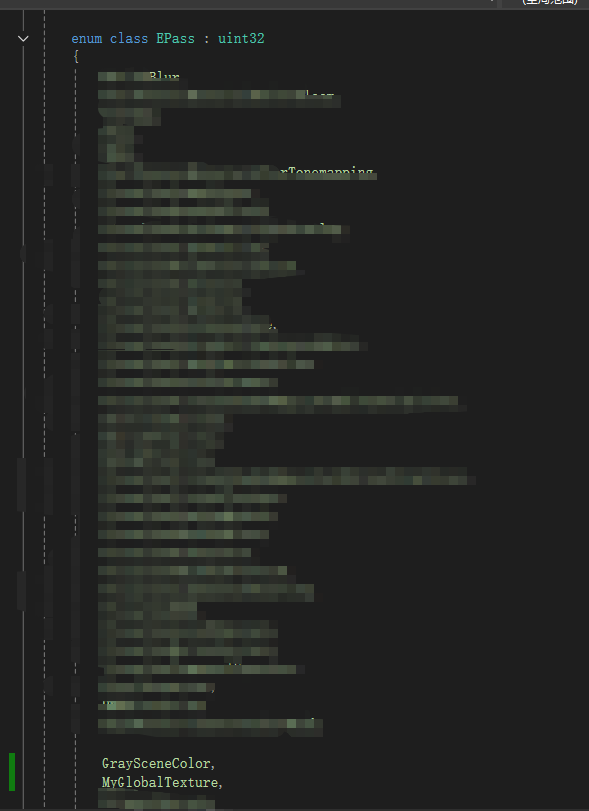
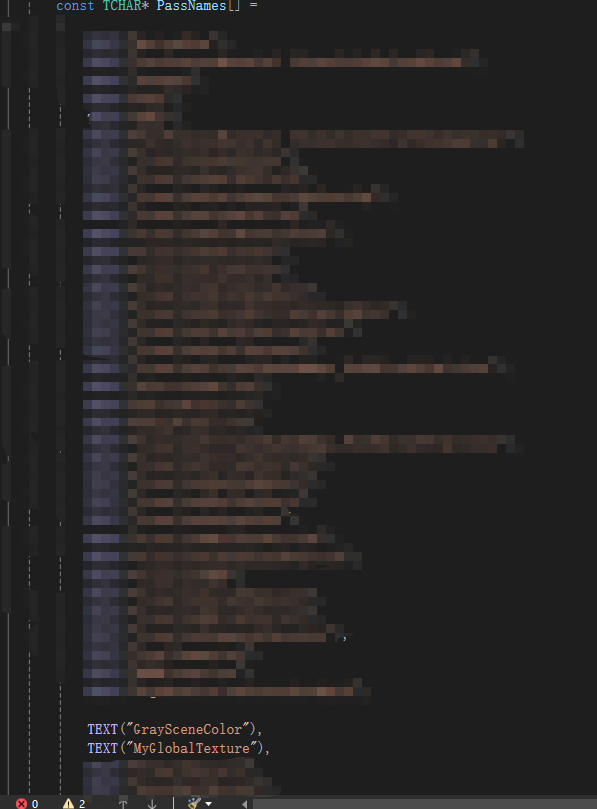
启用通道:

添加通道到任务队列:
