如果您喜欢此文章,请收藏、点赞、评论,谢谢,祝您快乐每一天。
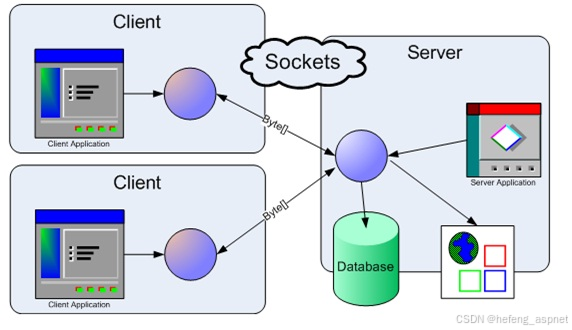
套接字编程是一种连接网络上两个节点进行通信的方法。它本质上是一种单向的客户端-服务器架构:客户端连接并向服务器发送消息,服务器则通过套接字连接回复这些消息。一个套接字(节点)监听特定IP地址上的特定端口,而另一个套接字则主动联系该节点以建立连接。服务器创建监听套接字,客户端则主动联系服务器。在深入学习服务器和客户端代码之前,强烈建议先了解TCP/IP模型。
客户端编程
在创建客户端套接字之前,用户必须决定要连接的" IP 地址",在本例中为 本地主机 (localhost) 。同时,我们还需要套接字本身的" Family "方法。然后,通过" connect "方法,我们将套接字连接到服务器。在发送任何消息之前,必须将其转换为字节数组。只有这样,才能通过" send "方法将其发送到服务器。之后,借助" receive "方法,我们将从服务器收到一个字节数组作为响应。值得注意的是,与 C 语言一样,"send"和"receive"方法仍然返回已发送或已接收的字节数。
// A C# program for Client
using System;
using System.Net;
using System.Net.Sockets;
using System.Text;
namespace Client {
class Program {
// Main Method
static void Main(string\[\] args)
{
ExecuteClient();
}
// ExecuteClient() Method
static void ExecuteClient()
{
try {
// Establish the remote endpoint
// for the socket. This example
// uses port 11111 on the local
// computer.
IPHostEntry ipHost = Dns.GetHostEntry(Dns.GetHostName());
IPAddress ipAddr = ipHost.AddressList0;
IPEndPoint localEndPoint = new IPEndPoint(ipAddr, 11111);
// Creation TCP/IP Socket using
// Socket Class Constructor
Socket sender = new Socket(ipAddr.AddressFamily,
SocketType.Stream, ProtocolType.Tcp);
try {
// Connect Socket to the remote
// endpoint using method Connect()
sender.Connect(localEndPoint);
// We print EndPoint information
// that we are connected
Console.WriteLine("Socket connected to -> {0} ",
sender.RemoteEndPoint.ToString());
// Creation of message that
// we will send to Server
byte\[\] messageSent = Encoding.ASCII.GetBytes("Test Client<EOF>");
int byteSent = sender.Send(messageSent);
// Data buffer
byte\[\] messageReceived = new byte1024;
// We receive the message using
// the method Receive(). This
// method returns number of bytes
// received, that we'll use to
// convert them to string
int byteRecv = sender.Receive(messageReceived);
Console.WriteLine("Message from Server -> {0}",
Encoding.ASCII.GetString(messageReceived,
0, byteRecv));
// Close Socket using
// the method Close()
sender.Shutdown(SocketShutdown.Both);
sender.Close();
}
// Manage of Socket's Exceptions
catch (ArgumentNullException ane) {
Console.WriteLine("ArgumentNullException : {0}", ane.ToString());
}
catch (SocketException se) {
Console.WriteLine("SocketException : {0}", se.ToString());
}
catch (Exception e) {
Console.WriteLine("Unexpected exception : {0}", e.ToString());
}
}
catch (Exception e) {
Console.WriteLine(e.ToString());
}
}
}
}
服务器端编程
同样,我们需要一个"IP地址"来标识服务器,以便客户端连接。创建套接字后,我们调用" bind "方法将IP地址绑定到套接字。然后,调用" listen "方法。此操作负责创建等待队列,该队列与每个打开的套接字 相关联。 "listen"方法接受一个输入参数,即等待队列中可以容纳的最大客户端数量。如上所述,通过*"send* " 和" receive "方法与客户端进行通信。
**注意:**不要忘记转换为字节数组。
// A C# Program for Server
using System;
using System.Net;
using System.Net.Sockets;
using System.Text;
namespace Server {
class Program {
// Main Method
static void Main(string\[\] args)
{
ExecuteServer();
}
public static void ExecuteServer()
{
// Establish the local endpoint
// for the socket. Dns.GetHostName
// returns the name of the host
// running the application.
IPHostEntry ipHost = Dns.GetHostEntry(Dns.GetHostName());
IPAddress ipAddr = ipHost.AddressList0;
IPEndPoint localEndPoint = new IPEndPoint(ipAddr, 11111);
// Creation TCP/IP Socket using
// Socket Class Constructor
Socket listener = new Socket(ipAddr.AddressFamily,
SocketType.Stream, ProtocolType.Tcp);
try {
// Using Bind() method we associate a
// network address to the Server Socket
// All client that will connect to this
// Server Socket must know this network
// Address
listener.Bind(localEndPoint);
// Using Listen() method we create
// the Client list that will want
// to connect to Server
listener.Listen(10);
while (true) {
Console.WriteLine("Waiting connection ... ");
// Suspend while waiting for
// incoming connection Using
// Accept() method the server
// will accept connection of client
Socket clientSocket = listener.Accept();
// Data buffer
byte\[\] bytes = new Byte1024;
string data = null;
while (true) {
int numByte = clientSocket.Receive(bytes);
data += Encoding.ASCII.GetString(bytes,
0, numByte);
if (data.IndexOf("<EOF>") > -1)
break;
}
Console.WriteLine("Text received -> {0} ", data);
byte\[\] message = Encoding.ASCII.GetBytes("Test Server");
// Send a message to Client
// using Send() method
clientSocket.Send(message);
// Close client Socket using the
// Close() method. After closing,
// we can use the closed Socket
// for a new Client Connection
clientSocket.Shutdown(SocketShutdown.Both);
clientSocket.Close();
}
}
catch (Exception e) {
Console.WriteLine(e.ToString());
}
}
}
}
在终端或命令提示符下运行:
- 首先将文件保存为 .cs 扩展名。假设我们将文件保存为client.cs 和server.cs。
- 然后执行以下命令编译这两个文件:
$ csc client.cs
$ csc server.cs
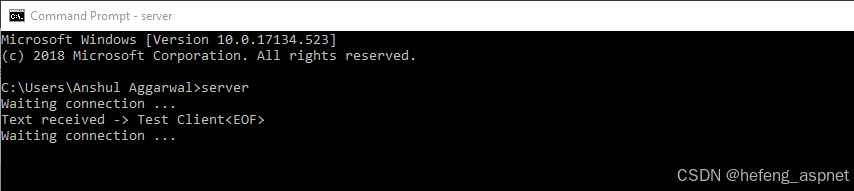
- 编译成功后,打开两个命令行窗口,一个用于服务器端,另一个用于客户端。首先尝试按如下方式执行服务器端命令。

- 之后,在另一个命令提示符中执行客户端代码,并在服务器端命令提示符中查看以下输出。
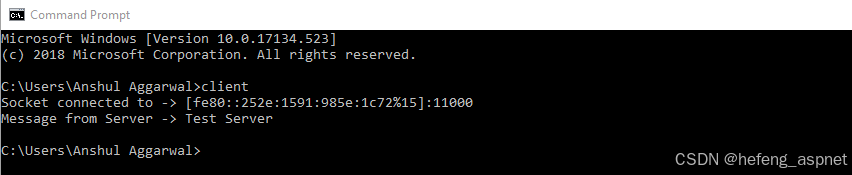
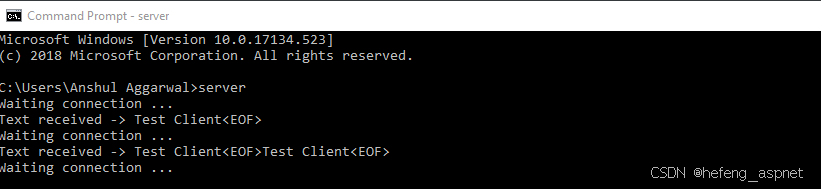
- 现在,客户端程序执行后,您就可以立即在服务器上看到更改。
如果您喜欢此文章,请收藏、点赞、评论,谢谢,祝您快乐每一天。