Ultralytics:解读AIFI模块
- 前言
- 相关介绍
-
- [Ultralytics 简介](#Ultralytics 简介)
- 前提条件
- 实验环境
- [AIFI(Adaptive Input Feature Integration Transformer)](#AIFI(Adaptive Input Feature Integration Transformer))
- 参考文献
前言
- 由于本人水平有限,难免出现错漏,敬请批评改正。
- 更多精彩内容,可点击进入Python日常小操作专栏、OpenCV-Python小应用专栏、YOLO系列专栏、自然语言处理专栏、人工智能混合编程实践专栏或我的个人主页查看
- YOLOs-CPP:一个免费开源的YOLO全系列C++推理库(以YOLO26为例)
- PaddleOCR:Win10上安装使用PPOCRLabel标注工具
- 目标检测:使用自己的数据集微调DEIMv2进行物体检测
- 图像分割:PyTorch从零开始实现SegFormer语义分割
- 图像超分:使用自己的数据集微调Real-ESRGAN-x4plus进行超分重建
- 图像生成:PyTorch从零开始实现一个简单的扩散模型
- Stable Diffusion:使用自己的数据集微调 Stable Diffusion 3.5 LoRA 文生图模型
- 图像超分:使用自己的数据集微调Real-ESRGAN-x2plus进行超分重建
- Anomalib:使用Anomalib 2.1.0训练自己的数据集进行异常检测
- Anomalib:在Linux服务器上安装使用Anomalib 2.1.0
- 人工智能混合编程实践:C++调用封装好的DLL进行异常检测推理
- 人工智能混合编程实践:C++调用封装好的DLL进行FP16图像超分重建(v3.0)
- 隔离系统Python:源码编译3.11.8到自定义目录(含PGO性能优化)
- 在线机的Python环境迁移到离线机上
- Nuitka 将 Python 脚本封装为 .pyd 或 .so 文件
- Ultralytics:使用 YOLO11 进行速度估计
- Ultralytics:使用 YOLO11 进行物体追踪
- Ultralytics:使用 YOLO11 进行物体计数
- Ultralytics:使用 YOLO11 进行目标打码
- 人工智能混合编程实践:C++调用Python ONNX进行YOLOv8推理
- 人工智能混合编程实践:C++调用封装好的DLL进行YOLOv8实例分割
- 人工智能混合编程实践:C++调用Python ONNX进行图像超分重建
- 人工智能混合编程实践:C++调用Python AgentOCR进行文本识别
- 通过计算实例简单地理解PatchCore异常检测
- Python将YOLO格式实例分割数据集转换为COCO格式实例分割数据集
- YOLOv8 Ultralytics:使用Ultralytics框架训练RT-DETR实时目标检测模型
- 基于DETR的人脸伪装检测
- YOLOv7训练自己的数据集(口罩检测)
- YOLOv8训练自己的数据集(足球检测)
- YOLOv5:TensorRT加速YOLOv5模型推理
- YOLOv5:IoU、GIoU、DIoU、CIoU、EIoU
- 玩转Jetson Nano(五):TensorRT加速YOLOv5目标检测
- YOLOv5:添加SE、CBAM、CoordAtt、ECA注意力机制
- YOLOv5:yolov5s.yaml配置文件解读、增加小目标检测层
- Python将COCO格式实例分割数据集转换为YOLO格式实例分割数据集
- YOLOv5:使用7.0版本训练自己的实例分割模型(车辆、行人、路标、车道线等实例分割)
- 使用Kaggle GPU资源免费体验Stable Diffusion开源项目
- Stable Diffusion:在服务器上部署使用Stable Diffusion WebUI进行AI绘图(v2.0)
- Stable Diffusion:使用自己的数据集微调训练LoRA模型(v2.0)
相关介绍
Ultralytics 简介
Ultralytics 基于多年的计算机视觉和人工智能基础研究,创建了最先进的 (SOTA) YOLO 模型。我们的模型不断更新性能和灵活性,快速、准确且易于使用。他们擅长对象检测、跟踪、实例分割、语义分割、图像分类和姿势估计任务。
前提条件
- 熟悉Python、Pytorch
实验环境
bash
Package                  Version
------------------------ ------------
Python                   3.11.8
absl-py                  2.4.0
accelerate               1.13.0
annotated-doc            0.0.4
anyio                    4.13.0
calflops                 0.3.2
certifi                  2026.4.22
charset-normalizer       3.4.7
click                    8.3.3
colorama                 0.4.6
contourpy                1.3.3
cycler                   0.12.1
filelock                 3.29.0
flatbuffers              25.12.19
fonttools                4.62.1
fsspec                   2026.4.0
grpcio                   1.80.0
h11                      0.16.0
hf-xet                   1.5.0
httpcore                 1.0.9
httpx                    0.28.1
huggingface_hub          1.14.0
idna                     3.15
Jinja2                   3.1.6
kiwisolver               1.5.0
Markdown                 3.10.2
markdown-it-py           4.2.0
MarkupSafe               3.0.3
matplotlib               3.10.9
mdurl                    0.1.2
ml_dtypes                0.5.0
mpmath                   1.3.0
networkx                 3.6.1
numpy                    1.26.4
nvidia-cublas-cu12       12.8.3.14
nvidia-cuda-cupti-cu12   12.8.57
nvidia-cuda-nvrtc-cu12   12.8.61
nvidia-cuda-runtime-cu12 12.8.57
nvidia-cudnn-cu12        9.7.1.26
nvidia-cufft-cu12        11.3.3.41
nvidia-cufile-cu12       1.13.0.11
nvidia-curand-cu12       10.3.9.55
nvidia-cusolver-cu12     11.7.2.55
nvidia-cusparse-cu12     12.5.7.53
nvidia-cusparselt-cu12   0.6.3
nvidia-nccl-cu12         2.26.2
nvidia-nvjitlink-cu12    12.8.61
nvidia-nvtx-cu12         12.8.55
onnx                     1.19.0
onnxruntime-gpu          1.26.0
onnxslim                 0.1.94
opencv-python            4.6.0.66
packaging                26.2
pillow                   12.2.0
pip                      24.0
polars                   1.40.1
polars-runtime-32        1.40.1
protobuf                 7.34.1
psutil                   7.2.2
pycocotools              2.0.11
Pygments                 2.20.0
pyparsing                3.3.2
python-dateutil          2.9.0.post0
PyYAML                   6.0.3
regex                    2026.5.9
requests                 2.34.1
rich                     15.0.0
safetensors              0.7.0
scipy                    1.16.0
setuptools               65.5.0
shellingham              1.5.4
six                      1.17.0
sympy                    1.14.0
tabulate                 0.10.0
tensorboard              2.20.0
tensorboard-data-server  0.7.2
tokenizers               0.22.2
torch                    2.7.1+cu128
torchaudio               2.7.1+cu128
torchvision              0.22.1+cu128
tqdm                     4.67.3
transformers             5.8.1
triton                   3.3.1
typer                    0.25.1
typing_extensions        4.15.0
ultralytics              8.4.58
ultralytics-thop         2.0.19
urllib3                  2.7.0
Werkzeug                 3.1.8
AIFI(Adaptive Input Feature Integration Transformer)
AIFI 是 TransformerEncoderLayer 的子类,专门为 2D 特征图 (如 CNN 输出的 [B, C, H, W] 特征)设计,使其能够直接使用 Transformer 进行全局建模。它在编码器基础上添加了 2D 正弦余弦位置编码,并将空间维度展平为序列,从而让 Transformer 能够感知特征图中的空间位置信息。该模块常见于 RT-DETR 等目标检测模型中,用于增强特征的全局上下文建模能力。
代码实现
python
import cv2
import math
import torch
import numpy as np
import matplotlib.pyplot as plt
from torch import nn

TORCH_1_11 = (torch.__version__ == "1.11.0")

class TransformerEncoderLayer(nn.Module):
    """A single layer of the transformer encoder.

    This class implements a standard transformer encoder layer with multi-head attention and feedforward network,
    supporting both pre-normalization and post-normalization configurations.

    Attributes:
        ma (nn.MultiheadAttention): Multi-head attention module.
        fc1 (nn.Linear): First linear layer in the feedforward network.
        fc2 (nn.Linear): Second linear layer in the feedforward network.
        norm1 (nn.LayerNorm): Layer normalization after attention.
        norm2 (nn.LayerNorm): Layer normalization after feedforward network.
        dropout (nn.Dropout): Dropout layer for the feedforward network.
        dropout1 (nn.Dropout): Dropout layer after attention.
        dropout2 (nn.Dropout): Dropout layer after feedforward network.
        act (nn.Module): Activation function.
        normalize_before (bool): Whether to apply normalization before attention and feedforward.
    """

    def __init__(
        self,
        c1: int,
        cm: int = 2048,
        num_heads: int = 8,
        dropout: float = 0.0,
        act: nn.Module = nn.GELU(),
        normalize_before: bool = False,
    ):
        """Initialize the TransformerEncoderLayer with specified parameters.

        Args:
            c1 (int): Input dimension.
            cm (int): Hidden dimension in the feedforward network.
            num_heads (int): Number of attention heads.
            dropout (float): Dropout probability.
            act (nn.Module): Activation function.
            normalize_before (bool): Whether to apply normalization before attention and feedforward.
        """
        super().__init__()
        # from ...utils.torch_utils import TORCH_1_9

        # if not TORCH_1_9:
        #     raise ModuleNotFoundError(
        #         "TransformerEncoderLayer() requires torch>=1.9 to use nn.MultiheadAttention(batch_first=True)."
        #     )
        self.ma = nn.MultiheadAttention(c1, num_heads, dropout=dropout, batch_first=True)
        # Implementation of Feedforward model
        self.fc1 = nn.Linear(c1, cm)
        self.fc2 = nn.Linear(cm, c1)

        self.norm1 = nn.LayerNorm(c1)
        self.norm2 = nn.LayerNorm(c1)
        self.dropout = nn.Dropout(dropout)
        self.dropout1 = nn.Dropout(dropout)
        self.dropout2 = nn.Dropout(dropout)

        self.act = act
        self.normalize_before = normalize_before

    @staticmethod
    def with_pos_embed(tensor: torch.Tensor, pos: torch.Tensor | None = None) -> torch.Tensor:
        """Add position embeddings to the tensor if provided."""
        return tensor if pos is None else tensor + pos

    def forward_post(
        self,
        src: torch.Tensor,
        src_mask: torch.Tensor | None = None,
        src_key_padding_mask: torch.Tensor | None = None,
        pos: torch.Tensor | None = None,
    ) -> torch.Tensor:
        """Perform forward pass with post-normalization.

        Args:
            src (torch.Tensor): Input tensor.
            src_mask (torch.Tensor, optional): Mask for the src sequence.
            src_key_padding_mask (torch.Tensor, optional): Mask for the src keys per batch.
            pos (torch.Tensor, optional): Positional encoding.

        Returns:
            (torch.Tensor): Output tensor after attention and feedforward.
        """
        q = k = self.with_pos_embed(src, pos)
        src2 = self.ma(q, k, value=src, attn_mask=src_mask, key_padding_mask=src_key_padding_mask)[0]
        src = src + self.dropout1(src2)
        src = self.norm1(src)
        src2 = self.fc2(self.dropout(self.act(self.fc1(src))))
        src = src + self.dropout2(src2)
        return self.norm2(src)

    def forward_pre(
        self,
        src: torch.Tensor,
        src_mask: torch.Tensor | None = None,
        src_key_padding_mask: torch.Tensor | None = None,
        pos: torch.Tensor | None = None,
    ) -> torch.Tensor:
        """Perform forward pass with pre-normalization.

        Args:
            src (torch.Tensor): Input tensor.
            src_mask (torch.Tensor, optional): Mask for the src sequence.
            src_key_padding_mask (torch.Tensor, optional): Mask for the src keys per batch.
            pos (torch.Tensor, optional): Positional encoding.

        Returns:
            (torch.Tensor): Output tensor after attention and feedforward.
        """
        src2 = self.norm1(src)
        q = k = self.with_pos_embed(src2, pos)
        src2 = self.ma(q, k, value=src2, attn_mask=src_mask, key_padding_mask=src_key_padding_mask)[0]
        src = src + self.dropout1(src2)
        src2 = self.norm2(src)
        src2 = self.fc2(self.dropout(self.act(self.fc1(src2))))
        return src + self.dropout2(src2)

    def forward(
        self,
        src: torch.Tensor,
        src_mask: torch.Tensor | None = None,
        src_key_padding_mask: torch.Tensor | None = None,
        pos: torch.Tensor | None = None,
    ) -> torch.Tensor:
        """Forward propagate the input through the encoder module.

        Args:
            src (torch.Tensor): Input tensor.
            src_mask (torch.Tensor, optional): Mask for the src sequence.
            src_key_padding_mask (torch.Tensor, optional): Mask for the src keys per batch.
            pos (torch.Tensor, optional): Positional encoding.

        Returns:
            (torch.Tensor): Output tensor after transformer encoder layer.
        """
        if self.normalize_before:
            return self.forward_pre(src, src_mask, src_key_padding_mask, pos)
        return self.forward_post(src, src_mask, src_key_padding_mask, pos)

class AIFI(TransformerEncoderLayer):
    """AIFI transformer layer for 2D data with positional embeddings.

    This class extends TransformerEncoderLayer to work with 2D feature maps by adding 2D sine-cosine positional
    embeddings and handling the spatial dimensions appropriately.
    """

    def __init__(
        self,
        c1: int,
        cm: int = 2048,
        num_heads: int = 8,
        dropout: float = 0,
        act: nn.Module = nn.GELU(),
        normalize_before: bool = False,
    ):
        """Initialize the AIFI instance with specified parameters.

        Args:
            c1 (int): Input dimension.
            cm (int): Hidden dimension in the feedforward network.
            num_heads (int): Number of attention heads.
            dropout (float): Dropout probability.
            act (nn.Module): Activation function.
            normalize_before (bool): Whether to apply normalization before attention and feedforward.
        """
        super().__init__(c1, cm, num_heads, dropout, act, normalize_before)

    def forward(self, x: torch.Tensor) -> torch.Tensor:
        """Forward pass for the AIFI transformer layer.

        Args:
            x (torch.Tensor): Input tensor with shape [B, C, H, W].

        Returns:
            (torch.Tensor): Output tensor with shape [B, C, H, W].
        """
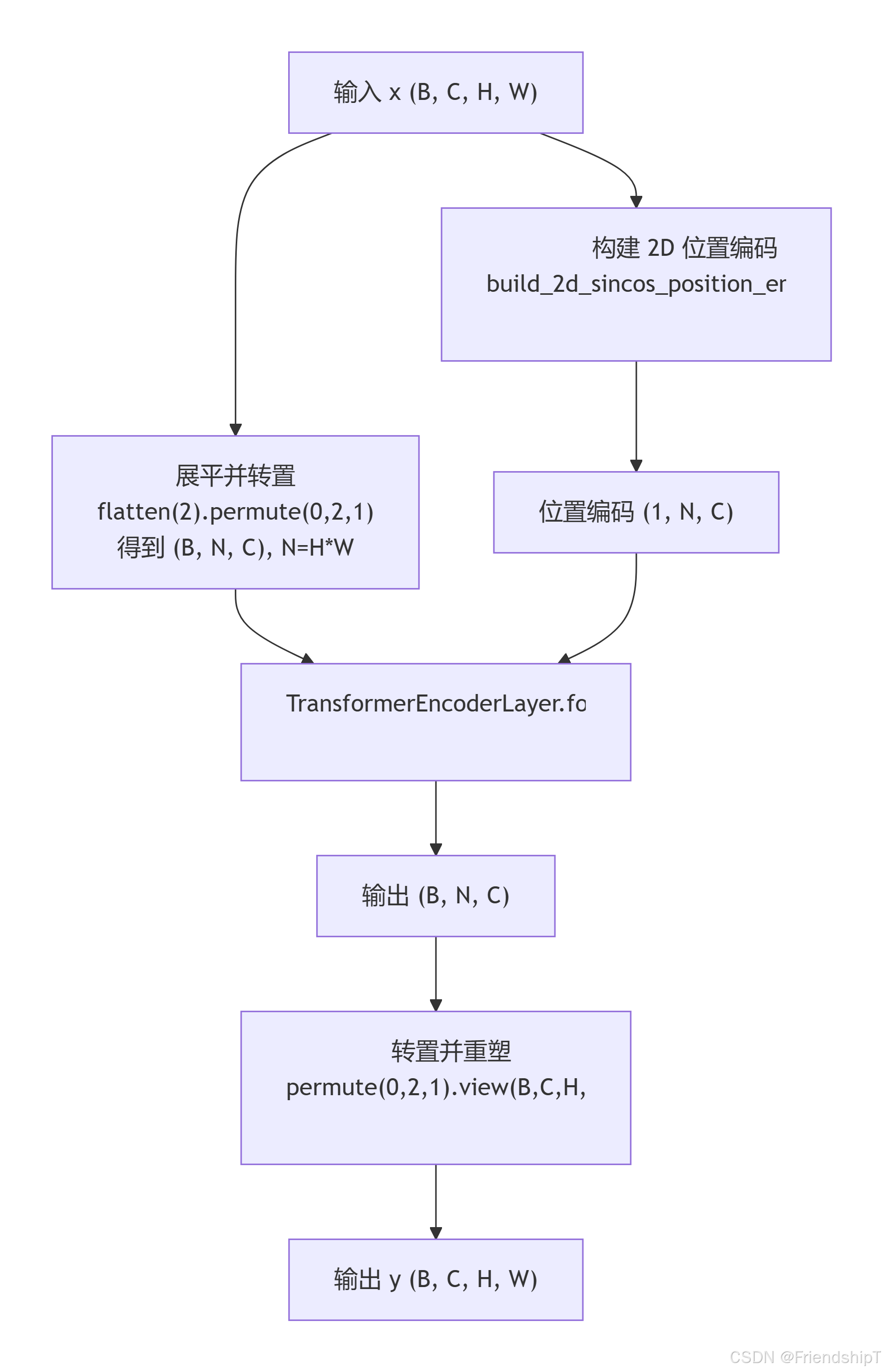
        c, h, w = x.shape[1:]
        pos_embed = self.build_2d_sincos_position_embedding(w, h, c)
        # Flatten [B, C, H, W] to [B, HxW, C]
        x = super().forward(x.flatten(2).permute(0, 2, 1), pos=pos_embed.to(device=x.device, dtype=x.dtype))
        return x.permute(0, 2, 1).view([-1, c, h, w]).contiguous()

    @staticmethod
    def build_2d_sincos_position_embedding(
        w: int, h: int, embed_dim: int = 256, temperature: float = 10000.0
    ) -> torch.Tensor:
        """Build 2D sine-cosine position embedding.

        Args:
            w (int): Width of the feature map.
            h (int): Height of the feature map.
            embed_dim (int): Embedding dimension.
            temperature (float): Temperature for the sine/cosine functions.

        Returns:
            (torch.Tensor): Position embedding with shape [1, h*w, embed_dim].
        """
        assert embed_dim % 4 == 0, "Embed dimension must be divisible by 4 for 2D sin-cos position embedding"
        grid_w = torch.arange(w, dtype=torch.float32)
        grid_h = torch.arange(h, dtype=torch.float32)
        grid_w, grid_h = torch.meshgrid(grid_w, grid_h, indexing="ij") if TORCH_1_11 else torch.meshgrid(grid_w, grid_h)
        pos_dim = embed_dim // 4
        omega = torch.arange(pos_dim, dtype=torch.float32) / pos_dim
        omega = 1.0 / (temperature**omega)

        # Pin matmul to fp32 for CoreML export: fp16 sin/cos on integer-derived positions accumulates visible error.
        out_w = grid_w.flatten()[..., None].float() @ omega[None]
        out_h = grid_h.flatten()[..., None].float() @ omega[None]

        return torch.cat([torch.sin(out_w), torch.cos(out_w), torch.sin(out_h), torch.cos(out_h)], 1)[None]
功能
- 特征图转序列 :将输入
[B, C, H, W]展平为[B, H*W, C],使每个像素点成为一个 token。 - 2D 位置编码:构建固定正弦余弦位置编码,并添加到 token 序列中,使自注意力能利用空间位置信息。
- Transformer 编码:通过多头自注意力和前馈网络进行全局特征交互,输出与输入形状相同的特征图。
- 即插即用 :可无缝替换 CNN 中的普通卷积块或
C2f模块,增强全局建模能力。
使用示例
python
if __name__ == '__main__':
    import torch
    # 判断 PyTorch 版本以兼容 meshgrid 参数
    TORCH_1_11 = torch.__version__ >= '1.11' if hasattr(torch, '__version__') else False

    # 1. 读取图像并缩放到 64x64
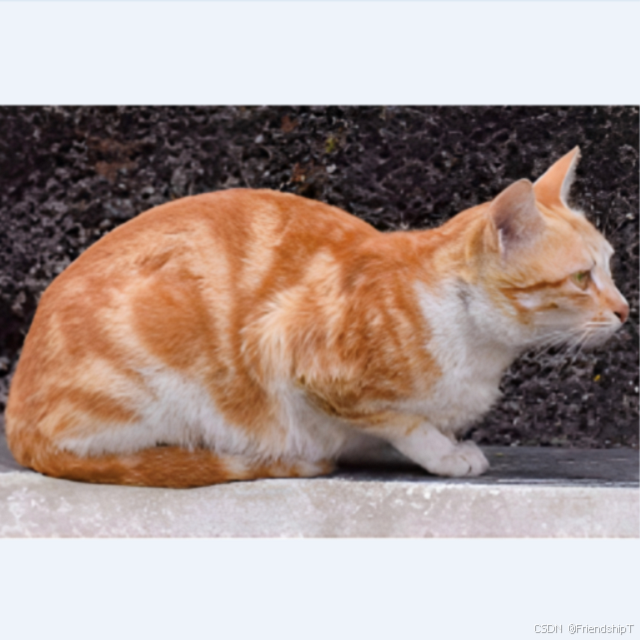
    img_path = "cat_640x640.png"  # 请替换为实际路径
    img_bgr = cv2.imread(img_path)
    if img_bgr is None:
        raise FileNotFoundError(f"图片 {img_path} 不存在!")
    img_resized = cv2.resize(img_bgr, (64, 64))
    img_rgb = cv2.cvtColor(img_resized, cv2.COLOR_BGR2RGB)

    # 转为张量 (1, 3, 64, 64) 并归一化到 [0,1]
    x = torch.from_numpy(img_rgb).float().permute(2, 0, 1).unsqueeze(0) / 255.0

    # 扩展为 4 通道(复制第一个通道,使得通道数能被 4 整除)
    x = torch.cat([x, x[:, :1, :, :]], dim=1)  # 现在形状为 (1, 4, 64, 64)
    B, C, H, W = x.shape
    print(f"输入形状: {x.shape} (B={B}, C={C}, H={H}, W={W})")

    # 2. 创建 AIFI 模块(C=4,num_heads 设为 2 或 4,保证整除)
    aifi = AIFI(
        c1=C,                  # 4
        cm=64,                 # 前馈隐藏层维度
        num_heads=2,           # 4 % 2 == 0,也可以设为 4
        dropout=0.0,
        act=nn.GELU(),
        normalize_before=False
    )

    # 3. 前向传播
    with torch.no_grad():
        out = aifi(x)
    print("输出形状:", out.shape)  # [1, 4, 64, 64]

    # 4. 可视化:显示前 3 个通道的输入、输出及差异(第 4 通道是复制的,可忽略)
    def normalize(arr):
        arr = (arr - arr.min()) / (arr.max() - arr.min() + 1e-8)
        return arr

    plt.figure(figsize=(16, 8), constrained_layout=True)
    for ch in range(3):
        input_ch = x[0, ch, :, :].cpu().numpy()
        output_ch = out[0, ch, :, :].cpu().numpy()
        diff = np.abs(input_ch - output_ch)

        plt.subplot(3, 4, ch*4 + 1)
        plt.imshow(normalize(input_ch), cmap='gray')
        plt.title(f"Input Ch{ch}")
        plt.axis("off")

        plt.subplot(3, 4, ch*4 + 2)
        plt.imshow(normalize(output_ch), cmap='gray')
        plt.title(f"Output Ch{ch}")
        plt.axis("off")

        plt.subplot(3, 4, ch*4 + 3)
        plt.imshow(diff, cmap='hot')
        plt.title(f"Diff Ch{ch}")
        plt.axis("off")

        # 在第一个通道处显示原始彩色图作为参考
        if ch == 0:
            plt.subplot(3, 4, 4)
            plt.imshow(img_rgb)
            plt.title("Original RGB")
            plt.axis("off")

    plt.savefig("aifi_visualization_real_image.png", dpi=150)
    # plt.show()
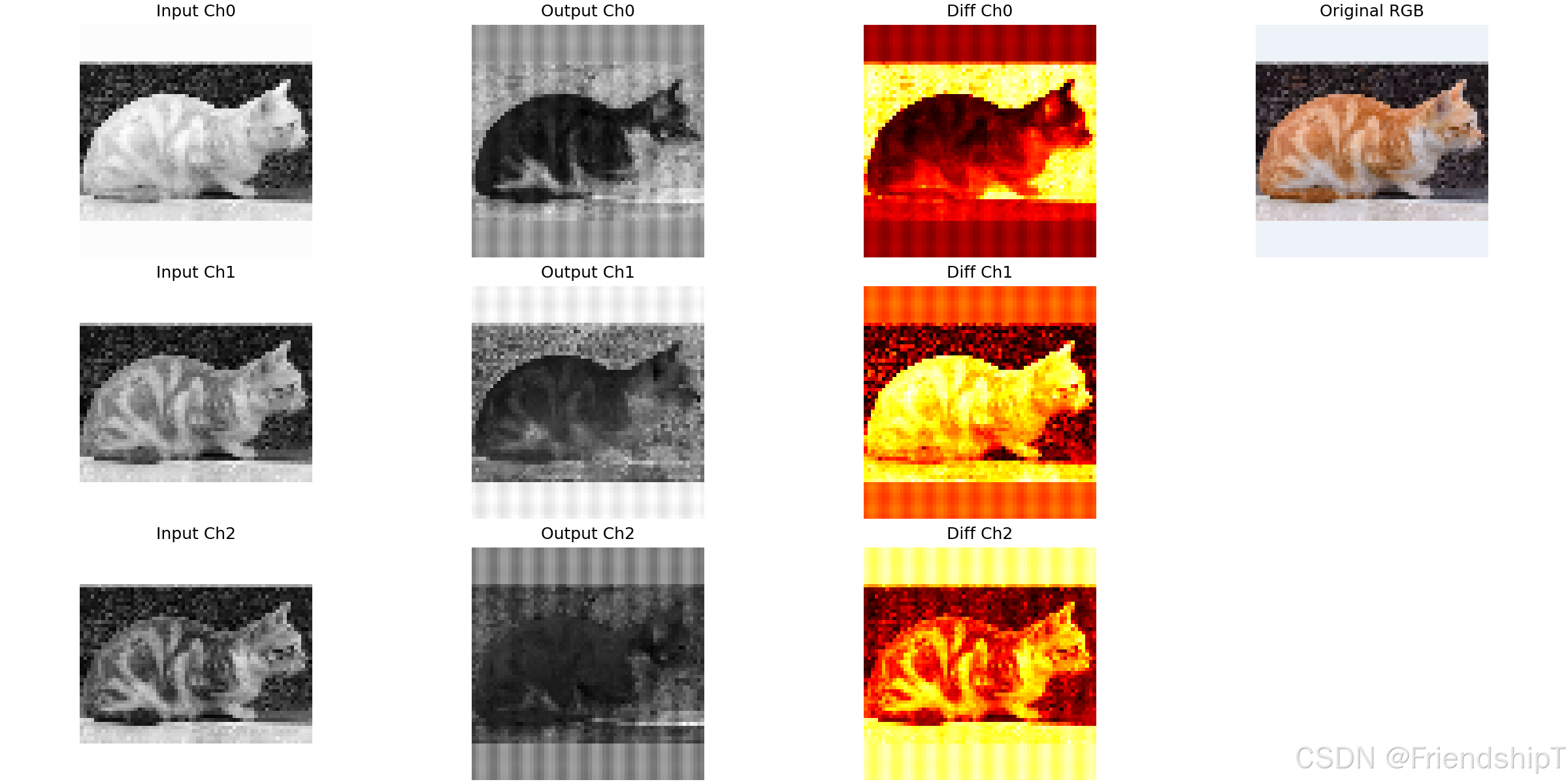
print("可视化已保存为 aifi_visualization_real_image.png")输出示例:
输入形状: torch.Size([1, 4, 64, 64]) (B=1, C=4, H=64, W=64)
输出形状: torch.Size([1, 4, 64, 64])
可视化已保存为 aifi_visualization_real_image.png
由于初始化随机,输入和输出特征图会有明显差异(但形状保持不变),说明模块进行了有效的特征变换。
流程示意图
代码解读
__init__ 方法
- 直接调用父类
TransformerEncoderLayer的构造函数,传递相同的参数,无需额外初始化。
forward 方法
- 获取输入
x的通道数c、高度h、宽度w。 - 调用
build_2d_sincos_position_embedding(w, h, c)生成位置编码,形状为[1, h*w, c]。 - 将
x展平并转置为[B, h*w, c]。 - 调用父类的
forward,传入src=x_flatten和pos=pos_embed。父类会使用with_pos_embed将位置编码加到src的副本上(用于 Q 和 K)。 - 将输出转置回
[B, c, h, w]并返回。
build_2d_sincos_position_embedding(静态方法)
- 功能:生成 2D 正弦余弦位置编码,与 ViT 等中的编码类似。
- 参数 :宽度
w、高度h、嵌入维度embed_dim(必须被 4 整除)、温度temperature(默认 10000.0)。 - 步骤 :
- 创建网格坐标
grid_w和grid_h,范围分别为[0, w-1]和[0, h-1]。 - 使用
torch.meshgrid生成二维网格(注意版本差异,需要TORCH_1_11控制indexing参数)。 - 计算频率
omega = 1.0 / (temperature ** (arange(pos_dim) / pos_dim))。 - 计算
out_w = grid_w.flatten() @ omega和out_h = grid_h.flatten() @ omega,形状均为[h*w, pos_dim]。 - 拼接
[sin(out_w), cos(out_w), sin(out_h), cos(out_h)],得到[h*w, 4*pos_dim],即[h*w, embed_dim]。 - 增加 batch 维度,返回
[1, h*w, embed_dim]。
- 创建网格坐标
注意 :代码中引用了
TORCH_1_11变量,用于判断 PyTorch 版本以正确调用meshgrid(1.11 之前默认indexing='ij',之后需指定)。您需要在模块外定义该变量或直接根据版本判断。
注意事项
- 版本依赖 :
build_2d_sincos_position_embedding中使用了TORCH_1_11,需提前定义或使用if torch.__version__ >= '1.11'来判断。 embed_dim必须被 4 整除 :因为编码分为sin/cos对,每对占 2 个维度,共 4 部分。- 位置编码固定 :当前实现为固定正弦余弦编码,不参与训练。若需可学习位置编码,可修改为
nn.Parameter。 - 计算复杂度 :序列长度
N = H*W,当特征图较大时(如 64×64 → 4096 token),自注意力的计算量会急剧增加,需谨慎使用或配合窗口注意力。 - 设备与数据类型 :
pos_embed.to(device=x.device, dtype=x.dtype)确保位置编码与输入在同一设备和数据类型。 normalize_before继承:父类支持 pre-norm 和 post-norm,可通过参数控制。
优缺点
优点
- 全局感受野:自注意力机制让每个 token 能直接关注所有其他 token,捕获长距离依赖,优于卷积的局部感受野。
- 集成位置编码:内置 2D 正弦余弦编码,无需额外设计,即插即用。
- 形状不变:输入输出形状完全一致,可作为 CNN 骨干网络的即插即用模块。
- 灵活性:继承了父类的归一化策略选择,可适应不同训练需求。
缺点
- 计算量大:自注意力的复杂度与序列长度平方成正比,对高分辨率特征图不友好。
- 位置编码固定:正弦余弦编码虽经典,但可能不如图像数据中可学习位置编码灵活。
- 依赖特定 torch 版本 :
build_2d_sincos_position_embedding中对meshgrid的调用需要根据版本调整,增加了维护成本。 - 仅适用于 2D 特征:专为图像设计,不适用于 1D 序列或 3D 数据。
在 YOLO 或 RT-DETR 等模型中,AIFI 通常作为编码器的一部分,用于将 CNN 提取的特征图进行全局建模,提升检测精度。使用时需权衡分辨率与计算资源,可考虑在下采样后的低分辨率特征图上应用。
参考文献
1 https://docs.ultralytics.com/
2 https://github.com/ultralytics/ultralytics.git
- 由于本人水平有限,难免出现错漏,敬请批评改正。
- 更多精彩内容,可点击进入Python日常小操作专栏、OpenCV-Python小应用专栏、YOLO系列专栏、自然语言处理专栏、人工智能混合编程实践专栏或我的个人主页查看
- YOLOs-CPP:一个免费开源的YOLO全系列C++推理库(以YOLO26为例)
- PaddleOCR:Win10上安装使用PPOCRLabel标注工具
- 目标检测:使用自己的数据集微调DEIMv2进行物体检测
- 图像分割:PyTorch从零开始实现SegFormer语义分割
- 图像超分:使用自己的数据集微调Real-ESRGAN-x4plus进行超分重建
- 图像生成:PyTorch从零开始实现一个简单的扩散模型
- Stable Diffusion:使用自己的数据集微调 Stable Diffusion 3.5 LoRA 文生图模型
- 图像超分:使用自己的数据集微调Real-ESRGAN-x2plus进行超分重建
- Anomalib:使用Anomalib 2.1.0训练自己的数据集进行异常检测
- Anomalib:在Linux服务器上安装使用Anomalib 2.1.0
- 人工智能混合编程实践:C++调用封装好的DLL进行异常检测推理
- 人工智能混合编程实践:C++调用封装好的DLL进行FP16图像超分重建(v3.0)
- 隔离系统Python:源码编译3.11.8到自定义目录(含PGO性能优化)
- 在线机的Python环境迁移到离线机上
- Nuitka 将 Python 脚本封装为 .pyd 或 .so 文件
- Ultralytics:使用 YOLO11 进行速度估计
- Ultralytics:使用 YOLO11 进行物体追踪
- Ultralytics:使用 YOLO11 进行物体计数
- Ultralytics:使用 YOLO11 进行目标打码
- 人工智能混合编程实践:C++调用Python ONNX进行YOLOv8推理
- 人工智能混合编程实践:C++调用封装好的DLL进行YOLOv8实例分割
- 人工智能混合编程实践:C++调用Python ONNX进行图像超分重建
- 人工智能混合编程实践:C++调用Python AgentOCR进行文本识别
- 通过计算实例简单地理解PatchCore异常检测
- Python将YOLO格式实例分割数据集转换为COCO格式实例分割数据集
- YOLOv8 Ultralytics:使用Ultralytics框架训练RT-DETR实时目标检测模型
- 基于DETR的人脸伪装检测
- YOLOv7训练自己的数据集(口罩检测)
- YOLOv8训练自己的数据集(足球检测)
- YOLOv5:TensorRT加速YOLOv5模型推理
- YOLOv5:IoU、GIoU、DIoU、CIoU、EIoU
- 玩转Jetson Nano(五):TensorRT加速YOLOv5目标检测
- YOLOv5:添加SE、CBAM、CoordAtt、ECA注意力机制
- YOLOv5:yolov5s.yaml配置文件解读、增加小目标检测层
- Python将COCO格式实例分割数据集转换为YOLO格式实例分割数据集
- YOLOv5:使用7.0版本训练自己的实例分割模型(车辆、行人、路标、车道线等实例分割)
- 使用Kaggle GPU资源免费体验Stable Diffusion开源项目
- Stable Diffusion:在服务器上部署使用Stable Diffusion WebUI进行AI绘图(v2.0)
- Stable Diffusion:使用自己的数据集微调训练LoRA模型(v2.0)