Kubernetes 高可用集群部署方案(3 Master + 2 Worker + Harbor)
适用系统:Ubuntu 24.04.3 LTS
网卡名称:ens33(请根据实际调整)
数据根目录:/data(建议单独挂载大容量磁盘)
网关:192.168.100.2
容器网络:Calico
Docker 网段:172.98.0.1/16
架构流程图
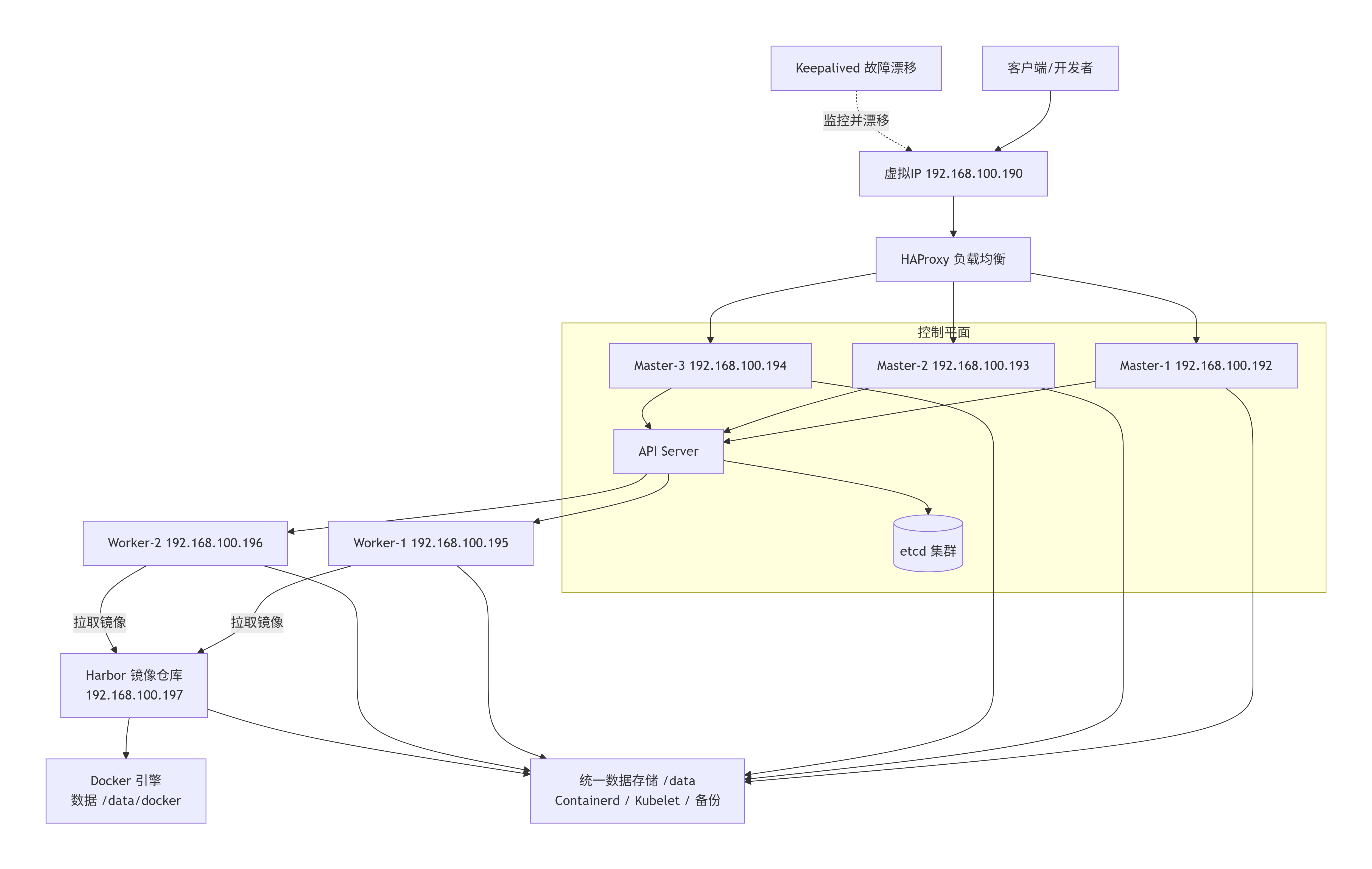
本集群方案解决的核心问题与架构优势
本方案并非简单的软件堆砌,而是针对生产环境运维痛点设计的标准化高可用体系。它主要解决了以下五大类问题:
1. 消除单点故障(高可用性 HA)
- 控制平面容灾 :3 个 Master 节点构成 etcd 集群(Raft 共识算法),容忍 1 台 Master 宕机 (甚至短暂容忍 2 台故障时只读)。配合 Keepalived 提供的 VIP(虚拟IP) ,当主 Master 故障时,VIP 会在 1-3 秒内漂移至备节点,业务侧访问
192.168.100.190:6443始终保持连通,彻底解决"kubectl 无法连接集群"的运维噩梦。 - API 负载分发:HAProxy 将 API Server 请求轮询分发至 3 个 Master,避免单节点 CPU/内存过载,提升了大规模资源调度时的响应速度。
2. 根目录空间保护与数据生命周期管理
- 避免"根满"灾难 :容器运行时(Containerd)、镜像层、容器日志、EmptyDir 临时卷极易撑爆系统根目录(
/),导致 SSH 无法登录、Pod 无法驱逐。本方案将所有大数据(/data/containerd、/data/kubelet、/data/docker)强制迁移至独立数据盘/data。 - 运维灵活性 :将 OS 与业务数据物理隔离后,您可以对
/data单独进行磁盘扩容 、LVM 快照 或挂载高性能 SSD,而无需重装系统,极大降低了磁盘维护的耦合风险。
3. 内网镜像分发加速与带宽节省(Harbor 独立部署)
- 消除 Docker Hub 依赖 :将 Harbor 独立部署在
192.168.100.197,集群内所有节点拉取镜像走 千兆/万兆内网,速度极快,彻底摆脱外网波动和 Docker Hub 限流策略。 - 资源隔离(IO 解耦) :Harbor 独立于 K8s 工作节点。当研发人员并发
docker push大镜像时,产生的磁盘 IO 和网络带宽消耗仅影响 Harbor 节点,不会干扰 Worker 节点上正在运行的生产业务 Pod。
4. 基础环境标准化与运维可观测性
- 时间一致性 :强制配置 Chrony 时间同步。杜绝了因证书(Certificate)过期验证失败、Pod 日志时间错乱、GC 回收异常等隐蔽性问题,这是 Kubernetes 集群长期稳定运行的基础门槛。
- 数据可恢复性 :内置 etcd 定时备份(保留 7 天)和 Harbor 数据备份机制。当遇到人为误操作(如
kubectl delete ns)或硬盘坏道时,您拥有明确的回滚与灾难重建能力。
5. 灵活的横向扩展能力
- 算力按需扩展 :2 个 Worker 节点作为计算资源池。未来业务增长时,只需按照本文档的基础环境配置(安装 Containerd + kubelet + 配置
/data),执行kubeadm join即可平滑增加 Worker 节点,无需重新初始化集群。
总结:该方案为您构建了一个"控制平面永不掉线、根目录永不爆满、镜像分发永不卡顿、故障恢复有据可依"的生产级 Kubernetes 底座。
一、集群规划
1.1 节点角色与 IP 地址
| 角色 | 主机名 | IP 地址 |
|---|---|---|
| Master-1 | k8s-master1 | 192.168.100.192 |
| Master-2 | k8s-master2 | 192.168.100.193 |
| Master-3 | k8s-master3 | 192.168.100.194 |
| Worker-1 | k8s-worker1 | 192.168.100.195 |
| Worker-2 | k8s-worker2 | 192.168.100.196 |
| Harbor | k8s-harbor | 192.168.100.197 |
| VIP(虚拟IP) | - | 192.168.100.190(用于 API Server 高可用) |
1.2 软件版本推荐(生产环境)
| 组件 | 推荐版本 | 说明 |
|---|---|---|
| Ubuntu | 24.04.3 LTS | 操作系统 |
| Kubernetes | 1.35.x / 1.3x | LTS 版本(本文以 1.35 为例) |
| Containerd | 1.7.x | 容器运行时 |
| Docker | 27.x | Harbor 依赖 |
| Harbor | 2.14.x | 私有镜像仓库 |
| HAProxy | 2.8.x | 负载均衡 |
| Keepalived | 2.2.x | VIP 高可用 |
| Chrony | 4.x | 时间同步 |
| Calico | 3.28.x | 容器网络插件 |
1.3 网络规划
| 网络类型 | CIDR / 地址 | 说明 |
|---|---|---|
| Pod 网络 | 192.168.0.0/16 | Calico 默认推荐,与主机网络隔离 |
| Service 网络 | 10.96.0.0/12 | Kubernetes 服务 ClusterIP 范围 |
| 集群 API 入口 | 192.168.100.190:16443 | 通过 VIP 访问 API Server |
| Harbor 服务 | 192.168.100.197:5000 (HTTP) harbor-Warehouses(域名) | 如需 HTTPS 请我另外一篇文章,本例演示 HTTP |
| Docker 网桥(Harbor) | 172.98.0.1/16 | 仅 Harbor 节点安装 Docker 后使用,避免与 K8s 网段冲突 |
| 默认网关 | 192.168.100.2 | 所有节点静态路由的网关地址 |
1.4 数据目录规划(所有节点)
| 用途 | 目录路径 | 说明 |
|---|---|---|
| Containerd 数据 | /data/containerd |
存放容器镜像、容器层、快照等 |
| Kubelet 数据 | /data/kubelet |
存放 Pod 的本地卷、emptyDir、日志等 |
| Docker 数据 | /data/docker |
仅 Harbor 节点使用,存放镜像层 |
| Harbor 数据 | /data/harbor |
存放镜像仓库的存储(数据库、镜像文件等) |
| etcd 备份 | /data/backup/etcd |
etcd 定时备份文件 |
| Harbor 备份 | /data/backup/harbor |
Harbor 数据库和配置备份 |
| 证书/配置备份 | /data/backup/k8s-config |
Kubernetes 证书和静态 Pod 清单备份 |
请在部署前确保
/data分区已挂载且大小满足需求(建议至少 100GiB或者更多)。
二、所有节点基础环境配置(每台机器均需执行)
2.1 设置主机名
bash
# 按角色修改
root@localhost:~# hostnamectl set-hostname k8s-master1
root@localhost:~# bash
root@k8s-master1:~#
root@k8s-master1:~# ip addr show ens33
2: ens33: <BROADCAST,MULTICAST,UP,LOWER_UP> mtu 1500 qdisc fq_codel state UP group default qlen 1000
    link/ether 00:0c:29:ae:eb:8e brd ff:ff:ff:ff:ff:ff
    altname enp2s1
    inet 192.168.100.192/24 brd 192.168.100.255 scope global ens33
       valid_lft forever preferred_lft forever
    inet6 fe80::20c:29ff:feae:eb8e/64 scope link
       valid_lft forever preferred_lft forever
root@k8s-master1:~#


root@localhost:~# hostnamectl set-hostname k8s-master2
root@localhost:~# bash
root@k8s-master2:~#
root@k8s-master2:~# ip addr show ens33
2: ens33: <BROADCAST,MULTICAST,UP,LOWER_UP> mtu 1500 qdisc fq_codel state UP group default qlen 1000
    link/ether 00:0c:29:cf:03:67 brd ff:ff:ff:ff:ff:ff
    altname enp2s1
    inet 192.168.100.193/24 brd 192.168.100.255 scope global ens33
       valid_lft forever preferred_lft forever
    inet6 fe80::20c:29ff:fecf:367/64 scope link
       valid_lft forever preferred_lft forever
root@k8s-master2:~#


root@localhost:~# hostnamectl set-hostname k8s-master3
root@localhost:~# bash
root@k8s-master3:~#
root@k8s-master3:~# ip addr show ens33
2: ens33: <BROADCAST,MULTICAST,UP,LOWER_UP> mtu 1500 qdisc fq_codel state UP group default qlen 1000
    link/ether 00:0c:29:80:fc:a1 brd ff:ff:ff:ff:ff:ff
    altname enp2s1
    inet 192.168.100.194/24 brd 192.168.100.255 scope global ens33
       valid_lft forever preferred_lft forever
    inet6 fe80::20c:29ff:fe80:fca1/64 scope link
       valid_lft forever preferred_lft forever
root@k8s-master3:~#


root@localhost:~# hostnamectl set-hostname k8s-worker1
root@localhost:~# bash
root@k8s-worker1:~#
root@k8s-worker1:~# ip addr show ens33
2: ens33: <BROADCAST,MULTICAST,UP,LOWER_UP> mtu 1500 qdisc fq_codel state UP group default qlen 1000
    link/ether 00:0c:29:48:42:1c brd ff:ff:ff:ff:ff:ff
    altname enp2s1
    inet 192.168.100.195/24 brd 192.168.100.255 scope global ens33
       valid_lft forever preferred_lft forever
    inet6 fe80::20c:29ff:fe48:421c/64 scope link
       valid_lft forever preferred_lft forever
root@k8s-worker1:~#


root@localhost:~# hostnamectl set-hostname k8s-worker2
root@localhost:~#
root@localhost:~# ip addr show ens33
2: ens33: <BROADCAST,MULTICAST,UP,LOWER_UP> mtu 1500 qdisc fq_codel state UP group default qlen 1000
    link/ether 00:0c:29:85:54:cc brd ff:ff:ff:ff:ff:ff
    altname enp2s1
    inet 192.168.100.196/24 brd 192.168.100.255 scope global ens33
       valid_lft forever preferred_lft forever
    inet6 fe80::20c:29ff:fe85:54cc/64 scope link
       valid_lft forever preferred_lft forever
root@localhost:~#


root@localhost:~# hostnamectl set-hostname k8s-harbor
root@localhost:~# bash
root@k8s-harbor:~#
root@k8s-harbor:~# ip addr show ens33
2: ens33: <BROADCAST,MULTICAST,UP,LOWER_UP> mtu 1500 qdisc fq_codel state UP group default qlen 1000
    link/ether 00:0c:29:e3:ad:5a brd ff:ff:ff:ff:ff:ff
    altname enp2s1
    inet 192.168.100.197/24 brd 192.168.100.255 scope global ens33
       valid_lft forever preferred_lft forever
    inet6 fe80::20c:29ff:fee3:ad5a/64 scope link
       valid_lft forever preferred_lft forever
root@k8s-harbor:~#
2.2 配置静态 IP(Netplan)
编辑 /etc/netplan/50-cloud-init.yaml(以 Master-1 为例):
yaml
root@k8s-master1:~# cat /etc/netplan/50-cloud-init.yaml
network:
  version: 2
  renderer: networkd
  ethernets:
    ens33:
      dhcp4: false
      optional: true
      addresses:
        - 192.168.100.192/24
      routes:
        - to: default
          via: 192.168.100.2
      nameservers:
        addresses:
          - 223.5.5.5
          - 114.114.114.114
root@k8s-master1:~#
执行 netplan apply 生效。
2.3 配置 hosts 解析
bash
cat >> /etc/hosts << EOF
192.168.100.192 k8s-master1
192.168.100.193 k8s-master2
192.168.100.194 k8s-master3
192.168.100.195 k8s-worker1
192.168.100.196 k8s-worker2
192.168.100.197 k8s-harbor harbor-Warehouses
192.168.100.190 k8s-api
EOF
2.4 关闭 Swap
bash
swapoff -a
sed -ri 's/.*swap.*/#&/' /etc/fstab
2.5 加载内核模块与 sysctl
bash
cat <<EOF | tee /etc/modules-load.d/k8s.conf
overlay
br_netfilter
EOF
modprobe overlay
modprobe br_netfilter

cat <<EOF | tee /etc/sysctl.d/k8s.conf
net.bridge.bridge-nf-call-iptables = 1
net.bridge.bridge-nf-call-ip6tables = 1
net.ipv4.ip_forward = 1
EOF
sysctl --system
2.6 创建数据目录并设置权限
bash
mkdir -p /data/containerd /data/containerd/state /data/kubelet /data/backup
mkdir -p /etc/containerd

# 仅在 Harbor 节点额外创建
# mkdir -p /data/docker /data/harbor
2.7 安装 Containerd 并修改数据目录
bash
# 每台都需要执行哦! 只在k8s-master1上演示
root@k8s-master1:~# apt update
Hit:1 https://mirrors.aliyun.com/ubuntu noble InRelease
Get:2 https://mirrors.aliyun.com/ubuntu noble-updates InRelease [126 kB]
Hit:3 https://mirrors.aliyun.com/ubuntu noble-backports InRelease
Get:4 https://mirrors.aliyun.com/ubuntu noble-updates/universe amd64 c-n-f Metadata [34.8 kB]
Fetched 161 kB in 0s (354 kB/s)
Reading package lists... Done
Building dependency tree... Done
Reading state information... Done
168 packages can be upgraded. Run 'apt list --upgradable' to see them.
root@k8s-master1:~#

# 查看都有那些版本
root@k8s-master1:~# apt-cache policy containerd
containerd:
  Installed: (none)
  Candidate: 2.2.1-0ubuntu1~24.04.2
  Version table:
     2.2.1-0ubuntu1~24.04.2 500
        500 https://mirrors.aliyun.com/ubuntu noble-updates/main amd64 Packages
     1.7.12-0ubuntu4 500
        500 https://mirrors.aliyun.com/ubuntu noble/main amd64 Packages
root@k8s-master1:~#

# 指定版本安装
root@k8s-master1:~# apt-get install -y containerd=1.7.12-0ubuntu4
Reading package lists... Done
Building dependency tree... Done
Reading state information... Done
The following additional packages will be installed:
  runc
The following NEW packages will be installed:
  containerd runc
0 upgraded, 2 newly installed, 0 to remove and 168 not upgraded.
Need to get 48.2 MB of archives.
After this operation, 177 MB of additional disk space will be used.
Get:1 https://mirrors.aliyun.com/ubuntu noble-updates/main amd64 runc amd64 1.3.4-0ubuntu1~24.04.1 [9,574 kB]
Get:2 https://mirrors.aliyun.com/ubuntu noble/main amd64 containerd amd64 1.7.12-0ubuntu4 [38.6 MB]
Fetched 48.2 MB in 53s (911 kB/s)
Selecting previously unselected package runc.
(Reading database ... 87518 files and directories currently installed.)
Preparing to unpack .../runc_1.3.4-0ubuntu1~24.04.1_amd64.deb ...
Unpacking runc (1.3.4-0ubuntu1~24.04.1) ...
Selecting previously unselected package containerd.
Preparing to unpack .../containerd_1.7.12-0ubuntu4_amd64.deb ...
Unpacking containerd (1.7.12-0ubuntu4) ...
Setting up runc (1.3.4-0ubuntu1~24.04.1) ...
Setting up containerd (1.7.12-0ubuntu4) ...
Created symlink /etc/systemd/system/multi-user.target.wants/containerd.service → /usr/lib/systemd/system/containerd.service.
Processing triggers for man-db (2.12.0-4build2) ...
Scanning processes...
Scanning linux images...

Running kernel seems to be up-to-date.

No services need to be restarted.

No containers need to be restarted.

No user sessions are running outdated binaries.

No VM guests are running outdated hypervisor (qemu) binaries on this host.
root@k8s-master1:~#

root@k8s-master1:~# mkdir -p /etc/containerd
root@k8s-master1:~#

# 生成 Containerd 的默认配置文件,并将其保存到指定的系统路径中
root@k8s-master1:~# containerd config default | tee /etc/containerd/config.toml

# 查看包含 "root" 的配置行
root@k8s-master1:~# sed -n  '/root/p' /etc/containerd/config.toml
root = "/var/lib/containerd"
        runtime_root = ""
          runtime_root = ""
        runtime_root = ""
    runtime_root = ""
    root_path = ""
    root_path = ""
    root_path = ""
    root_path = ""
    root_path = ""
    root_path = ""
    root_path = ""

# 预览替换 "root" 路径的结果
root@k8s-master1:~# sed -n  '/root/s/\/var\/lib\/containerd/\/data\/containerd/p' /etc/containerd/config.toml
root = "/data/containerd"

# 实际执行替换 "root" 路径
root@k8s-master1:~# sed -i  '/root/s/\/var\/lib\/containerd/\/data\/containerd/' /etc/containerd/config.toml

# 验证 "root" 路径修改结果
root@k8s-master1:~# grep '^root' /etc/containerd/config.toml
root = "/data/containerd"
root@k8s-master1:~#

# 查看当前的 "state" 配置
root@k8s-master1:~# grep '^state' /etc/containerd/config.toml
state = '/run/containerd'

# 实际执行替换 "state" 路径
root@k8s-master1:~# sed -i -E 's|^state = ["'\'']/run/containerd["'\'']|state = "/data/containerd/state"|' /etc/containerd/config.toml
root@k8s-master1:~#

# 验证 "state" 路径修改结果
root@k8s-master1:~# grep '^state' /etc/containerd/config.toml
state = "/data/containerd/state"
root@k8s-master1:~#

# 这组命令通过"预览 -> 修改 -> 验证"的严谨流程,安全地将 Containerd 的持久化数据目录(root)和运行时状态目录(state)从默认的 /var/lib/containerd 和 /run/containerd 迁移到了 /data/containerd 及其子目录下。

###################################################################

# 修改 cgroup 驱动
root@k8s-master1:~# sed -i 's/SystemdCgroup = false/SystemdCgroup = true/' /etc/containerd/config.toml
root@k8s-master1:~# grep 'SystemdCgroup' /etc/containerd/config.toml
            SystemdCgroup = true
root@k8s-master1:~#


# 把旧的镜像地址完整替换成新的阿里云镜像地址
root@k8s-master1:~# grep 'sandbox_image' /etc/containerd/config.toml
    sandbox_image = "registry.k8s.io/pause:3.8"
root@k8s-master1:~#
root@k8s-master1:~# sed -i 's|sandbox_image = "registry.k8s.io/pause:3.8"|sandbox_image = "registry.aliyuncs.com/google_containers/pause:3.9"|' /etc/containerd/config.toml
root@k8s-master1:~#
root@k8s-master1:~# grep 'sandbox_image' /etc/containerd/config.toml
    sandbox_image = "registry.aliyuncs.com/google_containers/pause:3.9"
root@k8s-master1:~#
root@k8s-master1:~#

# 替换这个配置,就是把「国内访问不了的国外基础镜像地址」,改成「国内阿里云的高速镜像地址」,解决 K8s 集群因为网络问题无法启动的致命问题。

# 配置镜像加速
root@k8s-master1:~# vim /etc/containerd/config.toml
root@k8s-master1:~#
root@k8s-master1:~# grep -C 10 'http' /etc/containerd/config.toml

    [plugins."io.containerd.grpc.v1.cri".image_decryption]
      key_model = "node"

    [plugins."io.containerd.grpc.v1.cri".registry]
      config_path = ""

      [plugins."io.containerd.grpc.v1.cri".registry.auths]

      [plugins."io.containerd.grpc.v1.cri".registry.configs]
        # 新增http仓库关闭tls校验配置
        [plugins."io.containerd.grpc.v1.cri".registry.configs."harbor-Warehouses:5000".tls]
          insecure_skip_verify = true

      [plugins."io.containerd.grpc.v1.cri".registry.headers]

      [plugins."io.containerd.grpc.v1.cri".registry.mirrors]
        # 新增http仓库关闭tls校验配置
        [plugins."io.containerd.grpc.v1.cri".registry.mirrors."docker.io"]
          endpoint = ["https://448b11122244ea9bfce60.mirror.swr.myhuaweicloud.com"]

        # 新增harbor私有仓库镜像转发
        [plugins."io.containerd.grpc.v1.cri".registry.mirrors."harbor-Warehouses:5000"]
          endpoint = ["http://harbor-Warehouses:5000"]

    [plugins."io.containerd.grpc.v1.cri".x509_key_pair_streaming]
      tls_cert_file = ""
      tls_key_file = ""

  [plugins."io.containerd.internal.v1.opt"]
    path = "/opt/containerd"

  [plugins."io.containerd.internal.v1.restart"]
    interval = "10s"
root@k8s-master1:~#
root@k8s-master1:~#
root@k8s-master1:~#
root@k8s-master1:~# scp -r /etc/containerd/config.toml root@k8s-master3:/etc/containerd/
The authenticity of host 'k8s-master3 (192.168.100.194)' can't be established.
ED25519 key fingerprint is SHA256:C6z9D6qXFhUfDPm1Ebef7MQRfFNjfjC/CHP714Ev8x0.
This key is not known by any other names.
Are you sure you want to continue connecting (yes/no/[fingerprint])? yes
Warning: Permanently added 'k8s-master3' (ED25519) to the list of known hosts.
root@k8s-master3's password:
config.toml                                                                                                       100% 9025     9.0MB/s   00:00
root@k8s-master1:~#
root@k8s-master1:~# scp -r /etc/containerd/config.toml root@k8s-worker1:/etc/containerd/
The authenticity of host 'k8s-worker1 (192.168.100.195)' can't be established.
ED25519 key fingerprint is SHA256:X6DBzMTnA3L4PuNaby2qk/ZE+eWV3QLXlOQBYkJ6dn8.
This key is not known by any other names.
Are you sure you want to continue connecting (yes/no/[fingerprint])? yes
Warning: Permanently added 'k8s-worker1' (ED25519) to the list of known hosts.
root@k8s-worker1's password:
config.toml                                                                                                       100% 9025     7.2MB/s   00:00
root@k8s-master1:~#
root@k8s-master1:~# scp -r /etc/containerd/config.toml root@k8s-worker2:/etc/containerd/
The authenticity of host 'k8s-worker2 (192.168.100.196)' can't be established.
ED25519 key fingerprint is SHA256:tGbCwYKUPNw+aAfQUcZlQcaTigUdhevkD/BwdmSmCKo.
This key is not known by any other names.
Are you sure you want to continue connecting (yes/no/[fingerprint])? yes
Warning: Permanently added 'k8s-worker2' (ED25519) to the list of known hosts.
root@k8s-worker2's password:
config.toml                                                                                                       100% 9025     6.7MB/s   00:00
root@k8s-master1:~#
root@k8s-master1:~# scp -r /etc/containerd/config.toml root@k8s-harbor:/etc/containerd/
The authenticity of host 'k8s-harbor (192.168.100.197)' can't be established.
ED25519 key fingerprint is SHA256:iXgXm7vVOnAwmL6DvE5NPMu1QQsFcao+oDdlPJPGQgQ.
This key is not known by any other names.
Are you sure you want to continue connecting (yes/no/[fingerprint])? yes
Warning: Permanently added 'k8s-harbor' (ED25519) to the list of known hosts.
root@k8s-harbor's password:
config.toml                                                                                                       100% 9025    10.8MB/s   00:00
root@k8s-master1:~#

# 如果传过去失败应该是,你还没有创建目录:mkdir -p /etc/containerd

# 配置 crictl,指定 crictl 工具连接的 Containerd 套接字地址,方便后续调试。
cat > /etc/crictl.yaml <<EOF
runtime-endpoint: unix:///run/containerd/containerd.sock
image-endpoint: unix:///run/containerd/containerd.sock
timeout: 10
debug: false
pull-image-on-create: false
EOF

# 重启服务,并设置开机自启
root@k8s-master1:~# systemctl restart containerd
root@k8s-master1:~# systemctl enable containerd
root@k8s-master1:~# systemctl status containerd
● containerd.service - containerd container runtime
     Loaded: loaded (/usr/lib/systemd/system/containerd.service; enabled; preset: enabled)
     Active: active (running) since Wed 2026-06-24 03:01:06 UTC; 8s ago
       Docs: https://containerd.io
   Main PID: 2050 (containerd)
      Tasks: 7
     Memory: 14.0M (peak: 14.5M)
        CPU: 133ms
     CGroup: /system.slice/containerd.service
             └─2050 /usr/bin/containerd

Jun 24 03:01:06 k8s-master1 containerd[2050]: time="2026-06-24T03:01:06.045123510Z" level=info msg=serving... address=/run/containerd/containerd.so>
Jun 24 03:01:06 k8s-master1 containerd[2050]: time="2026-06-24T03:01:06.045192670Z" level=info msg=serving... address=/run/containerd/containerd.so>
Jun 24 03:01:06 k8s-master1 containerd[2050]: time="2026-06-24T03:01:06.045257603Z" level=info msg="Start subscribing containerd event"
Jun 24 03:01:06 k8s-master1 containerd[2050]: time="2026-06-24T03:01:06.045416654Z" level=info msg="Start recovering state"
Jun 24 03:01:06 k8s-master1 containerd[2050]: time="2026-06-24T03:01:06.046679749Z" level=info msg="Start event monitor"
Jun 24 03:01:06 k8s-master1 containerd[2050]: time="2026-06-24T03:01:06.046721087Z" level=info msg="Start snapshots syncer"
Jun 24 03:01:06 k8s-master1 containerd[2050]: time="2026-06-24T03:01:06.046736927Z" level=info msg="Start cni network conf syncer for default"
Jun 24 03:01:06 k8s-master1 containerd[2050]: time="2026-06-24T03:01:06.046747687Z" level=info msg="Start streaming server"
Jun 24 03:01:06 k8s-master1 containerd[2050]: time="2026-06-24T03:01:06.046849350Z" level=info msg="containerd successfully booted in 0.033926s"
Jun 24 03:01:06 k8s-master1 systemd[1]: Started containerd.service - containerd container runtime.
root@k8s-master1:~#
2.8 安装 kubeadm / kubelet / kubectl
bash
# 除了harbor 不执行,其余需要安装k8s 集群都需要执行。3台master,2台worker
root@k8s-master1:~# apt-get update && apt-get install -y apt-transport-https
Hit:1 https://mirrors.aliyun.com/ubuntu noble InRelease
Get:2 https://mirrors.aliyun.com/ubuntu noble-updates InRelease [126 kB]
Get:3 https://mirrors.aliyun.com/ubuntu noble-backports InRelease [126 kB]
Get:4 https://mirrors.aliyun.com/ubuntu noble-updates/main amd64 Packages [1,031 kB]
Get:5 https://mirrors.aliyun.com/ubuntu noble-updates/main Translation-en [259 kB]
Get:6 https://mirrors.aliyun.com/ubuntu noble-updates/main amd64 Components [180 kB]
Get:7 https://mirrors.aliyun.com/ubuntu noble-updates/main amd64 c-n-f Metadata [17.4 kB]
Get:8 https://mirrors.aliyun.com/ubuntu noble-updates/universe amd64 Packages [1,656 kB]
Get:9 https://mirrors.aliyun.com/ubuntu noble-updates/universe Translation-en [326 kB]
Get:10 https://mirrors.aliyun.com/ubuntu noble-updates/universe amd64 Components [388 kB]
Get:11 https://mirrors.aliyun.com/ubuntu noble-updates/universe amd64 c-n-f Metadata [34.8 kB]
Get:12 https://mirrors.aliyun.com/ubuntu noble-updates/multiverse amd64 Components [940 B]
Get:13 https://mirrors.aliyun.com/ubuntu noble-backports/main amd64 Components [5,760 B]
Get:14 https://mirrors.aliyun.com/ubuntu noble-backports/universe amd64 Components [10.5 kB]
Fetched 4,162 kB in 4s (952 kB/s)
Reading package lists... Done
Reading package lists... Done
Building dependency tree... Done
Reading state information... Done
The following NEW packages will be installed:
  apt-transport-https
0 upgraded, 1 newly installed, 0 to remove and 164 not upgraded.
Need to get 3,970 B of archives.
After this operation, 36.9 kB of additional disk space will be used.
Get:1 https://mirrors.aliyun.com/ubuntu noble-updates/universe amd64 apt-transport-https all 2.8.3 [3,970 B]
Fetched 3,970 B in 1s (4,961 B/s)
Selecting previously unselected package apt-transport-https.
(Reading database ... 87557 files and directories currently installed.)
Preparing to unpack .../apt-transport-https_2.8.3_all.deb ...
Unpacking apt-transport-https (2.8.3) ...
Setting up apt-transport-https (2.8.3) ...
Scanning processes...
Scanning linux images...

Running kernel seems to be up-to-date.

No services need to be restarted.

No containers need to be restarted.

No user sessions are running outdated binaries.

No VM guests are running outdated hypervisor (qemu) binaries on this host.
root@k8s-master1:~#

#该文档示例为配置 1.35 版本,如需其他版本请在对应位置字符串替换即可。

#(比如需要安装 1.36 版本,则需要将如下配置中的 v1.35 替换成 v1.36)
root@k8s-master1:~# curl -fsSL https://mirrors.aliyun.com/kubernetes-new/core/stable/v1.35/deb/Release.key |
    gpg --dearmor -o /etc/apt/keyrings/kubernetes-apt-keyring.gpg
root@k8s-master1:~#
root@k8s-master1:~#  ls -l /etc/apt/keyrings/kubernetes-apt-keyring.gpg
-rw-r--r-- 1 root root 1200 Jun 24 03:05 /etc/apt/keyrings/kubernetes-apt-keyring.gpg
root@k8s-master1:~#
root@k8s-master1:~# echo "deb [signed-by=/etc/apt/keyrings/kubernetes-apt-keyring.gpg] https://mirrors.aliyun.com/kubernetes-new/core/stable/v1.35/deb/ /" |     tee /etc/apt/sources.list.d/kubernetes.list
deb [signed-by=/etc/apt/keyrings/kubernetes-apt-keyring.gpg] https://mirrors.aliyun.com/kubernetes-new/core/stable/v1.35/deb/ /
root@k8s-master1:~#
root@k8s-master1:~# apt-get update
Get:1 https://mirrors.aliyun.com/kubernetes-new/core/stable/v1.35/deb  InRelease [1,230 B]
Hit:2 https://mirrors.aliyun.com/ubuntu noble InRelease
Hit:3 https://mirrors.aliyun.com/ubuntu noble-updates InRelease
Hit:4 https://mirrors.aliyun.com/ubuntu noble-backports InRelease
Get:5 https://mirrors.aliyun.com/kubernetes-new/core/stable/v1.35/deb  Packages [10.1 kB]
Fetched 11.4 kB in 1s (16.3 kB/s)
Reading package lists... Done
root@k8s-master1:~#

# 查看 kubelet、kubeadm 和 kubectl 的所有可用版本
root@k8s-master1:~# apt-cache policy kubelet
kubelet:
  Installed: (none)
  Candidate: 1.35.6-1.1
  Version table:
     1.35.6-1.1 500
        500 https://mirrors.aliyun.com/kubernetes-new/core/stable/v1.35/deb  Packages
     1.35.5-1.1 500
        500 https://mirrors.aliyun.com/kubernetes-new/core/stable/v1.35/deb  Packages
     1.35.4-1.1 500
        500 https://mirrors.aliyun.com/kubernetes-new/core/stable/v1.35/deb  Packages
     1.35.3-1.1 500
        500 https://mirrors.aliyun.com/kubernetes-new/core/stable/v1.35/deb  Packages
     1.35.2-1.1 500
        500 https://mirrors.aliyun.com/kubernetes-new/core/stable/v1.35/deb  Packages
     1.35.1-1.1 500
        500 https://mirrors.aliyun.com/kubernetes-new/core/stable/v1.35/deb  Packages
     1.35.0-1.1 500
        500 https://mirrors.aliyun.com/kubernetes-new/core/stable/v1.35/deb  Packages
root@k8s-master1:~# apt-cache policy kubeadm
kubeadm:
  Installed: (none)
  Candidate: 1.35.6-1.1
  Version table:
     1.35.6-1.1 500
        500 https://mirrors.aliyun.com/kubernetes-new/core/stable/v1.35/deb  Packages
     1.35.5-1.1 500
        500 https://mirrors.aliyun.com/kubernetes-new/core/stable/v1.35/deb  Packages
     1.35.4-1.1 500
        500 https://mirrors.aliyun.com/kubernetes-new/core/stable/v1.35/deb  Packages
     1.35.3-1.1 500
        500 https://mirrors.aliyun.com/kubernetes-new/core/stable/v1.35/deb  Packages
     1.35.2-1.1 500
        500 https://mirrors.aliyun.com/kubernetes-new/core/stable/v1.35/deb  Packages
     1.35.1-1.1 500
        500 https://mirrors.aliyun.com/kubernetes-new/core/stable/v1.35/deb  Packages
     1.35.0-1.1 500
        500 https://mirrors.aliyun.com/kubernetes-new/core/stable/v1.35/deb  Packages
root@k8s-master1:~# apt-cache policy kubectl
kubectl:
  Installed: (none)
  Candidate: 1.35.6-1.1
  Version table:
     1.35.6-1.1 500
        500 https://mirrors.aliyun.com/kubernetes-new/core/stable/v1.35/deb  Packages
     1.35.5-1.1 500
        500 https://mirrors.aliyun.com/kubernetes-new/core/stable/v1.35/deb  Packages
     1.35.4-1.1 500
        500 https://mirrors.aliyun.com/kubernetes-new/core/stable/v1.35/deb  Packages
     1.35.3-1.1 500
        500 https://mirrors.aliyun.com/kubernetes-new/core/stable/v1.35/deb  Packages
     1.35.2-1.1 500
        500 https://mirrors.aliyun.com/kubernetes-new/core/stable/v1.35/deb  Packages
     1.35.1-1.1 500
        500 https://mirrors.aliyun.com/kubernetes-new/core/stable/v1.35/deb  Packages
     1.35.0-1.1 500
        500 https://mirrors.aliyun.com/kubernetes-new/core/stable/v1.35/deb  Packages
root@k8s-master1:~#


# 安装特定版
root@k8s-master1:~# apt-get install -y kubelet=1.35.1-1.1 kubeadm=1.35.1-1.1 kubectl=1.35.1-1.1
Reading package lists... Done
Building dependency tree... Done
Reading state information... Done
The following additional packages will be installed:
  cri-tools kubernetes-cni
The following NEW packages will be installed:
  cri-tools kubeadm kubectl kubelet kubernetes-cni
0 upgraded, 5 newly installed, 0 to remove and 164 not upgraded.
Need to get 92.0 MB of archives.
After this operation, 328 MB of additional disk space will be used.
Get:1 https://mirrors.aliyun.com/kubernetes-new/core/stable/v1.35/deb  cri-tools 1.35.0-1.1 [16.2 MB]
Get:2 https://mirrors.aliyun.com/kubernetes-new/core/stable/v1.35/deb  kubeadm 1.35.1-1.1 [12.4 MB]
Get:3 https://mirrors.aliyun.com/kubernetes-new/core/stable/v1.35/deb  kubectl 1.35.1-1.1 [11.5 MB]
Get:4 https://mirrors.aliyun.com/kubernetes-new/core/stable/v1.35/deb  kubernetes-cni 1.8.0-1.1 [38.9 MB]
Get:5 https://mirrors.aliyun.com/kubernetes-new/core/stable/v1.35/deb  kubelet 1.35.1-1.1 [12.9 MB]
Fetched 92.0 MB in 57s (1,612 kB/s)
Selecting previously unselected package cri-tools.
(Reading database ... 87561 files and directories currently installed.)
Preparing to unpack .../cri-tools_1.35.0-1.1_amd64.deb ...
Unpacking cri-tools (1.35.0-1.1) ...
Selecting previously unselected package kubeadm.
Preparing to unpack .../kubeadm_1.35.1-1.1_amd64.deb ...
Unpacking kubeadm (1.35.1-1.1) ...
Selecting previously unselected package kubectl.
Preparing to unpack .../kubectl_1.35.1-1.1_amd64.deb ...
Unpacking kubectl (1.35.1-1.1) ...
Selecting previously unselected package kubernetes-cni.
Preparing to unpack .../kubernetes-cni_1.8.0-1.1_amd64.deb ...
Unpacking kubernetes-cni (1.8.0-1.1) ...
Selecting previously unselected package kubelet.
Preparing to unpack .../kubelet_1.35.1-1.1_amd64.deb ...
Unpacking kubelet (1.35.1-1.1) ...
Setting up kubectl (1.35.1-1.1) ...
Setting up cri-tools (1.35.0-1.1) ...
Setting up kubernetes-cni (1.8.0-1.1) ...
Setting up kubeadm (1.35.1-1.1) ...
Setting up kubelet (1.35.1-1.1) ...
Scanning processes...
Scanning linux images...

Running kernel seems to be up-to-date.

No services need to be restarted.

No containers need to be restarted.

No user sessions are running outdated binaries.

No VM guests are running outdated hypervisor (qemu) binaries on this host.
root@k8s-master1:~# echo $?
0
root@k8s-master1:~#

# 锁定版本:安装后建议锁定版本以防止意外升级
root@k8s-master1:~# apt-mark hold kubelet kubeadm kubectl
kubelet set on hold.
kubeadm set on hold.
kubectl set on hold.
root@k8s-master1:~#

# 查看是否配置成功:华为云镜像加速器、私有镜像仓库
root@k8s-master1:~# crictl info | grep -C 5 "http"
      },
      "headers": {},
      "mirrors": {
        "docker.io": {
          "endpoint": [
            "https://448b823acc1c4d5b8cf5c81ea9bfce60.mirror.swr.myhuaweicloud.com"
          ]
        },
        "harbor-Warehouses:5000": {
          "endpoint": [
            "http://harbor-Warehouses:5000"
          ]
        }
      }
    },
    "restrictOOMScoreAdj": false,
root@k8s-master1:~#
2.9 配置 kubelet 数据目录(/data/kubelet)
创建 kubelet 服务额外参数配置:
bash
root@k8s-master1:~# ls -l /usr/lib/systemd/system/kubelet.service.d/10-kubeadm.conf
-rw-r--r-- 1 root root 1039 Jun 20 10:15 /usr/lib/systemd/system/kubelet.service.d/10-kubeadm.conf
root@k8s-master1:~#
root@k8s-master1:~# cat  /usr/lib/systemd/system/kubelet.service.d/10-kubeadm.conf
# Note: This dropin only works with kubeadm and kubelet v1.11+
[Service]
Environment="KUBELET_KUBECONFIG_ARGS=--bootstrap-kubeconfig=/etc/kubernetes/bootstrap-kubelet.conf --kubeconfig=/etc/kubernetes/kubelet.conf"
Environment="KUBELET_CONFIG_ARGS=--config=/var/lib/kubelet/config.yaml"
# This is a file that "kubeadm init" and "kubeadm join" generates at runtime, populating the KUBELET_KUBEADM_ARGS variable dynamically
EnvironmentFile=-/var/lib/kubelet/kubeadm-flags.env
# This is a file that the user can use for overrides of the kubelet args as a last resort. Preferably, the user should use
# the .NodeRegistration.KubeletExtraArgs object in the configuration files instead. KUBELET_EXTRA_ARGS should be sourced from this file.
EnvironmentFile=-/etc/default/kubelet
ExecStart=
# 找到最后一行 ExecStart,直接追加 --root-dir=/data/kubelet
#ExecStart=/usr/bin/kubelet $KUBELET_KUBECONFIG_ARGS $KUBELET_CONFIG_ARGS $KUBELET_KUBEADM_ARGS $KUBELET_EXTRA_ARGS
ExecStart=/usr/bin/kubelet $KUBELET_KUBECONFIG_ARGS $KUBELET_CONFIG_ARGS $KUBELET_KUBEADM_ARGS $KUBELET_EXTRA_ARGS --root-dir=/data/kubelet
root@k8s-master1:~#

root@k8s-master1:~# scp /usr/lib/systemd/system/kubelet.service.d/10-kubeadm.conf root@k8s-master2:/usr/lib/systemd/system/kubelet.service.d/
root@k8s-master2's password:
10-kubeadm.conf                                                                                                   100% 1039     1.5MB/s   00:00
root@k8s-master1:~# scp /usr/lib/systemd/system/kubelet.service.d/10-kubeadm.conf root@k8s-master3:/usr/lib/systemd/system/kubelet.service.d/
root@k8s-master3's password:
10-kubeadm.conf                                                                                                   100% 1039     1.8MB/s   00:00
root@k8s-master1:~# scp /usr/lib/systemd/system/kubelet.service.d/10-kubeadm.conf root@k8s-worker1:/usr/lib/systemd/system/kubelet.service.d/
root@k8s-worker1's password:
10-kubeadm.conf                                                                                                   100% 1039     1.3MB/s   00:00
root@k8s-master1:~# scp /usr/lib/systemd/system/kubelet.service.d/10-kubeadm.conf root@k8s-worker2:/usr/lib/systemd/system/kubelet.service.d/
root@k8s-worker2's password:
10-kubeadm.conf                                                                                                   100% 1039     1.3MB/s   00:00
root@k8s-master1:~#
# 清空 /etc/default/kubelet
root@k8s-master1:~# > /etc/default/kubelet
root@k8s-master1:~#
root@k8s-master1:~# systemctl daemon-reload

# 后续启动kubelet 服务后验证目录:ps -ef | grep kubelet | grep root-dir
注意 :在
kubeadm init之前完成此配置,否则 kubelet 默认会使用/var/lib/kubelet。
2.10 配置时间同步
bash
# 查询并显示当前系统时钟与硬件时钟(RTC)的各项状态信息
root@k8s-master1:~# timedatectl
               Local time: Wed 2026-06-24 03:49:09 UTC
           Universal time: Wed 2026-06-24 03:49:09 UTC
                 RTC time: Wed 2026-06-24 05:10:26
                Time zone: Etc/UTC (UTC, +0000)
System clock synchronized: yes
              NTP service: active
          RTC in local TZ: no
root@k8s-master1:~#
# 将系统的时区从 Etc/UTC 修改为上海(中国标准时间)
root@k8s-master1:~# timedatectl set-timezone Asia/Shanghai
root@k8s-master1:~# timedatectl
               Local time: Wed 2026-06-24 11:49:09 CST
           Universal time: Wed 2026-06-24 03:49:09 UTC
                 RTC time: Wed 2026-06-24 05:11:03
                Time zone: Asia/Shanghai (CST, +0800)
System clock synchronized: yes
              NTP service: active
          RTC in local TZ: no
root@k8s-master1:~#

# 安装 Chrony 时间同步服务
root@k8s-master1:~# apt install -y chrony
...省略N
Current default time zone: 'Asia/Shanghai'
Local time is now:      Wed Jun 24 11:49:11 CST 2026.
Universal Time is now:  Wed Jun 24 03:49:11 UTC 2026.
Run 'dpkg-reconfigure tzdata' if you wish to change it.

Setting up tzdata-legacy (2026a-0ubuntu0.24.04.1) ...
Setting up chrony (4.5-1ubuntu4.2) ...

Creating config file /etc/chrony/chrony.conf with new version

Creating config file /etc/chrony/chrony.keys with new version
dpkg-statoverride: warning: --update given but /var/log/chrony does not exist
Created symlink /etc/systemd/system/chronyd.service → /usr/lib/systemd/system/chrony.service.
Created symlink /etc/systemd/system/multi-user.target.wants/chrony.service → /usr/lib/systemd/system/chrony.service.
Processing triggers for dbus (1.14.10-4ubuntu4.1) ...
Processing triggers for man-db (2.12.0-4build2) ...
Scanning processes...
Scanning linux images...

Running kernel seems to be up-to-date.

No services need to be restarted.

No containers need to be restarted.

No user sessions are running outdated binaries.

No VM guests are running outdated hypervisor (qemu) binaries on this host.
root@k8s-master1:~#


root@k8s-master1:~# grep '^pool' /etc/chrony/chrony.conf
pool ntp.ubuntu.com        iburst maxsources 4
pool 0.ubuntu.pool.ntp.org iburst maxsources 1
pool 1.ubuntu.pool.ntp.org iburst maxsources 1
pool 2.ubuntu.pool.ntp.org iburst maxsources 2
root@k8s-master1:~#
root@k8s-master1:~# sed -i 's/^pool .*/pool ntp.aliyun.com iburst/' /etc/chrony/chrony.conf
root@k8s-master1:~#
root@k8s-master1:~# grep '^pool' /etc/chrony/chrony.conf
pool ntp.aliyun.com iburst
pool ntp.aliyun.com iburst
pool ntp.aliyun.com iburst
pool ntp.aliyun.com iburst
root@k8s-master1:~#


root@k8s-master1:~# systemctl restart chrony
root@k8s-master1:~# systemctl enable chrony
Synchronizing state of chrony.service with SysV service script with /usr/lib/systemd/systemd-sysv-install.
Executing: /usr/lib/systemd/systemd-sysv-install enable chrony
root@k8s-master1:~#
# 验证同步源
root@k8s-master1:~# chronyc sources -v

  .-- Source mode  '^' = server, '=' = peer, '#' = local clock.
 / .- Source state '*' = current best, '+' = combined, '-' = not combined,
| /             'x' = may be in error, '~' = too variable, '?' = unusable.
||                                                 .- xxxx [ yyyy ] +/- zzzz
||      Reachability register (octal) -.           |  xxxx = adjusted offset,
||      Log2(Polling interval) --.      |          |  yyyy = measured offset,
||                                \     |          |  zzzz = estimated error.
||                                 |    |           \
MS Name/IP address         Stratum Poll Reach LastRx Last sample
===============================================================================
^* 203.107.6.88                  2   6    17    24  +1108us[ +971us] +/-   22ms
root@k8s-master1:~#
2.11 重启所有节点
bash
reboot三、配置高可用负载均衡(仅在三台 Master 节点执行)
3.1 安装 HAProxy 和 Keepalived
bash
root@k8s-master1:~# apt install -y haproxy keepalived
Reading package lists... Done
Building dependency tree... Done
Reading state information... Done
The following additional packages will be installed:
  ipvsadm liblua5.4-0 libsnmp-base libsnmp40t64
Suggested packages:
  vim-haproxy haproxy-doc heartbeat ldirectord snmp-mibs-downloader
The following NEW packages will be installed:
  haproxy ipvsadm keepalived liblua5.4-0 libsnmp-base libsnmp40t64
0 upgraded, 6 newly installed, 0 to remove and 170 not upgraded.
Need to get 4,009 kB of archives.
After this operation, 11.2 MB of additional disk space will be used.
Get:1 https://mirrors.aliyun.com/ubuntu noble/main amd64 liblua5.4-0 amd64 5.4.6-3build2 [166 kB]
Get:2 https://mirrors.aliyun.com/ubuntu noble-updates/main amd64 haproxy amd64 2.8.16-0ubuntu0.24.04.3 [2,070 kB]
Get:3 https://mirrors.aliyun.com/ubuntu noble-updates/main amd64 libsnmp-base all 5.9.4+dfsg-1.1ubuntu3.2 [206 kB]
Get:4 https://mirrors.aliyun.com/ubuntu noble-updates/main amd64 libsnmp40t64 amd64 5.9.4+dfsg-1.1ubuntu3.2 [1,066 kB]
Get:5 https://mirrors.aliyun.com/ubuntu noble/main amd64 keepalived amd64 1:2.2.8-1build2 [460 kB]
Get:6 https://mirrors.aliyun.com/ubuntu noble-updates/main amd64 ipvsadm amd64 1:1.31-1ubuntu0.1 [40.3 kB]
Fetched 4,009 kB in 2s (2,329 kB/s)
Selecting previously unselected package liblua5.4-0:amd64.
(Reading database ... 88411 files and directories currently installed.)
Preparing to unpack .../0-liblua5.4-0_5.4.6-3build2_amd64.deb ...
Unpacking liblua5.4-0:amd64 (5.4.6-3build2) ...
Selecting previously unselected package haproxy.
Preparing to unpack .../1-haproxy_2.8.16-0ubuntu0.24.04.3_amd64.deb ...
Unpacking haproxy (2.8.16-0ubuntu0.24.04.3) ...
Selecting previously unselected package libsnmp-base.
Preparing to unpack .../2-libsnmp-base_5.9.4+dfsg-1.1ubuntu3.2_all.deb ...
Unpacking libsnmp-base (5.9.4+dfsg-1.1ubuntu3.2) ...
Selecting previously unselected package libsnmp40t64:amd64.
Preparing to unpack .../3-libsnmp40t64_5.9.4+dfsg-1.1ubuntu3.2_amd64.deb ...
Unpacking libsnmp40t64:amd64 (5.9.4+dfsg-1.1ubuntu3.2) ...
Selecting previously unselected package keepalived.
Preparing to unpack .../4-keepalived_1%3a2.2.8-1build2_amd64.deb ...
Unpacking keepalived (1:2.2.8-1build2) ...
Selecting previously unselected package ipvsadm.
Preparing to unpack .../5-ipvsadm_1%3a1.31-1ubuntu0.1_amd64.deb ...
Unpacking ipvsadm (1:1.31-1ubuntu0.1) ...
Setting up ipvsadm (1:1.31-1ubuntu0.1) ...
Setting up libsnmp-base (5.9.4+dfsg-1.1ubuntu3.2) ...
Setting up liblua5.4-0:amd64 (5.4.6-3build2) ...
Setting up libsnmp40t64:amd64 (5.9.4+dfsg-1.1ubuntu3.2) ...
Setting up keepalived (1:2.2.8-1build2) ...
Created symlink /etc/systemd/system/multi-user.target.wants/keepalived.service → /usr/lib/systemd/system/keepalived.service.
Setting up haproxy (2.8.16-0ubuntu0.24.04.3) ...
Created symlink /etc/systemd/system/multi-user.target.wants/haproxy.service → /usr/lib/systemd/system/haproxy.service.
Processing triggers for dbus (1.14.10-4ubuntu4.1) ...
Processing triggers for libc-bin (2.39-0ubuntu8.6) ...
Processing triggers for rsyslog (8.2312.0-3ubuntu9.1) ...
Processing triggers for man-db (2.12.0-4build2) ...
Scanning processes...
Scanning linux images...

Running kernel seems to be up-to-date.

No services need to be restarted.

No containers need to be restarted.

No user sessions are running outdated binaries.

No VM guests are running outdated hypervisor (qemu) binaries on this host.
root@k8s-master1:~#
root@k8s-master1:~# apt show haproxy
Package: haproxy
Version: 2.8.16-0ubuntu0.24.04.3
Priority: optional
Section: net
Origin: Ubuntu
Maintainer: Ubuntu Developers <ubuntu-devel-discuss@lists.ubuntu.com>
Original-Maintainer: Debian HAProxy Maintainers <team+haproxy@tracker.debian.org>
Bugs: https://bugs.launchpad.net/ubuntu/+filebug
Installed-Size: 4,702 kB
Pre-Depends: dpkg (>= 1.17.14), init-system-helpers (>= 1.54~)
Depends: libc6 (>= 2.38), libcrypt1 (>= 1:4.1.0), liblua5.4-0 (>= 5.4.6), libpcre2-8-0 (>= 10.22), libssl3t64 (>= 3.0.0), libsystemd0, adduser, lsb-base (>= 3.0-6)
Suggests: vim-haproxy, haproxy-doc
Homepage: http://www.haproxy.org/
Download-Size: 2,070 kB
APT-Manual-Installed: yes
APT-Sources: https://mirrors.aliyun.com/ubuntu noble-updates/main amd64 Packages
Description: fast and reliable load balancing reverse proxy
 HAProxy is a TCP/HTTP reverse proxy which is particularly suited for high
 availability environments. It features connection persistence through HTTP
 cookies, load balancing, header addition, modification, deletion both ways. It
 has request blocking capabilities and provides interface to display server
 status.

N: There is 1 additional record. Please use the '-a' switch to see it
root@k8s-master1:~#
3.2 配置 HAProxy
HAProxy 流量转发流程
下图展示了客户端请求如何通过 HAProxy 到达 Kubernetes API Server:
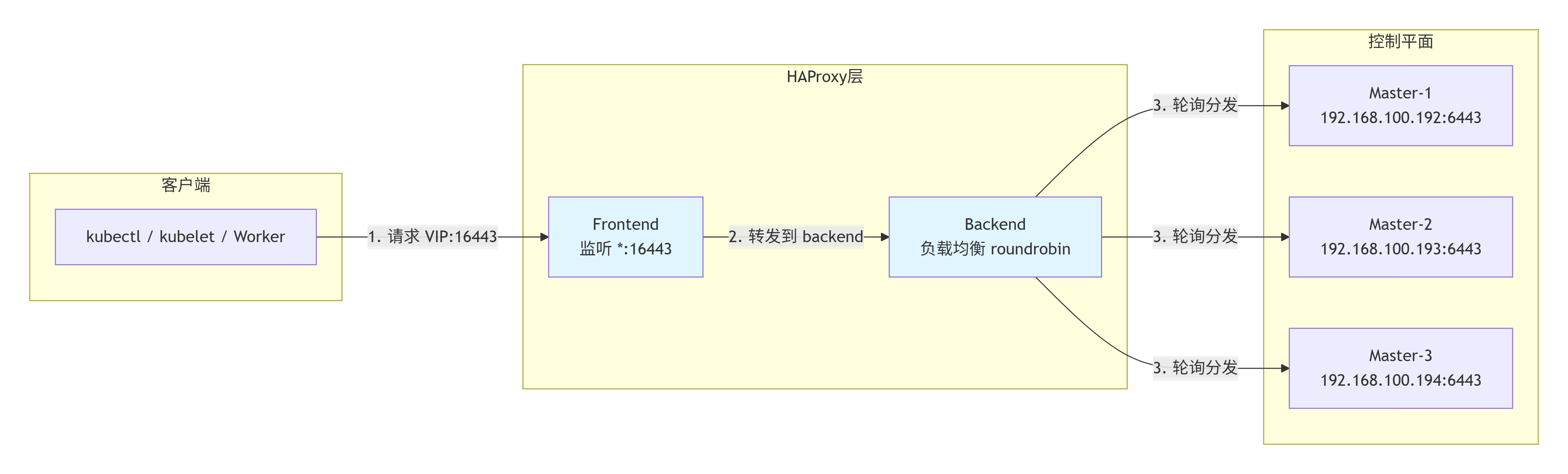
通俗解释:
- Frontend(前台) :HAProxy 在
16443端口"站岗",所有来找 K8s API 的请求都先到这里报到。之所以用16443而不是6443,是因为6443已经被每台 Master 上的 kube-apiserver 自己占用了,HAProxy 不能再去抢。 - Backend(后台):Frontend 收到请求后,交给 Backend 处理。Backend 像"叫号机"一样,按照轮询(roundrobin)的方式,把请求依次分发给三台 Master。
- 健康检查 :HAProxy 每隔 3 秒检查一次 Master 是否活着(
check inter 3s),如果某台 Master 连续 3 次没响应,就暂时把它踢出轮询名单,不再转发请求给它(fall 3)。等它恢复并连续 2 次检查通过后,再重新加入(rise 2)。 - 好处:三个 Master 分担 API 请求压力,任何一个 Master 宕机,HAProxy 自动停止向它转发,不影响集群整体服务。
编辑 /etc/haproxy/haproxy.cfg:(所有 Master 相同)
shell
root@k8s-master1:~# vi /etc/haproxy/haproxy.cfg
root@k8s-master1:~# cat /etc/haproxy/haproxy.cfg
global
    log         127.0.0.1 local2
    chroot      /var/lib/haproxy
    pidfile     /var/run/haproxy.pid
    maxconn     4000
    user        haproxy
    group       haproxy
    daemon
    stats socket /var/lib/haproxy/stats

#---------------------------------------------------------------------
# common defaults
#---------------------------------------------------------------------
defaults
    # 对于 K8s API 代理,建议默认直接使用 tcp 模式
    mode                    tcp
    log                     global
    option                  tcplog
    option                  dontlognull
    option                  redispatch
    retries                 3
    timeout connect         10s
    timeout client          1m
    timeout server          1m
    timeout check           10s
    maxconn                 3000

#---------------------------------------------------------------------
# kubernetes apiserver frontend
#---------------------------------------------------------------------
frontend kubernetes-apiserver
    bind                    *:16443
    default_backend         kubernetes-apiserver

#---------------------------------------------------------------------
# round robin balancing between the various backends
#---------------------------------------------------------------------
backend kubernetes-apiserver
    balance                 roundrobin
    # 注意:在 HAProxy 2.x 中,通常使用 'check' 即可,'check-ssl verify none' 视具体版本而定
    server k8s-master1 192.168.100.192:6443 check inter 3s fall 3 rise 2
    server k8s-master2 192.168.100.193:6443 check inter 3s fall 3 rise 2
    server k8s-master3 192.168.100.194:6443 check inter 3s fall 3 rise 2
root@k8s-master1:~#
# 先检查配置语法
root@k8s-master1:~# haproxy -c -f /etc/haproxy/haproxy.cfg
Configuration file is valid
root@k8s-master1:~#
重启并启用:
bash
root@k8s-master1:~# systemctl restart haproxy
root@k8s-master1:~#
root@k8s-master1:~# systemctl enable haproxy
Synchronizing state of haproxy.service with SysV service script with /usr/lib/systemd/systemd-sysv-install.
Executing: /usr/lib/systemd/systemd-sysv-install enable haproxy
root@k8s-master1:~#
3.3 配置keepalived
1. 脚本内容(所有 Master 节点)
在 /usr/local/bin/check_ha_and_apiserver.sh 中写入以下内容:
bash
#!/bin/bash
# 1. 检查 haproxy 进程是否存在
/usr/bin/killall -0 haproxy 2>/dev/null || exit 1

# 2. 检查本地 apiserver 健康(忽略证书,超时2秒)
curl -k -s --connect-timeout 2 https://127.0.0.1:6443/healthz > /dev/null || exit 1

# 全部正常
exit 0
赋予执行权限:
bash
chmod +x /usr/local/bin/check_ha_and_apiserver.sh依赖 :确保
curl已安装(apt install -y curl),且killall命令可用(通常已包含在psmisc包中,若无则apt install -y psmisc)。
2. 修改各 Master 节点的 Keepalived 配置
将 vrrp_script 中的 script 指向上述复合脚本,并保留原有的 weight 值(50、30、20)以确保优先级逻辑不变。
Master-1(k8s-master1)
bash
! Configuration File for keepalived
global_defs {
   router_id LVS_DEVEL
   script_user root
   enable_script_security
}
vrrp_script chk_apiserver {
    script "/usr/local/bin/check_ha_and_apiserver.sh"
    interval 2
    weight 50
    timeout 3          # 脚本执行超时 3 秒
    fall 2             # 连续失败 2 次才判定为故障
    rise 1             # 连续成功 1 次即恢复
}
vrrp_instance VI_1 {
    state MASTER
    interface ens33
    virtual_router_id 51
    priority 80
    advert_int 1
    authentication {
        auth_type PASS
        auth_pass 1111
    }
    virtual_ipaddress {
        192.168.100.190/24 dev ens33 label ens33:1
    }
    track_script {
        chk_apiserver
    }
}
Master-2(k8s-master2)
bash
! Configuration File for keepalived
global_defs {
   router_id LVS_DEVEL
   script_user root
   enable_script_security
}
vrrp_script chk_apiserver {
    script "/usr/local/bin/check_ha_and_apiserver.sh"
    interval 2
    weight 30
    timeout 3          # 脚本执行超时 3 秒
    fall 2             # 连续失败 2 次才判定为故障
    rise 1             # 连续成功 1 次即恢复
}
vrrp_instance VI_1 {
    state MASTER
    interface ens33
    virtual_router_id 51
    priority 90
    advert_int 1
    authentication {
        auth_type PASS
        auth_pass 1111
    }
    virtual_ipaddress {
        192.168.100.190/24 dev ens33 label ens33:1
    }
    track_script {
        chk_apiserver
    }
}
Master-3(k8s-master3)
bash
! Configuration File for keepalived
global_defs {
   router_id LVS_DEVEL
   script_user root
   enable_script_security
}
vrrp_script chk_apiserver {
    script "/usr/local/bin/check_ha_and_apiserver.sh"
    interval 2
    weight 20
    timeout 3          # 脚本执行超时 3 秒
    fall 2             # 连续失败 2 次才判定为故障
    rise 1             # 连续成功 1 次即恢复
}
vrrp_instance VI_1 {
    state MASTER
    interface ens33
    virtual_router_id 51
    priority 80
    advert_int 1
    authentication {
        auth_type PASS
        auth_pass 1111
    }
    virtual_ipaddress {
        192.168.100.190/24 dev ens33 label ens33:1
    }
    track_script {
        chk_apiserver
    }
}
注意 :所有节点的
virtual_router_id必须一致(此处为 51),网卡名ens33根据实际修改。
3. 部署与生效
3.1 分发脚本和配置
- 将脚本
check_ha_and_apiserver.sh复制到 所有 Master 节点 的/usr/local/bin/并赋予执行权限。 - 将上述对应的配置文件写入各 Master 节点的
/etc/keepalived/keepalived.conf。
3.2 设置开机自启 Keepalived
在所有 Master 节点上执行:
bash
systemctl enable keepalived先不要启动,然后脚本里写了,haproxy及apiserver进程都起来后才能有VIP,此时还没有初始化k8s,所有启动keepalived服务,脚本也会kill。
4. 故障转移逻辑(优先级计算)
| 节点 | state | priority(基础) | weight | 健康时有效优先级(基础 + weight) | 任一检查项失败时有效优先级(基础) |
|---|---|---|---|---|---|
| master1 | MASTER | 80 | 50 | 130 | 80 |
| master2 | BACKUP | 90 | 30 | 120 | 90 |
| master3 | BACKUP | 80 | 20 | 100 | 80 |
- 全部健康:master1(130)> master2(120)> master3(100) → VIP 在 master1。
- master1 的 HAProxy 或 apiserver 任一故障:master1 降至 80 → master2(120)接管 VIP。
- master2 故障(master1 健康):master1(130)> master2(90)→ VIP 不动。
- master1 和 master2 同时故障:master1=80,master2=90,master3(100)→ VIP 漂移至 master3。
- 故障恢复:优先级回升,自动抢占。
四、初始化 Kubernetes 集群(仅在 Master-1 执行)
bash
cat > kubeadm-config.yaml <<EOF
apiVersion: kubeadm.k8s.io/v1beta4
kind: ClusterConfiguration
kubernetesVersion: v1.35.0
controlPlaneEndpoint: "192.168.100.190:16443"   # VIP地址
imageRepository: registry.aliyuncs.com/google_containers
networking:
  podSubnet: "192.168.0.0/16"     # Calico默认网段
  serviceSubnet: "10.96.0.0/12"
apiServer:
  certSANs:
  - "192.168.100.190"
  - "k8s-vip"
  - "192.168.100.192"
  - "192.168.100.193"
  - "192.168.100.194"
  - "127.0.0.1"
---
apiVersion: kubeadm.k8s.io/v1beta4
kind: InitConfiguration
nodeRegistration:
  criSocket: "unix:///var/run/containerd/containerd.sock"
  name: "k8s-master1"
  kubeletExtraArgs:
    - name: root-dir
      value: /data/kubelet
EOF
# 建议在配置文件中把注释去掉。不要使用:2.9 配置 kubelet 数据目录(/data/kubelet)此步骤。

# 预拉取镜像
root@k8s-master1:~# kubeadm config images pull --config kubeadm-config.yaml
[config/images] Pulled registry.aliyuncs.com/google_containers/kube-apiserver:v1.35.0
[config/images] Pulled registry.aliyuncs.com/google_containers/kube-controller-manager:v1.35.0
[config/images] Pulled registry.aliyuncs.com/google_containers/kube-scheduler:v1.35.0
[config/images] Pulled registry.aliyuncs.com/google_containers/kube-proxy:v1.35.0
[config/images] Pulled registry.aliyuncs.com/google_containers/coredns:v1.13.1
[config/images] Pulled registry.aliyuncs.com/google_containers/pause:3.10.1
[config/images] Pulled registry.aliyuncs.com/google_containers/etcd:3.6.6-0
root@k8s-master1:~#
root@k8s-master1:~# echo $?
0
root@k8s-master1:~#


# 初始化集群
root@k8s-master1:~# kubeadm init --config kubeadm-config.yaml --upload-certs
[init] Using Kubernetes version: v1.35.0
[preflight] Running pre-flight checks
	[WARNING ContainerRuntimeVersion]: You must update your container runtime to a version that supports the CRI method RuntimeConfig. Falling back to using cgroupDriver from kubelet config will be removed in 1.36. For more information, see https://git.k8s.io/enhancements/keps/sig-node/4033-group-driver-detection-over-cri
[preflight] Pulling images required for setting up a Kubernetes cluster
[preflight] This might take a minute or two, depending on the speed of your internet connection
[preflight] You can also perform this action beforehand using 'kubeadm config images pull'
W0626 11:03:12.171630    7569 checks.go:906] detected that the sandbox image "registry.aliyuncs.com/google_containers/pause:3.9" of the container runtime is inconsistent with that used by kubeadm. It is recommended to use "registry.aliyuncs.com/google_containers/pause:3.10.1" as the CRI sandbox image.
[certs] Using certificateDir folder "/etc/kubernetes/pki"
[certs] Generating "ca" certificate and key
[certs] Generating "apiserver" certificate and key
[certs] apiserver serving cert is signed for DNS names [k8s-master1 k8s-vip kubernetes kubernetes.default kubernetes.default.svc kubernetes.default.svc.cluster.local] and IPs [10.96.0.1 192.168.100.192 192.168.100.190 192.168.100.193 192.168.100.194 127.0.0.1]
[certs] Generating "apiserver-kubelet-client" certificate and key
[certs] Generating "front-proxy-ca" certificate and key
[certs] Generating "front-proxy-client" certificate and key
[certs] Generating "etcd/ca" certificate and key
[certs] Generating "etcd/server" certificate and key
[certs] etcd/server serving cert is signed for DNS names [k8s-master1 localhost] and IPs [192.168.100.192 127.0.0.1 ::1]
[certs] Generating "etcd/peer" certificate and key
[certs] etcd/peer serving cert is signed for DNS names [k8s-master1 localhost] and IPs [192.168.100.192 127.0.0.1 ::1]
[certs] Generating "etcd/healthcheck-client" certificate and key
[certs] Generating "apiserver-etcd-client" certificate and key
[certs] Generating "sa" key and public key
[kubeconfig] Using kubeconfig folder "/etc/kubernetes"
W0626 11:03:12.911653    7569 endpoint.go:56] [endpoint] WARNING: port specified in controlPlaneEndpoint overrides bindPort in the controlplane address
[kubeconfig] Writing "admin.conf" kubeconfig file
W0626 11:03:12.959630    7569 endpoint.go:56] [endpoint] WARNING: port specified in controlPlaneEndpoint overrides bindPort in the controlplane address
[kubeconfig] Writing "super-admin.conf" kubeconfig file
[kubeconfig] Writing "kubelet.conf" kubeconfig file
W0626 11:03:12.999164    7569 endpoint.go:56] [endpoint] WARNING: port specified in controlPlaneEndpoint overrides bindPort in the controlplane address
[kubeconfig] Writing "controller-manager.conf" kubeconfig file
W0626 11:03:13.055573    7569 endpoint.go:56] [endpoint] WARNING: port specified in controlPlaneEndpoint overrides bindPort in the controlplane address
[kubeconfig] Writing "scheduler.conf" kubeconfig file
[etcd] Creating static Pod manifest for local etcd in "/etc/kubernetes/manifests"
[control-plane] Using manifest folder "/etc/kubernetes/manifests"
[control-plane] Creating static Pod manifest for "kube-apiserver"
[control-plane] Creating static Pod manifest for "kube-controller-manager"
[control-plane] Creating static Pod manifest for "kube-scheduler"
[kubelet-start] Writing kubelet environment file with flags to file "/var/lib/kubelet/kubeadm-flags.env"
[kubelet-start] Writing kubelet configuration to file "/var/lib/kubelet/instance-config.yaml"
[patches] Applied patch of type "application/strategic-merge-patch+json" to target "kubeletconfiguration"
[kubelet-start] Writing kubelet configuration to file "/var/lib/kubelet/config.yaml"
[kubelet-start] Starting the kubelet
[wait-control-plane] Waiting for the kubelet to boot up the control plane as static Pods from directory "/etc/kubernetes/manifests"
[kubelet-check] Waiting for a healthy kubelet at http://127.0.0.1:10248/healthz. This can take up to 4m0s
[kubelet-check] The kubelet is healthy after 501.672222ms
[control-plane-check] Waiting for healthy control plane components. This can take up to 4m0s
[control-plane-check] Checking kube-apiserver at https://192.168.100.192:6443/livez
[control-plane-check] Checking kube-controller-manager at https://127.0.0.1:10257/healthz
[control-plane-check] Checking kube-scheduler at https://127.0.0.1:10259/livez
[control-plane-check] kube-controller-manager is healthy after 2.520183938s
[control-plane-check] kube-scheduler is healthy after 4.554681181s
[control-plane-check] kube-apiserver is healthy after 6.501710108s
[upload-config] Storing the configuration used in ConfigMap "kubeadm-config" in the "kube-system" Namespace
[kubelet] Creating a ConfigMap "kubelet-config" in namespace kube-system with the configuration for the kubelets in the cluster
[upload-certs] Storing the certificates in Secret "kubeadm-certs" in the "kube-system" Namespace
[upload-certs] Using certificate key:
3ca42d3c119b53e3fc0c33230196a28a07cfc45a2c39cdeb919476f9aba5a558
[mark-control-plane] Marking the node k8s-master1 as control-plane by adding the labels: [node-role.kubernetes.io/control-plane node.kubernetes.io/exclude-from-external-load-balancers]
[mark-control-plane] Marking the node k8s-master1 as control-plane by adding the taints [node-role.kubernetes.io/control-plane:NoSchedule]
[bootstrap-token] Using token: sgcopv.5za805v5ipvk6r5u
[bootstrap-token] Configuring bootstrap tokens, cluster-info ConfigMap, RBAC Roles
[bootstrap-token] Configured RBAC rules to allow Node Bootstrap tokens to get nodes
[bootstrap-token] Configured RBAC rules to allow Node Bootstrap tokens to post CSRs in order for nodes to get long term certificate credentials
[bootstrap-token] Configured RBAC rules to allow the csrapprover controller automatically approve CSRs from a Node Bootstrap Token
[bootstrap-token] Configured RBAC rules to allow certificate rotation for all node client certificates in the cluster
[bootstrap-token] Creating the "cluster-info" ConfigMap in the "kube-public" namespace
[kubelet-finalize] Updating "/etc/kubernetes/kubelet.conf" to point to a rotatable kubelet client certificate and key
[addons] Applied essential addon: CoreDNS
W0626 11:03:23.283409    7569 endpoint.go:56] [endpoint] WARNING: port specified in controlPlaneEndpoint overrides bindPort in the controlplane address
[addons] Applied essential addon: kube-proxy

Your Kubernetes control-plane has initialized successfully!

To start using your cluster, you need to run the following as a regular user:

  mkdir -p $HOME/.kube
  sudo cp -i /etc/kubernetes/admin.conf $HOME/.kube/config
  sudo chown $(id -u):$(id -g) $HOME/.kube/config

Alternatively, if you are the root user, you can run:

  export KUBECONFIG=/etc/kubernetes/admin.conf

You should now deploy a pod network to the cluster.
Run "kubectl apply -f [podnetwork].yaml" with one of the options listed at:
  https://kubernetes.io/docs/concepts/cluster-administration/addons/

You can now join any number of control-plane nodes running the following command on each as root:

  kubeadm join 192.168.100.190:16443 --token sgcopv.5za805v5ipvk6r5u \
	--discovery-token-ca-cert-hash sha256:91ce606874d5708fe4f121fef26ec52286186e887be0ee0913b8b54ecece0c91 \
	--control-plane --certificate-key 3ca42d3c119b53e3fc0c33230196a28a07cfc45a2c39cdeb919476f9aba5a558

Please note that the certificate-key gives access to cluster sensitive data, keep it secret!
As a safeguard, uploaded-certs will be deleted in two hours; If necessary, you can use
"kubeadm init phase upload-certs --upload-certs" to reload certs afterward.

Then you can join any number of worker nodes by running the following on each as root:

kubeadm join 192.168.100.190:16443 --token sgcopv.5za805v5ipvk6r5u \
	--discovery-token-ca-cert-hash sha256:91ce606874d5708fe4f121fef26ec52286186e887be0ee0913b8b54ecece0c91
root@k8s-master1:~#
root@k8s-master1:~# export KUBECONFIG=/etc/kubernetes/admin.conf
root@k8s-master1:~#
root@k8s-master1:~# kubectl get node
NAME          STATUS     ROLES           AGE     VERSION
k8s-master1   NotReady   control-plane   4m20s   v1.35.1
root@k8s-master1:~#


# kubectl 补全
echo "source <(kubectl completion bash)" >> /root/.bashrc
echo "alias k=kubectl" >> /root/.bashrc
echo "complete -F __start_kubectl k" >> /root/.bashrc
source /root/.bashrc
记录输出的 kubeadm join 命令(含 token 和 certificate-key)。
配置 kubectl:
bash
mkdir -p $HOME/.kube
cp -i /etc/kubernetes/admin.conf $HOME/.kube/config
chown $(id -u):$(id -g) $HOME/.kube/config
检查 kubelet 是否已使用
/data/kubelet:ps aux | grep kubelet | grep root-dir
bash tab 自动补全
1. crictl 补全
bash
# 安装补全工具
apt install bash-completion -y
# 加载crictl补全
echo "source <(crictl completion bash)" >> /root/.bashrc
source /root/.bashrc
2. kubectl 补全
bash
echo "source <(kubectl completion bash)" >> /root/.bashrc
echo "alias k=kubectl" >> /root/.bashrc
echo "complete -F __start_kubectl k" >> /root/.bashrc
source /root/.bashrc
3. ctr 补全
bash
echo "source <(ctr completion bash)" >> /root/.bashrc
source /root/.bashrc
五、加入其他 Master 节点(Master-2、Master-3)
在相应节点上执行记录的 join 命令(含 --control-plane):
bash
root@k8s-master2:~# kubeadm join 192.168.100.190:16443 --token sgcopv.5za805v5ipvk6r5u \
        --discovery-token-ca-cert-hash sha256:91ce606874d5708fe4f121fef26ec52286186e887be0ee0913b8b54ecece0c91 \
        --control-plane --certificate-key 3ca42d3c119b53e3fc0c33230196a28a07cfc45a2c39cdeb919476f9aba5a558
......省略N

This node has joined the cluster and a new control plane instance was created:

* Certificate signing request was sent to apiserver and approval was received.
* The Kubelet was informed of the new secure connection details.
* Control plane label and taint were applied to the new node.
* The Kubernetes control plane instances scaled up.
* A new etcd member was added to the local/stacked etcd cluster.

To start administering your cluster from this node, you need to run the following as a regular user:

	mkdir -p $HOME/.kube
	sudo cp -i /etc/kubernetes/admin.conf $HOME/.kube/config
	sudo chown $(id -u):$(id -g) $HOME/.kube/config

Run 'kubectl get nodes' to see this node join the cluster.

root@k8s-master2:~#

root@k8s-master2:~# mkdir -p $HOME/.kube
root@k8s-master2:~# sudo cp -i /etc/kubernetes/admin.conf $HOME/.kube/config
root@k8s-master2:~# sudo chown $(id -u):$(id -g) $HOME/.kube/config
root@k8s-master2:~#


root@k8s-master3:~# kubeadm join 192.168.100.190:16443 --token sgcopv.5za805v5ipvk6r5u \
        --discovery-token-ca-cert-hash sha256:91ce606874d5708fe4f121fef26ec52286186e887be0ee0913b8b54ecece0c91 \
        --control-plane --certificate-key 3ca42d3c119b53e3fc0c33230196a28a07cfc45a2c39cdeb919476f9aba5a558
......省略N

To start administering your cluster from this node, you need to run the following as a regular user:

	mkdir -p $HOME/.kube
	sudo cp -i /etc/kubernetes/admin.conf $HOME/.kube/config
	sudo chown $(id -u):$(id -g) $HOME/.kube/config

Run 'kubectl get nodes' to see this node join the cluster.

root@k8s-master3:~#

root@k8s-master3:~# mkdir -p $HOME/.kube
root@k8s-master3:~# sudo cp -i /etc/kubernetes/admin.conf $HOME/.kube/config
root@k8s-master3:~#
root@k8s-master3:~# sudo chown $(id -u):$(id -g) $HOME/.kube/config
root@k8s-master3:~#
六、加入 Worker 节点(Worker-1、Worker-2)
在两个 Worker 上执行不含 --control-plane 的 join 命令。
bash
root@k8s-worker1:~# kubeadm join 192.168.100.190:16443 --token sgcopv.5za805v5ipvk6r5u \
        --discovery-token-ca-cert-hash sha256:91ce606874d5708fe4f121fef26ec52286186e887be0ee0913b8b54ecece0c91
[preflight] Running pre-flight checks
	[WARNING ContainerRuntimeVersion]: You must update your container runtime to a version that supports the CRI method RuntimeConfig. Falling back to using cgroupDriver from kubelet config will be removed in 1.36. For more information, see https://git.k8s.io/enhancements/keps/sig-node/4033-group-driver-detection-over-cri
[preflight] Reading configuration from the "kubeadm-config" ConfigMap in namespace "kube-system"...
[preflight] Use 'kubeadm init phase upload-config kubeadm --config your-config-file' to re-upload it.
[kubelet-start] Writing kubelet configuration to file "/var/lib/kubelet/instance-config.yaml"
[patches] Applied patch of type "application/strategic-merge-patch+json" to target "kubeletconfiguration"
[kubelet-start] Writing kubelet configuration to file "/var/lib/kubelet/config.yaml"
[kubelet-start] Writing kubelet environment file with flags to file "/var/lib/kubelet/kubeadm-flags.env"
[kubelet-start] Starting the kubelet
[kubelet-check] Waiting for a healthy kubelet at http://127.0.0.1:10248/healthz. This can take up to 4m0s
[kubelet-check] The kubelet is healthy after 507.736089ms
[kubelet-start] Waiting for the kubelet to perform the TLS Bootstrap

This node has joined the cluster:
* Certificate signing request was sent to apiserver and a response was received.
* The Kubelet was informed of the new secure connection details.

Run 'kubectl get nodes' on the control-plane to see this node join the cluster.

root@k8s-worker1:~# echo $?
0
root@k8s-worker1:~#


root@k8s-worker2:~# kubeadm join 192.168.100.190:16443 --token sgcopv.5za805v5ipvk6r5u \
        --discovery-token-ca-cert-hash sha256:91ce606874d5708fe4f121fef26ec52286186e887be0ee0913b8b54ecece0c91
[preflight] Running pre-flight checks
	[WARNING ContainerRuntimeVersion]: You must update your container runtime to a version that supports the CRI method RuntimeConfig. Falling back to using cgroupDriver from kubelet config will be removed in 1.36. For more information, see https://git.k8s.io/enhancements/keps/sig-node/4033-group-driver-detection-over-cri
[preflight] Reading configuration from the "kubeadm-config" ConfigMap in namespace "kube-system"...
[preflight] Use 'kubeadm init phase upload-config kubeadm --config your-config-file' to re-upload it.
[kubelet-start] Writing kubelet configuration to file "/var/lib/kubelet/instance-config.yaml"
[patches] Applied patch of type "application/strategic-merge-patch+json" to target "kubeletconfiguration"
[kubelet-start] Writing kubelet configuration to file "/var/lib/kubelet/config.yaml"
[kubelet-start] Writing kubelet environment file with flags to file "/var/lib/kubelet/kubeadm-flags.env"
[kubelet-start] Starting the kubelet
[kubelet-check] Waiting for a healthy kubelet at http://127.0.0.1:10248/healthz. This can take up to 4m0s
[kubelet-check] The kubelet is healthy after 510.807112ms
[kubelet-start] Waiting for the kubelet to perform the TLS Bootstrap

This node has joined the cluster:
* Certificate signing request was sent to apiserver and a response was received.
* The Kubelet was informed of the new secure connection details.

Run 'kubectl get nodes' on the control-plane to see this node join the cluster.

root@k8s-worker2:~# echo $?
0
root@k8s-worker2:~#
七、安装 CNI 网络插件(Calico)
bash
# 安装 Calico
root@k8s-master1:~# kubectl apply -f https://raw.githubusercontent.com/projectcalico/calico/v3.28.0/manifests/calico.yaml
poddisruptionbudget.policy/calico-kube-controllers created
serviceaccount/calico-kube-controllers created
serviceaccount/calico-node created
serviceaccount/calico-cni-plugin created
configmap/calico-config created
customresourcedefinition.apiextensions.k8s.io/bgpconfigurations.crd.projectcalico.org created
customresourcedefinition.apiextensions.k8s.io/bgpfilters.crd.projectcalico.org created
customresourcedefinition.apiextensions.k8s.io/bgppeers.crd.projectcalico.org created
customresourcedefinition.apiextensions.k8s.io/blockaffinities.crd.projectcalico.org created
customresourcedefinition.apiextensions.k8s.io/caliconodestatuses.crd.projectcalico.org created
customresourcedefinition.apiextensions.k8s.io/clusterinformations.crd.projectcalico.org created
customresourcedefinition.apiextensions.k8s.io/felixconfigurations.crd.projectcalico.org created
customresourcedefinition.apiextensions.k8s.io/globalnetworkpolicies.crd.projectcalico.org created
customresourcedefinition.apiextensions.k8s.io/globalnetworksets.crd.projectcalico.org created
customresourcedefinition.apiextensions.k8s.io/hostendpoints.crd.projectcalico.org created
customresourcedefinition.apiextensions.k8s.io/ipamblocks.crd.projectcalico.org created
customresourcedefinition.apiextensions.k8s.io/ipamconfigs.crd.projectcalico.org created
customresourcedefinition.apiextensions.k8s.io/ipamhandles.crd.projectcalico.org created
customresourcedefinition.apiextensions.k8s.io/ippools.crd.projectcalico.org created
customresourcedefinition.apiextensions.k8s.io/ipreservations.crd.projectcalico.org created
customresourcedefinition.apiextensions.k8s.io/kubecontrollersconfigurations.crd.projectcalico.org created
customresourcedefinition.apiextensions.k8s.io/networkpolicies.crd.projectcalico.org created
customresourcedefinition.apiextensions.k8s.io/networksets.crd.projectcalico.org created
clusterrole.rbac.authorization.k8s.io/calico-kube-controllers created
clusterrole.rbac.authorization.k8s.io/calico-node created
clusterrole.rbac.authorization.k8s.io/calico-cni-plugin created
clusterrolebinding.rbac.authorization.k8s.io/calico-kube-controllers created
clusterrolebinding.rbac.authorization.k8s.io/calico-node created
clusterrolebinding.rbac.authorization.k8s.io/calico-cni-plugin created
daemonset.apps/calico-node created
deployment.apps/calico-kube-controllers created
root@k8s-master1:~#


# 应全部 Ready
root@k8s-master1:~# kubectl get node
NAME          STATUS   ROLES           AGE     VERSION
k8s-master1   Ready    control-plane   5h8m    v1.35.1
k8s-master2   Ready    control-plane   4h34m   v1.35.1
k8s-master3   Ready    control-plane   4h33m   v1.35.1
k8s-worker1   Ready    <none>          4h31m   v1.35.1
k8s-worker2   Ready    <none>          4h31m   v1.35.1

# 等待所有 Pod 就绪
root@k8s-master1:~# kubectl get pods -n kube-system -o wide
NAME                                       READY   STATUS    RESTARTS   AGE     IP                NODE          NOMINATED NODE   READINESS GATES
calico-kube-controllers-79fcb48598-d2z8q   1/1     Running   0          119s    192.168.159.130   k8s-master1   <none>           <none>
calico-node-4frwb                          1/1     Running   0          119s    192.168.100.194   k8s-master3   <none>           <none>
calico-node-qlv8d                          1/1     Running   0          119s    192.168.100.192   k8s-master1   <none>           <none>
calico-node-sfgsd                          1/1     Running   0          119s    192.168.100.193   k8s-master2   <none>           <none>
calico-node-wjx8s                          1/1     Running   0          119s    192.168.100.195   k8s-worker1   <none>           <none>
calico-node-xdc44                          0/1     Running   0          119s    192.168.100.196   k8s-worker2   <none>           <none>
coredns-bbdc5fdf6-d8hbx                    1/1     Running   0          148m    192.168.159.131   k8s-master1   <none>           <none>
coredns-bbdc5fdf6-zdk4x                    1/1     Running   0          148m    192.168.159.129   k8s-master1   <none>           <none>
etcd-k8s-master1                           1/1     Running   0          148m    192.168.100.192   k8s-master1   <none>           <none>
etcd-k8s-master2                           1/1     Running   0          141m    192.168.100.193   k8s-master2   <none>           <none>
etcd-k8s-master3                           1/1     Running   0          6m12s   192.168.100.194   k8s-master3   <none>           <none>
kube-apiserver-k8s-master1                 1/1     Running   0          148m    192.168.100.192   k8s-master1   <none>           <none>
kube-apiserver-k8s-master2                 1/1     Running   0          141m    192.168.100.193   k8s-master2   <none>           <none>
kube-apiserver-k8s-master3                 1/1     Running   0          6m12s   192.168.100.194   k8s-master3   <none>           <none>
kube-controller-manager-k8s-master1        1/1     Running   0          148m    192.168.100.192   k8s-master1   <none>           <none>
kube-controller-manager-k8s-master2        1/1     Running   0          141m    192.168.100.193   k8s-master2   <none>           <none>
kube-controller-manager-k8s-master3        1/1     Running   0          6m12s   192.168.100.194   k8s-master3   <none>           <none>
kube-proxy-2mr7t                           1/1     Running   0          141m    192.168.100.193   k8s-master2   <none>           <none>
kube-proxy-5cdnz                           1/1     Running   0          148m    192.168.100.192   k8s-master1   <none>           <none>
kube-proxy-bcccg                           1/1     Running   0          3m34s   192.168.100.195   k8s-worker1   <none>           <none>
kube-proxy-ncm7g                           1/1     Running   0          3m31s   192.168.100.196   k8s-worker2   <none>           <none>
kube-proxy-q8dlm                           1/1     Running   0          6m14s   192.168.100.194   k8s-master3   <none>           <none>
kube-scheduler-k8s-master1                 1/1     Running   0          148m    192.168.100.192   k8s-master1   <none>           <none>
kube-scheduler-k8s-master2                 1/1     Running   0          141m    192.168.100.193   k8s-master2   <none>           <none>
kube-scheduler-k8s-master3                 1/1     Running   0          6m12s   192.168.100.194   k8s-master3   <none>           <none>
root@k8s-master1:~#
八、部署 Harbor 私有镜像仓库(在 192.168.100.197 节点)
8.1 安装 Docker 并修改数据目录
bash
# step 1: 安装必要的一些系统工具
root@k8s-harbor:~# sudo apt-get update
Hit:1 https://mirrors.aliyun.com/ubuntu noble InRelease
Hit:2 https://mirrors.aliyun.com/ubuntu noble-updates InRelease
Hit:3 https://mirrors.aliyun.com/ubuntu noble-backports InRelease
Reading package lists... Done
root@k8s-harbor:~# sudo apt-get install ca-certificates curl gnupg
Reading package lists... Done
Building dependency tree... Done
Reading state information... Done
ca-certificates is already the newest version (20260601~24.04.1).
ca-certificates set to manually installed.
curl is already the newest version (8.5.0-2ubuntu10.9).
curl set to manually installed.
gnupg is already the newest version (2.4.4-2ubuntu17.4).
0 upgraded, 0 newly installed, 0 to remove and 165 not upgraded.

# step 2: 信任 Docker 的 GPG 公钥
root@k8s-harbor:~# sudo install -m 0755 -d /etc/apt/keyrings

# Step 3: 写入软件源信息
root@k8s-harbor:~# curl -fsSL https://mirrors.aliyun.com/docker-ce/linux/ubuntu/gpg | sudo gpg --dearmor -o /etc/apt/keyrings/docker.gpg
root@k8s-harbor:~# sudo chmod a+r /etc/apt/keyrings/docker.gpg
root@k8s-harbor:~# echo \
  "deb [arch=$(dpkg --print-architecture) signed-by=/etc/apt/keyrings/docker.gpg] https://mirrors.aliyun.com/docker-ce/linux/ubuntu \
  "$(. /etc/os-release && echo "$VERSION_CODENAME")" stable" | \
  sudo tee /etc/apt/sources.list.d/docker.list > /dev/null

# Step 4: 安装Docker
root@k8s-harbor:~# sudo apt-get update
Get:1 https://mirrors.aliyun.com/docker-ce/linux/ubuntu noble InRelease [48.5 kB]
Hit:2 https://mirrors.aliyun.com/ubuntu noble InRelease
Hit:3 https://mirrors.aliyun.com/ubuntu noble-updates InRelease
Hit:4 https://mirrors.aliyun.com/ubuntu noble-backports InRelease
Get:5 https://mirrors.aliyun.com/docker-ce/linux/ubuntu noble/stable amd64 Packages [58.1 kB]
Fetched 107 kB in 1s (133 kB/s)
Reading package lists... Done
root@k8s-harbor:~# apt-cache madison docker-ce
 docker-ce | 5:29.6.0-1~ubuntu.24.04~noble | https://mirrors.aliyun.com/docker-ce/linux/ubuntu noble/stable amd64 Packages
 docker-ce | 5:29.5.3-1~ubuntu.24.04~noble | https://mirrors.aliyun.com/docker-ce/linux/ubuntu noble/stable amd64 Packages
 docker-ce | 5:29.5.2-1~ubuntu.24.04~noble | https://mirrors.aliyun.com/docker-ce/linux/ubuntu noble/stable amd64 Packages
 docker-ce | 5:29.5.1-1~ubuntu.24.04~noble | https://mirrors.aliyun.com/docker-ce/linux/ubuntu noble/stable amd64 Packages
 docker-ce | 5:29.5.0-1~ubuntu.24.04~noble | https://mirrors.aliyun.com/docker-ce/linux/ubuntu noble/stable amd64 Packages
 docker-ce | 5:29.4.3-1~ubuntu.24.04~noble | https://mirrors.aliyun.com/docker-ce/linux/ubuntu noble/stable amd64 Packages
 docker-ce | 5:29.4.2-2~ubuntu.24.04~noble | https://mirrors.aliyun.com/docker-ce/linux/ubuntu noble/stable amd64 Packages
 docker-ce | 5:29.4.2-1~ubuntu.24.04~noble | https://mirrors.aliyun.com/docker-ce/linux/ubuntu noble/stable amd64 Packages
 docker-ce | 5:29.4.1-1~ubuntu.24.04~noble | https://mirrors.aliyun.com/docker-ce/linux/ubuntu noble/stable amd64 Packages
 docker-ce | 5:29.4.0-1~ubuntu.24.04~noble | https://mirrors.aliyun.com/docker-ce/linux/ubuntu noble/stable amd64 Packages
 docker-ce | 5:29.3.1-1~ubuntu.24.04~noble | https://mirrors.aliyun.com/docker-ce/linux/ubuntu noble/stable amd64 Packages
 docker-ce | 5:29.3.0-1~ubuntu.24.04~noble | https://mirrors.aliyun.com/docker-ce/linux/ubuntu noble/stable amd64 Packages
 docker-ce | 5:29.2.1-1~ubuntu.24.04~noble | https://mirrors.aliyun.com/docker-ce/linux/ubuntu noble/stable amd64 Packages
 docker-ce | 5:29.2.0-1~ubuntu.24.04~noble | https://mirrors.aliyun.com/docker-ce/linux/ubuntu noble/stable amd64 Packages
 docker-ce | 5:29.1.5-1~ubuntu.24.04~noble | https://mirrors.aliyun.com/docker-ce/linux/ubuntu noble/stable amd64 Packages
 docker-ce | 5:29.1.4-1~ubuntu.24.04~noble | https://mirrors.aliyun.com/docker-ce/linux/ubuntu noble/stable amd64 Packages
 docker-ce | 5:29.1.3-1~ubuntu.24.04~noble | https://mirrors.aliyun.com/docker-ce/linux/ubuntu noble/stable amd64 Packages
 docker-ce | 5:29.1.2-1~ubuntu.24.04~noble | https://mirrors.aliyun.com/docker-ce/linux/ubuntu noble/stable amd64 Packages
 docker-ce | 5:29.1.1-1~ubuntu.24.04~noble | https://mirrors.aliyun.com/docker-ce/linux/ubuntu noble/stable amd64 Packages
 docker-ce | 5:29.1.0-1~ubuntu.24.04~noble | https://mirrors.aliyun.com/docker-ce/linux/ubuntu noble/stable amd64 Packages
 docker-ce | 5:29.0.4-1~ubuntu.24.04~noble | https://mirrors.aliyun.com/docker-ce/linux/ubuntu noble/stable amd64 Packages
 docker-ce | 5:29.0.3-1~ubuntu.24.04~noble | https://mirrors.aliyun.com/docker-ce/linux/ubuntu noble/stable amd64 Packages
 docker-ce | 5:29.0.2-1~ubuntu.24.04~noble | https://mirrors.aliyun.com/docker-ce/linux/ubuntu noble/stable amd64 Packages
 docker-ce | 5:29.0.1-1~ubuntu.24.04~noble | https://mirrors.aliyun.com/docker-ce/linux/ubuntu noble/stable amd64 Packages
 docker-ce | 5:29.0.0-1~ubuntu.24.04~noble | https://mirrors.aliyun.com/docker-ce/linux/ubuntu noble/stable amd64 Packages
 docker-ce | 5:28.5.2-1~ubuntu.24.04~noble | https://mirrors.aliyun.com/docker-ce/linux/ubuntu noble/stable amd64 Packages
 docker-ce | 5:28.5.1-1~ubuntu.24.04~noble | https://mirrors.aliyun.com/docker-ce/linux/ubuntu noble/stable amd64 Packages
 docker-ce | 5:28.5.0-1~ubuntu.24.04~noble | https://mirrors.aliyun.com/docker-ce/linux/ubuntu noble/stable amd64 Packages
 docker-ce | 5:28.4.0-1~ubuntu.24.04~noble | https://mirrors.aliyun.com/docker-ce/linux/ubuntu noble/stable amd64 Packages
 docker-ce | 5:28.3.3-1~ubuntu.24.04~noble | https://mirrors.aliyun.com/docker-ce/linux/ubuntu noble/stable amd64 Packages
 docker-ce | 5:28.3.2-1~ubuntu.24.04~noble | https://mirrors.aliyun.com/docker-ce/linux/ubuntu noble/stable amd64 Packages
 docker-ce | 5:28.3.1-1~ubuntu.24.04~noble | https://mirrors.aliyun.com/docker-ce/linux/ubuntu noble/stable amd64 Packages
 docker-ce | 5:28.3.0-1~ubuntu.24.04~noble | https://mirrors.aliyun.com/docker-ce/linux/ubuntu noble/stable amd64 Packages
 docker-ce | 5:28.2.2-1~ubuntu.24.04~noble | https://mirrors.aliyun.com/docker-ce/linux/ubuntu noble/stable amd64 Packages
 docker-ce | 5:28.2.1-1~ubuntu.24.04~noble | https://mirrors.aliyun.com/docker-ce/linux/ubuntu noble/stable amd64 Packages
 docker-ce | 5:28.2.0-1~ubuntu.24.04~noble | https://mirrors.aliyun.com/docker-ce/linux/ubuntu noble/stable amd64 Packages
 docker-ce | 5:28.1.1-1~ubuntu.24.04~noble | https://mirrors.aliyun.com/docker-ce/linux/ubuntu noble/stable amd64 Packages
 docker-ce | 5:28.1.0-1~ubuntu.24.04~noble | https://mirrors.aliyun.com/docker-ce/linux/ubuntu noble/stable amd64 Packages
 docker-ce | 5:28.0.4-1~ubuntu.24.04~noble | https://mirrors.aliyun.com/docker-ce/linux/ubuntu noble/stable amd64 Packages
 docker-ce | 5:28.0.3-1~ubuntu.24.04~noble | https://mirrors.aliyun.com/docker-ce/linux/ubuntu noble/stable amd64 Packages
 docker-ce | 5:28.0.2-1~ubuntu.24.04~noble | https://mirrors.aliyun.com/docker-ce/linux/ubuntu noble/stable amd64 Packages
 docker-ce | 5:28.0.1-1~ubuntu.24.04~noble | https://mirrors.aliyun.com/docker-ce/linux/ubuntu noble/stable amd64 Packages
 docker-ce | 5:28.0.0-1~ubuntu.24.04~noble | https://mirrors.aliyun.com/docker-ce/linux/ubuntu noble/stable amd64 Packages
 docker-ce | 5:27.5.1-1~ubuntu.24.04~noble | https://mirrors.aliyun.com/docker-ce/linux/ubuntu noble/stable amd64 Packages
 docker-ce | 5:27.5.0-1~ubuntu.24.04~noble | https://mirrors.aliyun.com/docker-ce/linux/ubuntu noble/stable amd64 Packages
 docker-ce | 5:27.4.1-1~ubuntu.24.04~noble | https://mirrors.aliyun.com/docker-ce/linux/ubuntu noble/stable amd64 Packages
 docker-ce | 5:27.4.0-1~ubuntu.24.04~noble | https://mirrors.aliyun.com/docker-ce/linux/ubuntu noble/stable amd64 Packages
 docker-ce | 5:27.3.1-1~ubuntu.24.04~noble | https://mirrors.aliyun.com/docker-ce/linux/ubuntu noble/stable amd64 Packages
 docker-ce | 5:27.3.0-1~ubuntu.24.04~noble | https://mirrors.aliyun.com/docker-ce/linux/ubuntu noble/stable amd64 Packages
 docker-ce | 5:27.2.1-1~ubuntu.24.04~noble | https://mirrors.aliyun.com/docker-ce/linux/ubuntu noble/stable amd64 Packages
 docker-ce | 5:27.2.0-1~ubuntu.24.04~noble | https://mirrors.aliyun.com/docker-ce/linux/ubuntu noble/stable amd64 Packages
 docker-ce | 5:27.1.2-1~ubuntu.24.04~noble | https://mirrors.aliyun.com/docker-ce/linux/ubuntu noble/stable amd64 Packages
 docker-ce | 5:27.1.1-1~ubuntu.24.04~noble | https://mirrors.aliyun.com/docker-ce/linux/ubuntu noble/stable amd64 Packages
 docker-ce | 5:27.1.0-1~ubuntu.24.04~noble | https://mirrors.aliyun.com/docker-ce/linux/ubuntu noble/stable amd64 Packages
 docker-ce | 5:27.0.3-1~ubuntu.24.04~noble | https://mirrors.aliyun.com/docker-ce/linux/ubuntu noble/stable amd64 Packages
 docker-ce | 5:27.0.2-1~ubuntu.24.04~noble | https://mirrors.aliyun.com/docker-ce/linux/ubuntu noble/stable amd64 Packages
 docker-ce | 5:27.0.1-1~ubuntu.24.04~noble | https://mirrors.aliyun.com/docker-ce/linux/ubuntu noble/stable amd64 Packages
 docker-ce | 5:26.1.4-1~ubuntu.24.04~noble | https://mirrors.aliyun.com/docker-ce/linux/ubuntu noble/stable amd64 Packages
 docker-ce | 5:26.1.3-1~ubuntu.24.04~noble | https://mirrors.aliyun.com/docker-ce/linux/ubuntu noble/stable amd64 Packages
 docker-ce | 5:26.1.2-1~ubuntu.24.04~noble | https://mirrors.aliyun.com/docker-ce/linux/ubuntu noble/stable amd64 Packages
 docker-ce | 5:26.1.1-1~ubuntu.24.04~noble | https://mirrors.aliyun.com/docker-ce/linux/ubuntu noble/stable amd64 Packages
 docker-ce | 5:26.1.0-1~ubuntu.24.04~noble | https://mirrors.aliyun.com/docker-ce/linux/ubuntu noble/stable amd64 Packages
 docker-ce | 5:26.0.2-1~ubuntu.24.04~noble | https://mirrors.aliyun.com/docker-ce/linux/ubuntu noble/stable amd64 Packages
 docker-ce | 5:26.0.1-1~ubuntu.24.04~noble | https://mirrors.aliyun.com/docker-ce/linux/ubuntu noble/stable amd64 Packages
 docker-ce | 5:26.0.0-1~ubuntu.24.04~noble | https://mirrors.aliyun.com/docker-ce/linux/ubuntu noble/stable amd64 Packages
root@k8s-harbor:~#
root@k8s-harbor:~# sudo apt-get -y install docker-ce=5:27.5.1-1~ubuntu.24.04~noble
Reading package lists... Done
Building dependency tree... Done
Reading state information... Done
The following additional packages will be installed:
  containerd.io docker-buildx-plugin docker-ce-cli docker-ce-rootless-extras docker-compose-plugin libltdl7 pigz
Suggested packages:
  aufs-tools cgroupfs-mount | cgroup-lite docker-model-plugin
The following packages will be REMOVED:
  containerd runc
The following NEW packages will be installed:
  containerd.io docker-buildx-plugin docker-ce docker-ce-cli docker-ce-rootless-extras docker-compose-plugin libltdl7 pigz
0 upgraded, 8 newly installed, 2 to remove and 164 not upgraded.
Need to get 102 MB of archives.
After this operation, 207 MB of additional disk space will be used.
Get:1 https://mirrors.aliyun.com/ubuntu noble/universe amd64 pigz amd64 2.8-1 [65.6 kB]
Get:2 https://mirrors.aliyun.com/docker-ce/linux/ubuntu noble/stable amd64 containerd.io amd64 2.2.5-1~ubuntu.24.04~noble [23.6 MB]
Get:3 https://mirrors.aliyun.com/docker-ce/linux/ubuntu noble/stable amd64 docker-buildx-plugin amd64 0.34.1-1~ubuntu.24.04~noble [17.2 MB]
Get:4 https://mirrors.aliyun.com/docker-ce/linux/ubuntu noble/stable amd64 docker-ce-cli amd64 5:29.6.0-1~ubuntu.24.04~noble [16.9 MB]
Get:5 https://mirrors.aliyun.com/docker-ce/linux/ubuntu noble/stable amd64 docker-ce amd64 5:27.5.1-1~ubuntu.24.04~noble [26.1 MB]
Get:6 https://mirrors.aliyun.com/docker-ce/linux/ubuntu noble/stable amd64 docker-ce-rootless-extras amd64 5:29.6.0-1~ubuntu.24.04~noble [10.2 MB]
Get:7 https://mirrors.aliyun.com/docker-ce/linux/ubuntu noble/stable amd64 docker-compose-plugin amd64 5.1.4-1~ubuntu.24.04~noble [8,126 kB]
Get:8 https://mirrors.aliyun.com/ubuntu noble/main amd64 libltdl7 amd64 2.4.7-7build1 [40.3 kB]
Fetched 102 MB in 1min 5s (1,579 kB/s)
(Reading database ... 87559 files and directories currently installed.)
Removing containerd (1.7.12-0ubuntu4) ...
Removing runc (1.3.4-0ubuntu1~24.04.1) ...
Selecting previously unselected package pigz.
(Reading database ... 87497 files and directories currently installed.)
Preparing to unpack .../0-pigz_2.8-1_amd64.deb ...
Unpacking pigz (2.8-1) ...
Selecting previously unselected package containerd.io.
Preparing to unpack .../1-containerd.io_2.2.5-1~ubuntu.24.04~noble_amd64.deb ...
Unpacking containerd.io (2.2.5-1~ubuntu.24.04~noble) ...
Selecting previously unselected package docker-buildx-plugin.
Preparing to unpack .../2-docker-buildx-plugin_0.34.1-1~ubuntu.24.04~noble_amd64.deb ...
Unpacking docker-buildx-plugin (0.34.1-1~ubuntu.24.04~noble) ...
Selecting previously unselected package docker-ce-cli.
Preparing to unpack .../3-docker-ce-cli_5%3a29.6.0-1~ubuntu.24.04~noble_amd64.deb ...
Unpacking docker-ce-cli (5:29.6.0-1~ubuntu.24.04~noble) ...
Selecting previously unselected package docker-ce.
Preparing to unpack .../4-docker-ce_5%3a27.5.1-1~ubuntu.24.04~noble_amd64.deb ...
Unpacking docker-ce (5:27.5.1-1~ubuntu.24.04~noble) ...
Selecting previously unselected package docker-ce-rootless-extras.
Preparing to unpack .../5-docker-ce-rootless-extras_5%3a29.6.0-1~ubuntu.24.04~noble_amd64.deb ...
Unpacking docker-ce-rootless-extras (5:29.6.0-1~ubuntu.24.04~noble) ...
Selecting previously unselected package docker-compose-plugin.
Preparing to unpack .../6-docker-compose-plugin_5.1.4-1~ubuntu.24.04~noble_amd64.deb ...
Unpacking docker-compose-plugin (5.1.4-1~ubuntu.24.04~noble) ...
Selecting previously unselected package libltdl7:amd64.
Preparing to unpack .../7-libltdl7_2.4.7-7build1_amd64.deb ...
Unpacking libltdl7:amd64 (2.4.7-7build1) ...
Setting up docker-buildx-plugin (0.34.1-1~ubuntu.24.04~noble) ...
Setting up containerd.io (2.2.5-1~ubuntu.24.04~noble) ...

Configuration file '/etc/containerd/config.toml'
 ==> File on system created by you or by a script.
 ==> File also in package provided by package maintainer.
   What would you like to do about it ?  Your options are:
    Y or I  : install the package maintainer's version
    N or O  : keep your currently-installed version
      D     : show the differences between the versions
      Z     : start a shell to examine the situation
 The default action is to keep your current version.
*** config.toml (Y/I/N/O/D/Z) [default=N] ? y
Installing new version of config file /etc/containerd/config.toml ...
Setting up docker-compose-plugin (5.1.4-1~ubuntu.24.04~noble) ...
Setting up libltdl7:amd64 (2.4.7-7build1) ...
Setting up docker-ce-cli (5:29.6.0-1~ubuntu.24.04~noble) ...
Setting up pigz (2.8-1) ...
Setting up docker-ce-rootless-extras (5:29.6.0-1~ubuntu.24.04~noble) ...
Setting up docker-ce (5:27.5.1-1~ubuntu.24.04~noble) ...
Created symlink /etc/systemd/system/multi-user.target.wants/docker.service → /usr/lib/systemd/system/docker.service.
Created symlink /etc/systemd/system/sockets.target.wants/docker.socket → /usr/lib/systemd/system/docker.socket.
Processing triggers for man-db (2.12.0-4build2) ...
Processing triggers for libc-bin (2.39-0ubuntu8.6) ...
Scanning processes...
Scanning linux images...

Running kernel seems to be up-to-date.

No services need to be restarted.

No containers need to be restarted.

No user sessions are running outdated binaries.

No VM guests are running outdated hypervisor (qemu) binaries on this host.
root@k8s-harbor:~#

mkdir -p /data/docker
cat > /etc/docker/daemon.json <<'EOF'
{
  "data-root": "/data/docker",
  "registry-mirrors": [ "https://448b823acc1c4d5b8c123421fce60.mirror.swr.myhuaweicloud.com" ],
  "bip": "172.98.0.1/16",
  "default-address-pools": [
    {
      "base": "172.99.0.0/16",
      "size": 24
    }
  ],
  "iptables": true,
  "ip-forward": true,
  "ip-masq": true
}
EOF9
systemctl restart docker
systemctl enable docker
8.2 安装 Docker Compose
bash
curl -L "https://github.com/docker/compose/releases/download/v2.27.0/docker-compose-$(uname -s)-$(uname -m)" -o /usr/local/bin/docker-compose
chmod +x /usr/local/bin/docker-compose

root@k8s-harbor:~# ls -ld /usr/local/bin/docker-compose
-rwxr-xr-x 1 root root 61431093 Jun 20 12:35 /usr/local/bin/docker-compose
root@k8s-harbor:~#
8.3 下载并配置 Harbor
bash
wget https://github.com/goharbor/harbor/releases/download/v2.14.0/harbor-offline-installer-v2.14.0.tgz
root@k8s-harbor:~# tar -xvf harbor-offline-installer-v2.14.0.tgz -C /data/harbor/
harbor/harbor.v2.14.0.tar.gz
harbor/prepare
harbor/LICENSE
harbor/install.sh
harbor/common.sh
harbor/harbor.yml.tmpl
root@k8s-harbor:~# cd /data/harbor/harbor/
root@k8s-harbor:/data/harbor/harbor# ls
common.sh  harbor.v2.14.0.tar.gz  harbor.yml.tmpl  install.sh  LICENSE  prepare
root@k8s-harbor:/data/harbor/harbor#

root@k8s-harbor:/data/harbor/harbor# cp harbor.yml.tmpl harbor.yml

vim harbor.yml
修改(使用 HTTP,数据目录指定为 /data/harbor):
yaml
# 域名:harbor-Warehouses
root@k8s-harbor:/data/harbor/harbor# head -n 15 harbor.yml
# Configuration file of Harbor

# The IP address or hostname to access admin UI and registry service.
# DO NOT use localhost or 127.0.0.1, because Harbor needs to be accessed by external clients.
hostname: harbor-Warehouses

# http related config
http:
  # port for http, default is 80. If https enabled, this port will redirect to https port
  port: 5000

# https related config
#https:
  # https port for harbor, default is 443
  # port: 443
root@k8s-harbor:/data/harbor/harbor#
root@k8s-harbor:/data/harbor/harbor# grep 'data_volume' harbor.yml
data_volume: /data/harbor
root@k8s-harbor:/data/harbor/harbor#
保存后执行 ./install.sh。
bash
root@k8s-harbor:~# cd /data/harbor/harbor/
root@k8s-harbor:/data/harbor/harbor# ./install.sh

[Step 0]: checking if docker is installed ...

Note: docker version: 29.6.0

[Step 1]: checking docker-compose is installed ...

Note: Docker Compose version v5.1.4

[Step 2]: loading Harbor images ...
5dd32317cf96: Loading layer [==================================================>]  40.82MB/40.82MB
e959dc37d186: Loading layer [==================================================>]  16.49MB/16.49MB
2cd016989b45: Loading layer [==================================================>]  175.3MB/175.3MB
c477c7fe5160: Loading layer [==================================================>]  26.59MB/26.59MB
14b19a3a10a0: Loading layer [==================================================>]  18.59MB/18.59MB
d05ad82c41db: Loading layer [==================================================>]   5.12kB/5.12kB
1c14d9a1a9c0: Loading layer [==================================================>]  6.144kB/6.144kB
04b0441a1d4d: Loading layer [==================================================>]  3.072kB/3.072kB
19378685fc53: Loading layer [==================================================>]  2.048kB/2.048kB
26781eaaebd9: Loading layer [==================================================>]   2.56kB/2.56kB
5db0caa837d5: Loading layer [==================================================>]  14.85kB/14.85kB
Loaded image: goharbor/harbor-db:v2.14.0
5d851e2a1093: Loading layer [==================================================>]  125.2MB/125.2MB
343ea1f9f01a: Loading layer [==================================================>]  3.584kB/3.584kB
f494fdbb1706: Loading layer [==================================================>]  3.072kB/3.072kB
daed9a74821e: Loading layer [==================================================>]   2.56kB/2.56kB
f2d7c23374ea: Loading layer [==================================================>]  3.072kB/3.072kB
68170287aff9: Loading layer [==================================================>]  3.584kB/3.584kB
111f5dc74343: Loading layer [==================================================>]  20.48kB/20.48kB
Loaded image: goharbor/harbor-log:v2.14.0
a76efeb95db6: Loading layer [==================================================>]  9.162MB/9.162MB
3b3f22ce738a: Loading layer [==================================================>]  4.096kB/4.096kB
1a843a98313c: Loading layer [==================================================>]  3.072kB/3.072kB
d0d666c85032: Loading layer [==================================================>]  155.3MB/155.3MB
f26e603cbfeb: Loading layer [==================================================>]  16.49MB/16.49MB
cf96ac74f5f4: Loading layer [==================================================>]  172.6MB/172.6MB
Loaded image: goharbor/trivy-adapter-photon:v2.14.0
1bd3ff6de6c7: Loading layer [==================================================>]  16.49MB/16.49MB
48e35ad952ee: Loading layer [==================================================>]  110.5MB/110.5MB
e3140dab4118: Loading layer [==================================================>]  3.072kB/3.072kB
7f1e309cfc13: Loading layer [==================================================>]   59.9kB/59.9kB
87a5ef88148b: Loading layer [==================================================>]  61.95kB/61.95kB
Loaded image: goharbor/redis-photon:v2.14.0
d3dda50ad797: Loading layer [==================================================>]  112.3MB/112.3MB
Loaded image: goharbor/nginx-photon:v2.14.0
a527857ee623: Loading layer [==================================================>]  8.661MB/8.661MB
8c4ac2a0acab: Loading layer [==================================================>]  4.096kB/4.096kB
ad50297b7979: Loading layer [==================================================>]  3.072kB/3.072kB
a3691511d386: Loading layer [==================================================>]  18.96MB/18.96MB
3d88da6fc880: Loading layer [==================================================>]  19.76MB/19.76MB
Loaded image: goharbor/registry-photon:v2.14.0
b5e4ded37c34: Loading layer [==================================================>]  102.8MB/102.8MB
f9aa914c3423: Loading layer [==================================================>]   42.2MB/42.2MB
512aec7e0a63: Loading layer [==================================================>]  13.98MB/13.98MB
718229382536: Loading layer [==================================================>]  66.05kB/66.05kB
e290d0d1d461: Loading layer [==================================================>]   2.56kB/2.56kB
3e8b7c41f18b: Loading layer [==================================================>]  1.536kB/1.536kB
ed24e244e53e: Loading layer [==================================================>]  9.728kB/9.728kB
c762c2342983: Loading layer [==================================================>]  1.106MB/1.106MB
48df6a3bf03f: Loading layer [==================================================>]  596.5kB/596.5kB
Loaded image: goharbor/prepare:v2.14.0
048116257f39: Loading layer [==================================================>]  112.3MB/112.3MB
f154ae201402: Loading layer [==================================================>]  6.979MB/6.979MB
7103bac664c9: Loading layer [==================================================>]  253.4kB/253.4kB
73b30dcd2110: Loading layer [==================================================>]  1.539MB/1.539MB
Loaded image: goharbor/harbor-portal:v2.14.0
87592cb61177: Loading layer [==================================================>]  11.62MB/11.62MB
b61ec4a12f24: Loading layer [==================================================>]  3.584kB/3.584kB
11ca2cb60a99: Loading layer [==================================================>]   2.56kB/2.56kB
2fff6be7637d: Loading layer [==================================================>]  75.23MB/75.23MB
cd68804425cb: Loading layer [==================================================>]  5.632kB/5.632kB
22e7951ad38f: Loading layer [==================================================>]    129kB/129kB
2eab5f954eb7: Loading layer [==================================================>]  209.9kB/209.9kB
b553052d8ff9: Loading layer [==================================================>]  76.36MB/76.36MB
28a8326e903d: Loading layer [==================================================>]   2.56kB/2.56kB
Loaded image: goharbor/harbor-core:v2.14.0
0c33b0e9524b: Loading layer [==================================================>]  11.62MB/11.62MB
76cbfcebe181: Loading layer [==================================================>]  3.584kB/3.584kB
3e4cc3f35f30: Loading layer [==================================================>]   2.56kB/2.56kB
4d3c846a78c9: Loading layer [==================================================>]   63.4MB/63.4MB
710f51a0bd54: Loading layer [==================================================>]  64.19MB/64.19MB
Loaded image: goharbor/harbor-jobservice:v2.14.0
7d26adb546d7: Loading layer [==================================================>]  8.661MB/8.661MB
e5dcb4c390be: Loading layer [==================================================>]  4.096kB/4.096kB
63dd40e26115: Loading layer [==================================================>]  18.96MB/18.96MB
f7d9210aac9e: Loading layer [==================================================>]  3.072kB/3.072kB
e4ba205c0e89: Loading layer [==================================================>]  39.08MB/39.08MB
e92488fc5ede: Loading layer [==================================================>]  58.83MB/58.83MB
Loaded image: goharbor/harbor-registryctl:v2.14.0
73ac7af54136: Loading layer [==================================================>]  11.62MB/11.62MB
b9937c3e3dc4: Loading layer [==================================================>]  40.22MB/40.22MB
db12238a7180: Loading layer [==================================================>]  4.608kB/4.608kB
61c440c209f7: Loading layer [==================================================>]  41.01MB/41.01MB
Loaded image: goharbor/harbor-exporter:v2.14.0


[Step 3]: preparing environment ...

[Step 4]: preparing harbor configs ...
prepare base dir is set to /data/harbor/harbor
WARNING:root:WARNING: HTTP protocol is insecure. Harbor will deprecate http protocol in the future. Please make sure to upgrade to https
Generated configuration file: /config/portal/nginx.conf
Generated configuration file: /config/log/logrotate.conf
Generated configuration file: /config/log/rsyslog_docker.conf
Generated configuration file: /config/nginx/nginx.conf
Generated configuration file: /config/core/env
Generated configuration file: /config/core/app.conf
Generated configuration file: /config/registry/config.yml
Generated configuration file: /config/registryctl/env
Generated configuration file: /config/registryctl/config.yml
Generated configuration file: /config/db/env
Generated configuration file: /config/jobservice/env
Generated configuration file: /config/jobservice/config.yml
copy /data/secret/tls/harbor_internal_ca.crt to shared trust ca dir as name harbor_internal_ca.crt ...
ca file /hostfs/data/secret/tls/harbor_internal_ca.crt is not exist
copy  to shared trust ca dir as name storage_ca_bundle.crt ...
copy None to shared trust ca dir as name redis_tls_ca.crt ...
Generated and saved secret to file: /data/secret/keys/secretkey
Successfully called func: create_root_cert
Generated configuration file: /compose_location/docker-compose.yml
Clean up the input dir


Note: stopping existing Harbor instance ...


[Step 5]: starting Harbor ...
[+] up 10/10
 ✔ Network harbor_harbor       Created                                                                                                          0.2s
 ✔ Container harbor-log        Started                                                                                                          0.7s
 ✔ Container registryctl       Started                                                                                                          2.5s
 ✔ Container registry          Started                                                                                                          2.6s
 ✔ Container harbor-portal     Started                                                                                                          2.7s
 ✔ Container harbor-db         Started                                                                                                          2.7s
 ✔ Container redis             Started                                                                                                          2.4s
 ✔ Container harbor-core       Started                                                                                                          4.3s
 ✔ Container nginx             Started                                                                                                          5.3s
 ✔ Container harbor-jobservice Started                                                                                                          5.3s
✔ ----Harbor has been installed and started successfully.----
root@k8s-harbor:/data/harbor/harbor#
root@k8s-harbor:/data/harbor/harbor# ls -l
total 656332
drwxr-xr-x 3 root root        20 Jun 20 12:44 common
-rw-r--r-- 1 root root      3646 Sep  9  2025 common.sh
-rw-r--r-- 1 root root      5900 Jun 20 12:44 docker-compose.yml
-rw-r--r-- 1 root root 672014938 Sep  9  2025 harbor.v2.14.0.tar.gz
-rw-r--r-- 1 root root     14705 Jun 20 12:41 harbor.yml
-rw-r--r-- 1 root root     14688 Sep  9  2025 harbor.yml.tmpl
-rwxr-xr-x 1 root root      1975 Sep  9  2025 install.sh
-rw-r--r-- 1 root root     11347 Sep  9  2025 LICENSE
-rwxr-xr-x 1 root root      2211 Sep  9  2025 prepare
root@k8s-harbor:/data/harbor/harbor#

# 日常操作流程总结
# 修改配置:编辑 harbor.yml
# 生效配置:./prepare
# 重启服务:docker-compose down && docker-compose up -d
# 全新重装:./install.sh
# 查看日志:docker-compose logs -f

root@k8s-harbor:~# docker ps
CONTAINER ID   IMAGE                                 COMMAND                  CREATED          STATUS                             PORTS                                         NAMES
c6379dbfbc0e   goharbor/nginx-photon:v2.14.0         "nginx -g 'daemon of..."   13 seconds ago   Up 7 seconds (health: starting)    0.0.0.0:5000->5000/tcp, [::]:5000->5000/tcp   nginx
9024076736a0   goharbor/harbor-jobservice:v2.14.0    "/harbor/entrypoint...."   13 seconds ago   Up 7 seconds (health: starting)                                                  harbor-jobservice
03099bd4c8a7   goharbor/harbor-core:v2.14.0          "/harbor/entrypoint...."   13 seconds ago   Up 9 seconds (health: starting)                                                  harbor-core
1ddf6f77c745   goharbor/harbor-portal:v2.14.0        "nginx -g 'daemon of..."   13 seconds ago   Up 10 seconds (health: starting)                                                 harbor-portal
0cf47300e576   goharbor/registry-photon:v2.14.0      "/home/harbor/entryp..."   13 seconds ago   Up 11 seconds (health: starting)                                                 registry
d1845e20dfcb   goharbor/harbor-registryctl:v2.14.0   "/home/harbor/start...."   13 seconds ago   Up 10 seconds (health: starting)                                                 registryctl
1d8f55d1c56d   goharbor/redis-photon:v2.14.0         "redis-server /etc/r..."   13 seconds ago   Up 11 seconds (health: starting)                                                 redis
3ea9aac584a7   goharbor/harbor-db:v2.14.0            "/docker-entrypoint...."   13 seconds ago   Up 11 seconds (health: starting)                                                 harbor-db
b6ff206bcddc   goharbor/harbor-log:v2.14.0           "/bin/sh -c /usr/loc..."   13 seconds ago   Up 12 seconds (health: starting)   127.0.0.1:1514->10514/tcp                     harbor-log
root@k8s-harbor:~#
root@k8s-harbor:~# ss -antl
State    Recv-Q   Send-Q     Local Address:Port     Peer Address:Port   Process
LISTEN   0        4096          127.0.0.54:53            0.0.0.0:*
LISTEN   0        128            127.0.0.1:6010          0.0.0.0:*
LISTEN   0        128            127.0.0.1:6011          0.0.0.0:*
LISTEN   0        128            127.0.0.1:6012          0.0.0.0:*
LISTEN   0        4096           127.0.0.1:1514          0.0.0.0:*
LISTEN   0        4096             0.0.0.0:5000          0.0.0.0:*
LISTEN   0        4096             0.0.0.0:22            0.0.0.0:*
LISTEN   0        4096       127.0.0.53%lo:53            0.0.0.0:*
LISTEN   0        128                [::1]:6011             [::]:*
LISTEN   0        128                [::1]:6010             [::]:*
LISTEN   0        128                [::1]:6012             [::]:*
LISTEN   0        4096                [::]:5000             [::]:*
LISTEN   0        4096                [::]:22               [::]:*
root@k8s-harbor:~#
访问 http://192.168.100.197:5000 验证。
8.4 配置所有 Kubernetes 节点信任 Harbor(HTTP)
在每个 K8s 节点(Master 和 Worker)上编辑 /etc/containerd/config.toml,添加:
toml
root@k8s-master1:~# grep -C 5 'harbor-Warehouses' /etc/containerd/config.toml

      [plugins."io.containerd.grpc.v1.cri".registry.auths]

      [plugins."io.containerd.grpc.v1.cri".registry.configs]
        # 新增http仓库关闭tls校验配置
        [plugins."io.containerd.grpc.v1.cri".registry.configs."harbor-Warehouses:5000".tls]
          insecure_skip_verify = true

      [plugins."io.containerd.grpc.v1.cri".registry.headers]

      [plugins."io.containerd.grpc.v1.cri".registry.mirrors]
        # 配置华为云镜像加速器
        [plugins."io.containerd.grpc.v1.cri".registry.mirrors."docker.io"]
          endpoint = ["https://448b823a21234cf5c81ea9bfce60.mirror.swr.myhuaweicloud.com"]
        # 新增harbor私有仓库镜像转发
        [plugins."io.containerd.grpc.v1.cri".registry.mirrors."harbor-Warehouses:5000"]
          endpoint = ["http://harbor-Warehouses:5000"]

    [plugins."io.containerd.grpc.v1.cri".x509_key_pair_streaming]
      tls_cert_file = ""
      tls_key_file = ""

root@k8s-master1:~#
重启 containerd:systemctl restart containerd
8.5 配置docker私有镜像仓库地址
vi /etc/docker/daemon.json 修改 /etc/docker/daemon.json,新增 insecure-registries
bash
{
  "data-root": "/data/docker",
  "registry-mirrors": [ "https://448b823acc1c4d5b8cf5c81ea9bfce60.mirror.swr.myhuaweicloud.com" ],
  "bip": "172.98.0.1/16",
  "default-address-pools": [
    {
      "base": "172.99.0.0/16",
      "size": 24
    }
  ],
  "iptables": true,
  "ip-forward": true,
  "ip-masq": true,
  "insecure-registries": ["harbor-Warehouses:5000"]
}
bash
# 校验json语法是否合法
dockerd reload
# 重启docker服务
systemctl restart docker
# 验证配置是否加载成功
docker info | grep "Insecure Registries"
九、备份策略
9.1 etcd 自动备份(在任一 Master 上)
创建脚本 /usr/local/bin/etcd-backup.sh:
bash
#!/bin/bash
BACKUP_DIR=/data/backup/etcd
mkdir -p $BACKUP_DIR
export ETCDCTL_ENDPOINTS=https://127.0.0.1:2379
export ETCDCTL_CACERT=/etc/kubernetes/pki/etcd/ca.crt
export ETCDCTL_CERT=/etc/kubernetes/pki/etcd/server.crt
export ETCDCTL_KEY=/etc/kubernetes/pki/etcd/server.key
etcdctl snapshot save $BACKUP_DIR/etcd-$(date +%Y%m%d-%H%M%S).db
find $BACKUP_DIR -name "*.db" -mtime +7 -delete
添加 cron:0 2 * * * /usr/local/bin/etcd-backup.sh
9.2 Harbor 备份(在 Harbor 节点)
bash
mkdir -p /data/backup/harbor
cat > /usr/local/bin/harbor-backup.sh << 'EOF'
#!/bin/bash
BACKUP_DIR=/data/backup/harbor/$(date +%Y%m%d)
mkdir -p $BACKUP_DIR
docker exec harbor-db pg_dump -U postgres registry > $BACKUP_DIR/db.sql
cp -r /data/harbor $BACKUP_DIR/storage
cp -r /data/harbor/harbor $BACKUP_DIR/config
find /data/backup/harbor -type d -mtime +30 -exec rm -rf {} \;
EOF
chmod +x /usr/local/bin/harbor-backup.sh
添加 cron(例如每天 3 点执行)。
9.3 Kubernetes 配置文件备份
定期打包 /etc/kubernetes/pki、/etc/kubernetes/*.conf、/etc/kubernetes/manifests 到 /data/backup/k8s-config。
十、集群验证与测试
10.1 基础健康检查
bash
kubectl get nodes -o wide
kubectl get pods -n kube-system
root@k8s-master1:~# kubectl get componentstatuses
Warning: v1 ComponentStatus is deprecated in v1.19+
NAME                 STATUS    MESSAGE   ERROR
controller-manager   Healthy   ok
scheduler            Healthy   ok
etcd-0               Healthy   ok
root@k8s-master1:~#
root@k8s-master1:~#

root@k8s-master1:~# kubeadm certs check-expiration
[check-expiration] Reading configuration from the "kubeadm-config" ConfigMap in namespace "kube-system"...
[check-expiration] Use 'kubeadm init phase upload-config kubeadm --config your-config-file' to re-upload it.

CERTIFICATE                EXPIRES                  RESIDUAL TIME   CERTIFICATE AUTHORITY   EXTERNALLY MANAGED
admin.conf                 Jun 26, 2027 03:03 UTC   364d            ca                      no
apiserver                  Jun 26, 2027 03:03 UTC   364d            ca                      no
apiserver-etcd-client      Jun 26, 2027 03:03 UTC   364d            etcd-ca                 no
apiserver-kubelet-client   Jun 26, 2027 03:03 UTC   364d            ca                      no
controller-manager.conf    Jun 26, 2027 03:03 UTC   364d            ca                      no
etcd-healthcheck-client    Jun 26, 2027 03:03 UTC   364d            etcd-ca                 no
etcd-peer                  Jun 26, 2027 03:03 UTC   364d            etcd-ca                 no
etcd-server                Jun 26, 2027 03:03 UTC   364d            etcd-ca                 no
front-proxy-client         Jun 26, 2027 03:03 UTC   364d            front-proxy-ca          no
scheduler.conf             Jun 26, 2027 03:03 UTC   364d            ca                      no
super-admin.conf           Jun 26, 2027 03:03 UTC   364d            ca                      no

CERTIFICATE AUTHORITY   EXPIRES                  RESIDUAL TIME   EXTERNALLY MANAGED
ca                      Jun 23, 2036 03:03 UTC   9y              no
etcd-ca                 Jun 23, 2036 03:03 UTC   9y              no
front-proxy-ca          Jun 23, 2036 03:03 UTC   9y              no
root@k8s-master1:~#
10.2 验证数据目录
检查各节点实际使用目录是否为 /data:
bash
# 查看 containerd 数据目录
ls -l /data/containerd
# 查看 kubelet 数据目录
ps aux | grep kubelet | grep root-dir
# Harbor 节点查看 docker 数据目录
docker info | grep "Docker Root Dir"
10.3 高可用性测试
10.3.1 Keepalived 故障转移逻辑
下图展示了 Keepalived 如何通过健康检查实现 VIP 自动漂移:
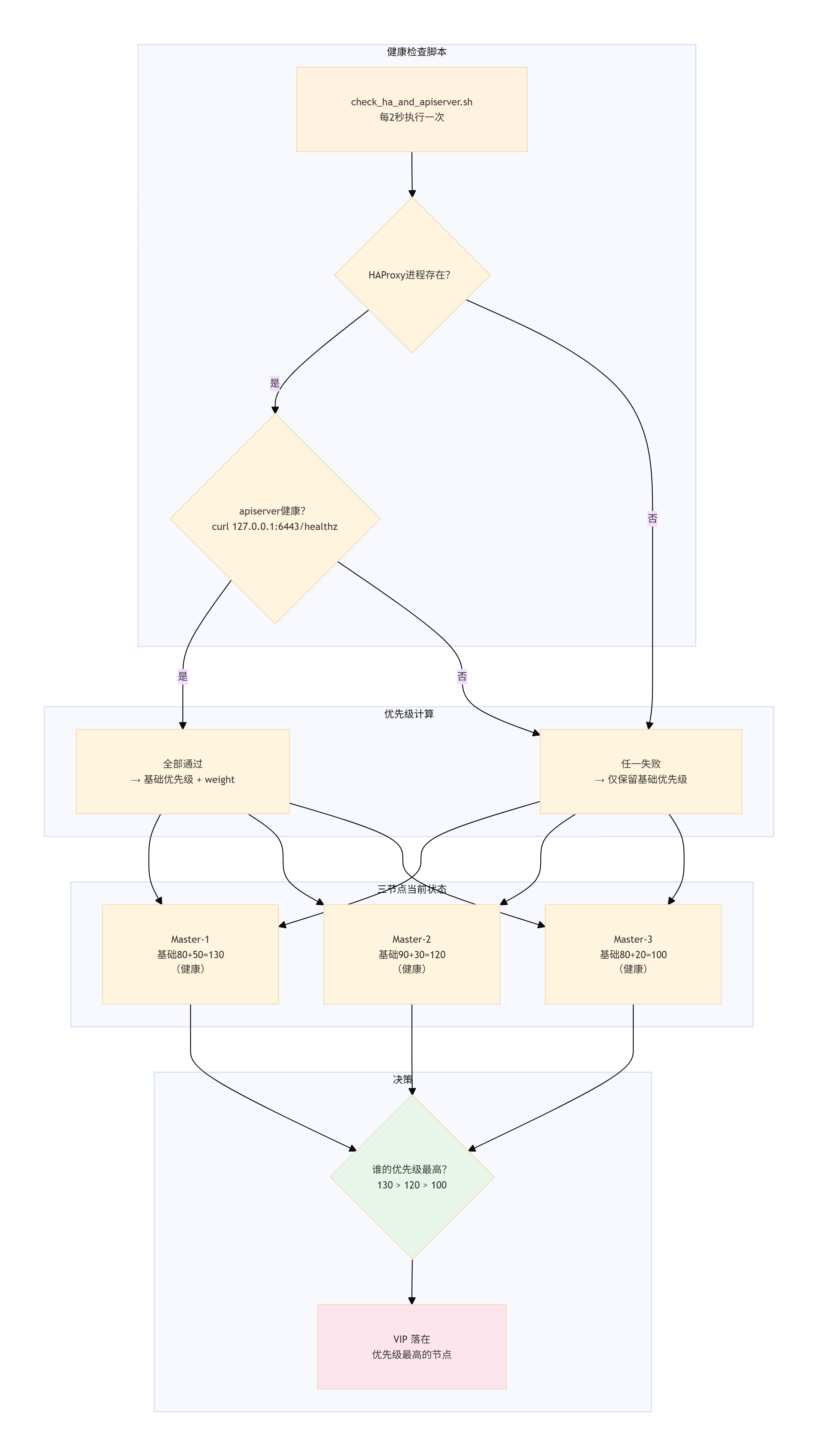
Keepalived 各个节点初始状态一览表:
| 节点 | 角色 | 基础优先级 | 健康加成(weight) | 全部健康时有效优先级 | 任一检查失败时有效优先级 |
|---|---|---|---|---|---|
| Master-1 | MASTER | 80 | +50 | 130 | 80 |
| Master-2 | BACKUP | 90 | +30 | 120 | 90 |
| Master-3 | BACKUP | 80 | +20 | 100 | 80 |
通俗解释:
- 健康检查脚本 :每 2 秒做两件事------① 检查 HAProxy 进程是否在运行;② 访问本地的
https://127.0.0.1:6443/healthz,确认 apiserver 是否正常响应。两项都通过才算健康,有一项失败就算故障。 - 优先级决定 VIP 归属:所有节点都健康时,Master-1 的有效优先级是 130,比 Master-2 的 120 和 Master-3 的 100 都高,所以 VIP 落在 Master-1。
- 故障自动降级:如果 Master-1 的 HAProxy 或 apiserver 挂了,脚本检测失败,它的有效优先级立刻从 130 降到 80。此时 Master-2 的 120 变成最高,VIP 自动漂移到 Master-2。
- 多点故障兜底:如果 Master-1 和 Master-2 同时出问题,Master-3 的 100 会成为最高,VIP 漂移到 Master-3,保证集群始终有一个入口可用。
- 恢复后自动抢回:故障节点恢复正常后,脚本检测通过,它的有效优先级回升,VIP 自动抢回(抢占模式)。
10.3.2 测试前准备
-
确认当前 VIP 位置
在任意 Master 上执行:
bashroot@k8s-master1:~# ip a show ens33 | grep 192.168.100.190 inet 192.168.100.190/24 scope global secondary ens33:1 root@k8s-master1:~# root@k8s-master2:~# ip a show ens33 | grep 192.168.100.190 root@k8s-master2:~# root@k8s-master3:~# ip a show ens33 | grep 192.168.100.190 root@k8s-master3:~#预期输出显示 VIP 绑定在 master1 上。
-
开启日志监控(可选)
在三个 Master 节点分别打开终端,实时查看 Keepalived 日志:
bashroot@k8s-master1:~# journalctl -u keepalived -f Jun 28 17:09:00 k8s-master1 systemd[1]: Started keepalived.service - Keepalive Daemon (LVS and VRRP). Jun 28 17:09:00 k8s-master1 Keepalived[26564]: Startup complete Jun 28 17:09:00 k8s-master1 Keepalived_vrrp[26565]: (VI_1) Entering BACKUP STATE (init) Jun 28 17:09:00 k8s-master1 Keepalived_vrrp[26565]: VRRP_Script(chk_apiserver) succeeded Jun 28 17:09:00 k8s-master1 Keepalived_vrrp[26565]: (VI_1) Changing effective priority from 80 to 130 Jun 28 17:09:00 k8s-master1 Keepalived_vrrp[26565]: (VI_1) received lower priority (120) advert from 192.168.100.193 - discarding Jun 28 17:09:01 k8s-master1 Keepalived_vrrp[26565]: (VI_1) received lower priority (120) advert from 192.168.100.193 - discarding Jun 28 17:09:02 k8s-master1 Keepalived_vrrp[26565]: (VI_1) received lower priority (120) advert from 192.168.100.193 - discarding Jun 28 17:09:03 k8s-master1 Keepalived_vrrp[26565]: (VI_1) received lower priority (120) advert from 192.168.100.193 - discarding Jun 28 17:09:03 k8s-master1 Keepalived_vrrp[26565]: (VI_1) Entering MASTER STATE root@k8s-master2:~# journalctl -u keepalived -f Jun 28 17:10:04 k8s-master2 Keepalived[17979]: Running on Linux 6.8.0-90-generic #91-Ubuntu SMP PREEMPT_DYNAMIC Tue Nov 18 14:14:30 UTC 2025 (built for Linux 6.8.0) Jun 28 17:10:04 k8s-master2 Keepalived[17979]: Command line: '/usr/sbin/keepalived' '--dont-fork' Jun 28 17:10:04 k8s-master2 Keepalived[17979]: Configuration file /etc/keepalived/keepalived.conf Jun 28 17:10:04 k8s-master2 Keepalived[17979]: NOTICE: setting config option max_auto_priority should result in better keepalived performance Jun 28 17:10:04 k8s-master2 Keepalived[17979]: Starting VRRP child process, pid=17980 Jun 28 17:10:04 k8s-master2 Keepalived[17979]: Startup complete Jun 28 17:10:04 k8s-master2 systemd[1]: Started keepalived.service - Keepalive Daemon (LVS and VRRP). Jun 28 17:10:04 k8s-master2 Keepalived_vrrp[17980]: (VI_1) Entering BACKUP STATE (init) Jun 28 17:10:04 k8s-master2 Keepalived_vrrp[17980]: VRRP_Script(chk_apiserver) succeeded Jun 28 17:10:04 k8s-master2 Keepalived_vrrp[17980]: (VI_1) Changing effective priority from 90 to 120 root@k8s-master3:~# journalctl -u keepalived -f Jun 28 17:10:44 k8s-master3 Keepalived[18249]: Running on Linux 6.8.0-90-generic #91-Ubuntu SMP PREEMPT_DYNAMIC Tue Nov 18 14:14:30 UTC 2025 (built for Linux 6.8.0) Jun 28 17:10:44 k8s-master3 Keepalived[18249]: Command line: '/usr/sbin/keepalived' '--dont-fork' Jun 28 17:10:44 k8s-master3 Keepalived[18249]: Configuration file /etc/keepalived/keepalived.conf Jun 28 17:10:44 k8s-master3 Keepalived[18249]: NOTICE: setting config option max_auto_priority should result in better keepalived performance Jun 28 17:10:44 k8s-master3 Keepalived[18249]: Starting VRRP child process, pid=18251 Jun 28 17:10:44 k8s-master3 Keepalived[18249]: Startup complete Jun 28 17:10:44 k8s-master3 systemd[1]: Started keepalived.service - Keepalive Daemon (LVS and VRRP). Jun 28 17:10:44 k8s-master3 Keepalived_vrrp[18251]: (VI_1) Entering BACKUP STATE (init) Jun 28 17:10:44 k8s-master3 Keepalived_vrrp[18251]: VRRP_Script(chk_apiserver) succeeded Jun 28 17:10:44 k8s-master3 Keepalived_vrrp[18251]: (VI_1) Changing effective priority from 80 to 100便于观察优先级变化和切换事件。
10.3.3 测试场景
场景1:模拟 master1 的 HAProxy 故障
-
操作 :在 master1 上停止 HAProxy:
bashroot@k8s-master1:~# systemctl stop haproxy -
预期结果:
- 等待 2~3 秒后,master1 上的 VIP 消失(
ip a无 VIP)。 - master2 上出现 VIP(接管成功)。
- master3 上无 VIP。
- 等待 2~3 秒后,master1 上的 VIP 消失(
-
验证命令:
bash# 在 master1 执行,应无输出 root@k8s-master1:~# ip a show ens33 | grep 192.168.100.190 root@k8s-master1:~# # 在 master2 执行,应有输出 root@k8s-master2:~# ip a show ens33 | grep 192.168.100.190 inet 192.168.100.190/24 scope global secondary ens33:1 root@k8s-master2:~# -
恢复:
bash# 在 master1 上执行 root@k8s-master1:~# systemctl start haproxy root@k8s-master1:~#等待 2~3 秒,VIP 自动切回 master1。
bashroot@k8s-master1:~# ip a show ens33 | grep 192.168.100.190 inet 192.168.100.190/24 scope global secondary ens33:1 root@k8s-master1:~#
场景2:模拟 master1 的 apiserver 故障
-
操作 : 在 master1 上阻断本地 6443 端口 (生产环境请谨慎操作,建议在测试集群进行):
bashroot@k8s-master1:~# iptables -I INPUT -p tcp --dport 6443 -j DROP此时
curl -k https://127.0.0.1:6443/healthz将超时,脚本返回失败。bashroot@k8s-master1:~# curl -k https://127.0.0.1:6443/healthz curl: (28) Failed to connect to 127.0.0.1 port 6443 after 133820 ms: Couldn't connect to server root@k8s-master1:~# ip a show ens33 | grep 192.168.100.190 root@k8s-master1:~# -
预期结果:
-
同场景1,VIP 漂移至 master2。
bashroot@k8s-master2:~# ip a show ens33 | grep 192.168.100.190 inet 192.168.100.190/24 scope global secondary ens33:1 root@k8s-master2:~#
-
-
验证 :通过
curl -k https://127.0.0.1:6443/healthz在 master1 上应失败;在 master2 上通过 VIP 访问应成功。bashroot@k8s-master2:~# curl -k https://127.0.0.1:6443/healthz ok root@k8s-master2:~# -
恢复:
bashroot@k8s-master1:~# iptables -D INPUT -p tcp --dport 6443 -j DROP root@k8s-master1:~# root@k8s-master1:~# ip a show ens33 | grep 192.168.100.190 inet 192.168.100.190/24 scope global secondary ens33:1 root@k8s-master1:~# root@k8s-master1:~# curl -k https://127.0.0.1:6443/healthz ok root@k8s-master1:~#
场景3:同时模拟 master1 和 master2 故障
-
操作 :
-
在 master1 上停止 HAProxy(或 apiserver)。
bashroot@k8s-master1:~# systemctl stop haproxy.service root@k8s-master1:~# -
在 master2 上停止 HAProxy(或 apiserver)。
bashroot@k8s-master2:~# systemctl stop haproxy.service root@k8s-master2:~#
-
-
预期结果 :
-
master1 有效优先级降为 80,master2 降为 90,master3 健康优先级为 100。
bashroot@k8s-master1:~# systemctl stop haproxy.service root@k8s-master1:~# root@k8s-master1:~# journalctl -u keepalived.service -f Jun 28 17:47:09 k8s-master1 Keepalived_vrrp[26565]: (VI_1) Changing effective priority from 80 to 130 Jun 28 17:47:10 k8s-master1 Keepalived_vrrp[26565]: (VI_1) received lower priority (120) advert from 192.168.100.193 - discarding Jun 28 17:47:11 k8s-master1 Keepalived_vrrp[26565]: (VI_1) received lower priority (120) advert from 192.168.100.193 - discarding Jun 28 17:47:12 k8s-master1 Keepalived_vrrp[26565]: (VI_1) received lower priority (120) advert from 192.168.100.193 - discarding Jun 28 17:47:12 k8s-master1 Keepalived_vrrp[26565]: (VI_1) Entering MASTER STATE Jun 28 17:52:04 k8s-master1 Keepalived_vrrp[26565]: Script `chk_apiserver` now returning 1 Jun 28 17:52:06 k8s-master1 Keepalived_vrrp[26565]: VRRP_Script(chk_apiserver) failed (exited with status 1) Jun 28 17:52:06 k8s-master1 Keepalived_vrrp[26565]: (VI_1) Changing effective priority from 130 to 80 Jun 28 17:52:09 k8s-master1 Keepalived_vrrp[26565]: (VI_1) Master received advert from 192.168.100.193 with higher priority 120, ours 80 Jun 28 17:52:09 k8s-master1 Keepalived_vrrp[26565]: (VI_1) Entering BACKUP STATE root@k8s-master2:~# systemctl stop haproxy.service root@k8s-master2:~# root@k8s-master2:~# journalctl -u keepalived.service -f Jun 28 17:47:12 k8s-master2 Keepalived_vrrp[17980]: (VI_1) Entering BACKUP STATE Jun 28 17:52:06 k8s-master2 Keepalived_vrrp[17980]: (VI_1) received lower priority (80) advert from 192.168.100.192 - discarding Jun 28 17:52:07 k8s-master2 Keepalived_vrrp[17980]: Script `chk_apiserver` now returning 1 Jun 28 17:52:07 k8s-master2 Keepalived_vrrp[17980]: (VI_1) received lower priority (80) advert from 192.168.100.192 - discarding Jun 28 17:52:08 k8s-master2 Keepalived_vrrp[17980]: (VI_1) received lower priority (80) advert from 192.168.100.192 - discarding Jun 28 17:52:09 k8s-master2 Keepalived_vrrp[17980]: (VI_1) Entering MASTER STATE Jun 28 17:52:09 k8s-master2 Keepalived_vrrp[17980]: VRRP_Script(chk_apiserver) failed (exited with status 1) Jun 28 17:52:09 k8s-master2 Keepalived_vrrp[17980]: (VI_1) Changing effective priority from 120 to 90 Jun 28 17:52:12 k8s-master2 Keepalived_vrrp[17980]: (VI_1) Master received advert from 192.168.100.194 with higher priority 100, ours 90 Jun 28 17:52:12 k8s-master2 Keepalived_vrrp[17980]: (VI_1) Entering BACKUP STATE root@k8s-master3:~# ip a show ens33 | grep 192.168.100.190 inet 192.168.100.190/24 scope global secondary ens33:1 root@k8s-master3:~# journalctl -u keepalived.service -f Jun 28 17:43:00 k8s-master3 Keepalived_vrrp[18251]: (VI_1) received lower priority (80) advert from 192.168.100.192 - discarding Jun 28 17:43:01 k8s-master3 Keepalived_vrrp[18251]: (VI_1) received lower priority (80) advert from 192.168.100.192 - discarding Jun 28 17:43:02 k8s-master3 Keepalived_vrrp[18251]: (VI_1) received lower priority (80) advert from 192.168.100.192 - discarding Jun 28 17:52:06 k8s-master3 Keepalived_vrrp[18251]: (VI_1) received lower priority (80) advert from 192.168.100.192 - discarding Jun 28 17:52:07 k8s-master3 Keepalived_vrrp[18251]: (VI_1) received lower priority (80) advert from 192.168.100.192 - discarding Jun 28 17:52:08 k8s-master3 Keepalived_vrrp[18251]: (VI_1) received lower priority (80) advert from 192.168.100.192 - discarding Jun 28 17:52:10 k8s-master3 Keepalived_vrrp[18251]: (VI_1) received lower priority (90) advert from 192.168.100.193 - discarding Jun 28 17:52:11 k8s-master3 Keepalived_vrrp[18251]: (VI_1) received lower priority (90) advert from 192.168.100.193 - discarding Jun 28 17:52:12 k8s-master3 Keepalived_vrrp[18251]: (VI_1) received lower priority (90) advert from 192.168.100.193 - discarding Jun 28 17:52:12 k8s-master3 Keepalived_vrrp[18251]: (VI_1) Entering MASTER STATE -
VIP 漂移至 master3。
-
-
验证 :
bash# 在 master3 执行,应出现 VIP root@k8s-master3:~# ip a show ens33 | grep 192.168.100.190 inet 192.168.100.190/24 scope global secondary ens33:1 root@k8s-master3:~# -
恢复:依次恢复 master1 和 master2 的服务,VIP 最终回到 master1(因为其优先级最高)。
场景4:Keepalived 进程故障(网络分区模拟)
-
操作 :在 master1 上停止 Keepalived 进程:
bashroot@k8s-master1:~# systemctl stop keepalived root@k8s-master1:~# root@k8s-master1:~# ip a show ens33 | grep 192.168.100.190 root@k8s-master1:~# -
预期结果:
-
由于 master1 不再发送 VRRP 通告,master2 在超时后(约 3 个通告周期)自动接管 VIP。
bashroot@k8s-master2:~# ip a show ens33 | grep 192.168.100.190 inet 192.168.100.190/24 scope global secondary ens33:1 root@k8s-master2:~#
-
-
恢复:启动 master1 的 Keepalived:
bashsystemctl start keepalivedVIP 自动抢回(因配置为抢占模式)。
10.3.4 测试结论
| 测试场景 | 预期 VIP 位置 | 实际结果(勾选) |
|---|---|---|
| master1 HAProxy 故障 | master2 | ☑️ |
| master1 apiserver 故障 | master2 | ☑️ |
| master1 恢复 | master1 | ☑️ |
| master1 + master2 同时故障 | master3 | ☑️ |
| master1 Keepalived 停止 | master2 | ☑️ |
| master1 Keepalived 恢复 | master1 | ☑️ |
若上述场景均符合预期,则说明:
- 复合健康检查脚本配置正确。
- VIP 能够在 HAProxy 或 apiserver 任一组件异常时自动漂移。
- 集群 API 入口具备真正的故障自愈能力,可投入生产使用。
10.3.5 注意事项
- 防火墙 :VRRP 协议(协议号 112)必须在 Master 节点间畅通,否则 Keepalived 无法正常通信。可用
iptables -I INPUT -p vrrp -j ACCEPT放行。 - 脚本超时 :
interval 2表示每 2 秒检查一次,故障检测延迟约 2~3 秒,属正常范围。 - apiserver 测试:模拟 apiserver 故障时,请确保不影响集群整体运行(可仅在测试集群操作)。生产环境如需验证,建议在低峰期进行,并准备好恢复手段。
- 日志审计 :日常运维中可结合
journalctl -u keepalived查看切换记录,便于故障溯源。
10.4 业务功能测试
本节提供三个递进式验证场景,从 公网镜像部署 → 私有 Harbor 镜像拉取 → 镜像滚动更新,全面验证集群网络、存储、调度及 CI/CD 核心能力。
10.4.1 部署 Nginx 并暴露 NodePort 访问
目的:验证集群能否正常调度 Pod、创建 Service 并提供外部访问。
步骤:
-
创建 Deployment
bashkubectl create deployment nginx-test --image=nginx:latest --replicas=2 -
暴露 Service(NodePort 类型)
bashkubectl expose deployment nginx-test --port=80 --type=NodePort --name=nginx-svc -
查看 Service 分配的 NodePort
bashroot@k8s-master1:~# kubectl get svc nginx-svc NAME TYPE CLUSTER-IP EXTERNAL-IP PORT(S) AGE nginx-svc NodePort 10.108.77.186 <none> 80:31077/TCP 45s记下
80:31077/TCP中的 31077,此为 NodePort。 -
通过浏览器或 curl 访问 Nginx
bash# 方式一:通过 ClusterIP(仅集群内部可访问) root@k8s-master1:~# curl 10.108.77.186 <!DOCTYPE html> <html> <head><title>Welcome to nginx!</title></head> <body> <h1>Welcome to nginx!</h1> <p>If you see this page, the nginx web server is successfully installed...</p> </body> </html> # 方式二:通过 NodePort(外部访问,使用任意节点 IP + NodePort) # 在浏览器访问:http://192.168.100.195:31077预期返回 Nginx 欢迎页面 HTML。
-
验证 Pod 分布
bashroot@k8s-master1:~# kubectl get pods -o wide | grep nginx-test nginx-test-85554887ff-gb8tk 1/1 Running 0 10h 192.168.126.6 k8s-worker2 <none> <none> nginx-test-85554887ff-zs5dx 1/1 Running 0 10h 192.168.194.68 k8s-worker1 <none> <none> root@k8s-master1:~#
确认两个 Pod 分布在不同的 Worker 节点上。
-
清理测试资源
bashkubectl delete deployment nginx-test kubectl delete svc nginx-svc
10.4.2 从 Harbor 私有仓库拉取镜像并运行 Pod
目的:验证 Harbor 与集群的集成(镜像推送、拉取、认证)。
前置条件
- Harbor 已部署且可通过 HTTP 访问(
http://192.168.100.197:5000)。 - 所有 K8s 节点已配置 containerd 信任该 HTTP 仓库(参见第 8.4 节)。
- Harbor 节点已安装 docker 命令行。
步骤
1. 准备测试镜像并推送到 Harbor
在 Harbor 节点操作:
bash
# 登录 Harbor
root@k8s-harbor:~# docker login http://harbor-Warehouses:5000 -u admin -p Harbor12345
WARNING! Using --password via the CLI is insecure. Use --password-stdin.
Login Succeeded

# 拉取测试镜像
root@k8s-harbor:~# docker pull busybox:latest
latest: Pulling from library/busybox
b05093807bb0: Pull complete
Status: Downloaded newer image for busybox:latest

# 打标签并推送
root@k8s-harbor:~# docker tag busybox:latest harbor-Warehouses:5000/library/busybox:test
root@k8s-harbor:~# docker push harbor-Warehouses:5000/library/busybox:test
The push refers to repository [harbor-Warehouses:5000/library/busybox]
0958e0fef2d6: Pushed
test: digest: sha256:92b1d1cae5f235812184415e63d9b24464116c58d3ba3c460b1eb0247f0f46e3 size: 527
推送成功后,可在 Harbor Web 界面(http://192.168.100.197:5000)的 "library" 项目中看到 busybox:test。
2. 在 Kubernetes 中创建 Secret(用于拉取私有镜像)
bash
kubectl create secret docker-registry harbor-secret \
  --docker-server=harbor-Warehouses:5000 \
  --docker-username=admin \
  --docker-password=Harbor12345 \
  --docker-email=admin@example.com
说明 :
--docker-server必须与 Pod 中 image 字段的仓库地址完全一致(含端口)。
3. 部署 Pod 使用 Harbor 镜像
创建 Pod 定义文件 harbor-pod.yaml:
yaml
apiVersion: v1
kind: Pod
metadata:
  name: harbor-test-pod
spec:
  containers:
  - name: busybox
    image: harbor-Warehouses:5000/library/busybox:test
    command: ["sleep", "3600"]
  imagePullSecrets:
  - name: harbor-secret
应用并检查:
bash
root@k8s-master1:~# kubectl apply -f harbor-pod.yaml
pod/harbor-test-pod created

root@k8s-master1:~# kubectl get pods harbor-test-pod
NAME              READY   STATUS    RESTARTS   AGE
harbor-test-pod   1/1     Running   0          4s

root@k8s-master1:~# kubectl describe pod harbor-test-pod | tail -n 10
Events:
  Type    Reason   Age   From       Message
  ----    ------   ----  ----       -------
  Normal  Scheduled  52s  default-scheduler  Successfully assigned default/harbor-test-pod to k8s-worker1
  Normal  Pulling    52s  kubelet   Pulling image "harbor-Warehouses:5000/library/busybox:test"
  Normal  Pulled     51s  kubelet   Successfully pulled image "harbor-Warehouses:5000/library/busybox:test" in 283ms
  Normal  Created    51s  kubelet   Container created
  Normal  Started    51s  kubelet   Container started
预期状态为 Running,Events 中显示成功拉取镜像。
4. 验证容器内运行正常
bash
root@k8s-master1:~# kubectl exec -it harbor-test-pod -- /bin/sh
/ # ls /
bin   dev   etc   home  lib   lib64 proc  root  sys   tmp   usr   var
/ # echo "Hello from Harbor" > /tmp/test.txt
/ # cat /tmp/test.txt
Hello from Harbor
/ # exit
若能正常执行,说明镜像拉取成功且容器可写(临时存储正常)。
5. 清理测试资源
bash
kubectl delete pod harbor-test-pod
kubectl delete secret harbor-secret
10.4.3 Harbor 镜像滚动更新验证
目的:模拟生产环境应用版本升级,验证 Kubernetes 滚动更新机制与 Harbor 私有仓库的集成。
前置条件
- Harbor 已部署且可访问。
- 已有
harbor-secret(若未创建,参考 10.4.2 步骤创建)。
步骤
1. 准备初始镜像并推送到 Harbor(版本 v1)
在 Harbor 节点操作:
bash
# 拉取 nginx 1.24 作为初始版本
docker pull nginx:1.24

# 打标签并推送
docker tag nginx:1.24 harbor-Warehouses:5000/library/nginx:v1
docker push harbor-Warehouses:5000/library/nginx:v1
2. 在 Kubernetes 中部署该镜像
创建 nginx-harbor.yaml:
- K8s NodePort 默认随机分配 30000--32767 区间端口,手动指定 nodePort 就能锁定固定端口。
yaml
apiVersion: apps/v1
kind: Deployment
metadata:
  name: nginx-harbor
spec:
  replicas: 2
  selector:
    matchLabels:
      app: nginx-harbor
  template:
    metadata:
      labels:
        app: nginx-harbor
    spec:
      containers:
      - name: nginx
        image: harbor-Warehouses:5000/library/nginx:v1
        ports:
        - containerPort: 80
      imagePullSecrets:
      - name: harbor-secret
---
apiVersion: v1
kind: Service
metadata:
  name: nginx-harbor-svc
spec:
  selector:
    app: nginx-harbor
  ports:
  - port: 80
    targetPort: 80
    nodePort: 30080
  type: NodePort
部署并验证:
bash
root@k8s-master1:~# kubectl apply -f nginx-harbor.yaml
deployment.apps/nginx-harbor created
service/nginx-harbor-svc created
root@k8s-master1:~#
# 应显示两个 Running
root@k8s-master1:~#
root@k8s-master1:~# kubectl get pods -l app=nginx-harbor
NAME                            READY   STATUS        RESTARTS   AGE
nginx-harbor-7d8595c484-b4vsk   1/1     Running       0          74s
nginx-harbor-7d8595c484-dh6v4   1/1     Running       0          74s
root@k8s-master1:~#


# 记下 NodePort,例如 31849
root@k8s-master1:~# kubectl get svc nginx-harbor-svc
NAME               TYPE       CLUSTER-IP      EXTERNAL-IP   PORT(S)        AGE
nginx-harbor-svc   NodePort   10.110.144.32   <none>        80:30080/TCP   3m21s
root@k8s-master1:~#

# K8s NodePort 默认随机分配 30000--32767 区间端口,手动指定 nodePort 就能锁定固定端口。
访问验证:
bash
root@k8s-master1:~# curl 10.110.144.32
<!DOCTYPE html>
<html>
<head>
<title>Welcome to nginx!</title>
<style>
html { color-scheme: light dark; }
body { width: 35em; margin: 0 auto;
font-family: Tahoma, Verdana, Arial, sans-serif; }
</style>
</head>
<body>
<h1>Welcome to nginx!</h1>
<p>If you see this page, the nginx web server is successfully installed and
working. Further configuration is required.</p>

<p>For online documentation and support please refer to
<a href="http://nginx.org/">nginx.org</a>.<br/>
Commercial support is available at
<a href="http://nginx.com/">nginx.com</a>.</p>

<p><em>Thank you for using nginx.</em></p>
</body>
</html>
root@k8s-master1:~#
root@k8s-master1:~#
curl -I http://192.168.100.195:30080   # 使用任意节点 IP + NodePort
预期返回 HTTP 200。
3. 推送新版本镜像(v2)
在 Harbor 节点操作:
bash
root@k8s-harbor:~# docker pull nginx:1.25
1.25: Pulling from library/nginx
09f376ebb190: Pull complete
a11fc495bafd: Pull complete
933cc8470577: Pull complete
999643392fb7: Pull complete
971bb7f4fb12: Pull complete
45337c09cd57: Pull complete
de3b062c0af7: Pull complete
Digest: sha256:a484819eb60211f5299034ac80f6a681b06f89e65866ce91f356ed7c72af059c
Status: Downloaded newer image for nginx:1.25
docker.io/library/nginx:1.25
root@k8s-harbor:~#
root@k8s-harbor:~# docker tag nginx:1.25 harbor-Warehouses:5000/library/nginx:v2
root@k8s-harbor:~#
root@k8s-harbor:~# docker push harbor-Warehouses:5000/library/nginx:v2
The push refers to repository [harbor-Warehouses:5000/library/nginx]
14773070094d: Pushed
7d2fd59c368c: Pushed
56f8fe6aedcd: Pushed
9f4d73e635f1: Pushed
747b290aeba8: Pushed
fc1cf9ca5139: Pushed
5d4427064ecc: Pushed
v2: digest: sha256:0e1ac7f12d904a5ce077d1b5c763b5750c7985e524f6083e5eaa7e7313833440 size: 1778
root@k8s-harbor:~#
4. 执行滚动更新
bash
# 更新镜像版本
root@k8s-master1:~# kubectl set image deployment/nginx-harbor nginx=harbor-Warehouses:5000/library/nginx:v2
deployment.apps/nginx-harbor image updated
root@k8s-master1:~#


# 观察更新进度
root@k8s-master1:~# kubectl rollout status deployment/nginx-harbor
Waiting for deployment "nginx-harbor" rollout to finish: 1 old replicas are pending termination...
Waiting for deployment "nginx-harbor" rollout to finish: 1 old replicas are pending termination...
deployment "nginx-harbor" successfully rolled out
root@k8s-master1:~#
5. 验证更新结果
bash
# 查看 Pod 镜像版本
root@k8s-master1:~# kubectl describe pods -l app=nginx-harbor | grep Image:
    Image:          harbor-Warehouses:5000/library/nginx:v2
    Image:          harbor-Warehouses:5000/library/nginx:v2
    Image:          harbor-Warehouses:5000/library/nginx:v1
    Image:          harbor-Warehouses:5000/library/nginx:v1
    Image:          harbor-Warehouses:5000/library/nginx:v1
    Image:          harbor-Warehouses:5000/library/nginx:v1
root@k8s-master1:~#


# 在容器内确认版本
root@k8s-master1:~# kubectl exec -it deployment/nginx-harbor -- nginx -v
nginx version: nginx/1.25.5
root@k8s-master1:~#


# 再次访问 Service,确认服务正常
root@k8s-master1:~# curl 10.110.144.32
<!DOCTYPE html>
<html>
<head>
<title>Welcome to nginx!</title>
<style>
html { color-scheme: light dark; }
body { width: 35em; margin: 0 auto;
font-family: Tahoma, Verdana, Arial, sans-serif; }
</style>
</head>
<body>
<h1>Welcome to nginx!</h1>
<p>If you see this page, the nginx web server is successfully installed and
working. Further configuration is required.</p>

<p>For online documentation and support please refer to
<a href="http://nginx.org/">nginx.org</a>.<br/>
Commercial support is available at
<a href="http://nginx.com/">nginx.com</a>.</p>

<p><em>Thank you for using nginx.</em></p>
</body>
</html>
root@k8s-master1:~#


curl -I http://192.168.100.195:30888   # 应返回 HTTP 200
6. 观察滚动更新过程(可选)
在更新过程中,可使用以下命令观察 Pod 动态:
bash
kubectl get pods -l app=nginx-harbor -w可以看到旧 Pod 逐个终止,新 Pod 逐个启动,期间 Service 始终保持可用。
7. 回滚测试
bash
root@k8s-master1:~# kubectl rollout undo deployment/nginx-harbor
deployment.apps/nginx-harbor rolled back
root@k8s-master1:~# kubectl rollout status deployment/nginx-harbor
deployment "nginx-harbor" successfully rolled out
root@k8s-master1:~# kubectl describe pods -l app=nginx-harbor | grep Image:
    Image:          harbor-Warehouses:5000/library/nginx:v2
    Image:          harbor-Warehouses:5000/library/nginx:v2
    Image:          harbor-Warehouses:5000/library/nginx:v1
    Image:          harbor-Warehouses:5000/library/nginx:v1
    Image:          harbor-Warehouses:5000/library/nginx:v1
    Image:          harbor-Warehouses:5000/library/nginx:v1
    Image:          harbor-Warehouses:5000/library/nginx:v1
    Image:          harbor-Warehouses:5000/library/nginx:v1
root@k8s-master1:~# kubectl exec -it deployment/nginx-harbor -- nginx -v
nginx version: nginx/1.24.0
root@k8s-master1:~#


# 回滚到上一版本
root@k8s-master1:~# kubectl rollout undo deployment/nginx-harbor
deployment.apps/nginx-harbor rolled back
root@k8s-master1:~#

# 确认回滚状态
root@k8s-master1:~# kubectl rollout status deployment/nginx-harbor
deployment "nginx-harbor" successfully rolled out
root@k8s-master1:~#

# 验证版本已恢复
root@k8s-master1:~# kubectl describe pods -l app=nginx-harbor | grep Image:
    Image:          harbor-Warehouses:5000/library/nginx:v2
    Image:          harbor-Warehouses:5000/library/nginx:v2
    Image:          harbor-Warehouses:5000/library/nginx:v1
    Image:          harbor-Warehouses:5000/library/nginx:v1
    Image:          harbor-Warehouses:5000/library/nginx:v1
    Image:          harbor-Warehouses:5000/library/nginx:v1
    Image:          harbor-Warehouses:5000/library/nginx:v1
    Image:          harbor-Warehouses:5000/library/nginx:v1
root@k8s-master1:~# kubectl exec -it deployment/nginx-harbor -- nginx -v
nginx version: nginx/1.24.0
root@k8s-master1:~#

root@k8s-master1:~# kubectl get deployment nginx-harbor -o jsonpath='{.spec.template.spec.containers[0].image}'
harbor-Warehouses:5000/library/nginx:v1
root@k8s-master1:~#
root@k8s-master1:~#
# 含义:Deployment 现在规定新建 Pod 必须用 v1 镜像,你回滚 undo 已经生效
预期镜像版本恢复为 v1。
8. 清理测试资源
bash
kubectl delete deployment nginx-harbor
kubectl delete svc nginx-harbor-svc
# 若不再需要 secret,可一并删除
# kubectl delete secret harbor-secret
测试结论
| 测试场景 | 验证目标 | 成功标准 |
|---|---|---|
| 10.4.1 公网镜像部署 | Service/网络/调度能力 | Nginx 欢迎页可正常访问 |
| 10.4.2 Harbor 私有镜像拉取 | 私有仓库认证与拉取 | Pod 从 Harbor 成功拉取镜像并运行 |
| 10.4.3 滚动更新验证 | 镜像版本升级与回滚 | 更新后 Pod 使用新镜像,回滚后恢复旧版本,期间服务无中断 |
若以上三项全部通过,说明:
- Service/网络/调度 正常;
- 私有仓库认证与拉取 正常;
- 滚动更新与回滚机制 正常;
- containerd 配置 正确。
至此,集群核心功能验证完毕,可投入生产使用。