一、主要内容
上篇树莓派上传DHT22温湿度数据到腾讯云物联网平台实现了真实数据上传云端,但本地树莓派上有必要存储数据备份,一是便于Openclaw查阅,二是后期用于数据分析。
因为树莓派上跑的是单机、低频次、小数据量 的传感器采集场景,选 SQLite 是性价比最高的选择。核心就一句话:够用、够轻、够简单。
为什么选 SQLite
| 原因 | 说明 |
|---|---|
| 零安装零服务 | SQLite 是文件型数据库,Python 标准库自带 sqlite3,不需要像 MySQL/PostgreSQL 那样安装、启动、配置服务。 |
| 资源占用极低 | 树莓派内存和 CPU 有限,SQLite 不需要常驻进程,只有运行 SQL 时才占用资源。 |
| 文件即数据库 | 整个数据库就是一个 .db 文件,备份、迁移、复制都极其简单。 |
| 查询能力完整 | 支持标准 SQL、索引、聚合查询(AVG、COUNT、时间范围查询等),比 CSV/JSON 强大很多。 |
| 并发够用 | DHT22 通常几分钟才采一条数据,写入频率极低,SQLite 完全能应付。代码里还开了 WAL 模式,进一步提升了并发性能。 |
| 数据类型匹配 | 温度、湿度是简单浮点数,时间戳用 TEXT 存 ISO 格式,足够用。 |
为什么不选其他数据库
| 数据库 | 为什么不选 |
|---|---|
| MySQL / MariaDB / PostgreSQL | 太重了。需要安装数据库服务、配置用户权限、维护进程,对树莓派和单传感器场景来说是"杀鸡用牛刀"。 |
| InfluxDB / TimescaleDB | 时序数据库确实专业,但适合海量、高并发的时序数据。单个 DHT22 几分钟一条数据,InfluxDB 的优势完全发挥不出来,还要额外安装和维护服务。 |
| Redis | Redis 是内存数据库,主打缓存和高速读写,数据持久化能力不如 SQLite,也不适合长期历史数据存储和复杂查询。 |
| CSV / JSON 文件 | 简单是简单,但没有索引、聚合查询麻烦,数据量大了之后查询很慢,也不利于扩展。 |
| TinyDB | 纯 Python 的轻量 NoSQL,也不错,但 SQLite 更成熟、标准、通用,以后迁移到其他语言或工具也更方便。 |
什么情况下会换别的
- 数据量很大(比如每秒几十条)、需要复杂分析 → 考虑 InfluxDB / PostgreSQL + TimescaleDB
- 多台树莓派/传感器要汇总到服务器 → 考虑 PostgreSQL / MySQL / 云端时序数据库
- 只需要临时缓存最新数据 → Redis
- 只是临时存几行日志 → CSV/JSON 也行
但现在这种单个树莓派 + 单个 DHT22 + 本地存储 + 简单查询统计的场景,SQLite 就是最合适的,后期扩展到大量传感器时再部署其他数据库。✨
二、实现步骤
(一)SQLite 本地存储模块
DHT22 传感器数据 --- SQLite 本地存储模块,文件名称dht22_db.py。
功能说明:
- 使用 SQLite 存储 DHT22 温湿度传感器数据
- 每条记录包含数据产生时的精确时间戳(年月日时分秒)
- 提供初始化建表、写入、批量查询、统计等基础功能
- 轻量级,仅依赖 Python 标准库(无需额外安装)
使用方式:
from dht22_db import Dht22Database
初始化(自动创建表)
db = Dht22Database("/path/to/sensor_data.db")
写入一条记录(时间戳由调用方传入)
db.insert("2026-06-14 01:55:00", 25.8, 67.9)
查询最近 10 条
rows = db.query_recent(10)
统计总数
count = db.count_all()
依赖:
Python 标准库(sqlite3, datetime)
python
#!/usr/bin/env python3
import sqlite3
import os
from datetime import datetime

# ==================== SQL 语句 ====================

# 建表语句
CREATE_TABLE_SQL = """
CREATE TABLE IF NOT EXISTS dht22 (
    id          INTEGER PRIMARY KEY AUTOINCREMENT,
    temperature REAL    NOT NULL,
    humidity    REAL    NOT NULL,
    recorded_at TEXT    NOT NULL
)
"""

# 创建索引(按时间查询更快)
CREATE_INDEX_SQL = """
CREATE INDEX IF NOT EXISTS idx_dht22_recorded_at
    ON dht22 (recorded_at DESC)
"""

# 写入语句
INSERT_SQL = """
INSERT INTO dht22 (temperature, humidity, recorded_at)
    VALUES (?, ?, ?)
"""

# 查询最近 N 条
QUERY_RECENT_SQL = """
SELECT id, temperature, humidity, recorded_at
    FROM dht22
    ORDER BY recorded_at DESC
    LIMIT ?
"""

# 按时间段查询
QUERY_RANGE_SQL = """
SELECT id, temperature, humidity, recorded_at
    FROM dht22
    WHERE recorded_at >= ? AND recorded_at <= ?
    ORDER BY recorded_at ASC
"""

# 统计总数
COUNT_ALL_SQL = """
SELECT COUNT(*) FROM dht22
"""

# 统计时间段内数量
COUNT_RANGE_SQL = """
SELECT COUNT(*) FROM dht22
    WHERE recorded_at >= ? AND recorded_at <= ?
"""

# 统计时间段内平均温度/湿度
AVG_RANGE_SQL = """
SELECT AVG(temperature), AVG(humidity)
    FROM dht22
    WHERE recorded_at >= ? AND recorded_at <= ?
"""

# 获取最早和最晚的记录时间
TIME_RANGE_SQL = """
SELECT MIN(recorded_at), MAX(recorded_at) FROM dht22
"""


# ==================== 数据库操作类 ====================

class Dht22Database:
    """
    DHT22 温湿度数据 SQLite 存储

    所有数据以 TEXT 类型存储 ISO 格式时间戳(YYYY-MM-DD HH:MM:SS),
    精确到秒,便于查询和排序。

    用法:
        >>> db = Dht22Database("sensor_data.db")
        >>> db.insert("2026-06-14 01:55:00", 25.8, 67.9)
        >>> db.insert("2026-06-14 02:05:00", 25.6, 68.2)
        >>> rows = db.query_recent(5)
        >>> print(rows[0]["temperature"])
        25.6
    """

    def __init__(self, db_path: str = None):
        """
        初始化数据库连接

        参数:
            db_path: 数据库文件路径。若为 None,默认保存在脚本所在目录
                     若路径不存在,自动创建包含目录和 .db 文件
        """
        if db_path is None:
            script_dir = os.path.dirname(os.path.abspath(__file__))
            db_path = os.path.join(script_dir, "sensor_data.db")

        self.db_path = db_path

        # 自动创建目录(如果路径包含子目录)
        db_dir = os.path.dirname(db_path)
        if db_dir and not os.path.exists(db_dir):
            os.makedirs(db_dir, exist_ok=True)

        # 初始化建表 - 每次调用_init_tables()
        self._init_tables()

    def _get_connection(self) -> sqlite3.Connection:
        """
        获取数据库连接(每次调用创建新连接,确保线程安全)

        返回:
            sqlite3.Connection 对象

        说明:
            SQLite 连接不是线程安全的。每次操作创建新连接,
            避免多线程环境下出现问题。连接用完后由调用方关闭。
        """
        conn = sqlite3.connect(self.db_path)
        # 启用行工厂,返回字典格式结果
        conn.row_factory = sqlite3.Row
        # 启用 WAL 模式,提高并发写入性能
        conn.execute("PRAGMA journal_mode=WAL")
        return conn

    def _init_tables(self):
        """
        仅在表不存在时创建(避免重复执行)

        说明:
            查询 sqlite_master 判断 dht22 表是否已存在,
            只在首次运行或数据库文件丢失时才创建。
        """
        conn = self._get_connection()
        try:
            # 检查 dht22 表是否已存在
            cursor = conn.execute(
                "SELECT name FROM sqlite_master WHERE type='table' AND name='dht22'"
            )
            if cursor.fetchone() is None:
                # 表不存在,创建
                conn.execute(CREATE_TABLE_SQL)
                conn.execute(CREATE_INDEX_SQL)
                conn.commit()
                print(f"✅ [数据库] 首次初始化 {self.db_path}")
            else:
                print(f"✅ [数据库] 已有数据 {self.db_path}")
        finally:
            conn.close()

    def insert(self, recorded_at: str, temperature: float, humidity: float):
        """
        写入一条传感器数据

        参数:
            recorded_at:  数据产生时间,格式 "YYYY-MM-DD HH:MM:SS"
            temperature:  温度值(℃)
            humidity:     湿度值(%RH)

        示例:
            >>> db.insert("2026-06-14 01:55:00", 25.83, 67.92)

        说明:
            recorded_at 由调用方传入,建议使用数据采集时刻的时间,
            而不是数据库写入时间。这样即使上报有延迟,时间戳也准确。
        """
        conn = self._get_connection()
        try:
            conn.execute(INSERT_SQL, (temperature, humidity, recorded_at))
            conn.commit()
        finally:
            conn.close()

    def insert_now(self, temperature: float, humidity: float) -> str:
        """
        写入一条传感器数据(自动使用当前时间)

        参数:
            temperature:  温度值(℃)
            humidity:     湿度值(%RH)

        返回:
            str: 写入的时间戳字符串 "YYYY-MM-DD HH:MM:SS"

        示例:
            >>> ts = db.insert_now(25.8, 67.9)
            >>> print(ts)
            2026-06-14 01:55:00
        """
        now = datetime.now().strftime("%Y-%m-%d %H:%M:%S")
        self.insert(now, temperature, humidity)
        return now

    def query_recent(self, limit: int = 10) -> list:
        """
        查询最近 N 条记录(按时间倒序)

        参数:
            limit: 返回条数,默认 10 条

        返回:
            list[dict]: 每条记录包含 id, temperature, humidity, recorded_at
                        [{'id': 1, 'temperature': 25.8, 'humidity': 67.9,
                          'recorded_at': '2026-06-14 01:55:00'}, ...]

        示例:
            >>> db.query_recent(5)
        """
        conn = self._get_connection()
        try:
            cursor = conn.execute(QUERY_RECENT_SQL, (limit,))
            rows = cursor.fetchall()
            return [dict(row) for row in rows]
        finally:
            conn.close()

    def query_range(self, start: str, end: str) -> list:
        """
        查询指定时间范围内的记录(按时间正序)

        参数:
            start: 起始时间 "YYYY-MM-DD HH:MM:SS"
            end:   结束时间 "YYYY-MM-DD HH:MM:SS"

        返回:
            list[dict]: 每条记录包含 id, temperature, humidity, recorded_at

        示例:
            >>> db.query_range("2026-06-14 00:00:00", "2026-06-14 23:59:59")
        """
        conn = self._get_connection()
        try:
            cursor = conn.execute(QUERY_RANGE_SQL, (start, end))
            rows = cursor.fetchall()
            return [dict(row) for row in rows]
        finally:
            conn.close()

    def count_all(self) -> int:
        """
        统计总记录数

        返回:
            int: 数据库中总记录条数

        示例:
            >>> total = db.count_all()
            142
        """
        conn = self._get_connection()
        try:
            cursor = conn.execute(COUNT_ALL_SQL)
            return cursor.fetchone()[0]
        finally:
            conn.close()

    def count_range(self, start: str, end: str) -> int:
        """
        统计指定时间范围内的记录数

        参数:
            start: 起始时间 "YYYY-MM-DD HH:MM:SS"
            end:   结束时间 "YYYY-MM-DD HH:MM:SS"

        返回:
            int: 该时间段内的记录条数

        示例:
            >>> db.count_range("2026-06-14 00:00:00", "2026-06-14 23:59:59")
        """
        conn = self._get_connection()
        try:
            cursor = conn.execute(COUNT_RANGE_SQL, (start, end))
            return cursor.fetchone()[0]
        finally:
            conn.close()

    def avg_range(self, start: str, end: str) -> dict:
        """
        统计指定时间范围内的平均温湿度

        参数:
            start: 起始时间 "YYYY-MM-DD HH:MM:SS"
            end:   结束时间 "YYYY-MM-DD HH:MM:SS"

        返回:
            dict: {"avg_temperature": 25.7, "avg_humidity": 68.1}

        示例:
            >>> avg = db.avg_range("2026-06-14 00:00:00", "2026-06-14 23:59:59")
            {'avg_temperature': 25.72, 'avg_humidity': 68.05}
        """
        conn = self._get_connection()
        try:
            cursor = conn.execute(AVG_RANGE_SQL, (start, end))
            row = cursor.fetchone()
            return {
                "avg_temperature": round(row[0], 2) if row[0] else None,
                "avg_humidity":    round(row[1], 2) if row[1] else None
            }
        finally:
            conn.close()

    def get_time_range(self) -> dict:
        """
        查询数据库中最早和最晚的记录时间

        返回:
            dict: {"earliest": "2026-06-14 01:55:00", "latest": "2026-06-14 12:00:00"}
                  空表时返回 None

        示例:
            >>> db.get_time_range()
        """
        conn = self._get_connection()
        try:
            cursor = conn.execute(TIME_RANGE_SQL)
            row = cursor.fetchone()
            if row[0] is None:
                return None
            return {"earliest": row[0], "latest": row[1]}
        finally:
            conn.close()

    def print_stats(self):
        """
        打印数据库统计信息(用于调试和查看)

        示例:
            >>> db.print_stats()

            ════════════════════════════════════
             DHT22 数据库统计
            ════════════════════════════════════
             数据库: /path/to/sensor_data.db
             总记录数: 142 条
            ════════════════════════════════════
        """
        total = self.count_all()
        time_range = self.get_time_range()

        print(f"\n{'='*50}")
        print(f" DHT22 数据库统计")
        print(f"{'='*50}")
        print(f"  数据库: {self.db_path}")
        print(f"  总记录数: {total} 条")
        if time_range:
            print(f"  最早记录: {time_range['earliest']}")
            print(f"  最新记录: {time_range['latest']}")
        print(f"{'='*50}\n")


# ==================== 简单测试 ====================

if __name__ == "__main__":
    import tempfile

    # 使用临时数据库测试
    tmp_path = os.path.join(tempfile.gettempdir(), "dht22_test.db")

    # 如果测试文件已存在,先删除
    if os.path.exists(tmp_path):
        os.remove(tmp_path)

    db = Dht22Database(tmp_path)

    # 写入测试数据
    print("写入测试数据...")
    db.insert("2026-06-14 00:00:00", 25.0, 60.0)
    db.insert("2026-06-14 00:10:00", 25.5, 61.0)
    db.insert("2026-06-14 00:20:00", 26.0, 62.0)
    db.insert("2026-06-14 00:30:00", 26.5, 63.0)
    db.insert_now(25.8, 67.9)

    # 查询测试
    print("\n最近 3 条记录:")
    for row in db.query_recent(3):
        print(f"  {row['recorded_at']} | {row['temperature']}℃ | {row['humidity']}%")

    print(f"\n总记录数: {db.count_all()} 条")

    print(f"\n平均温湿度 (0点~1点):")
    avg = db.avg_range("2026-06-14 00:00:00", "2026-06-14 01:00:00")
    print(f"  平均温度: {avg['avg_temperature']}℃, 平均湿度: {avg['avg_humidity']}%")

    # 打印统计
    db.print_stats()

    # 清理测试文件
    os.remove(tmp_path)
    print("✅ 测试通过,已清理临时文件")
(二)修改原数据上报模块
腾讯物联网平台 --- DHT22 温湿度传感器 真实数据上报脚本,文件名称iot_dht22_sender.py,导入本地数据库模块
功能说明:
- 通过 GPIO 针脚读取 DHT22(AM2302)传感器真实的温度 & 湿度数据
- 复用 iot_mqtt.py 模块,连接腾讯云物联网平台并上报数据
- 与 iot_sender.py 共用同一份 config.json 配置文件
- 使用 adafruit-circuitpython-dht 库(内核级脉冲计数,精度高)
- 自带容错:单次读取失败自动重试,连续失败后跳过本次上报
- 打印详细的传感器读数日志和上报状态
- 本地 SQLite 数据库存储传感器数据(复用 dht22_db.py 模块)
python
#!/usr/bin/env python3
# ==================== 导入依赖库 ====================

import time          # 延时、计时
import sys           # 退出程序
import os            # 路径操作

# ---- 导入本项目的 MQTT 公共模块 ----
# iot_mqtt.py 封装了配置读取、MQTT 连接、数据上报等全部逻辑
from iot_mqtt import MqttUploader

# ---- 导入本地数据库模块 ----
# dht22_db.py 封装了 SQLite 存储操作,纯标准库零依赖
from dht22_db import Dht22Database

# ---- 导入 Adafruit DHT 库 ----
# adafruit-circuitpython-dht 使用内核级脉冲计数(pulseio),精度高,稳定可靠
try:
    import board
    import adafruit_dht
    DHT_LIB_AVAILABLE = True
except ImportError:
    DHT_LIB_AVAILABLE = False
    print("⚠️  [警告] adafruit-circuitpython-dht 未安装,将无法读取传感器数据")
    print("   安装方法: pip install adafruit-circuitpython-dht")


# ==================== DHT22 传感器读取类 ====================

class DHT22Reader:
    """
    DHT22(AM2302)温湿度传感器驱动 --- 使用 Adafruit CircuitPython 库

    底层通过内核级脉冲计数(pulseio)与 DHT22 通信,
    精度远高于纯 Python bit-banging,在树莓派 Linux 上稳定可靠。

    使用示例:
        >>> reader = DHT22Reader(pin=4)          # GPIO4 (BCM 编号)
        >>> data = reader.read()                 # 读取一次
        >>> print(data)  # {"temperature": 25.6, "humidity": 62.3}
    """

    # BCM 编号 → adafruit.board 属性名映射
    BCM_TO_BOARD_PIN = {
        2: board.D2,   3: board.D3,   4: board.D4,
        14: board.D14, 15: board.D15,
        17: board.D17, 18: board.D18, 27: board.D27,
        22: board.D22, 23: board.D23, 24: board.D24,
        10: board.D10, 9: board.D9,   25: board.D25,
        11: board.D11, 8: board.D8,    7: board.D7,
        0: board.D0,   1: board.D1,    5: board.D5,
        6: board.D6,   12: board.D12,  13: board.D13,
        19: board.D19, 16: board.D16,  26: board.D26,
        20: board.D20, 21: board.D21,
    }

    # 读取配置
    MAX_RETRIES = 5             # 单次读取失败时的最大重试次数
    RETRY_DELAY = 2.0           # 两次重试之间的等待时间(秒)

    def __init__(self, pin: int):
        """
        初始化 DHT22 传感器读取器

        参数:
            pin: 数据线连接的 GPIO 引脚编号(BCM 编号)
                 例如:pin=4 表示 GPIO4,对应物理引脚 7
        """
        if not DHT_LIB_AVAILABLE:
            raise RuntimeError(
                "adafruit-circuitpython-dht 不可用,无法初始化 DHT22 传感器"
            )

        self.pin = pin                          # GPIO BCM 引脚编号
        self._last_read = None                  # 缓存最近一次成功读取的数据
        self._consecutive_failures = 0          # 连续失败计数(用于日志)

        # 将 BCM 编号映射为 board 属性
        board_pin = self.BCM_TO_BOARD_PIN.get(pin)
        if board_pin is None:
            raise ValueError(f"不支持的 BCM 引脚 {pin},可选: {sorted(self.BCM_TO_BOARD_PIN.keys())}")

        # 创建 DHT22 传感器实例(use_pulseio=True = 内核级高精度脉冲计数)
        self._sensor = adafruit_dht.DHT22(board_pin, use_pulseio=True)

    def read(self) -> dict:
        """
        从 DHT22 传感器读取一次温湿度数据

        返回:
            dict: 成功时返回 {"temperature": 25.6, "humidity": 62.3}
                  失败时返回 None
        """
        if not DHT_LIB_AVAILABLE:
            return None

        try:
            temperature = self._sensor.temperature
            humidity    = self._sensor.humidity

            # Adafruit 库可能返回 None
            if temperature is None or humidity is None:
                return None

            # 合理性检查:温度 -40~80℃,湿度 0~100%
            if not (-40.0 <= temperature <= 80.0):
                print(f"   ⚠️  [异常] 温度值不合理: {temperature}℃")
                return None
            if not (0.0 <= humidity <= 100.0):
                print(f"   ⚠️  [异常] 湿度值不合理: {humidity}%")
                return None

            result = {
                "temperature": round(temperature, 2),
                "humidity":    round(humidity, 2)
            }

            self._last_read = result
            self._consecutive_failures = 0
            return result

        except RuntimeError as e:
            # Adafruit 库读取失败时抛出 RuntimeError
            # 常见原因:DHT22 未响应、校验失败、数据不完整
            print(f"   ⚠️  [传感器异常] {e}")
            return None
        except Exception as e:
            print(f"   ⚠️  [传感器异常] {e}")
            return None

    def read_with_retry(self) -> dict:
        """
        带重试机制的传感器读取

        返回:
            dict: 成功时返回温湿度数据,全部重试失败返回 None

        说明:
            最多重试 MAX_RETRIES 次(默认 3 次),
            每次失败后等待 RETRY_DELAY 秒(默认 2 秒)再重试。
            所有重试失败后,连续失败计数 +1。
        """
        for attempt in range(1, self.MAX_RETRIES + 1):
            result = self.read()
            if result is not None:
                return result
            if attempt < self.MAX_RETRIES:
                print(f"   🔄 [重试] 第 {attempt} 次失败,{self.RETRY_DELAY} 秒后重试...")
                time.sleep(self.RETRY_DELAY)

        self._consecutive_failures += 1
        print(f"   ❌ [读取失败] 已连续失败 {self._consecutive_failures} 次")
        return None

    def cleanup(self):
        """
        清理传感器资源

        说明:
            程序退出时必须调用此方法,释放底层 pulseio 资源。
            否则下次运行时可能因资源被占用而报错。

            use_pulseio=True 时,adafruit 库会启动 libgpiod_pulsein64
            子进程。如果主进程被 SIGKILL 杀掉,子进程会变成孤儿进程
            并继续占用 GPIO,导致下次启动失败。因此 cleanup 需要:
            1. 调用 sensor.exit() 正常退出
            2. 强制杀掉残留的 libgpiod_pulsein 进程
        """
        import subprocess

        # 1. 正常退出传感器
        try:
            self._sensor.exit()
        except Exception:
            pass

        # 2. 清理可能残留的 libgpiod_pulsein 子进程
        #    (防止主进程被 SIGKILL 时子进程变成孤儿)
        try:
            subprocess.run(
                ["pkill", "-f", "libgpiod_pulsein"],
                stdout=subprocess.DEVNULL,
                stderr=subprocess.DEVNULL,
                timeout=5
            )
        except Exception:
            pass


# ==================== 主函数 ====================

def main():
    """
    程序主入口

    执行流程:
        1. 初始化 DHT22 传感器读取器
        2. 加载 MQTT 配置(复用 iot_mqtt.py)
        3. 连接腾讯云物联网平台
        4. 主循环:定时读取传感器 → 上报数据
        5. 退出时清理 GPIO 和 MQTT 资源
    """

    # ==================== 1. 初始化 DHT22 传感器 ====================

    # ---- 传感器配置 ----
    # DHT22_PIN: 数据线连接的 GPIO BCM 编号
    #   默认 GPIO4 → 物理引脚 7
    #   如需使用其他引脚,修改此处的数字即可
    #   常用可选引脚:GPIO4(7), GPIO17(11), GPIO27(13), GPIO22(15)
    DHT22_PIN = 4

    print(f"\n{'='*55}")
    print(f" 腾讯物联网平台 --- DHT22 温湿度传感器 真实数据上报")
    print(f"{'='*55}")
    print(f"  GPIO 引脚: BCM {DHT22_PIN} (物理引脚 {_bcm_to_physical(DHT22_PIN)})")
    print(f"  传感器类型: DHT22 / AM2302")
    print(f"  接线方式: VCC→3.3V | DATA→GPIO{DHT22_PIN} | GND→GND")
    print(f"  读取方式: adafruit-circuitpython-dht (内核脉冲计数)")
    print(f"{'='*55}")

    # 创建传感器读取器实例
    try:
        dht22 = DHT22Reader(pin=DHT22_PIN)
        print(f"✅ [传感器] DHT22 读取器初始化成功")
    except RuntimeError as e:
        print(f"❌ [传感器] 初始化失败: {e}")
        print(f"   请确认:")
        print(f"   1. 在树莓派上运行本脚本")
        print(f"   2. DHT22 接线正确")
        print(f"   3. 必要时运行: sudo python iot_dht22_sender.py")
        sys.exit(1)

    # ==================== 1.5 初始化本地数据库 ====================

    # 创建数据库实例(默认存储在脚本同目录 sensor_data.db)
    db = Dht22Database()
    print(f"✅ [数据库] SQLite 初始化成功 ({db.db_path})")

    # ==================== 2. 加载 MQTT 配置 & 连接 ====================

    # 创建 MQTT 上传器(自动读取同目录下的 config.json)
    uploader = MqttUploader()

    # 打印启动信息
    uploader.print_startup_info(
        title="DHT22 温湿度传感器 --- 真实数据上报",
        extra_lines=[
            ("数据来源", "DHT22 传感器 (GPIO{})".format(DHT22_PIN)),
            ("上报模式", "真实传感器读数"),
        ]
    )

    # 连接腾讯云物联网平台
    if not uploader.connect():
        print(f"❌ [错误] 无法连接腾讯云,请检查网络和配置")
        dht22.cleanup()
        sys.exit(1)

    # ==================== 3. 注册信号处理 ====================

    def signal_handler(sig, frame):
        """
        Ctrl+C 信号处理函数

        不直接退出,而是将 running 标志设为 False,
        让主循环自然结束,确保资源清理代码被执行。
        """
        print(f"\n🛑 [退出信号] 检测到 Ctrl+C,正在优雅退出...")
        uploader.set_running(False)

    MqttUploader.register_signal_handler(signal_handler)

    # ==================== 4. 主循环 ====================

    print(f"\n📡 [运行中] 开始定时读取 DHT22 并上报数据")
    print(f"   上报间隔: {uploader.report_interval} 秒")
    print(f"   按 Ctrl+C 退出\n")

    report_count     = 0    # 成功上报次数
    skip_count       = 0    # 因传感器读取失败而跳过的次数
    last_successful_read = None  # 最近一次成功读取的数据

    while uploader.is_running():

        # ---- 读取 DHT22 传感器数据 ----
        print(f"--- 第 {report_count + 1} 次读取 ---")
        sensor_data = dht22.read_with_retry()

        if sensor_data is None:
            # 传感器读取失败:跳过本次上报,等待下一轮
            skip_count += 1
            print(f"   ⏭️  [跳过] 本次读数失败,跳过上报(累计跳过 {skip_count} 次)")
        else:
            # 读取成功:保存数据,上报到腾讯云
            last_successful_read = sensor_data
            temp = sensor_data["temperature"]
            humi = sensor_data["humidity"]

            print(f"   🌡️  [传感器读数] 温度: {temp}℃ | 湿度: {humi}%")

            # 写入本地数据库(记录传感器采集时刻的时间戳)
            timestamp = db.insert_now(temp, humi)
            print(f"   💾 [本地数据库] 已写入 {timestamp}")

            # 上报到腾讯云物联网平台
            report_count += 1
            uploader.report(sensor_data)

        # ---- 等待下一次上报 ----
        # 使用小步 sleep(每次 0.5 秒),及时响应 Ctrl+C
        waited = 0
        while uploader.is_running() and waited < uploader.report_interval:
            time.sleep(0.5)
            waited += 0.5

    # ==================== 5. 清理退出 ====================

    print(f"\n{'='*55}")
    print(f" 📊 运行统计")
    print(f"{'='*55}")
    print(f"  成功上报: {report_count} 次")
    print(f"  读取失败跳过: {skip_count} 次")
    if last_successful_read:
        print(f"  最后读数: {last_successful_read['temperature']}℃ / "
              f"{last_successful_read['humidity']}%")
    print(f"{'='*55}")

    # 打印数据库统计
    db.print_stats()

    # 清理传感器
    dht22.cleanup()
    print(f"🧹 [传感器] 已释放 DHT22 资源 (BCM {DHT22_PIN})")

    # 断开 MQTT
    uploader.disconnect()

    print(f"✨ [完成] 程序已安全退出,再见!\n")


# ==================== 辅助函数 ====================

def _bcm_to_physical(bcm_pin: int) -> str:
    """
    将 BCM GPIO 编号转换为物理引脚编号(用于显示,方便接线)

    参数:
        bcm_pin: GPIO BCM 编号(如 4、17、27)

    返回:
        str: 物理引脚编号字符串,如 "7";查不到则返回 "?"+BCM编号

    说明:
        树莓派 40 针 GPIO 引脚映射表。
        只包含常用的 GPIO 引脚,不包含电源和 GND。
    """
    # 树莓派 4B 40 针 GPIO 映射表:{BCM编号: 物理引脚编号}
    BCM_TO_PHYSICAL = {
        2: 3,   3: 5,   4: 7,   14: 8,  15: 10,
        17: 11, 18: 12, 27: 13, 22: 15, 23: 16,
        24: 18, 10: 19, 9: 21,  25: 22, 11: 23,
        8: 24,  7: 26,  0: 27,  1: 28,  5: 29,
        6: 31,  12: 32, 13: 33, 19: 35, 16: 36,
        26: 37, 20: 38, 21: 40,
    }
    phys = BCM_TO_PHYSICAL.get(bcm_pin)
    if phys is not None:
        return str(phys)
    return f"?{bcm_pin}"


# ==================== 程序入口 ====================

if __name__ == "__main__":
    main()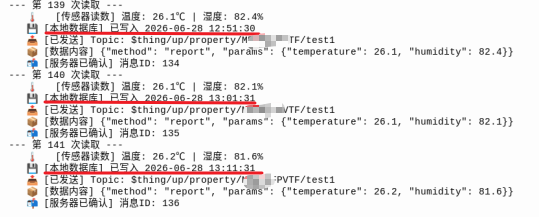
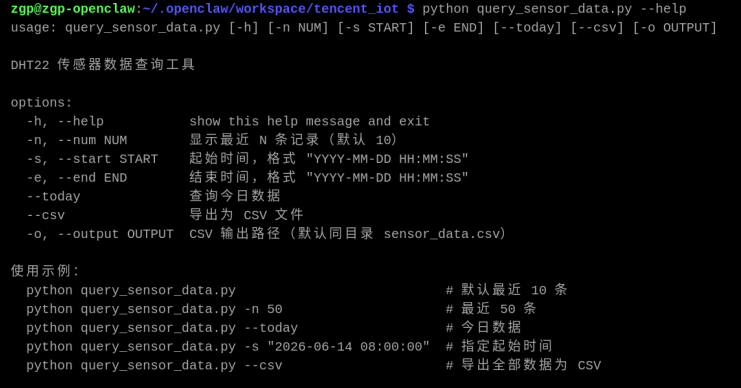
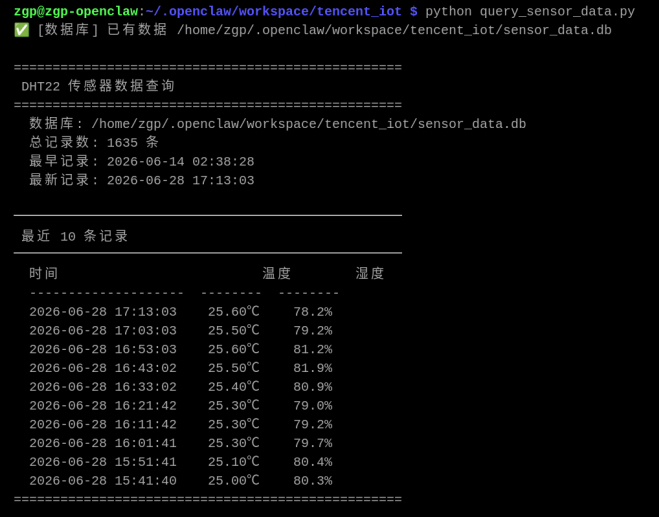
(三)数据库DHT22 传感器数据查询脚本
文件名称为query_sensor_data.py
功能说明:
- 读取 sensor_data.db 中的传感器数据并展示
- 支持:最近N条、时间段查询、平均统计、导出CSV
- 复用 dht22_db.py 模块,不重复数据库逻辑
python
运行方式:
   cd /home/zgp/.openclaw/workspace/tencent_iot
   source venv/bin/activate

   # 默认显示最近 10 条
   python query_sensor_data.py

   # 显示最近 20 条
   python query_sensor_data.py -n 20

   # 查询指定时间段
   python query_sensor_data.py -s "2026-06-14 00:00:00" -e "2026-06-14 23:59:59"

   # 显示今日统计
   python query_sensor_data.py --today

   # 导出为 CSV 文件
   python query_sensor_data.py --csv

   # 导出指定时间段为 CSV
   python query_sensor_data.py -s "2026-06-14 00:00:00" -e "2026-06-14 23:59:59" --csv
python
import argparse
import sys
import os
from datetime import datetime

# ---- 复用数据库模块 ----
from dht22_db import Dht22Database


def print_rows(rows):
    """格式化打印数据行"""
    if not rows:
        print("  (无数据)")
        return

    # 表头
    print(f"  {'时间':20s}  {'温度':>8s}  {'湿度':>8s}")
    print(f"  {'-'*20}  {'-'*8}  {'-'*8}")

    for r in rows:
        print(f"  {r['recorded_at']}  {r['temperature']:>7.2f}℃  {r['humidity']:>7.1f}%")


def print_summary(db, start=None, end=None, label=""):
    """打印统计摘要"""
    if start and end:
        total = db.count_range(start, end)
        avg = db.avg_range(start, end)
    else:
        total = db.count_all()
        avg = None

    if label:
        print(f"\n{'='*50}")
        print(f" {label}")
        print(f"{'='*50}")

    print(f"  总记录数: {total} 条")

    if total == 0:
        print(f"  (暂无数据)")
        return

    # 时间范围
    tr = db.get_time_range()
    if tr:
        print(f"  最早记录: {tr['earliest']}")
        print(f"  最新记录: {tr['latest']}")

    # 平均温湿度
    if avg and avg['avg_temperature'] is not None:
        print(f"  平均温度: {avg['avg_temperature']}℃")
        print(f"  平均湿度: {avg['avg_humidity']}%")


def export_csv(rows, csv_path):
    """导出数据为 CSV 文件"""
    if not rows:
        print("⚠️  没有数据可导出")
        return

    with open(csv_path, "w", encoding="utf-8") as f:
        f.write("时间,温度(℃),湿度(%RH)\n")
        for r in rows:
            f.write(f"{r['recorded_at']},{r['temperature']},{r['humidity']}\n")

    print(f"✅ 已导出 {len(rows)} 条记录到 {csv_path}")


def get_today_range():
    """获取今天的时间范围"""
    today = datetime.now().strftime("%Y-%m-%d")
    return f"{today} 00:00:00", f"{today} 23:59:59"


def main():
    parser = argparse.ArgumentParser(
        description="DHT22 传感器数据查询工具",
        formatter_class=argparse.RawDescriptionHelpFormatter,
        epilog="""
使用示例:
  python query_sensor_data.py                           # 默认最近 10 条
  python query_sensor_data.py -n 50                     # 最近 50 条
  python query_sensor_data.py --today                   # 今日数据
  python query_sensor_data.py -s "2026-06-14 08:00:00"  # 指定起始时间
  python query_sensor_data.py --csv                     # 导出全部数据为 CSV
        """
    )

    parser.add_argument("-n", "--num", type=int, default=10,
                        help="显示最近 N 条记录(默认 10)")
    parser.add_argument("-s", "--start", type=str, default=None,
                        help='起始时间,格式 "YYYY-MM-DD HH:MM:SS"')
    parser.add_argument("-e", "--end", type=str, default=None,
                        help='结束时间,格式 "YYYY-MM-DD HH:MM:SS"')
    parser.add_argument("--today", action="store_true",
                        help="查询今日数据")
    parser.add_argument("--csv", action="store_true",
                        help="导出为 CSV 文件")
    parser.add_argument("-o", "--output", type=str, default=None,
                        help="CSV 输出路径(默认同目录 sensor_data.csv)")

    args = parser.parse_args()

    # 初始化数据库(自动定位到脚本同目录)
    db = Dht22Database()

    # ---- 确定查询范围 ----
    if args.today:
        start, end = get_today_range()
    elif args.start or args.end:
        start = args.start or "2000-01-01 00:00:00"
        end = args.end or "2099-12-31 23:59:59"
    else:
        start = None
        end = None

    # ---- 查询数据 ----
    if start and end:
        rows = db.query_range(start, end)
        label = f"查询结果 ({start} ~ {end})"
    else:
        rows = db.query_recent(args.num)
        label = f"最近 {args.num} 条记录"

    # ---- CSV 导出 ----
    if args.csv:
        csv_path = args.output or os.path.join(
            os.path.dirname(os.path.abspath(__file__)), "sensor_data.csv"
        )
        # CSV 导出时取全部数据(如果没指定时间范围)
        if not start and not end:
            rows = db.query_recent(999999)  # 取全部
        export_csv(rows, csv_path)
        return

    # ---- 打印结果 ----
    print(f"\n{'='*50}")
    print(f" DHT22 传感器数据查询")
    print(f"{'='*50}")
    print(f"  数据库: {db.db_path}")

    # 打印统计
    print_summary(db, start, end)

    # 打印数据
    print(f"\n{'─'*50}")
    print(f" {label}")
    print(f"{'─'*50}")
    print_rows(rows)

    print(f"{'='*50}\n")


if __name__ == "__main__":
    main()