在Gin框架中可以使用gin.Context对象的String() JSON() XML() HTML() FILE()等方法生成Http响应.
1.字符串响应请求:
vbscript
func response() {
	request := gin.Default()
	request.GET("/stringResponse", func(context *gin.Context) {
		context.String(http.StatusOK, "hello string response")
	})
}
通过string方法发送了200状态码和字符串给客户端.
2.动态字符串响应:
vbscript
func response() {

	response := "动态响应"
	request := gin.Default()
	request.GET("/stringResponse", func(context *gin.Context) {
		context.String(http.StatusOK, "hello %s", response)
	})
}
响应字符串包含了response的值.实现了动态内容输出.
3.HTML方式响应:
go
package main

import (
	"github.com/gin-gonic/gin"
	"net/http"
	"strings"
)

func main() {
	request := gin.Default()
	request.GET("/hi_html", func(c *gin.Context) {
		htmlContent := "<h1>Hi,this an html response</h1>"
		c.Data(http.StatusOK, "text/html; charset=utf-8", []byte(htmlContent))
	})

	request.Run()

}
执行结果:

4.json格式响应请求:
go
package main

import (
	"github.com/gin-gonic/gin"
	"net/http"
	"strings"
)

func main() {
	request := gin.Default()
	request.GET("/hi_json", func(c *gin.Context) {
		jsonData := gin.H{
			"message": "hello world",
			"status":  200,
		}
		c.JSON(http.StatusOK, jsonData)
	})

	request.Run()

}
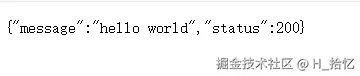
执行结果:
5.Go结构体Json响应:
go
package main

import (
	"github.com/gin-gonic/gin"
	"net/http"
	"strings"
)

func main() {
	request := gin.Default()
	request.GET("/hi_json", func(c *gin.Context) {
		jsonData := JsonData{
			Message: "Hello World!",
			Status:  200,
		}
		c.JSON(http.StatusOK, jsonData)
	})

	request.Run()

}

type JsonData struct {
	Message string `json:"message"`
	Status  int    `json:"status"`
}
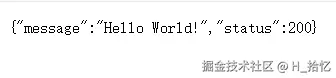
执行结果:
6.XML格式响应:
go
package main

import (
	"github.com/gin-gonic/gin"
	"net/http"
	"strings"
)

func main() {
	request := gin.Default()
	request.GET("/hi_xml", func(c *gin.Context) {
		xmlData := gin.H{
			"message": "hello xml",
			"status":  200,
		}
		c.XML(http.StatusOK, xmlData)
	})

	request.Run()

}
执行结果:

7.结构体定义XML响应:
go
package main

import (
	"github.com/gin-gonic/gin"
	"net/http"
	"strings"
)

func main() {
	request := gin.Default()
	request.GET("/hi_xml", func(c *gin.Context) {
		xmlData := JsonData{
			Message: "Hello World!",
			Status:  200,
		}
		c.XML(http.StatusOK, xmlData)
	})

	request.Run()

}
8.设置Http响应头:
gin.Context对象的Header方法用于设置单个响应头.该方法接收两个参数,响应头名称和对应的值:
go
package main

import (
	"github.com/gin-gonic/gin"
	"net/http"
	"strings"
)

func main() {
	request := gin.Default()
	request.GET("/hi_header", func(c *gin.Context) {
		c.Header("X-Custom-Header", "this is a custom header")
		c.String(http.StatusOK, "this is a custom header")
	})
	request.Run()
}
9.设置多个响应头:
可以通过多次调用Header方法来设置多个响应头.
css
package main

import (
	"github.com/gin-gonic/gin"
	"net/http"
	"strings"
)

func main() {
	request := gin.Default()
	request.GET("/hi_header", func(c *gin.Context) {
		c.Header("X-Custom-Header-One", "this is a custom header")
		c.Header("X-Custom-Header-Two", "this is a custom header")
		c.Header("X-Custom-Header-Three", "this is a custom header")
		c.String(http.StatusOK, "this is a custom header")
	})
	request.Run()
}
10.重定向设置响应头:
在执行重定向之前,使用gin.Context对象的Header方法设置响应头,然后使用Redirect进行重定向.
go
package main

import (
	"github.com/gin-gonic/gin"
	"net/http"
	"strings"
)

func main() {
	request := gin.Default()
	request.GET("/hi_header", func(c *gin.Context) {
		c.Header("Content-Type", "text/html; charset=utf-8")
		c.Redirect(http.StatusTemporaryRedirect, "http://www.google.com")
	})
	request.Run()
}