目录
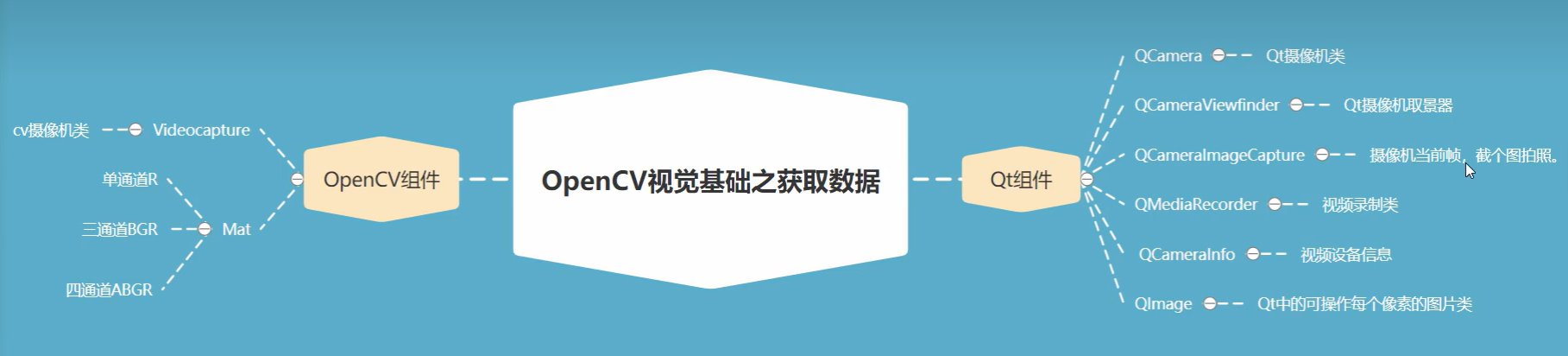
获取摄像头数据的方式有两种,一种调用opencv组件接口,一种是qt组件,当前我们介绍用qt组件实现摄像图获取数据,用opencv来处理数据,实现qt与opencv结合。
介绍:
获取摄像头数据的方式有两种,一种调用opencv组件接口,一种是qt组件,当前我们介绍用qt组件实现摄像图获取数据,用opencv来处理数据,实现qt与opencv结合。
示例源码:
pro文件:
QT       += core gui multimedia multimediawidgets

greaterThan(QT_MAJOR_VERSION, 4): QT += widgets

CONFIG += c++11

# The following define makes your compiler emit warnings if you use
# any Qt feature that has been marked deprecated (the exact warnings
# depend on your compiler). Please consult the documentation of the
# deprecated API in order to know how to port your code away from it.
DEFINES += QT_DEPRECATED_WARNINGS

# You can also make your code fail to compile if it uses deprecated APIs.
# In order to do so, uncomment the following line.
# You can also select to disable deprecated APIs only up to a certain version of Qt.
#DEFINES += QT_DISABLE_DEPRECATED_BEFORE=0x060000    # disables all the APIs deprecated before Qt 6.0.0

# OpenCV头文件
INCLUDEPATH += "D:/Program Files/opencv/opencv-4.5.1/install/include"
# Debug vc14 动态库
LIBS += -L"D:/Program Files/opencv/opencv-4.5.1/install/x64/vc14/lib" -lopencv_world451d

# 强制统一为 MDd 动态调试运行库(和Qt、OpenCV同步)
QMAKE_CXXFLAGS_DEBUG += /MDd
QMAKE_CFLAGS_DEBUG += /MDd
# 排除静态CRT冲突库
QMAKE_LFLAGS_DEBUG += /NODEFAULTLIB:libcmtd.lib

SOURCES += \
    convert.cpp \
    main.cpp \
    mainwindow.cpp

HEADERS += \
    convert.h \
    mainwindow.h

FORMS += \
    mainwindow.ui

# Default rules for deployment.
qnx: target.path = /tmp/$${TARGET}/bin
else: unix:!android: target.path = /opt/$${TARGET}/bin
!isEmpty(target.path): INSTALLS += target
main.cpp
#include "mainwindow.h"

#include <QApplication>

int main(int argc, char *argv[])
{
    QApplication a(argc, argv);
    MainWindow w;
    w.show();
    return a.exec();
}
mainwindow.h
#ifndef MAINWINDOW_H
#define MAINWINDOW_H

#include <QMainWindow>
#include <QCamera>
#include <QCameraInfo>
#include <qcameraimagecapture.h>
#include <qmediarecorder.h>
#include <qcameraviewfinder.h>
#include <QHBoxLayout>
#include <opencv2/opencv.hpp>
#include <convert.h>
#include <QMediaMetaData>
using namespace cv;
#include <iostream>
using namespace  std;

QT_BEGIN_NAMESPACE
namespace Ui { class MainWindow; }
QT_END_NAMESPACE

class MainWindow : public QMainWindow
{
    Q_OBJECT

public:
    MainWindow(QWidget *parent = nullptr);
    ~MainWindow();

private slots:
    void on_pushButton_clicked();

    void on_pushButton_2_clicked();

    void on_pushButton_3_clicked();

    void on_pushButton_4_clicked();

private:
    Ui::MainWindow *ui;
    QCamera* camera;
    QCameraViewfinder* videfinder;
    QCameraImageCapture* imageCapture;
    QHBoxLayout* videolayout;
};
#endif // MAINWINDOW_H
mainwindow.cpp
#include "mainwindow.h"
#include "ui_mainwindow.h"
#include <qdebug.h>
#include <qmessagebox.h>
#include <qfiledialog.h>

MainWindow::MainWindow(QWidget *parent)
    : QMainWindow(parent)
    , ui(new Ui::MainWindow)
{
    ui->setupUi(this);

    QString videoName = QCameraInfo::defaultCamera().deviceName();
    ui->comboBox->addItem(videoName);
    qDebug()<<videoName;
    videolayout = new QHBoxLayout(this);
    ui->groupBox->setLayout(videolayout);
    //初始化类中的对象指针
    camera = nullptr;
    videfinder = nullptr;
    imageCapture = nullptr;


}

MainWindow::~MainWindow()
{
    delete ui;
}


void MainWindow::on_pushButton_clicked()
{
    camera = new QCamera;
    videfinder = new QCameraViewfinder;
    videolayout->addWidget(videfinder);
    camera->setViewfinder(videfinder);
    //开启摄像头
    camera->start();

}

void MainWindow::on_pushButton_2_clicked()
{
    if(camera ==nullptr&& videfinder == nullptr)
    {
        return;
    }
    camera->stop();
    camera->unload();
    camera->deleteLater();
    videfinder->deleteLater();
    camera= nullptr;
    videfinder = nullptr;
}

void MainWindow::on_pushButton_3_clicked()//抓拍
{
    if(camera ==nullptr)
    {
        QMessageBox::information(this,"tixing","open camear");
        return;
    }
    imageCapture = new QCameraImageCapture(camera, this);
    camera->setCaptureMode(QCamera::CaptureStillImage);
    camera->searchAndLock();//针对多线程情况下拍照安全。
    imageCapture->capture();
    connect(imageCapture, &QCameraImageCapture::imageCaptured, [&](int id, const QImage& recv){
         QSize size =ui->label_2->size();
         //qt实现
          // ui->label_2->setPixmap(QPixmap::fromImage(recv.scaled(size)));


           //由Qimage转MAT
         Mat mat = convert::imageToMat(std::move((QImage&)recv));
         //有这个mat数字阵列对象,我们是不是可以加入一些opencv的算法。
         //。。。。一系列处理动作


         //。。经过一系列的opencv处理后,然后转qImage
         QImage temp = convert::matToImage(mat);
         ui->label_2->setPixmap(QPixmap::fromImage(temp.scaled(size)));
    });
    camera->unlock();

}

void MainWindow::on_pushButton_4_clicked()//保存图片
{
    if(imageCapture == nullptr)
    {
        QMessageBox::information(this,"提示","请先拍照");
        return;
    }
    QString filename = QFileDialog::getSaveFileName(this,"save","./",".jpg;;.png;;.jpeg;;.dmp");
    if(filename.isNull())
    {
        return;
    }
    imageCapture->capture(filename);
}
mainwindow.ui
<?xml version="1.0" encoding="UTF-8"?>
<ui version="4.0">
 <class>MainWindow</class>
 <widget class="QMainWindow" name="MainWindow">
  <property name="geometry">
   <rect>
    <x>0</x>
    <y>0</y>
    <width>626</width>
    <height>600</height>
   </rect>
  </property>
  <property name="windowTitle">
   <string>MainWindow</string>
  </property>
  <widget class="QWidget" name="centralwidget">
   <widget class="QGroupBox" name="groupBox">
    <property name="geometry">
     <rect>
      <x>20</x>
      <y>30</y>
      <width>261</width>
      <height>201</height>
     </rect>
    </property>
    <property name="title">
     <string>摄像头</string>
    </property>
   </widget>
   <widget class="QGroupBox" name="groupBox_2">
    <property name="geometry">
     <rect>
      <x>20</x>
      <y>240</y>
      <width>271</width>
      <height>211</height>
     </rect>
    </property>
    <property name="title">
     <string>拍照显示</string>
    </property>
    <widget class="QLabel" name="label_2">
     <property name="geometry">
      <rect>
       <x>40</x>
       <y>40</y>
       <width>191</width>
       <height>141</height>
      </rect>
     </property>
     <property name="text">
      <string>TextLabel</string>
     </property>
    </widget>
   </widget>
   <widget class="QGroupBox" name="groupBox_3">
    <property name="geometry">
     <rect>
      <x>300</x>
      <y>90</y>
      <width>261</width>
      <height>141</height>
     </rect>
    </property>
    <property name="title">
     <string>抓拍功能</string>
    </property>
    <widget class="QPushButton" name="pushButton">
     <property name="geometry">
      <rect>
       <x>20</x>
       <y>30</y>
       <width>75</width>
       <height>23</height>
      </rect>
     </property>
     <property name="text">
      <string>开启摄像头</string>
     </property>
    </widget>
    <widget class="QPushButton" name="pushButton_2">
     <property name="geometry">
      <rect>
       <x>120</x>
       <y>30</y>
       <width>75</width>
       <height>23</height>
      </rect>
     </property>
     <property name="text">
      <string>关闭摄像头</string>
     </property>
    </widget>
    <widget class="QPushButton" name="pushButton_3">
     <property name="geometry">
      <rect>
       <x>30</x>
       <y>70</y>
       <width>75</width>
       <height>23</height>
      </rect>
     </property>
     <property name="text">
      <string>抓拍</string>
     </property>
    </widget>
    <widget class="QPushButton" name="pushButton_4">
     <property name="geometry">
      <rect>
       <x>120</x>
       <y>70</y>
       <width>75</width>
       <height>23</height>
      </rect>
     </property>
     <property name="text">
      <string>保存图片</string>
     </property>
    </widget>
   </widget>
   <widget class="QGroupBox" name="groupBox_4">
    <property name="geometry">
     <rect>
      <x>310</x>
      <y>240</y>
      <width>271</width>
      <height>211</height>
     </rect>
    </property>
    <property name="title">
     <string>录制功能</string>
    </property>
    <widget class="QPushButton" name="pushButton_5">
     <property name="geometry">
      <rect>
       <x>20</x>
       <y>40</y>
       <width>75</width>
       <height>23</height>
      </rect>
     </property>
     <property name="text">
      <string>开始录制</string>
     </property>
    </widget>
    <widget class="QPushButton" name="pushButton_6">
     <property name="geometry">
      <rect>
       <x>110</x>
       <y>40</y>
       <width>71</width>
       <height>23</height>
      </rect>
     </property>
     <property name="text">
      <string>暂停录制</string>
     </property>
    </widget>
    <widget class="QPushButton" name="pushButton_7">
     <property name="geometry">
      <rect>
       <x>20</x>
       <y>80</y>
       <width>75</width>
       <height>23</height>
      </rect>
     </property>
     <property name="text">
      <string>停止录制</string>
     </property>
    </widget>
    <widget class="QPushButton" name="pushButton_8">
     <property name="geometry">
      <rect>
       <x>110</x>
       <y>80</y>
       <width>75</width>
       <height>23</height>
      </rect>
     </property>
     <property name="text">
      <string>保存录制</string>
     </property>
    </widget>
   </widget>
   <widget class="QLabel" name="label">
    <property name="geometry">
     <rect>
      <x>320</x>
      <y>40</y>
      <width>71</width>
      <height>16</height>
     </rect>
    </property>
    <property name="text">
     <string>摄像头信息</string>
    </property>
   </widget>
   <widget class="QComboBox" name="comboBox">
    <property name="geometry">
     <rect>
      <x>420</x>
      <y>40</y>
      <width>131</width>
      <height>22</height>
     </rect>
    </property>
   </widget>
  </widget>
  <widget class="QMenuBar" name="menubar">
   <property name="geometry">
    <rect>
     <x>0</x>
     <y>0</y>
     <width>626</width>
     <height>22</height>
    </rect>
   </property>
  </widget>
  <widget class="QStatusBar" name="statusbar"/>
 </widget>
 <resources/>
 <connections/>
</ui>convert.h#ifndef CONVERT_H
#define CONVERT_H
#include <opencv2/opencv.hpp>
#include <QObject>
#include <qimage.h>
#include <qdebug.h>
using namespace cv;
class convert : public QObject
{
Q_OBJECT
public:
explicit convert(QObject *parent = nullptr);
//image 转 Mat阵列
static Mat imageToMat(QImage&& image);
//Mat 转 QImage
static QImage matToImage(Mat mat);
signals:
};
#endif // CONVERT_Hconvert.cpp
#include "convert.h"

convert::convert(QObject *parent) : QObject(parent)
{

}

Mat convert::imageToMat(QImage &&image)
{
    image = image.convertToFormat(QImage::Format_RGB888);
    Mat mat(image.height(),image.width(),CV_8UC3,(uchar*)image.bits(),image.bytesPerLine());
    cvtColor(mat,mat,COLOR_RGB2BGR);
    qDebug()<<"image to mat";
    return mat;
}
QImage convert::matToImage(Mat mat)
{
    cvtColor(mat,mat,COLOR_BGR2RGB);
    QImage image(mat.data,mat.cols,mat.rows,mat.step,QImage::Format_RGB888);
    qDebug()<<"mat to image";
    return image;
}
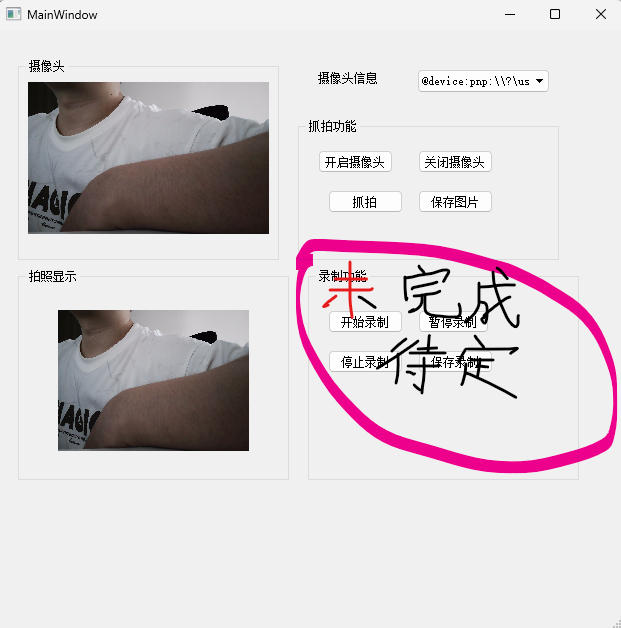
界面展示(录制功能未完成待定)