项目地址:https://gitee.com/CodeMao01/harness-agentscope-learn
框架介绍:https://java.agentscope.io/v1/zh/blogs/agentscope-v1-harness.html、
一、项目搭建
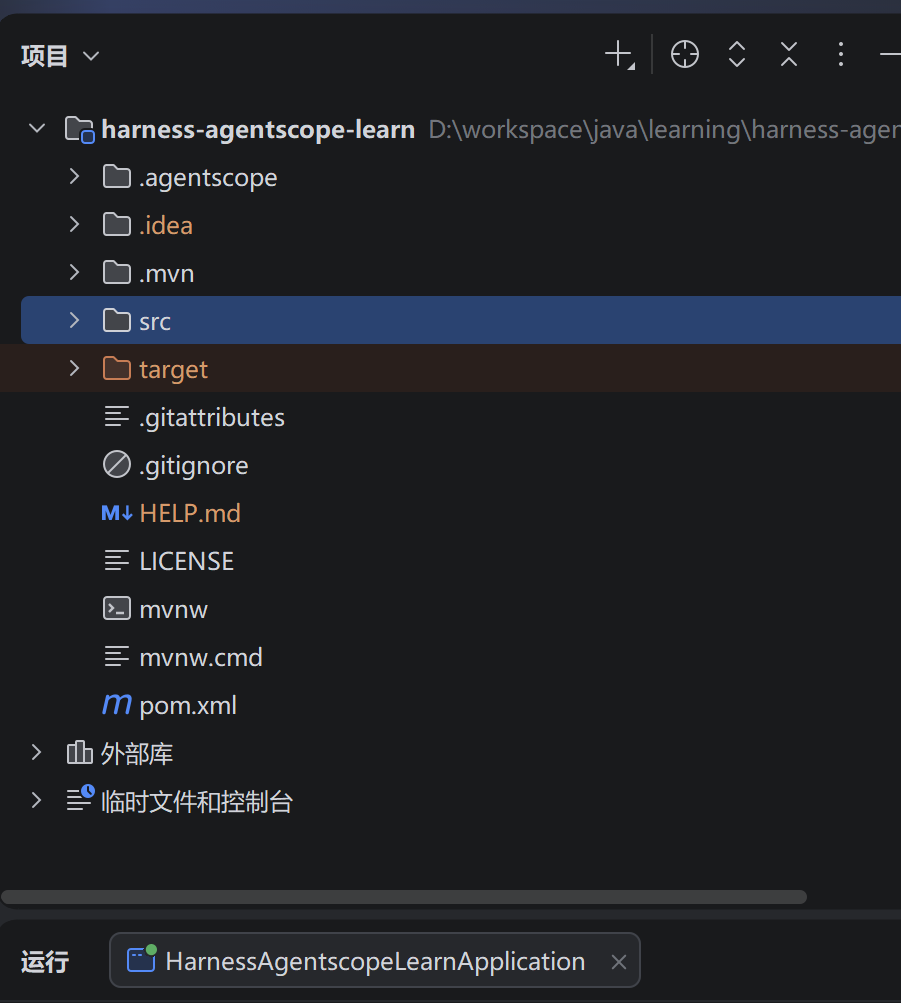
- pom.xml
xml
<?xml version="1.0" encoding="UTF-8"?>
<project xmlns="http://maven.apache.org/POM/4.0.0" xmlns:xsi="http://www.w3.org/2001/XMLSchema-instance"
  xsi:schemaLocation="http://maven.apache.org/POM/4.0.0 https://maven.apache.org/xsd/maven-4.0.0.xsd">
  <modelVersion>4.0.0</modelVersion>
  <parent>
    <groupId>org.springframework.boot</groupId>
    <artifactId>spring-boot-starter-parent</artifactId>
    <version>4.1.0</version>
    <relativePath/> <!-- lookup parent from repository -->
  </parent>
  <groupId>com.example</groupId>
  <artifactId>harness-agentscope-learn</artifactId>
  <version>0.0.1-SNAPSHOT</version>
  <name>harness-agentscope-learn</name>
  <description>harness-agentscope-learn</description>
  <properties>
    <java.version>25</java.version>
    <agentscope.version>1.1.0-RC2</agentscope.version>
  </properties>
  <dependencies>

    <dependency>
      <groupId>org.springframework.boot</groupId>
      <artifactId>spring-boot-starter-web</artifactId>
    </dependency>

    <dependency>
      <groupId>io.agentscope</groupId>
      <artifactId>agentscope-harness</artifactId>
      <version>${agentscope.version}</version>
    </dependency>

    <dependency>
      <groupId>io.github.cdimascio</groupId>
      <artifactId>dotenv-java</artifactId>
      <version>3.2.0</version>
    </dependency>

    <dependency>
      <groupId>org.projectlombok</groupId>
      <artifactId>lombok</artifactId>
      <scope>provided</scope>
    </dependency>

  </dependencies>

  <build>
    <plugins>
      <plugin>
        <groupId>org.springframework.boot</groupId>
        <artifactId>spring-boot-maven-plugin</artifactId>
      </plugin>
    </plugins>
  </build>

</project>- 创建HarnessAgent
java
package com.example.harnessagentscopelearn;

import io.agentscope.core.agent.RuntimeContext;
import io.agentscope.core.message.Msg;
import io.agentscope.core.model.DashScopeChatModel;
import io.agentscope.core.model.OllamaChatModel;
import io.agentscope.core.model.ollama.OllamaOptions;
import io.agentscope.core.model.ollama.ThinkOption;
import io.agentscope.harness.agent.HarnessAgent;
import io.github.cdimascio.dotenv.Dotenv;
import org.springframework.boot.SpringApplication;
import org.springframework.boot.autoconfigure.SpringBootApplication;

import java.nio.file.Path;
import java.nio.file.Paths;

//@SpringBootApplication
public class HarnessAgentscopeLearnApplication {

    public static void main(String[] args) {
//        SpringApplication.run(HarnessAgentscopeLearnApplication.class, args);

        Dotenv.configure().ignoreIfMissing().systemProperties().load();

        // workspace存储位置
        Path workspace = Paths.get(".agentscope/workspace");

        // 创建模型
        DashScopeChatModel model = DashScopeChatModel.builder()
                .modelName(System.getProperty("DASHSCOPE_MODEL_NAME"))
                .apiKey(System.getenv("DASHSCOPE_KEY"))
                .build();
        // 会报空指针 后面等正式版发布应该会解决
//        OllamaChatModel model = OllamaChatModel.builder()
//                .modelName("qwen3.5:0.8b")
//                .defaultOptions(OllamaOptions.builder()
//                        .thinkOption(ThinkOption.ThinkBoolean.DISABLED).build())
//                .build();

        // 创建harness agent
        HarnessAgent agent = HarnessAgent.builder()
                .name("quickstart-harness")
                .model(model)
                .workspace(workspace)
                .enableAgentTracingLog(false)
                .build();

        // userId + sessionId 作为隔离对象
        RuntimeContext ctx = RuntimeContext.builder()
                .userId("userId_1")
                .sessionId("sessionId_2")
                .build();

        Msg msg = agent.call(Msg.builder().textContent("我是大帅哥, 我喜欢看电影").build(), ctx).block();
        System.out.println("Assistant: " + msg.getTextContent());


        Msg msg1 = agent.call(Msg.builder().textContent("你知道我的爱好嘛?").build(), ctx).block();
        System.out.println("Assistant1: " + msg1.getTextContent());


    }

}
二、初始化AGENT.md和agent常见参数
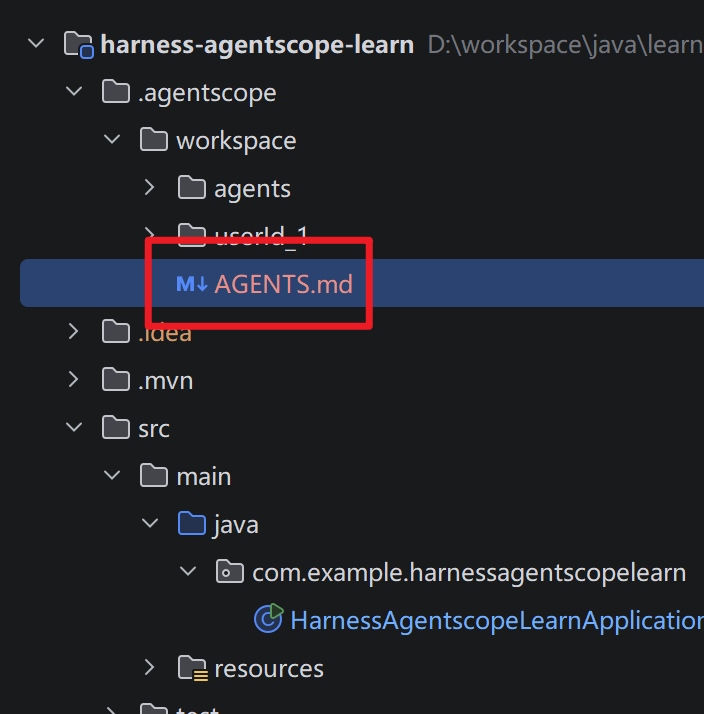
java
package com.example.harnessagentscopelearn;

import io.agentscope.core.agent.RuntimeContext;
import io.agentscope.core.message.Msg;
import io.agentscope.core.model.DashScopeChatModel;
import io.agentscope.harness.agent.HarnessAgent;
import io.agentscope.harness.agent.filesystem.spec.LocalFilesystemSpec;
import io.agentscope.harness.agent.memory.compaction.CompactionConfig;
import io.agentscope.harness.agent.memory.compaction.ToolResultEvictionConfig;
import io.github.cdimascio.dotenv.Dotenv;

import java.io.IOException;
import java.nio.file.Files;
import java.nio.file.Path;
import java.nio.file.Paths;

//@SpringBootApplication
public class HarnessAgentscopeLearnApplication {

    public static void main(String[] args) throws IOException {
//        SpringApplication.run(HarnessAgentscopeLearnApplication.class, args);

        Dotenv.configure().ignoreIfMissing().systemProperties().load();

        // workspace存储位置
        Path workspace = Paths.get(".agentscope/workspace");

        // 初始化 AGNET.md
        initWorkspaceIfAbsent(workspace);

        // 创建模型
        DashScopeChatModel model = DashScopeChatModel.builder()
                .modelName(System.getProperty("DASHSCOPE_MODEL_NAME"))
                .apiKey(System.getenv("DASHSCOPE_KEY"))
                .build();
        // 会报空指针 后面等正式版发布应该会解决
//        OllamaChatModel model = OllamaChatModel.builder()
//                .modelName("qwen3.5:0.8b")
//                .defaultOptions(OllamaOptions.builder()
//                        .thinkOption(ThinkOption.ThinkBoolean.DISABLED).build())
//                .build();

        // 创建harness agent
        HarnessAgent agent = HarnessAgent.builder()
                .name("quickstart-harness")
                .model(model)
                .workspace(workspace)
                .enableAgentTracingLog(false)
                // 压缩
                .compaction(CompactionConfig.builder()
                        // 压缩阈值 消息超过30条就压缩
                        .triggerMessages(30)
                        // 保留最近的10条消息 不压缩
                        .keepMessages(10)
                        // 压缩前 磁盘持久化
                        .flushBeforeCompact(true)
                        // 压缩前 如果超过内存大小先压缩
                        .offloadBeforeCompact(true)
                        .build())
                // 如果工具返回的内容很多则进行裁剪 只保留前后2000行 剩下的存储到次方当中
                .toolResultEviction(ToolResultEvictionConfig.defaults())
                // 本地文件沙箱 超过2分钟则终止
                .filesystem(new LocalFilesystemSpec().executeTimeoutSeconds(120))
                .build();

        // userId + sessionId 作为隔离对象
        RuntimeContext ctx = RuntimeContext.builder()
                .userId("userId_1")
                .sessionId("sessionId_2")
                .build();

        Msg msg = agent.call(Msg.builder().textContent("我是大帅哥, 我喜欢看电影").build(), ctx).block();
        System.out.println("Assistant: " + msg.getTextContent());


        Msg msg1 = agent.call(Msg.builder().textContent("你知道我的爱好嘛?").build(), ctx).block();
        System.out.println("Assistant1: " + msg1.getTextContent());

    }

    /**
     * 初始化 AGENT.md 这是harness的人物画像
     *
     * @param workspace
     * @throws IOException
     */
    private static void initWorkspaceIfAbsent(Path workspace) throws IOException {
        // 如果Path对应的文件夹不存在,则创建
        Files.createDirectories(workspace);
        // 获取AGENT.md文件路径
        Path agentPath = workspace.resolve("AGENTS.md");
        // 如果AGENT.md文件存在,则返回
        if (Files.exists(agentPath)) return;
        Files.writeString(agentPath, """
                你是一个乐于助人的助手
                """);
    }

}
三、文件系统
3.1、操作本地文件系统(如上面的.fileSystem)
3.2、操作远程文件系统
定义:内存存储、内存session、RemoteFilesystemSpec
java
package com.example.harnessagentscopelearn;

import io.agentscope.core.agent.RuntimeContext;
import io.agentscope.core.message.Msg;
import io.agentscope.core.model.DashScopeChatModel;
import io.agentscope.core.session.InMemorySession;
import io.agentscope.harness.agent.HarnessAgent;
import io.agentscope.harness.agent.IsolationScope;
import io.agentscope.harness.agent.filesystem.spec.RemoteFilesystemSpec;
import io.agentscope.harness.agent.memory.compaction.CompactionConfig;
import io.agentscope.harness.agent.memory.compaction.ToolResultEvictionConfig;
import io.agentscope.harness.agent.store.InMemoryStore;
import io.github.cdimascio.dotenv.Dotenv;

import java.io.IOException;

//@SpringBootApplication
public class RemoteFileSystemDemo {

    public static void main(String[] args) throws IOException {
        Dotenv.configure().ignoreIfMissing().systemProperties().load();

        // 创建模型
        DashScopeChatModel model = DashScopeChatModel.builder()
                .modelName(System.getProperty("DASHSCOPE_MODEL_NAME"))
                .apiKey(System.getenv("DASHSCOPE_KEY"))
                .build();

        // 远程文件系统
        InMemoryStore store = new InMemoryStore();
        RemoteFilesystemSpec remoteFilesystemSpec = new RemoteFilesystemSpec(store)
                // 隔离级别
                .isolationScope(IsolationScope.USER)
                .addSharedPrefix("knowledge/");

        // 创建 InMemorySession(分布式 Session)
        InMemorySession session = new InMemorySession();

        // 创建harness agent
        HarnessAgent agent = HarnessAgent.builder()
                .name("quickstart-harness")
                .model(model)
                .session(session)
                .enableAgentTracingLog(false)
                // 压缩
                .compaction(CompactionConfig.builder()
                        // 压缩阈值 消息超过30条就压缩
                        .triggerMessages(30)
                        // 保留最近的10条消息 不压缩
                        .keepMessages(10)
                        // 压缩前 磁盘持久化
                        .flushBeforeCompact(true)
                        // 压缩前 如果超过内存大小先压缩
                        .offloadBeforeCompact(true)
                        .build())
                // 如果工具返回的内容很多则进行裁剪 只保留前后2000行 剩下的存储到次方当中
                .toolResultEviction(ToolResultEvictionConfig.defaults())
                .filesystem(remoteFilesystemSpec)
                .build();

        // userId + sessionId 作为隔离对象
        RuntimeContext ctx = RuntimeContext.builder()
                .userId("userId_1")
                .sessionId("sessionId_2")
                .build();

        Msg msg = agent.call(Msg.builder().textContent("我是大帅哥, 我喜欢看电影").build(), ctx).block();
        System.out.println("Assistant: " + msg.getTextContent());


        Msg msg1 = agent.call(Msg.builder().textContent("你知道我的爱好嘛?").build(), ctx).block();
        System.out.println("Assistant1: " + msg1.getTextContent());

    }

}
3.3、沙箱文件系统
在docker容器里面运行 起到文件隔离的作用
java
package com.example.harnessagentscopelearn;

import io.agentscope.core.agent.RuntimeContext;
import io.agentscope.core.message.Msg;
import io.agentscope.core.model.DashScopeChatModel;
import io.agentscope.core.session.InMemorySession;
import io.agentscope.harness.agent.HarnessAgent;
import io.agentscope.harness.agent.IsolationScope;
import io.agentscope.harness.agent.filesystem.spec.DockerFilesystemSpec;
import io.agentscope.harness.agent.filesystem.spec.RemoteFilesystemSpec;
import io.agentscope.harness.agent.memory.compaction.CompactionConfig;
import io.agentscope.harness.agent.memory.compaction.ToolResultEvictionConfig;
import io.agentscope.harness.agent.sandbox.SandboxDistributedOptions;
import io.agentscope.harness.agent.store.InMemoryStore;
import io.github.cdimascio.dotenv.Dotenv;

import java.io.IOException;

//@SpringBootApplication
public class SendboxFileSystemDemo {

    public static void main(String[] args) throws IOException {
        Dotenv.configure().ignoreIfMissing().systemProperties().load();

        // 创建模型
        DashScopeChatModel model = DashScopeChatModel.builder()
                .modelName(System.getProperty("DASHSCOPE_MODEL_NAME"))
                .apiKey(System.getenv("DASHSCOPE_KEY"))
                .build();

        // 创建harness agent
        HarnessAgent agent = HarnessAgent.builder()
                .name("quickstart-harness")
                .model(model)
                .enableAgentTracingLog(false)
                // 压缩
                .compaction(CompactionConfig.builder()
                        // 压缩阈值 消息超过30条就压缩
                        .triggerMessages(30)
                        // 保留最近的10条消息 不压缩
                        .keepMessages(10)
                        // 压缩前 磁盘持久化
                        .flushBeforeCompact(true)
                        // 压缩前 如果超过内存大小先压缩
                        .offloadBeforeCompact(true)
                        .build())
                // 如果工具返回的内容很多则进行裁剪 只保留前后2000行 剩下的存储到次方当中
                .toolResultEviction(ToolResultEvictionConfig.defaults())
                // 原官方地址:docker.io/library/ubuntu
                // 加速地址:docker.1ms.run/library/ubuntu
                // 等价于 docker pull ubuntu22:04
                .filesystem(new DockerFilesystemSpec()
                        .image("docker.1ms.run/library/ubuntu"))
                // 关闭沙盒分布式
                .sandboxDistributed(SandboxDistributedOptions.builder().requireDistributed(false).build())
                .build();

        // userId + sessionId 作为隔离对象
        RuntimeContext ctx = RuntimeContext.builder()
                .userId("userId_1")
                .sessionId("sessionId_2")
                .build();

        Msg msg = agent.call(Msg.builder().textContent("我是大帅哥, 我喜欢看电影").build(), ctx).block();
        System.out.println("Assistant: " + msg.getTextContent());


        Msg msg1 = agent.call(Msg.builder().textContent("你知道我的爱好嘛?").build(), ctx).block();
        System.out.println("Assistant1: " + msg1.getTextContent());

    }

}