文章目录
-
- [线程基础(对应项目:Server.cpp 的 reader_thread_ 和 writer_thread_)](#线程基础(对应项目:Server.cpp 的 reader_thread_ 和 writer_thread_))
-
- [std::thread 创建](#std::thread 创建)
- [std::thread 的 join 与 detach](#std::thread 的 join 与 detach)
- [std::jthread (C++20) 的 RAII 优势](#std::jthread (C++20) 的 RAII 优势)
- 线程生命周期
- [线程函数:lambda vs 函数对象 vs 成员函数指针](#线程函数:lambda vs 函数对象 vs 成员函数指针)
- [互斥锁(对应项目:output_mutex_ 和 m_pluginsMutex)](#互斥锁(对应项目:output_mutex_ 和 m_pluginsMutex))
- [条件变量(对应项目:Server.cpp 的 WriterLoop)](#条件变量(对应项目:Server.cpp 的 WriterLoop))
-
- [std::condition_variable 用法](#std::condition_variable 用法)
- [wait() 的谓词形式](#wait() 的谓词形式)
- [notify_one() vs notify_all()](#notify_one() vs notify_all())
- [虚假唤醒(Spurious Wakeup)](#虚假唤醒(Spurious Wakeup))
- std::condition_variable_any (C++20)
- 项目中的生产者-消费者模式
- 原子操作
-
- [std::atomic<bool> 无锁标志](#std::atomic
无锁标志) - [std::atomic<int> 计数器](#std::atomic
计数器) - [memory_order 概念](#memory_order 概念)
- [volatile sig_atomic_t 信号安全变量](#volatile sig_atomic_t 信号安全变量)
- compare_exchange_strong/weak
- [std::atomic<bool> 无锁标志](#std::atomic
- Future/Promise
-
- [std::promise 设置值](#std::promise 设置值)
- [std::future 获取值](#std::future 获取值)
- [std::shared_future 多次获取](#std::shared_future 多次获取)
- [std::async 异步任务](#std::async 异步任务)
- [wait_for 超时等待](#wait_for 超时等待)
- 项目中的异步请求-响应匹配
- 项目并发模型全景
-
- [三线程架构图(以 ConnectAsync 模式为例)](#三线程架构图(以 ConnectAsync 模式为例))
- 数据流追踪:一个请求如何经过多个线程
- 锁竞争分析
- [无锁快照访问原理(GetPluginsSnapshot + shared_ptr)](#无锁快照访问原理(GetPluginsSnapshot + shared_ptr))
- 优雅停止的线程安全
- [常见并发 Bug 与调试](#常见并发 Bug 与调试)
-
- [数据竞争(Data Race)](#数据竞争(Data Race))
- 死锁(Deadlock)
- 忘记解锁(不再可能的问题)
- 条件变量丢失通知
- 从这段代码学到的并发最佳实践
- [补充:TSingleton 中的 call_once](#补充:TSingleton 中的 call_once)
线程基础(对应项目:Server.cpp 的 reader_thread_ 和 writer_thread_)
std::thread 创建
std::thread 是 C++11 引入的标准线程类。构造时传入一个可调用对象(函数指针、lambda、函数对象、成员函数指针),线程立即启动执行。构造完成即意味着线程开始运行。
MCP Server 项目中有三处典型的线程创建:
方式一:成员函数指针(最常用)
cpp
// Server.cpp:119 --- 创建一个运行成员函数 WriterLoop 的线程
writer_thread_ = std::thread(&Server::WriterLoop, this);语法要点:&Server::WriterLoop 是成员函数指针,this 是隐式第一个参数(对象实例)。成员函数指针写成 &ClassName::FunctionName,调用时编译器会自动处理 this 指针的传递。
方式二:lambda 表达式
cpp
// Server.cpp:177 --- 创建一个运行 lambda 的读取线程
reader_thread_ = std::thread([this]() {
    LOG(INFO) << "Async Reader thread started." << std::endl;
    while (reader_running_ && !isStopping_) {
        // ... 读取和处理的循环体
    }
    LOG(INFO) << "Async Reader thread exiting." << std::endl;
});
lambda [this]() 捕获 this 指针从而访问成员变量。lambda 方式适合线程体逻辑较为复杂、不想单拆成员函数,或者需要捕获多个局部变量([=] 或 [&] 捕获)的场景。
方式三:捕获局部变量的 lambda
cpp
// HttpStreamTransport.cpp:48 --- HTTP 服务器线程
server_thread_ = std::thread([this]() {
    LOG(INFO) << "Starting HttpStream server on " << host_ << ":" << port_ << std::endl;
    if (!server_->listen(host_.c_str(), port_)) {
        LOG(ERROR) << "Failed to start HttpStream server" << std::endl;
        server_running_.store(false);
    }
});
方式四:带值捕获的 lambda
cpp
// PluginsLoader.cpp:290 --- 文件监视线程,将参数以值传递方式捕获进线程
m_watchThread = std::thread(&PluginsLoader::WatchLoop, this, directory, interval);
这里 directory 和 interval 以值传递方式复制给成员函数参数。也可以用 lambda 写为:
cpp
m_watchThread = std::thread([this, directory, interval]() {
    WatchLoop(directory, interval);
});
std::thread 的 join 与 detach
线程对象析构时如果仍处于 joinable 状态(即未调用 join() 或 detach()),程序会调用 std::terminate() 崩溃。因此,每个 std::thread 对象在生命周期结束前,必做二选一:
join():阻塞当前线程,等待目标线程执行完毕。这是最安全、最常用的方式。项目中所有线程都使用 join。
cpp
// Server.cpp:238-241 --- 等待写线程完成
if (writer_thread_.joinable()) {
    writer_thread_.join();
    LOG(INFO) << "Writer thread joined." << std::endl;
}
cpp
// Server.cpp:518-522 (StopAsync) --- 同时等待读、写线程完成
reader_running_ = false;
if (reader_thread_.joinable()) {
    reader_thread_.join();
}
cpp
// HttpStreamTransport.cpp:74-76 --- 等待 HTTP 服务器线程
if (server_thread_.joinable()) {
    server_thread_.join();
}detach():分离线程,让它在后台独立运行。分离后无法再 join。项目中没有使用 detach。
joinable() 检查:在 join 前做 joinable() 检查是一种防御性编程习惯。虽然正常流程下线程一定是 joinable 的,但检查可以应对重复调用 Stop() 或异常路径等边缘情况。
std::jthread (C++20) 的 RAII 优势
C++20 引入了 std::jthread,它是 std::thread 的 RAII 增强版:
- 自动 join :jthread 析构时自动调用
join(),避免忘记 join 导致的std::terminate()崩溃。 - 内置停止令牌 :通过
std::stop_token/std::stop_source协作式停止线程,无需自己维护原子布尔标志。
本项目使用 C++20 标准编译但未使用 jthread,主要原因是项目需要精确控制停止时序(先停止服务线程、再停止读/写线程),而非依赖自动 join 的顺序。但理解 jthread 对把握项目中使用原子标志进行协作式停止的设计意图很重要。
如果项目使用 jthread 的等效写法:
cpp
// 替代 writer_thread_ + writer_running_ 的 jthread 版本
std::jthread writer_thread_;

// 线程函数接收 stop_token
void WriterLoop(std::stop_token token) {
    while (!token.stop_requested()) {
        // ... 等待条件变量时同时等待停止请求
    }
}

// 停止时:
writer_thread_.request_stop(); // 设置停止令牌
queue_cv_.notify_one();        // 唤醒等待线程
// jthread 析构自动 join
项目没有使用 jthread 而自己维护原子标志的原因是:需要 queue_cv_.wait() 的谓词同时检查队列非空和停止标志,这要求停止标志能被条件变量的谓词 lambda 捕获。jthread 的 stop_token 可以实现相同效果,但手动原子标志提供更灵活的停止语义(例如不同线程使用不同停止标志,以支持同步/异步两种模式的独立清理)。
线程生命周期
项目中线程的生命周期由以下几个成员变量控制:
| 线程名称 | 标志变量 | 创建位置 | 加入(join)位置 | 用途 |
|---|---|---|---|---|
| 写线程 (WriterThread) | writer_running_ (Server.h:118) |
Server.cpp:119 | Server.cpp:239 | 从通知队列取数据写入 transport |
| 读线程 (ReaderThread) | reader_running_ (Server.h:121) |
Server.cpp:177 | Server.cpp:520 | 异步模式:transport 读取 + 路由处理 |
| HTTP 线程 (ServerThread) | server_running_ (HttpStreamTransport.hpp:84) |
HttpStreamTransport.cpp:48 | HttpStreamTransport.cpp:75 | 运行 httplib HTTP 服务器事件循环 |
| SSE 线程 (ServerThread) | server_running_ (SseTransport.h:89) |
SseTransport.cpp:116 | SseTransport.cpp:143 | 运行 httplib HTTP 服务器事件循环 |
| 监视线程 (WatchThread) | m_watching (PluginsLoader.h:151) |
PluginsLoader.cpp:290 | PluginsLoader.cpp:294 | 每 5 秒扫描插件目录变化 |
线程生命周期图:

线程函数:lambda vs 函数对象 vs 成员函数指针
| 方式 | 示例 | 使用场景 |
|---|---|---|
| 成员函数指针 | std::thread(&Server::WriterLoop, this) |
线程体逻辑独立、可复用、需要访问多个成员 |
| lambda | std::thread([this]{ ... }) |
线程体逻辑简单、或需要捕获多个外部变量 |
| 函数对象 | std::thread(MyFunctor{}) |
需要状态化可调用对象(带成员变量) |
| 自由函数 | std::thread(my_free_function) |
纯逻辑无状态 |
项目中混合使用成员函数指针(WriterLoop、WatchLoop)和 lambda(读线程、HTTP 服务器线程),选择依据是线程逻辑的独立性和是否需要作为单独的测试单元。WriterLoop 和 WatchLoop 作为成员函数,可以被独立单元测试;而异步读线程的内联 lambda 与 ConnectAsync 的上下文紧密耦合,没有必要单独抽出。
互斥锁(对应项目:output_mutex_ 和 m_pluginsMutex)
std::mutex 基本用法
std::mutex 是最基本的互斥锁,提供两个核心操作:
lock():尝试获取锁,如果已有其他线程持有则阻塞等待。unlock():释放锁,允许等待的线程获取。
项目中直接使用 std::mutex 的位置:
| 互斥量 | 声明位置 | 保护对象 | 涉及线程 |
|---|---|---|---|
output_mutex_ |
Server.h:115 | notification_queue_ + transport_->Write() |
主线程(读-处理-写) + 写线程 |
incoming_mutex_ |
HttpStreamTransport.hpp:93 | incoming_messages_ |
HTTP工作线程 + Server(主线程) |
pending_mutex_ |
HttpStreamTransport.hpp:101 | pending_requests_ |
HTTP工作线程(读写) |
sse_mutex_ |
HttpStreamTransport.hpp:105 | sse_notifications_ |
HTTP工作线程 + SSE内容提供者 |
outgoing_mutex_ |
SseTransport.h:97 | outgoing_messages_ |
Server主线程 + SSE内容提供者 |
serverNotificationMutex |
main.cpp:49 | Server::SendNotification 的调用 | 各插件回调线程 + 插件变更回调 |
std::lock_guard -- RAII 守卫
std::lock_guard 是最简单的 RAII 锁守卫:构造时 lock(),析构时 unlock()。不可手动解锁,不可转移所有权。
项目中的典型用法 -- SendNotification (Server.cpp:257):
cpp
void Server::SendNotification(const std::string& pluginName, const char* notification) {
    if (isStopping_.load()) {
        LOG(WARNING) << pluginName << " attempted to send notification while server stopping." << std::endl;
        return;
    }

    // 加锁将通知入队,作用域结束自动解锁
    {
        std::lock_guard<std::mutex> lock(output_mutex_);
        notification_queue_.emplace(notification);
    }  // <-- lock_guard 析构,自动 unlock

    queue_cv_.notify_one();  // 在锁外通知,避免"惊群"效应
}
这里使用 { } 显式限定作用域是一个重要技巧:将 lock_guard 限制在最小代码块中,notify_one() 在锁外调用,避免被唤醒的线程又立即阻塞在锁上(称为"hurry up and wait"问题)。
项目中的另一处 -- main.cpp:62:
cpp
void ClientNotificationCallbackImpl(const char* pluginName, const char* notification) {
    std::lock_guard<std::mutex> lock(notificationState.serverNotificationMutex);
    if (server && server->IsValid()) {
        server->SendNotification(pluginName, notification);
    }
}
这里 notificationState 是文件作用域的全局变量 (main.cpp:48-51)。lock_guard 保护 server 在回调期间不被其他线程释放(配合 server 是 shared_ptr,在 main.cpp:40 声明)。
std::unique_lock -- 灵活锁
std::unique_lock 提供比 lock_guard 更多的灵活性:
- 延迟加锁 :构造时传入
std::defer_lock,稍后手动调用lock() - 提前解锁 :可主动调用
unlock(),不必等析构 - 尝试加锁 :
try_lock()非阻塞尝试 - 转移所有权 :支持移动语义(
lock_guard不可移动)
项目中的典型用法 -- WriterLoop (Server.cpp:65-103):
cpp
void Server::WriterLoop() {
    while (writer_running_.load()) {
        std::string notification_to_send;
        {
            std::unique_lock<std::mutex> lock(output_mutex_);
            // 条件变量 wait() 要求 unique_lock,因为 wait 内部需要多次 unlock/lock
            queue_cv_.wait(lock, [this] {
                return !notification_queue_.empty() || !writer_running_.load();
            });

            if (!writer_running_.load() && notification_queue_.empty()) {
                break;
            }

            if (!notification_queue_.empty()) {
                notification_to_send = std::move(notification_queue_.front());
                notification_queue_.pop();
            }
        } // <-- 释放锁,因为下面的 Write 可能阻塞

        if (!notification_to_send.empty() && transport_) {
            try {
                std::lock_guard<std::mutex> write_lock(output_mutex_);
                if (transport_) {
                    transport_->Write(notification_to_send);
                }
            } catch (const std::exception& e) {
                LOG(ERROR) << "Error writing notification: " << e.what() << std::endl;
            }
        }
        std::this_thread::sleep_for(std::chrono::milliseconds(1));
    }
}
这段代码展示了 unique_lock 的两个关键优势:
条件变量 cv.wait(lock, predicate)要求unique_lock参数(C++ 标准库的规定)- 取数据后释放锁(作用域结束),然后在锁外执行耗时的 IO 写操作,最后重新加锁做写入保护。如果用
lock_guard则无法手动控制解锁时机。
同一个锁两次出入:
注意这里 output_mutex_ 被同一个线程加锁了两次(先 unique_lock 取数据,后 lock_guard 做写保护)。这是合法的,因为两次加锁之间锁已释放(unique_lock 作用域结束),不是递归加锁。这展示了同一个锁在不同阶段分别保护的细粒度设计。
std::shared_mutex 读写锁(多读单写)
std::shared_mutex (C++17) 支持两种加锁模式:
- 排他锁(exclusive/write) :
lock()/unlock(),同一时刻仅一个线程持有,其他线程(无论读者还是写者)都阻塞。 - 共享锁(shared/read) :
lock_shared()/unlock_shared(),多个读者可同时持有,但写者阻塞等待所有读者释放。
项目中的核心应用 -- PluginsLoader.h:148:
cpp
std::vector<std::shared_ptr<PluginEntry>> m_plugins;
mutable std::shared_mutex m_pluginsMutex;
mutable 修饰符使得 m_pluginsMutex 可以在 const 成员函数中修改(加锁不算修改对象的逻辑状态)。
项目中的读锁(共享锁)-- GetPluginsSnapshot (PluginsLoader.cpp:248-251):
cpp
std::vector<std::shared_ptr<PluginEntry>> PluginsLoader::GetPluginsSnapshot() const {
    std::shared_lock lock(m_pluginsMutex);  // 共享锁,允许多个读者并发
    return m_plugins;  // 返回 m_plugins 的拷贝(vector 拷贝构造)
}
这个设计非常精巧。注意三点:
std::shared_lock** 获取共享读锁**,允许多个请求处理线程同时调用GetPluginsSnapshot()。- 返回的是
m_plugins的浅拷贝 :拷贝vector,但其中的shared_ptr<PluginEntry>引用计数递增。因此拷贝成本是 O(N) 的指针操作,而非 O(N) 的插件数据拷贝。 - 拷贝后立即释放锁(shared_lock 析构),后续遍历快照时完全不持有任何锁,从而不会阻塞热加载线程。
项目中的写锁(排他锁)-- LoadPlugins (PluginsLoader.cpp:225):
cpp
{
    std::unique_lock lock(m_pluginsMutex);  // 排他锁
    for (auto& entry : newEntries) {
        m_plugins.push_back(std::move(entry));
    }
}
项目中的写锁 -- ScanForChanges (PluginsLoader.cpp:336, 424):
cpp
// 第一阶段:收集变更信息(共享锁,不阻塞读者)
{
    std::shared_lock lock(m_pluginsMutex);
    // ... 分析哪些插件需要新增/更新/删除
}

// 第三阶段:执行实际变更(排他锁)
{
    std::unique_lock lock(m_pluginsMutex);
    // ... 替换/新增/删除 m_plugins 中的条目
}
这是三阶段提交模式:先在共享锁下收集变更,然后在锁外创建新实例(最耗时操作),最后在排他锁下交换指针。排他锁的持有时间被最小化到仅指针交换的纳秒级。
std::shared_lock 共享读锁
std::shared_lock (C++14) 是 std::shared_mutex 的共享读守卫,等价于 std::unique_lock 之于 std::mutex。构造时自动调用 lock_shared(),析构时自动调用 unlock_shared()。
项目中的使用 (PluginsLoader.cpp:249):
cpp
std::shared_lock lock(m_pluginsMutex);
return m_plugins;
注意这里返回的是 vector 的拷贝,而不是引用。这是一项深思熟虑的设计决策:如果返回引用,调用者将持有锁期间的引用,必须保证所有调用者在锁持有期间完成使用,这会显著增加锁持有时间和死锁风险。返回拷贝 + shared_ptr 引用计数增加是最优方案。
死锁与预防
死锁发生于两个或多个线程互相等待对方释放锁,形成循环依赖。必要条件(Coffman 条件):
- 互斥:资源每次只能被一个线程使用
- 持有并等待:线程持有资源时在等待其他资源
- 不可抢占:资源只能由持有者自愿释放
- 循环等待:存在线程的循环等待链
项目如何预防死锁:
- 单一锁原则 :每个函数尽量只获取一把锁。如 GetPluginsSnapshot 仅获取
m_pluginsMutex。 - 固定加锁顺序 :
ScanForChanges中先shared_lock再unique_lock,永远不会反过来。 - 锁外通知 :
SendNotification在lock_guard作用域结束后才调用notify_one()。 - 非递归锁 :项目中没有使用
std::recursive_mutex,避免了同一线程重复加锁的潜在逻辑错误。不使用递归锁是 Google C++ 风格指南的推荐做法------如果需要递归锁,往往意味着设计有问题。
项目中的锁粒度分析
output_mutex_ 的粒度设计 (Server.h:115):
output_mutex_ 同时保护两样东西:队列操作 (notification_queue_) 和 transport 写操作 (transport_->Write())。设计理由如下:
- 注释 (Server.cpp:87-89) 说明了设计权衡:对于 stdio transport,单线程写入安全,锁可以不覆盖 write。但为了通用性和安全性(HTTP/SSE transport 可能涉及内部状态),选择保守地覆盖 write。
- 然而取数据和写数据不是一次连续加锁:中间释放了锁。这是为了在等待 IO 写操作时不持锁------如果 write 阻塞 100ms,在持锁期间主线程的响应写入也会被阻塞。
m_pluginsMutex 的粒度设计 (PluginsLoader.h:148):
这是项目中粒度控制最好的例子。三阶段提交模式实现了最细粒度的写锁:

对比粗粒度锁方案(整个扫描期间持排他锁),热加载期间所有请求都会被阻塞 100ms+。而这个细粒度方案阻塞时间降到几乎为零。
条件变量(对应项目:Server.cpp 的 WriterLoop)
std::condition_variable 用法
条件变量用于线程间的"等待-通知"同步。一个线程在条件不满足时阻塞等待,另一个线程在条件满足时发送通知唤醒它。
:::color1
条件变量的使用总是遵循固定模式:
- 获取互斥锁
- 检查条件(不满足 → wait;满足 → 继续)
- wait() 内部:原子性地释放锁并进入等待状态
- 被唤醒后:自动重新获取锁,再次检查条件(防止虚假唤醒)
- 执行临界区操作
- 释放锁
:::
项目中典型的条件变量使用:
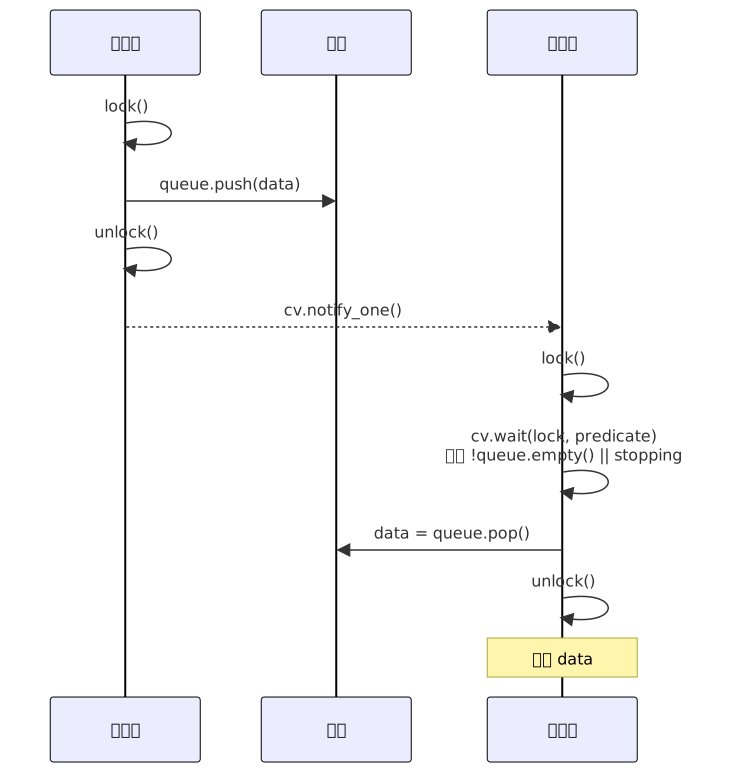
wait() 的谓词形式
cv.wait(lock, predicate) 等价于:
cpp
while (!predicate()) {
    cv.wait(lock);
}
谓词形式解决了虚假唤醒问题------即使线程被虚假唤醒,也会重新检查条件,不满足则继续等待。
项目中的使用 (Server.cpp:72):
cpp
queue_cv_.wait(lock, [this] {
    return !notification_queue_.empty() || !writer_running_.load();
});
这个谓词检查两个条件:队列非空(有事可做)或写线程被要求停止(优雅退出)。两个条件的组合保证写线程两种情况都能唤醒。
HttpStreamTransport.cpp:96-98:
cpp
incoming_cv_.wait(lock, [this]() {
    return !incoming_messages_.empty() || !server_running_.load();
});
SseTransport.cpp:62-64:
cpp
incoming_cv_.wait(lock, [this]() {
    return !incoming_messages_.empty() || !server_running_.load();
});
notify_one() vs notify_all()
notify_one():唤醒一个等待线程(如果有的话)。如果多个线程在等待,不确定唤醒哪一个。notify_all():唤醒所有等待线程。
选择规则:
| 场景 | 选择 | 原因 |
|---|---|---|
| 生产者-消费者(单个消费者) | notify_one() |
只需一个线程处理新数据 |
| 停止通知(所有线程都需要退出) | notify_all() |
所有等待线程都需要感知到停止信号 |
| 多生产者-多消费者 | notify_one() 或 notify_all() |
notify_all 更安全但可能惊群 |
项目中的实际选择:
| 通知位置 | 通知类型 | 理由 |
|---|---|---|
| Server.cpp:260 (SendNotification) | notify_one() |
只有一个写线程消费队列 |
| Server.cpp:237 (Stop) | notify_one() |
写线程被 writer_running_=false 唤醒,只需一份通知 |
| SseTransport.cpp:147 (Stop) | notify_all() |
停止时需唤醒所有等待者 |
| HttpStreamTransport.cpp:78 (Stop) | notify_all() |
停止时需唤醒所有等待者 |
| HttpStreamTransport.cpp:409 (HandleDeleteSession) | notify_all() |
会话删除,唤醒所有阻塞的读/SSE |
虚假唤醒(Spurious Wakeup)
虚假唤醒是指:线程在条件变量上等待时,即使没有其他线程调用 ****notify_one() `或 notify_all(),线程也可能被意外唤醒。这是操作系统和硬件层面的现象,POSIX 标准明确允许。
预防措施 :始终使用 wait() 的谓词重载,或显式用 while 循环包裹 wait()。
项目中的所有条件变量等待处都使用了谓词形式,且谓词检查的都是线程安全的原子状态或受保护的数据结构状态。
std::condition_variable_any (C++20)
std::condition_variable_any 可以与任何满足 BasicLockable 要求的锁类型配合使用,而不仅仅是 std::unique_lock<std::mutex>。例如可以与 std::shared_lock 配合。
cpp
std::shared_mutex mtx;
std::condition_variable_any cv_any;

void reader() {
    std::shared_lock lock(mtx);
    cv_any.wait(lock, []{ return data_ready; });
    // 读数据
}
项目中未使用,但理解它的存在有助于理解为什么 std::condition_variable 要求 std::unique_lock------因为标准库 cv 的 wait() 内部需要调用 lock.unlock() 和 lock.lock(),只有 unique_lock 提供这种灵活的锁定/解锁能力。
项目中的生产者-消费者模式
MCP Server 中存在多层生产者-消费者关系:
第一层:插件 → 通知队列 → 写线程

这是 Server 层的通知机制。当工具执行完需要推送通知时,SendNotification 将通知入队,WriterLoop 线程取出并通过 Transport 发送。
第二层(SSE + HTTP Stream 共用):HTTP POST → 消息队列 → Server::Read()

客户端通过 POST 发来的 JSON-RPC 请求,由 HTTP 处理线程放入 incoming_messages_ 队列,Server 主线程在 Read() 中阻塞等待取出。
第三层(HTTP Stream 独有):Server::Write() → SSE 通知队列 → GET /mcp SSE 流

HTTP Stream 中,服务器主动通知(如 tools/list_changed)不走 POST 响应,而是进入 sse_notifications_ 队列,由 GET /mcp 的 SSE 流推送。
第四层(SSE 独有):Server::Write() → 出站消息队列 → GET /sse SSE 流

SSE 模式下,所有响应 (包括请求结果和服务器通知)都进入 outgoing_messages_,由 GET /sse 的 SSE 长连接推送。与第三层不同------第三层只推"通知",第四层推"一切"。
四层关系总览:

说明:第2层是"统一入口",Server 处理请求后,根据 Transport 类型分流到第3层(HTTP Stream 的通知)或第4层(SSE 的所有响应)。第1层是 Server 内部的独立通知通道。
原子操作
std::atomic 无锁标志
std::atomic<bool> 是最常用的无锁原子类型。Load 和 Store 操作在 x86 架构上通常编译为普通的 MOV 指令(加上内存屏障),不需要使用操作系统互斥量。
项目中所有原子标志汇总:
| 变量名 | 声明位置 | 用途 | 读写场景 |
|---|---|---|---|
isStopping_ |
Server.h:106 | 全局停止标志 | 主线程写(store),所有线程读(load) |
isSyncCleaned_ |
Server.h:107 | 同步模式清理一次性保护 | Stop() 中 exchange |
isAsyncCleaned_ |
Server.h:108 | 异步模式清理一次性保护 | StopAsync() 中 exchange |
writer_running_ |
Server.h:118 | 写线程运行状态 | 主线程写,写线程读 |
reader_running_ |
Server.h:121 | 读线程运行状态 | 主线程写,读线程读 |
server_running_ |
HttpStreamTransport.hpp:84 | HTTP 服务器运行状态 | Start/Stop 线程写,各种回调读 |
client_connected_ |
HttpStreamTransport.hpp:85 | 客户端连接状态 | HTTP 回调写,Write() 中读 |
sse_stream_active_ |
HttpStreamTransport.hpp:107 | SSE 流活跃状态 | SSE 内容提供者/Stop 中写 |
sse_active_ |
SseTransport.h:101 | SSE 连接活跃状态 | SSE 内容提供者/Stop 中写 |
m_watching |
PluginsLoader.h:151 | 文件监视运行状态 | StartWatching/StopWatching 中读写 |
std::atomic 计数器
项目的 parserErrors_ (Server.h:110) 是普通 int,非原子。它在主线程中递增(Server.cpp:152, 203),仅在单线程作用域内使用,因此不需要原子保护。但如果未来多个请求处理线程同时递增此计数器,则需要改为 std::atomic<int> 或在递增时加锁。
memory_order 概念
std::atomic 的所有操作都可以指定内存序(memory_order),控制多线程间的可见性和重排约束:
| 内存序 | relax | acquire-release | seq_cst |
|---|---|---|---|
| 性能 | 最高 | 中等 | 最低(默认) |
| 保证 | 仅原子性 | 同步两个线程 | 全局一致顺序 |
| 使用场景 | 简单计数器 | 生产者-消费者 | 需要严格顺序保证 |
项目中所有原子操作使用默认的 memory_order_seq_cst,这对本项目的使用模式是安全的并且是正确的。简化理解即可:
isStopping_.load()→ 任意读线程都能看到最新写入的值isStopping_.store(true)→ 对所有后续 load 可见isSyncCleaned_.exchange(true)→ 原子地交换(写入 true 并返回旧值),用于检查是否已经执行过清理
volatile sig_atomic_t 信号安全变量
cpp
// main.cpp:46
volatile sig_atomic_t g_stopRequested = 0;
volatile sig_atomic_t 是一种特殊的类型组合:
sig_atomic_t:定义为可以在信号处理函数和主程序间安全读写的整数类型(保证读写是原子的,不会被信号中断破坏)。volatile:禁止编译器优化掉看似"无用"的读取。信号处理函数中写入、主循环中读取,编译器可能认为主循环中这个变量"从不改变"而优化掉读取。
cpp
// main.cpp:53-58 --- 信号处理函数
void stop_handler(sig_atomic_t s) {
    g_stopRequested = 1;
    if (server) {
        server->RequestStop();  // RequestStop 内部只做原子存储,信号安全
    }
}

// main.cpp:127-133 --- 主循环中的检查
while (!isStopping_) {
    // ... 阻塞读取
    // 当 SIGINT 打断阻塞操作后,isStopping_ 被 RequestStop 设置,
    // 循环条件在下一次迭代中检测到退出
}
为什么不是 std::atomic<sig_atomic_t>? 严格来说,C++11 的 std::atomic 不是信号安全的(信号处理函数中使用可能导致未定义行为)。但 volatile sig_atomic_t 是 POSIX 标准保证的信号安全机制。因此这里同时出现两种风格:信号处理函数中使用 C 风格的 volatile sig_atomic_t,主程序使用 C++ 风格的 std::atomic<bool>。RequestStop() 内部仅做 isStopping_.store(true)------原子存储,不调用任何可能分配内存或获取锁的函数,因此在信号处理函数中调用是安全的。
compare_exchange_strong/weak
compare_exchange_strong 和 compare_exchange_weak 是实现无锁数据结构的核心原语。项目中使用 exchange() 而非 compare_exchange,因为业务需求是简单的"执行一次"保证:
cpp
// Server.cpp:221 --- Stop() 的防重复调用
if (isSyncCleaned_.exchange(true)) return;

// Server.cpp:503 --- StopAsync() 的防重复调用
if (isAsyncCleaned_.exchange(true)) return;

// PluginsLoader.cpp:289 --- StartWatching() 的防重复启动
if (m_watching.exchange(true)) return;
exchange(true) 原子地将变量设置为 true 并返回旧值。如果旧值已经是 true(意味着已经执行过),直接返回。这实现了无锁的"单次执行"语义,等价于 compare_exchange_strong(expected, true) 但更简洁。
Future/Promise
std::promise 设置值
std::promise<T> 是一个"一次性"的值设置端。通过 set_value() 设置值后,与之关联的 std::future 变得可用。每个 promise 只能设置一次值,重复设置抛出 std::future_error。
项目中的定义 (HttpStreamTransport.hpp:97-99):
cpp
struct PendingRequest {
    std::promise<std::string> promise;
};
每个 HTTP 请求在等待 MCP 服务器的 JSON-RPC 响应时,创建一个 PendingRequest 对象。其 promise 在收到响应或被取消时被设置。
设置值 (HttpStreamTransport.cpp:134):
cpp
it->second->promise.set_value(json_data); // 将响应 JSON 传回给等待的 HTTP 请求取消时设置空值 (HttpStreamTransport.cpp:86):
cpp
pending->promise.set_value(""); // Stop() 时取消所有挂起的请求std::future 获取值
std::future<T> 是从 std::promise<T> 获取值的"消费端"。通过 promise.get_future() 获得。每个 promise 只能产生一个 future 对象。
项目中的获取 (HttpStreamTransport.cpp:268):
cpp
std::future<std::string> response_future = pending->promise.get_future();std::shared_future 多次获取
std::shared_future 允许多个线程从同一个 shared state 获取值,可多次调用 get()。项目中没有使用,因为每个 HTTP 请求只有一个等待者。
std::future 可以通过 share() 转换为 std::shared_future:
cpp
std::promise<int> p;
std::future<int> f = p.get_future();
std::shared_future<int> sf = f.share();  // 此后 f 不再有效
std::async 异步任务
std::async 创建异步任务并返回 std::future。可指定启动策略:
std::launch::async:在新线程中异步执行std::launch::deferred:延迟执行,在首次调用get()或wait()时在当前线程中执行std::launch::async | std::launch::deferred(默认):由实现选择
项目中的使用 (HttpStreamTransport.cpp:151-155):
cpp
std::future<std::pair<size_t, std::string>> HttpStream::ReadAsync() {
    return std::async(std::launch::async, [this]() -> std::pair<size_t, std::string> {
        return Read();  // 在新线程中调用 Read()
    });
}
ITOTransport.h:42-43 定义了这个接口:
cpp
virtual std::future<std::pair<size_t, std::string>> ReadAsync() = 0;
virtual std::future<void> WriteAsync(const std::string& json_data) = 0;
ConnectAsync (Server.cpp:161-217) 使用 ReadAsync() 返回的 future 实现异步读取:
cpp
auto future = transport_->ReadAsync();
auto [length, json_string] = future.get(); // 阻塞等待异步读取的结果std::async** 的一个陷阱**:std::async 返回的 std::future 在析构时会阻塞等待任务完成(如果任务是异步启动的)。这意味着如果接收 future 时没有调用 get() 或 wait() 而让它超出作用域,析构函数会阻塞。项目中接收 future 后总是立即或随后调用 .get(),避免了此问题。
wait_for 超时等待
std::future::wait_for() 等待指定时间,返回三种状态之一:
std::future_status::ready:结果已就绪std::future_status::timeout:超时,结果尚未就绪std::future_status::deferred:任务被延迟执行(使用std::launch::deferred时)
项目中的使用 (HttpStreamTransport.cpp:283):
cpp
// 等待服务器处理请求并响应,最多等待 30 秒
auto status = response_future.wait_for(std::chrono::seconds(30));
if (status == std::future_status::timeout) {
    LOG(ERROR) << "Request timed out (id=" << id_str << ")" << std::endl;
    // 清理挂起的请求
    {
        std::lock_guard<std::mutex> lock(pending_mutex_);
        pending_requests_.erase(id_str);
    }
    res.status = 504;
    res.set_content("{\"error\":\"Request timed out\"}", "application/json");
    return;
}

std::string response_data = response_future.get(); // 获取结果这段代码值得注意的一个细节:wait_for 返回 timeout 后,调用者并没有再调用 future.get()(而是直接返回 504 错误)。这种情况下 future 对象析构时发现 shared state 仍然有效(promise 还没有被 set_value),析构函数不会阻塞------它只是释放对 shared state 的引用。
但如果 promise 在超时后的某个时刻被 set_value(例如请求处理特别慢),这个值将被丢弃,因为 future 的引用已经释放。项目通过在超时路径中清理 pending_requests_ map 来预防这种情况。
项目中的异步请求-响应匹配
HttpStreamTransport 实现了一种"异步请求-响应匹配"机制,用于处理 HTTP POST 请求需要等待 MCP 服务器异步返回 JSON-RPC 响应的情况。
完整的流程:

这个设计允许 HTTP 请求-响应模式与 MCP 的异步消息处理模型无缝集成。Promise/Future 在这里扮演了"等待特定 ID 的响应"的同步原语角色。
项目并发模型全景
三线程架构图(以 ConnectAsync 模式为例)
#mermaid-svg-jxMIYuueW5iRADLb{font-family:"trebuchet ms",verdana,arial,sans-serif;font-size:16px;fill:#333;}@keyframes edge-animation-frame{from{stroke-dashoffset:0;}}@keyframes dash{to{stroke-dashoffset:0;}}#mermaid-svg-jxMIYuueW5iRADLb .edge-animation-slow{stroke-dasharray:9,5!important;stroke-dashoffset:900;animation:dash 50s linear infinite;stroke-linecap:round;}#mermaid-svg-jxMIYuueW5iRADLb .edge-animation-fast{stroke-dasharray:9,5!important;stroke-dashoffset:900;animation:dash 20s linear infinite;stroke-linecap:round;}#mermaid-svg-jxMIYuueW5iRADLb .error-icon{fill:#552222;}#mermaid-svg-jxMIYuueW5iRADLb .error-text{fill:#552222;stroke:#552222;}#mermaid-svg-jxMIYuueW5iRADLb .edge-thickness-normal{stroke-width:1px;}#mermaid-svg-jxMIYuueW5iRADLb .edge-thickness-thick{stroke-width:3.5px;}#mermaid-svg-jxMIYuueW5iRADLb .edge-pattern-solid{stroke-dasharray:0;}#mermaid-svg-jxMIYuueW5iRADLb .edge-thickness-invisible{stroke-width:0;fill:none;}#mermaid-svg-jxMIYuueW5iRADLb .edge-pattern-dashed{stroke-dasharray:3;}#mermaid-svg-jxMIYuueW5iRADLb .edge-pattern-dotted{stroke-dasharray:2;}#mermaid-svg-jxMIYuueW5iRADLb .marker{fill:#333333;stroke:#333333;}#mermaid-svg-jxMIYuueW5iRADLb .marker.cross{stroke:#333333;}#mermaid-svg-jxMIYuueW5iRADLb svg{font-family:"trebuchet ms",verdana,arial,sans-serif;font-size:16px;}#mermaid-svg-jxMIYuueW5iRADLb p{margin:0;}#mermaid-svg-jxMIYuueW5iRADLb .label{font-family:"trebuchet ms",verdana,arial,sans-serif;color:#333;}#mermaid-svg-jxMIYuueW5iRADLb .cluster-label text{fill:#333;}#mermaid-svg-jxMIYuueW5iRADLb .cluster-label span{color:#333;}#mermaid-svg-jxMIYuueW5iRADLb .cluster-label span p{background-color:transparent;}#mermaid-svg-jxMIYuueW5iRADLb .label text,#mermaid-svg-jxMIYuueW5iRADLb span{fill:#333;color:#333;}#mermaid-svg-jxMIYuueW5iRADLb .node rect,#mermaid-svg-jxMIYuueW5iRADLb .node circle,#mermaid-svg-jxMIYuueW5iRADLb .node ellipse,#mermaid-svg-jxMIYuueW5iRADLb .node polygon,#mermaid-svg-jxMIYuueW5iRADLb .node path{fill:#ECECFF;stroke:#9370DB;stroke-width:1px;}#mermaid-svg-jxMIYuueW5iRADLb .rough-node .label text,#mermaid-svg-jxMIYuueW5iRADLb .node .label text,#mermaid-svg-jxMIYuueW5iRADLb .image-shape .label,#mermaid-svg-jxMIYuueW5iRADLb .icon-shape .label{text-anchor:middle;}#mermaid-svg-jxMIYuueW5iRADLb .node .katex path{fill:#000;stroke:#000;stroke-width:1px;}#mermaid-svg-jxMIYuueW5iRADLb .rough-node .label,#mermaid-svg-jxMIYuueW5iRADLb .node .label,#mermaid-svg-jxMIYuueW5iRADLb .image-shape .label,#mermaid-svg-jxMIYuueW5iRADLb .icon-shape .label{text-align:center;}#mermaid-svg-jxMIYuueW5iRADLb .node.clickable{cursor:pointer;}#mermaid-svg-jxMIYuueW5iRADLb .root .anchor path{fill:#333333!important;stroke-width:0;stroke:#333333;}#mermaid-svg-jxMIYuueW5iRADLb .arrowheadPath{fill:#333333;}#mermaid-svg-jxMIYuueW5iRADLb .edgePath .path{stroke:#333333;stroke-width:2.0px;}#mermaid-svg-jxMIYuueW5iRADLb .flowchart-link{stroke:#333333;fill:none;}#mermaid-svg-jxMIYuueW5iRADLb .edgeLabel{background-color:rgba(232,232,232, 0.8);text-align:center;}#mermaid-svg-jxMIYuueW5iRADLb .edgeLabel p{background-color:rgba(232,232,232, 0.8);}#mermaid-svg-jxMIYuueW5iRADLb .edgeLabel rect{opacity:0.5;background-color:rgba(232,232,232, 0.8);fill:rgba(232,232,232, 0.8);}#mermaid-svg-jxMIYuueW5iRADLb .labelBkg{background-color:rgba(232, 232, 232, 0.5);}#mermaid-svg-jxMIYuueW5iRADLb .cluster rect{fill:#ffffde;stroke:#aaaa33;stroke-width:1px;}#mermaid-svg-jxMIYuueW5iRADLb .cluster text{fill:#333;}#mermaid-svg-jxMIYuueW5iRADLb .cluster span{color:#333;}#mermaid-svg-jxMIYuueW5iRADLb div.mermaidTooltip{position:absolute;text-align:center;max-width:200px;padding:2px;font-family:"trebuchet ms",verdana,arial,sans-serif;font-size:12px;background:hsl(80, 100%, 96.2745098039%);border:1px solid #aaaa33;border-radius:2px;pointer-events:none;z-index:100;}#mermaid-svg-jxMIYuueW5iRADLb .flowchartTitleText{text-anchor:middle;font-size:18px;fill:#333;}#mermaid-svg-jxMIYuueW5iRADLb rect.text{fill:none;stroke-width:0;}#mermaid-svg-jxMIYuueW5iRADLb .icon-shape,#mermaid-svg-jxMIYuueW5iRADLb .image-shape{background-color:rgba(232,232,232, 0.8);text-align:center;}#mermaid-svg-jxMIYuueW5iRADLb .icon-shape p,#mermaid-svg-jxMIYuueW5iRADLb .image-shape p{background-color:rgba(232,232,232, 0.8);padding:2px;}#mermaid-svg-jxMIYuueW5iRADLb .icon-shape .label rect,#mermaid-svg-jxMIYuueW5iRADLb .image-shape .label rect{opacity:0.5;background-color:rgba(232,232,232, 0.8);fill:rgba(232,232,232, 0.8);}#mermaid-svg-jxMIYuueW5iRADLb .label-icon{display:inline-block;height:1em;overflow:visible;vertical-align:-0.125em;}#mermaid-svg-jxMIYuueW5iRADLb .node .label-icon path{fill:currentColor;stroke:revert;stroke-width:revert;}#mermaid-svg-jxMIYuueW5iRADLb :root{--mermaid-font-family:"trebuchet ms",verdana,arial,sans-serif;} HttpStream/SSE HTTP 线程
server_thread_
HttpStreamTransport.cpp:48
httplib::Server::listen() 事件循环
└─ 处理 POST /mcp 请求
└─ 管理 SSE 长连接
incoming_mutex_ + incoming_cv_
outgoing_mutex_ + outgoing_cv_
pending_mutex_ + PendingRequest
PluginsLoader 监视线程
WatchLoop
PluginsLoader.cpp:300
每5秒扫描插件目录
三阶段提交更新 m_plugins
m_pluginsMutex (shared_mutex)
共享数据
output_mutex_
notification_queue_
queue_cv_
读线程 (仅 ConnectAsync)
Server.cpp:177
while(running)
等待transport
future.get()
解析JSON
HandleReq
写transport
睡眠1ms
写线程 WriterLoop
Server.cpp:65
while(running)
等待队列
取通知
写transport
睡眠1ms
主线程 Server.cpp:107
(Read-Handle-Write 循环)
while(!stop)
读transport
解析JSON
HandleReq
写transport
main.cpp (主进程)
main()
├─ signal(SIGINT, stop_handler)
├─ LoadPlugins()
├─ StartWatching()
└─ Connect()
主线程退出后仍可在此等待
注意 :同步模式 (Connect) 没有读线程,读取和处理都在主线程中完成(Server.cpp:127-154)。异步模式 (ConnectAsync) 有独立的读线程。
数据流追踪:一个请求如何经过多个线程
以 HttpStream 传输、ConnectAsync 模式下的 tools/list 请求为例:
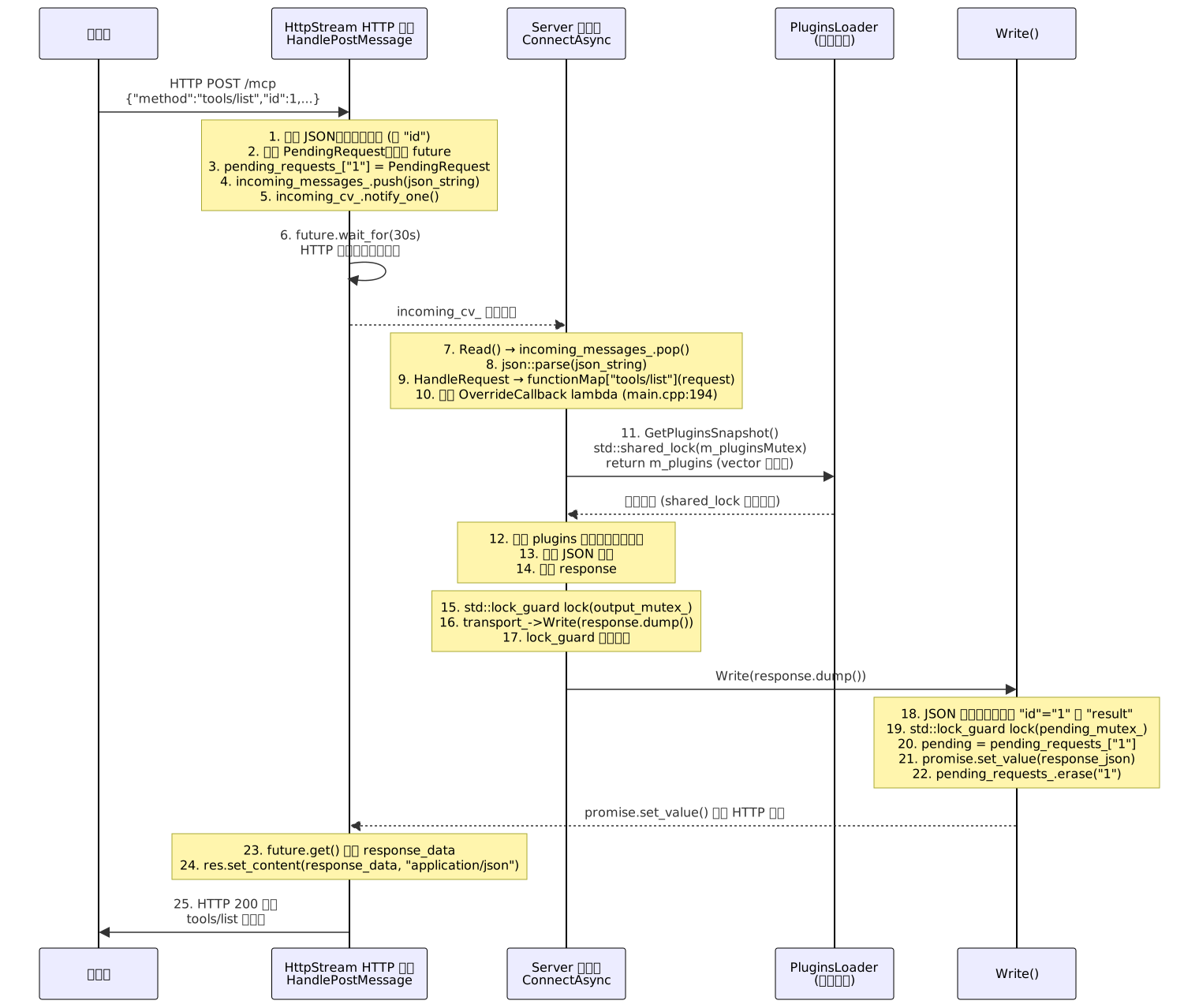
全程涉及 4 把锁 (incoming_mutex_、pending_mutex_、m_pluginsMutex、output_mutex_),但每把锁的持有时间都被压缩到最小。最长的不持锁阶段是步骤 12(遍历插件构建响应),这期间所有其他请求可以自由处理。
锁竞争分析
| 锁 | 竞争方 | 持有时间 | 竞争程度 | 热路径 |
|---|---|---|---|---|
output_mutex_ |
主线程(响应)、写线程(通知)、插件回调 | ~us 级(队列操作+write) | 低 | 每个请求/通知都经过 |
m_pluginsMutex (读) |
多个请求处理线程 | ~us 级(vector 拷贝) | 低 | 每个请求获取快照 |
m_pluginsMutex (写) |
热加载线程 | ~ns 级(指针交换) | 极低 | 仅文件变化时 |
incoming_mutex_ |
HTTP 线程、Server 读线程 | ~us 级(队列操作) | 中 | 每个请求都经过 |
pending_mutex_ |
HTTP 线程(插入+查询+擦除)、Write(查找+擦除) | ~us 级(哈希表操作) | 中 | 每个请求都经过 |
sse_mutex_ |
Write()、SSE 内容提供者 | ~us 级(队列操作) | 低 | 仅通知时 |
项目的锁竞争设计良好:没有单把锁在热路径上持有超过微秒级别,且最关键的热加载写锁被优化到纳秒级别。
无锁快照访问原理(GetPluginsSnapshot + shared_ptr)
GetPluginsSnapshot() (PluginsLoader.cpp:248-251) 是项目中并发设计的亮点,实现原理如下:
cpp
std::vector<std::shared_ptr<PluginEntry>> PluginsLoader::GetPluginsSnapshot() const {
    std::shared_lock lock(m_pluginsMutex);  // 1. 共享读锁
    return m_plugins;                       // 2. 拷贝 vector
} // 3. 锁释放为什么是"无锁"访问:
严格说是"持锁时间最短"而非无锁。但由于:
- 仅在拷贝
vector<shared_ptr>期间持有共享读锁(微秒级) shared_ptr拷贝仅增加引用计数(原子操作)- 拷贝完成后立即释放锁
- 后续遍历快照完全无锁
因此在热路径上,插件数据访问几乎是无锁的。即使热加载线程正在卸载旧版本插件,只要快照中仍有引用,旧版本的 PluginEntry 析构就不会执行(shared_ptr 引用计数 > 0),快照使用者不受影响。
核心保障 :PluginEntry 的析构函数 (PluginsLoader.h:76-97) 在所有 shared_ptr 引用释放后才执行 Shutdown()、DestroyPlugin、FreeLibrary/dlclose,因此快照持有者永远看到的是有效插件实例。
优雅停止的线程安全
项目的停止流程经过精心设计,以确保线程安全。
信号触发路径 (main.cpp:53-58):
cpp
void stop_handler(sig_atomic_t s) {
    g_stopRequested = 1;
    if (server) {
        server->RequestStop();         // 1: 原子设置 isStopping_ = true
    }
}
Server::RequestStop 实现 (Server.cpp:245-247):
cpp
void Server::RequestStop() {
    isStopping_.store(true);            // 仅原子操作,完全信号安全
}
Connect 循环感知停止 (Server.cpp:127-133):
cpp
while (!isStopping_) {                 // 3: 每次迭代检查原子标志
    auto [length, json_string] = transport->Read();
    if (isStopping_) break;            // 4: Read 被信号中断后立即检查
    // ...
}
Stop() 实现 (Server.cpp:220-243) -- 同步模式:
cpp
void Server::Stop() {
    if (isSyncCleaned_.exchange(true)) return;  // 防重复调用

    isStopping_ = true;                          // 兜底设置

    if (transport_) {
        transport_->Stop();                      // 停止底层 transport
        transport_.reset();
    }

    writer_running_ = false;                    // 通知写线程退出
    queue_cv_.notify_one();                     // 唤醒写线程
    if (writer_thread_.joinable()) {
        writer_thread_.join();                  // 等待写线程完成
    }
}
StopAsync() 实现 (Server.cpp:502-525) -- 异步模式:
cpp
void Server::StopAsync() {
    if (isAsyncCleaned_.exchange(true)) return;  // 防重复

    isStopping_ = true;

    writer_running_ = false;
    queue_cv_.notify_one();
    if (writer_thread_.joinable()) {
        writer_thread_.join();
    }

    reader_running_ = false;
    if (reader_thread_.joinable()) {
        reader_thread_.join();
    }
}
停止顺序的设计原理:
停止流程的关键是"先关闭输入源,再清空队列,最后等待消费者":
isStopping_ = true-- 拒绝新的请求和通知transport_->Stop()-- 关闭底层传输,中断阻塞的 Read()writer_running_ = false-- 通知写线程准备退出queue_cv_.notify_one()-- 唤醒可能等待在空队列上的写线程writer_thread_.join()-- 等待写线程完成最后一个队列项(如果有)reader_running_ = false+reader_thread_.join()(仅异步模式)
为什么 RequestStop 和 Stop 分离?
分离原因在于信号处理函数中不能执行线程 join(非 async-signal-safe)。RequestStop() 仅做原子存储,安全高效。主循环检测到 isStopping_ 后,Connect() 返回,回到 main() 的清理代码(main.cpp:343-355),在那里调用 StopWatching()、UnloadPlugins()、Stop(),这些都是信号安全的------因为此时已经回到了正常的非信号上下文中。
常见并发 Bug 与调试
数据竞争(Data Race)
定义:两个或多个线程同时访问同一块内存,至少一个是写操作,且没有同步机制保证访问顺序。
例子:
cpp
// Bug: 多线程同时修改 parserErrors_ 且没有任何保护
int parserErrors_ = 0;

// 线程A
parserErrors_++;

// 线程B
parserErrors_++;
// 结果:parserErrors_ 的值不确定!
项目中如何防范: parserErrors_ (Server.h:110) 被设计为仅在主线程中递增(Server.cpp:152, 203)。因此不存在竞争。类似地,verboseLevel_(Server.h:109)只在启动阶段设置,之后只读。
死锁(Deadlock)
项目中预防死锁的机制总结:
- 嵌套锁设计 :WriterLoop 中
output_mutex_被先后两次加锁,但中间 gap 期间锁已释放,不是嵌套。 - 加锁顺序一致性:ScanForChanges 中始终先 shared_lock 再 unique_lock。
- 锁外通知 :SendNotification (Server.cpp:258) 在
lock_guard作用域结束后才调用notify_one()。
一个容易被忽略的死锁风险:
cpp
// 危险模式(项目中避免了)
void dangerous() {
    std::lock_guard lock(mtx);
    cv.notify_one();  // 如果被唤醒的线程立即尝试获取 mtx,会阻塞
}

// 安全模式(项目中的做法)
void safe() {
    {
        std::lock_guard lock(mtx);
        queue.push(data);
    }  // 锁释放
    cv.notify_one();
}
忘记解锁(不再可能的问题)
使用 RAII 守卫(lock_guard、unique_lock、shared_lock)后,忘记解锁已成为历史。项目中没有出现手动 lock() / unlock() 的配对,所有加锁都通过 RAII 守卫。
条件变量丢失通知
**条件变量丢失通知(Lost Wakeup)**发生在:
- 消费者检查条件,发现不满足
- 生产者更新条件,调用
notify_one() - 消费者调用
wait()
→ 通知已经发出,消费者永远等待
项目中的防护模式(Server.cpp:69-83):
cpp
// 正确:先加锁,再检查条件,在锁的保护下调用 wait
std::unique_lock<std::mutex> lock(output_mutex_);
queue_cv_.wait(lock, [this] {
    return !notification_queue_.empty() || !writer_running_.load();
});
wait() 在内部原子地执行"释放锁 + 进入等待",从而保证在步骤 1 和 3 之间不可能丢失通知。
生产者端(Server.cpp:256-260):
cpp
{
    std::lock_guard<std::mutex> lock(output_mutex_);
    notification_queue_.emplace(notification);
}
queue_cv_.notify_one();
生产者总是先在锁内更新条件,再通知。即使通知在消费者进入 wait 之前发出,消费者也不会错过------因为消费者在进入 wait 前会重新检查谓词。
从这段代码学到的并发最佳实践
1. RAII 守卫,永不手动管理锁
项目中没有一处 lock() 和 unlock() 的裸配对。始终使用 lock_guard、unique_lock、shared_lock。
2. 使用 shared_ptr 管理跨线程生命周期
PluginEntry 通过 shared_ptr 共享,配合 shared_mutex 实现安全的并发访问。GetPluginsSnapshot() 返回 vector 的浅拷贝(shared_ptr 引用计数递增),确保插件对象在快照持有者使用期间不会被析构。
3. 锁粒度最小化:持锁不做 IO
Server.cpp:69-83 的 WriterLoop 展示了这一原则:在锁内取出数据、释放锁、在锁外做 IO 写操作、再重新加锁做下一次队列操作。中间不持锁的 IO 阶段允许主线程无阻塞地写入响应。
4. 原子标志 + 条件变量谓词 = 可中断的等待
cpp
queue_cv_.wait(lock, [this] {
    return !notification_queue_.empty() || !writer_running_.load();
});
这种模式使线程既能高效等待数据,又能及时响应停止信号。
5. 三阶段提交实现无阻塞热更新
cpp
// 阶段1:共享锁收集变更
{ std::shared_lock lock(m_pluginsMutex); /* 收集 */ }
// 阶段2:无锁创建新实例 (耗时数百毫秒!)
// 阶段3:排他锁交换指针
{ std::unique_lock lock(m_pluginsMutex); /* 指针交换 */ }
6. exchange() 实现一次性操作
cpp
if (isSyncCleaned_.exchange(true)) return; // 已执行过,直接返回比 bool expected = false; compare_exchange_strong(expected, true) 更简洁,比 if (flag) return; flag = true; 更安全。
7. 信号处理函数只做最小操作
cpp
// main.cpp:53-58
void stop_handler(sig_atomic_t s) {
    g_stopRequested = 1;          // volatile sig_atomic_t,信号安全
    server->RequestStop();        // 仅原子存储,信号安全
}
不分配内存、不获取锁、不 join 线程。真正的清理工作(join 线程、释放资源)由 main() 中信号处理返回后的正常路径执行。
8. 显式 delete 拷贝/移动构造
cpp
// Server.h:53-56
Server(const Server&) = delete;
Server& operator=(const Server&) = delete;
Server(Server&&) = delete;
Server& operator=(Server&&) = delete;
对于包含 std::thread、std::mutex 成员的类型,拷贝是无意义的(线程无法拷贝),移动语义在大多数情况下也不安全。显式 delete 在编译期阻止误用。
补充:TSingleton 中的 call_once
src/utils/TSingleton.h 使用 std::call_once + std::once_flag 实现线程安全的单例:
cpp
static T& GetInstance() {
    std::call_once(initFlag, []() {
        instance.reset(new T());
    });
    return *instance;
}
std::call_once 保证传入的 lambda 被精确执行一次,即使多个线程同时调用 GetInstance()。这是 C++11 引入的标准线程安全单例实现方案,优于传统的双重检查锁定(DCL)模式,因为 DCL 在 C++11 前依赖平台特定的内存屏障。