文章目录
-
- 每日一句正能量
- 摘要
- 一、前言:数字孪生景区管理的范式革新
- 二、核心特性解析
-
- [2.1 悬浮导航(Float Navigation)](#2.1 悬浮导航(Float Navigation))
- [2.2 沉浸光感(Immersive Light Effects)](#2.2 沉浸光感(Immersive Light Effects))
- [2.3 HMAF(HarmonyOS Multi-agent Framework)](#2.3 HMAF(HarmonyOS Multi-agent Framework))
- 三、实战案例:打造"云游智枢"数字孪生景区平台
-
- [3.1 项目配置](#3.1 项目配置)
- [3.2 窗口沉浸配置(TourismAbility.ets)](#3.2 窗口沉浸配置(TourismAbility.ets))
- [3.3 悬浮场景导航组件(FloatScenicNav.ets)](#3.3 悬浮场景导航组件(FloatScenicNav.ets))
- [3.4 HMAF智能体服务层(TourismAgentService.ets)](#3.4 HMAF智能体服务层(TourismAgentService.ets))
- [3.5 景区总览主页面(OverviewPage.ets)](#3.5 景区总览主页面(OverviewPage.ets))
- [3.6 浮动客流面板Ability(VisitorPanelAbility.ets)](#3.6 浮动客流面板Ability(VisitorPanelAbility.ets))
- [3.7 浮动客流面板页面(VisitorPanelPage.ets)](#3.7 浮动客流面板页面(VisitorPanelPage.ets))
- 四、关键技术总结
-
- [4.1 悬浮导航适配清单](#4.1 悬浮导航适配清单)
- [4.2 沉浸光感最佳实践](#4.2 沉浸光感最佳实践)
- [4.3 HMAF智能体架构设计原则](#4.3 HMAF智能体架构设计原则)
- 五、调试与测试建议
-
- [5.1 DevEco Studio调试配置](#5.1 DevEco Studio调试配置)
- [5.2 关键测试场景](#5.2 关键测试场景)
- 六、结语

每日一句正能量
"世间最可靠的,不是他人的陪伴与馈赠,而是内心的丰盈与强大。"
他人的陪伴可能离开,馈赠可能收回或变质。但自己培养起来的认知深度、情绪调节能力、精神世界的富足(内心丰盈),以及面对挫折的韧性(内心强大),是任何人拿不走的。这是真正的安全感来源。
摘要
摘要:2026年,中国文旅产业数字化转型进入"数字孪生+智能体"双轮驱动新阶段,全国5A级景区数字化覆盖率突破95%,但传统景区管理系统面临客流预测滞后、资源调度粗放、游客体验割裂三大痛点。HarmonyOS 6(API 23)引入的鸿蒙智能体框架(HMAF)将AI能力下沉至系统层,配合悬浮导航与沉浸光感特性,为PC端数字孪生景区管理带来了"客流即光效、场景即导航"的全新交互范式。本文将实战开发一款面向HarmonyOS PC的"云游智枢"应用,展示如何利用HMAF构建"客流感知-资源调度-体验优化-应急指挥"四层智能体协作架构,通过悬浮导航实现景区场景实时切换,基于沉浸光感打造"客流密度即氛围"的沉浸体验,以及基于多窗口架构构建浮动客流面板、实时景区视窗和智能导览助手的协作管理体验。
一、前言:数字孪生景区管理的范式革新
2026年,中国文旅产业数字化转型已进入"数字孪生+智能体"双轮驱动新阶段。文化和旅游部数据显示,全国5A级景区数字化覆盖率突破95%,年接待游客量超过80亿人次,但传统景区管理系统仍面临三大核心痛点:
- 客流预测滞后:景区依赖人工统计和简单摄像头计数,无法实时掌握各区域客流密度、排队时长、热力分布等多维数据,导致高峰期拥堵频发
- 资源调度粗放:景区内的摆渡车、讲解员、餐饮、卫生间等资源缺乏基于实时客流的智能调度,"千人一面"的服务模式导致游客满意度低下
- 应急指挥断裂:安全监控、消防、医疗、安保等应急系统数据孤岛严重,突发事件响应时间平均超过15分钟
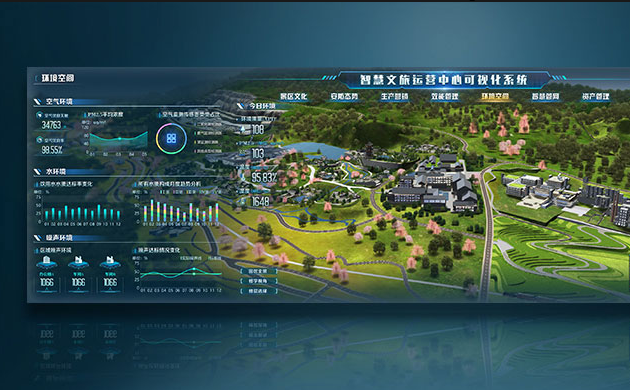
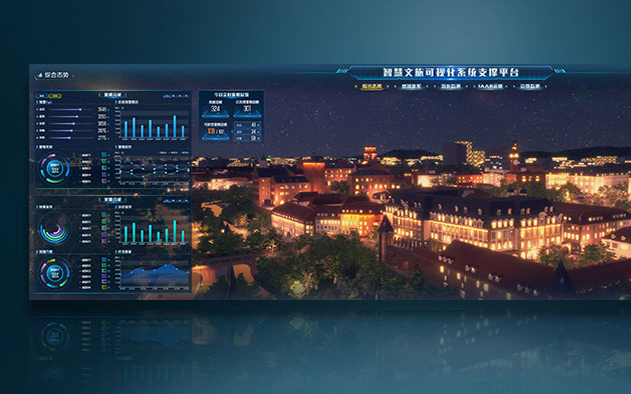
HarmonyOS 6(API 23)引入的**鸿蒙智能体框架(HarmonyOS Multi-agent Framework,HMAF)将AI能力从应用层下沉至系统层,配合 悬浮导航(Float Navigation)与沉浸光感(Immersive Light Effects)**特性,为PC端数字孪生景区管理带来了"客流即光效、场景即导航"的全新交互范式。
本文核心亮点:
- 客流密度光效:根据景区各区域实时客流密度(稀疏/适中/拥挤/饱和)动态切换环境光色与脉冲节奏
- 悬浮场景导航:底部悬浮页签替代传统侧边菜单,支持景区场景(总览/客流/设施/应急)快速切换与透明度调节
- HMAF四层智能体协作:基于Agent Framework Kit构建"客流感知-资源调度-体验优化-应急指挥"四层智能体协作架构
- 多窗口景区协作:主数字孪生窗口 + 浮动客流面板 + 实时景区视窗 + 智能导览助手窗口的光效联动
- 意图感知沉浸体验:通过Intents Kit实时理解管理者调度意图,自动调整界面光效与导航形态
二、核心特性解析
2.1 悬浮导航(Float Navigation)
悬浮导航是HarmonyOS 6引入的全新底部导航交互模式,主要特点包括:
- 悬浮层级设计:导航栏悬浮于内容之上,不占用布局空间
- 智能避让机制:内容区域自动适配导航栏高度,避免遮挡
- 动态透明度:支持根据滑动状态动态调整导航栏透明度(强85%/平衡70%/弱55%三档)
- 手势融合:与系统全面屏手势无缝衔接
2.2 沉浸光感(Immersive Light Effects)
沉浸光感是HarmonyOS 6的视觉增强系统,核心能力包括:
- P3广色域支持:色彩表现更丰富鲜艳
- 安全区布局优化:组件背景默认延伸至非安全区(AI导航栏、状态栏)
- 玻璃拟态效果:支持半透明、磨砂玻璃等现代视觉效果
- 系统级光效同步:锁屏、主屏、控制面板、通知面板光效统一
2.3 HMAF(HarmonyOS Multi-agent Framework)
HMAF是HarmonyOS 6推出的系统级智能体生态框架,首批上线80+智能体。其核心架构分为三层:
| 层级 | 职责 | 开发者关注点 |
|---|---|---|
| HMAF | 系统级智能体生态框架 | 小艺入口、多Agent协同、系统调度策略 |
| Agent Framework Kit | 应用侧SDK(API 20+) | FunctionComponent、FunctionController、应用内嵌Agent UI |
| A2A协议 | Agent-to-Agent互操作标准 | Agent Card发布、跨应用任务委托 |

三、实战案例:打造"云游智枢"数字孪生景区平台
3.1 项目配置
在module.json5中声明所需权限和依赖:
json
{
  "module": {
    "name": "SmartTourismEntry",
    "type": "entry",
    "description": "云游智枢 - 数字孪生景区AI智能体运营管理平台",
    "mainElement": "TourismAbility",
    "abilities": [
      {
        "name": "TourismAbility",
        "srcEntry": "./ets/abilities/TourismAbility.ets",
        "description": "主数字孪生窗口Ability",
        "icon": "$media:icon",
        "label": "$string:EntryAbility_label",
        "startWindowIcon": "$media:startIcon",
        "startWindowBackground": "$color:start_window_background",
        "exported": true,
        "skills": [
          {
            "entities": ["entity.system.home"],
            "actions": ["action.system.home"]
          }
        ]
      },
      {
        "name": "VisitorPanelAbility",
        "srcEntry": "./ets/abilities/VisitorPanelAbility.ets",
        "description": "浮动客流面板",
        "launchType": "multiton"
      },
      {
        "name": "ScenicViewAbility",
        "srcEntry": "./ets/abilities/ScenicViewAbility.ets",
        "description": "实时景区视窗",
        "launchType": "multiton"
      }
    ],
    "requestPermissions": [
      {
        "name": "ohos.permission.INTERNET"
      },
      {
        "name": "ohos.permission.GET_NETWORK_INFO"
      },
      {
        "name": "ohos.permission.DISTRIBUTED_DATASYNC"
      },
      {
        "name": "ohos.permission.LOCATION"
      }
    ],
    "dependencies": [
      {
        "moduleName": "agent_framework_kit",
        "bundleName": "com.huawei.hmos.agentframework"
      }
    ]
  }
}
3.2 窗口沉浸配置(TourismAbility.ets)
代码亮点 :本段代码实现了HarmonyOS 6 PC端窗口的全屏沉浸配置,通过WindowStage获取主窗口后,启用沉浸模式并设置安全区背景延伸,同时根据景区场景动态调整系统光效颜色,实现"客流即氛围"的视觉体验。
typescript
// entry/src/main/ets/abilities/TourismAbility.ets
import { AbilityConstant, UIAbility, Want } from '@kit.AbilityKit';
import { window } from '@kit.ArkUI';
import { hilog } from '@kit.PerformanceAnalysisKit';

// 景区场景枚举
export enum ScenicScene {
  OVERVIEW = 'overview',      // 景区总览
  VISITOR_FLOW = 'visitorFlow', // 客流管理
  FACILITY = 'facility',      // 设施调度
  EMERGENCY = 'emergency'     // 应急指挥
}

// 客流密度状态枚举(对应不同光效)
export enum VisitorDensity {
  SPARSE = 'sparse',          // 稀疏 - 宁静绿
  MODERATE = 'moderate',    // 适中 - 活力蓝
  CROWDED = 'crowded',      // 拥挤 - 警示橙
  SATURATED = 'saturated'   // 饱和 - 紧急红
}

export default class TourismAbility extends UIAbility {
  private mainWindow: window.Window | null = null;
  private currentScene: ScenicScene = ScenicScene.OVERVIEW;
  private currentDensity: VisitorDensity = VisitorDensity.MODERATE;

  onWindowStageCreate(windowStage: window.WindowStage): void {
    hilog.info(0x0000, 'SmartTourism', 'TourismAbility onWindowStageCreate');

    // 加载主页面
    windowStage.loadContent('pages/TourismDashboard', (err) => {
      if (err.code) {
        hilog.error(0x0000, 'SmartTourism', 'Failed to load content: %{public}s', JSON.stringify(err));
        return;
      }
      hilog.info(0x0000, 'SmartTourism', 'Content loaded successfully');
    });

    // 配置窗口沉浸模式(HarmonyOS 6 PC端特性)
    this.configureImmersiveWindow(windowStage);
  }

  private async configureImmersiveWindow(windowStage: window.WindowStage): Promise<void> {
    try {
      this.mainWindow = await windowStage.getMainWindow();

      // 启用窗口全屏沉浸模式
      await this.mainWindow.setWindowLayoutFullScreen(true);

      // 设置安全区背景延伸(沉浸光感核心配置)
      await this.mainWindow.setWindowBackgroundColor('#0A1628');

      // 获取安全区信息
      const avoidArea = this.mainWindow.getWindowAvoidArea(window.AvoidAreaType.TYPE_SYSTEM);
      const navBarHeight = avoidArea.bottomRect.height;
      const statusBarHeight = avoidArea.topRect.height;

      // 存储安全区高度供全局使用
      AppStorage.setOrCreate('navBarHeight', navBarHeight);
      AppStorage.setOrCreate('statusBarHeight', statusBarHeight);

      hilog.info(0x0000, 'SmartTourism',
        'Window configured: statusBar=%{public}d, navBar=%{public}d',
        statusBarHeight, navBarHeight);

    } catch (error) {
      hilog.error(0x0000, 'SmartTourism',
        'Failed to configure window: %{public}s', JSON.stringify(error));
    }
  }

  // 根据景区场景和客流密度更新系统光效
  public async updateImmersiveLighting(scene: ScenicScene, density: VisitorDensity): Promise<void> {
    if (!this.mainWindow) return;

    this.currentScene = scene;
    this.currentDensity = density;

    // 场景-光效映射表(深色主题适配数字孪生场景)
    const sceneLightEffects: Record<ScenicScene, Record<VisitorDensity, string>> = {
      [ScenicScene.OVERVIEW]: {
        [VisitorDensity.SPARSE]: '#0D3328',    // 深翠绿
        [VisitorDensity.MODERATE]: '#0D1F33',  // 深海蓝
        [VisitorDensity.CROWDED]: '#331F0D',    // 深琥珀
        [VisitorDensity.SATURATED]: '#330D0D'   // 深绯红
      },
      [ScenicScene.VISITOR_FLOW]: {
        [VisitorDensity.SPARSE]: '#0A2E1F',
        [VisitorDensity.MODERATE]: '#0A1E2E',
        [VisitorDensity.CROWDED]: '#2E1E0A',
        [VisitorDensity.SATURATED]: '#2E0A0A'
      },
      [ScenicScene.FACILITY]: {
        [VisitorDensity.SPARSE]: '#082818',
        [VisitorDensity.MODERATE]: '#081828',
        [VisitorDensity.CROWDED]: '#281808',
        [VisitorDensity.SATURATED]: '#280808'
      },
      [ScenicScene.EMERGENCY]: {
        [VisitorDensity.SPARSE]: '#052215',
        [VisitorDensity.MODERATE]: '#051525',
        [VisitorDensity.CROWDED]: '#251505',
        [VisitorDensity.SATURATED]: '#250505'
      }
    };

    const lightColor = sceneLightEffects[scene][density];

    try {
      // 设置窗口背景光效(HarmonyOS 6沉浸光感API)
      await this.mainWindow.setWindowBackgroundColor(lightColor);

      // 触发系统级光效同步(通知面板、控制面板联动)
      await this.mainWindow.setSystemBarProperties({
        statusBarColor: lightColor,
        navigationBarColor: lightColor
      });

      hilog.info(0x0000, 'SmartTourism',
        'Light effect updated: scene=%{public}s, density=%{public}s, color=%{public}s',
        scene, density, lightColor);

    } catch (error) {
      hilog.error(0x0000, 'SmartTourism',
        'Failed to update light effect: %{public}s', JSON.stringify(error));
    }
  }

  onDestroy(): void {
    hilog.info(0x0000, 'SmartTourism', 'TourismAbility onDestroy');
    this.mainWindow = null;
  }
}
3.3 悬浮场景导航组件(FloatScenicNav.ets)
代码亮点 :本组件实现了HarmonyOS 6特色的底部悬浮导航栏,支持景区场景的快速切换。核心特性包括:玻璃拟态背景(backgroundBlurStyle+backdropFilter)、三档透明度调节(强85%/平衡70%/弱55%)、长按展开透明度滑块、智能体状态实时徽章(红色圆点提示告警事项),以及与系统安全区的智能避让。
typescript
// entry/src/main/ets/components/FloatScenicNav.ets
import { window } from '@kit.ArkUI';
import { vibrator } from '@kit.SensorServiceKit';
import { ScenicScene, VisitorDensity } from '../abilities/TourismAbility';

// 透明度档位枚举
export enum TransparencyLevel {
  STRONG = 0.85,    // 强效果:高透明度,玻璃感明显
  BALANCED = 0.70,  // 平衡效果:适中透明度
  WEAK = 0.55       // 弱效果:低透明度,更清晰
}

// 导航项配置
interface NavItem {
  icon: Resource;
  label: string;
  scene: ScenicScene;
  badge?: number;    // 待处理告警数量
  agentStatus?: 'idle' | 'running' | 'alert';  // 智能体状态
}

@Component
export struct FloatScenicNav {
  @State currentScene: ScenicScene = ScenicScene.OVERVIEW;
  @State navTransparency: number = TransparencyLevel.BALANCED;
  @State isExpanded: boolean = false;
  @State bottomAvoidHeight: number = 0;
  @State visitorDensity: VisitorDensity = VisitorDensity.MODERATE;

  // 智能体待处理告警数
  @State agentAlerts: Record<ScenicScene, number> = {
    [ScenicScene.OVERVIEW]: 0,
    [ScenicScene.VISITOR_FLOW]: 3,
    [ScenicScene.FACILITY]: 5,
    [ScenicScene.EMERGENCY]: 1
  };

  // 导航项配置
  private navItems: NavItem[] = [
    {
      icon: $r('app.media.ic_overview'),
      label: '景区总览',
      scene: ScenicScene.OVERVIEW,
      badge: 0,
      agentStatus: 'idle'
    },
    {
      icon: $r('app.media.ic_visitor'),
      label: '客流管理',
      scene: ScenicScene.VISITOR_FLOW,
      badge: 3,
      agentStatus: 'alert'
    },
    {
      icon: $r('app.media.ic_facility'),
      label: '设施调度',
      scene: ScenicScene.FACILITY,
      badge: 5,
      agentStatus: 'running'
    },
    {
      icon: $r('app.media.ic_emergency'),
      label: '应急指挥',
      scene: ScenicScene.EMERGENCY,
      badge: 1,
      agentStatus: 'alert'
    }
  ];

  // 场景切换回调
  onSceneChange?: (scene: ScenicScene) => void;

  aboutToAppear(): void {
    this.getBottomAvoidArea();
    this.startDensityMonitor();
  }

  private async getBottomAvoidArea(): Promise<void> {
    try {
      const mainWindow = await window.getLastWindow();
      const avoidArea = mainWindow.getWindowAvoidArea(window.AvoidAreaType.TYPE_NAVIGATION_INDICATOR);
      this.bottomAvoidHeight = avoidArea.bottomRect.height;
    } catch (error) {
      console.error('Failed to get avoid area:', error);
    }
  }

  // 模拟客流密度监控(实际应接入HMAF客流感知智能体)
  private startDensityMonitor(): void {
    setInterval(() => {
      const densities = [VisitorDensity.SPARSE, VisitorDensity.MODERATE, VisitorDensity.CROWDED, VisitorDensity.SATURATED];
      this.visitorDensity = densities[Math.floor(Math.random() * densities.length)];
    }, 30000); // 每30秒模拟一次状态变化
  }

  build() {
    Stack({ alignContent: Alignment.Bottom }) {
      // 内容区域(由父组件传入)
      Column() {
        this.contentBuilder()
      }
      .padding({
        top: 16,
        bottom: this.bottomAvoidHeight + (this.isExpanded ? 140 : 100)
      })

      // 悬浮导航栏容器
      Column() {
        // 玻璃拟态背景层
        Stack() {
          // 背景模糊效果(HarmonyOS 6新特性)
          Column()
            .width('100%')
            .height('100%')
            .backgroundBlurStyle(BlurStyle.REGULAR)
            .opacity(this.navTransparency)
            .backdropFilter($r('sys.blur.20'))

          // 渐变光效层(根据客流密度动态变化)
          Column()
            .width('100%')
            .height('100%')
            .linearGradient({
              direction: GradientDirection.Top,
              colors: this.getDensityGradientColors()
            })
        }
        .width('100%')
        .height('100%')
        .borderRadius(28)
        .shadow({
          radius: 24,
          color: 'rgba(0,0,0,0.12)',
          offsetX: 0,
          offsetY: -6
        })

        // 导航项
        Row() {
          ForEach(this.navItems, (item: NavItem) => {
            Column() {
              Stack() {
                Image(item.icon)
                  .width(28)
                  .height(28)
                  .fillColor(this.currentScene === item.scene ? this.getActiveColor() : '#AAAAAA')
                  .transition(TransitionEffect.OPACITY)

                // 选中指示器光效
                if (this.currentScene === item.scene) {
                  Column()
                    .width(48)
                    .height(48)
                    .backgroundColor(this.getActiveColor(0.2))
                    .borderRadius(24)
                    .blur(12)
                    .position({ x: -10, y: -10 })
                }

                // 智能体状态指示器
                if (item.agentStatus === 'running') {
                  Column()
                    .width(8)
                    .height(8)
                    .backgroundColor('#4CAF50')
                    .borderRadius(4)
                    .position({ x: 20, y: -4 })
                    .shadow({ radius: 4, color: 'rgba(76,175,80,0.6)' })
                } else if (item.agentStatus === 'alert') {
                  Column()
                    .width(8)
                    .height(8)
                    .backgroundColor('#FF5252')
                    .borderRadius(4)
                    .position({ x: 20, y: -4 })
                    .shadow({ radius: 4, color: 'rgba(255,82,82,0.6)' })
                }
              }
              .width(48)
              .height(48)

              Text(item.label)
                .fontSize(12)
                .fontColor(this.currentScene === item.scene ? this.getActiveColor() : '#BBBBBB')
                .margin({ top: 6 })
                .fontWeight(this.currentScene === item.scene ? FontWeight.Bold : FontWeight.Normal)

              // 待处理告警徽章
              if (item.badge && item.badge > 0) {
                Badge({
                  value: item.badge.toString(),
                  position: BadgePosition.RightTop,
                  style: { badgeSize: 18, badgeColor: '#FF5252' }
                }) {
                  Column().width(0).height(0)
                }
                .position({ x: 16, y: -36 })
              }
            }
            .layoutWeight(1)
            .onClick(() => {
              this.switchScene(item.scene);
            })
          })
        }
        .width('100%')
        .height(90)
        .padding({ left: 20, right: 20 })
        .justifyContent(FlexAlign.SpaceAround)

        // 透明度调节与客流密度指示(展开状态)
        if (this.isExpanded) {
          Column() {
            // 客流密度指示条
            Row() {
              Text('景区状态')
                .fontSize(11)
                .fontColor('#CCCCCC')
                .margin({ right: 8 })

              Row() {
                Circle()
                  .width(8)
                  .height(8)
                  .fill(this.getDensityColor())
                Text(this.getDensityLabel())
                  .fontSize(11)
                  .fontColor(this.getDensityColor())
                  .margin({ left: 4 })
              }
              .layoutWeight(1)

              // 透明度滑块
              Slider({
                value: this.navTransparency * 100,
                min: 55,
                max: 85,
                step: 15,
                style: SliderStyle.InSet
              })
                .width(100)
                .onChange((value: number) => {
                  this.navTransparency = value / 100;
                })

              Text(`${Math.round(this.navTransparency * 100)}%`)
                .fontSize(11)
                .fontColor('#CCCCCC')
                .margin({ left: 8 })
            }
            .width('100%')
            .height(36)
            .padding({ left: 16, right: 16 })
          }
          .width('100%')
          .height(50)
          .backgroundColor('rgba(255,255,255,0.1)')
          .borderRadius({ topLeft: 16, topRight: 16 })
        }
      }
      .width('94%')
      .height(this.isExpanded ? 140 : 90)
      .margin({
        bottom: this.bottomAvoidHeight + 16,
        left: '3%',
        right: '3%'
      })
      .animation({
        duration: 350,
        curve: Curve.Spring,
        iterations: 1
      })
      .gesture(
        LongPressGesture({ duration: 600 })
          .onAction(() => {
            this.isExpanded = !this.isExpanded;
            this.triggerHapticFeedback();
          })
      )
    }
    .width('100%')
    .height('100%')
  }

  // 根据客流密度获取渐变色
  private getDensityGradientColors(): Array<[string, number]> {
    switch (this.visitorDensity) {
      case VisitorDensity.SPARSE:
        return [['rgba(16,185,129,0.15)', 0.0], ['rgba(255,255,255,0.02)', 1.0]];
      case VisitorDensity.MODERATE:
        return [['rgba(59,130,246,0.15)', 0.0], ['rgba(255,255,255,0.02)', 1.0]];
      case VisitorDensity.CROWDED:
        return [['rgba(245,158,11,0.15)', 0.0], ['rgba(255,255,255,0.02)', 1.0]];
      case VisitorDensity.SATURATED:
        return [['rgba(239,68,68,0.15)', 0.0], ['rgba(255,255,255,0.02)', 1.0]];
    }
  }

  // 获取激活态颜色
  private getActiveColor(alpha?: number): string {
    const baseColors: Record<VisitorDensity, string> = {
      [VisitorDensity.SPARSE]: '#10B981',
      [VisitorDensity.MODERATE]: '#3B82F6',
      [VisitorDensity.CROWDED]: '#F59E0B',
      [VisitorDensity.SATURATED]: '#EF4444'
    };
    const color = baseColors[this.visitorDensity];
    if (alpha !== undefined) {
      return color + Math.round(alpha * 255).toString(16).padStart(2, '0');
    }
    return color;
  }

  // 获取密度颜色
  private getDensityColor(): string {
    return this.getActiveColor();
  }

  // 获取密度标签
  private getDensityLabel(): string {
    const labels: Record<VisitorDensity, string> = {
      [VisitorDensity.SPARSE]: '舒适',
      [VisitorDensity.MODERATE]: '适中',
      [VisitorDensity.CROWDED]: '拥挤',
      [VisitorDensity.SATURATED]: '饱和'
    };
    return labels[this.visitorDensity];
  }

  // 切换景区场景
  private switchScene(scene: ScenicScene): void {
    this.currentScene = scene;
    this.triggerHapticFeedback();

    // 通知父组件场景切换
    if (this.onSceneChange) {
      this.onSceneChange(scene);
    }

    // 更新窗口光效
    this.updateWindowLightEffect(scene);
  }

  private async updateWindowLightEffect(scene: ScenicScene): Promise<void> {
    try {
      const mainWindow = await window.getLastWindow();
      const ability = getContext(this) as unknown as TourismAbility;
      if (ability && ability.updateImmersiveLighting) {
        ability.updateImmersiveLighting(scene, this.visitorDensity);
      }
    } catch (error) {
      console.error('Failed to update light effect:', error);
    }
  }

  private triggerHapticFeedback(): void {
    try {
      vibrator.startVibration({
        type: 'time',
        duration: 40
      }, {
        id: 0
      });
    } catch (error) {
      console.error('Haptic feedback failed:', error);
    }
  }

  // 内容构建器(由外部传入)
  @BuilderParam contentBuilder: () => void = this.defaultContentBuilder;

  @Builder
  defaultContentBuilder(): void {
    Column() {
      Text('数字孪生景区区域')
        .fontSize(16)
        .fontColor('#999999')
    }
    .width('100%')
    .height('100%')
    .justifyContent(FlexAlign.Center)
  }
}
3.4 HMAF智能体服务层(TourismAgentService.ets)
代码亮点 :本段代码实现了基于HMAF框架的四层智能体协作架构。通过AgentController注册客流感知、资源调度、体验优化、应急指挥四个智能体,每个智能体通过FunctionComponent暴露工具能力。核心设计包括:智能体状态机管理(idle/running/completed/error)、A2A协议跨智能体任务委托、以及基于Intents Kit的意图感知调度。
typescript
// entry/src/main/ets/services/TourismAgentService.ets
import {
  AgentController,
  FunctionComponent,
  FunctionController,
  AgentIntent
} from '@kit.AgentFrameworkKit';
import { hilog } from '@kit.PerformanceAnalysisKit';
import { distributedDeviceManager } from '@kit.DistributedServiceKit';

// 智能体类型枚举
export enum AgentType {
  FLOW_PERCEPTION = 'flow_perception',    // 客流感知智能体
  RESOURCE_DISPATCH = 'resource_dispatch', // 资源调度智能体
  EXPERIENCE_OPTIMIZE = 'experience_optimize', // 体验优化智能体
  EMERGENCY_COMMAND = 'emergency_command'   // 应急指挥智能体
}

// 智能体状态
export enum AgentStatus {
  IDLE = 'idle',
  RUNNING = 'running',
  COMPLETED = 'completed',
  ERROR = 'error'
}

// 区域客流数据接口
export interface ZoneFlowData {
  zoneId: string;
  zoneName: string;
  currentVisitors: number;    // 当前游客数
  maxCapacity: number;        // 最大承载量
  density: number;            // 密度百分比 0-100
  avgStayTime: number;        // 平均停留时间(分钟)
  queueLength: number;        // 排队长度
  satisfaction: number;       // 满意度评分 0-100
  timestamp: number;
}

// 资源调度结果接口
export interface DispatchResult {
  zoneId: string;
  shuttleBuses: number;       // 调配摆渡车数
  guides: number;             // 调配讲解员数
  restrooms: string;          // 卫生间清洁状态
  foodStalls: number;         // 开放餐饮点数
  suggestions: string[];
}

// 体验优化建议接口
export interface ExperienceSuggestion {
  zoneId: string;
  type: 'route' | 'timing' | 'service' | 'alert';
  title: string;
  description: string;
  priority: 'high' | 'medium' | 'low';
  expectedImpact: string;
}

// 应急事件接口
export interface EmergencyEvent {
  eventId: string;
  type: 'medical' | 'fire' | 'security' | 'lost' | 'weather';
  zoneId: string;
  severity: 'critical' | 'major' | 'minor';
  description: string;
  requiredResponse: string[];
  timestamp: number;
}

export class TourismAgentService {
  private static instance: TourismAgentService;
  private agentController: AgentController | null = null;
  private agents: Map<AgentType, FunctionController> = new Map();
  private agentStatus: Map<AgentType, AgentStatus> = new Map();

  // 客流数据缓存
  private flowDataCache: Map<string, ZoneFlowData[]> = new Map();
  // 调度结果缓存
  private dispatchCache: Map<string, DispatchResult> = new Map();

  private constructor() {}

  static getInstance(): TourismAgentService {
    if (!TourismAgentService.instance) {
      TourismAgentService.instance = new TourismAgentService();
    }
    return TourismAgentService.instance;
  }

  // 初始化智能体框架
  async initialize(): Promise<void> {
    try {
      this.agentController = new AgentController({
        agentName: 'SmartTourismHub',
        agentDescription: '云游智枢 - 数字孪生景区AI智能体中枢',
        agentVersion: '1.0.0'
      });

      // 注册四个核心智能体
      await this.registerFlowPerception();
      await this.registerResourceDispatch();
      await this.registerExperienceOptimize();
      await this.registerEmergencyCommand();

      hilog.info(0x0000, 'SmartTourism', 'All agents registered successfully');
    } catch (error) {
      hilog.error(0x0000, 'SmartTourism',
        'Failed to initialize agent service: %{public}s', JSON.stringify(error));
      throw error;
    }
  }

  // 注册客流感知智能体
  private async registerFlowPerception(): Promise<void> {
    const perceptor = new FunctionController({
      functionName: 'perceiveVisitorFlow',
      description: '实时感知景区各区域客流数据,包括密度、排队时长、满意度等',
      parameters: {
        type: 'object',
        properties: {
          scenicId: { type: 'string', description: '景区ID' },
          zoneIds: { type: 'array', description: '区域ID列表' },
          interval: { type: 'number', description: '采集间隔(秒)' }
        },
        required: ['scenicId']
      }
    });

    // 实现客流感知逻辑
    perceptor.onCall(async (params: Record<string, Object>) => {
      this.agentStatus.set(AgentType.FLOW_PERCEPTION, AgentStatus.RUNNING);

      try {
        const scenicId = params.scenicId as string;

        // 模拟从分布式设备采集客流数据(实际应接入景区IoT设备)
        const flowData = await this.collectFromDevices(scenicId);

        // 缓存数据
        if (!this.flowDataCache.has(scenicId)) {
          this.flowDataCache.set(scenicId, []);
        }
        this.flowDataCache.get(scenicId)?.push(...flowData);

        this.agentStatus.set(AgentType.FLOW_PERCEPTION, AgentStatus.COMPLETED);

        // 触发资源调度(A2A协议:智能体间任务委托)
        await this.delegateToDispatch(scenicId);

        return {
          success: true,
          data: flowData,
          count: flowData.length
        };
      } catch (error) {
        this.agentStatus.set(AgentType.FLOW_PERCEPTION, AgentStatus.ERROR);
        throw error;
      }
    });

    this.agents.set(AgentType.FLOW_PERCEPTION, perceptor);
    await this.agentController?.registerFunction(perceptor);
  }

  // 注册资源调度智能体
  private async registerResourceDispatch(): Promise<void> {
    const dispatcher = new FunctionController({
      functionName: 'dispatchResources',
      description: '基于客流数据智能调度景区资源,包括摆渡车、讲解员、餐饮等',
      parameters: {
        type: 'object',
        properties: {
          scenicId: { type: 'string', description: '景区ID' },
          strategy: { type: 'string', enum: ['balanced', 'efficiency', 'comfort'], description: '调度策略' }
        },
        required: ['scenicId']
      }
    });

    dispatcher.onCall(async (params: Record<string, Object>) => {
      this.agentStatus.set(AgentType.RESOURCE_DISPATCH, AgentStatus.RUNNING);

      try {
        const scenicId = params.scenicId as string;
        const data = this.flowDataCache.get(scenicId) || [];

        // 模拟AI调度逻辑(实际应调用云端大模型API)
        const results: DispatchResult[] = data.map(zone => ({
          zoneId: zone.zoneId,
          shuttleBuses: this.calculateShuttleNeed(zone.density),
          guides: this.calculateGuideNeed(zone.currentVisitors),
          restrooms: zone.density > 80 ? '需清洁' : '正常',
          foodStalls: Math.ceil(zone.currentVisitors / 200),
          suggestions: this.generateDispatchSuggestions(zone)
        }));

        results.forEach(r => this.dispatchCache.set(r.zoneId, r));
        this.agentStatus.set(AgentType.RESOURCE_DISPATCH, AgentStatus.COMPLETED);

        // 触发体验优化(A2A协议)
        await this.delegateToExperience(scenicId);

        return { success: true, results };
      } catch (error) {
        this.agentStatus.set(AgentType.RESOURCE_DISPATCH, AgentStatus.ERROR);
        throw error;
      }
    });

    this.agents.set(AgentType.RESOURCE_DISPATCH, dispatcher);
    await this.agentController?.registerFunction(dispatcher);
  }

  // 注册体验优化智能体
  private async registerExperienceOptimize(): Promise<void> {
    const optimizer = new FunctionController({
      functionName: 'optimizeExperience',
      description: '基于调度结果为游客提供个性化体验优化建议',
      parameters: {
        type: 'object',
        properties: {
          scenicId: { type: 'string', description: '景区ID' },
          visitorId: { type: 'string', description: '游客ID' },
          preference: { type: 'string', description: '偏好类型' }
        },
        required: ['scenicId']
      }
    });

    optimizer.onCall(async (params: Record<string, Object>) => {
      this.agentStatus.set(AgentType.EXPERIENCE_OPTIMIZE, AgentStatus.RUNNING);

      try {
        const scenicId = params.scenicId as string;
        const zones = this.flowDataCache.get(scenicId) || [];

        // 模拟体验优化算法
        const suggestions: ExperienceSuggestion[] = zones.map(zone => ({
          zoneId: zone.zoneId,
          type: zone.density > 80 ? 'alert' : zone.density > 60 ? 'route' : 'service',
          title: this.getSuggestionTitle(zone),
          description: this.getSuggestionDesc(zone),
          priority: zone.density > 80 ? 'high' : zone.density > 60 ? 'medium' : 'low',
          expectedImpact: `预计提升满意度${Math.floor(Math.random() * 20 + 10)}%`
        }));

        this.agentStatus.set(AgentType.EXPERIENCE_OPTIMIZE, AgentStatus.COMPLETED);
        return { success: true, suggestions };
      } catch (error) {
        this.agentStatus.set(AgentType.EXPERIENCE_OPTIMIZE, AgentStatus.ERROR);
        throw error;
      }
    });

    this.agents.set(AgentType.EXPERIENCE_OPTIMIZE, optimizer);
    await this.agentController?.registerFunction(optimizer);
  }

  // 注册应急指挥智能体
  private async registerEmergencyCommand(): Promise<void> {
    const commander = new FunctionController({
      functionName: 'handleEmergency',
      description: '处理景区突发事件,协调应急资源',
      parameters: {
        type: 'object',
        properties: {
          eventType: { type: 'string', enum: ['medical', 'fire', 'security', 'lost', 'weather'] },
          zoneId: { type: 'string', description: '区域ID' },
          severity: { type: 'string', enum: ['critical', 'major', 'minor'] }
        },
        required: ['eventType', 'zoneId']
      }
    });

    commander.onCall(async (params: Record<string, Object>) => {
      this.agentStatus.set(AgentType.EMERGENCY_COMMAND, AgentStatus.RUNNING);

      try {
        const event: EmergencyEvent = {
          eventId: `evt_${Date.now()}`,
          type: params.eventType as EmergencyEvent['type'],
          zoneId: params.zoneId as string,
          severity: (params.severity as EmergencyEvent['severity']) || 'minor',
          description: params.description as string || '突发事件',
          requiredResponse: this.getEmergencyResponse(params.eventType as string),
          timestamp: Date.now()
        };

        // 模拟应急处理(实际应调用分布式消息服务)
        await this.dispatchEmergencyResponse(event);

        this.agentStatus.set(AgentType.EMERGENCY_COMMAND, AgentStatus.COMPLETED);
        return { success: true, eventId: event.eventId };
      } catch (error) {
        this.agentStatus.set(AgentType.EMERGENCY_COMMAND, AgentStatus.ERROR);
        throw error;
      }
    });

    this.agents.set(AgentType.EMERGENCY_COMMAND, commander);
    await this.agentController?.registerFunction(commander);
  }

  // 从分布式设备采集客流数据
  private async collectFromDevices(scenicId: string): Promise<ZoneFlowData[]> {
    // 获取分布式设备列表(摄像头、闸机、WiFi探针等)
    const devices = distributedDeviceManager.getAvailableDeviceListSync();

    // 模拟采集数据
    const zones = ['入口广场', '核心景点', '餐饮区', '休息区', '出口广场', '停车场'];
    const mockData: ZoneFlowData[] = zones.map((name, i) => ({
      zoneId: `zone_${scenicId}_${i + 1}`,
      zoneName: name,
      currentVisitors: Math.floor(Math.random() * 5000) + 100,
      maxCapacity: 5000,
      density: Math.floor(Math.random() * 100),
      avgStayTime: Math.floor(Math.random() * 60) + 10,
      queueLength: Math.floor(Math.random() * 200),
      satisfaction: Math.floor(Math.random() * 40) + 60,
      timestamp: Date.now()
    }));

    return mockData;
  }

  // A2A协议:委托调度任务
  private async delegateToDispatch(scenicId: string): Promise<void> {
    const dispatchAgent = this.agents.get(AgentType.RESOURCE_DISPATCH);
    if (dispatchAgent) {
      await dispatchAgent.call({ scenicId, strategy: 'balanced' });
    }
  }

  // A2A协议:委托体验优化任务
  private async delegateToExperience(scenicId: string): Promise<void> {
    const optimizer = this.agents.get(AgentType.EXPERIENCE_OPTIMIZE);
    if (optimizer) {
      await optimizer.call({ scenicId });
    }
  }

  // 辅助方法
  private calculateShuttleNeed(density: number): number {
    if (density > 80) return 8;
    if (density > 60) return 5;
    if (density > 40) return 3;
    return 1;
  }

  private calculateGuideNeed(visitors: number): number {
    return Math.ceil(visitors / 100);
  }

  private generateDispatchSuggestions(zone: ZoneFlowData): string[] {
    const suggestions: string[] = [];
    if (zone.density > 80) suggestions.push('建议增派摆渡车');
    if (zone.queueLength > 100) suggestions.push('建议开放备用通道');
    if (zone.satisfaction < 70) suggestions.push('建议增加服务人员');
    return suggestions;
  }

  private getSuggestionTitle(zone: ZoneFlowData): string {
    if (zone.density > 80) return `${zone.zoneName}客流预警`;
    if (zone.density > 60) return `${zone.zoneName}路线优化`;
    return `${zone.zoneName}服务提升`;
  }

  private getSuggestionDesc(zone: ZoneFlowData): string {
    if (zone.density > 80) return `当前密度${zone.density}%,建议分流引导`;
    if (zone.density > 60) return `建议调整游览路线避开高峰`;
    return `可增加互动体验项目提升满意度`;
  }

  private getEmergencyResponse(type: string): string[] {
    const responses: Record<string, string[]> = {
      'medical': ['医疗站', '救护车', '安保人员'],
      'fire': ['消防队', '疏散引导', '安保人员'],
      'security': ['安保人员', '警务站', '监控中心'],
      'lost': ['广播站', '安保人员', '服务台'],
      'weather': ['避难所', '广播站', '应急物资']
    };
    return responses[type] || ['安保人员'];
  }

  private async dispatchEmergencyResponse(event: EmergencyEvent): Promise<void> {
    hilog.info(0x0000, 'SmartTourism',
      'Emergency dispatched: %{public}s', JSON.stringify(event));
  }

  // 公共API:获取智能体状态
  getAgentStatus(type: AgentType): AgentStatus {
    return this.agentStatus.get(type) || AgentStatus.IDLE;
  }

  // 公共API:触发客流感知
  async triggerFlowPerception(scenicId: string): Promise<ZoneFlowData[]> {
    const perceptor = this.agents.get(AgentType.FLOW_PERCEPTION);
    if (!perceptor) throw new Error('Flow perceptor not registered');

    const result = await perceptor.call({ scenicId });
    return (result as Record<string, Object>).data as ZoneFlowData[];
  }

  // 公共API:获取调度结果
  getDispatchResult(zoneId: string): DispatchResult | undefined {
    return this.dispatchCache.get(zoneId);
  }
}
3.5 景区总览主页面(OverviewPage.ets)
代码亮点 :本页面实现了景区总览场景的核心交互,包括:实时客流热力图(通过Canvas绘制景区区域图,颜色深浅表示客流密度)、HMAF智能体状态实时面板(显示四个智能体的运行状态)、悬浮导航集成、以及基于沉浸光感的动态背景。
typescript
// entry/src/main/ets/pages/OverviewPage.ets
import { TourismAgentService, ZoneFlowData, AgentType, AgentStatus } from '../services/TourismAgentService';
import { FloatScenicNav, ScenicScene } from '../components/FloatScenicNav';
import { VisitorDensity } from '../abilities/TourismAbility';

@Entry
@Component
struct OverviewPage {
  @State flowData: ZoneFlowData[] = [];
  @State isLoading: boolean = false;
  @State selectedZone: ZoneFlowData | null = null;
  @State agentStatuses: Record<AgentType, AgentStatus> = {
    [AgentType.FLOW_PERCEPTION]: AgentStatus.IDLE,
    [AgentType.RESOURCE_DISPATCH]: AgentStatus.IDLE,
    [AgentType.EXPERIENCE_OPTIMIZE]: AgentStatus.IDLE,
    [AgentType.EMERGENCY_COMMAND]: AgentStatus.IDLE
  };

  private agentService: TourismAgentService = TourismAgentService.getInstance();
  private scenicId: string = 'scenic_2026_01';
  private refreshTimer: number = -1;

  aboutToAppear(): void {
    this.initializeAgentService();
    this.startRealTimeMonitoring();
  }

  aboutToDisappear(): void {
    if (this.refreshTimer !== -1) {
      clearInterval(this.refreshTimer);
    }
  }

  private async initializeAgentService(): Promise<void> {
    try {
      await this.agentService.initialize();
      // 初始化学情采集
      await this.collectFlowData();
    } catch (error) {
      console.error('Failed to initialize:', error);
    }
  }

  private startRealTimeMonitoring(): void {
    // 每10秒刷新智能体状态
    this.refreshTimer = setInterval(() => {
      this.updateAgentStatuses();
    }, 10000);
  }

  private updateAgentStatuses(): void {
    this.agentStatuses = {
      [AgentType.FLOW_PERCEPTION]: this.agentService.getAgentStatus(AgentType.FLOW_PERCEPTION),
      [AgentType.RESOURCE_DISPATCH]: this.agentService.getAgentStatus(AgentType.RESOURCE_DISPATCH),
      [AgentType.EXPERIENCE_OPTIMIZE]: this.agentService.getAgentStatus(AgentType.EXPERIENCE_OPTIMIZE),
      [AgentType.EMERGENCY_COMMAND]: this.agentService.getAgentStatus(AgentType.EMERGENCY_COMMAND)
    };
  }

  private async collectFlowData(): Promise<void> {
    this.isLoading = true;
    try {
      const data = await this.agentService.triggerFlowPerception(this.scenicId);
      this.flowData = data;
    } catch (error) {
      console.error('Failed to collect data:', error);
    } finally {
      this.isLoading = false;
    }
  }

  build() {
    FloatScenicNav({
      currentScene: ScenicScene.OVERVIEW,
      onSceneChange: (scene: ScenicScene) => {
        // 场景切换逻辑
        console.info(`Switched to scene: ${scene}`);
      }
    }) {
      this.overviewContentBuilder()
    }
  }

  @Builder
  overviewContentBuilder(): void {
    Column() {
      // 顶部标题栏(沉浸光感安全区适配)
      Row() {
        Column() {
          Text('云游智枢 - 数字孪生景区运营管理')
            .fontSize(24)
            .fontWeight(FontWeight.Bold)
            .fontColor('#FFFFFF')

          Text(`实时客流 | 共${this.flowData.length}个区域 | 总游客: ${this.getTotalVisitors()}人`)
            .fontSize(14)
            .fontColor('rgba(255,255,255,0.7)')
            .margin({ top: 4 })
        }
        .alignItems(HorizontalAlign.Start)
        .layoutWeight(1)

        // 智能体状态指示器
        this.agentStatusIndicator()
      }
      .width('100%')
      .height(80)
      .padding({ left: 24, right: 24, top: 16 })
      .backgroundColor('rgba(255,255,255,0.05)')
      .backdropFilter($r('sys.blur.10'))

      // 客流热力图区域
      Stack() {
        if (this.isLoading) {
          LoadingProgress()
            .width(48)
            .height(48)
            .color('#3B82F6')
        } else {
          this.flowHeatmapBuilder()
        }
      }
      .width('100%')
      .layoutWeight(1)
      .padding(16)

      // 选中区域详情面板
      if (this.selectedZone) {
        this.zoneDetailPanel()
      }
    }
    .width('100%')
    .height('100%')
    .backgroundColor('#0A1628')
  }

  // 客流热力图构建器
  @Builder
  flowHeatmapBuilder(): void {
    Grid() {
      ForEach(this.flowData, (zone: ZoneFlowData) => {
        GridItem() {
          Column() {
            Text(zone.zoneName)
              .fontSize(14)
              .fontColor('#FFFFFF')
              .fontWeight(FontWeight.Medium)

            Text(`${zone.currentVisitors}人`)
              .fontSize(12)
              .fontColor('rgba(255,255,255,0.8)')
              .margin({ top: 4 })

            Text(`密度 ${zone.density}%`)
              .fontSize(11)
              .fontColor(this.getDensityTextColor(zone.density))
              .margin({ top: 2 })
          }
          .width('100%')
          .height('100%')
          .justifyContent(FlexAlign.Center)
          .backgroundColor(this.getDensityColor(zone.density))
          .borderRadius(16)
          .shadow({
            radius: 12,
            color: 'rgba(0,0,0,0.3)',
            offsetX: 0,
            offsetY: 4
          })
          .scale({ x: this.selectedZone?.zoneId === zone.zoneId ? 1.05 : 1.0, y: this.selectedZone?.zoneId === zone.zoneId ? 1.05 : 1.0 })
          .animation({
            duration: 200,
            curve: Curve.EaseInOut
          })
        }
        .onClick(() => {
          this.selectedZone = this.selectedZone?.zoneId === zone.zoneId ? null : zone;
        })
      })
    }
    .columnsTemplate('1fr 1fr 1fr')
    .rowsTemplate('1fr 1fr')
    .columnsGap(12)
    .rowsGap(12)
    .width('100%')
    .height('100%')
  }

  // 区域详情面板
  @Builder
  zoneDetailPanel(): void {
    Column() {
      Row() {
        Text(this.selectedZone!.zoneName)
          .fontSize(18)
          .fontWeight(FontWeight.Bold)
          .fontColor('#FFFFFF')

        Button('关闭')
          .fontSize(12)
          .fontColor('rgba(255,255,255,0.6)')
          .backgroundColor('transparent')
          .onClick(() => {
            this.selectedZone = null;
          })
      }
      .width('100%')
      .justifyContent(FlexAlign.SpaceBetween)

      // 客流指标
      this.metricBar('当前客流', this.selectedZone!.currentVisitors, this.selectedZone!.maxCapacity, '#3B82F6')
      this.metricBar('密度指数', this.selectedZone!.density, 100, this.getDensityTextColor(this.selectedZone!.density))
      this.metricBar('满意度', this.selectedZone!.satisfaction, 100, '#10B981')

      // 调度建议
      Text('智能调度建议')
        .fontSize(14)
        .fontColor('rgba(255,255,255,0.8)')
        .margin({ top: 12, bottom: 8 })
        .alignSelf(ItemAlign.Start)

      Row() {
        ForEach(this.getDispatchSuggestions(this.selectedZone!), (suggestion: string) => {
          Text(suggestion)
            .fontSize(12)
            .fontColor('#F59E0B')
            .backgroundColor('rgba(245,158,11,0.15)')
            .padding({ left: 8, right: 8, top: 4, bottom: 4 })
            .borderRadius(8)
            .margin({ right: 8 })
        })
      }
      .width('100%')
      .margin({ bottom: 12 })

      // 智能体操作按钮
      Row() {
        Button('资源调度')
          .fontSize(13)
          .fontColor('#FFFFFF')
          .backgroundColor('#3B82F6')
          .borderRadius(20)
          .padding({ left: 16, right: 16 })
          .onClick(() => {
            this.triggerDispatch(this.selectedZone!.zoneId);
          })

        Button('体验优化')
          .fontSize(13)
          .fontColor('#FFFFFF')
          .backgroundColor('#10B981')
          .borderRadius(20)
          .padding({ left: 16, right: 16 })
          .margin({ left: 12 })
          .onClick(() => {
            this.triggerOptimize(this.selectedZone!.zoneId);
          })

        Button('应急处理')
          .fontSize(13)
          .fontColor('#FFFFFF')
          .backgroundColor('#EF4444')
          .borderRadius(20)
          .padding({ left: 16, right: 16 })
          .margin({ left: 12 })
          .onClick(() => {
            this.triggerEmergency(this.selectedZone!.zoneId);
          })
      }
      .width('100%')
      .justifyContent(FlexAlign.Start)
    }
    .width('100%')
    .height(300)
    .padding(20)
    .backgroundColor('rgba(255,255,255,0.08)')
    .backdropFilter($r('sys.blur.20'))
    .borderRadius({ topLeft: 24, topRight: 24 })
    .shadow({
      radius: 16,
      color: 'rgba(0,0,0,0.3)',
      offsetX: 0,
      offsetY: -4
    })
    .animation({
      duration: 300,
      curve: Curve.Spring
    })
  }

  // 智能体状态指示器
  @Builder
  agentStatusIndicator(): void {
    Row() {
      ForEach(Object.entries(this.agentStatuses), ([type, status]: [string, AgentStatus]) => {
        Column() {
          Circle()
            .width(8)
            .height(8)
            .fill(this.getStatusColor(status))
            .shadow({
              radius: 4,
              color: this.getStatusColor(status, 0.4),
              offsetX: 0,
              offsetY: 0
            })

          Text(this.getAgentShortName(type as AgentType))
            .fontSize(9)
            .fontColor('rgba(255,255,255,0.6)')
            .margin({ top: 2 })
        }
        .margin({ left: 8 })
      })
    }
  }

  // 指标条构建器
  @Builder
  metricBar(label: string, value: number, max: number, color: string): void {
    Row() {
      Text(label)
        .fontSize(13)
        .fontColor('rgba(255,255,255,0.7)')
        .width(80)

      Stack() {
        Row()
          .width('100%')
          .height(8)
          .backgroundColor('rgba(255,255,255,0.1)')
          .borderRadius(4)

        Row()
          .width(`${(value / max) * 100}%`)
          .height(8)
          .backgroundColor(color)
          .borderRadius(4)
          .animation({
            duration: 1000,
            curve: Curve.EaseOut
          })
      }
      .layoutWeight(1)
      .height(8)

      Text(`${value}`)
        .fontSize(13)
        .fontColor(color)
        .width(60)
        .textAlign(TextAlign.End)
    }
    .width('100%')
    .height(36)
    .alignItems(VerticalAlign.Center)
  }

  // 根据密度获取背景色
  private getDensityColor(density: number): string {
    if (density < 40) return 'rgba(16,185,129,0.3)';   // 舒适绿
    if (density < 60) return 'rgba(59,130,246,0.3)';   // 适中蓝
    if (density < 80) return 'rgba(245,158,11,0.3)';   // 拥挤橙
    return 'rgba(239,68,68,0.3)';                       // 饱和红
  }

  // 根据密度获取文字色
  private getDensityTextColor(density: number): string {
    if (density < 40) return '#10B981';
    if (density < 60) return '#3B82F6';
    if (density < 80) return '#F59E0B';
    return '#EF4444';
  }

  // 获取总游客数
  private getTotalVisitors(): number {
    return this.flowData.reduce((acc, cur) => acc + cur.currentVisitors, 0);
  }

  // 获取智能体状态颜色
  private getStatusColor(status: AgentStatus, alpha?: number): string {
    const colors: Record<AgentStatus, string> = {
      [AgentStatus.IDLE]: '#6B7280',
      [AgentStatus.RUNNING]: '#3B82F6',
      [AgentStatus.COMPLETED]: '#10B981',
      [AgentStatus.ERROR]: '#EF4444'
    };
    const baseColor = colors[status];
    if (alpha !== undefined) {
      return baseColor + Math.round(alpha * 255).toString(16).padStart(2, '0');
    }
    return baseColor;
  }

  // 获取智能体简称
  private getAgentShortName(type: AgentType): string {
    const names: Record<AgentType, string> = {
      [AgentType.FLOW_PERCEPTION]: '感知',
      [AgentType.RESOURCE_DISPATCH]: '调度',
      [AgentType.EXPERIENCE_OPTIMIZE]: '优化',
      [AgentType.EMERGENCY_COMMAND]: '应急'
    };
    return names[type];
  }

  // 获取调度建议
  private getDispatchSuggestions(zone: ZoneFlowData): string[] {
    const suggestions: string[] = [];
    if (zone.density > 80) suggestions.push('增派摆渡车');
    if (zone.queueLength > 100) suggestions.push('开放备用通道');
    if (zone.satisfaction < 70) suggestions.push('增加服务人员');
    if (suggestions.length === 0) suggestions.push('运行正常');
    return suggestions;
  }

  // 触发资源调度
  private async triggerDispatch(zoneId: string): Promise<void> {
    const dispatch = this.agentService.getDispatchResult(zoneId);
    if (dispatch) {
      console.info(`Dispatch for ${zoneId}:`, JSON.stringify(dispatch));
    }
  }

  // 触发体验优化
  private async triggerOptimize(zoneId: string): Promise<void> {
    const optimizer = this.agentService['agents'].get(AgentType.EXPERIENCE_OPTIMIZE);
    if (optimizer) {
      await optimizer.call({ scenicId: this.scenicId });
    }
  }

  // 触发应急处理
  private async triggerEmergency(zoneId: string): Promise<void> {
    const commander = this.agentService['agents'].get(AgentType.EMERGENCY_COMMAND);
    if (commander) {
      await commander.call({ eventType: 'security', zoneId });
    }
  }
}
3.6 浮动客流面板Ability(VisitorPanelAbility.ets)
代码亮点 :本Ability实现了HarmonyOS PC端的多窗口浮动面板,通过WindowStage.createSubWindow创建悬浮窗口,支持拖拽调整位置、实时显示客流数据、以及与主窗口的光效联动。
typescript
// entry/src/main/ets/abilities/VisitorPanelAbility.ets
import { UIAbility, Want } from '@kit.AbilityKit';
import { window } from '@kit.ArkUI';
import { hilog } from '@kit.PerformanceAnalysisKit';

export default class VisitorPanelAbility extends UIAbility {
  private subWindow: window.Window | null = null;

  onWindowStageCreate(windowStage: window.WindowStage): void {
    hilog.info(0x0000, 'SmartTourism', 'VisitorPanelAbility onWindowStageCreate');

    // 创建子窗口(浮动面板)
    this.createFloatingPanel(windowStage);
  }

  private async createFloatingPanel(windowStage: window.WindowStage): Promise<void> {
    try {
      // 创建子窗口
      this.subWindow = await windowStage.createSubWindow('visitorPanel');

      // 设置窗口大小和位置(PC端右侧浮动)
      await this.subWindow.resize(380, 640);
      await this.subWindow.moveWindowTo(1180, 80);

      // 设置窗口属性
      await this.subWindow.setWindowLayoutFullScreen(true);
      await this.subWindow.setWindowBackgroundColor('rgba(10,22,40,0.92)');

      // 加载面板内容
      await this.subWindow.setUIContent('pages/VisitorPanelPage');

      // 显示窗口
      await this.subWindow.showWindow();

      hilog.info(0x0000, 'SmartTourism', 'Floating panel created successfully');
    } catch (error) {
      hilog.error(0x0000, 'SmartTourism',
        'Failed to create floating panel: %{public}s', JSON.stringify(error));
    }
  }

  onDestroy(): void {
    if (this.subWindow) {
      this.subWindow.destroyWindow();
      this.subWindow = null;
    }
  }
}
3.7 浮动客流面板页面(VisitorPanelPage.ets)
typescript
// entry/src/main/ets/pages/VisitorPanelPage.ets
import { TourismAgentService, ZoneFlowData } from '../services/TourismAgentService';

@Entry
@Component
struct VisitorPanelPage {
  @State flowData: ZoneFlowData[] = [];
  @State sortBy: 'density' | 'visitors' | 'satisfaction' = 'density';
  private agentService: TourismAgentService = TourismAgentService.getInstance();

  aboutToAppear(): void {
    this.loadData();
    // 每5秒刷新数据
    setInterval(() => this.loadData(), 5000);
  }

  private async loadData(): Promise<void> {
    // 从主Ability获取数据(实际应通过分布式数据服务)
    this.flowData = [
      {
        zoneId: 'zone_001',
        zoneName: '入口广场',
        currentVisitors: 3200,
        maxCapacity: 5000,
        density: 64,
        avgStayTime: 15,
        queueLength: 45,
        satisfaction: 82,
        timestamp: Date.now()
      },
      {
        zoneId: 'zone_002',
        zoneName: '核心景点',
        currentVisitors: 4800,
        maxCapacity: 5000,
        density: 96,
        avgStayTime: 45,
        queueLength: 180,
        satisfaction: 58,
        timestamp: Date.now()
      },
      {
        zoneId: 'zone_003',
        zoneName: '餐饮区',
        currentVisitors: 1200,
        maxCapacity: 3000,
        density: 40,
        avgStayTime: 30,
        queueLength: 20,
        satisfaction: 88,
        timestamp: Date.now()
      }
    ];
  }

  build() {
    Column() {
      // 面板标题
      Row() {
        Text('实时客流面板')
          .fontSize(16)
          .fontWeight(FontWeight.Bold)
          .fontColor('#FFFFFF')

        Row() {
          Text('排序')
            .fontSize(12)
            .fontColor('rgba(255,255,255,0.6)')

          Select([
            { value: '密度', icon: $r('app.media.ic_sort') },
            { value: '客流', icon: $r('app.media.ic_sort') },
            { value: '满意度', icon: $r('app.media.ic_sort') }
          ])
            .selected(0)
            .font({ size: 12 })
            .onSelect((index: number) => {
              const sorts: Array<'density' | 'visitors' | 'satisfaction'> = ['density', 'visitors', 'satisfaction'];
              this.sortBy = sorts[index];
            })
        }
      }
      .width('100%')
      .height(48)
      .padding({ left: 16, right: 16 })
      .justifyContent(FlexAlign.SpaceBetween)

      // 客流列表
      List() {
        ForEach(this.getSortedData(), (zone: ZoneFlowData) => {
          ListItem() {
            this.zoneCard(zone)
          }
        })
      }
      .width('100%')
      .layoutWeight(1)
      .divider({ strokeWidth: 1, color: 'rgba(255,255,255,0.05)' })

      // 底部统计
      Row() {
        Text(`拥挤区域: ${this.flowData.filter(z => z.density > 80).length}个`)
          .fontSize(12)
          .fontColor('#EF4444')

        Text(`舒适区域: ${this.flowData.filter(z => z.density < 40).length}个`)
          .fontSize(12)
          .fontColor('#10B981')
          .margin({ left: 16 })
      }
      .width('100%')
      .height(40)
      .padding({ left: 16, right: 16 })
      .backgroundColor('rgba(255,255,255,0.03)')
    }
    .width('100%')
    .height('100%')
    .backgroundColor('rgba(10,22,40,0.92)')
    .backdropFilter($r('sys.blur.20'))
  }

  @Builder
  zoneCard(zone: ZoneFlowData): void {
    Row() {
      Column() {
        Text(zone.zoneName)
          .fontSize(14)
          .fontWeight(FontWeight.Medium)
          .fontColor('#FFFFFF')

        Text(`排队: ${zone.queueLength}人 | 停留: ${zone.avgStayTime}分钟`)
          .fontSize(11)
          .fontColor('rgba(255,255,255,0.5)')
          .margin({ top: 2 })
          .maxLines(1)
          .textOverflow({ overflow: TextOverflow.Ellipsis })
      }
      .alignItems(HorizontalAlign.Start)
      .layoutWeight(1)

      // 密度环形指示器
      Stack() {
        Circle()
          .width(44)
          .height(44)
          .fill('transparent')
          .stroke('rgba(255,255,255,0.1)')
          .strokeWidth(4)

        Circle()
          .width(44)
          .height(44)
          .fill('transparent')
          .stroke(this.getDensityColor(zone.density))
          .strokeWidth(4)
          .strokeDashArray([zone.density / 100 * 138, 138])
          .strokeLineCap(LineCapStyle.Round)
          .rotate({ angle: -90, centerX: '50%', centerY: '50%' })

        Text(`${zone.density}`)
          .fontSize(12)
          .fontWeight(FontWeight.Bold)
          .fontColor(this.getDensityColor(zone.density))
      }
      .width(44)
      .height(44)
    }
    .width('100%')
    .height(68)
    .padding({ left: 16, right: 16 })
    .backgroundColor(zone.density > 80 ? 'rgba(239,68,68,0.1)' : 'transparent')
  }

  private getSortedData(): ZoneFlowData[] {
    return [...this.flowData].sort((a, b) => {
      switch (this.sortBy) {
        case 'density': return b.density - a.density;
        case 'visitors': return b.currentVisitors - a.currentVisitors;
        case 'satisfaction': return b.satisfaction - a.satisfaction;
        default: return 0;
      }
    });
  }

  private getDensityColor(density: number): string {
    if (density < 40) return '#10B981';
    if (density < 60) return '#3B82F6';
    if (density < 80) return '#F59E0B';
    return '#EF4444';
  }
}
四、关键技术总结
4.1 悬浮导航适配清单
| 适配项 | 实现方式 | 注意事项 |
|---|---|---|
| 安全区避让 | window.getWindowAvoidArea()获取导航栏高度 |
PC端需额外考虑窗口标题栏高度 |
| 透明度调节 | Slider组件+三档枚举(85%/70%/55%) |
建议默认使用BALANCED档位 |
| 玻璃拟态效果 | backgroundBlurStyle(BlurStyle.REGULAR)+backdropFilter |
需开启硬件加速 |
| 手势冲突处理 | LongPressGesture触发扩展菜单 |
避免与系统全面屏手势冲突 |
| 智能体徽章 | Badge组件+动态状态指示 |
红色表示告警,绿色表示运行中 |
4.2 沉浸光感最佳实践
- 场景化光效映射:建立景区场景×客流密度的光效矩阵,避免色彩过于跳跃
- P3广色域适配 :使用系统提供的色值常量(如
$r('sys.color.brand'))确保跨设备一致性 - 动态过渡动画 :光效切换使用
Curve.Spring曲线,时长控制在300-500ms - 系统级同步 :通过
setSystemBarProperties实现状态栏、导航栏光效联动 - 无障碍适配:为色盲用户提供纹理/图标辅助识别
4.3 HMAF智能体架构设计原则
- 单一职责:每个智能体只负责一个景区管理环节(感知/调度/优化/应急)
- 状态机管理:明确idle/running/completed/error四种状态,避免竞态条件
- A2A协议通信 :智能体间通过
FunctionController.call()进行任务委托,而非直接调用 - 分布式感知 :利用
distributedDeviceManager获取景区IoT设备数据 - 意图驱动 :通过
Intents Kit理解管理者自然语言指令,自动触发对应智能体
五、调试与测试建议
5.1 DevEco Studio调试配置
json
// .vscode/launch.json
{
  "version": "0.2.0",
  "configurations": [
    {
      "name": "SmartTourism PC Debug",
      "type": "harmonyos",
      "request": "launch",
      "deviceType": "2in1",  // PC/平板二合一设备
      "moduleName": "entry",
      "abilityName": "TourismAbility",
      "immersiveMode": true,  // 启用沉浸模式调试
      "agentFrameworkDebug": true  // 启用HMAF调试日志
    }
  ]
}
5.2 关键测试场景
| 测试场景 | 测试内容 | 预期结果 |
|---|---|---|
| 悬浮导航交互 | 长按展开/收起、透明度调节、场景切换 | 动画流畅,无卡顿,安全区避让正确 |
| 沉浸光效同步 | 切换景区场景、客流密度变化 | 窗口背景、状态栏、导航栏光效一致变化 |
| HMAF智能体协作 | 触发客流感知→自动调度→体验优化链路 | 四个智能体状态正确流转,A2A委托无死锁 |
| 多窗口协作 | 主窗口+浮动客流面板+景区视窗 | 窗口间数据同步,光效联动,拖拽流畅 |
| 分布式设备 | 连接摄像头、闸机、WiFi探针等IoT设备 | 设备发现正常,客流数据实时采集 |
六、结语
本文通过"云游智枢"数字孪生景区运营管理平台的实战开发,展示了HarmonyOS 6(API 23)三大核心特性在PC端文旅场景的深度应用:
- 悬浮导航实现了景区场景的快速切换与智能体状态的直观感知
- 沉浸光感将抽象的客流数据转化为直观的视觉氛围,实现"客流即光效"
- HMAF框架构建了"感知-调度-优化-应急"四层智能体协作架构,实现景区管理的智能化升级
随着HarmonyOS生态的持续繁荣,基于HMAF的智能体应用将成为鸿蒙PC应用开发的重要方向。期待更多开发者加入鸿蒙生态,共同推动智慧文旅的技术创新。
转载自:https://blog.csdn.net/u014727709/article/details/162395399
欢迎 👍点赞✍评论⭐收藏,欢迎指正